"8652e693bd7bbc55"{"id":"1002973","slug":"active-ragdoll","title":"Active Ragdoll","category":"Animations","engine":"4.17+,5.0+","assetVersion":"","engineVersion":"Engine Version: 4.17+,5.0+","tag":"Animations","accent":"blue","visual":"animation","summary":"Active Ragdoll is a blueprint-only Unreal Engine setup for realistic ragdoll animation, with live muscle strength, pose switching, and a full test level.","platform":"Unreal Engine","indexPolicy":"index","publishedAt":"2026-11-25T08:48:13.124Z","updatedAt":"2026-11-25T08:48:13.124Z","sourceNotes":[],"fileContents":[],"compatibility":["Unreal Engine","Engine Version: 4.17+,5.0+"],"featuredImage":{"alt":"Active Ragdoll","src":"/wp-content/uploads/published/2026/11/5a117b696370-c8d3d20c-b464-4244-afa1-0cbdb78816bc-cdbefbe3f8.webp"},"hasDownloadLink":true,"downloads":0,"terms":[{"taxonomy":"category","slug":"animations-game-systems","name":"Animations"}],"galleryImages":[{"src":"/wp-content/uploads/published/2026/11/69a6a9754b70-aa887514-dada-4849-8506-21f845466da8-5a4b233509.webp","alt":"Active Ragdoll"},{"src":"/wp-content/uploads/published/2026/11/93bab10f8824-b093a507-513c-4d1c-b6ff-5743c5cb4c57-9b37e88843.webp","alt":"Active Ragdoll"},{"src":"/wp-content/uploads/published/2026/11/dc972535ff8a-95c2fc46-0d42-465a-8e30-aaadbd91696d-e4beea03ed.webp","alt":"Active Ragdoll"},{"src":"/wp-content/uploads/published/2026/11/1fedd75098aa-4fb5cc4f-0f7e-4ebe-800e-c179db34023e-2151018c44.webp","alt":"Active Ragdoll"},{"src":"/wp-content/uploads/published/2026/11/6fe4d4bbecda-90186839-faac-4353-ba4a-2a9597b4cd8e-258af064a1.webp","alt":"Active Ragdoll"}],"accessPanel":{"kind":"resource","title":"Get this resource","safetyNote":"Resources are manually reviewed before listing to improve quality and reduce obvious risks.","fileName":"Active Ragdoll.7z","resourceType":"Resource archive","versions":[]},"contentHtml":"\u003ch2\u003eWhere an Active Ragdoll Changes the Scene\u003c/h2\u003e\n\u003cp\u003eA character that drops and stays dropped stops being interesting the moment the body stops moving. The scenes that sell physical damage — a figure tumbling down a staircase, a body thrown by a vehicle, a wall giving way under an impact, a character pushing itself back up off the floor — all depend on the ragdoll continuing to react after the first hit. Active Ragdoll exists for that gap: a quick and simple way to create more realistic ragdoll animation, with a test map and test blueprints you can place into a level to watch how the body behaves in different situations.\u003c/p\u003e\n\u003cp\u003eNothing here is a single canned death animation. Muscle strength is adjustable, poses and physics assets can be swapped while gameplay is running, and the test level supplies a set of situations to compare results against. Those three things — tunable stiffness, live swapping, and a place to look at the outcome — are what the setup actually hands you to work with.\u003c/p\u003e \u003ch2\u003eDriving the Ragdoll: Muscle Strength, Poses, and Physics Assets\u003c/h2\u003e\n\u003cp\u003eMuscle strength is the dial that decides how much resistance a character shows while it is being simulated. Leaned one way, the body hangs loose and heavy and folds on contact. Leaned the other way it holds its shape and fights the fall. Because the value is a live parameter rather than a baked setting, the same rig can carry a range of reactions instead of one fixed feel — soft on a minor stumble, stiff and resisting when you want the character to look like it is trying to stay upright.\u003c/p\u003e\n\u003cp\u003ePose switching and physics asset switching also happen on the fly during gameplay. In practice that means you can move between configurations without leaving the running level: compare how a different pose reads mid-fall, or how a different physics asset changes the way the character lands and settles. Each variation is a separate take on the same collision, which makes side-by-side judgement possible in a way that stopping play to change a setting never allows.\u003c/p\u003e \u003ch3\u003eGetting Up and the Move to Physical Animation\u003c/h3\u003e\n\u003cp\u003eGetting-up animations were among the most requested additions and are now part of the character. A body that can be knocked down but never returns to its feet limits what a scene can do with a fight or an accident; with recovery animations in place, the ragdoll has a route back to standing after the hit instead of ending the moment flat on the ground.\u003c/p\u003e\n\u003cp\u003eThe setup also switched to the new physical animation available in UE 4.14 and later. That engine version is the clearest compatibility fact attached to the asset — the current physical animation path is the one built for Unreal Engine 4.14+. A project still sitting on an older engine release is the case where that switch deserves checking first, before anything else about the workflow is judged.\u003c/p\u003e \u003ch2\u003eThe Ragdoll Test Level and Its Blueprints\u003c/h2\u003e\n\u003cp\u003eThe test map is what makes the tuning legible. You place the supplied test blueprints into a level, then watch what the body does under a given condition, changing muscle strength or swapping a pose and physics asset as it goes. The level has grown with the updates, and the current contents cover a wider range of contact than a flat floor ever could:\u003c/p\u003e\n\u003cul\u003e\n\u003cli\u003eGetting-up animations added to the character\u003c/li\u003e\n\u003cli\u003ePhysical animation from UE 4.14+ in place of the previous approach\u003c/li\u003e\n\u003cli\u003eStairs added to the test level\u003c/li\u003e\n\u003cli\u003eTwo new vehicle blueprints\u003c/li\u003e\n\u003cli\u003eA destructible wall blueprint\u003c/li\u003e\n\u003c/ul\u003e\n\u003cp\u003eStairs matter more than they sound. Descending steps produce a chain of small collisions rather than one large one, and that is exactly where a stiff ragdoll starts to look mechanical — each tread catches a limb and redirects it. The vehicle blueprints put something large and heavy in the path of the body, and the destructible wall blueprint lets an impact break the geometry instead of ending at a solid surface. Repeated contact, high-mass contact, and breakable contact now sit in one map, so a behaviour tweak can be judged against three different kinds of collision without building a scene for each.\u003c/p\u003e \u003ch2\u003eBlueprint-Only Ragdoll Setup, No Plugins\u003c/h2\u003e\n\u003cp\u003eEverything is made entirely in the Editor with blueprints, and no external plugin is required. The practical consequence is that the ragdoll logic is ordinary blueprint content inside the project: visible, inspectable, and editable node by node rather than sealed behind a plugin module you have to trust. If a reaction needs to be reworked, the graph is where you rework it.\u003c/p\u003e\n\u003cp\u003eThat also keeps the system portable between projects in the most mundane sense — there is no separate dependency to install, version, or carry along with the level. The package is tagged Ragdoll, Active, Procedural, Blueprint, and Physical, and those five words describe the same idea from different angles: a simulated body, driven procedurally, assembled entirely in blueprints.\u003c/p\u003e \u003ch2\u003eControls, Slow Motion, and Comments in the Graphs\u003c/h2\u003e\n\u003cp\u003eA user interface and control scheme come with the asset, and slow motion is part of the toolkit. Ragdoll contacts happen in fractions of a second, which is precisely why they are hard to evaluate at normal speed; slowing time down lets you see where a limb caught, why the body folded the way it did, and whether a pose actually held through the impact or simply collapsed in a slightly different order.\u003c/p\u003e\n\u003cp\u003eExplanation and comments are built into the setup as well. The graphs are annotated, so the reasoning behind a section of logic sits next to the nodes rather than in a separate document, and the interface keeps the adjustable values within reach while the level runs. For anyone learning how the pieces connect, that combination — annotated graphs, exposed controls, and the ability to slow the simulation — removes most of the guesswork from reading someone else's ragdoll.\u003c/p\u003e \u003ch2\u003eDeciding Whether the Ragdoll Fits\u003c/h2\u003e\n\u003cp\u003eWhat you get is a blueprint-built, plugin-free ragdoll with live muscle strength, live pose and physics asset switching, recovery animations, and a test level carrying stairs, vehicles, and a destructible wall. That set points at projects where characters need to be knocked around and get back up: combat where a hit should read as physical, accidents and traversal falls, destruction that reacts to a body hitting it.\u003c/p\u003e\n\u003cp\u003eThe decision comes down to two plain questions. Does the project run Unreal Engine 4.14 or later, so the physical animation path applies? And does the scene need a body that keeps reacting after the first impact not just one animation that plays out and stops? If both answers are yes, the test level is the place to start — drop the test blueprints in, walk the character down the stairs, put a vehicle in its way, and see whether the muscle strength settings give you the weight you are after before touching your own characters.\u003c/p\u003e\n\n\u003ch2\u003eContinue Browsing Similar Packs\u003c/h2\u003e\n\u003cul\u003e\n\u003cli\u003e\u003ca href=\"https://3dcghub.com/easy-dynmc-ragdoll/\" rel=\"noopener noreferrer\"\u003eEASY DYNMC RAGDOLL\u003c/a\u003e\u003c/li\u003e\n\u003cli\u003e\u003ca href=\"https://3dcghub.com/dynamic-ragdoll/\" rel=\"noopener noreferrer\"\u003eDynamic Ragdoll\u003c/a\u003e\u003c/li\u003e\n\u003cli\u003e\u003ca href=\"https://3dcghub.com/multiplayer-ragdoll/\" rel=\"noopener noreferrer\"\u003eMultiplayer Ragdoll\u003c/a\u003e\u003c/li\u003e\n\u003cli\u003e\u003ca href=\"https://3dcghub.com/chaos-battleground-ragdoll-corpse-freezing-and-culling/\" rel=\"noopener noreferrer\"\u003eChaos Battleground - Ragdoll Corpse Freezing \u0026amp; Culling\u003c/a\u003e\u003c/li\u003e\n\u003cli\u003e\u003ca href=\"https://3dcghub.com/ragdoll-animator-2/\" rel=\"noopener noreferrer\"\u003eRagdoll Animator 2\u003c/a\u003e\u003c/li\u003e\n\u003c/ul\u003e","contentTextLength":6889,"navigation":{"current":18,"total":4911,"previous":{"id":"1002974","slug":"advance-male-customization","title":"Advance Male Customization","category":"Characters \u0026 Creatures","platform":"Unreal Engine","updatedAt":"2026-11-25T08:48:59.784Z"},"next":{"id":"1002972","slug":"action-rpg-inventory-system","title":"Action RPG Inventory System","category":"Network \u0026 Multiplayer","platform":"Unreal Engine","updatedAt":"2026-11-25T08:46:19.961Z"}},"relatedResources":[{"id":"1000591","slug":"easy-dynmc-ragdoll","title":"EASY DYNMC RAGDOLL","category":"Characters \u0026 Creatures","engine":"4.26+,5.0+","assetVersion":"","engineVersion":"Engine Version: 4.26+,5.0+","tag":"Characters","accent":"blue","visual":"character","summary":"Pelvis-based ragdoll Blueprint for Unreal Engine 4.26–4.27. Drives walk, run, and jump on Mixamo skeletons. Built for party-game styles like Gang Beasts.","platform":"Unreal Engine","indexPolicy":"index","publishedAt":"2026-07-17T00:37:41.477Z","updatedAt":"2026-07-17T00:37:41.477Z","sourceNotes":[],"fileContents":[],"compatibility":["Unreal Engine","Engine Version: 4.26+,5.0+"],"featuredImage":{"alt":"EASY DYNMC RAGDOLL","src":"/wp-content/uploads/published/2026/07/8b06cd6f9acf-16a13933-bbc8-447d-ad2e-0998bb0c26ea-5a22b3b1d3.webp"},"fileSizeBytes":41969862,"hasDownloadLink":true,"downloads":1},{"id":"1001234","slug":"dynamic-ragdoll","title":"Dynamic Ragdoll","category":"Action-Adventure","engine":"5.0+","assetVersion":"","engineVersion":"Engine Version: 5.0+","tag":"Action-Adventure","accent":"blue","visual":"mech","summary":"Explore the Dynamic Ragdoll component for Unreal Engine, blending physics-driven movement with capsule navigation, grabbing, and static mesh grappling.","platform":"Unreal Engine","indexPolicy":"index","publishedAt":"2026-09-21T03:43:09.332Z","updatedAt":"2026-09-21T03:43:09.332Z","sourceNotes":[],"fileContents":[],"compatibility":["Unreal Engine","Engine Version: 5.0+"],"featuredImage":{"alt":"Dynamic Ragdoll","src":"/wp-content/uploads/published/2026/09/6824929db97d-78b6c3bc-6964-4151-a8be-5208c1911bd3-2af4fd9652.webp"},"fileSizeBytes":2334331,"hasDownloadLink":true,"downloads":2},{"id":"1001241","slug":"multiplayer-ragdoll","title":"Multiplayer Ragdoll","category":"Action-Adventure","engine":"5.0+","assetVersion":"","engineVersion":"Engine Version: 5.0+","tag":"Action-Adventure","accent":"blue","visual":"mech","summary":"Networked physics system for Unreal Engine synchronizing server-calculated ragdoll poses across clients, complete with forward and backward recovery states.","platform":"Unreal Engine","indexPolicy":"index","publishedAt":"2026-09-23T14:47:54.395Z","updatedAt":"2026-09-23T14:47:54.395Z","sourceNotes":[],"fileContents":[],"compatibility":["Unreal Engine","Engine Version: 5.0+"],"featuredImage":{"alt":"Multiplayer Ragdoll","src":"/wp-content/uploads/published/2026/09/238b83edb3e0-b7fc37f2-e54c-49a3-afb2-b2f4548f972d-90f1b39ecc.webp"},"fileSizeBytes":2859324,"hasDownloadLink":true,"downloads":0}]}[{"id":4225,"sourceId":4225,"taxonomyId":4225,"taxonomy":"category","slug":"asset-library","name":"Asset Library","parentId":null,"count":4765,"hasChildren":true,"href":"/","seoTitle":"Free Game Assets Library | 3DCGHUB","seoDescription":"Browse free Unreal Engine, Unity, Blender assets and game development tutorials on 3DCGHUB with previews, compatibility notes, and secure downloads.","sitemapEnabled":true,"children":[{"id":4227,"sourceId":4227,"taxonomyId":4227,"taxonomy":"category","slug":"blender-add-ons-plugins","name":"Blender Add-ons \u0026 Plugins","parentId":4225,"count":10,"hasChildren":false,"href":"/category/blender-add-ons-plugins/","seoTitle":"Free Blender Add-ons \u0026 Plugins | 3DCGHUB","seoDescription":"Browse free Blender Add-ons \u0026 Plugins tools for Blender on 3DCGHUB: curated downloads with preview images, compatibility notes and secure download access.","sitemapEnabled":true},{"id":514,"sourceId":514,"taxonomyId":514,"taxonomy":"category","slug":"unity-2","name":"Unity","parentId":4225,"count":453,"hasChildren":true,"href":"/category/unity-2/","seoTitle":"Free Unity Assets | 3DCGHUB","seoDescription":"Browse free Unity resources on 3DCGHUB: curated downloads with preview images, compatibility notes and secure download access.","sitemapEnabled":true,"children":[{"id":523,"sourceId":523,"taxonomyId":523,"taxonomy":"category","slug":"2d","name":"2D","parentId":514,"count":1,"hasChildren":true,"href":"/category/2d/","seoTitle":"Free Unity 2D | 3DCGHUB","seoDescription":"Browse free 2D assets for Unity on 3DCGHUB: curated downloads with preview images, compatibility notes and secure download access.","sitemapEnabled":true},{"id":515,"sourceId":515,"taxonomyId":515,"taxonomy":"category","slug":"3d-unity-2","name":"3D","parentId":514,"count":162,"hasChildren":true,"href":"/category/3d-unity-2/","seoTitle":"Free Unity 3D Assets | 3DCGHUB","seoDescription":"Browse free 3D assets for Unity on 3DCGHUB: curated downloads with preview images, compatibility notes and secure download access.","sitemapEnabled":true},{"id":565,"sourceId":565,"taxonomyId":565,"taxonomy":"category","slug":"add-ons","name":"Add-Ons","parentId":514,"count":2,"hasChildren":false,"href":"/category/add-ons/","seoTitle":"Free Unity Add-Ons | 3DCGHUB","seoDescription":"Browse free Add-Ons assets for Unity on 3DCGHUB: curated downloads with preview images, compatibility notes and secure download access.","sitemapEnabled":true},{"id":529,"sourceId":529,"taxonomyId":529,"taxonomy":"category","slug":"audio-unity-2","name":"Audio","parentId":514,"count":1,"hasChildren":true,"href":"/category/audio-unity-2/","seoTitle":"Free Unity Audio | 3DCGHUB","seoDescription":"Browse free Audio for Unity on 3DCGHUB: curated downloads with preview images, compatibility notes and secure download access.","sitemapEnabled":true},{"id":557,"sourceId":557,"taxonomyId":557,"taxonomy":"category","slug":"templates","name":"Templates","parentId":514,"count":36,"hasChildren":true,"href":"/category/templates/","seoTitle":"Free Unity Templates | 3DCGHUB","seoDescription":"Browse free Unity project templates on 3DCGHUB. Starter kits with previews, compatibility notes, and secure download access.","sitemapEnabled":true},{"id":533,"sourceId":533,"taxonomyId":533,"taxonomy":"category","slug":"tools-unity-2","name":"Tools","parentId":514,"count":0,"hasChildren":true,"href":"/category/tools-unity-2/","sitemapEnabled":true},{"id":554,"sourceId":554,"taxonomyId":554,"taxonomy":"category","slug":"vfx-unity-2","name":"VFX","parentId":514,"count":4,"hasChildren":true,"href":"/category/vfx-unity-2/","seoTitle":"Free Unity VFX | 3DCGHUB","seoDescription":"Browse free VFX for Unity on 3DCGHUB: curated downloads with preview images, compatibility notes and secure download access.","sitemapEnabled":true}]},{"id":511,"sourceId":511,"taxonomyId":511,"taxonomy":"category","slug":"unreal-engine-2","name":"Unreal Engine","parentId":4225,"count":4303,"hasChildren":true,"href":"/category/unreal-engine-2/","seoTitle":"Free Unreal Engine Assets | 3DCGHUB","seoDescription":"Browse free Unreal Engine resources on 3DCGHUB: curated downloads with preview images, compatibility notes and secure download access.","sitemapEnabled":true,"children":[{"id":54,"sourceId":54,"taxonomyId":54,"taxonomy":"category","slug":"3d","name":"3D","parentId":511,"count":2434,"hasChildren":true,"href":"/category/3d/","seoTitle":"Free Unreal Engine 3D | 3DCGHUB","seoDescription":"Browse free 3D assets for Unreal Engine on 3DCGHUB: curated downloads with preview images, compatibility notes and secure download access.","sitemapEnabled":true},{"id":441,"sourceId":441,"taxonomyId":441,"taxonomy":"category","slug":"animations","name":"Animations","parentId":511,"count":245,"hasChildren":true,"href":"/category/animations/","seoTitle":"Free Unreal Engine Animations | 3DCGHUB","seoDescription":"Browse free Animations for Unreal Engine on 3DCGHUB: curated downloads with preview images, compatibility notes and secure download access.","sitemapEnabled":true},{"id":446,"sourceId":446,"taxonomyId":446,"taxonomy":"category","slug":"audio","name":"Audio","parentId":511,"count":63,"hasChildren":true,"href":"/category/audio/","seoTitle":"Free Unreal Engine Audio Resources | 3DCGHUB","seoDescription":"Browse free Unreal Engine audio resources including sound effects, voices, dialogue, and ambient sounds. Curated free downloads on 3DCGHUB.","sitemapEnabled":true},{"id":466,"sourceId":466,"taxonomyId":466,"taxonomy":"category","slug":"game-systems","name":"Game Systems","parentId":511,"count":366,"hasChildren":true,"href":"/category/game-systems/","seoTitle":"Free Unreal Engine Game Systems | 3DCGHUB","seoDescription":"Browse free Game Systems tools for Unreal Engine on 3DCGHUB: curated downloads with preview images, compatibility notes and secure download access.","sitemapEnabled":true},{"id":478,"sourceId":478,"taxonomyId":478,"taxonomy":"category","slug":"game-templates","name":"Game Templates","parentId":511,"count":151,"hasChildren":true,"href":"/category/game-templates/","seoTitle":"Free Unreal Engine Game Templates | 3DCGHUB","seoDescription":"Browse free Game Templates for Unreal Engine on 3DCGHUB: curated downloads with preview images, compatibility notes and secure download access.","sitemapEnabled":true},{"id":432,"sourceId":432,"taxonomyId":432,"taxonomy":"category","slug":"hdri","name":"HDRI","parentId":511,"count":6,"hasChildren":true,"href":"/category/hdri/","seoTitle":"Free Unreal Engine HDRI | 3DCGHUB","seoDescription":"Browse free Unreal Engine HDRI skies and lighting maps on 3DCGHUB. Environment lighting with previews and secure downloads.","sitemapEnabled":true},{"id":228,"sourceId":228,"taxonomyId":228,"taxonomy":"category","slug":"material-and-textures","name":"Material \u0026 Textures","parentId":511,"count":172,"hasChildren":true,"href":"/category/material-and-textures/","seoTitle":"Free Unreal Engine Material \u0026 Textures | 3DCGHUB","seoDescription":"Browse free Material \u0026 Textures for Unreal Engine on 3DCGHUB: curated downloads with preview images, compatibility notes and secure download access.","sitemapEnabled":true},{"id":298,"sourceId":298,"taxonomyId":298,"taxonomy":"category","slug":"sprites-and-flipbooks","name":"Sprites \u0026 Flipbooks","parentId":511,"count":18,"hasChildren":true,"href":"/category/sprites-and-flipbooks/","seoTitle":"Free Unreal Engine Sprites \u0026 Flipbooks | 3DCGHUB","seoDescription":"Browse free Sprites \u0026 Flipbooks assets for Unreal Engine on 3DCGHUB: curated downloads with preview images, compatibility notes and secure download access.","sitemapEnabled":true},{"id":489,"sourceId":489,"taxonomyId":489,"taxonomy":"category","slug":"tools-and-plugins","name":"Tools \u0026 Plugins","parentId":511,"count":390,"hasChildren":true,"href":"/category/tools-and-plugins/","seoTitle":"Free Unreal Engine Tools \u0026 Plugins | 3DCGHUB","seoDescription":"Browse free Tools \u0026 Plugins for Unreal Engine on 3DCGHUB: curated downloads with preview images, compatibility notes and secure download access.","sitemapEnabled":true},{"id":459,"sourceId":459,"taxonomyId":459,"taxonomy":"category","slug":"ui","name":"UI","parentId":511,"count":45,"hasChildren":true,"href":"/category/ui/","seoTitle":"Free Unreal Engine UI | 3DCGHUB","seoDescription":"Browse free UI for Unreal Engine on 3DCGHUB: curated downloads with preview images, compatibility notes and secure download access.","sitemapEnabled":true},{"id":450,"sourceId":450,"taxonomyId":450,"taxonomy":"category","slug":"vfx","name":"VFX","parentId":511,"count":413,"hasChildren":true,"href":"/category/vfx/","seoTitle":"Free Unreal Engine VFX | 3DCGHUB","seoDescription":"Browse free VFX for Unreal Engine on 3DCGHUB: curated downloads with preview images, compatibility notes and secure download access.","sitemapEnabled":true}]}]},{"id":4222,"sourceId":4222,"taxonomyId":4222,"taxonomy":"category","slug":"tutorial-library","name":"Tutorial Library","parentId":null,"count":117,"hasChildren":false,"href":"/tutorials/","seoTitle":"Free Game Development Tutorial Library | 3DCGHUB","seoDescription":"Browse free game development tutorials for Unreal Engine, Unity, Blender, and more on 3DCGHUB with practical workflows and secure downloads.","sitemapEnabled":true}]
Resource screenshots
1 / 5
Asset drops
Daily Asset Drops
Follow 3DCGHUB on Telegram for daily Unreal, Unity & Blender drops and curated CC0 releases.
Resources are manually reviewed before listing to improve quality and reduce obvious risks.
Reviewed archive
Animations
Active Ragdoll
Active Ragdoll is a blueprint-only Unreal Engine setup for realistic ragdoll animation, with live muscle strength, pose switching, and a full test level.
A character that drops and stays dropped stops being interesting the moment the body stops moving. The scenes that sell physical damage — a figure tumbling down a staircase, a body thrown by a vehicle, a wall giving way under an impact, a character pushing itself back up off the floor — all depend on the ragdoll continuing to react after the first hit. Active Ragdoll exists for that gap: a quick and simple way to create more realistic ragdoll animation, with a test map and test blueprints you can place into a level to watch how the body behaves in different situations.
Nothing here is a single canned death animation. Muscle strength is adjustable, poses and physics assets can be swapped while gameplay is running, and the test level supplies a set of situations to compare results against. Those three things — tunable stiffness, live swapping, and a place to look at the outcome — are what the setup actually hands you to work with.
Driving the Ragdoll: Muscle Strength, Poses, and Physics Assets
Muscle strength is the dial that decides how much resistance a character shows while it is being simulated. Leaned one way, the body hangs loose and heavy and folds on contact. Leaned the other way it holds its shape and fights the fall. Because the value is a live parameter rather than a baked setting, the same rig can carry a range of reactions instead of one fixed feel — soft on a minor stumble, stiff and resisting when you want the character to look like it is trying to stay upright.
Pose switching and physics asset switching also happen on the fly during gameplay. In practice that means you can move between configurations without leaving the running level: compare how a different pose reads mid-fall, or how a different physics asset changes the way the character lands and settles. Each variation is a separate take on the same collision, which makes side-by-side judgement possible in a way that stopping play to change a setting never allows.
Getting Up and the Move to Physical Animation
Getting-up animations were among the most requested additions and are now part of the character. A body that can be knocked down but never returns to its feet limits what a scene can do with a fight or an accident; with recovery animations in place, the ragdoll has a route back to standing after the hit instead of ending the moment flat on the ground.
The setup also switched to the new physical animation available in UE 4.14 and later. That engine version is the clearest compatibility fact attached to the asset — the current physical animation path is the one built for Unreal Engine 4.14+. A project still sitting on an older engine release is the case where that switch deserves checking first, before anything else about the workflow is judged.
The Ragdoll Test Level and Its Blueprints
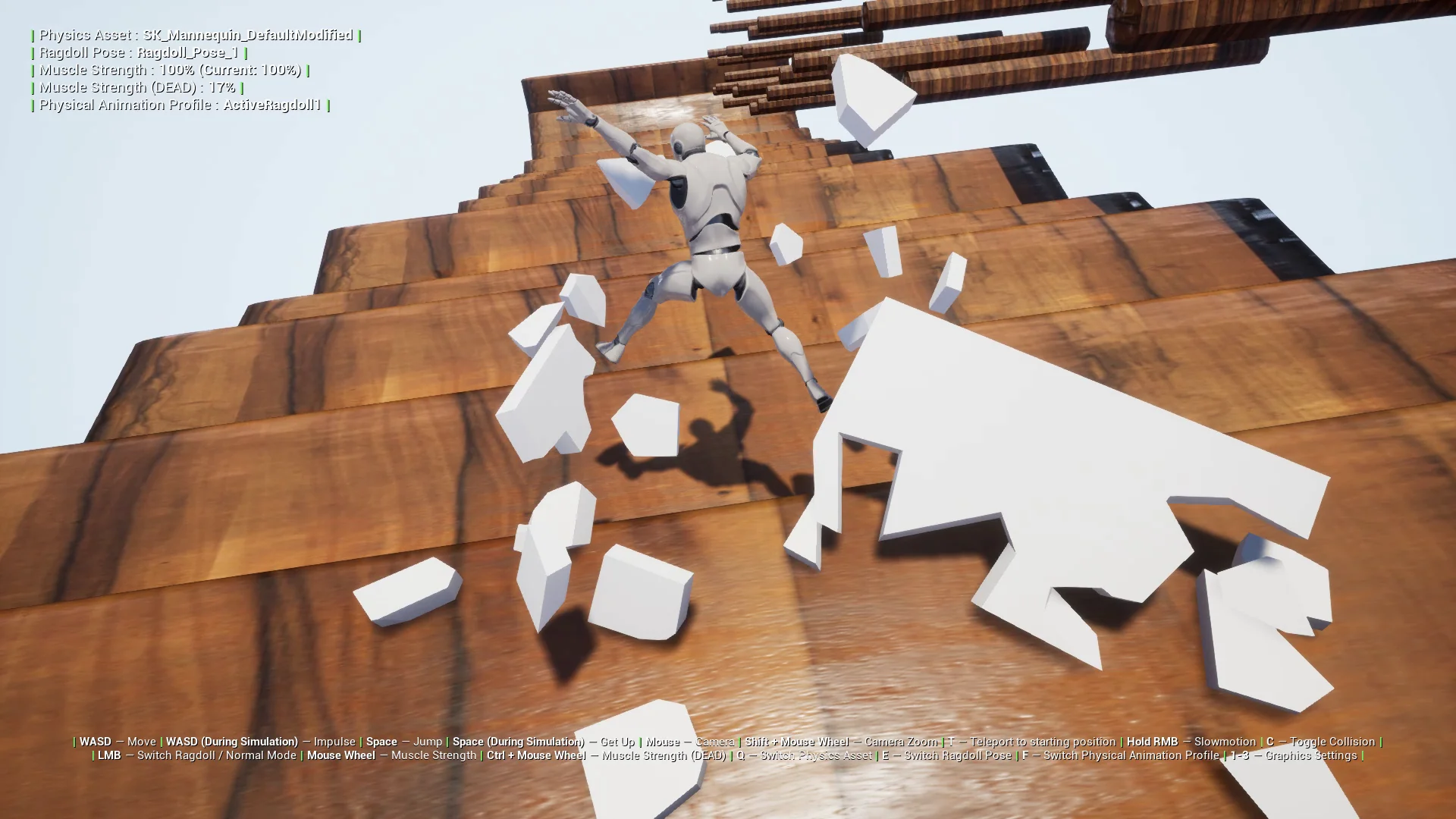
The test map is what makes the tuning legible. You place the supplied test blueprints into a level, then watch what the body does under a given condition, changing muscle strength or swapping a pose and physics asset as it goes. The level has grown with the updates, and the current contents cover a wider range of contact than a flat floor ever could:
Getting-up animations added to the character
Physical animation from UE 4.14+ in place of the previous approach
Stairs added to the test level
Two new vehicle blueprints
A destructible wall blueprint
Stairs matter more than they sound. Descending steps produce a chain of small collisions rather than one large one, and that is exactly where a stiff ragdoll starts to look mechanical — each tread catches a limb and redirects it. The vehicle blueprints put something large and heavy in the path of the body, and the destructible wall blueprint lets an impact break the geometry instead of ending at a solid surface. Repeated contact, high-mass contact, and breakable contact now sit in one map, so a behaviour tweak can be judged against three different kinds of collision without building a scene for each.
Blueprint-Only Ragdoll Setup, No Plugins
Everything is made entirely in the Editor with blueprints, and no external plugin is required. The practical consequence is that the ragdoll logic is ordinary blueprint content inside the project: visible, inspectable, and editable node by node rather than sealed behind a plugin module you have to trust. If a reaction needs to be reworked, the graph is where you rework it.
That also keeps the system portable between projects in the most mundane sense — there is no separate dependency to install, version, or carry along with the level. The package is tagged Ragdoll, Active, Procedural, Blueprint, and Physical, and those five words describe the same idea from different angles: a simulated body, driven procedurally, assembled entirely in blueprints.
Controls, Slow Motion, and Comments in the Graphs
A user interface and control scheme come with the asset, and slow motion is part of the toolkit. Ragdoll contacts happen in fractions of a second, which is precisely why they are hard to evaluate at normal speed; slowing time down lets you see where a limb caught, why the body folded the way it did, and whether a pose actually held through the impact or simply collapsed in a slightly different order.
Explanation and comments are built into the setup as well. The graphs are annotated, so the reasoning behind a section of logic sits next to the nodes rather than in a separate document, and the interface keeps the adjustable values within reach while the level runs. For anyone learning how the pieces connect, that combination — annotated graphs, exposed controls, and the ability to slow the simulation — removes most of the guesswork from reading someone else's ragdoll.
Deciding Whether the Ragdoll Fits
What you get is a blueprint-built, plugin-free ragdoll with live muscle strength, live pose and physics asset switching, recovery animations, and a test level carrying stairs, vehicles, and a destructible wall. That set points at projects where characters need to be knocked around and get back up: combat where a hit should read as physical, accidents and traversal falls, destruction that reacts to a body hitting it.
The decision comes down to two plain questions. Does the project run Unreal Engine 4.14 or later, so the physical animation path applies? And does the scene need a body that keeps reacting after the first impact not just one animation that plays out and stops? If both answers are yes, the test level is the place to start — drop the test blueprints in, walk the character down the stairs, put a vehicle in its way, and see whether the muscle strength settings give you the weight you are after before touching your own characters.
 Characters
 Action-Adventure
 Action-Adventure