"c14ff6bd758dadb1"{"id":"1001083","slug":"chaos-battleground-ragdoll-corpse-freezing-and-culling","title":"Chaos Battleground - Ragdoll Corpse Freezing \u0026 Culling","category":"Procedural Systems","engine":"5.7","assetVersion":"Asset Version: 1.0.0","engineVersion":"Engine Version: 5.7","tag":"Procedural Systems","accent":"blue","visual":"mech","summary":"Freeze ragdoll corpses after stabilization, snapshot their final pose, and manage bodies with culling, FIFO limits, and material fade.","platform":"Unreal Engine","publishedAt":"2026-09-04T16:25:43.688Z","updatedAt":"2026-09-04T16:25:43.688Z","sourceNotes":[],"fileContents":[],"compatibility":["Unreal Engine","Asset Version: 1.0.0","Engine Version: 5.7"],"featuredImage":{"alt":"Chaos Battleground - Ragdoll Corpse Freezing \u0026 Culling","src":"/wp-content/uploads/published/2026/09/546b1013f085-50c99698-fba9-4c07-8f94-bd3196e48aeb-7a9f9b032d.webp"},"hasDownloadLink":true,"downloads":0,"terms":[{"taxonomy":"category","slug":"procedural-systems-tools-and-plugins","name":"Procedural Systems"}],"galleryImages":[{"src":"/wp-content/uploads/published/2026/09/18085cf3ea1b-b6c43d6c-8b2f-4291-b97e-6fa5af967de3-00b4158dfe.webp","alt":"Chaos Battleground - Ragdoll Corpse Freezing \u0026 Culling"},{"src":"/wp-content/uploads/published/2026/09/f8efd05c36f3-a2b2842e-f8f7-48a5-8214-b4c1dae6ad1b-fe8497c4ff.webp","alt":"Chaos Battleground - Ragdoll Corpse Freezing \u0026 Culling"},{"src":"/wp-content/uploads/published/2026/09/171256fbb148-9702f1c9-667d-403d-a4ac-af0aa207a4c1-f769f73348.webp","alt":"Chaos Battleground - Ragdoll Corpse Freezing \u0026 Culling"},{"src":"/wp-content/uploads/published/2026/09/b7b50252b71b-46cdf21e-0f22-4a87-9e1c-ea8740cb47c9-d522f30bbe.webp","alt":"Chaos Battleground - Ragdoll Corpse Freezing \u0026 Culling"},{"src":"/wp-content/uploads/published/2026/09/a82f17f4aae7-344ffa09-c411-4113-8d81-c4a6fdc75512-a7be987d1e.webp","alt":"Chaos Battleground - Ragdoll Corpse Freezing \u0026 Culling"}],"accessPanel":{"kind":"resource","title":"Download this resource","eyebrow":"Free Download","message":"Log in or create a free account to start your download.","fileName":"5.7.7z","safetyNote":"Resources are manually reviewed before listing to improve quality and reduce obvious risks.","actionLabel":"Download Free","resourceType":"Resource archive"},"contentHtml":"\u003cp\u003eThere's a moment in large-scale melee or shooter scenes when the bodies start to outnumber the living. Ragdoll deaths sell that chaos, but every simulated corpse drags the same physics cost onto the stage. Corpses pile up, resting bodies keep updating, and their uncontrolled sliding becomes a visual distraction. Chaos Battleground attacks both sides of the problem: it makes each ragdoll death settle into a stable pose, and it manages the resulting corpses so they only stay visible while they are useful.\u003c/p\u003e\u003ch2\u003eA Freezing Sequence That Preserves the Final Pose\u003c/h2\u003e\u003cp\u003eAfter an NPC dies, Chaos Battleground doesn't cut straight to an animation elimination. The character becomes a standard ragdoll, so the death can react to other bodies, terrain, and any physics forces still in the scene. The system then waits for that ragdoll to stabilize. If the body takes too long to stop moving, a timeout ends the wait. At that point, the system captures the final pose with a snapshot, disables physics simulation, and leaves the body in a frozen state.\u003c/p\u003e\u003cp\u003eBecause the frozen pose comes from the ragdoll's own resting state, there is no visible popping. The body doesn't snap to a keyframed position or a recorded animation. It simply stays where it settled. Automatic freezing can be triggered by the ragdoll's body sleep or by a timeout. The AnimGraph node \u003cstrong\u003eCB Corpse Freeze\u003c/strong\u003e Then carries the frozen pose inside the character's animation graph.\u003c/p\u003e\u003ch2\u003eCorpse Manager Culling, Priorities, and FIFO Removal\u003c/h2\u003e\u003cp\u003eA single frozen corpse is easy to handle. Accumulating dozens of them requires management, and Chaos Battleground's corpse manager is designed to be plug and play. Distance culling uses hysteresis, which prevents a corpse from repeatedly switching visibility when the camera sits at the culling boundary. The manager also limits the number of simultaneously visible bodies. When that cap is reached, on-screen corpses are prioritized, so off-screen ones are hidden first. A protected near zone around the player prevents the system from hiding corpses that are directly in the player's vicinity, even when the total count is high.\u003c/p\u003e\u003cp\u003eThe manager also imposes a total corpse count limit. When the number of bodies exceeds that limit, the oldest corpse is selected for removal using FIFO logic. That corpse is smoothly hidden before it is removed, avoiding a sudden delete. This keeps the battlefield's body count stable without forcing every corpse to disappear instantly.\u003c/p\u003e\u003ch2\u003eMaterial Fade With FadeChaosBattle and MIDs\u003c/h2\u003e\u003cp\u003eThe hiding step runs through material fade. Chaos Battleground exposes separate fade-in and fade-out timings, so a corpse fades slowly into existence or gradually out of view. The fade uses a \u003cstrong\u003eFadeChaosBattle\u003c/strong\u003e Parameter. For material handling, the system accepts user-provided MIDs, and it can also create MIDs automatically. This flexibility means it isn't tied to a single material configuration.\u003c/p\u003e\u003ch2\u003eComponent Events That Expose the Corpse Lifecycle\u003c/h2\u003e\u003cp\u003eGameplay needs to know what the manager is doing. The system fires component events: \u003cstrong\u003eOnFrozen\u003c/strong\u003e When a corpse finishes the physical freeze and snapshot process, \u003cstrong\u003eOnCorpseShown\u003c/strong\u003e When a corpse becomes visible, and \u003cstrong\u003eOnCorpseHidden\u003c/strong\u003e When it is culled or hidden by the manager. These events provide direct hooks for gameplay systems, effects, and audio.\u003c/p\u003e\u003ch2\u003eA System Built for High Body Counts\u003c/h2\u003e\u003cp\u003eIt all adds up to a system that scales for scenes with a large number of corpses. Chaos Battleground is built for those situations where a fight leaves dead bodies scattered across the level. The developer behind the plugin has more than seven years of Unreal Engine experience, and the plugin has been featured multiple times in Epic Games ShowCase. Regular updates and continuous improvements come from direct implementation of community feedback, and free Discord support accompanies the package. The system lists compatibility with World Director NPC PRO – Massive NPC Simulation with Multiplayer \u0026 Optimization, so it can fit into an existing massive NPC workload.\u003c/p\u003e\u003cp\u003eFor teams that want to keep ragdoll deaths physically credible but do not want the game's performance to sink along with the dead, Chaos Battleground provides a direct workflow: freeze the ragdoll once it settles, then let a corpse manager handle visibility, removal, and fade.\u003c/p\u003e\n\n\u003ch2\u003eRelated Resources Worth Checking\u003c/h2\u003e\n\u003cul\u003e\n\u003cli\u003e\u003ca href=\"https://3dcghub.com/crazy-ivy-realistic-ivy-generator-vine-plugin-grow-procedural-plants-in-editor/\" title=\"Crazy Ivy Realistic Ivy Generator Vine Plugin - Grow Procedural Plants in Editor\"\u003eCrazy Ivy Realistic Ivy Generator Vine Plugin - Grow Procedural Plants in Editor\u003c/a\u003e\u003c/li\u003e\n\u003cli\u003e\u003ca href=\"https://3dcghub.com/rodinbridge-unreal-engine-add-on/\" title=\"RodinBridge - Unreal Engine Add-on\"\u003eRodinBridge - Unreal Engine Add-on\u003c/a\u003e\u003c/li\u003e\n\u003cli\u003e\u003ca href=\"https://3dcghub.com/vector-flow-field-2d/\" title=\"Vector Flow Field 2D\"\u003eVector Flow Field 2D\u003c/a\u003e\u003c/li\u003e\n\u003cli\u003e\u003ca href=\"https://3dcghub.com/landscaping/\" title=\"Landscaping\"\u003eLandscaping\u003c/a\u003e\u003c/li\u003e\n\u003cli\u003e\u003ca href=\"https://3dcghub.com/unreal-engine-5-chaos-destruction-complete-course/\" title=\"Unreal Engine 5 - Chaos Destruction Complete Course!\"\u003eUnreal Engine 5 - Chaos Destruction Complete Course!\u003c/a\u003e\u003c/li\u003e\n\u003c/ul\u003e","contentTextLength":4499,"navigation":{"current":746,"total":3719,"previous":{"id":"1001084","slug":"elias-wick-advanced-fog","title":"Elias Wick – Advanced Fog","category":"Variety","platform":"Unreal Engine","updatedAt":"2026-09-04T16:40:25.414Z"},"next":{"id":"1001082","slug":"card-games-templates","title":"Card Games Templates","category":"Gameplay Features","platform":"Unreal Engine","updatedAt":"2026-09-04T16:21:29.710Z"}},"relatedResources":[{"id":"15225","slug":"crazy-ivy-realistic-ivy-generator-vine-plugin-grow-procedural-plants-in-editor","title":"Crazy Ivy Realistic Ivy Generator Vine Plugin - Grow Procedural Plants in Editor","category":"Procedural Systems","engine":"5.0 - 5.4","assetVersion":"Engine version: 5.0 - 5.4","engineVersion":"4.27","tag":"Procedural Systems","accent":"blue","visual":"animation","summary":"Crazy Ivy is a powerful procedural tool designed to grow realistic ivy directly within your editor. By automatically detecting static meshes, this plugin allows for the creation of unique, optimized vegetation systems.","platform":"Unreal Engine","publishedAt":"2026-03-12T08:22:47.000Z","updatedAt":"2026-04-19T15:44:52.000Z","sourceNotes":[],"fileContents":[],"compatibility":["Unreal Engine","Engine version: 5.0 - 5.4"],"featuredImage":{"alt":"Crazy Ivy Realistic Ivy Generator Vine Plugin - Grow Procedural Plants in Editor","src":"https://3dcghub.com/wp-content/uploads/2026/03/82ad95ba-cc8c-422c-b4cc-dff51937564d.webp"},"hasDownloadLink":true,"downloads":1},{"id":"15349","slug":"rodinbridge-unreal-engine-add-on","title":"RodinBridge - Unreal Engine Add-on","category":"Procedural Systems","engine":"5.6 - 5.7","assetVersion":"Engine version: 5.6 - 5.7","engineVersion":"Asset Version:2.2.0","tag":"Procedural Systems","accent":"blue","visual":"mech","summary":"RodinBridge integrates advanced generative AI technology into the Unreal Engine environment. This add-on allows creators to transform simple text or images into realistic, CG-friendly 3D models with photorealistic materials.","platform":"Unreal Engine","publishedAt":"2026-03-12T08:42:41.000Z","updatedAt":"2026-04-19T15:44:49.000Z","sourceNotes":[],"fileContents":[],"compatibility":["Unreal Engine","Engine version: 5.6 - 5.7","Asset Version: 2.2.0"],"featuredImage":{"alt":"RodinBridge - Unreal Engine Add-on","src":"https://3dcghub.com/wp-content/uploads/2026/03/33842b32-d11e-4c78-88d7-17ca976d07f0.webp"},"hasDownloadLink":true,"downloads":0},{"id":"15379","slug":"vector-flow-field-2d","title":"Vector Flow Field 2D","category":"Procedural Systems","engine":"5. 0 - 5.3","assetVersion":"Engine version: 5. 0 - 5.3","engineVersion":"5.0","tag":"Procedural Systems","accent":"blue","visual":"luts","summary":"Visualize complex vector data with Vector Flow Field 2D. This GPU-powered plugin renders one million particles at 60fps for high-performance flow field effects.","platform":"Unreal Engine","publishedAt":"2026-03-12T08:49:59.000Z","updatedAt":"2026-04-19T15:44:48.000Z","sourceNotes":[],"fileContents":[],"compatibility":["Unreal Engine","Engine version: 5. 0 - 5.3"],"featuredImage":{"alt":"Vector Flow Field 2D","src":"https://3dcghub.com/wp-content/uploads/2026/03/0fb84e83-6772-4c38-8b07-ca8ee0c63bba.webp"},"hasDownloadLink":true,"downloads":0}]}
Procedural Systems
Chaos Battleground - Ragdoll Corpse Freezing & Culling
Freeze ragdoll corpses after stabilization, snapshot their final pose, and manage bodies with culling, FIFO limits, and material fade.
There's a moment in large-scale melee or shooter scenes when the bodies start to outnumber the living. Ragdoll deaths sell that chaos, but every simulated corpse drags the same physics cost onto the stage. Corpses pile up, resting bodies keep updating, and their uncontrolled sliding becomes a visual distraction. Chaos Battleground attacks both sides of the problem: it makes each ragdoll death settle into a stable pose, and it manages the resulting corpses so they only stay visible while they are useful.
A Freezing Sequence That Preserves the Final Pose
After an NPC dies, Chaos Battleground doesn't cut straight to an animation elimination. The character becomes a standard ragdoll, so the death can react to other bodies, terrain, and any physics forces still in the scene. The system then waits for that ragdoll to stabilize. If the body takes too long to stop moving, a timeout ends the wait. At that point, the system captures the final pose with a snapshot, disables physics simulation, and leaves the body in a frozen state.
Because the frozen pose comes from the ragdoll's own resting state, there is no visible popping. The body doesn't snap to a keyframed position or a recorded animation. It simply stays where it settled. Automatic freezing can be triggered by the ragdoll's body sleep or by a timeout. The AnimGraph node CB Corpse Freeze Then carries the frozen pose inside the character's animation graph.
Corpse Manager Culling, Priorities, and FIFO Removal
A single frozen corpse is easy to handle. Accumulating dozens of them requires management, and Chaos Battleground's corpse manager is designed to be plug and play. Distance culling uses hysteresis, which prevents a corpse from repeatedly switching visibility when the camera sits at the culling boundary. The manager also limits the number of simultaneously visible bodies. When that cap is reached, on-screen corpses are prioritized, so off-screen ones are hidden first. A protected near zone around the player prevents the system from hiding corpses that are directly in the player's vicinity, even when the total count is high.
The manager also imposes a total corpse count limit. When the number of bodies exceeds that limit, the oldest corpse is selected for removal using FIFO logic. That corpse is smoothly hidden before it is removed, avoiding a sudden delete. This keeps the battlefield's body count stable without forcing every corpse to disappear instantly.
Material Fade With FadeChaosBattle and MIDs
The hiding step runs through material fade. Chaos Battleground exposes separate fade-in and fade-out timings, so a corpse fades slowly into existence or gradually out of view. The fade uses a FadeChaosBattle Parameter. For material handling, the system accepts user-provided MIDs, and it can also create MIDs automatically. This flexibility means it isn't tied to a single material configuration.
Component Events That Expose the Corpse Lifecycle
Gameplay needs to know what the manager is doing. The system fires component events: OnFrozen When a corpse finishes the physical freeze and snapshot process, OnCorpseShown When a corpse becomes visible, and OnCorpseHidden When it is culled or hidden by the manager. These events provide direct hooks for gameplay systems, effects, and audio.
A System Built for High Body Counts
It all adds up to a system that scales for scenes with a large number of corpses. Chaos Battleground is built for those situations where a fight leaves dead bodies scattered across the level. The developer behind the plugin has more than seven years of Unreal Engine experience, and the plugin has been featured multiple times in Epic Games ShowCase. Regular updates and continuous improvements come from direct implementation of community feedback, and free Discord support accompanies the package. The system lists compatibility with World Director NPC PRO – Massive NPC Simulation with Multiplayer & Optimization, so it can fit into an existing massive NPC workload.
For teams that want to keep ragdoll deaths physically credible but do not want the game's performance to sink along with the dead, Chaos Battleground provides a direct workflow: freeze the ragdoll once it settles, then let a corpse manager handle visibility, removal, and fade.
 Procedural Systems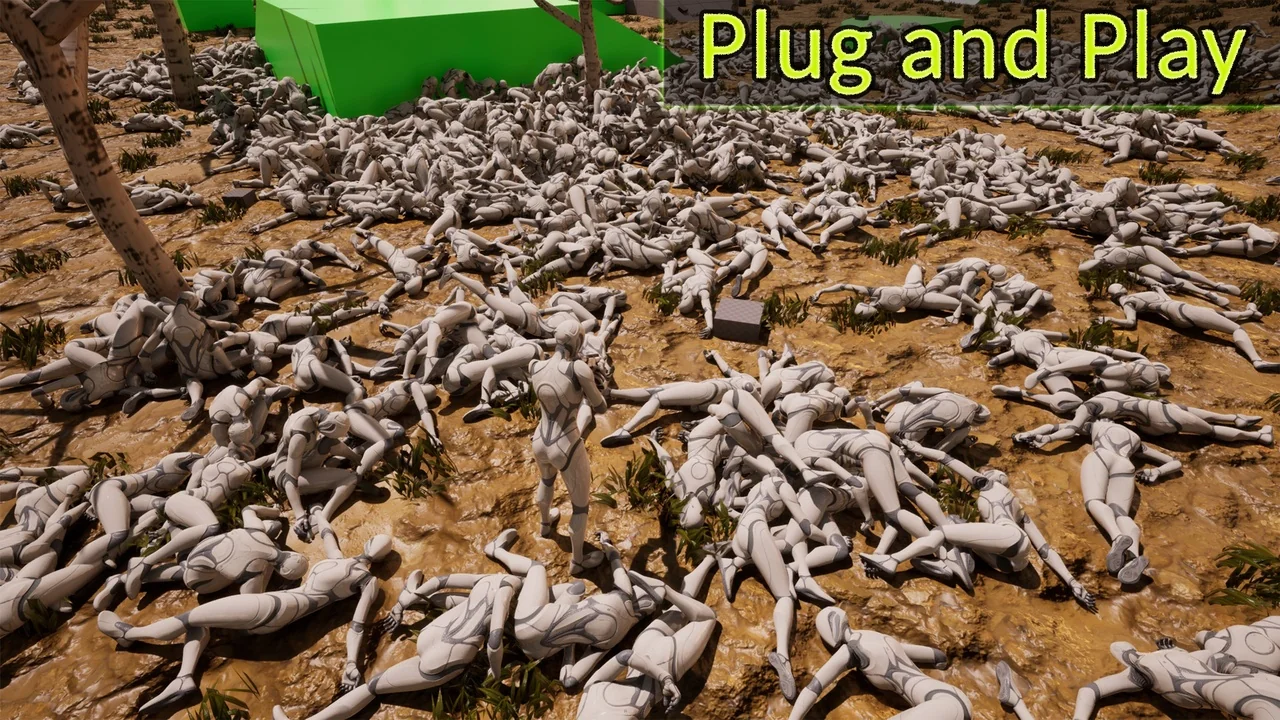
 Procedural Systems
 Procedural Systems
 Procedural Systems