"c14ff6bd758dadb1"{"id":"1001082","slug":"card-games-templates","title":"Card Games Templates","category":"Gameplay Features","engine":"5.1+","assetVersion":"","engineVersion":"Engine Version: 5.1+","tag":"Gameplay Features","accent":"blue","visual":"mech","summary":"Blueprint-driven card game templates for Unreal Engine: a player-vs-AI fight example with attack/health rules, and a stack/combine system using Data Tables, pus","platform":"Unreal Engine","publishedAt":"2026-09-04T16:21:29.710Z","updatedAt":"2026-09-04T16:21:29.710Z","sourceNotes":[],"fileContents":[],"compatibility":["Unreal Engine","Engine Version: 5.1+"],"featuredImage":{"alt":"Card Games Templates","src":"/wp-content/uploads/published/2026/09/77bb7a6848fc-38863a66-82f8-4f22-ba70-b8a12a7a2160-3ed66bc619.webp"},"hasDownloadLink":true,"downloads":1,"terms":[{"taxonomy":"category","slug":"gameplay-features","name":"Gameplay Features"}],"galleryImages":[{"src":"/wp-content/uploads/published/2026/09/d566f678950e-c7300120-e0aa-4ae6-8fd5-f71bb8f8a583-abd49041cf.webp","alt":"Card Games Templates"},{"src":"/wp-content/uploads/published/2026/09/d68a35400fc6-21177386-c73c-4689-bfcd-388c5e4610f1-f091cbb1ec.webp","alt":"Card Games Templates"},{"src":"/wp-content/uploads/published/2026/09/e56fb2855b6e-fd45f945-5bc4-40ec-97af-3c7458098c69-eeae6b6a32.webp","alt":"Card Games Templates"},{"src":"/wp-content/uploads/published/2026/09/9bb3329da37a-68af3119-08a7-4026-9759-340c5d651efa-7d64912e9c.webp","alt":"Card Games Templates"}],"accessPanel":{"kind":"resource","title":"Download this resource","eyebrow":"Free Download","message":"Log in or create a free account to start your download.","fileName":"Content.7z","safetyNote":"Resources are manually reviewed before listing to improve quality and reduce obvious risks.","actionLabel":"Download Free","resourceType":"Resource archive"},"contentHtml":"\u003cp\u003eGetting a card game moving means wiring up all the invisible rules before any actual card can be played. The first card that needs to move, the condition that decides a win, the way one object reacts when it gets close to another — that list is familiar to anyone who has tried to build a card game from nothing. Card Games Templates attacks the problem by shipping those systems as 100% blueprint-powered assets. Everything is written in the blueprint graph, so modders and prototype-minded developers can inspect, rewire, and reuse the logic without needing to branch into external C++ code.\u003c/p\u003e \u003ch2\u003eBlueprint-Drive Workflow Without C++ Hooks\u003c/h2\u003e \u003cp\u003eAt the center of the package sits the parent card blueprint asset, which handles movement logic in 3D space. This keeps individual card assets clean because they don’t each carry their own motion logic. Instead, they inherit it from the parent, so adding a new card to a scene means getting its ability to be dragged or moved as a guaranteed baseline. The same general layer provides a card user widget sample, which is the on-screen UI representation you can see when a card is held or inspected. Custom sounds and images are also bundled in, giving the project a small but usable set of assets from day one.\u003c/p\u003e \u003cp\u003eBecause every part of the pack is blueprint-based, you can follow the logic from the top down. Rather than hunting through hidden compiled modules, you can open a blueprint and trace exactly where a card is dealt, where its state changes, and how it decides whether to leave play. That setup makes this template collection a useful teaching piece, not just a plug-in-and-play system.\u003c/p\u003e \u003ch2\u003eFight Card Game Template: A Clear Ruleset You Can See Play Out\u003c/h2\u003e \u003cp\u003eThe Fight Card Game Template gives you a complete player-versus-random-AI battle example. The ruleset is legible: an opponent card is defeated when the attacking card’s attack power is greater than the opponent card’s health. So when you swing a card with an Attack value of 5 into a target with 3 Health, the target is removed — a system that’s simple enough to retune for your own game’s balance.\u003c/p\u003e \u003cp\u003eThe template shows this using both 3D cards in space and 2D card widgets as a parallel UI. You get five custom fight animal cards as assets, each presumably carrying its own Attack and Health values. The board is laid out with a 2-vs-2 fight zone, plus separate player and AI hand zones. You can see each card’s combat attributes on the card face and read the current state of the fight as the AI plays its own hand.\u003c/p\u003e \u003cp\u003eThe underlying fight game blueprint is commented intentionally. It’s structured around card distribution, then game logic, then a simple winner resolver. That means you can follow the flow from shuffle to combat resolution and modify only the parts you need. Instead of working through an opaque behavior sequence, you get a decipherable structure that explains how the random AI selects cards and how a victor gets decided.\u003c/p\u003e \u003ch2\u003eCard Stack and Combine Template: Shifting Decks and Data-Driven Patterns\u003c/h2\u003e \u003cp\u003eThe second template in the pack explores a different type of card interaction: stacking cards into a shifted deck and combining them according to set patterns. This template comes with sample 3D cards and a combination logic system where the defined matches live inside a Data Table. That choice has a practical effect: updating which cards can combine does not require touching the blueprint graph. Adding a new pairing is a matter of editing a row in the table, which makes it easy to create a large set of recipes.\u003c/p\u003e \u003cp\u003eThe shifted deck stack logic lets you build a pile where each new card offset from the one below it, making the whole stack visibly obvious to the player. The physical side of the interaction is handled with push physics: cards push each other when they get near. So when you drop a new card into a dense collection or navigate it toward an existing pile, the nearby cards react physically rather than passing through one another. For a card game that wants a tangible tabletop feel, that push response creates the sensation that cards occupy real space.\u003c/p\u003e \u003cp\u003eDrag actions are also considered. When you pick up a card and move it over a deck area, that deck is highlighted to indicate where the card will land. That kind of lightweight feedback goes a long way in a game where players repeatedly assess where their card should go.\u003c/p\u003e \u003ch2\u003eWhat the Version 1.1 Pass Changes\u003c/h2\u003e \u003cp\u003eThe project was updated with a Version 1.1 milestone. Most noticeably, it now targets Unreal Engine 5.3. That brings the entire card system into the current UE5 generation, making it a safer starting point for prospective games on that engine version.\u003c/p\u003e \u003cp\u003eDuring that update, all card blueprints received proper working shadows, built by attaching a plane to each card. That solves a common headache with blueprint-based card actors: a simple plane attached to the card gives the callback needed to cast a reasonable shadow onto the game board. If a prototype relies on shadows to read the vertical position of a card above the table, this change removes the need for that extra debugging.\u003c/p\u003e \u003cp\u003eVersion 1.1 also added very simple enhanced input support for the Combination Template. Since Enhanced Input is now standard in Unreal Engine 5, the combination flow now maps to this system instead of relying on legacy setup. The documentation emphasizes that the input implementation is kept simple, making it easier to extend later without confusing the drag-and-drop flow.\u003c/p\u003e \u003cp\u003eCard Games Templates isn’t trying to be a finished game. It walks a balance between offering working card logic and leaving enough open structure for your own card designs, art, and rule changes. Whether you need the card-battle loop with attack-and-health resolution or the creating of shifted card stacks that interact with drag physics, the pack gives you two independent starting points under one blueprint-based framework. The fight template demonstrates a traditional card combat flow, while the stack-and-combine template demonstrates a spatial, pattern-driven system. Both can help you reach a playable core much earlier than building that scaffolding from the ground up.\u003c/p\u003e\n\n\u003ch2\u003eRelated Resources Worth Checking\u003c/h2\u003e\n\u003cul\u003e\n\u003cli\u003e\u003ca href=\"https://3dcghub.com/ultimate-character-customization/\" title=\"Ultimate Character Customization\"\u003eUltimate Character Customization\u003c/a\u003e\u003c/li\u003e\n\u003cli\u003e\u003ca href=\"https://3dcghub.com/traffic-ai-system/\" title=\"Traffic AI System\"\u003eTraffic AI System\u003c/a\u003e\u003c/li\u003e\n\u003cli\u003e\u003ca href=\"https://3dcghub.com/stationary-weapon-ciws/\" title=\"Stationary weapon : CIWS\"\u003eStationary weapon : CIWS\u003c/a\u003e\u003c/li\u003e\n\u003cli\u003e\u003ca href=\"https://3dcghub.com/general-ai-framework/\" title=\"General AI Framework\"\u003eGeneral AI Framework\u003c/a\u003e\u003c/li\u003e\n\u003cli\u003e\u003ca href=\"https://3dcghub.com/next-gen-destruction-toolkit/\" title=\"Next Gen Destruction Toolkit\"\u003eNext Gen Destruction Toolkit\u003c/a\u003e\u003c/li\u003e\n\u003c/ul\u003e","contentTextLength":6286,"navigation":{"current":747,"total":3719,"previous":{"id":"1001083","slug":"chaos-battleground-ragdoll-corpse-freezing-and-culling","title":"Chaos Battleground - Ragdoll Corpse Freezing \u0026 Culling","category":"Procedural Systems","platform":"Unreal Engine","updatedAt":"2026-09-04T16:25:43.688Z"},"next":{"id":"1001081","slug":"burnt-forest-aftermath-environment","title":"Burnt Forest Aftermath Environment","category":"Forest \u0026 Jungle","platform":"Unreal Engine","updatedAt":"2026-09-04T16:18:47.027Z"}},"relatedResources":[{"id":"15092","slug":"tile-based-minimap","title":"Tile Based Minimap","category":"Gameplay Features","engine":"5.3 - 5.5","assetVersion":"Asset Version: 1.2.2 - 2.1.1","engineVersion":"Engine Version: 5.3 - 5.5","tag":"Gameplay Features","accent":"blue","visual":"mech","summary":"The Tile Based Minimap system provides a robust solution for creating tiled in-game maps using pre-rendered level images. It features GPS-style routing, multi-grid support, and full Blueprint extensibility.","platform":"Unreal Engine","publishedAt":"2026-03-12T07:51:23.000Z","updatedAt":"2026-10-08T12:57:55.645Z","sourceNotes":[],"fileContents":[],"compatibility":["Unreal Engine","Asset Version: 1.2.2 - 2.1.1","Engine Version: 5.3 - 5.5"],"featuredImage":{"alt":"Tile Based Minimap","src":"https://3dcghub.com/wp-content/uploads/2026/03/768cc7d5-0ca5-439b-b02a-f4807a2c39bd.webp"},"hasDownloadLink":true,"downloads":4},{"id":"1001711","slug":"ultimate-horse-system-horse-horse-riding-horse-system-mount-rideable-horse","title":"Ultimate Horse System (Horse, Horse Riding, Horse System, Mount, Rideable Horse)","category":"Gameplay Features","engine":"5.1+","assetVersion":"","engineVersion":"Engine Version: 5.1+","tag":"Gameplay Features","accent":"blue","visual":"mech","summary":"Explore the Ultimate Horse System for Unreal Engine, featuring full network replication, modular saddles, Foot IK, water interaction, and custom rider support.","platform":"Unreal Engine","publishedAt":"2026-10-14T17:15:39.983Z","updatedAt":"2026-10-14T17:15:39.983Z","sourceNotes":[],"fileContents":[],"compatibility":["Unreal Engine","Engine Version: 5.1+"],"featuredImage":{"alt":"Ultimate Horse System (Horse, Horse Riding, Horse System, Mount, Rideable Horse)","src":"/wp-content/uploads/published/2026/10/6dc76c7660f2-d252bb16-9c4e-4df7-8a68-0bb86ab4c882-eca349b4ab.webp"},"hasDownloadLink":true,"downloads":2},{"id":"1001475","slug":"ultimate-hit-reaction-system","title":"Ultimate Hit Reaction System","category":"Gameplay Features","engine":"5.6+","assetVersion":"","engineVersion":"Engine Version: 5.6+","tag":"Gameplay Features","accent":"blue","visual":"mech","summary":"A deep dive into the Ultimate Hit Reaction System for Unreal Engine, covering its 168 mocap animations, Chooser Tables, Motion Warping, and IK integration.","platform":"Unreal Engine","publishedAt":"2026-10-08T08:28:50.048Z","updatedAt":"2026-10-08T08:28:50.048Z","sourceNotes":[],"fileContents":[],"compatibility":["Unreal Engine","Engine Version: 5.6+"],"featuredImage":{"alt":"Ultimate Hit Reaction System","src":"/wp-content/uploads/published/2026/10/8833d5e34c3d-c4d6cc46-3a57-4651-a1d2-e8585976b5ea-a14898b9cd.webp"},"hasDownloadLink":true,"downloads":2}]}
Gameplay Features
Card Games Templates
Blueprint-driven card game templates for Unreal Engine: a player-vs-AI fight example with attack/health rules, and a stack/combine system using Data Tables, pus
Getting a card game moving means wiring up all the invisible rules before any actual card can be played. The first card that needs to move, the condition that decides a win, the way one object reacts when it gets close to another — that list is familiar to anyone who has tried to build a card game from nothing. Card Games Templates attacks the problem by shipping those systems as 100% blueprint-powered assets. Everything is written in the blueprint graph, so modders and prototype-minded developers can inspect, rewire, and reuse the logic without needing to branch into external C++ code.
Blueprint-Drive Workflow Without C++ Hooks
At the center of the package sits the parent card blueprint asset, which handles movement logic in 3D space. This keeps individual card assets clean because they don’t each carry their own motion logic. Instead, they inherit it from the parent, so adding a new card to a scene means getting its ability to be dragged or moved as a guaranteed baseline. The same general layer provides a card user widget sample, which is the on-screen UI representation you can see when a card is held or inspected. Custom sounds and images are also bundled in, giving the project a small but usable set of assets from day one.
Because every part of the pack is blueprint-based, you can follow the logic from the top down. Rather than hunting through hidden compiled modules, you can open a blueprint and trace exactly where a card is dealt, where its state changes, and how it decides whether to leave play. That setup makes this template collection a useful teaching piece, not just a plug-in-and-play system.
Fight Card Game Template: A Clear Ruleset You Can See Play Out
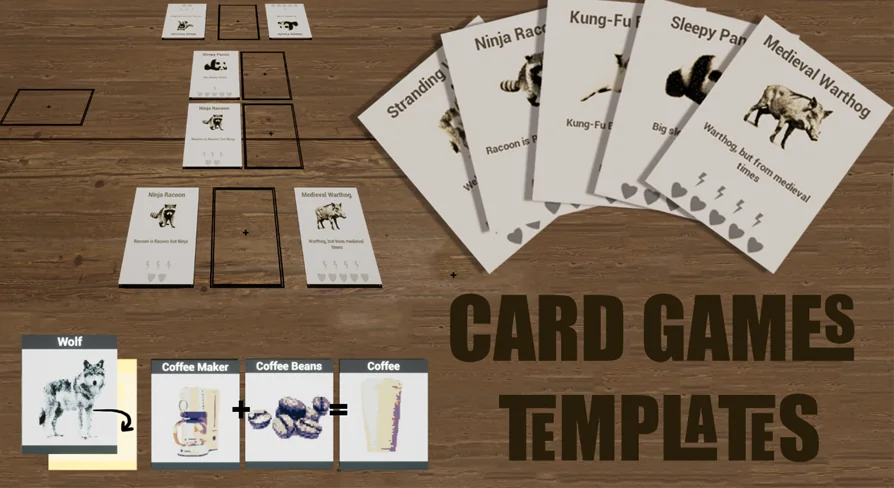
The Fight Card Game Template gives you a complete player-versus-random-AI battle example. The ruleset is legible: an opponent card is defeated when the attacking card’s attack power is greater than the opponent card’s health. So when you swing a card with an Attack value of 5 into a target with 3 Health, the target is removed — a system that’s simple enough to retune for your own game’s balance.
The template shows this using both 3D cards in space and 2D card widgets as a parallel UI. You get five custom fight animal cards as assets, each presumably carrying its own Attack and Health values. The board is laid out with a 2-vs-2 fight zone, plus separate player and AI hand zones. You can see each card’s combat attributes on the card face and read the current state of the fight as the AI plays its own hand.
The underlying fight game blueprint is commented intentionally. It’s structured around card distribution, then game logic, then a simple winner resolver. That means you can follow the flow from shuffle to combat resolution and modify only the parts you need. Instead of working through an opaque behavior sequence, you get a decipherable structure that explains how the random AI selects cards and how a victor gets decided.
Card Stack and Combine Template: Shifting Decks and Data-Driven Patterns
The second template in the pack explores a different type of card interaction: stacking cards into a shifted deck and combining them according to set patterns. This template comes with sample 3D cards and a combination logic system where the defined matches live inside a Data Table. That choice has a practical effect: updating which cards can combine does not require touching the blueprint graph. Adding a new pairing is a matter of editing a row in the table, which makes it easy to create a large set of recipes.
The shifted deck stack logic lets you build a pile where each new card offset from the one below it, making the whole stack visibly obvious to the player. The physical side of the interaction is handled with push physics: cards push each other when they get near. So when you drop a new card into a dense collection or navigate it toward an existing pile, the nearby cards react physically rather than passing through one another. For a card game that wants a tangible tabletop feel, that push response creates the sensation that cards occupy real space.
Drag actions are also considered. When you pick up a card and move it over a deck area, that deck is highlighted to indicate where the card will land. That kind of lightweight feedback goes a long way in a game where players repeatedly assess where their card should go.
What the Version 1.1 Pass Changes
The project was updated with a Version 1.1 milestone. Most noticeably, it now targets Unreal Engine 5.3. That brings the entire card system into the current UE5 generation, making it a safer starting point for prospective games on that engine version.
During that update, all card blueprints received proper working shadows, built by attaching a plane to each card. That solves a common headache with blueprint-based card actors: a simple plane attached to the card gives the callback needed to cast a reasonable shadow onto the game board. If a prototype relies on shadows to read the vertical position of a card above the table, this change removes the need for that extra debugging.
Version 1.1 also added very simple enhanced input support for the Combination Template. Since Enhanced Input is now standard in Unreal Engine 5, the combination flow now maps to this system instead of relying on legacy setup. The documentation emphasizes that the input implementation is kept simple, making it easier to extend later without confusing the drag-and-drop flow.
Card Games Templates isn’t trying to be a finished game. It walks a balance between offering working card logic and leaving enough open structure for your own card designs, art, and rule changes. Whether you need the card-battle loop with attack-and-health resolution or the creating of shifted card stacks that interact with drag physics, the pack gives you two independent starting points under one blueprint-based framework. The fight template demonstrates a traditional card combat flow, while the stack-and-combine template demonstrates a spatial, pattern-driven system. Both can help you reach a playable core much earlier than building that scaffolding from the ground up.
 Gameplay Features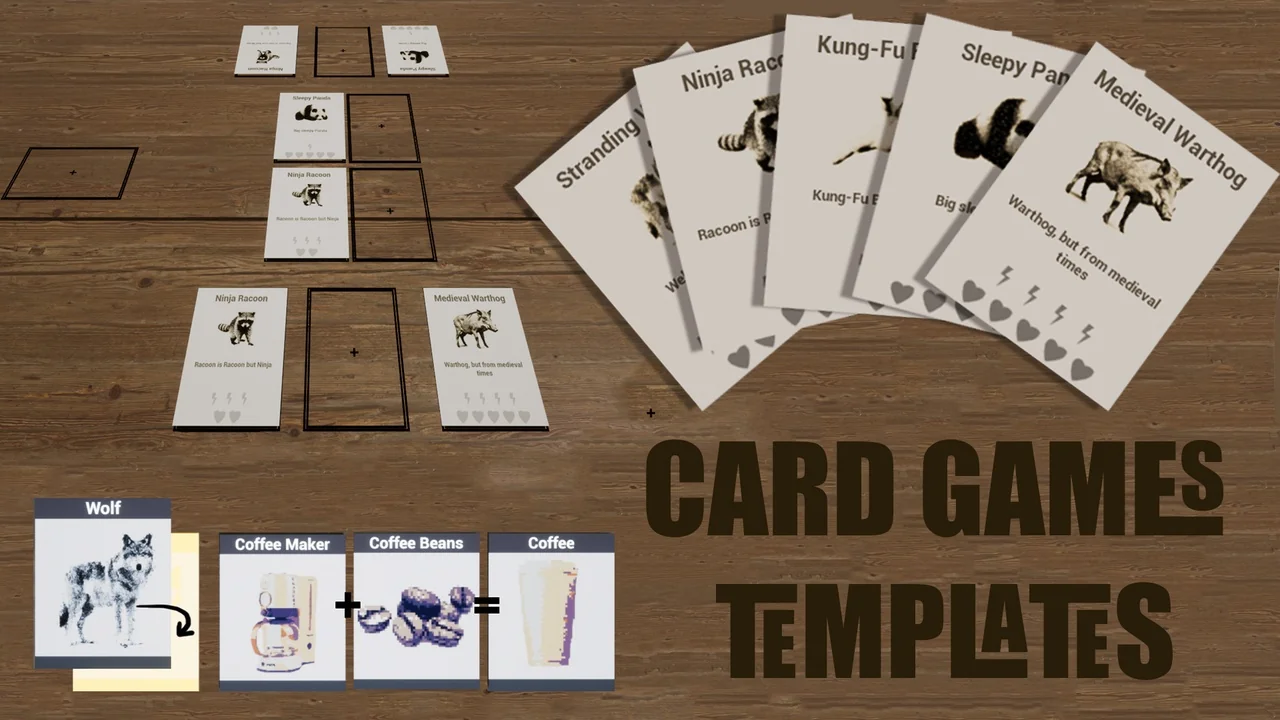
 Gameplay Features
 Gameplay Features
 Gameplay Features