"1f00f67f9253451b"{"id":"1000966","slug":"stationary-weapon-ciws","title":"Stationary weapon : CIWS","category":"Gameplay Features","engine":"5.1+","assetVersion":"","engineVersion":"Engine Version: 5.1+","tag":"Gameplay Features","accent":"blue","visual":"mech","summary":"Fully working stationary CIWS anti-air turret with player or AI control, an all-in-one Blueprint, and a destroyed version. Includes demo V.1.0 and custom charac","platform":"Unreal Engine","publishedAt":"2026-08-15T11:38:12.595Z","updatedAt":"2026-08-15T11:38:12.595Z","sourceNotes":[],"fileContents":[],"compatibility":["Unreal Engine","Engine Version: 5.1+"],"featuredImage":{"alt":"Stationary weapon : CIWS","src":"/wp-content/uploads/published/2026/08/9d9b34593d3e-45d1c995-e50f-4b4f-b2a0-acb6b4fb8c75-9d1b537ee5.webp"},"hasDownloadLink":true,"downloads":0,"terms":[{"taxonomy":"category","slug":"gameplay-features","name":"Gameplay Features"}],"galleryImages":[{"src":"/wp-content/uploads/published/2026/08/a013d2bf22ae-722a3f39-ee27-4465-91a0-715dabac9aba-c3d3ea5ccf.webp","alt":"Stationary weapon : CIWS"},{"src":"/wp-content/uploads/published/2026/08/40ef1ee449de-ef1e51c9-119c-4b7e-a448-5589209bb77e-596b7472c6.webp","alt":"Stationary weapon : CIWS"},{"src":"/wp-content/uploads/published/2026/08/a33ba344b74b-3bd16437-f09d-4908-ba90-d7d37ba22176-8519173749.webp","alt":"Stationary weapon : CIWS"},{"src":"/wp-content/uploads/published/2026/08/bcb073fe3e96-91a9e1e0-a40d-4241-9702-e42e9747915a-b3770c6ab2.webp","alt":"Stationary weapon : CIWS"},{"src":"/wp-content/uploads/published/2026/08/e4f74272cf8a-f4ac4942-cd03-4327-9c84-5aa76ea601d2-6e7b579cc2.webp","alt":"Stationary weapon : CIWS"},{"src":"/wp-content/uploads/published/2026/08/a66cc656a0f6-8bf7390a-e135-4582-b007-b42d39f9d931-8af7b66415.webp","alt":"Stationary weapon : CIWS"},{"src":"/wp-content/uploads/published/2026/08/16457b1167c7-3efdb497-8edc-49b5-860f-ff578953b18b-17397bd33e.webp","alt":"Stationary weapon : CIWS"},{"src":"/wp-content/uploads/published/2026/08/d9cd4f52830e-0392f20b-fefa-47e4-b165-daa70dc5bced-ded43a384d.webp","alt":"Stationary weapon : CIWS"},{"src":"/wp-content/uploads/published/2026/08/088edc6d4696-99d6aa3e-5747-4ee0-b141-88a4f5c94c1f-883ea2cf33.webp","alt":"Stationary weapon : CIWS"},{"src":"/wp-content/uploads/published/2026/08/1f878e728267-85ff4a6a-1c55-4e12-ab26-04e8e54af376-75579631c8.webp","alt":"Stationary weapon : CIWS"}],"accessPanel":{"kind":"resource","title":"Download this resource","eyebrow":"Free Download","message":"Log in or create a free account to start your download.","fileName":"Content.7z","safetyNote":"Resources are manually reviewed before listing to improve quality and reduce obvious risks.","actionLabel":"Download Free","resourceType":"Resource archive"},"contentHtml":"\u003cp\u003eFor a base defense sequence, an automated sentry post, or a ruined battlefield, a stationary anti-air turret can quickly become the anchor of the scene. The CIWS in this project is not a static prop. It is a fully working stationary weapon system, and it arrives as an all-in-one Blueprint that can be used in any game or project.\u003c/p\u003e\n\u003cp\u003eThe turret is designed around the anti-air role, but its placement can be far more flexible. Because it is stationary, the system can be positioned wherever a fixed defensive emplacement makes sense. The package also includes a destroyed version, so the same turret can represent an active threat or the remains of one.\u003c/p\u003e\n\u003cp\u003eBecause the CIWS is a stationary weapon, scene placement is straightforward. It can be anchored to a platform, a rooftop, or a ground position, and the anti-air role gives it a clear purpose when aircraft are part of the level.\u003c/p\u003e\n\u003ch2\u003eInside the CIWS Blueprint\u003c/h2\u003e\n\u003cp\u003eThe CIWS is built from scratch, which means the model, the moving parts, and the firing logic all belong to this project. There is no reliance on pre-built template content. The developer describes it as an all-in-one, easy-to-use Blueprint, so the core functionalities are grouped together instead of scattered across multiple assets and graphs.\u003c/p\u003e\n\u003cp\u003eThe phrase all in one matters here because the asset does not require a second system to handle targeting or firing. The necessary logic sits inside a single Blueprint, which keeps the turret self-contained and reduces the amount of external wiring a developer has to manage.\u003c/p\u003e\n\u003cp\u003eThat structure makes it approachable for a developer who wants to drop the turret into a level and connect it to existing systems. The Blueprint handles the behavior as a single package. For an artist or level designer, this means the CIWS can be treated as a complete gameplay object rather than a collection of separate parts that need to be assembled.\u003c/p\u003e\n\u003ch2\u003ePlayer-controlled and AI-controlled turret modes\u003c/h2\u003e\n\u003cp\u003eThe weapon system offers both player-controlled and AI-controlled options. With player control, the turret becomes a directly operated weapon, suited for moments where the player needs to defend a position or shoot down incoming aircraft. With AI control, the turret can operate on its own, which works well for an automated defense network or an enemy emplacement that reacts to the player.\u003c/p\u003e\n\u003cp\u003eBoth options are available in the same all-in-one Blueprint. That is a practical arrangement for projects that want to reuse the same turret in different contexts. A mission might start with an AI-controlled CIWS guarding a gate, then later give the player access to the same turret for a firefight.\u003c/p\u003e\n\u003cp\u003eFor a solo developer, having both control modes in one asset reduces the need to write custom behavior from scratch. For a larger team, it provides a reference for how a turret can be set up to switch between player and AI input.\u003c/p\u003e\n\u003ch2\u003eDestroyed CIWS for post-battle storytelling\u003c/h2\u003e\n\u003cp\u003eIncluded in the project is a destroyed version of the CIWS. This version turns the weapon into a piece of scenery that communicates damage and defeat. A destroyed turret can be placed in a town after an attack, near a crashed vehicle, or along a defensive line that failed.\u003c/p\u003e\n\u003cp\u003eThe presence of both live and destroyed versions in one project is useful for level design consistency. The same silhouette and detailing carry through, so a group of intact CIWS turrets and a burned-out one belong to the same world.\u003c/p\u003e\n\u003cp\u003eThe destroyed version can also be used as a gameplay object itself. It might block a path, provide cover, or serve as a marker for a previous event.\u003c/p\u003e\n\u003ch2\u003eCustom character integration and vehicle compatibility\u003c/h2\u003e\n\u003cp\u003eThe project includes custom character integration, with instructions that apply no matter which vehicle or character setup is in use. This is particularly important for teams that have already built their own pawn classes or vehicle controllers. The integration step is meant to connect the turret to the existing character system, not the other way around.\u003c/p\u003e\n\u003cp\u003eThe instruction requirement is explicit: follow the instructions no matter which vehicle is in use. That suggests the integration is a defined process rather than an automatic assumption.\u003c/p\u003e\n\u003cp\u003eFor projects tied to the Driveable Vehicle: UH - H60 Ghost Hawk, the CIWS is noted as compatible with that helicopter. That means teams using the H-60 can combine it with the turret following the same integration instructions.\u003c/p\u003e\n\u003ch2\u003eDemo V.1.0 and the breakdown video\u003c/h2\u003e\n\u003cp\u003eThe project comes with Demo V.1.0, which gives a direct way to test the turret in a playable setting. Instead of guessing how the Blueprint behaves, a developer can open the demo and see the CIWS operate. A breakdown video is also included to visually explain the asset's structure and logic.\u003c/p\u003e\n\u003cp\u003eThe demo also acts as an invitation from the developer to test the turret before putting it into a larger project. The developer invites feedback after trying the system, and distinguishes between positive and negative responses. Both are meant to drive improvements.\u003c/p\u003e\n\u003cp\u003eThat open approach suggests the asset is not treated as a finished black box, but as a weapon system that can be refined based on real use.\u003c/p\u003e\n\u003cp\u003eFor teams working on military or sci-fi projects that need a functioning stationary anti-air turret, this CIWS package covers the core requirement. It offers player and AI control, a destroyed variant, custom character integration, and a demo to confirm the behavior before a full build.\u003c/p\u003e\n\n\u003ch2\u003eRelated Resources Worth Checking\u003c/h2\u003e\n\u003cul\u003e\n\u003cli\u003e\u003ca href=\"https://3dcghub.com/gasp-basic-template-for-fps-with-spatial-inventory/\" title=\"GASP: Basic Template for FPS with Spatial Inventory\"\u003eGASP: Basic Template for FPS with Spatial Inventory\u003c/a\u003e\u003c/li\u003e\n\u003cli\u003e\u003ca href=\"https://3dcghub.com/universal-shooting-game-template-and-framework/\" title=\"Universal Shooting Game Template and Framework\"\u003eUniversal Shooting Game Template and Framework\u003c/a\u003e\u003c/li\u003e\n\u003cli\u003e\u003ca href=\"https://3dcghub.com/modular-gameplay-blueprint-systems/\" title=\"Modular Gameplay Blueprint Systems\"\u003eModular Gameplay Blueprint Systems\u003c/a\u003e\u003c/li\u003e\n\u003cli\u003e\u003ca href=\"https://3dcghub.com/usk-inventory-and-weapon/\" title=\"USK: Inventory And Weapon\"\u003eUSK: Inventory And Weapon\u003c/a\u003e\u003c/li\u003e\n\u003cli\u003e\u003ca href=\"https://3dcghub.com/advanced-jigsaw-inventory-system/\" title=\"Advanced Jigsaw Inventory system\"\u003eAdvanced Jigsaw Inventory system\u003c/a\u003e\u003c/li\u003e\n\u003c/ul\u003e","contentTextLength":5632,"navigation":{"current":361,"total":3222,"previous":{"id":"1000967","slug":"tokyo-back-alleys-buildings","title":"Tokyo Back Alleys - Buildings","category":"Buildings \u0026 Architecture","platform":"Unreal Engine","updatedAt":"2026-08-15T12:13:52.457Z"},"next":{"id":"1000965","slug":"sci-fi-door-set","title":"Sci-Fi Door Set","category":"Electronics \u0026 Technology","platform":"Unreal Engine","updatedAt":"2026-08-15T11:31:43.425Z"}},"relatedResources":[{"id":"27714","slug":"gasp-basic-template-for-fps-with-spatial-inventory","title":"GASP: Basic Template for FPS with Spatial Inventory","category":"Gameplay Features","engine":"5.5+","assetVersion":"Engine version: 5.5+","engineVersion":"","tag":"Gameplay Features","accent":"blue","visual":"audio","summary":"GASP: Basic Template for FPS with Spatial Inventory combines a spatial inventory system, a basic weapon system, and GASP content in one FPS-focused package. Its main draw is a configurable inventory layout where item size and shape affect how gear is arrang...","platform":"Unreal Engine","publishedAt":"2026-04-28T15:48:38.000Z","updatedAt":"2026-04-28T15:48:40.000Z","sourceNotes":[],"fileContents":[],"compatibility":["Unreal Engine","Engine version: 5.5+"],"featuredImage":{"alt":"GASP: Basic Template for FPS with Spatial Inventory","src":"https://3dcghub.com/wp-content/uploads/2026/04/d5a9310af048_7c263bb3-7b8e-48cc-a0b6-b062efafc7d1.webp"},"hasDownloadLink":true,"downloads":0},{"id":"1001049","slug":"character-interaction","title":"Character Interaction","category":"Gameplay Features","engine":"5.3+","assetVersion":"","engineVersion":"Engine Version: 5.3+","tag":"Gameplay Features","accent":"blue","visual":"character","summary":"Blueprint-based character interaction system for UE5 with IK, first-person support, weapon switcher, vehicles, AI enemies, and close combat. Includes CI Add-on","platform":"Unreal Engine","publishedAt":"2026-08-27T16:20:39.102Z","updatedAt":"2026-08-27T16:20:39.102Z","sourceNotes":[],"fileContents":[],"compatibility":["Unreal Engine","Engine Version: 5.3+"],"featuredImage":{"alt":"Character Interaction","src":"/wp-content/uploads/published/2026/08/c04328b89794-30343517-c1fe-4277-9c93-7f18419493c9-612ecb684f.webp"},"hasDownloadLink":true,"downloads":2},{"id":"11176","slug":"universal-shooting-game-template-and-framework","title":"Universal Shooting Game Template and Framework","category":"Gameplay Features","engine":"5.1+","assetVersion":"Engine version: 5.1+","engineVersion":"5.1","tag":"Gameplay Features","accent":"blue","visual":"character","summary":"A comprehensive, blueprint-only framework designed for creating shooting games with independent modules and multiplayer support. It features integrated AI, weapon systems, and character customization tools.","platform":"Unreal Engine","publishedAt":"2026-03-03T17:04:56.000Z","updatedAt":"2026-04-19T15:48:15.000Z","sourceNotes":[],"fileContents":[],"compatibility":["Unreal Engine","Engine version: 5.1+"],"featuredImage":{"alt":"Universal Shooting Game Template and Framework","src":"https://3dcghub.com/wp-content/uploads/2026/03/809586c9-06d5-4b25-8d10-adc2975bbd96.webp"},"hasDownloadLink":true,"downloads":0}]}
Gameplay Features
Stationary weapon : CIWS
Fully working stationary CIWS anti-air turret with player or AI control, an all-in-one Blueprint, and a destroyed version. Includes demo V.1.0 and custom charac
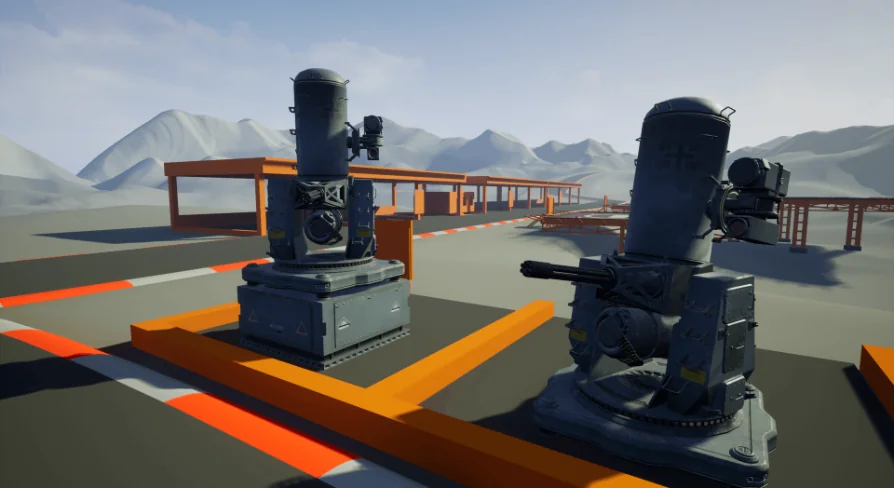
For a base defense sequence, an automated sentry post, or a ruined battlefield, a stationary anti-air turret can quickly become the anchor of the scene. The CIWS in this project is not a static prop. It is a fully working stationary weapon system, and it arrives as an all-in-one Blueprint that can be used in any game or project.
The turret is designed around the anti-air role, but its placement can be far more flexible. Because it is stationary, the system can be positioned wherever a fixed defensive emplacement makes sense. The package also includes a destroyed version, so the same turret can represent an active threat or the remains of one.
Because the CIWS is a stationary weapon, scene placement is straightforward. It can be anchored to a platform, a rooftop, or a ground position, and the anti-air role gives it a clear purpose when aircraft are part of the level.
Inside the CIWS Blueprint
The CIWS is built from scratch, which means the model, the moving parts, and the firing logic all belong to this project. There is no reliance on pre-built template content. The developer describes it as an all-in-one, easy-to-use Blueprint, so the core functionalities are grouped together instead of scattered across multiple assets and graphs.
The phrase all in one matters here because the asset does not require a second system to handle targeting or firing. The necessary logic sits inside a single Blueprint, which keeps the turret self-contained and reduces the amount of external wiring a developer has to manage.
That structure makes it approachable for a developer who wants to drop the turret into a level and connect it to existing systems. The Blueprint handles the behavior as a single package. For an artist or level designer, this means the CIWS can be treated as a complete gameplay object rather than a collection of separate parts that need to be assembled.
Player-controlled and AI-controlled turret modes
The weapon system offers both player-controlled and AI-controlled options. With player control, the turret becomes a directly operated weapon, suited for moments where the player needs to defend a position or shoot down incoming aircraft. With AI control, the turret can operate on its own, which works well for an automated defense network or an enemy emplacement that reacts to the player.
Both options are available in the same all-in-one Blueprint. That is a practical arrangement for projects that want to reuse the same turret in different contexts. A mission might start with an AI-controlled CIWS guarding a gate, then later give the player access to the same turret for a firefight.
For a solo developer, having both control modes in one asset reduces the need to write custom behavior from scratch. For a larger team, it provides a reference for how a turret can be set up to switch between player and AI input.
Destroyed CIWS for post-battle storytelling
Included in the project is a destroyed version of the CIWS. This version turns the weapon into a piece of scenery that communicates damage and defeat. A destroyed turret can be placed in a town after an attack, near a crashed vehicle, or along a defensive line that failed.
The presence of both live and destroyed versions in one project is useful for level design consistency. The same silhouette and detailing carry through, so a group of intact CIWS turrets and a burned-out one belong to the same world.
The destroyed version can also be used as a gameplay object itself. It might block a path, provide cover, or serve as a marker for a previous event.
Custom character integration and vehicle compatibility
The project includes custom character integration, with instructions that apply no matter which vehicle or character setup is in use. This is particularly important for teams that have already built their own pawn classes or vehicle controllers. The integration step is meant to connect the turret to the existing character system, not the other way around.
The instruction requirement is explicit: follow the instructions no matter which vehicle is in use. That suggests the integration is a defined process rather than an automatic assumption.
For projects tied to the Driveable Vehicle: UH - H60 Ghost Hawk, the CIWS is noted as compatible with that helicopter. That means teams using the H-60 can combine it with the turret following the same integration instructions.
Demo V.1.0 and the breakdown video
The project comes with Demo V.1.0, which gives a direct way to test the turret in a playable setting. Instead of guessing how the Blueprint behaves, a developer can open the demo and see the CIWS operate. A breakdown video is also included to visually explain the asset's structure and logic.
The demo also acts as an invitation from the developer to test the turret before putting it into a larger project. The developer invites feedback after trying the system, and distinguishes between positive and negative responses. Both are meant to drive improvements.
That open approach suggests the asset is not treated as a finished black box, but as a weapon system that can be refined based on real use.
For teams working on military or sci-fi projects that need a functioning stationary anti-air turret, this CIWS package covers the core requirement. It offers player and AI control, a destroyed variant, custom character integration, and a demo to confirm the behavior before a full build.
 Gameplay Features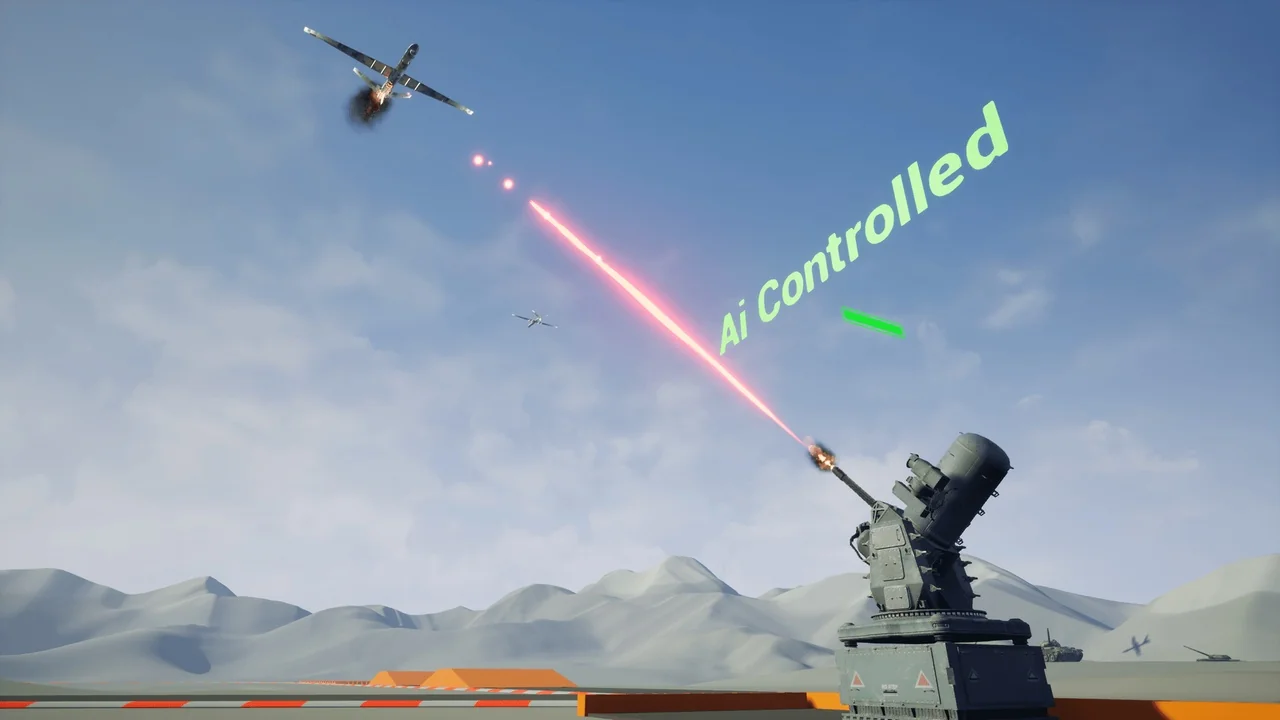
 Gameplay Features
 Gameplay Features
 Gameplay Features