"0341a2901a4ae9aa"{"id":"15379","slug":"vector-flow-field-2d","title":"Vector Flow Field 2D","category":"Procedural Systems","engine":"5. 0 - 5.3","assetVersion":"Engine version: 5. 0 - 5.3","engineVersion":"5.0","tag":"Procedural Systems","accent":"blue","visual":"luts","summary":"Visualize complex vector data with Vector Flow Field 2D. This GPU-powered plugin renders one million particles at 60fps for high-performance flow field effects.","platform":"Unreal Engine","publishedAt":"2026-03-12T08:49:59.000Z","updatedAt":"2026-04-19T15:44:48.000Z","sourceNotes":[],"fileContents":[],"compatibility":["Unreal Engine","Engine version: 5. 0 - 5.3"],"featuredImage":{"alt":"Vector Flow Field 2D","src":"https://3dcghub.com/wp-content/uploads/2026/03/0fb84e83-6772-4c38-8b07-ca8ee0c63bba.webp"},"hasDownloadLink":true,"downloads":0,"terms":[{"taxonomy":"category","slug":"procedural-systems-tools-and-plugins","name":"Procedural Systems"},{"taxonomy":"post_tag","slug":"blueprint","name":"Blueprint"},{"taxonomy":"post_tag","slug":"materials","name":"Materials"},{"taxonomy":"post_tag","slug":"plugins","name":"Plugins"},{"taxonomy":"post_tag","slug":"unreal-engine-5","name":"Unreal Engine 5"},{"taxonomy":"post_tag","slug":"vector-flow-field","name":"Vector Flow Field"},{"taxonomy":"post_tag","slug":"vfx","name":"VFX"}],"galleryImages":[{"src":"https://3dcghub.com/wp-content/uploads/2026/03/0a7e8f0ce518_2e7f1ba3-79a2-4fe0-ba06-b1069ae5ea93.webp","alt":"Vector Flow Field 2D"},{"src":"https://3dcghub.com/wp-content/uploads/2026/03/9db9ec0712eb_4605204e-5b58-45b5-b6b4-4e645e087385.webp","alt":"Vector Flow Field 2D"},{"src":"https://3dcghub.com/wp-content/uploads/2026/03/21b3f042a259_e1b110ac-48c3-410b-b9b6-5d4cfa71c278.webp","alt":"Vector Flow Field 2D"},{"src":"https://3dcghub.com/wp-content/uploads/2026/03/0bf4faff61cb_347e4cc8-8b92-4741-b8ba-8bc01d74516a.webp","alt":"Vector Flow Field 2D"}],"accessPanel":{"kind":"resource","title":"Access this resource","eyebrow":"Free Download","message":"Log in or create a free account to start your download.","fileName":"Vector Flow Field 2D.7z","safetyNote":"All resources are 100% manually reviewed to eliminate all risks.","actionLabel":"Download Free","resourceType":"Resource archive"},"contentHtml":"\u003ch2\u003eEfficient Data Visualization with Vector Flow Field 2D\u003c/h2\u003e\n\u003cp\u003e\u003cstrong\u003eVector Flow Field 2D\u003c/strong\u003e is a specialized tool designed for developers who need to visualize complex vector field data. This plugin allows users to draw intricate flow fields directly within their project environments. It leverages the power of the graphics card to ensure smooth and efficient performance during operation. Therefore, it is an ideal solution for projects requiring high-density particle movement and data representation.\u003c/p\u003e\n\n\u003ch2\u003eHigh-Performance GPU Rendering\u003c/h2\u003e\n\u003cp\u003eOne of the standout features of \u003cstrong\u003eVector Flow Field 2D\u003c/strong\u003e is its fully GPU-powered architecture. Because the processing happens on the GPU, the plugin can handle massive amounts of data simultaneously. Consequently, users can render up to one million particles while maintaining a stable 60fps. This high level of performance is essential for real-time applications where visual fluidly is a priority.\u003c/p\u003e\n\n\u003cp\u003eBy utilizing the GPU, the plugin reduces the load on the CPU. This allows for more complex simulations without sacrificing the overall frame rate of the application. Moreover, the efficiency of the shader-based system ensures that the flow field remains responsive even at peak particle counts.\u003c/p\u003e\n\n\u003ch2\u003eVersatile Use Cases and Data Handling\u003c/h2\u003e\n\u003cp\u003eThe developer has designed this tool to work with any available vector field data. Whether you are working on geographical maps or atmospheric effects, this plugin provides the necessary framework. According to the creator, it is particularly well-suited for several specific types of visualizations:\u003c/p\u003e\n\u003cul\u003e\n \u003cli\u003e\u003cstrong\u003eGeography:\u003c/strong\u003e Visualizing terrain data or mapping movements across a 2D plane.\u003c/li\u003e\n \u003cli\u003e\u003cstrong\u003eWind Patterns:\u003c/strong\u003e Creating realistic flow representations for environmental effects.\u003c/li\u003e\n \u003cli\u003e\u003cstrong\u003eMeteor Effects:\u003c/strong\u003e Simulating high-speed particle trails and directional motion.\u003c/li\u003e\n \u003cli\u003e\u003cstrong\u003eGeneral Flow Fields:\u003c/strong\u003e Drawing any data set that relies on vector coordinates.\u003c/li\u003e\n\u003c/ul\u003e\n\n\u003cp\u003eThe inclusion of Blueprint and code support allows for flexible integration into various workflows. Furthermore, the use of shaders enables high-quality rendering that can be customized to fit the aesthetic needs of a project.\u003c/p\u003e\n\n\u003ch2\u003eCompatibility and Technical Integration\u003c/h2\u003e\n\u003cp\u003eCurrently, \u003cstrong\u003eVector Flow Field 2D\u003c/strong\u003e supports versions 4.26 and 4.27 out of the box. However, users are not strictly limited to these specific versions. If you are working in a different environment, you can build the necessary version through your IDE. This flexibility ensures that the plugin remains useful across different project setups and developer configurations.\u003c/p\u003e\n\n\u003cp\u003eTo help users get started quickly, the creator provides tutorial resources. These guides cover the basics of setting up the plugin and drawing your first flow field. Consequently, even those new to vector data can begin visualizing their assets with minimal delay.\u003c/p\u003e\n\n\u003ch2\u003eClosing Notes\u003c/h2\u003e\n\u003cp\u003eIn practice, \u003cstrong\u003eVector Flow Field 2D\u003c/strong\u003e offers a robust solution for high-performance particle visualization. By combining GPU power with flexible data support, it allows for the rendering of a million particles at 60fps. Whether you are focused on geography, wind simulations, or general flow data, this plugin provides the tools necessary for smooth, real-time rendering.\u003c/p\u003e\n\n\u003ch2\u003eRelated Resources Worth Checking\u003c/h2\u003e\n\u003cul\u003e\n\u003cli\u003e\u003ca href=\"https://3dcghub.com/rodinbridge-unreal-engine-add-on/\" title=\"RodinBridge – Unreal Engine Add-on\"\u003eRodinBridge – Unreal Engine Add-on\u003c/a\u003e\u003c/li\u003e\n\u003cli\u003e\u003ca href=\"https://3dcghub.com/extile-plus-ultimate-non-tiling-material-toolkit-for-unreal-engine-environments/\" title=\"EXTILE PLUS -Ultimate Non-Tiling Material Toolkit for Unreal Engine Environments\"\u003eEXTILE PLUS -Ultimate Non-Tiling Material Toolkit for Unreal Engine Environments\u003c/a\u003e\u003c/li\u003e\n\u003cli\u003e\u003ca href=\"https://3dcghub.com/ultimate-template-unrealengine-2d-dialogue-inventory-system-save/\" title=\"ULTIMATE Template UnrealEngine || 2D + Dialogue + Inventory system + Save | |\"\u003eULTIMATE Template UnrealEngine || 2D + Dialogue + Inventory system + Save | |\u003c/a\u003e\u003c/li\u003e\n\u003cli\u003e\u003ca href=\"https://3dcghub.com/altermesh-geometry-nodes-in-unreal/\" title=\"AlterMesh – Geometry Nodes in Unreal\"\u003eAlterMesh – Geometry Nodes in Unreal\u003c/a\u003e\u003c/li\u003e\n\u003cli\u003e\u003ca href=\"https://3dcghub.com/zxing-for-unreal/\" title=\"ZXing For Unreal\"\u003eZXing For Unreal\u003c/a\u003e\u003c/li\u003e\n\u003c/ul\u003e","contentTextLength":3459,"navigation":{"current":3441,"total":4017,"previous":{"id":"15339","slug":"procedural-terrain-generator-v2","title":"Procedural Terrain Generator v2","category":"Procedural Systems","platform":"Unreal Engine","updatedAt":"2026-04-19T15:44:49.000Z"},"next":{"id":"15372","slug":"terracrust-procedural-landscape","title":"Terracrust: Procedural Landscape","category":"Procedural Systems","platform":"Unreal Engine","updatedAt":"2026-04-19T15:44:48.000Z"}},"relatedResources":[{"id":"1001932","slug":"50-vector-particles","title":"50+ Vector Particles","category":"Variety","engine":"4.26+,5.0+","assetVersion":"","engineVersion":"Engine Version: 4.26+,5.0+","tag":"Variety","accent":"blue","visual":"mech","summary":"Explore 50+ Vector Particles, featuring Maya 2015 fluid dynamic fields, local and global setups, energy walls, flame jets, and demo room integration.","platform":"Unreal Engine","publishedAt":"2026-10-24T11:10:47.968Z","updatedAt":"2026-10-24T11:10:47.968Z","sourceNotes":[],"fileContents":[],"compatibility":["Unreal Engine","Engine Version: 4.26+,5.0+"],"featuredImage":{"alt":"50+ Vector Particles","src":"/wp-content/uploads/published/2026/10/7377f5f8f34c-6bab5d5e-1640-407d-83af-8aaff61eb265-f493fdedda.webp"},"hasDownloadLink":true,"downloads":0},{"id":"15349","slug":"rodinbridge-unreal-engine-add-on","title":"RodinBridge - Unreal Engine Add-on","category":"Procedural Systems","engine":"5.6 - 5.7","assetVersion":"Engine version: 5.6 - 5.7","engineVersion":"Asset Version:2.2.0","tag":"Procedural Systems","accent":"blue","visual":"mech","summary":"RodinBridge integrates advanced generative AI technology into the Unreal Engine environment. This add-on allows creators to transform simple text or images into realistic, CG-friendly 3D models with photorealistic materials.","platform":"Unreal Engine","publishedAt":"2026-03-12T08:42:41.000Z","updatedAt":"2026-04-19T15:44:49.000Z","sourceNotes":[],"fileContents":[],"compatibility":["Unreal Engine","Engine version: 5.6 - 5.7","Asset Version: 2.2.0"],"featuredImage":{"alt":"RodinBridge - Unreal Engine Add-on","src":"https://3dcghub.com/wp-content/uploads/2026/03/33842b32-d11e-4c78-88d7-17ca976d07f0.webp"},"hasDownloadLink":true,"downloads":0},{"id":"15042","slug":"line-of-sight-dynamic-mesh","title":"Line Of Sight. Dynamic mesh.","category":"Gameplay Features","engine":"4.26 - 5.8","assetVersion":"Asset Version:1.1 - 1.2","engineVersion":"Engine version: 4.26 - 5.8","tag":"Gameplay Features","accent":"blue","visual":"city","summary":"Enhance your game's visibility mechanics with Line Of Sight. Dynamic mesh., a high-performance C++ component designed for object detection and pseudo-lighting effects in both 2D and 3D environments.","platform":"Unreal Engine","publishedAt":"2026-03-12T07:35:31.000Z","updatedAt":"2026-09-30T04:27:29.697Z","sourceNotes":[],"fileContents":[],"compatibility":["Unreal Engine","Asset Version:1.1 - 1.2","Engine version: 4.26 - 5.8"],"featuredImage":{"alt":"Line Of Sight. Dynamic mesh.","src":"https://3dcghub.com/wp-content/uploads/2026/03/93d0eb38-da16-45d6-8884-d0fb25a29b10.webp"},"hasDownloadLink":true,"downloads":1}]}
Procedural Systems
Vector Flow Field 2D
Visualize complex vector data with Vector Flow Field 2D. This GPU-powered plugin renders one million particles at 60fps for high-performance flow field effects.
Efficient Data Visualization with Vector Flow Field 2D
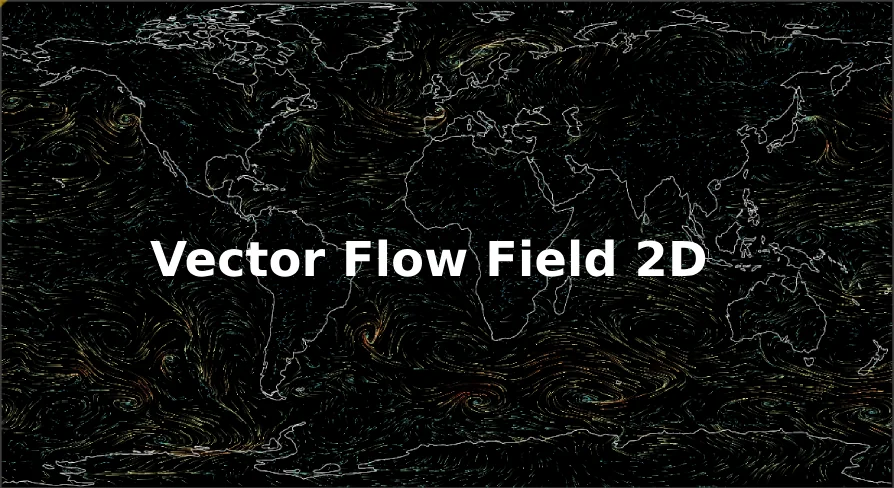
Vector Flow Field 2D is a specialized tool designed for developers who need to visualize complex vector field data. This plugin allows users to draw intricate flow fields directly within their project environments. It leverages the power of the graphics card to ensure smooth and efficient performance during operation. Therefore, it is an ideal solution for projects requiring high-density particle movement and data representation.
High-Performance GPU Rendering
One of the standout features of Vector Flow Field 2D is its fully GPU-powered architecture. Because the processing happens on the GPU, the plugin can handle massive amounts of data simultaneously. Consequently, users can render up to one million particles while maintaining a stable 60fps. This high level of performance is essential for real-time applications where visual fluidly is a priority.
By utilizing the GPU, the plugin reduces the load on the CPU. This allows for more complex simulations without sacrificing the overall frame rate of the application. Moreover, the efficiency of the shader-based system ensures that the flow field remains responsive even at peak particle counts.
Versatile Use Cases and Data Handling
The developer has designed this tool to work with any available vector field data. Whether you are working on geographical maps or atmospheric effects, this plugin provides the necessary framework. According to the creator, it is particularly well-suited for several specific types of visualizations:
Geography: Visualizing terrain data or mapping movements across a 2D plane.
Wind Patterns: Creating realistic flow representations for environmental effects.
Meteor Effects: Simulating high-speed particle trails and directional motion.
General Flow Fields: Drawing any data set that relies on vector coordinates.
The inclusion of Blueprint and code support allows for flexible integration into various workflows. Furthermore, the use of shaders enables high-quality rendering that can be customized to fit the aesthetic needs of a project.
Compatibility and Technical Integration
Currently, Vector Flow Field 2D supports versions 4.26 and 4.27 out of the box. However, users are not strictly limited to these specific versions. If you are working in a different environment, you can build the necessary version through your IDE. This flexibility ensures that the plugin remains useful across different project setups and developer configurations.
To help users get started quickly, the creator provides tutorial resources. These guides cover the basics of setting up the plugin and drawing your first flow field. Consequently, even those new to vector data can begin visualizing their assets with minimal delay.
Closing Notes
In practice, Vector Flow Field 2D offers a robust solution for high-performance particle visualization. By combining GPU power with flexible data support, it allows for the rendering of a million particles at 60fps. Whether you are focused on geography, wind simulations, or general flow data, this plugin provides the tools necessary for smooth, real-time rendering.
 Procedural Systems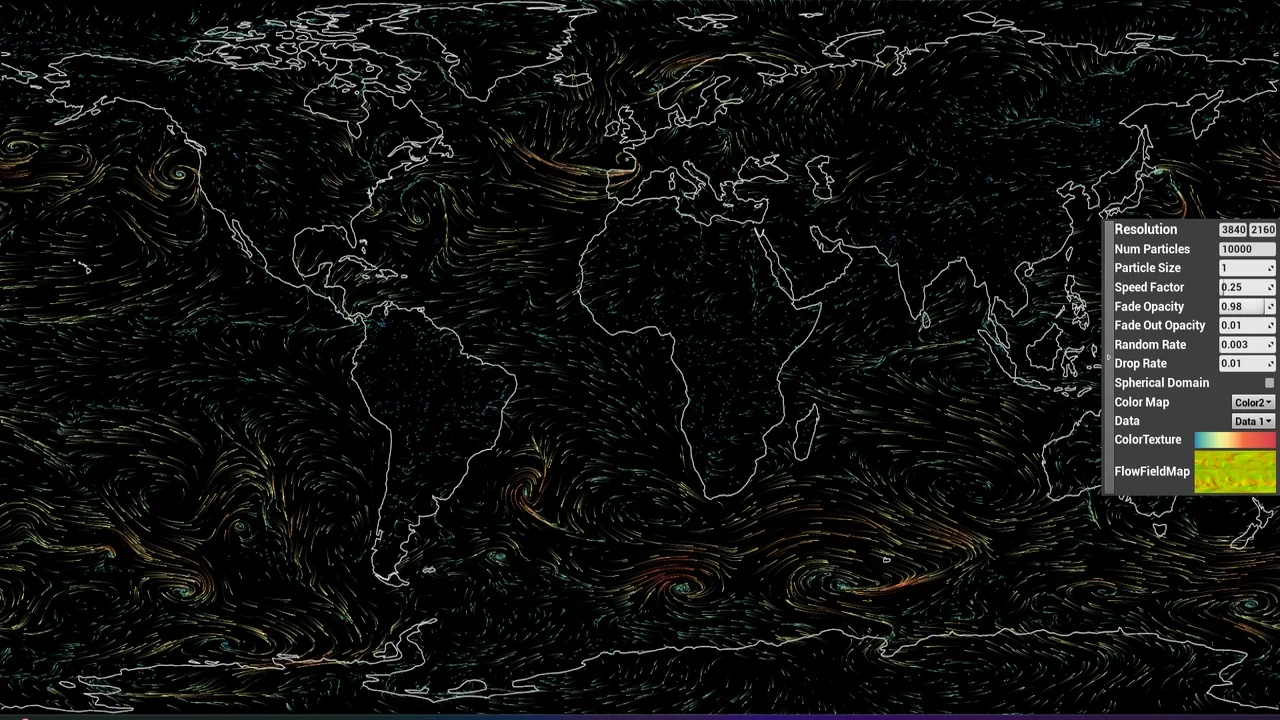
 Variety
 Procedural Systems
 Gameplay Features