"8652e693bd7bbc55"{"id":"1002980","slug":"advanced-shield-system","title":"Advanced Shield System","category":"Gameplay Features","engine":"4.26+,5.0+","assetVersion":"","engineVersion":"Engine Version: 4.26+,5.0+","tag":"Gameplay Features","accent":"blue","visual":"mech","summary":"A customizable shield component that layers energy shields over static and skeletal meshes, with replication, disintegration, hit feedback, and a full demo leve","platform":"Unreal Engine","indexPolicy":"index","publishedAt":"2026-11-25T09:36:49.054Z","updatedAt":"2026-11-25T09:36:49.054Z","sourceNotes":[],"fileContents":[],"compatibility":["Unreal Engine","Engine Version: 4.26+,5.0+"],"featuredImage":{"alt":"Advanced Shield System","src":"/wp-content/uploads/published/2026/11/866250ca591c-dd83e1d1-12b4-453d-98b7-7698a32ed298-9dddc07468.webp"},"hasDownloadLink":true,"downloads":0,"terms":[{"taxonomy":"category","slug":"gameplay-features","name":"Gameplay Features"}],"galleryImages":[{"src":"/wp-content/uploads/published/2026/11/2dd86120cb1e-9ddc0cd8-10e6-4451-b694-52c580b0e667-c6fd1e9890.webp","alt":"Advanced Shield System"},{"src":"/wp-content/uploads/published/2026/11/348a10b9def5-d2e48dae-32f5-41c7-8993-5f4170bc42b1-2086822fad.webp","alt":"Advanced Shield System"},{"src":"/wp-content/uploads/published/2026/11/7ae14072eef9-5bde1312-0320-485c-8324-afd0b0fab308-1c1b8e5999.webp","alt":"Advanced Shield System"}],"accessPanel":{"kind":"resource","title":"Get this resource","safetyNote":"Resources are manually reviewed before listing to improve quality and reduce obvious risks.","fileName":"Content.7z","resourceType":"Resource archive","versions":[]},"contentHtml":"\u003ch2\u003eShield Effects for Space Combat and Fantasy Encounters\u003c/h2\u003e\n\u003cp\u003eA shooter lives or dies on how quickly a player can read damage. The shield arc is often the first thing they look at when things go wrong, which makes it a gameplay object long before it is a visual one. The Advanced Shield System treats it that way: a customizable shield component that protects the player as a gameplay feature, drawing an external shield layer that covers the existing meshes rather than replacing them.\u003c/p\u003e\n\u003cp\u003eThat single design decision shapes everything else. Because the shield is a layer sitting over the character, the same component serves a futuristic space adventure and a magical fantasy realm without asking the art team to rebuild the character. The body, the armor, the creature rig — all of it stays as authored, and the shield is applied on top as its own surface. Change the material and the setting changes with it.\u003c/p\u003e \u003ch2\u003eInside the Advanced Shield System: Mesh Replication\u003c/h2\u003e\n\u003cp\u003eThe component replicates any number of Static or Skeletal Meshes and merges them with the original meshes, then applies the new shield material on top. In practice this means a character assembled from several separate pieces — a body, a set of attachments, whatever the rig requires — can be wrapped in one shield pass instead of hand-placing a duplicate shell around every part. Static props can be included on the same terms, so a shielded objective or a protected turret uses the same logic as the player.\u003c/p\u003e\n\u003cp\u003eThe covering itself is driven by World Position Offset, which pushes the shield surface out from the merged geometry so it reads as a shell around the silhouette. Element exclusion is handled through a custom material element index, so specific material slots on a mesh can be kept out of the shield treatment while the rest of the surface is covered. On a character with exposed skin, a face plate, or a weapon slot that should stay visible, that exclusion is the difference between a clean shield and an effect that swallows detail the player needs to see.\u003c/p\u003e \u003ch3\u003eWhy replication belongs in a component\u003c/h3\u003e\n\u003cp\u003eMulti-mesh characters are the norm in production, and they are exactly where one-off shield effects fall apart. A shield that has to be manually duplicated and re-fitted every time an attachment changes is maintenance debt. Handling replication inside the system keeps the shield attached to the actual mesh set at runtime, so adding a piece to a character does not mean opening the shield setup again.\u003c/p\u003e \u003ch2\u003eDisintegration and the Hit Read\u003c/h2\u003e\n\u003cp\u003eDamage feedback is where the system moves past decoration. The disintegration feature adds a visual spectacle, and it also does gameplay work by providing real-time feedback and a strategic element — the player can see the shield reacting, not just a number dropping in a corner. When the shield receives damage, it can play a custom pulsating animation that gives instant feedback on the hit. Because that animation is custom rather than fixed, its rhythm can be matched to the pace of the project: a slow pulse for a heavy tank, something sharper for a fast shooter.\u003c/p\u003e\n\u003cp\u003eBoth pieces — the disintegration and the pulse — answer the same question at different intensities. A hit registers, and the shield shows it. Layering the two gives a short, readable exchange on every impact instead of a silent bar.\u003c/p\u003e \u003ch2\u003eTuning the Shield Material\u003c/h2\u003e\n\u003cp\u003eColors, textures and material parameters are all exposed and fully customizable, which is the part most projects will spend their time in. The shield surface is parametric, so the same setup covers a hard blue energy barrier, a golden divine ward, or a corrosive green field by adjusting values rather than authoring new effects. Textures drive the finer character of the surface; colors and parameters carry the broad read.\u003c/p\u003e\n\u003cp\u003eThis is also how the system spans genres without a rewrite. A magical fantasy realm and a science-fiction corridor want different shield language, and the difference is expressed through the material inputs the component already exposes. Variants can be held as separate instances of that material, so a project with several factions or damage tiers keeps them side by side rather than rebuilding the effect each time.\u003c/p\u003e \u003ch2\u003eSetup Functions and the Demo Level\u003c/h2\u003e\n\u003cp\u003eIntegration is handled through simple setup functions, which keeps the component approachable in a project that already has its own character pipeline. A demo level is included with examples of every feature, and each one is an interactive example with a use case attached — the difference between reading that disintegration exists and watching a shield take a hit and break apart. Documentation and a demo accompany the system as well.\u003c/p\u003e\n\u003cp\u003eOne note worth planning around: quality level 3 or above enables Lumen. The demo's presentation depends on that setting, so a project running lower quality levels should expect to evaluate the shield under its own lighting rather than assuming the demo look transfers untouched.\u003c/p\u003e \u003ch2\u003eFitting the System to a Shooter Project\u003c/h2\u003e\n\u003cp\u003eThe tags around this resource tell a fairly consistent story — shooter, damage, hit, material, customization — and that is the context where it earns its keep. It is a game-ready shield for projects where the shield is a mechanic: something that takes damage, reports that damage back to the player, and changes appearance across characters or factions. A project that only needs a decorative aura has simpler options. A project that needs a shield to replicate across a modular character, survive mesh changes, and communicate hits in real time is the case this component was assembled for.\u003c/p\u003e\n\u003cp\u003eStart with the demo level and the element exclusion setup, since those determine how the shield sits on your actual character meshes. Tune the material parameters against your own lighting once that is settled, and treat the pulsating hit animation as a feel decision rather than an afterthought — it is the moment the player reads most often.\u003c/p\u003e\n\n\u003ch2\u003eExplore Similar Assets\u003c/h2\u003e\n\u003cul\u003e\n\u003cli\u003e\u003ca href=\"https://3dcghub.com/inventory-for-battle-royale-v1-1/\" rel=\"noopener noreferrer\"\u003eInventory for Battle Royale v1.1\u003c/a\u003e\u003c/li\u003e\n\u003cli\u003e\u003ca href=\"https://3dcghub.com/ultimate-spell-system/\" rel=\"noopener noreferrer\"\u003eUltimate Spell System\u003c/a\u003e\u003c/li\u003e\n\u003cli\u003e\u003ca href=\"https://3dcghub.com/gaming-health-widget/\" rel=\"noopener noreferrer\"\u003eGaming Health Widget\u003c/a\u003e\u003c/li\u003e\n\u003cli\u003e\u003ca href=\"https://3dcghub.com/advanced-fishing-template/\" rel=\"noopener noreferrer\"\u003eAdvanced Fishing Template\u003c/a\u003e\u003c/li\u003e\n\u003cli\u003e\u003ca href=\"https://3dcghub.com/modular-fps-hands/\" rel=\"noopener noreferrer\"\u003eModular FPS Hands\u003c/a\u003e\u003c/li\u003e\n\u003c/ul\u003e","contentTextLength":6040,"navigation":{"current":11,"total":4911,"previous":{"id":"1002981","slug":"advanced-social-system","title":"Advanced Social System","category":"Network \u0026 Multiplayer","platform":"Unreal Engine","updatedAt":"2026-11-25T09:37:30.566Z"},"next":{"id":"1002979","slug":"advanced-multiplayer-chat-system-v2-0","title":"Advanced Multiplayer Chat System v2.0","category":"Network \u0026 Multiplayer","platform":"Unreal Engine","updatedAt":"2026-11-25T09:36:15.296Z"}},"relatedResources":[{"id":"1001640","slug":"inventory-for-battle-royale-v1-1","title":"Inventory for Battle Royale v1.1","category":"Gameplay Features","engine":"4.26+,5.0+","assetVersion":"","engineVersion":"Engine Version: 4.26+,5.0+","tag":"Gameplay Features","accent":"blue","visual":"mech","summary":"Explore Inventory for Battle Royale v1.1, featuring networked inventory, loot chests, crafting, health and shield mechanics, and clean Blueprints.","platform":"Unreal Engine","indexPolicy":"index","publishedAt":"2026-10-13T02:22:40.598Z","updatedAt":"2026-10-13T02:22:40.598Z","sourceNotes":[],"fileContents":[],"compatibility":["Unreal Engine","Engine Version: 4.26+,5.0+"],"featuredImage":{"alt":"Inventory for Battle Royale v1.1","src":"/wp-content/uploads/published/2026/10/9ecef3719bb5-7767b398-2c33-4015-875a-cae5683083b3-48dc8d86af.webp"},"fileSizeBytes":105997733,"hasDownloadLink":true,"downloads":0},{"id":"1001307","slug":"ultimate-spell-system","title":"Ultimate Spell System","category":"Gameplay Features","engine":"5.1+","assetVersion":"","engineVersion":"Engine Version: 5.1+","tag":"Gameplay Features","accent":"blue","visual":"mech","summary":"Explore the Ultimate Spell System, an advanced magic framework featuring Niagara integration, multiplayer support, mana, shields, and spellbook mechanics.","platform":"Unreal Engine","indexPolicy":"index","publishedAt":"2026-10-02T06:21:12.194Z","updatedAt":"2026-10-02T06:21:12.194Z","sourceNotes":[],"fileContents":[],"compatibility":["Unreal Engine","Engine Version: 5.1+"],"featuredImage":{"alt":"Ultimate Spell System","src":"/wp-content/uploads/published/2026/10/b765acfa374d-8db4a436-8f55-46de-a8d5-84bd16177dcd-b3cdaaff6f.webp"},"fileSizeBytes":353191646,"hasDownloadLink":true,"downloads":0},{"id":"10870","slug":"gaming-health-widget","title":"Gaming Health Widget","category":"Gameplay Features","engine":"5.6+","assetVersion":"Engine version: 5.6+","engineVersion":"4.24","tag":"Gameplay Features","accent":"blue","visual":"mech","summary":"Enhance your project's user interface with this versatile Gaming Health Widget. It features customizable health, mana, and shield components alongside a flexible experience system.","platform":"Unreal Engine","indexPolicy":"noindex","publishedAt":"2026-03-03T16:25:16.000Z","updatedAt":"2026-04-19T15:49:55.000Z","sourceNotes":[],"fileContents":[],"compatibility":["Unreal Engine","Engine version: 5.6+"],"featuredImage":{"alt":"Gaming Health Widget","src":"https://3dcghub.com/wp-content/uploads/2026/03/2c18a22e-1205-4b81-8dde-2e2c752274c7.webp"},"fileSizeBytes":32008157,"hasDownloadLink":true,"downloads":0}]}[{"id":4225,"sourceId":4225,"taxonomyId":4225,"taxonomy":"category","slug":"asset-library","name":"Asset Library","parentId":null,"count":4765,"hasChildren":true,"href":"/","seoTitle":"Free Game Assets Library | 3DCGHUB","seoDescription":"Browse free Unreal Engine, Unity, Blender assets and game development tutorials on 3DCGHUB with previews, compatibility notes, and secure downloads.","sitemapEnabled":true,"children":[{"id":4227,"sourceId":4227,"taxonomyId":4227,"taxonomy":"category","slug":"blender-add-ons-plugins","name":"Blender Add-ons \u0026 Plugins","parentId":4225,"count":10,"hasChildren":false,"href":"/category/blender-add-ons-plugins/","seoTitle":"Free Blender Add-ons \u0026 Plugins | 3DCGHUB","seoDescription":"Browse free Blender Add-ons \u0026 Plugins tools for Blender on 3DCGHUB: curated downloads with preview images, compatibility notes and secure download access.","sitemapEnabled":true},{"id":514,"sourceId":514,"taxonomyId":514,"taxonomy":"category","slug":"unity-2","name":"Unity","parentId":4225,"count":453,"hasChildren":true,"href":"/category/unity-2/","seoTitle":"Free Unity Assets | 3DCGHUB","seoDescription":"Browse free Unity resources on 3DCGHUB: curated downloads with preview images, compatibility notes and secure download access.","sitemapEnabled":true,"children":[{"id":523,"sourceId":523,"taxonomyId":523,"taxonomy":"category","slug":"2d","name":"2D","parentId":514,"count":1,"hasChildren":true,"href":"/category/2d/","seoTitle":"Free Unity 2D | 3DCGHUB","seoDescription":"Browse free 2D assets for Unity on 3DCGHUB: curated downloads with preview images, compatibility notes and secure download access.","sitemapEnabled":true},{"id":515,"sourceId":515,"taxonomyId":515,"taxonomy":"category","slug":"3d-unity-2","name":"3D","parentId":514,"count":162,"hasChildren":true,"href":"/category/3d-unity-2/","seoTitle":"Free Unity 3D Assets | 3DCGHUB","seoDescription":"Browse free 3D assets for Unity on 3DCGHUB: curated downloads with preview images, compatibility notes and secure download access.","sitemapEnabled":true},{"id":565,"sourceId":565,"taxonomyId":565,"taxonomy":"category","slug":"add-ons","name":"Add-Ons","parentId":514,"count":2,"hasChildren":false,"href":"/category/add-ons/","seoTitle":"Free Unity Add-Ons | 3DCGHUB","seoDescription":"Browse free Add-Ons assets for Unity on 3DCGHUB: curated downloads with preview images, compatibility notes and secure download access.","sitemapEnabled":true},{"id":529,"sourceId":529,"taxonomyId":529,"taxonomy":"category","slug":"audio-unity-2","name":"Audio","parentId":514,"count":1,"hasChildren":true,"href":"/category/audio-unity-2/","seoTitle":"Free Unity Audio | 3DCGHUB","seoDescription":"Browse free Audio for Unity on 3DCGHUB: curated downloads with preview images, compatibility notes and secure download access.","sitemapEnabled":true},{"id":557,"sourceId":557,"taxonomyId":557,"taxonomy":"category","slug":"templates","name":"Templates","parentId":514,"count":36,"hasChildren":true,"href":"/category/templates/","seoTitle":"Free Unity Templates | 3DCGHUB","seoDescription":"Browse free Unity project templates on 3DCGHUB. Starter kits with previews, compatibility notes, and secure download access.","sitemapEnabled":true},{"id":533,"sourceId":533,"taxonomyId":533,"taxonomy":"category","slug":"tools-unity-2","name":"Tools","parentId":514,"count":0,"hasChildren":true,"href":"/category/tools-unity-2/","sitemapEnabled":true},{"id":554,"sourceId":554,"taxonomyId":554,"taxonomy":"category","slug":"vfx-unity-2","name":"VFX","parentId":514,"count":4,"hasChildren":true,"href":"/category/vfx-unity-2/","seoTitle":"Free Unity VFX | 3DCGHUB","seoDescription":"Browse free VFX for Unity on 3DCGHUB: curated downloads with preview images, compatibility notes and secure download access.","sitemapEnabled":true}]},{"id":511,"sourceId":511,"taxonomyId":511,"taxonomy":"category","slug":"unreal-engine-2","name":"Unreal Engine","parentId":4225,"count":4303,"hasChildren":true,"href":"/category/unreal-engine-2/","seoTitle":"Free Unreal Engine Assets | 3DCGHUB","seoDescription":"Browse free Unreal Engine resources on 3DCGHUB: curated downloads with preview images, compatibility notes and secure download access.","sitemapEnabled":true,"children":[{"id":54,"sourceId":54,"taxonomyId":54,"taxonomy":"category","slug":"3d","name":"3D","parentId":511,"count":2434,"hasChildren":true,"href":"/category/3d/","seoTitle":"Free Unreal Engine 3D | 3DCGHUB","seoDescription":"Browse free 3D assets for Unreal Engine on 3DCGHUB: curated downloads with preview images, compatibility notes and secure download access.","sitemapEnabled":true},{"id":441,"sourceId":441,"taxonomyId":441,"taxonomy":"category","slug":"animations","name":"Animations","parentId":511,"count":245,"hasChildren":true,"href":"/category/animations/","seoTitle":"Free Unreal Engine Animations | 3DCGHUB","seoDescription":"Browse free Animations for Unreal Engine on 3DCGHUB: curated downloads with preview images, compatibility notes and secure download access.","sitemapEnabled":true},{"id":446,"sourceId":446,"taxonomyId":446,"taxonomy":"category","slug":"audio","name":"Audio","parentId":511,"count":63,"hasChildren":true,"href":"/category/audio/","seoTitle":"Free Unreal Engine Audio Resources | 3DCGHUB","seoDescription":"Browse free Unreal Engine audio resources including sound effects, voices, dialogue, and ambient sounds. Curated free downloads on 3DCGHUB.","sitemapEnabled":true},{"id":466,"sourceId":466,"taxonomyId":466,"taxonomy":"category","slug":"game-systems","name":"Game Systems","parentId":511,"count":366,"hasChildren":true,"href":"/category/game-systems/","seoTitle":"Free Unreal Engine Game Systems | 3DCGHUB","seoDescription":"Browse free Game Systems tools for Unreal Engine on 3DCGHUB: curated downloads with preview images, compatibility notes and secure download access.","sitemapEnabled":true},{"id":478,"sourceId":478,"taxonomyId":478,"taxonomy":"category","slug":"game-templates","name":"Game Templates","parentId":511,"count":151,"hasChildren":true,"href":"/category/game-templates/","seoTitle":"Free Unreal Engine Game Templates | 3DCGHUB","seoDescription":"Browse free Game Templates for Unreal Engine on 3DCGHUB: curated downloads with preview images, compatibility notes and secure download access.","sitemapEnabled":true},{"id":432,"sourceId":432,"taxonomyId":432,"taxonomy":"category","slug":"hdri","name":"HDRI","parentId":511,"count":6,"hasChildren":true,"href":"/category/hdri/","seoTitle":"Free Unreal Engine HDRI | 3DCGHUB","seoDescription":"Browse free Unreal Engine HDRI skies and lighting maps on 3DCGHUB. Environment lighting with previews and secure downloads.","sitemapEnabled":true},{"id":228,"sourceId":228,"taxonomyId":228,"taxonomy":"category","slug":"material-and-textures","name":"Material \u0026 Textures","parentId":511,"count":172,"hasChildren":true,"href":"/category/material-and-textures/","seoTitle":"Free Unreal Engine Material \u0026 Textures | 3DCGHUB","seoDescription":"Browse free Material \u0026 Textures for Unreal Engine on 3DCGHUB: curated downloads with preview images, compatibility notes and secure download access.","sitemapEnabled":true},{"id":298,"sourceId":298,"taxonomyId":298,"taxonomy":"category","slug":"sprites-and-flipbooks","name":"Sprites \u0026 Flipbooks","parentId":511,"count":18,"hasChildren":true,"href":"/category/sprites-and-flipbooks/","seoTitle":"Free Unreal Engine Sprites \u0026 Flipbooks | 3DCGHUB","seoDescription":"Browse free Sprites \u0026 Flipbooks assets for Unreal Engine on 3DCGHUB: curated downloads with preview images, compatibility notes and secure download access.","sitemapEnabled":true},{"id":489,"sourceId":489,"taxonomyId":489,"taxonomy":"category","slug":"tools-and-plugins","name":"Tools \u0026 Plugins","parentId":511,"count":390,"hasChildren":true,"href":"/category/tools-and-plugins/","seoTitle":"Free Unreal Engine Tools \u0026 Plugins | 3DCGHUB","seoDescription":"Browse free Tools \u0026 Plugins for Unreal Engine on 3DCGHUB: curated downloads with preview images, compatibility notes and secure download access.","sitemapEnabled":true},{"id":459,"sourceId":459,"taxonomyId":459,"taxonomy":"category","slug":"ui","name":"UI","parentId":511,"count":45,"hasChildren":true,"href":"/category/ui/","seoTitle":"Free Unreal Engine UI | 3DCGHUB","seoDescription":"Browse free UI for Unreal Engine on 3DCGHUB: curated downloads with preview images, compatibility notes and secure download access.","sitemapEnabled":true},{"id":450,"sourceId":450,"taxonomyId":450,"taxonomy":"category","slug":"vfx","name":"VFX","parentId":511,"count":413,"hasChildren":true,"href":"/category/vfx/","seoTitle":"Free Unreal Engine VFX | 3DCGHUB","seoDescription":"Browse free VFX for Unreal Engine on 3DCGHUB: curated downloads with preview images, compatibility notes and secure download access.","sitemapEnabled":true}]}]},{"id":4222,"sourceId":4222,"taxonomyId":4222,"taxonomy":"category","slug":"tutorial-library","name":"Tutorial Library","parentId":null,"count":117,"hasChildren":false,"href":"/tutorials/","seoTitle":"Free Game Development Tutorial Library | 3DCGHUB","seoDescription":"Browse free game development tutorials for Unreal Engine, Unity, Blender, and more on 3DCGHUB with practical workflows and secure downloads.","sitemapEnabled":true}]
Resource screenshots
1 / 3
Asset drops
Daily Asset Drops
Follow 3DCGHUB on Telegram for daily Unreal, Unity & Blender drops and curated CC0 releases.
Resources are manually reviewed before listing to improve quality and reduce obvious risks.
Reviewed archive
Gameplay Features
Advanced Shield System
A customizable shield component that layers energy shields over static and skeletal meshes, with replication, disintegration, hit feedback, and a full demo leve
Shield Effects for Space Combat and Fantasy Encounters
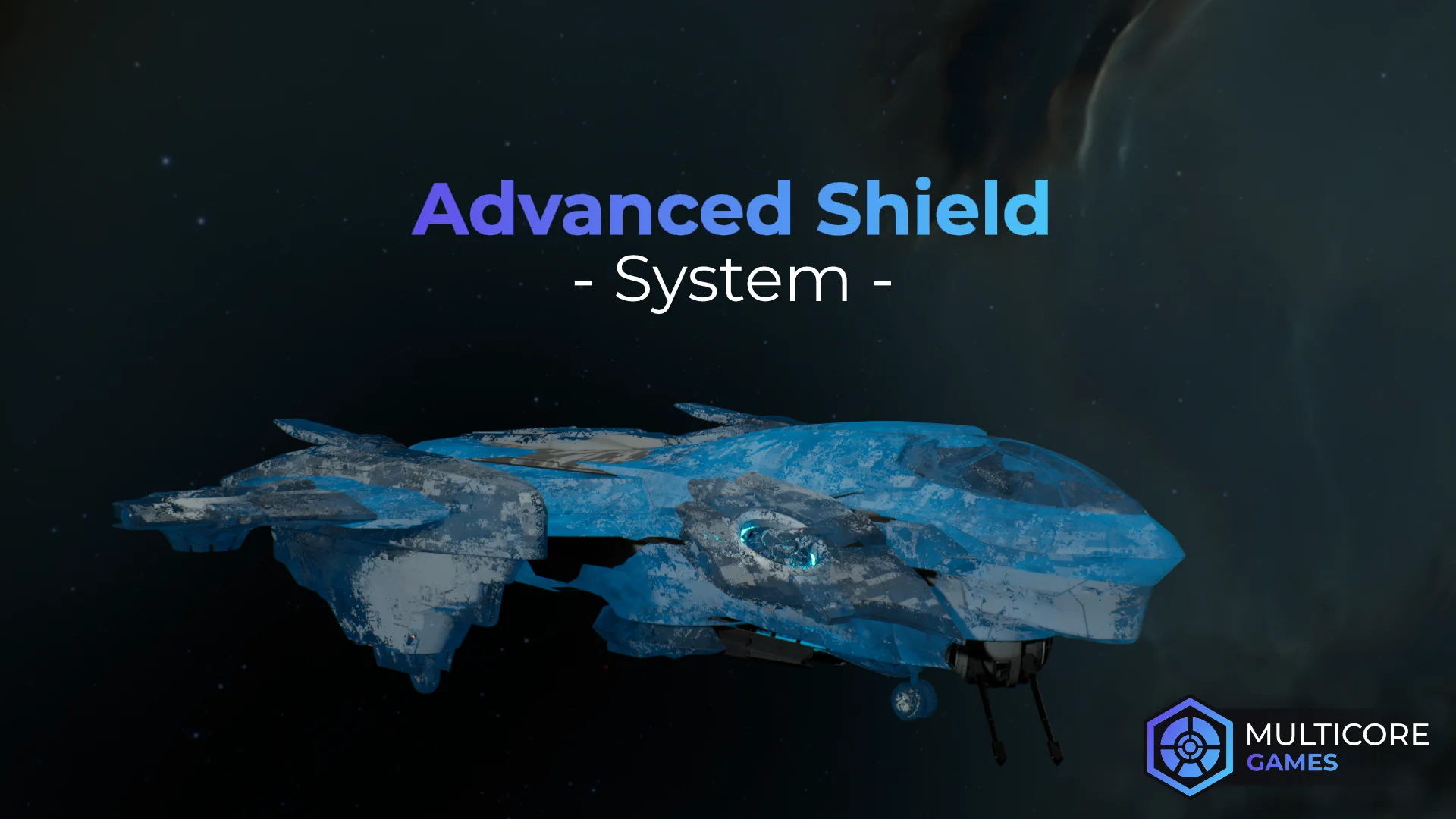
A shooter lives or dies on how quickly a player can read damage. The shield arc is often the first thing they look at when things go wrong, which makes it a gameplay object long before it is a visual one. The Advanced Shield System treats it that way: a customizable shield component that protects the player as a gameplay feature, drawing an external shield layer that covers the existing meshes rather than replacing them.
That single design decision shapes everything else. Because the shield is a layer sitting over the character, the same component serves a futuristic space adventure and a magical fantasy realm without asking the art team to rebuild the character. The body, the armor, the creature rig — all of it stays as authored, and the shield is applied on top as its own surface. Change the material and the setting changes with it.
Inside the Advanced Shield System: Mesh Replication
The component replicates any number of Static or Skeletal Meshes and merges them with the original meshes, then applies the new shield material on top. In practice this means a character assembled from several separate pieces — a body, a set of attachments, whatever the rig requires — can be wrapped in one shield pass instead of hand-placing a duplicate shell around every part. Static props can be included on the same terms, so a shielded objective or a protected turret uses the same logic as the player.
The covering itself is driven by World Position Offset, which pushes the shield surface out from the merged geometry so it reads as a shell around the silhouette. Element exclusion is handled through a custom material element index, so specific material slots on a mesh can be kept out of the shield treatment while the rest of the surface is covered. On a character with exposed skin, a face plate, or a weapon slot that should stay visible, that exclusion is the difference between a clean shield and an effect that swallows detail the player needs to see.
Why replication belongs in a component
Multi-mesh characters are the norm in production, and they are exactly where one-off shield effects fall apart. A shield that has to be manually duplicated and re-fitted every time an attachment changes is maintenance debt. Handling replication inside the system keeps the shield attached to the actual mesh set at runtime, so adding a piece to a character does not mean opening the shield setup again.
Disintegration and the Hit Read
Damage feedback is where the system moves past decoration. The disintegration feature adds a visual spectacle, and it also does gameplay work by providing real-time feedback and a strategic element — the player can see the shield reacting, not just a number dropping in a corner. When the shield receives damage, it can play a custom pulsating animation that gives instant feedback on the hit. Because that animation is custom rather than fixed, its rhythm can be matched to the pace of the project: a slow pulse for a heavy tank, something sharper for a fast shooter.
Both pieces — the disintegration and the pulse — answer the same question at different intensities. A hit registers, and the shield shows it. Layering the two gives a short, readable exchange on every impact instead of a silent bar.
Tuning the Shield Material
Colors, textures and material parameters are all exposed and fully customizable, which is the part most projects will spend their time in. The shield surface is parametric, so the same setup covers a hard blue energy barrier, a golden divine ward, or a corrosive green field by adjusting values rather than authoring new effects. Textures drive the finer character of the surface; colors and parameters carry the broad read.
This is also how the system spans genres without a rewrite. A magical fantasy realm and a science-fiction corridor want different shield language, and the difference is expressed through the material inputs the component already exposes. Variants can be held as separate instances of that material, so a project with several factions or damage tiers keeps them side by side rather than rebuilding the effect each time.
Setup Functions and the Demo Level
Integration is handled through simple setup functions, which keeps the component approachable in a project that already has its own character pipeline. A demo level is included with examples of every feature, and each one is an interactive example with a use case attached — the difference between reading that disintegration exists and watching a shield take a hit and break apart. Documentation and a demo accompany the system as well.
One note worth planning around: quality level 3 or above enables Lumen. The demo's presentation depends on that setting, so a project running lower quality levels should expect to evaluate the shield under its own lighting rather than assuming the demo look transfers untouched.
Fitting the System to a Shooter Project
The tags around this resource tell a fairly consistent story — shooter, damage, hit, material, customization — and that is the context where it earns its keep. It is a game-ready shield for projects where the shield is a mechanic: something that takes damage, reports that damage back to the player, and changes appearance across characters or factions. A project that only needs a decorative aura has simpler options. A project that needs a shield to replicate across a modular character, survive mesh changes, and communicate hits in real time is the case this component was assembled for.
Start with the demo level and the element exclusion setup, since those determine how the shield sits on your actual character meshes. Tune the material parameters against your own lighting once that is settled, and treat the pulsating hit animation as a feel decision rather than an afterthought — it is the moment the player reads most often.
 Gameplay Features
 Gameplay Features
 Gameplay Features