"7e6fc58c410f2894"{"id":"1001640","slug":"inventory-for-battle-royale-v1-1","title":"Inventory for Battle Royale v1.1","category":"Gameplay Features","engine":"4.26+,5.0+","assetVersion":"","engineVersion":"Engine Version: 4.26+,5.0+","tag":"Gameplay Features","accent":"blue","visual":"mech","summary":"Explore Inventory for Battle Royale v1.1, featuring networked inventory, loot chests, crafting, health and shield mechanics, and clean Blueprints.","platform":"Unreal Engine","publishedAt":"2026-10-13T02:22:40.598Z","updatedAt":"2026-10-13T02:22:40.598Z","sourceNotes":[],"fileContents":[],"compatibility":["Unreal Engine","Engine Version: 4.26+,5.0+"],"featuredImage":{"alt":"Inventory for Battle Royale v1.1","src":"/wp-content/uploads/published/2026/10/9ecef3719bb5-7767b398-2c33-4015-875a-cae5683083b3-48dc8d86af.webp"},"hasDownloadLink":true,"downloads":0,"terms":[{"taxonomy":"category","slug":"gameplay-features","name":"Gameplay Features"}],"galleryImages":[{"src":"/wp-content/uploads/published/2026/10/a925b28c6ff6-d36fea6a-aa6c-4ab7-a478-813ed150af27-ef30f0611b.webp","alt":"Inventory for Battle Royale v1.1"},{"src":"/wp-content/uploads/published/2026/10/9b33408f39b4-c1f57a36-455c-4f2f-a863-ac3647f2c414-b192fd44f2.webp","alt":"Inventory for Battle Royale v1.1"},{"src":"/wp-content/uploads/published/2026/10/cf2e8a155ff6-33b0e6e8-8297-4a1d-a64f-3995d9e964c0-6726060526.webp","alt":"Inventory for Battle Royale v1.1"},{"src":"/wp-content/uploads/published/2026/10/b1dc1c365dc2-236baa5f-bab0-42d5-9042-2feb72a49d0c-f2a60e227a.webp","alt":"Inventory for Battle Royale v1.1"},{"src":"/wp-content/uploads/published/2026/10/8a0e4f37dda7-ee15cc0b-1a38-4b88-b8c5-798cc5153089-e56c3ae8e3.webp","alt":"Inventory for Battle Royale v1.1"},{"src":"/wp-content/uploads/published/2026/10/a4a285825a0f-c9bb3ddc-89e0-4268-8116-eafec5b0bfb5-dabda2531f.webp","alt":"Inventory for Battle Royale v1.1"},{"src":"/wp-content/uploads/published/2026/10/dfad28ec1be1-b6a6c036-aec9-4268-a418-6d47893eb588-ae09416d79.webp","alt":"Inventory for Battle Royale v1.1"},{"src":"/wp-content/uploads/published/2026/10/ae7186d7b224-0bb19f2b-6644-4839-9055-1591d4f02644-4ff50c4b89.webp","alt":"Inventory for Battle Royale v1.1"},{"src":"/wp-content/uploads/published/2026/10/e6c59f8343fd-c63369cc-357a-48c1-b5eb-e8881e4c6f5a-ae7d1ece21.webp","alt":"Inventory for Battle Royale v1.1"}],"accessPanel":{"kind":"resource","title":"Download this resource","eyebrow":"Free Download","message":"Log in or create a free account to start your download.","fileName":"Inventory for Battle Royale v1.1.7z","safetyNote":"Resources are manually reviewed before listing to improve quality and reduce obvious risks.","actionLabel":"Download Free","resourceType":"Resource archive"},"contentHtml":"\u003ch2\u003eCore Inventory, Weapons, and Consumable Mechanics\u003c/h2\u003e\n\u003cp\u003eInventory for Battle Royale v1.1 connects the core survival loops of item collection, weapon management, and field recovery through a dynamic item framework. The central inventory system is configured to manage active gear, quick-access slots, and general pack storage while interacting seamlessly with separate weapon and consumable subsystems. Items inside the inventory retain distinct functional properties, ensuring that equipment triggers the correct behavior when drawn, swapped, or utilized during active matches.\u003c/p\u003e\n\u003cp\u003eWeapon handling is divided to account for ready-state equipment, weapon switching, and dedicated damage handling. When equipped, weapons interact directly with player targeting and combat systems, feeding into the health and shield architecture. Consumables operate in tandem with this structure, allowing players to carry and trigger recovery items that restore health pools or replenish depleted shields. Because the item data remains dynamic, configuring unique consumables or distinctive weapon archetypes does not require rebuilding fundamental gameplay loops.\u003c/p\u003e \u003ch2\u003eWorld Interaction Through Loot Chests and Crafting Stations\u003c/h2\u003e\n\u003cp\u003eExploration and resource gathering rely on two interactive object categories: the loot chest system and crafting stations. The loot chest system governs how containers populate the game world, distribute item drops, and handle opening interactions. Players can approach world chests, trigger extraction, and transfer stored goods directly into their personal inventory slots. This creates predictable physical interaction points across combat zones, establishing hotspots for gear acquisition.\u003c/p\u003e\n\u003cp\u003eCrafting stations introduce processing gameplay, giving players a dedicated apparatus to combine collected materials into higher-value tools, consumables, or combat gear. The crafting station system reads existing items from player inventory capacity, checks for component availability, and outputs new items directly back to the user or into the game space. Both the chest and crafting frameworks are constructed to interface natively with the broader item pipeline, ensuring that freshly crafted supplies or discovered containers immediately recognize new items introduced to the project.\u003c/p\u003e \u003ch2\u003eHealth, Shield, Damage, and Notification Systems\u003c/h2\u003e\n\u003cp\u003eDefensive and offensive interactions are processed through an integrated health, shield, and damage system. This setup monitors incoming damage, calculates defensive mitigation through active shield pools, and deducts remaining impact directly from player health. The relationship between shields and health operates smoothly alongside the consumable system, ensuring recovery items target the appropriate defensive metric when consumed under fire or between skirmishes.\u003c/p\u003e\n\u003cp\u003eTo keep players informed during rapid combat sequences, an integrated notification system broadcasts immediate feedback. Whenever items are collected, chests are unlocked, crafting actions finish, or health and shields fluctuate, notifications trigger responsive visual queues on the interface. This real-time messaging keeps users oriented within high-tempo matches, removing guesswork during intense gear management and defensive recovery phases.\u003c/p\u003e \u003ch2\u003eData Table Configuration and Item Rarity Customization\u003c/h2\u003e\n\u003cp\u003eVisual and qualitative item tiers are managed through the item rarity system, which anchors its rules directly to an editable Data Table. This setup enables quick adjustments to rarity tiers without diving into core logic nodes or altering interactive objects individually. Within the Data Table, developers can customize rarity color schemes to visually separate standard gear from higher-tier combat rewards.\u003c/p\u003e\n\u003cp\u003eBecause all system designs are dynamic, adding new items to the project remains straightforward. New equipment, recovery tools, or crafting components simply inherit the foundational structures already laid out in the item logic. Once registered with their baseline stats and tied to the corresponding Data Table entries, newly introduced items immediately adopt the appropriate rarity colors, inventory behaviors, and world-drop rules across chests and crafting benches.\u003c/p\u003e \u003ch2\u003eMultiplayer Support and Blueprint Integration\u003c/h2\u003e\n\u003cp\u003eNetwork play is supported out of the box, with multiplayer support integrated throughout every player action, world chest opening, and inventory transaction. Replicated states ensure that item pickups, inventory contents, health alterations, and crafting actions remain synchronized between the server and participating clients. This eliminates local state discrepancies during contested item pickups or simultaneous chest access in crowded drop zones.\u003c/p\u003e\n\u003cp\u003eThe entire framework is constructed with clean and organized Blueprints complete with detailed notes explaining logic pathways, variable assignments, and event flows. This structural clarity makes it easy to migrate the package into existing projects without untangling convoluted dependencies. The architecture also allows smooth integration alongside companion frameworks, including projects utilizing the Hacking Device Kit v2, providing a clean baseline for battle royale environments, tactical survival titles, or modular multiplayer sandboxes.\u003c/p\u003e\n\n\u003ch2\u003eContinue Browsing Similar Packs\u003c/h2\u003e\n\u003cul\u003e\n\u003cli\u003e\u003ca href=\"https://3dcghub.com/battle-royale-zone-with-minimap/\" title=\"Battle Royale Zone With Minimap\"\u003eBattle Royale Zone With Minimap\u003c/a\u003e\u003c/li\u003e\n\u003cli\u003e\u003ca href=\"https://3dcghub.com/battle-royale-island-pack-battle-royale-battle-royale-buildings-island/\" title=\"Battle Royale Island Pack (Battle Royale, Battle Royale Buildings, Island )\"\u003eBattle Royale Island Pack (Battle Royale, Battle Royale Buildings, Island )\u003c/a\u003e\u003c/li\u003e\n\u003cli\u003e\u003ca href=\"https://3dcghub.com/inventory-system-pro-by-moonville/\" title=\"Inventory System Pro by Moonville\"\u003eInventory System Pro by Moonville\u003c/a\u003e\u003c/li\u003e\n\u003cli\u003e\u003ca href=\"https://3dcghub.com/inventory-system/\" title=\"Inventory System\"\u003eInventory System\u003c/a\u003e\u003c/li\u003e\n\u003cli\u003e\u003ca href=\"https://3dcghub.com/advanced-grid-inventory-system/\" title=\"Advanced Grid Inventory System\"\u003eAdvanced Grid Inventory System\u003c/a\u003e\u003c/li\u003e\n\u003c/ul\u003e","contentTextLength":5460,"navigation":{"current":43,"total":3618,"previous":{"id":"1001641","slug":"landfill","title":"Landfill","category":"Industrial","platform":"Unreal Engine","updatedAt":"2026-10-13T02:25:34.093Z"},"next":{"id":"1001639","slug":"industry-props-pack-3-office","title":"Industry Props Pack 3 Office","category":"Furniture \u0026 Fixtures","platform":"Unreal Engine","updatedAt":"2026-10-13T02:21:07.307Z"}},"relatedResources":[{"id":"10577","slug":"battle-royale-zone-with-minimap","title":"Battle Royale Zone With Minimap","category":"Gameplay Features","engine":"4.27,5.0+","assetVersion":"Engine version: 4.27,5.0+","engineVersion":"4.23","tag":"Gameplay Features","accent":"blue","visual":"audio","summary":"Enhance your survival game with a Battle Royale Zone With Minimap system that tracks zone transitions and actor locations at runtime. This tool includes a configurable zone and an interactive overview map.","platform":"Unreal Engine","publishedAt":"2026-03-03T15:45:05.000Z","updatedAt":"2026-04-19T15:49:59.000Z","sourceNotes":[],"fileContents":[],"compatibility":["Unreal Engine","Engine version: 4.27,5.0+"],"featuredImage":{"alt":"Battle Royale Zone With Minimap","src":"https://3dcghub.com/wp-content/uploads/2026/03/17fb69dc-4ff9-487a-ba07-954a7ee7931e.webp"},"hasDownloadLink":true,"downloads":0},{"id":"9892","slug":"battle-royale-island-pack-battle-royale-battle-royale-buildings-island","title":"Battle Royale Island Pack (Battle Royale, Battle Royale Buildings, Island )","category":"Towns \u0026 Villages","engine":"4.26+,5.0+","assetVersion":"Engine version: 4.26+,5.0+","engineVersion":"4.23","tag":"Towns \u0026 Villages","accent":"blue","visual":"city","summary":"Build expansive and detailed multiplayer maps with the Battle Royale Island Pack. This collection features over 20 settlements, military props, and optimized foliage for high-performance gaming.","platform":"Unreal Engine","publishedAt":"2026-03-02T16:34:33.000Z","updatedAt":"2026-04-19T15:50:09.000Z","sourceNotes":[],"fileContents":[],"compatibility":["Unreal Engine","Engine version: 4.26+,5.0+"],"featuredImage":{"alt":"Battle Royale Island Pack (Battle Royale, Battle Royale Buildings, Island )","src":"https://3dcghub.com/wp-content/uploads/2026/03/c7fa99a5-28cf-4ce8-a7b8-0c864fb1f062.webp"},"hasDownloadLink":true,"downloads":2},{"id":"1001617","slug":"inventory-system-pro-by-moonville","title":"Inventory System Pro by Moonville","category":"Gameplay Features","engine":"5.4+","assetVersion":"","engineVersion":"Engine Version: 5.4+","tag":"Gameplay Features","accent":"blue","visual":"mech","summary":"Inventory System Pro delivers a Blueprint-only toolkit featuring uniform and jigsaw grids, survival mechanics, and combat equipment for Unreal Engine.","platform":"Unreal Engine","publishedAt":"2026-10-11T01:45:57.813Z","updatedAt":"2026-10-11T01:45:57.813Z","sourceNotes":[],"fileContents":[],"compatibility":["Unreal Engine","Engine Version: 5.4+"],"featuredImage":{"alt":"Inventory System Pro by Moonville","src":"/wp-content/uploads/published/2026/10/cff3dc4ff029-f198679a-e82f-4dd8-b6af-a92f2cff2487-78f73d85b7.webp"},"hasDownloadLink":true,"downloads":1}]}
Gameplay Features
Inventory for Battle Royale v1.1
Explore Inventory for Battle Royale v1.1, featuring networked inventory, loot chests, crafting, health and shield mechanics, and clean Blueprints.
Inventory for Battle Royale v1.1 connects the core survival loops of item collection, weapon management, and field recovery through a dynamic item framework. The central inventory system is configured to manage active gear, quick-access slots, and general pack storage while interacting seamlessly with separate weapon and consumable subsystems. Items inside the inventory retain distinct functional properties, ensuring that equipment triggers the correct behavior when drawn, swapped, or utilized during active matches.
Weapon handling is divided to account for ready-state equipment, weapon switching, and dedicated damage handling. When equipped, weapons interact directly with player targeting and combat systems, feeding into the health and shield architecture. Consumables operate in tandem with this structure, allowing players to carry and trigger recovery items that restore health pools or replenish depleted shields. Because the item data remains dynamic, configuring unique consumables or distinctive weapon archetypes does not require rebuilding fundamental gameplay loops.
World Interaction Through Loot Chests and Crafting Stations
Exploration and resource gathering rely on two interactive object categories: the loot chest system and crafting stations. The loot chest system governs how containers populate the game world, distribute item drops, and handle opening interactions. Players can approach world chests, trigger extraction, and transfer stored goods directly into their personal inventory slots. This creates predictable physical interaction points across combat zones, establishing hotspots for gear acquisition.
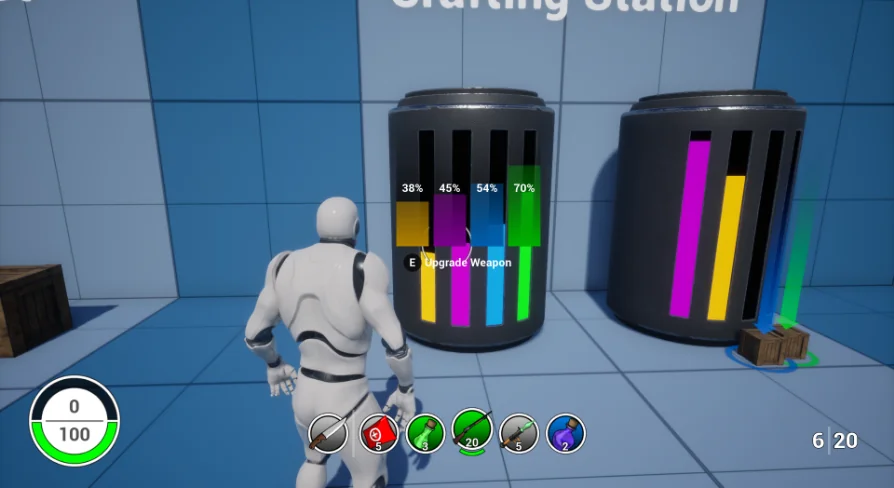
Crafting stations introduce processing gameplay, giving players a dedicated apparatus to combine collected materials into higher-value tools, consumables, or combat gear. The crafting station system reads existing items from player inventory capacity, checks for component availability, and outputs new items directly back to the user or into the game space. Both the chest and crafting frameworks are constructed to interface natively with the broader item pipeline, ensuring that freshly crafted supplies or discovered containers immediately recognize new items introduced to the project.
Health, Shield, Damage, and Notification Systems
Defensive and offensive interactions are processed through an integrated health, shield, and damage system. This setup monitors incoming damage, calculates defensive mitigation through active shield pools, and deducts remaining impact directly from player health. The relationship between shields and health operates smoothly alongside the consumable system, ensuring recovery items target the appropriate defensive metric when consumed under fire or between skirmishes.
To keep players informed during rapid combat sequences, an integrated notification system broadcasts immediate feedback. Whenever items are collected, chests are unlocked, crafting actions finish, or health and shields fluctuate, notifications trigger responsive visual queues on the interface. This real-time messaging keeps users oriented within high-tempo matches, removing guesswork during intense gear management and defensive recovery phases.
Data Table Configuration and Item Rarity Customization
Visual and qualitative item tiers are managed through the item rarity system, which anchors its rules directly to an editable Data Table. This setup enables quick adjustments to rarity tiers without diving into core logic nodes or altering interactive objects individually. Within the Data Table, developers can customize rarity color schemes to visually separate standard gear from higher-tier combat rewards.
Because all system designs are dynamic, adding new items to the project remains straightforward. New equipment, recovery tools, or crafting components simply inherit the foundational structures already laid out in the item logic. Once registered with their baseline stats and tied to the corresponding Data Table entries, newly introduced items immediately adopt the appropriate rarity colors, inventory behaviors, and world-drop rules across chests and crafting benches.
Multiplayer Support and Blueprint Integration
Network play is supported out of the box, with multiplayer support integrated throughout every player action, world chest opening, and inventory transaction. Replicated states ensure that item pickups, inventory contents, health alterations, and crafting actions remain synchronized between the server and participating clients. This eliminates local state discrepancies during contested item pickups or simultaneous chest access in crowded drop zones.
The entire framework is constructed with clean and organized Blueprints complete with detailed notes explaining logic pathways, variable assignments, and event flows. This structural clarity makes it easy to migrate the package into existing projects without untangling convoluted dependencies. The architecture also allows smooth integration alongside companion frameworks, including projects utilizing the Hacking Device Kit v2, providing a clean baseline for battle royale environments, tactical survival titles, or modular multiplayer sandboxes.
 Gameplay Features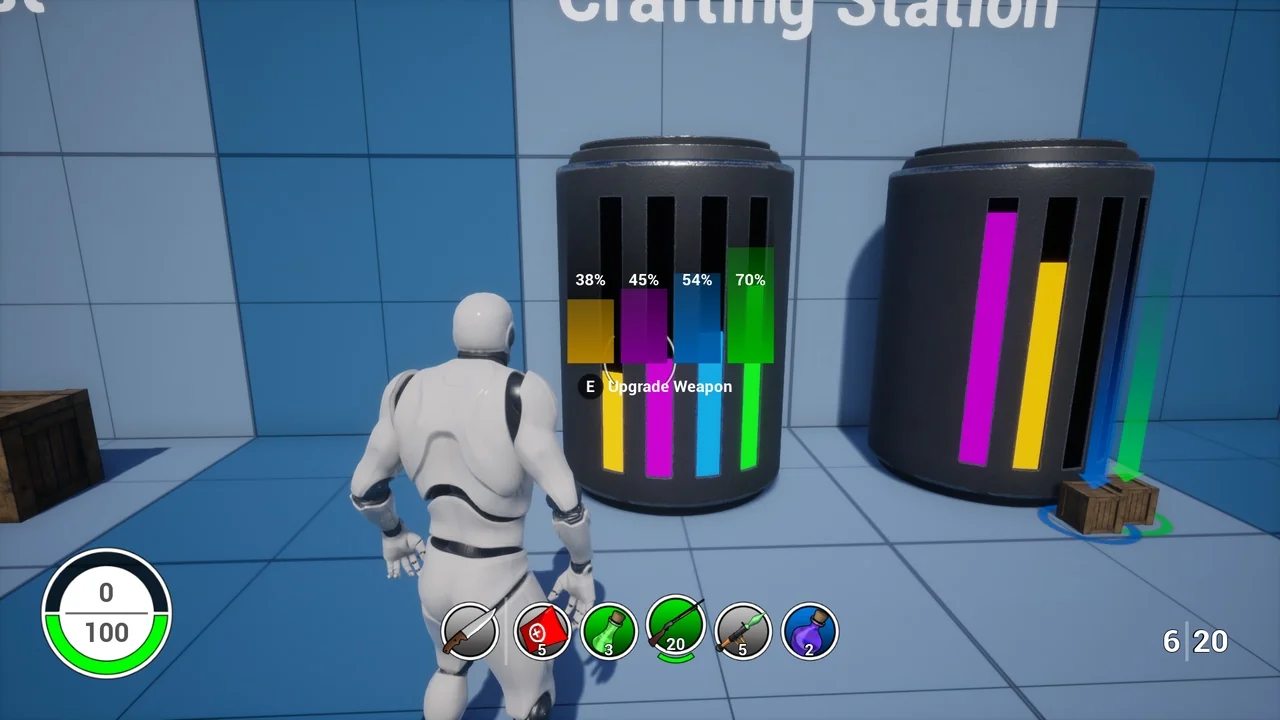
 Gameplay Features
 Towns & Villages
 Gameplay Features