"0341a2901a4ae9aa"{"id":"10577","slug":"battle-royale-zone-with-minimap","title":"Battle Royale Zone With Minimap","category":"Gameplay Features","engine":"4.27,5.0+","assetVersion":"Engine version: 4.27,5.0+","engineVersion":"4.23","tag":"Gameplay Features","accent":"blue","visual":"audio","summary":"Enhance your survival game with a Battle Royale Zone With Minimap system that tracks zone transitions and actor locations at runtime. This tool includes a configurable zone and an interactive overview map.","platform":"Unreal Engine","publishedAt":"2026-03-03T15:45:05.000Z","updatedAt":"2026-04-19T15:49:59.000Z","sourceNotes":[],"fileContents":[],"compatibility":["Unreal Engine","Engine version: 4.27,5.0+"],"featuredImage":{"alt":"Battle Royale Zone With Minimap","src":"https://3dcghub.com/wp-content/uploads/2026/03/17fb69dc-4ff9-487a-ba07-954a7ee7931e.webp"},"hasDownloadLink":true,"downloads":0,"terms":[{"taxonomy":"category","slug":"gameplay-features","name":"Gameplay Features"},{"taxonomy":"post_tag","slug":"battle-royale-zone-with-minimap","name":"Battle Royale Zone With Minimap"},{"taxonomy":"post_tag","slug":"minimap-system","name":"minimap system"},{"taxonomy":"post_tag","slug":"zone-movement-tracking","name":"zone movement tracking"}],"galleryImages":[{"src":"https://3dcghub.com/wp-content/uploads/2026/03/2b95b26a9cd0_20cfd649-3c3d-4c78-a60a-bb081c7b2a23.webp","alt":"Battle Royale Zone With Minimap"},{"src":"https://3dcghub.com/wp-content/uploads/2026/03/0d5472c88076_2195c5e9-5ad5-4d49-a0b4-41fcb4d546f4.webp","alt":"Battle Royale Zone With Minimap"},{"src":"https://3dcghub.com/wp-content/uploads/2026/03/7b464056b1d1_3e572a8a-ea61-4efe-8a62-c9ca6c9ede83.webp","alt":"Battle Royale Zone With Minimap"},{"src":"https://3dcghub.com/wp-content/uploads/2026/03/083bb2d6d8c7_d9f77356-0e11-4cb9-9997-bde97cb6d86f.webp","alt":"Battle Royale Zone With Minimap"},{"src":"https://3dcghub.com/wp-content/uploads/2026/03/29c2894ca217_16454843-93af-456b-803e-d068ce50cc94.webp","alt":"Battle Royale Zone With Minimap"},{"src":"https://3dcghub.com/wp-content/uploads/2026/03/6d0c0f7dcd7c_b8929052-b4ac-4214-bd91-ae9b72836750.webp","alt":"Battle Royale Zone With Minimap"},{"src":"https://3dcghub.com/wp-content/uploads/2026/03/a8bcbc02164f_15dd4c75-e06f-4d18-a1d1-362d45e895b3.webp","alt":"Battle Royale Zone With Minimap"},{"src":"https://3dcghub.com/wp-content/uploads/2026/03/e07f9d0a473a_5a504ee4-1e4a-48bd-9a14-6170729af6e1.webp","alt":"Battle Royale Zone With Minimap"},{"src":"https://3dcghub.com/wp-content/uploads/2026/03/11e291760bba_49f6f007-4bc3-46f5-9895-de82f5e8f565.webp","alt":"Battle Royale Zone With Minimap"},{"src":"https://3dcghub.com/wp-content/uploads/2026/03/04d34c02fc93_a513dd1f-ee89-4c1b-9f6b-8f3a8d1aa92d.webp","alt":"Battle Royale Zone With Minimap"}],"accessPanel":{"kind":"resource","title":"Access this resource","eyebrow":"Free Download","message":"Log in or create a free account to start your download.","fileName":"Battle Royale Zone With Minimap.7z","safetyNote":"All resources are 100% manually reviewed to eliminate all risks.","actionLabel":"Download Free","resourceType":"Resource archive"},"contentHtml":"\u003ch2\u003eOverview of the Battle Royale Zone With Minimap\u003c/h2\u003e\n\u003cp\u003eThe \u003cstrong\u003eBattle Royale Zone With Minimap\u003c/strong\u003e provides a comprehensive solution for developers building competitive survival games. This system allows you to track the movement of the play area during runtime. Therefore, you can easily monitor where the zone is currently located and its specific target location.\u003c/p\u003e\n\n\u003cp\u003eBeyond that, the system provides clarity for players by indicating where the next zone will appear once the current movement stops. This ensures that the gameplay flow remains predictable and fair. The developer has integrated both a minimap and an overview map to handle these visualization tasks effectively.\u003c/p\u003e\n\n\u003ch2\u003eInteractive Map Features\u003c/h2\u003e\n\u003cp\u003eThe overview map included in this package is highly interactive. Users can zoom in and out to get a better view of the terrain. Moreover, you can hold the left mouse button to drag the map around for better navigation. These features are essential for players planning their next move within the shrinking play area.\u003c/p\u003e\n\n\u003cp\u003eAnother significant benefit is the ability to track specific actors. You can add actors to both the minimap and the overview map at runtime. Consequently, the system will track their exact location and rotation. This functionality is vital for keeping players informed about their surroundings and objectives.\u003c/p\u003e\n\n\u003ch2\u003eCustomizable Zone Configuration\u003c/h2\u003e\n\u003cp\u003eConfiguring the \u003cstrong\u003eBattle Royale Zone With Minimap\u003c/strong\u003e is a straightforward process for any developer. You simply place the zone actor into your map and use the details panel for adjustments. From there, you can easily select the overall size and the number of steps the zone will take during a match.\u003c/p\u003e\n\n\u003cp\u003eEach individual step is specifically configurable to meet your design needs. For example, you can make a certain zone step start dealing more damage. Alternatively, you can make the zone move faster as the game progresses. This flexibility allows for a highly tailored gameplay experience.\u003c/p\u003e\n\n\u003ch2\u003ePlayer Survival Mechanics\u003c/h2\u003e\n\u003cp\u003eThe \u003cstrong\u003eBattle Royale Zone With Minimap\u003c/strong\u003e also manages player health and visual feedback. Once a player is outside the designated safe area, they begin taking damage every second. The amount of damage depends entirely on your specific configuration for the current zone step.\u003c/p\u003e\n\n\u003cp\u003eIn addition to health reduction, the system includes visual cues. A post-processing effect activates whenever a player is outside the zone. This provides immediate feedback, alerting the player that they are in a dangerous area. These mechanics work together to create a tense and engaging survival atmosphere.\u003c/p\u003e\n\n\u003ch2\u003eBest Fit\u003c/h2\u003e\n\u003cp\u003eThe clearest takeaway is that this resource offers a robust framework for managing play areas in survival titles. With its interactive maps, actor tracking, and highly configurable zone steps, it simplifies complex gameplay mechanics. It is an efficient tool for any creator looking to implement professional-grade zone systems into their projects.\u003c/p\u003e\n\n\u003ch2\u003eContinue Browsing Similar Packs\u003c/h2\u003e\n\u003cul\u003e\n\u003cli\u003e\u003ca href=\"https://3dcghub.com/mobile-game-3/\" title=\"Mobile Game 3\"\u003eMobile Game 3\u003c/a\u003e\u003c/li\u003e\n\u003cli\u003e\u003ca href=\"https://3dcghub.com/bowling-pool-darts-pub-games-pack/\" title=\"Bowling, Pool \u0026amp;amp; Darts – Pub Games Pack\"\u003eBowling, Pool \u0026amp; Darts – Pub Games Pack\u003c/a\u003e\u003c/li\u003e\n\u003cli\u003e\u003ca href=\"https://3dcghub.com/zombie-02-game-assets-extra/\" title=\"Zombie 02 – Game Assets + Extra\"\u003eZombie 02 – Game Assets + Extra\u003c/a\u003e\u003c/li\u003e\n\u003cli\u003e\u003ca href=\"https://3dcghub.com/parasite-zombie-05-game-assets-extra/\" title=\"Parasite Zombie 05 – Game Assets + Extra\"\u003eParasite Zombie 05 – Game Assets + Extra\u003c/a\u003e\u003c/li\u003e\n\u003cli\u003e\u003ca href=\"https://3dcghub.com/parasite-zombie-04-game-assets-extra/\" title=\"Parasite Zombie 04 – Game Assets + Extra\"\u003eParasite Zombie 04 – Game Assets + Extra\u003c/a\u003e\u003c/li\u003e\n\u003c/ul\u003e","contentTextLength":3133,"navigation":{"current":3151,"total":4017,"previous":{"id":"10589","slug":"bcd-closeup-camera","title":"BCD Closeup Camera","category":"Gameplay Features","platform":"Unreal Engine","updatedAt":"2026-04-19T15:49:59.000Z"},"next":{"id":"10564","slug":"advanced-tactical-based-system","title":"Advanced Tactical-based System","category":"Gameplay Features","platform":"Unreal Engine","updatedAt":"2026-04-19T15:49:59.000Z"}},"relatedResources":[{"id":"1001640","slug":"inventory-for-battle-royale-v1-1","title":"Inventory for Battle Royale v1.1","category":"Gameplay Features","engine":"4.26+,5.0+","assetVersion":"","engineVersion":"Engine Version: 4.26+,5.0+","tag":"Gameplay Features","accent":"blue","visual":"mech","summary":"Explore Inventory for Battle Royale v1.1, featuring networked inventory, loot chests, crafting, health and shield mechanics, and clean Blueprints.","platform":"Unreal Engine","publishedAt":"2026-10-13T02:22:40.598Z","updatedAt":"2026-10-13T02:22:40.598Z","sourceNotes":[],"fileContents":[],"compatibility":["Unreal Engine","Engine Version: 4.26+,5.0+"],"featuredImage":{"alt":"Inventory for Battle Royale v1.1","src":"/wp-content/uploads/published/2026/10/9ecef3719bb5-7767b398-2c33-4015-875a-cae5683083b3-48dc8d86af.webp"},"hasDownloadLink":true,"downloads":0},{"id":"1001933","slug":"advanced-battle-royale-template","title":"Advanced Battle Royale Template","category":"Shooter","engine":"4.27+,5.0+","assetVersion":"","engineVersion":"Engine Version: 4.27+,5.0+","tag":"Shooter","accent":"blue","visual":"mech","summary":"Explore the Advanced Battle Royale Template, featuring 100% Blueprint logic, projectile weapons, replicated map markers, and data-table-driven inventories.","platform":"Unreal Engine","publishedAt":"2026-10-24T11:11:26.550Z","updatedAt":"2026-10-24T11:11:26.550Z","sourceNotes":[],"fileContents":[],"compatibility":["Unreal Engine","Engine Version: 4.27+,5.0+"],"featuredImage":{"alt":"Advanced Battle Royale Template","src":"/wp-content/uploads/published/2026/10/915e90e53fa8-b337f04b-37f3-4649-b2a6-1d741358aa96-8cf9609d56.webp"},"hasDownloadLink":true,"downloads":0},{"id":"9892","slug":"battle-royale-island-pack-battle-royale-battle-royale-buildings-island","title":"Battle Royale Island Pack (Battle Royale, Battle Royale Buildings, Island )","category":"Towns \u0026 Villages","engine":"4.26+,5.0+","assetVersion":"Engine version: 4.26+,5.0+","engineVersion":"4.23","tag":"Towns \u0026 Villages","accent":"blue","visual":"city","summary":"Build expansive and detailed multiplayer maps with the Battle Royale Island Pack. This collection features over 20 settlements, military props, and optimized foliage for high-performance gaming.","platform":"Unreal Engine","publishedAt":"2026-03-02T16:34:33.000Z","updatedAt":"2026-04-19T15:50:09.000Z","sourceNotes":[],"fileContents":[],"compatibility":["Unreal Engine","Engine version: 4.26+,5.0+"],"featuredImage":{"alt":"Battle Royale Island Pack (Battle Royale, Battle Royale Buildings, Island )","src":"https://3dcghub.com/wp-content/uploads/2026/03/c7fa99a5-28cf-4ce8-a7b8-0c864fb1f062.webp"},"hasDownloadLink":true,"downloads":3}]}
Gameplay Features
Battle Royale Zone With Minimap
Enhance your survival game with a Battle Royale Zone With Minimap system that tracks zone transitions and actor locations at runtime. This tool includes a configurable zone and an interactive overview map.
The Battle Royale Zone With Minimap provides a comprehensive solution for developers building competitive survival games. This system allows you to track the movement of the play area during runtime. Therefore, you can easily monitor where the zone is currently located and its specific target location.
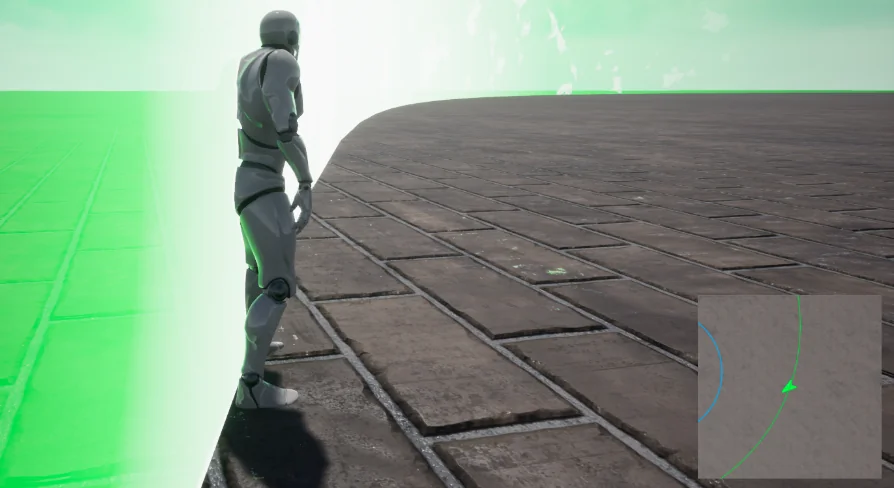
Beyond that, the system provides clarity for players by indicating where the next zone will appear once the current movement stops. This ensures that the gameplay flow remains predictable and fair. The developer has integrated both a minimap and an overview map to handle these visualization tasks effectively.
Interactive Map Features
The overview map included in this package is highly interactive. Users can zoom in and out to get a better view of the terrain. Moreover, you can hold the left mouse button to drag the map around for better navigation. These features are essential for players planning their next move within the shrinking play area.
Another significant benefit is the ability to track specific actors. You can add actors to both the minimap and the overview map at runtime. Consequently, the system will track their exact location and rotation. This functionality is vital for keeping players informed about their surroundings and objectives.
Customizable Zone Configuration
Configuring the Battle Royale Zone With Minimap is a straightforward process for any developer. You simply place the zone actor into your map and use the details panel for adjustments. From there, you can easily select the overall size and the number of steps the zone will take during a match.
Each individual step is specifically configurable to meet your design needs. For example, you can make a certain zone step start dealing more damage. Alternatively, you can make the zone move faster as the game progresses. This flexibility allows for a highly tailored gameplay experience.
Player Survival Mechanics
The Battle Royale Zone With Minimap also manages player health and visual feedback. Once a player is outside the designated safe area, they begin taking damage every second. The amount of damage depends entirely on your specific configuration for the current zone step.
In addition to health reduction, the system includes visual cues. A post-processing effect activates whenever a player is outside the zone. This provides immediate feedback, alerting the player that they are in a dangerous area. These mechanics work together to create a tense and engaging survival atmosphere.
Best Fit
The clearest takeaway is that this resource offers a robust framework for managing play areas in survival titles. With its interactive maps, actor tracking, and highly configurable zone steps, it simplifies complex gameplay mechanics. It is an efficient tool for any creator looking to implement professional-grade zone systems into their projects.
 Gameplay Features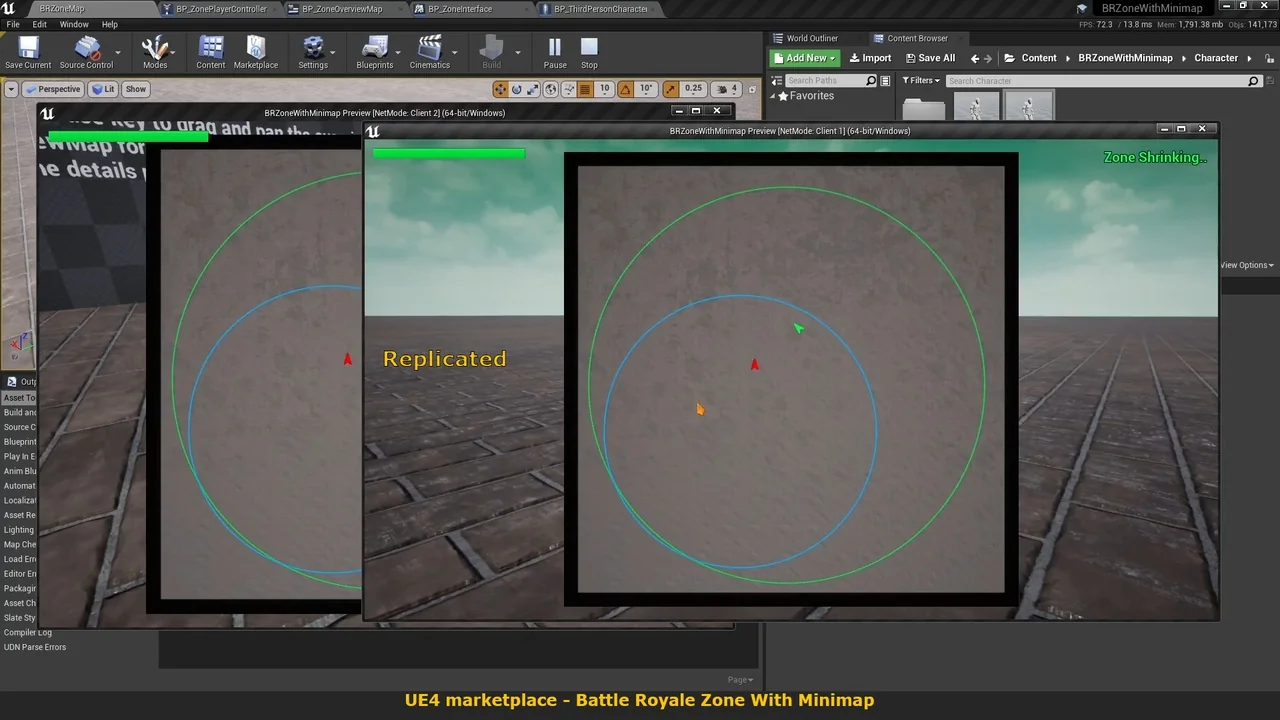
 Gameplay Features
 Shooter
 Towns & Villages