"8652e693bd7bbc55"{"id":"1002981","slug":"advanced-social-system","title":"Advanced Social System","category":"Network \u0026 Multiplayer","engine":"4.10+,5.0+","assetVersion":"","engineVersion":"Engine Version: 4.10+,5.0+","tag":"Network","accent":"blue","visual":"mech","summary":"A command-driven social layer for multiplayer and MMO projects: configurable chat channels, emotes with animations and sounds, parties, guilds and zone chat.","platform":"Unreal Engine","indexPolicy":"index","publishedAt":"2026-11-25T09:37:30.566Z","updatedAt":"2026-11-25T09:37:30.566Z","sourceNotes":[],"fileContents":[],"compatibility":["Unreal Engine","Engine Version: 4.10+,5.0+"],"featuredImage":{"alt":"Advanced Social System","src":"/wp-content/uploads/published/2026/11/92555ab367ff-42d4e6ed-3162-4b51-85b0-1ef8636782c5-e478be8928.webp"},"hasDownloadLink":true,"downloads":0,"terms":[{"taxonomy":"category","slug":"network-and-multiplayer","name":"Network \u0026 Multiplayer"}],"galleryImages":[{"src":"/wp-content/uploads/published/2026/11/bc85e5c0bfd0-5b485dbe-aad2-4e95-a023-d3a44aa6a44b-0d210491ef.webp","alt":"Advanced Social System"},{"src":"/wp-content/uploads/published/2026/11/8e120aea72b3-056badcf-5e88-4a59-b68d-a91d895c8918-453bcde742.webp","alt":"Advanced Social System"},{"src":"/wp-content/uploads/published/2026/11/8e29fdf2dd15-0baa9044-f7be-4d11-b3df-b5ae37e312da-efbccaaf35.webp","alt":"Advanced Social System"},{"src":"/wp-content/uploads/published/2026/11/0800f8ec7014-dee8fed4-9856-4090-8f57-fe644629f40b-1329f93778.webp","alt":"Advanced Social System"},{"src":"/wp-content/uploads/published/2026/11/9c079fe34181-2f274986-34b6-4c00-8f39-a0fe34f96a80-cc79e68d54.webp","alt":"Advanced Social System"}],"accessPanel":{"kind":"resource","title":"Get this resource","safetyNote":"Resources are manually reviewed before listing to improve quality and reduce obvious risks.","fileName":"Advanced Social System.7z","resourceType":"Resource archive","versions":[]},"contentHtml":"\u003cp\u003eA player types /s and the line is read only by the characters standing in the immediate area. The next message goes out with /g and lands with the guild instead. A third arrives as a whisper through /w, and the answer comes back with a single /r. None of that exchange needs a menu, a window or a click — the conversation moves through the keyboard alone.\u003c/p\u003e \u003cp\u003eAdvanced Social System packages that behaviour into a chat, party, guild, emote and command layer for multiplayer projects. Six configurable chat channels handle the routing, an emote system ties animations and sounds to what a player expresses, and parties and guilds get their own membership tools. The package is put together to be integrated into an existing project and built upon, not replaced afterwards.\u003c/p\u003e \u003ch2\u003eHow the Advanced Chat Channels Move a Message\u003c/h2\u003e \u003cp\u003eSix channel names cover the social space: Say, Yell, Party, Guild, Private Messages and Global chat. Each answers a different question about who should receive a line of text. Say is the tight, local radius. Yell widens that to players in your area. Party and Guild are membership channels — the message follows the group rather than the geography. Private Messages run one-to-one, and Global chat is the wider channel that reaches the zone.\u003c/p\u003e \u003cp\u003eBecause the channels are configurable, the split between them can be adjusted to the way a particular world is built. A project that wants a loud, crowded starting town can lean on the short-range channels and keep Global for the area around it; one that runs quiet open-world traversal may push more traffic into the membership channels. The channel structure is the first thing a team will tune, because everything else — emotes, commands, party and guild talk — resolves back into one of these destinations.\u003c/p\u003e \u003ch2\u003eSlash Commands Carry the Whole Social System\u003c/h2\u003e \u003cp\u003eThe interface is a command line, and the package ships with a broad set of them already wired up. A single \u003cem\u003e/?\u003c/em\u003e Prints the help information for the player. \u003cem\u003e/quit\u003c/em\u003e And \u003cem\u003e/exit\u003c/em\u003e Close the game. Chat itself is covered by \u003cem\u003e/say\u003c/em\u003e And \u003cem\u003e/s\u003c/em\u003e For the immediate area, \u003cem\u003e/yell\u003c/em\u003e, \u003cem\u003e/y\u003c/em\u003e, \u003cem\u003e/sh\u003c/em\u003e And \u003cem\u003e/shout\u003c/em\u003e For the wider local radius, \u003cem\u003e/party\u003c/em\u003e And \u003cem\u003e/p\u003c/em\u003e For the group, and \u003cem\u003e/guild\u003c/em\u003e And \u003cem\u003e/g\u003c/em\u003e For the guild.\u003c/p\u003e \u003cp\u003ePrivate conversation gets a full set of entry points. \u003cem\u003e/whisper\u003c/em\u003e, \u003cem\u003e/w\u003c/em\u003e, \u003cem\u003e/tell\u003c/em\u003e And \u003cem\u003e/t\u003c/em\u003e All address a message to another player, and \u003cem\u003e/reply\u003c/em\u003e Or \u003cem\u003e/r\u003c/em\u003e Answers the last whisper without retyping a name. Numbered shortcuts handle the wide channels: \u003cem\u003e/general\u003c/em\u003e And \u003cem\u003e/1\u003c/em\u003e Reach every player in the zone, while \u003cem\u003e/trade\u003c/em\u003e And \u003cem\u003e/2\u003c/em\u003e Do the same for the trade channel. Party administration sits on \u003cem\u003e/invite\u003c/em\u003e And \u003cem\u003e/inv\u003c/em\u003e, \u003cem\u003e/leave\u003c/em\u003e, \u003cem\u003e/remove\u003c/em\u003e, \u003cem\u003e/uninvite\u003c/em\u003e And \u003cem\u003e/kick\u003c/em\u003e, plus \u003cem\u003e/disband\u003c/em\u003e To dissolve the group outright.\u003c/p\u003e \u003cp\u003eThose are examples rather than the full roster — many more commands are included. The important part for a developer is that the command layer is presented as a system to extend. New verbs and new aliases can be hung off the same structure that already parses the shipped ones, so a studio's own features inherit the same input path the players learn on day one.\u003c/p\u003e \u003ch2\u003eEmotes That Fire Animations and Sounds\u003c/h2\u003e \u003cp\u003eEmotes are more than a text tag. The emote system lets a creator assign an animation and a sound to a player emote, so a wave or a cheer resolves into visible motion and audible feedback rather than a line of bracketed text. The binding happens once per emote, which keeps the behaviour consistent every time a player triggers it.\u003c/p\u003e \u003cp\u003ePlayers reach those emotes with \u003cem\u003e/emote\u003c/em\u003e, \u003cem\u003e/em\u003c/em\u003e Or \u003cem\u003e/e\u003c/em\u003e, performed with the given text. That makes the emote channel both a performance tool and a social one — a player can express something the animation library already covers, and the accompanying text carries the rest of the intent. For teams building a roleplay-leaning space or a hub where players idle between activities, the animation-and-sound pairing is the piece that makes the world feel inhabited without any extra content authored for it.\u003c/p\u003e \u003ch2\u003eParty and Guild Membership Inside the Social System\u003c/h2\u003e \u003cp\u003eGroups are managed from the same command line. A party can be formed by inviting a player, and members can be promoted or kicked as the leader sees fit. Leaving is a single command, and disbanding ends the arrangement for everyone at once. Because the party also owns a chat channel, the roster and the conversation stay in step: whoever is in the group is exactly who receives \u003cem\u003e/p\u003c/em\u003e Messages.\u003c/p\u003e \u003cp\u003eGuilds follow the same pattern with a longer reach. A guild carries a MOTD, and membership is handled through invite, promote and kick actions. That combination covers the routine life of an organisation — bringing someone in, raising them within the structure, removing them when needed — and the guild channel carries the resulting conversation. Both systems sit alongside the chat channels rather than on top of them, so the social graph and the message routing never drift apart.\u003c/p\u003e \u003ch2\u003eZone Chat Configured by Area\u003c/h2\u003e \u003cp\u003eGlobal channels are area based, which makes zone chat a matter of configuration rather than scripting. An area can be set up so that \u003cem\u003e/general\u003c/em\u003e Or \u003cem\u003e/trade\u003c/em\u003e Reaches the players inside it, and the boundaries of that zone are defined by the areas a project already uses for its world. A city, a starter valley and a dungeon floor can each carry their own general conversation without leaking into one another.\u003c/p\u003e \u003cp\u003eThis is the detail that most often decides whether a social layer fits an existing project. Area-based channels mean the zone boundaries live where the level design already puts them, and adjusting the social footprint of a region becomes an editing task instead of a code change.\u003c/p\u003e \u003ch2\u003eMultiplayer Projects and the Blueprint Workflow\u003c/h2\u003e \u003cp\u003eThe tags attached to the package describe its audience closely: multiplayer, MMO, communication, party, guild, chat and Blueprint. That is a resource aimed at projects where many players share a persistent space and need to talk, group and organise — the situations where a chat window alone stops being enough. It is not a single-player dialogue tool, and it is not a cosmetic emote pack; it is the connective tissue between players.\u003c/p\u003e \u003cp\u003eBlueprint sits in that tag list as the implementation route, which puts the system within reach of teams working in visual scripting rather than requiring a dedicated networking programmer to own it. Combined with the promise of easy integration and a command system that is simple to build on, the practical benefit is speed: a studio can stand up say, yell, whisper, party, guild and zone chat with the accompanying commands, then spend its time on the parts of its game nobody has shipped before.\u003c/p\u003e \u003cp\u003eFor a team evaluating the package, the clearest takeaway is the depth of the command set — help, quit, six channel destinations with aliases, whisper and reply, numbered general and trade shortcuts, and full party administration — because that is the surface players touch constantly, and it is already covered here.\u003c/p\u003e\n\n\u003ch2\u003eExplore Similar Assets\u003c/h2\u003e\n\u003cul\u003e\n\u003cli\u003e\u003ca href=\"https://3dcghub.com/advanced-multiplayer-chat-system-v2-0/\" rel=\"noopener noreferrer\"\u003eAdvanced Multiplayer Chat System v2.0\u003c/a\u003e\u003c/li\u003e\n\u003cli\u003e\u003ca href=\"https://3dcghub.com/action-rpg-inventory-system/\" rel=\"noopener noreferrer\"\u003eAction RPG Inventory System\u003c/a\u003e\u003c/li\u003e\n\u003cli\u003e\u003ca href=\"https://3dcghub.com/multiplayer-starter-pack/\" rel=\"noopener noreferrer\"\u003eMultiplayer Starter Pack\u003c/a\u003e\u003c/li\u003e\n\u003cli\u003e\u003ca href=\"https://3dcghub.com/simple-capture-the-flag/\" rel=\"noopener noreferrer\"\u003eSimple Capture The Flag\u003c/a\u003e\u003c/li\u003e\n\u003cli\u003e\u003ca href=\"https://3dcghub.com/tps-multiplayer-pack/\" rel=\"noopener noreferrer\"\u003eTPS Multiplayer Pack\u003c/a\u003e\u003c/li\u003e\n\u003c/ul\u003e","contentTextLength":6982,"navigation":{"current":10,"total":4911,"previous":{"id":"1002982","slug":"advanced-thermal-scope","title":"Advanced Thermal Scope","category":"Weapons \u0026 Combat","platform":"Unreal Engine","updatedAt":"2026-11-25T09:38:03.877Z"},"next":{"id":"1002980","slug":"advanced-shield-system","title":"Advanced Shield System","category":"Gameplay Features","platform":"Unreal Engine","updatedAt":"2026-11-25T09:36:49.054Z"}},"relatedResources":[{"id":"1002979","slug":"advanced-multiplayer-chat-system-v2-0","title":"Advanced Multiplayer Chat System v2.0","category":"Network \u0026 Multiplayer","engine":"4.26+,5.0+","assetVersion":"Asset Version: 2.0","engineVersion":"Engine Version: 4.26+,5.0+","tag":"Network","accent":"blue","visual":"mech","summary":"A blueprint-only, replicated chat widget for dedicated-server multiplayer games, with 11 color-coded channels, dynamic tabs, per-tab settings, commands and a so","platform":"Unreal Engine","indexPolicy":"index","publishedAt":"2026-11-25T09:36:15.296Z","updatedAt":"2026-11-25T09:36:15.296Z","sourceNotes":[],"fileContents":[],"compatibility":["Unreal Engine","Asset Version: 2.0","Engine Version: 4.26+,5.0+"],"featuredImage":{"alt":"Advanced Multiplayer Chat System v2.0","src":"/wp-content/uploads/published/2026/11/5c6c298e4e92-69522a7f-8c3a-4456-bb22-86cd6ea91e86-8e2bb2375d.webp"},"hasDownloadLink":true,"downloads":0},{"id":"1002972","slug":"action-rpg-inventory-system","title":"Action RPG Inventory System","category":"Network \u0026 Multiplayer","engine":"4.25+,5.0+","assetVersion":"","engineVersion":"Engine Version: 4.25+,5.0+","tag":"Network","accent":"blue","visual":"mech","summary":"A multiplayer inventory system with equip-able and usable items, replicated stats, configurable slots, loot and storage containers, and a drag-and-drop UI demo.","platform":"Unreal Engine","indexPolicy":"index","publishedAt":"2026-11-25T08:46:19.961Z","updatedAt":"2026-11-25T08:46:19.961Z","sourceNotes":[],"fileContents":[],"compatibility":["Unreal Engine","Engine Version: 4.25+,5.0+"],"featuredImage":{"alt":"Action RPG Inventory System","src":"/wp-content/uploads/published/2026/11/09f2123e194b-7a367a27-ea30-4e34-a602-2477f355d7bd-f4da46691b.webp"},"hasDownloadLink":true,"downloads":0},{"id":"1002330","slug":"multiplayer-starter-pack","title":"Multiplayer Starter Pack","category":"Network \u0026 Multiplayer","engine":"4.24+,5.0+","assetVersion":"","engineVersion":"Engine Version: 4.24+,5.0+","tag":"Network","accent":"blue","visual":"mech","summary":"Blueprint multiplayer template with host, join, and destroy sessions, chat, team selection, a pre-match timer, TPS locomotion, and health and ammo pickups.","platform":"Unreal Engine","indexPolicy":"index","publishedAt":"2026-11-06T06:35:10.726Z","updatedAt":"2026-11-06T06:35:10.726Z","sourceNotes":[],"fileContents":[],"compatibility":["Unreal Engine","Engine Version: 4.24+,5.0+"],"featuredImage":{"alt":"Multiplayer Starter Pack","src":"/wp-content/uploads/published/2026/11/3a54eaf386b8-506590ed-707a-4389-ad7a-99366257b1fa-78298e0e6c.webp"},"fileSizeBytes":65939969,"hasDownloadLink":true,"downloads":0}]}[{"id":4225,"sourceId":4225,"taxonomyId":4225,"taxonomy":"category","slug":"asset-library","name":"Asset Library","parentId":null,"count":4765,"hasChildren":true,"href":"/","seoTitle":"Free Game Assets Library | 3DCGHUB","seoDescription":"Browse free Unreal Engine, Unity, Blender assets and game development tutorials on 3DCGHUB with previews, compatibility notes, and secure downloads.","sitemapEnabled":true,"children":[{"id":4227,"sourceId":4227,"taxonomyId":4227,"taxonomy":"category","slug":"blender-add-ons-plugins","name":"Blender Add-ons \u0026 Plugins","parentId":4225,"count":10,"hasChildren":false,"href":"/category/blender-add-ons-plugins/","seoTitle":"Free Blender Add-ons \u0026 Plugins | 3DCGHUB","seoDescription":"Browse free Blender Add-ons \u0026 Plugins tools for Blender on 3DCGHUB: curated downloads with preview images, compatibility notes and secure download access.","sitemapEnabled":true},{"id":514,"sourceId":514,"taxonomyId":514,"taxonomy":"category","slug":"unity-2","name":"Unity","parentId":4225,"count":453,"hasChildren":true,"href":"/category/unity-2/","seoTitle":"Free Unity Assets | 3DCGHUB","seoDescription":"Browse free Unity resources on 3DCGHUB: curated downloads with preview images, compatibility notes and secure download access.","sitemapEnabled":true,"children":[{"id":523,"sourceId":523,"taxonomyId":523,"taxonomy":"category","slug":"2d","name":"2D","parentId":514,"count":1,"hasChildren":true,"href":"/category/2d/","seoTitle":"Free Unity 2D | 3DCGHUB","seoDescription":"Browse free 2D assets for Unity on 3DCGHUB: curated downloads with preview images, compatibility notes and secure download access.","sitemapEnabled":true},{"id":515,"sourceId":515,"taxonomyId":515,"taxonomy":"category","slug":"3d-unity-2","name":"3D","parentId":514,"count":162,"hasChildren":true,"href":"/category/3d-unity-2/","seoTitle":"Free Unity 3D Assets | 3DCGHUB","seoDescription":"Browse free 3D assets for Unity on 3DCGHUB: curated downloads with preview images, compatibility notes and secure download access.","sitemapEnabled":true},{"id":565,"sourceId":565,"taxonomyId":565,"taxonomy":"category","slug":"add-ons","name":"Add-Ons","parentId":514,"count":2,"hasChildren":false,"href":"/category/add-ons/","seoTitle":"Free Unity Add-Ons | 3DCGHUB","seoDescription":"Browse free Add-Ons assets for Unity on 3DCGHUB: curated downloads with preview images, compatibility notes and secure download access.","sitemapEnabled":true},{"id":529,"sourceId":529,"taxonomyId":529,"taxonomy":"category","slug":"audio-unity-2","name":"Audio","parentId":514,"count":1,"hasChildren":true,"href":"/category/audio-unity-2/","seoTitle":"Free Unity Audio | 3DCGHUB","seoDescription":"Browse free Audio for Unity on 3DCGHUB: curated downloads with preview images, compatibility notes and secure download access.","sitemapEnabled":true},{"id":557,"sourceId":557,"taxonomyId":557,"taxonomy":"category","slug":"templates","name":"Templates","parentId":514,"count":36,"hasChildren":true,"href":"/category/templates/","seoTitle":"Free Unity Templates | 3DCGHUB","seoDescription":"Browse free Unity project templates on 3DCGHUB. Starter kits with previews, compatibility notes, and secure download access.","sitemapEnabled":true},{"id":533,"sourceId":533,"taxonomyId":533,"taxonomy":"category","slug":"tools-unity-2","name":"Tools","parentId":514,"count":0,"hasChildren":true,"href":"/category/tools-unity-2/","sitemapEnabled":true},{"id":554,"sourceId":554,"taxonomyId":554,"taxonomy":"category","slug":"vfx-unity-2","name":"VFX","parentId":514,"count":4,"hasChildren":true,"href":"/category/vfx-unity-2/","seoTitle":"Free Unity VFX | 3DCGHUB","seoDescription":"Browse free VFX for Unity on 3DCGHUB: curated downloads with preview images, compatibility notes and secure download access.","sitemapEnabled":true}]},{"id":511,"sourceId":511,"taxonomyId":511,"taxonomy":"category","slug":"unreal-engine-2","name":"Unreal Engine","parentId":4225,"count":4303,"hasChildren":true,"href":"/category/unreal-engine-2/","seoTitle":"Free Unreal Engine Assets | 3DCGHUB","seoDescription":"Browse free Unreal Engine resources on 3DCGHUB: curated downloads with preview images, compatibility notes and secure download access.","sitemapEnabled":true,"children":[{"id":54,"sourceId":54,"taxonomyId":54,"taxonomy":"category","slug":"3d","name":"3D","parentId":511,"count":2434,"hasChildren":true,"href":"/category/3d/","seoTitle":"Free Unreal Engine 3D | 3DCGHUB","seoDescription":"Browse free 3D assets for Unreal Engine on 3DCGHUB: curated downloads with preview images, compatibility notes and secure download access.","sitemapEnabled":true},{"id":441,"sourceId":441,"taxonomyId":441,"taxonomy":"category","slug":"animations","name":"Animations","parentId":511,"count":245,"hasChildren":true,"href":"/category/animations/","seoTitle":"Free Unreal Engine Animations | 3DCGHUB","seoDescription":"Browse free Animations for Unreal Engine on 3DCGHUB: curated downloads with preview images, compatibility notes and secure download access.","sitemapEnabled":true},{"id":446,"sourceId":446,"taxonomyId":446,"taxonomy":"category","slug":"audio","name":"Audio","parentId":511,"count":63,"hasChildren":true,"href":"/category/audio/","seoTitle":"Free Unreal Engine Audio Resources | 3DCGHUB","seoDescription":"Browse free Unreal Engine audio resources including sound effects, voices, dialogue, and ambient sounds. Curated free downloads on 3DCGHUB.","sitemapEnabled":true},{"id":466,"sourceId":466,"taxonomyId":466,"taxonomy":"category","slug":"game-systems","name":"Game Systems","parentId":511,"count":366,"hasChildren":true,"href":"/category/game-systems/","seoTitle":"Free Unreal Engine Game Systems | 3DCGHUB","seoDescription":"Browse free Game Systems tools for Unreal Engine on 3DCGHUB: curated downloads with preview images, compatibility notes and secure download access.","sitemapEnabled":true},{"id":478,"sourceId":478,"taxonomyId":478,"taxonomy":"category","slug":"game-templates","name":"Game Templates","parentId":511,"count":151,"hasChildren":true,"href":"/category/game-templates/","seoTitle":"Free Unreal Engine Game Templates | 3DCGHUB","seoDescription":"Browse free Game Templates for Unreal Engine on 3DCGHUB: curated downloads with preview images, compatibility notes and secure download access.","sitemapEnabled":true},{"id":432,"sourceId":432,"taxonomyId":432,"taxonomy":"category","slug":"hdri","name":"HDRI","parentId":511,"count":6,"hasChildren":true,"href":"/category/hdri/","seoTitle":"Free Unreal Engine HDRI | 3DCGHUB","seoDescription":"Browse free Unreal Engine HDRI skies and lighting maps on 3DCGHUB. Environment lighting with previews and secure downloads.","sitemapEnabled":true},{"id":228,"sourceId":228,"taxonomyId":228,"taxonomy":"category","slug":"material-and-textures","name":"Material \u0026 Textures","parentId":511,"count":172,"hasChildren":true,"href":"/category/material-and-textures/","seoTitle":"Free Unreal Engine Material \u0026 Textures | 3DCGHUB","seoDescription":"Browse free Material \u0026 Textures for Unreal Engine on 3DCGHUB: curated downloads with preview images, compatibility notes and secure download access.","sitemapEnabled":true},{"id":298,"sourceId":298,"taxonomyId":298,"taxonomy":"category","slug":"sprites-and-flipbooks","name":"Sprites \u0026 Flipbooks","parentId":511,"count":18,"hasChildren":true,"href":"/category/sprites-and-flipbooks/","seoTitle":"Free Unreal Engine Sprites \u0026 Flipbooks | 3DCGHUB","seoDescription":"Browse free Sprites \u0026 Flipbooks assets for Unreal Engine on 3DCGHUB: curated downloads with preview images, compatibility notes and secure download access.","sitemapEnabled":true},{"id":489,"sourceId":489,"taxonomyId":489,"taxonomy":"category","slug":"tools-and-plugins","name":"Tools \u0026 Plugins","parentId":511,"count":390,"hasChildren":true,"href":"/category/tools-and-plugins/","seoTitle":"Free Unreal Engine Tools \u0026 Plugins | 3DCGHUB","seoDescription":"Browse free Tools \u0026 Plugins for Unreal Engine on 3DCGHUB: curated downloads with preview images, compatibility notes and secure download access.","sitemapEnabled":true},{"id":459,"sourceId":459,"taxonomyId":459,"taxonomy":"category","slug":"ui","name":"UI","parentId":511,"count":45,"hasChildren":true,"href":"/category/ui/","seoTitle":"Free Unreal Engine UI | 3DCGHUB","seoDescription":"Browse free UI for Unreal Engine on 3DCGHUB: curated downloads with preview images, compatibility notes and secure download access.","sitemapEnabled":true},{"id":450,"sourceId":450,"taxonomyId":450,"taxonomy":"category","slug":"vfx","name":"VFX","parentId":511,"count":413,"hasChildren":true,"href":"/category/vfx/","seoTitle":"Free Unreal Engine VFX | 3DCGHUB","seoDescription":"Browse free VFX for Unreal Engine on 3DCGHUB: curated downloads with preview images, compatibility notes and secure download access.","sitemapEnabled":true}]}]},{"id":4222,"sourceId":4222,"taxonomyId":4222,"taxonomy":"category","slug":"tutorial-library","name":"Tutorial Library","parentId":null,"count":117,"hasChildren":false,"href":"/tutorials/","seoTitle":"Free Game Development Tutorial Library | 3DCGHUB","seoDescription":"Browse free game development tutorials for Unreal Engine, Unity, Blender, and more on 3DCGHUB with practical workflows and secure downloads.","sitemapEnabled":true}]
Resource screenshots
1 / 5
Asset drops
Daily Asset Drops
Follow 3DCGHUB on Telegram for daily Unreal, Unity & Blender drops and curated CC0 releases.
Resources are manually reviewed before listing to improve quality and reduce obvious risks.
Reviewed archive
Network
Advanced Social System
A command-driven social layer for multiplayer and MMO projects: configurable chat channels, emotes with animations and sounds, parties, guilds and zone chat.
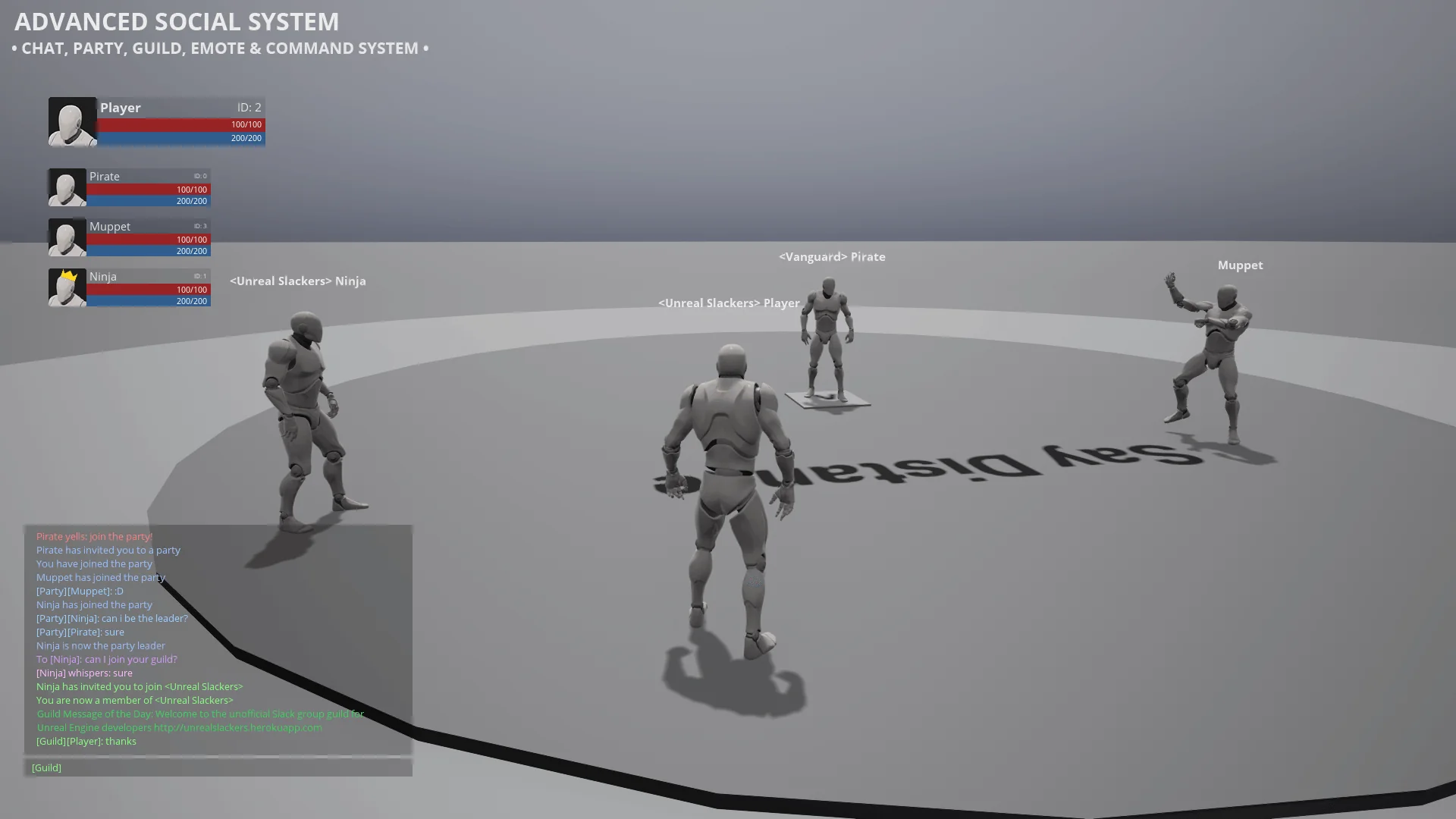
A player types /s and the line is read only by the characters standing in the immediate area. The next message goes out with /g and lands with the guild instead. A third arrives as a whisper through /w, and the answer comes back with a single /r. None of that exchange needs a menu, a window or a click — the conversation moves through the keyboard alone.
Advanced Social System packages that behaviour into a chat, party, guild, emote and command layer for multiplayer projects. Six configurable chat channels handle the routing, an emote system ties animations and sounds to what a player expresses, and parties and guilds get their own membership tools. The package is put together to be integrated into an existing project and built upon, not replaced afterwards.
How the Advanced Chat Channels Move a Message
Six channel names cover the social space: Say, Yell, Party, Guild, Private Messages and Global chat. Each answers a different question about who should receive a line of text. Say is the tight, local radius. Yell widens that to players in your area. Party and Guild are membership channels — the message follows the group rather than the geography. Private Messages run one-to-one, and Global chat is the wider channel that reaches the zone.
Because the channels are configurable, the split between them can be adjusted to the way a particular world is built. A project that wants a loud, crowded starting town can lean on the short-range channels and keep Global for the area around it; one that runs quiet open-world traversal may push more traffic into the membership channels. The channel structure is the first thing a team will tune, because everything else — emotes, commands, party and guild talk — resolves back into one of these destinations.
Slash Commands Carry the Whole Social System
The interface is a command line, and the package ships with a broad set of them already wired up. A single /? Prints the help information for the player. /quit And /exit Close the game. Chat itself is covered by /say And /s For the immediate area, /yell, /y, /sh And /shout For the wider local radius, /party And /p For the group, and /guild And /g For the guild.
Private conversation gets a full set of entry points. /whisper, /w, /tell And /t All address a message to another player, and /reply Or /r Answers the last whisper without retyping a name. Numbered shortcuts handle the wide channels: /general And /1 Reach every player in the zone, while /trade And /2 Do the same for the trade channel. Party administration sits on /invite And /inv, /leave, /remove, /uninvite And /kick, plus /disband To dissolve the group outright.
Those are examples rather than the full roster — many more commands are included. The important part for a developer is that the command layer is presented as a system to extend. New verbs and new aliases can be hung off the same structure that already parses the shipped ones, so a studio's own features inherit the same input path the players learn on day one.
Emotes That Fire Animations and Sounds
Emotes are more than a text tag. The emote system lets a creator assign an animation and a sound to a player emote, so a wave or a cheer resolves into visible motion and audible feedback rather than a line of bracketed text. The binding happens once per emote, which keeps the behaviour consistent every time a player triggers it.
Players reach those emotes with /emote, /em Or /e, performed with the given text. That makes the emote channel both a performance tool and a social one — a player can express something the animation library already covers, and the accompanying text carries the rest of the intent. For teams building a roleplay-leaning space or a hub where players idle between activities, the animation-and-sound pairing is the piece that makes the world feel inhabited without any extra content authored for it.
Party and Guild Membership Inside the Social System
Groups are managed from the same command line. A party can be formed by inviting a player, and members can be promoted or kicked as the leader sees fit. Leaving is a single command, and disbanding ends the arrangement for everyone at once. Because the party also owns a chat channel, the roster and the conversation stay in step: whoever is in the group is exactly who receives /p Messages.
Guilds follow the same pattern with a longer reach. A guild carries a MOTD, and membership is handled through invite, promote and kick actions. That combination covers the routine life of an organisation — bringing someone in, raising them within the structure, removing them when needed — and the guild channel carries the resulting conversation. Both systems sit alongside the chat channels rather than on top of them, so the social graph and the message routing never drift apart.
Zone Chat Configured by Area
Global channels are area based, which makes zone chat a matter of configuration rather than scripting. An area can be set up so that /general Or /trade Reaches the players inside it, and the boundaries of that zone are defined by the areas a project already uses for its world. A city, a starter valley and a dungeon floor can each carry their own general conversation without leaking into one another.
This is the detail that most often decides whether a social layer fits an existing project. Area-based channels mean the zone boundaries live where the level design already puts them, and adjusting the social footprint of a region becomes an editing task instead of a code change.
Multiplayer Projects and the Blueprint Workflow
The tags attached to the package describe its audience closely: multiplayer, MMO, communication, party, guild, chat and Blueprint. That is a resource aimed at projects where many players share a persistent space and need to talk, group and organise — the situations where a chat window alone stops being enough. It is not a single-player dialogue tool, and it is not a cosmetic emote pack; it is the connective tissue between players.
Blueprint sits in that tag list as the implementation route, which puts the system within reach of teams working in visual scripting rather than requiring a dedicated networking programmer to own it. Combined with the promise of easy integration and a command system that is simple to build on, the practical benefit is speed: a studio can stand up say, yell, whisper, party, guild and zone chat with the accompanying commands, then spend its time on the parts of its game nobody has shipped before.
For a team evaluating the package, the clearest takeaway is the depth of the command set — help, quit, six channel destinations with aliases, whisper and reply, numbered general and trade shortcuts, and full party administration — because that is the surface players touch constantly, and it is already covered here.
 Network
 Network
 Network