"8652e693bd7bbc55"{"id":"1002982","slug":"advanced-thermal-scope","title":"Advanced Thermal Scope","category":"Weapons \u0026 Combat","engine":"4.25+,5.0+","assetVersion":"","engineVersion":"Engine Version: 4.25+,5.0+","tag":"Weapons \u0026 Combat","accent":"blue","visual":"mech","summary":"A Blueprint and script weapon scope with three thermal color modes, distance measurement, and wind speed and direction for spotting camouflaged targets.","platform":"Unreal Engine","indexPolicy":"index","publishedAt":"2026-11-25T09:38:03.877Z","updatedAt":"2026-11-25T09:38:03.877Z","sourceNotes":[],"fileContents":[],"compatibility":["Unreal Engine","Engine Version: 4.25+,5.0+"],"featuredImage":{"alt":"Advanced Thermal Scope","src":"/wp-content/uploads/published/2026/11/24605d436c93-ebc952f2-9061-47e8-93df-9b180c4cd1a2-bd7ca738da.webp"},"hasDownloadLink":true,"downloads":0,"terms":[{"taxonomy":"category","slug":"weapons-and-combat","name":"Weapons \u0026 Combat"}],"galleryImages":[{"src":"/wp-content/uploads/published/2026/11/f6907ae5fd58-397e9527-a07a-46f2-9666-dc13ec61267d-55cba0b9dd.webp","alt":"Advanced Thermal Scope"},{"src":"/wp-content/uploads/published/2026/11/7057dd2bf062-3d796f04-0705-47a2-96b8-c291d88d7755-c3cb3d2e4e.webp","alt":"Advanced Thermal Scope"},{"src":"/wp-content/uploads/published/2026/11/711aea534ae5-589a433a-d14d-4be3-96f8-41bfdf32c84d-66d51e30d2.webp","alt":"Advanced Thermal Scope"},{"src":"/wp-content/uploads/published/2026/11/051457d103fb-9c17e649-4a46-439c-bab8-ea814ed37202-7ae3bbf84c.webp","alt":"Advanced Thermal Scope"}],"accessPanel":{"kind":"resource","title":"Get this resource","safetyNote":"Resources are manually reviewed before listing to improve quality and reduce obvious risks.","fileName":"Advanced Thermal Scope.7z","resourceType":"Resource archive","versions":[]},"contentHtml":"\u003cp\u003eMost weapon optics in a shooter get the same treatment: a convincing mesh, a reticle texture, and nothing behind the glass. That holds up until a level leans on concealment or long sightlines, and the player has no way to find a target, judge the gap, or read conditions. The Advanced Thermal Scope exists to fill that gap — a sighting device that reports information back to the player instead of just sitting in the middle of the screen.\u003c/p\u003e \u003cp\u003eIt is a scope asset with a working feature set: three color modes, a distance measurement, and a wind readout carrying speed and direction. The tags place it as a weapon item that runs on Blueprint and script logic, with a realistic bent rather than an arcade one. Setup is covered by a quick start guide, and the feature set has been revised through at least two named passes, marked as update v.2.1 and update v.3.\u003c/p\u003e \u003ch2\u003eThree Thermal Color Modes for Camouflaged Targets\u003c/h2\u003e \u003cp\u003eThe headline capability is detection. Camouflaged enemies sitting inside dense bushes are the exact case where a standard optic fails — the target is technically in view, but the visual noise of foliage swallows it. The scope deals with that through three different color modes, giving the same scene three separate readings so a target that blends into one presentation separates out in another.\u003c/p\u003e \u003cp\u003eFor level design, that changes how heavy cover can be used. A designer can place a camo-equipped enemy deep in vegetation with the expectation that the scope holder has a tool for the job, and the tension shifts from \"can I see them\" to \"can I range them before they move.\" The three modes also give players a reason to interact with the optic during play rather than treating it as a permanent overlay. Nothing about the modes is a cosmetic filter alone; they sit on top of the same detection problem the scope was made to solve.\u003c/p\u003e \u003ch2\u003eRanging and Wind: What the Scope Reports\u003c/h2\u003e \u003cp\u003eDistance measurement addresses the second half of a long shot. The scope reads the gap to a target, framed around the distant sniper who would otherwise be a guess. In practice that means an overwatch player can call a range and act on it without leaving the sight picture or opening a separate UI element. Wind speed and direction appear alongside it, so the two readings a shooter needs before a precision shot arrive from the same device.\u003c/p\u003e \u003ch3\u003eBallistics Are Not Part of the Package\u003c/h3\u003e \u003cp\u003eThe scope is explicit about its boundary: ballistics are not included. It measures and displays; it does not compute bullet drop, lead, or impact. That distinction matters during integration. If a project already runs its own projectile or zeroing system, the scope hands it clean inputs — range, wind speed, wind direction — and the existing math takes over. If the project has no such system, the readings remain informational, which is still useful for a slower, more deliberate weapon feel where the player interprets conditions themselves. Either way, nobody should expect the optic to land the shot for them.\u003c/p\u003e \u003ch2\u003eWhere the Blueprint and Script Tags Land\u003c/h2\u003e \u003cp\u003eTwo of the four tags — Blueprint and Script — describe how the behavior is delivered. Mode changes, ranging, and the wind readout run as logic rather than as baked animation, which is what allows the device to react to a target in the scene instead of playing a fixed sequence. That is the difference between an optic that reads a bush and one that pretends to.\u003c/p\u003e \u003cp\u003eThe remaining tags, Realistic and Weapon, set expectations on both ends. Realistic signals that the presentation is meant to hold up beside grounded weapon models and restrained HUD work, not a stylized arcade overlay. Weapon places it in the equipment chain: it belongs on a gun, driven by the same input and state that the rest of the loadout uses. A team wiring it in should expect to hook the scope's script into an existing weapon Blueprint rather than building a standalone prop. The quick start guide is the shortest path through that hookup, and it is worth reading before improvising a connection.\u003c/p\u003e \u003ch2\u003eVersion 2.1, Version 3, and the Quick Start Guide\u003c/h2\u003e \u003cp\u003eVersion markers tell you something practical about a script-driven asset: it has been maintained. Two later revisions, update v.2.1 and update v.3, sit on top of the original release, and a video overview exists for the behavior itself. For a studio evaluating the scope mid-project, that combination is more useful than a feature list — the video shows how the color modes, ranging, and wind display actually behave in motion, and the version history suggests the logic has been reworked rather than abandoned after launch.\u003c/p\u003e \u003cp\u003eBringing a third-party scope into an existing weapon system usually goes wrong at the small seams: input conflicts, a HUD that fights the project's own overlay, a mode switch that clashes with a fire-mode toggle. A quick start guide shortens that phase considerably. Reading it first also reveals the intended order of operations, so the scope's script is attached and driven the way its author expected instead of being bent into an unfamiliar slot.\u003c/p\u003e \u003ch2\u003eFitting the Advanced Scope into a Sniper Loadout\u003c/h2\u003e \u003cp\u003eThe natural home for this device is a designated marksman or overwatch role in a shooter that gives concealment real weight. A level structured through treelines, brush, and long approaches rewards a player who can pick a camo target out of the greenery and put a number on the distance. Put the scope on that loadout and the spotting duty moves from the player's eyes to the optic, which is precisely the fantasy the asset is chasing.\u003c/p\u003e \u003cp\u003eIt also fits where enemy camouflage is a deliberate mechanic rather than decoration — the three color modes become a counter-tool the designer can hand out at a specific point in a mission. Assign the Advanced Thermal Scope to the ranged role, let the project's own ballistics consume the range and wind values, and the optic becomes the information layer of the shot rather than a decorative lens.\u003c/p\u003e\n\n\u003ch2\u003eRelated Resources Worth Checking\u003c/h2\u003e\n\u003cul\u003e\n\u003cli\u003e\u003ca href=\"https://3dcghub.com/advanced-attachment-bundle/\" rel=\"noopener noreferrer\"\u003eAdvanced Attachment Bundle\u003c/a\u003e\u003c/li\u003e\n\u003cli\u003e\u003ca href=\"https://3dcghub.com/advanced-enemy-sensor/\" rel=\"noopener noreferrer\"\u003eAdvanced Enemy Sensor\u003c/a\u003e\u003c/li\u003e\n\u003cli\u003e\u003ca href=\"https://3dcghub.com/tactical-grenades/\" rel=\"noopener noreferrer\"\u003eTactical Grenades\u003c/a\u003e\u003c/li\u003e\n\u003cli\u003e\u003ca href=\"https://3dcghub.com/rpg-7-grenade-launcher/\" rel=\"noopener noreferrer\"\u003eRPG-7 GRENADE LAUNCHER\u003c/a\u003e\u003c/li\u003e\n\u003cli\u003e\u003ca href=\"https://3dcghub.com/ai-turret-component/\" rel=\"noopener noreferrer\"\u003eAI Turret Component\u003c/a\u003e\u003c/li\u003e\n\u003c/ul\u003e","contentTextLength":6034,"navigation":{"current":9,"total":4911,"previous":{"id":"1002983","slug":"advanced-weapon-laser","title":"Advanced Weapon Laser","category":"Weapons \u0026 Combat","platform":"Unreal Engine","updatedAt":"2026-11-25T09:38:38.606Z"},"next":{"id":"1002981","slug":"advanced-social-system","title":"Advanced Social System","category":"Network \u0026 Multiplayer","platform":"Unreal Engine","updatedAt":"2026-11-25T09:37:30.566Z"}},"relatedResources":[{"id":"1002288","slug":"advanced-attachment-bundle","title":"Advanced Attachment Bundle","category":"Weapons \u0026 Combat","engine":"4.24+,5.0+","assetVersion":"","engineVersion":"Engine Version: 4.24+,5.0+","tag":"Weapons \u0026 Combat","accent":"blue","visual":"mech","summary":"Advanced Attachment Bundle adds a Thermal Scope, Laser, and Enemy Sensor to realistic weapon projects; Script and Blueprint tags apply to the set.","platform":"Unreal Engine","indexPolicy":"index","publishedAt":"2026-11-04T05:18:09.932Z","updatedAt":"2026-11-04T05:18:09.932Z","sourceNotes":[],"fileContents":[],"compatibility":["Unreal Engine","Engine Version: 4.24+,5.0+"],"featuredImage":{"alt":"Advanced Attachment Bundle","src":"/wp-content/uploads/published/2026/11/5e30949b9335-79e53120-c335-4c52-8082-602c49da2a1b-674e543392.webp"},"fileSizeBytes":554834381,"hasDownloadLink":true,"downloads":0},{"id":"1002975","slug":"advanced-enemy-sensor","title":"Advanced Enemy Sensor","category":"Weapons \u0026 Combat","engine":"4.27,5.0+","assetVersion":"","engineVersion":"Engine Version: 4.27,5.0+","tag":"Weapons \u0026 Combat","accent":"blue","visual":"mech","summary":"Blueprint weapon script that detects subtle movement and heartbeats, with handheld sidearm and weapon-attachment builds for scope and optional laser mounting.","platform":"Unreal Engine","indexPolicy":"index","publishedAt":"2026-11-25T09:00:19.497Z","updatedAt":"2026-11-25T09:00:19.497Z","sourceNotes":[],"fileContents":[],"compatibility":["Unreal Engine","Engine Version: 4.27,5.0+"],"featuredImage":{"alt":"Advanced Enemy Sensor","src":"/wp-content/uploads/published/2026/11/86cd8a158755-7a5cc915-8e5a-4831-a0c3-23cc1668de84-29ad4c9baa.webp"},"hasDownloadLink":true,"downloads":0},{"id":"1001709","slug":"tactical-grenades","title":"Tactical Grenades","category":"Weapons \u0026 Combat","engine":"4.26+,5.0+","assetVersion":"","engineVersion":"Engine Version: 4.26+,5.0+","tag":"Weapons \u0026 Combat","accent":"blue","visual":"mech","summary":"AAA tactical grenades featuring 4K PBR textures, custom animations, visual effects, and audio for PC, console, and VR combat projects.","platform":"Unreal Engine","indexPolicy":"index","publishedAt":"2026-10-14T17:14:02.022Z","updatedAt":"2026-10-14T17:14:02.022Z","sourceNotes":[],"fileContents":[],"compatibility":["Unreal Engine","Engine Version: 4.26+,5.0+"],"featuredImage":{"alt":"Tactical Grenades","src":"/wp-content/uploads/published/2026/10/3b1d353a273c-01b18f81-7f25-4166-92a9-31ee2818a19d-3e669dc0f6.webp"},"fileSizeBytes":145344561,"hasDownloadLink":true,"downloads":5}]}[{"id":4225,"sourceId":4225,"taxonomyId":4225,"taxonomy":"category","slug":"asset-library","name":"Asset Library","parentId":null,"count":4765,"hasChildren":true,"href":"/","seoTitle":"Free Game Assets Library | 3DCGHUB","seoDescription":"Browse free Unreal Engine, Unity, Blender assets and game development tutorials on 3DCGHUB with previews, compatibility notes, and secure downloads.","sitemapEnabled":true,"children":[{"id":4227,"sourceId":4227,"taxonomyId":4227,"taxonomy":"category","slug":"blender-add-ons-plugins","name":"Blender Add-ons \u0026 Plugins","parentId":4225,"count":10,"hasChildren":false,"href":"/category/blender-add-ons-plugins/","seoTitle":"Free Blender Add-ons \u0026 Plugins | 3DCGHUB","seoDescription":"Browse free Blender Add-ons \u0026 Plugins tools for Blender on 3DCGHUB: curated downloads with preview images, compatibility notes and secure download access.","sitemapEnabled":true},{"id":514,"sourceId":514,"taxonomyId":514,"taxonomy":"category","slug":"unity-2","name":"Unity","parentId":4225,"count":453,"hasChildren":true,"href":"/category/unity-2/","seoTitle":"Free Unity Assets | 3DCGHUB","seoDescription":"Browse free Unity resources on 3DCGHUB: curated downloads with preview images, compatibility notes and secure download access.","sitemapEnabled":true,"children":[{"id":523,"sourceId":523,"taxonomyId":523,"taxonomy":"category","slug":"2d","name":"2D","parentId":514,"count":1,"hasChildren":true,"href":"/category/2d/","seoTitle":"Free Unity 2D | 3DCGHUB","seoDescription":"Browse free 2D assets for Unity on 3DCGHUB: curated downloads with preview images, compatibility notes and secure download access.","sitemapEnabled":true},{"id":515,"sourceId":515,"taxonomyId":515,"taxonomy":"category","slug":"3d-unity-2","name":"3D","parentId":514,"count":162,"hasChildren":true,"href":"/category/3d-unity-2/","seoTitle":"Free Unity 3D Assets | 3DCGHUB","seoDescription":"Browse free 3D assets for Unity on 3DCGHUB: curated downloads with preview images, compatibility notes and secure download access.","sitemapEnabled":true},{"id":565,"sourceId":565,"taxonomyId":565,"taxonomy":"category","slug":"add-ons","name":"Add-Ons","parentId":514,"count":2,"hasChildren":false,"href":"/category/add-ons/","seoTitle":"Free Unity Add-Ons | 3DCGHUB","seoDescription":"Browse free Add-Ons assets for Unity on 3DCGHUB: curated downloads with preview images, compatibility notes and secure download access.","sitemapEnabled":true},{"id":529,"sourceId":529,"taxonomyId":529,"taxonomy":"category","slug":"audio-unity-2","name":"Audio","parentId":514,"count":1,"hasChildren":true,"href":"/category/audio-unity-2/","seoTitle":"Free Unity Audio | 3DCGHUB","seoDescription":"Browse free Audio for Unity on 3DCGHUB: curated downloads with preview images, compatibility notes and secure download access.","sitemapEnabled":true},{"id":557,"sourceId":557,"taxonomyId":557,"taxonomy":"category","slug":"templates","name":"Templates","parentId":514,"count":36,"hasChildren":true,"href":"/category/templates/","seoTitle":"Free Unity Templates | 3DCGHUB","seoDescription":"Browse free Unity project templates on 3DCGHUB. Starter kits with previews, compatibility notes, and secure download access.","sitemapEnabled":true},{"id":533,"sourceId":533,"taxonomyId":533,"taxonomy":"category","slug":"tools-unity-2","name":"Tools","parentId":514,"count":0,"hasChildren":true,"href":"/category/tools-unity-2/","sitemapEnabled":true},{"id":554,"sourceId":554,"taxonomyId":554,"taxonomy":"category","slug":"vfx-unity-2","name":"VFX","parentId":514,"count":4,"hasChildren":true,"href":"/category/vfx-unity-2/","seoTitle":"Free Unity VFX | 3DCGHUB","seoDescription":"Browse free VFX for Unity on 3DCGHUB: curated downloads with preview images, compatibility notes and secure download access.","sitemapEnabled":true}]},{"id":511,"sourceId":511,"taxonomyId":511,"taxonomy":"category","slug":"unreal-engine-2","name":"Unreal Engine","parentId":4225,"count":4303,"hasChildren":true,"href":"/category/unreal-engine-2/","seoTitle":"Free Unreal Engine Assets | 3DCGHUB","seoDescription":"Browse free Unreal Engine resources on 3DCGHUB: curated downloads with preview images, compatibility notes and secure download access.","sitemapEnabled":true,"children":[{"id":54,"sourceId":54,"taxonomyId":54,"taxonomy":"category","slug":"3d","name":"3D","parentId":511,"count":2434,"hasChildren":true,"href":"/category/3d/","seoTitle":"Free Unreal Engine 3D | 3DCGHUB","seoDescription":"Browse free 3D assets for Unreal Engine on 3DCGHUB: curated downloads with preview images, compatibility notes and secure download access.","sitemapEnabled":true},{"id":441,"sourceId":441,"taxonomyId":441,"taxonomy":"category","slug":"animations","name":"Animations","parentId":511,"count":245,"hasChildren":true,"href":"/category/animations/","seoTitle":"Free Unreal Engine Animations | 3DCGHUB","seoDescription":"Browse free Animations for Unreal Engine on 3DCGHUB: curated downloads with preview images, compatibility notes and secure download access.","sitemapEnabled":true},{"id":446,"sourceId":446,"taxonomyId":446,"taxonomy":"category","slug":"audio","name":"Audio","parentId":511,"count":63,"hasChildren":true,"href":"/category/audio/","seoTitle":"Free Unreal Engine Audio Resources | 3DCGHUB","seoDescription":"Browse free Unreal Engine audio resources including sound effects, voices, dialogue, and ambient sounds. Curated free downloads on 3DCGHUB.","sitemapEnabled":true},{"id":466,"sourceId":466,"taxonomyId":466,"taxonomy":"category","slug":"game-systems","name":"Game Systems","parentId":511,"count":366,"hasChildren":true,"href":"/category/game-systems/","seoTitle":"Free Unreal Engine Game Systems | 3DCGHUB","seoDescription":"Browse free Game Systems tools for Unreal Engine on 3DCGHUB: curated downloads with preview images, compatibility notes and secure download access.","sitemapEnabled":true},{"id":478,"sourceId":478,"taxonomyId":478,"taxonomy":"category","slug":"game-templates","name":"Game Templates","parentId":511,"count":151,"hasChildren":true,"href":"/category/game-templates/","seoTitle":"Free Unreal Engine Game Templates | 3DCGHUB","seoDescription":"Browse free Game Templates for Unreal Engine on 3DCGHUB: curated downloads with preview images, compatibility notes and secure download access.","sitemapEnabled":true},{"id":432,"sourceId":432,"taxonomyId":432,"taxonomy":"category","slug":"hdri","name":"HDRI","parentId":511,"count":6,"hasChildren":true,"href":"/category/hdri/","seoTitle":"Free Unreal Engine HDRI | 3DCGHUB","seoDescription":"Browse free Unreal Engine HDRI skies and lighting maps on 3DCGHUB. Environment lighting with previews and secure downloads.","sitemapEnabled":true},{"id":228,"sourceId":228,"taxonomyId":228,"taxonomy":"category","slug":"material-and-textures","name":"Material \u0026 Textures","parentId":511,"count":172,"hasChildren":true,"href":"/category/material-and-textures/","seoTitle":"Free Unreal Engine Material \u0026 Textures | 3DCGHUB","seoDescription":"Browse free Material \u0026 Textures for Unreal Engine on 3DCGHUB: curated downloads with preview images, compatibility notes and secure download access.","sitemapEnabled":true},{"id":298,"sourceId":298,"taxonomyId":298,"taxonomy":"category","slug":"sprites-and-flipbooks","name":"Sprites \u0026 Flipbooks","parentId":511,"count":18,"hasChildren":true,"href":"/category/sprites-and-flipbooks/","seoTitle":"Free Unreal Engine Sprites \u0026 Flipbooks | 3DCGHUB","seoDescription":"Browse free Sprites \u0026 Flipbooks assets for Unreal Engine on 3DCGHUB: curated downloads with preview images, compatibility notes and secure download access.","sitemapEnabled":true},{"id":489,"sourceId":489,"taxonomyId":489,"taxonomy":"category","slug":"tools-and-plugins","name":"Tools \u0026 Plugins","parentId":511,"count":390,"hasChildren":true,"href":"/category/tools-and-plugins/","seoTitle":"Free Unreal Engine Tools \u0026 Plugins | 3DCGHUB","seoDescription":"Browse free Tools \u0026 Plugins for Unreal Engine on 3DCGHUB: curated downloads with preview images, compatibility notes and secure download access.","sitemapEnabled":true},{"id":459,"sourceId":459,"taxonomyId":459,"taxonomy":"category","slug":"ui","name":"UI","parentId":511,"count":45,"hasChildren":true,"href":"/category/ui/","seoTitle":"Free Unreal Engine UI | 3DCGHUB","seoDescription":"Browse free UI for Unreal Engine on 3DCGHUB: curated downloads with preview images, compatibility notes and secure download access.","sitemapEnabled":true},{"id":450,"sourceId":450,"taxonomyId":450,"taxonomy":"category","slug":"vfx","name":"VFX","parentId":511,"count":413,"hasChildren":true,"href":"/category/vfx/","seoTitle":"Free Unreal Engine VFX | 3DCGHUB","seoDescription":"Browse free VFX for Unreal Engine on 3DCGHUB: curated downloads with preview images, compatibility notes and secure download access.","sitemapEnabled":true}]}]},{"id":4222,"sourceId":4222,"taxonomyId":4222,"taxonomy":"category","slug":"tutorial-library","name":"Tutorial Library","parentId":null,"count":117,"hasChildren":false,"href":"/tutorials/","seoTitle":"Free Game Development Tutorial Library | 3DCGHUB","seoDescription":"Browse free game development tutorials for Unreal Engine, Unity, Blender, and more on 3DCGHUB with practical workflows and secure downloads.","sitemapEnabled":true}]
Resource screenshots
1 / 4
Asset drops
Daily Asset Drops
Follow 3DCGHUB on Telegram for daily Unreal, Unity & Blender drops and curated CC0 releases.
Resources are manually reviewed before listing to improve quality and reduce obvious risks.
Reviewed archive
Weapons & Combat
Advanced Thermal Scope
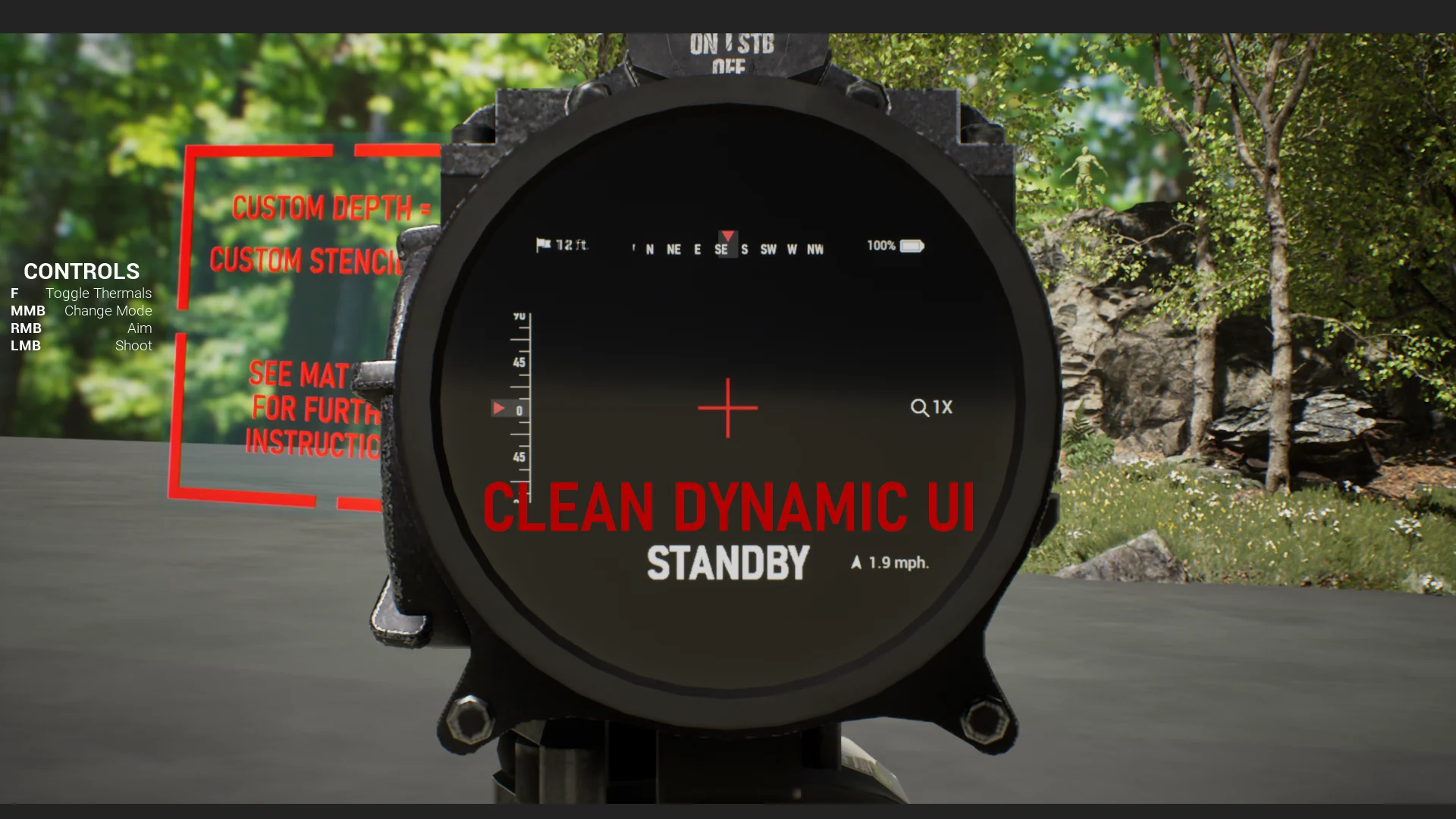
A Blueprint and script weapon scope with three thermal color modes, distance measurement, and wind speed and direction for spotting camouflaged targets.
Most weapon optics in a shooter get the same treatment: a convincing mesh, a reticle texture, and nothing behind the glass. That holds up until a level leans on concealment or long sightlines, and the player has no way to find a target, judge the gap, or read conditions. The Advanced Thermal Scope exists to fill that gap — a sighting device that reports information back to the player instead of just sitting in the middle of the screen.
It is a scope asset with a working feature set: three color modes, a distance measurement, and a wind readout carrying speed and direction. The tags place it as a weapon item that runs on Blueprint and script logic, with a realistic bent rather than an arcade one. Setup is covered by a quick start guide, and the feature set has been revised through at least two named passes, marked as update v.2.1 and update v.3.
Three Thermal Color Modes for Camouflaged Targets
The headline capability is detection. Camouflaged enemies sitting inside dense bushes are the exact case where a standard optic fails — the target is technically in view, but the visual noise of foliage swallows it. The scope deals with that through three different color modes, giving the same scene three separate readings so a target that blends into one presentation separates out in another.
For level design, that changes how heavy cover can be used. A designer can place a camo-equipped enemy deep in vegetation with the expectation that the scope holder has a tool for the job, and the tension shifts from "can I see them" to "can I range them before they move." The three modes also give players a reason to interact with the optic during play rather than treating it as a permanent overlay. Nothing about the modes is a cosmetic filter alone; they sit on top of the same detection problem the scope was made to solve.
Ranging and Wind: What the Scope Reports
Distance measurement addresses the second half of a long shot. The scope reads the gap to a target, framed around the distant sniper who would otherwise be a guess. In practice that means an overwatch player can call a range and act on it without leaving the sight picture or opening a separate UI element. Wind speed and direction appear alongside it, so the two readings a shooter needs before a precision shot arrive from the same device.
Ballistics Are Not Part of the Package
The scope is explicit about its boundary: ballistics are not included. It measures and displays; it does not compute bullet drop, lead, or impact. That distinction matters during integration. If a project already runs its own projectile or zeroing system, the scope hands it clean inputs — range, wind speed, wind direction — and the existing math takes over. If the project has no such system, the readings remain informational, which is still useful for a slower, more deliberate weapon feel where the player interprets conditions themselves. Either way, nobody should expect the optic to land the shot for them.
Where the Blueprint and Script Tags Land
Two of the four tags — Blueprint and Script — describe how the behavior is delivered. Mode changes, ranging, and the wind readout run as logic rather than as baked animation, which is what allows the device to react to a target in the scene instead of playing a fixed sequence. That is the difference between an optic that reads a bush and one that pretends to.
The remaining tags, Realistic and Weapon, set expectations on both ends. Realistic signals that the presentation is meant to hold up beside grounded weapon models and restrained HUD work, not a stylized arcade overlay. Weapon places it in the equipment chain: it belongs on a gun, driven by the same input and state that the rest of the loadout uses. A team wiring it in should expect to hook the scope's script into an existing weapon Blueprint rather than building a standalone prop. The quick start guide is the shortest path through that hookup, and it is worth reading before improvising a connection.
Version 2.1, Version 3, and the Quick Start Guide
Version markers tell you something practical about a script-driven asset: it has been maintained. Two later revisions, update v.2.1 and update v.3, sit on top of the original release, and a video overview exists for the behavior itself. For a studio evaluating the scope mid-project, that combination is more useful than a feature list — the video shows how the color modes, ranging, and wind display actually behave in motion, and the version history suggests the logic has been reworked rather than abandoned after launch.
Bringing a third-party scope into an existing weapon system usually goes wrong at the small seams: input conflicts, a HUD that fights the project's own overlay, a mode switch that clashes with a fire-mode toggle. A quick start guide shortens that phase considerably. Reading it first also reveals the intended order of operations, so the scope's script is attached and driven the way its author expected instead of being bent into an unfamiliar slot.
Fitting the Advanced Scope into a Sniper Loadout
The natural home for this device is a designated marksman or overwatch role in a shooter that gives concealment real weight. A level structured through treelines, brush, and long approaches rewards a player who can pick a camo target out of the greenery and put a number on the distance. Put the scope on that loadout and the spotting duty moves from the player's eyes to the optic, which is precisely the fantasy the asset is chasing.
It also fits where enemy camouflage is a deliberate mechanic rather than decoration — the three color modes become a counter-tool the designer can hand out at a specific point in a mission. Assign the Advanced Thermal Scope to the ranged role, let the project's own ballistics consume the range and wind values, and the optic becomes the information layer of the shot rather than a decorative lens.
 Weapons & Combat
 Weapons & Combat
 Weapons & Combat