"8652e693bd7bbc55"{"id":"1002983","slug":"advanced-weapon-laser","title":"Advanced Weapon Laser","category":"Weapons \u0026 Combat","engine":"4.26+,5.0+","assetVersion":"","engineVersion":"Engine Version: 4.26+,5.0+","tag":"Weapons \u0026 Combat","accent":"blue","visual":"mech","summary":"Advanced Weapon Laser is a Blueprint-based weapon script that combines a laser and flashlight into one attachment for hipfire and nighttime scenarios.","platform":"Unreal Engine","indexPolicy":"index","publishedAt":"2026-11-25T09:38:38.606Z","updatedAt":"2026-11-25T09:38:38.606Z","sourceNotes":[],"fileContents":[],"compatibility":["Unreal Engine","Engine Version: 4.26+,5.0+"],"featuredImage":{"alt":"Advanced Weapon Laser","src":"/wp-content/uploads/published/2026/11/9cc22195fdfa-ec63833b-e1cc-4e8c-b91a-0df4a51ab3d6-0e1cfb64d8.webp"},"hasDownloadLink":true,"downloads":0,"terms":[{"taxonomy":"category","slug":"weapons-and-combat","name":"Weapons \u0026 Combat"}],"galleryImages":[{"src":"/wp-content/uploads/published/2026/11/beea728034be-d22cf910-2505-4906-98d0-85673acb0e09-2ab9228850.webp","alt":"Advanced Weapon Laser"},{"src":"/wp-content/uploads/published/2026/11/31dc19ac50d6-4c08f0c1-f1ea-4c49-9b80-83c0c52715db-688498b4be.webp","alt":"Advanced Weapon Laser"},{"src":"/wp-content/uploads/published/2026/11/561bce0c61b8-1a66a3bb-e0a9-4290-b5f3-ef15b6731c9c-01d2887357.webp","alt":"Advanced Weapon Laser"}],"accessPanel":{"kind":"resource","title":"Get this resource","safetyNote":"Resources are manually reviewed before listing to improve quality and reduce obvious risks.","fileName":"Advanced Weapon Laser.7z","resourceType":"Resource archive","versions":[]},"contentHtml":"\u003ch2\u003eWhen Hipfire and Darkness Get in the Way\u003c/h2\u003e\n\u003cp\u003eHipfire misses and nighttime visibility problems are two different frustrations that often land in the same weapon setup. A player firing without aiming down the sights has less visual guidance, and a scene set at night or in dark interiors makes targets harder to pick out. Advanced Weapon Laser addresses both issues with a single weapon attachment: a laser and a flashlight combined in one small package. Instead of treating those tools as separate choices, the package puts them together so a weapon can carry both functions at once.\u003c/p\u003e\n\u003cp\u003eThe intent is direct. It is for the moment when a gun feels under-equipped, when the player cannot reliably hit from the hip, or when a nighttime operation turns into a search through darkness. The package is a focused weapon accessory script with a realistic tag, built as a Blueprint, and aimed at making a gun more appealing and more usable in those situations.\u003c/p\u003e \u003ch2\u003eWhat Advanced Weapon Laser Puts on the Weapon\u003c/h2\u003e\n\u003cp\u003eThe core of the package is the combination itself: laser and flashlight in one attachment. That combination answers the either-or question posed by separate devices. A weapon can have the aiming reference of a laser and the illumination of a flashlight without forcing a choice between them. Because the two functions share one small package, the weapon does not need to carry two separate accessories to cover both jobs.\u003c/p\u003e\n\u003cp\u003eThe word 'small' matters here. The attachment is presented as a compact unit, not a bulky replacement for the weapon. It adds a visible accessory to a gun that may otherwise look plain or lack attachments. For a weapon that is not fancy and has no other attachments, this gives it a more equipped appearance while also adding the laser and flashlight functions. The realistic tag keeps the accessory in a grounded weapon context.\u003c/p\u003e\n\u003cp\u003eThe Script and Blueprint tags place the package in the logic layer. The attachment's behavior is handled through a Blueprint script, so the package is relevant to teams working on how the weapon functions in play. The laser and flashlight are part of a weapon script, which means their role extends beyond a static visual detail. That focus is useful when the goal is an interactive attachment rather than a one-off prop.\u003c/p\u003e \u003ch2\u003eLaser and Flashlight Without Choosing\u003c/h2\u003e\n\u003cp\u003eSeparate laser and flashlight attachments create a small but constant decision: which one to carry, which one to activate, which problem to solve first. Advanced Weapon Laser removes that decision at the package level. The laser handles the hipfire problem by giving the player a visible reference on the weapon; the flashlight handles the nighttime problem by lighting up the area ahead. One unit covers both needs.\u003c/p\u003e\n\u003cp\u003eThat combined approach is most useful when a scene shifts quickly. A player moving through a dark building may need illumination to see the space, then need a clear hipfire reference when a target appears. Swapping between two devices would interrupt that flow. Having both functions in one small package keeps the weapon consistent through the encounter. The same applies to outdoor night operations where visibility is low and the player cannot afford to lose their aiming reference.\u003c/p\u003e\n\u003cp\u003eThe package also solves the 'gun isn't that fancy' problem. A plain weapon with no attachments can feel incomplete. Adding a visible laser and flashlight unit gives it a more finished, equipped look without turning it into a different weapon. The appeal is both practical and visual: the gun looks more capable, and the player gains tools that address real aiming and visibility issues.\u003c/p\u003e \u003ch2\u003eAdvanced Weapon Laser in Blueprint and Script Form\u003c/h2\u003e\n\u003cp\u003eBecause the package carries Script and Blueprint tags, its value sits in behavior. A Blueprint-based weapon script can be integrated into the logic that controls how the weapon functions in a scene. The realistic tag suggests the behavior is meant to read as a believable weapon accessory, not an exaggerated effect. The weapon tag confirms the context: this is a firearm accessory, not a generic prop or environment tool.\u003c/p\u003e\n\u003cp\u003eFor a project that already has a weapon framework, the package is a focused attachment script. For a prototype that needs a weapon light and laser quickly, the Blueprint form gives a starting point that is already driven by the attachment. The script nature also means the package is concerned with what the attachment does when it is part of a weapon, not just how it looks in a static render.\u003c/p\u003e\n\u003cp\u003eThe compact scope is an advantage. A team does not have to sort through a large weapons pack to find the laser and flashlight behavior. The package isolates that function: one small attachment, two tools, and a Blueprint script that supports the combination. That makes it easier to evaluate against the specific problems of hipfire accuracy and nighttime visibility.\u003c/p\u003e \u003ch2\u003eNight Operations and Weapons With Few Attachments\u003c/h2\u003e\n\u003cp\u003eNighttime operations are the clearest scene type for the flashlight side of the package. Dark interiors, low-light exteriors, and scenes where the player needs to identify what is ahead all benefit from a weapon-mounted light. The laser side fits the hipfire problem: when the player fires without aiming down the sights, a laser provides a point of reference that is otherwise missing. Putting both on the same weapon means the player does not have to sacrifice one capability for the other.\u003c/p\u003e\n\u003cp\u003eWeapons that lack attachments are the second clear fit. A gun that is not fancy and has no other accessories can use the package to gain both a laser and a flashlight while also looking more equipped. A firearm in a scene that needs to feel less bare can use the attachment as a visible upgrade that does not replace the weapon itself.\u003c/p\u003e\n\u003cp\u003eThe realistic tag keeps these uses grounded. The package is a weapon laser and flashlight combined into one small unit, with a Blueprint script handling the attachment behavior. That makes it suitable for realistic weapon setups where the accessory should look and function like a practical piece of equipment.\u003c/p\u003e \u003ch2\u003eWho Gets the Most from Advanced Weapon Laser\u003c/h2\u003e\n\u003cp\u003eThe package is a natural fit for weapon developers and gameplay programmers working on hipfire feel and low-light encounters. A team that already has a weapon system but needs a compact laser and flashlight attachment can use the Blueprint script to fill that gap. A solo developer building a nighttime mission or a close-quarters scenario can use it to address both visibility and hipfire accuracy with one asset.\u003c/p\u003e\n\u003cp\u003eIt also suits projects where weapons are intentionally simple. If the design calls for a gun that is not fancy and lacks attachments, this package adds a useful accessory without changing what the weapon is. The small package keeps the focus on the two functions that matter: seeing in the dark and getting a better reference when firing from the hip.\u003c/p\u003e\n\u003cp\u003eIn a production, Advanced Weapon Laser belongs in the weapon logic work. It is a targeted attachment script for realistic weapons, not a full combat framework. Teams can slot it into the specific scenes and weapon setups where hipfire misses and nighttime visibility are the problems to solve.\u003c/p\u003e\n\n\u003ch2\u003eRelated Resources Worth Checking\u003c/h2\u003e\n\u003cul\u003e\n\u003cli\u003e\u003ca href=\"https://3dcghub.com/advanced-enemy-sensor/\" rel=\"noopener noreferrer\"\u003eAdvanced Enemy Sensor\u003c/a\u003e\u003c/li\u003e\n\u003cli\u003e\u003ca href=\"https://3dcghub.com/advanced-attachment-bundle/\" rel=\"noopener noreferrer\"\u003eAdvanced Attachment Bundle\u003c/a\u003e\u003c/li\u003e\n\u003cli\u003e\u003ca href=\"https://3dcghub.com/spaceship-colony-cruiser/\" rel=\"noopener noreferrer\"\u003eSpaceship Colony Cruiser\u003c/a\u003e\u003c/li\u003e\n\u003cli\u003e\u003ca href=\"https://3dcghub.com/tactical-grenades/\" rel=\"noopener noreferrer\"\u003eTactical Grenades\u003c/a\u003e\u003c/li\u003e\n\u003cli\u003e\u003ca href=\"https://3dcghub.com/advanced-thermal-scope/\" rel=\"noopener noreferrer\"\u003eAdvanced Thermal Scope\u003c/a\u003e\u003c/li\u003e\n\u003c/ul\u003e","contentTextLength":7272,"navigation":{"current":8,"total":4911,"previous":{"id":"1002984","slug":"ai-behavior-toolkit","title":"AI Behavior Toolkit","category":"Gameplay Features","platform":"Unreal Engine","updatedAt":"2026-11-25T09:48:02.962Z"},"next":{"id":"1002982","slug":"advanced-thermal-scope","title":"Advanced Thermal Scope","category":"Weapons \u0026 Combat","platform":"Unreal Engine","updatedAt":"2026-11-25T09:38:03.877Z"}},"relatedResources":[{"id":"1002975","slug":"advanced-enemy-sensor","title":"Advanced Enemy Sensor","category":"Weapons \u0026 Combat","engine":"4.27,5.0+","assetVersion":"","engineVersion":"Engine Version: 4.27,5.0+","tag":"Weapons \u0026 Combat","accent":"blue","visual":"mech","summary":"Blueprint weapon script that detects subtle movement and heartbeats, with handheld sidearm and weapon-attachment builds for scope and optional laser mounting.","platform":"Unreal Engine","indexPolicy":"index","publishedAt":"2026-11-25T09:00:19.497Z","updatedAt":"2026-11-25T09:00:19.497Z","sourceNotes":[],"fileContents":[],"compatibility":["Unreal Engine","Engine Version: 4.27,5.0+"],"featuredImage":{"alt":"Advanced Enemy Sensor","src":"/wp-content/uploads/published/2026/11/86cd8a158755-7a5cc915-8e5a-4831-a0c3-23cc1668de84-29ad4c9baa.webp"},"hasDownloadLink":true,"downloads":0},{"id":"1002288","slug":"advanced-attachment-bundle","title":"Advanced Attachment Bundle","category":"Weapons \u0026 Combat","engine":"4.24+,5.0+","assetVersion":"","engineVersion":"Engine Version: 4.24+,5.0+","tag":"Weapons \u0026 Combat","accent":"blue","visual":"mech","summary":"Advanced Attachment Bundle adds a Thermal Scope, Laser, and Enemy Sensor to realistic weapon projects; Script and Blueprint tags apply to the set.","platform":"Unreal Engine","indexPolicy":"index","publishedAt":"2026-11-04T05:18:09.932Z","updatedAt":"2026-11-04T05:18:09.932Z","sourceNotes":[],"fileContents":[],"compatibility":["Unreal Engine","Engine Version: 4.24+,5.0+"],"featuredImage":{"alt":"Advanced Attachment Bundle","src":"/wp-content/uploads/published/2026/11/5e30949b9335-79e53120-c335-4c52-8082-602c49da2a1b-674e543392.webp"},"fileSizeBytes":554834381,"hasDownloadLink":true,"downloads":0},{"id":"1001837","slug":"spaceship-colony-cruiser","title":"Spaceship Colony Cruiser","category":"Weapons \u0026 Combat","engine":"4.26+,5.0+","assetVersion":"","engineVersion":"Engine Version: 4.26+,5.0+","tag":"Weapons \u0026 Combat","accent":"blue","visual":"mech","summary":"Spaceship Colony Cruiser provides the Davis3D flight system, dynamic shields, customizable lasers, physics asteroids, automated turrets, and optimized shaders.","platform":"Unreal Engine","indexPolicy":"index","publishedAt":"2026-10-21T08:28:03.709Z","updatedAt":"2026-10-21T08:28:03.709Z","sourceNotes":[],"fileContents":[],"compatibility":["Unreal Engine","Engine Version: 4.26+,5.0+"],"featuredImage":{"alt":"Spaceship Colony Cruiser","src":"/wp-content/uploads/published/2026/10/54c024b5cf11-fe8acb37-eb2c-4562-8197-b28a3f0134a3-887ce93b16.webp"},"fileSizeBytes":125150135,"hasDownloadLink":true,"downloads":0}]}[{"id":4225,"sourceId":4225,"taxonomyId":4225,"taxonomy":"category","slug":"asset-library","name":"Asset Library","parentId":null,"count":4765,"hasChildren":true,"href":"/","seoTitle":"Free Game Assets Library | 3DCGHUB","seoDescription":"Browse free Unreal Engine, Unity, Blender assets and game development tutorials on 3DCGHUB with previews, compatibility notes, and secure downloads.","sitemapEnabled":true,"children":[{"id":4227,"sourceId":4227,"taxonomyId":4227,"taxonomy":"category","slug":"blender-add-ons-plugins","name":"Blender Add-ons \u0026 Plugins","parentId":4225,"count":10,"hasChildren":false,"href":"/category/blender-add-ons-plugins/","seoTitle":"Free Blender Add-ons \u0026 Plugins | 3DCGHUB","seoDescription":"Browse free Blender Add-ons \u0026 Plugins tools for Blender on 3DCGHUB: curated downloads with preview images, compatibility notes and secure download access.","sitemapEnabled":true},{"id":514,"sourceId":514,"taxonomyId":514,"taxonomy":"category","slug":"unity-2","name":"Unity","parentId":4225,"count":453,"hasChildren":true,"href":"/category/unity-2/","seoTitle":"Free Unity Assets | 3DCGHUB","seoDescription":"Browse free Unity resources on 3DCGHUB: curated downloads with preview images, compatibility notes and secure download access.","sitemapEnabled":true,"children":[{"id":523,"sourceId":523,"taxonomyId":523,"taxonomy":"category","slug":"2d","name":"2D","parentId":514,"count":1,"hasChildren":true,"href":"/category/2d/","seoTitle":"Free Unity 2D | 3DCGHUB","seoDescription":"Browse free 2D assets for Unity on 3DCGHUB: curated downloads with preview images, compatibility notes and secure download access.","sitemapEnabled":true},{"id":515,"sourceId":515,"taxonomyId":515,"taxonomy":"category","slug":"3d-unity-2","name":"3D","parentId":514,"count":162,"hasChildren":true,"href":"/category/3d-unity-2/","seoTitle":"Free Unity 3D Assets | 3DCGHUB","seoDescription":"Browse free 3D assets for Unity on 3DCGHUB: curated downloads with preview images, compatibility notes and secure download access.","sitemapEnabled":true},{"id":565,"sourceId":565,"taxonomyId":565,"taxonomy":"category","slug":"add-ons","name":"Add-Ons","parentId":514,"count":2,"hasChildren":false,"href":"/category/add-ons/","seoTitle":"Free Unity Add-Ons | 3DCGHUB","seoDescription":"Browse free Add-Ons assets for Unity on 3DCGHUB: curated downloads with preview images, compatibility notes and secure download access.","sitemapEnabled":true},{"id":529,"sourceId":529,"taxonomyId":529,"taxonomy":"category","slug":"audio-unity-2","name":"Audio","parentId":514,"count":1,"hasChildren":true,"href":"/category/audio-unity-2/","seoTitle":"Free Unity Audio | 3DCGHUB","seoDescription":"Browse free Audio for Unity on 3DCGHUB: curated downloads with preview images, compatibility notes and secure download access.","sitemapEnabled":true},{"id":557,"sourceId":557,"taxonomyId":557,"taxonomy":"category","slug":"templates","name":"Templates","parentId":514,"count":36,"hasChildren":true,"href":"/category/templates/","seoTitle":"Free Unity Templates | 3DCGHUB","seoDescription":"Browse free Unity project templates on 3DCGHUB. Starter kits with previews, compatibility notes, and secure download access.","sitemapEnabled":true},{"id":533,"sourceId":533,"taxonomyId":533,"taxonomy":"category","slug":"tools-unity-2","name":"Tools","parentId":514,"count":0,"hasChildren":true,"href":"/category/tools-unity-2/","sitemapEnabled":true},{"id":554,"sourceId":554,"taxonomyId":554,"taxonomy":"category","slug":"vfx-unity-2","name":"VFX","parentId":514,"count":4,"hasChildren":true,"href":"/category/vfx-unity-2/","seoTitle":"Free Unity VFX | 3DCGHUB","seoDescription":"Browse free VFX for Unity on 3DCGHUB: curated downloads with preview images, compatibility notes and secure download access.","sitemapEnabled":true}]},{"id":511,"sourceId":511,"taxonomyId":511,"taxonomy":"category","slug":"unreal-engine-2","name":"Unreal Engine","parentId":4225,"count":4303,"hasChildren":true,"href":"/category/unreal-engine-2/","seoTitle":"Free Unreal Engine Assets | 3DCGHUB","seoDescription":"Browse free Unreal Engine resources on 3DCGHUB: curated downloads with preview images, compatibility notes and secure download access.","sitemapEnabled":true,"children":[{"id":54,"sourceId":54,"taxonomyId":54,"taxonomy":"category","slug":"3d","name":"3D","parentId":511,"count":2434,"hasChildren":true,"href":"/category/3d/","seoTitle":"Free Unreal Engine 3D | 3DCGHUB","seoDescription":"Browse free 3D assets for Unreal Engine on 3DCGHUB: curated downloads with preview images, compatibility notes and secure download access.","sitemapEnabled":true},{"id":441,"sourceId":441,"taxonomyId":441,"taxonomy":"category","slug":"animations","name":"Animations","parentId":511,"count":245,"hasChildren":true,"href":"/category/animations/","seoTitle":"Free Unreal Engine Animations | 3DCGHUB","seoDescription":"Browse free Animations for Unreal Engine on 3DCGHUB: curated downloads with preview images, compatibility notes and secure download access.","sitemapEnabled":true},{"id":446,"sourceId":446,"taxonomyId":446,"taxonomy":"category","slug":"audio","name":"Audio","parentId":511,"count":63,"hasChildren":true,"href":"/category/audio/","seoTitle":"Free Unreal Engine Audio Resources | 3DCGHUB","seoDescription":"Browse free Unreal Engine audio resources including sound effects, voices, dialogue, and ambient sounds. Curated free downloads on 3DCGHUB.","sitemapEnabled":true},{"id":466,"sourceId":466,"taxonomyId":466,"taxonomy":"category","slug":"game-systems","name":"Game Systems","parentId":511,"count":366,"hasChildren":true,"href":"/category/game-systems/","seoTitle":"Free Unreal Engine Game Systems | 3DCGHUB","seoDescription":"Browse free Game Systems tools for Unreal Engine on 3DCGHUB: curated downloads with preview images, compatibility notes and secure download access.","sitemapEnabled":true},{"id":478,"sourceId":478,"taxonomyId":478,"taxonomy":"category","slug":"game-templates","name":"Game Templates","parentId":511,"count":151,"hasChildren":true,"href":"/category/game-templates/","seoTitle":"Free Unreal Engine Game Templates | 3DCGHUB","seoDescription":"Browse free Game Templates for Unreal Engine on 3DCGHUB: curated downloads with preview images, compatibility notes and secure download access.","sitemapEnabled":true},{"id":432,"sourceId":432,"taxonomyId":432,"taxonomy":"category","slug":"hdri","name":"HDRI","parentId":511,"count":6,"hasChildren":true,"href":"/category/hdri/","seoTitle":"Free Unreal Engine HDRI | 3DCGHUB","seoDescription":"Browse free Unreal Engine HDRI skies and lighting maps on 3DCGHUB. Environment lighting with previews and secure downloads.","sitemapEnabled":true},{"id":228,"sourceId":228,"taxonomyId":228,"taxonomy":"category","slug":"material-and-textures","name":"Material \u0026 Textures","parentId":511,"count":172,"hasChildren":true,"href":"/category/material-and-textures/","seoTitle":"Free Unreal Engine Material \u0026 Textures | 3DCGHUB","seoDescription":"Browse free Material \u0026 Textures for Unreal Engine on 3DCGHUB: curated downloads with preview images, compatibility notes and secure download access.","sitemapEnabled":true},{"id":298,"sourceId":298,"taxonomyId":298,"taxonomy":"category","slug":"sprites-and-flipbooks","name":"Sprites \u0026 Flipbooks","parentId":511,"count":18,"hasChildren":true,"href":"/category/sprites-and-flipbooks/","seoTitle":"Free Unreal Engine Sprites \u0026 Flipbooks | 3DCGHUB","seoDescription":"Browse free Sprites \u0026 Flipbooks assets for Unreal Engine on 3DCGHUB: curated downloads with preview images, compatibility notes and secure download access.","sitemapEnabled":true},{"id":489,"sourceId":489,"taxonomyId":489,"taxonomy":"category","slug":"tools-and-plugins","name":"Tools \u0026 Plugins","parentId":511,"count":390,"hasChildren":true,"href":"/category/tools-and-plugins/","seoTitle":"Free Unreal Engine Tools \u0026 Plugins | 3DCGHUB","seoDescription":"Browse free Tools \u0026 Plugins for Unreal Engine on 3DCGHUB: curated downloads with preview images, compatibility notes and secure download access.","sitemapEnabled":true},{"id":459,"sourceId":459,"taxonomyId":459,"taxonomy":"category","slug":"ui","name":"UI","parentId":511,"count":45,"hasChildren":true,"href":"/category/ui/","seoTitle":"Free Unreal Engine UI | 3DCGHUB","seoDescription":"Browse free UI for Unreal Engine on 3DCGHUB: curated downloads with preview images, compatibility notes and secure download access.","sitemapEnabled":true},{"id":450,"sourceId":450,"taxonomyId":450,"taxonomy":"category","slug":"vfx","name":"VFX","parentId":511,"count":413,"hasChildren":true,"href":"/category/vfx/","seoTitle":"Free Unreal Engine VFX | 3DCGHUB","seoDescription":"Browse free VFX for Unreal Engine on 3DCGHUB: curated downloads with preview images, compatibility notes and secure download access.","sitemapEnabled":true}]}]},{"id":4222,"sourceId":4222,"taxonomyId":4222,"taxonomy":"category","slug":"tutorial-library","name":"Tutorial Library","parentId":null,"count":117,"hasChildren":false,"href":"/tutorials/","seoTitle":"Free Game Development Tutorial Library | 3DCGHUB","seoDescription":"Browse free game development tutorials for Unreal Engine, Unity, Blender, and more on 3DCGHUB with practical workflows and secure downloads.","sitemapEnabled":true}]
Resource screenshots
1 / 3
Asset drops
Daily Asset Drops
Follow 3DCGHUB on Telegram for daily Unreal, Unity & Blender drops and curated CC0 releases.
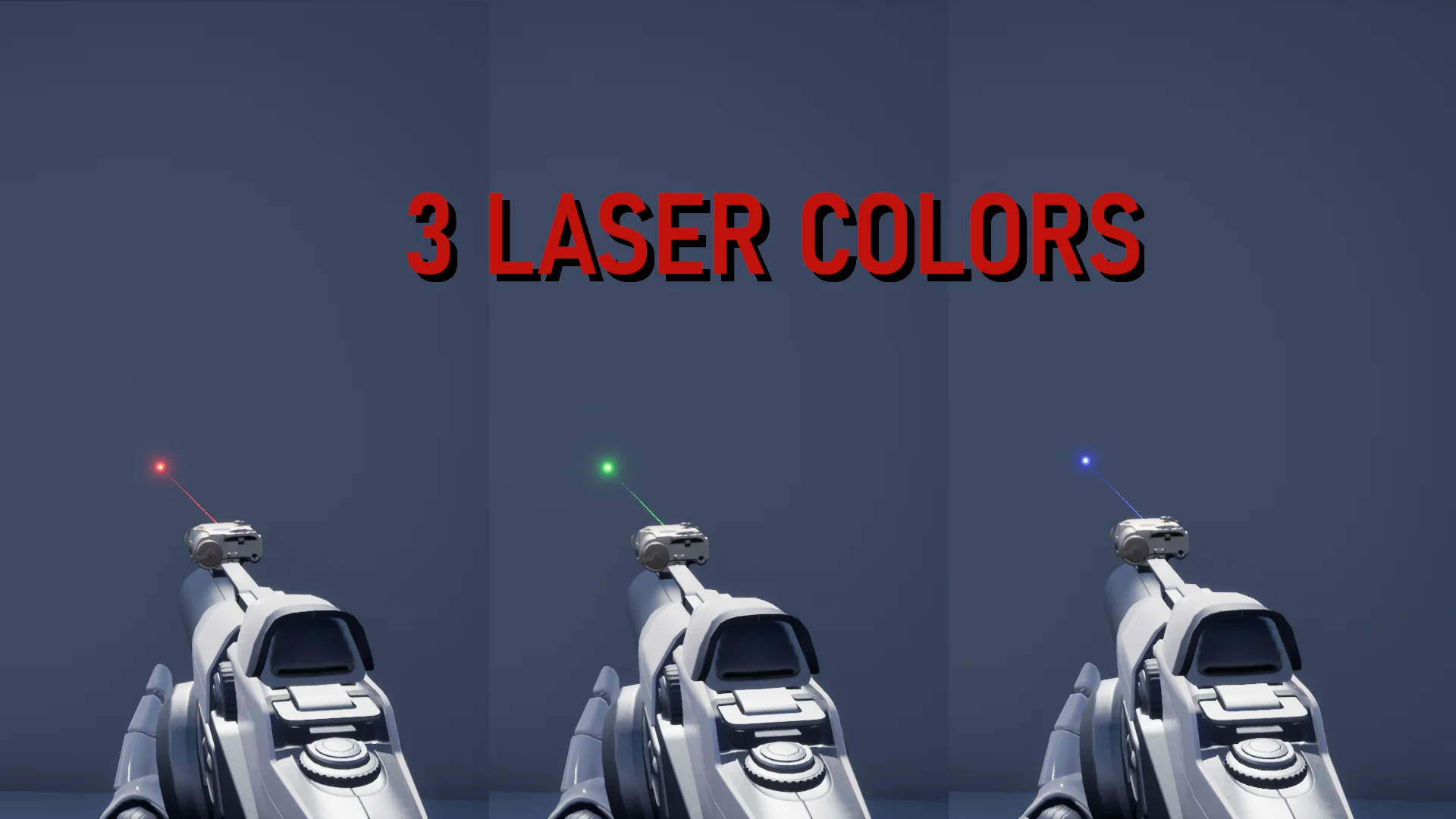
Hipfire misses and nighttime visibility problems are two different frustrations that often land in the same weapon setup. A player firing without aiming down the sights has less visual guidance, and a scene set at night or in dark interiors makes targets harder to pick out. Advanced Weapon Laser addresses both issues with a single weapon attachment: a laser and a flashlight combined in one small package. Instead of treating those tools as separate choices, the package puts them together so a weapon can carry both functions at once.
The intent is direct. It is for the moment when a gun feels under-equipped, when the player cannot reliably hit from the hip, or when a nighttime operation turns into a search through darkness. The package is a focused weapon accessory script with a realistic tag, built as a Blueprint, and aimed at making a gun more appealing and more usable in those situations.
What Advanced Weapon Laser Puts on the Weapon
The core of the package is the combination itself: laser and flashlight in one attachment. That combination answers the either-or question posed by separate devices. A weapon can have the aiming reference of a laser and the illumination of a flashlight without forcing a choice between them. Because the two functions share one small package, the weapon does not need to carry two separate accessories to cover both jobs.
The word 'small' matters here. The attachment is presented as a compact unit, not a bulky replacement for the weapon. It adds a visible accessory to a gun that may otherwise look plain or lack attachments. For a weapon that is not fancy and has no other attachments, this gives it a more equipped appearance while also adding the laser and flashlight functions. The realistic tag keeps the accessory in a grounded weapon context.
The Script and Blueprint tags place the package in the logic layer. The attachment's behavior is handled through a Blueprint script, so the package is relevant to teams working on how the weapon functions in play. The laser and flashlight are part of a weapon script, which means their role extends beyond a static visual detail. That focus is useful when the goal is an interactive attachment rather than a one-off prop.
Laser and Flashlight Without Choosing
Separate laser and flashlight attachments create a small but constant decision: which one to carry, which one to activate, which problem to solve first. Advanced Weapon Laser removes that decision at the package level. The laser handles the hipfire problem by giving the player a visible reference on the weapon; the flashlight handles the nighttime problem by lighting up the area ahead. One unit covers both needs.
That combined approach is most useful when a scene shifts quickly. A player moving through a dark building may need illumination to see the space, then need a clear hipfire reference when a target appears. Swapping between two devices would interrupt that flow. Having both functions in one small package keeps the weapon consistent through the encounter. The same applies to outdoor night operations where visibility is low and the player cannot afford to lose their aiming reference.
The package also solves the 'gun isn't that fancy' problem. A plain weapon with no attachments can feel incomplete. Adding a visible laser and flashlight unit gives it a more finished, equipped look without turning it into a different weapon. The appeal is both practical and visual: the gun looks more capable, and the player gains tools that address real aiming and visibility issues.
Advanced Weapon Laser in Blueprint and Script Form
Because the package carries Script and Blueprint tags, its value sits in behavior. A Blueprint-based weapon script can be integrated into the logic that controls how the weapon functions in a scene. The realistic tag suggests the behavior is meant to read as a believable weapon accessory, not an exaggerated effect. The weapon tag confirms the context: this is a firearm accessory, not a generic prop or environment tool.
For a project that already has a weapon framework, the package is a focused attachment script. For a prototype that needs a weapon light and laser quickly, the Blueprint form gives a starting point that is already driven by the attachment. The script nature also means the package is concerned with what the attachment does when it is part of a weapon, not just how it looks in a static render.
The compact scope is an advantage. A team does not have to sort through a large weapons pack to find the laser and flashlight behavior. The package isolates that function: one small attachment, two tools, and a Blueprint script that supports the combination. That makes it easier to evaluate against the specific problems of hipfire accuracy and nighttime visibility.
Night Operations and Weapons With Few Attachments
Nighttime operations are the clearest scene type for the flashlight side of the package. Dark interiors, low-light exteriors, and scenes where the player needs to identify what is ahead all benefit from a weapon-mounted light. The laser side fits the hipfire problem: when the player fires without aiming down the sights, a laser provides a point of reference that is otherwise missing. Putting both on the same weapon means the player does not have to sacrifice one capability for the other.
Weapons that lack attachments are the second clear fit. A gun that is not fancy and has no other accessories can use the package to gain both a laser and a flashlight while also looking more equipped. A firearm in a scene that needs to feel less bare can use the attachment as a visible upgrade that does not replace the weapon itself.
The realistic tag keeps these uses grounded. The package is a weapon laser and flashlight combined into one small unit, with a Blueprint script handling the attachment behavior. That makes it suitable for realistic weapon setups where the accessory should look and function like a practical piece of equipment.
Who Gets the Most from Advanced Weapon Laser
The package is a natural fit for weapon developers and gameplay programmers working on hipfire feel and low-light encounters. A team that already has a weapon system but needs a compact laser and flashlight attachment can use the Blueprint script to fill that gap. A solo developer building a nighttime mission or a close-quarters scenario can use it to address both visibility and hipfire accuracy with one asset.
It also suits projects where weapons are intentionally simple. If the design calls for a gun that is not fancy and lacks attachments, this package adds a useful accessory without changing what the weapon is. The small package keeps the focus on the two functions that matter: seeing in the dark and getting a better reference when firing from the hip.
In a production, Advanced Weapon Laser belongs in the weapon logic work. It is a targeted attachment script for realistic weapons, not a full combat framework. Teams can slot it into the specific scenes and weapon setups where hipfire misses and nighttime visibility are the problems to solve.
 Weapons & Combat
 Weapons & Combat
 Weapons & Combat