"8652e693bd7bbc55"{"id":"1002984","slug":"ai-behavior-toolkit","title":"AI Behavior Toolkit","category":"Gameplay Features","engine":"4.26+,5.0+","assetVersion":"","engineVersion":"Engine Version: 4.26+,5.0+","tag":"Gameplay Features","accent":"blue","visual":"mech","summary":"Blueprint-based AI behavior system with state and tag logic for civilians, companions, guards, monsters and animals in projects already in progress.","platform":"Unreal Engine","indexPolicy":"index","publishedAt":"2026-11-25T09:48:02.962Z","updatedAt":"2026-11-25T09:48:02.962Z","sourceNotes":[],"fileContents":[],"compatibility":["Unreal Engine","Engine Version: 4.26+,5.0+"],"featuredImage":{"alt":"AI Behavior Toolkit","src":"/wp-content/uploads/published/2026/11/feabfa3504ff-e764a62d-77fa-4d33-8bff-d825bd3159fe-dc6a508711.webp"},"hasDownloadLink":true,"downloads":0,"terms":[{"taxonomy":"category","slug":"gameplay-features","name":"Gameplay Features"}],"galleryImages":[{"src":"/wp-content/uploads/published/2026/11/aa20a127432e-ea448ae2-e402-4b7d-8a6b-3b8ec187a03a-d81870db7d.webp","alt":"AI Behavior Toolkit"},{"src":"/wp-content/uploads/published/2026/11/3d60c6b91b08-93516640-2de9-4a58-9cf1-24b940626c96-e37a8cfa66.webp","alt":"AI Behavior Toolkit"},{"src":"/wp-content/uploads/published/2026/11/450623a16adc-da3f16ca-aeba-452e-9bef-cdc354a6885e-7350eab444.webp","alt":"AI Behavior Toolkit"},{"src":"/wp-content/uploads/published/2026/11/05db89531776-35f8f840-5c4f-40d9-9332-d9ed9f48be4f-9bef759ab9.webp","alt":"AI Behavior Toolkit"},{"src":"/wp-content/uploads/published/2026/11/4f3940a57181-4808c82b-e63d-4ed4-808a-64df7b556f02-ffbeb41f9c.webp","alt":"AI Behavior Toolkit"},{"src":"/wp-content/uploads/published/2026/11/ae49d73e9604-3b76040a-d0d1-4db7-aaad-c533f812a4c0-327ad880cf.webp","alt":"AI Behavior Toolkit"},{"src":"/wp-content/uploads/published/2026/11/ef4ae28cb026-12dfc4ff-e734-43fe-93d3-a5fdb7464bc4-9b9e90b66c.webp","alt":"AI Behavior Toolkit"}],"accessPanel":{"kind":"resource","title":"Get this resource","safetyNote":"Resources are manually reviewed before listing to improve quality and reduce obvious risks.","fileName":"AI Behavior Toolkit.7z","resourceType":"Resource archive","versions":[]},"contentHtml":"\u003ch2\u003eWhat the AI Behavior Toolkit Actually Hands You\u003c/h2\u003e\n\u003cp\u003eThe AI Behavior Toolkit is a behavior system rather than a finished character. It arrives as a plug-and-play package built in Blueprints, and its stated aim is narrow and practical: get believable AI characters standing and reacting within minutes instead of after weeks of scaffolding. That framing is the useful part. Most AI work in a game is not the interesting design work — it is the plumbing that decides what a character is currently doing, how it responds when the situation shifts, and how the separate pieces of its behavior stay consistent with one another. The toolkit takes that plumbing and hands it over in a customizable form.\u003c/p\u003e\n\u003cp\u003eTwo qualities define the package. It is plug-and-play, so it is meant to attach to what you have already built rather than force a rebuild. And it is deliberately generic, so it is not welded to a single archetype. Civilians, companions, guards, monsters and animals are all named as supported kinds of AI, which in ordinary production would be four or five separate systems written by four or five different hands. Putting one behavior foundation beneath all of them changes how you plan an NPC budget for a scene.\u003c/p\u003e \u003ch2\u003eHow Behavior States and Tags Hold the System Together\u003c/h2\u003e\n\u003cp\u003eThe two pillars named in the toolkit are a Behavior State system and a Tag system, and the pairing is what makes a generic AI layer workable instead of mushy.\u003c/p\u003e\n\u003cp\u003eA state layer answers the question a character is always answering: what mode am I in right now. Idle, investigating, following, guarding, fleeing — the states are where the shape of a character's life gets written down, and because they are states instead of one monolithic script, a character's behavior can be cohesive without being rigid. Responsiveness comes from the same place. When the world changes, the character moves to a different state instead of having to unwind a long chain of one-off logic.\u003c/p\u003e\n\u003cp\u003eThe tag layer does the sorting. Tags are how behaviors and interactions find the right targets and the right conditions without hard-wiring every combination by hand. In a toolkit that has to cover a guard, a companion and a wild animal with the same core, tags are what keep those roles distinguishable while the underlying machinery stays shared. The payoff is customization: you are not editing a fixed behavior tree to make one NPC different from another, you are composing states and tagging them so the system knows which pieces belong together.\u003c/p\u003e\n\u003cp\u003eFor a designer, this is also the part that makes the toolkit learnable. There are only two concepts to hold in your head. Once states and tags are clear, the rest of the AI is a matter of authoring combinations rather than learning a bespoke framework.\u003c/p\u003e \u003ch2\u003eOne Toolkit, Five Kinds of Inhabitant\u003c/h2\u003e\n\u003cp\u003eThe archetype list is worth reading as a description of a scene rather than as a feature list. Civilians are ambient population — the people who make a street, a market or a hub feel occupied and who usually have no combat role at all. Companions travel with the player and need behavior that stays legible when the player is the one setting the pace. Guards are the opposite: they hold a position, they watch, and their behavior is read by the player as a signal about where they are allowed to go. Monsters and animals round the list out with the least human of the set, where readable behavior matters even more because there is no dialogue to explain intent.\u003c/p\u003e\n\u003cp\u003eBuilding all five from one system has a downstream effect on production. Tuning passes, debugging and the mental model your team shares all stay the same as you move from a townsperson to a guard to a creature. That consistency is a quiet advantage over five hand-rolled AI scripts that each solve the same problem in a different dialect.\u003c/p\u003e \u003ch2\u003eSlotting the Toolkit Into Work Already in Progress\u003c/h2\u003e\n\u003cp\u003eThe toolkit was made with existing projects in mind, and that is the detail that determines where it belongs in a workflow. This is not a framework that asks you to start a project over. It is intended to connect smoothly with whatever you have already built, which means the realistic insertion point is mid-production: a playable level, a set of characters, a game loop — and then a behavior layer added on top of them.\u003c/p\u003e\n\u003cp\u003eThat shapes how you would actually phase the work. Characters can be blocked out and animated first. Scenes can be dressed and tested with placeholder logic. The AI behavior pass then arrives as its own stage, adding the decision-making that turns props with animations into inhabitants that respond. Because the system is generic, the same pass can be run across wildly different character types in the same sprint instead of being split by archetype. And because it is customizable, the behavior you get out of the box is a starting point rather than a ceiling — the states and tags are yours to shape around the specific fiction of your game.\u003c/p\u003e \u003ch2\u003eThe Genre Range Reflected in the Toolkit's Tags\u003c/h2\u003e\n\u003cp\u003eThe tags attached to the toolkit sketch a wider map than a single genre: shooter, RPG, parkour, flying, multiplayer, simulation, alongside AI, NPC, intelligent, artificial and Blueprint. Read together, they describe a system that has been pointed at very different kinds of projects — ones with combat, ones with traversal, ones with airborne characters, ones with networked sessions, ones that are more systemic than narrative.\u003c/p\u003e\n\u003cp\u003eWhat that means in practice is that the toolkit is not making assumptions about your game's core loop. If your project is a shooter, the guards and hostiles come from the same behavior foundation as the civilians behind the front line. If it is an RPG, the companion and the townsperson are variations on a shared idea. If it is a simulation, the ambient population is the point rather than the backdrop. The generic design is what allows one package to be credible across those cases, and it is also the reason the state-and-tag structure matters more than any single preset behavior.\u003c/p\u003e \u003ch2\u003eWhere the Boss AI Toolkit Takes Over\u003c/h2\u003e\n\u003cp\u003eThe toolkit's role becomes clearer when set against its combat-oriented counterpart, the Boss AI Toolkit, which is a separate system for building boss fights — a simple-to-integrate, highly customizable boss encounter creation tool aimed at RPG and FPS projects that need epic boss enemies.\u003c/p\u003e\n\u003cp\u003eThe division is useful for planning. General inhabitants, patrols, followers and ambient population sit with the AI Behavior Toolkit; the large, authored, set-piece confrontation sits with the boss system. A project can reasonably want both, and knowing which layer owns which kind of character keeps the behavior work from sprawling into one undifferentiated mass of AI logic.\u003c/p\u003e \u003ch2\u003eDeciding Whether It Belongs in Your Build\u003c/h2\u003e\n\u003cp\u003eIf your project already has characters, levels and a loop, and what is missing is the layer that makes those characters decide things, the AI Behavior Toolkit is aimed squarely at that gap. It suits teams that want believable behavior quickly, that plan to keep tuning it, and that need the same foundation to serve friendly, neutral and hostile characters without writing each one from scratch. If the AI you need is a single authored boss encounter rather than a population of inhabitants, that is the other toolkit's territory. In both cases the practical test is the same: count how many distinct kinds of character you have to bring to life, and check whether one shared state-and-tag foundation can carry them.\u003c/p\u003e\n\n\u003ch2\u003eExplore Similar Assets\u003c/h2\u003e\n\u003cul\u003e\n\u003cli\u003e\u003ca href=\"https://3dcghub.com/advanced-tactical-based-system/\" rel=\"noopener noreferrer\"\u003eAdvanced Tactical-based System\u003c/a\u003e\u003c/li\u003e\n\u003cli\u003e\u003ca href=\"https://3dcghub.com/freeflow-combat/\" rel=\"noopener noreferrer\"\u003eFreeflow Combat\u003c/a\u003e\u003c/li\u003e\n\u003cli\u003e\u003ca href=\"https://3dcghub.com/smart-ai/\" rel=\"noopener noreferrer\"\u003eSmart AI\u003c/a\u003e\u003c/li\u003e\n\u003cli\u003e\u003ca href=\"https://3dcghub.com/npc-ai-queuing-system/\" rel=\"noopener noreferrer\"\u003eNPC AI Queuing System\u003c/a\u003e\u003c/li\u003e\n\u003cli\u003e\u003ca href=\"https://3dcghub.com/boss-ai-toolkit/\" rel=\"noopener noreferrer\"\u003eBoss AI Toolkit\u003c/a\u003e\u003c/li\u003e\n\u003c/ul\u003e","contentTextLength":7538,"navigation":{"current":7,"total":4911,"previous":{"id":"1002985","slug":"air-strike","title":"Air Strike","category":"Gameplay Features","platform":"Unreal Engine","updatedAt":"2026-11-25T09:49:14.550Z"},"next":{"id":"1002983","slug":"advanced-weapon-laser","title":"Advanced Weapon Laser","category":"Weapons \u0026 Combat","platform":"Unreal Engine","updatedAt":"2026-11-25T09:38:38.606Z"}},"relatedResources":[{"id":"10564","slug":"advanced-tactical-based-system","title":"Advanced Tactical-based System","category":"Gameplay Features","engine":"4.26+,5.0+","assetVersion":"Engine version: 4.26+,5.0+","engineVersion":"4.26","tag":"Gameplay Features","accent":"blue","visual":"mech","summary":"Build professional turn-based strategy games with the Advanced Tactical-based System. This resource includes dynamic cover, grid-based movement, and advanced AI behavior for developers.","platform":"Unreal Engine","indexPolicy":"noindex","publishedAt":"2026-03-03T15:40:42.000Z","updatedAt":"2026-04-19T15:49:59.000Z","sourceNotes":[],"fileContents":[],"compatibility":["Unreal Engine","Engine version: 4.26+,5.0+"],"featuredImage":{"alt":"Advanced Tactical-based System","src":"https://3dcghub.com/wp-content/uploads/2026/03/5696fc64-1997-4079-bac3-49b1e7de5b99.webp"},"fileSizeBytes":54951869,"hasDownloadLink":true,"downloads":3},{"id":"10858","slug":"freeflow-combat","title":"Freeflow Combat","category":"Gameplay Features","engine":"4.27,5.0+","assetVersion":"Engine version: 4.27,5.0+","engineVersion":"4.27","tag":"Gameplay Features","accent":"blue","visual":"city","summary":"Freeflow Combat offers a comprehensive modular framework for creating fluid, superhero-style combat. It features smart targeting, coordinated group AI, and cinematic finishers to streamline game development.","platform":"Unreal Engine","indexPolicy":"noindex","publishedAt":"2026-03-03T16:25:04.000Z","updatedAt":"2026-04-19T15:49:55.000Z","sourceNotes":[],"fileContents":[],"compatibility":["Unreal Engine","Engine version: 4.27,5.0+"],"featuredImage":{"alt":"Freeflow Combat","src":"https://3dcghub.com/wp-content/uploads/2026/03/796e8d94-436a-4186-83b5-a3597b87b3ab.webp"},"fileSizeBytes":58082021,"hasDownloadLink":true,"downloads":2},{"id":"11105","slug":"smart-ai","title":"Smart AI","category":"Gameplay Features","engine":"4.27,5.0+","assetVersion":"Engine version: 4.27,5.0+","engineVersion":"4.26","tag":"Gameplay Features","accent":"blue","visual":"city","summary":"Enhance your project with Smart AI, a versatile system offering 15 unique behaviors and full multiplayer support. It includes melee and ranged combat, specialized AI types, and advanced optimization tools.","platform":"Unreal Engine","indexPolicy":"noindex","publishedAt":"2026-03-03T16:56:50.000Z","updatedAt":"2026-04-19T15:49:49.000Z","sourceNotes":[],"fileContents":[],"compatibility":["Unreal Engine","Engine version: 4.27,5.0+"],"featuredImage":{"alt":"Smart AI","src":"https://3dcghub.com/wp-content/uploads/2026/03/3e6175a6-1ad0-4a6a-aa6a-a60785237185.webp"},"fileSizeBytes":1151302823,"hasDownloadLink":true,"downloads":1}]}[{"id":4225,"sourceId":4225,"taxonomyId":4225,"taxonomy":"category","slug":"asset-library","name":"Asset Library","parentId":null,"count":4765,"hasChildren":true,"href":"/","seoTitle":"Free Game Assets Library | 3DCGHUB","seoDescription":"Browse free Unreal Engine, Unity, Blender assets and game development tutorials on 3DCGHUB with previews, compatibility notes, and secure downloads.","sitemapEnabled":true,"children":[{"id":4227,"sourceId":4227,"taxonomyId":4227,"taxonomy":"category","slug":"blender-add-ons-plugins","name":"Blender Add-ons \u0026 Plugins","parentId":4225,"count":10,"hasChildren":false,"href":"/category/blender-add-ons-plugins/","seoTitle":"Free Blender Add-ons \u0026 Plugins | 3DCGHUB","seoDescription":"Browse free Blender Add-ons \u0026 Plugins tools for Blender on 3DCGHUB: curated downloads with preview images, compatibility notes and secure download access.","sitemapEnabled":true},{"id":514,"sourceId":514,"taxonomyId":514,"taxonomy":"category","slug":"unity-2","name":"Unity","parentId":4225,"count":453,"hasChildren":true,"href":"/category/unity-2/","seoTitle":"Free Unity Assets | 3DCGHUB","seoDescription":"Browse free Unity resources on 3DCGHUB: curated downloads with preview images, compatibility notes and secure download access.","sitemapEnabled":true,"children":[{"id":523,"sourceId":523,"taxonomyId":523,"taxonomy":"category","slug":"2d","name":"2D","parentId":514,"count":1,"hasChildren":true,"href":"/category/2d/","seoTitle":"Free Unity 2D | 3DCGHUB","seoDescription":"Browse free 2D assets for Unity on 3DCGHUB: curated downloads with preview images, compatibility notes and secure download access.","sitemapEnabled":true},{"id":515,"sourceId":515,"taxonomyId":515,"taxonomy":"category","slug":"3d-unity-2","name":"3D","parentId":514,"count":162,"hasChildren":true,"href":"/category/3d-unity-2/","seoTitle":"Free Unity 3D Assets | 3DCGHUB","seoDescription":"Browse free 3D assets for Unity on 3DCGHUB: curated downloads with preview images, compatibility notes and secure download access.","sitemapEnabled":true},{"id":565,"sourceId":565,"taxonomyId":565,"taxonomy":"category","slug":"add-ons","name":"Add-Ons","parentId":514,"count":2,"hasChildren":false,"href":"/category/add-ons/","seoTitle":"Free Unity Add-Ons | 3DCGHUB","seoDescription":"Browse free Add-Ons assets for Unity on 3DCGHUB: curated downloads with preview images, compatibility notes and secure download access.","sitemapEnabled":true},{"id":529,"sourceId":529,"taxonomyId":529,"taxonomy":"category","slug":"audio-unity-2","name":"Audio","parentId":514,"count":1,"hasChildren":true,"href":"/category/audio-unity-2/","seoTitle":"Free Unity Audio | 3DCGHUB","seoDescription":"Browse free Audio for Unity on 3DCGHUB: curated downloads with preview images, compatibility notes and secure download access.","sitemapEnabled":true},{"id":557,"sourceId":557,"taxonomyId":557,"taxonomy":"category","slug":"templates","name":"Templates","parentId":514,"count":36,"hasChildren":true,"href":"/category/templates/","seoTitle":"Free Unity Templates | 3DCGHUB","seoDescription":"Browse free Unity project templates on 3DCGHUB. Starter kits with previews, compatibility notes, and secure download access.","sitemapEnabled":true},{"id":533,"sourceId":533,"taxonomyId":533,"taxonomy":"category","slug":"tools-unity-2","name":"Tools","parentId":514,"count":0,"hasChildren":true,"href":"/category/tools-unity-2/","sitemapEnabled":true},{"id":554,"sourceId":554,"taxonomyId":554,"taxonomy":"category","slug":"vfx-unity-2","name":"VFX","parentId":514,"count":4,"hasChildren":true,"href":"/category/vfx-unity-2/","seoTitle":"Free Unity VFX | 3DCGHUB","seoDescription":"Browse free VFX for Unity on 3DCGHUB: curated downloads with preview images, compatibility notes and secure download access.","sitemapEnabled":true}]},{"id":511,"sourceId":511,"taxonomyId":511,"taxonomy":"category","slug":"unreal-engine-2","name":"Unreal Engine","parentId":4225,"count":4303,"hasChildren":true,"href":"/category/unreal-engine-2/","seoTitle":"Free Unreal Engine Assets | 3DCGHUB","seoDescription":"Browse free Unreal Engine resources on 3DCGHUB: curated downloads with preview images, compatibility notes and secure download access.","sitemapEnabled":true,"children":[{"id":54,"sourceId":54,"taxonomyId":54,"taxonomy":"category","slug":"3d","name":"3D","parentId":511,"count":2434,"hasChildren":true,"href":"/category/3d/","seoTitle":"Free Unreal Engine 3D | 3DCGHUB","seoDescription":"Browse free 3D assets for Unreal Engine on 3DCGHUB: curated downloads with preview images, compatibility notes and secure download access.","sitemapEnabled":true},{"id":441,"sourceId":441,"taxonomyId":441,"taxonomy":"category","slug":"animations","name":"Animations","parentId":511,"count":245,"hasChildren":true,"href":"/category/animations/","seoTitle":"Free Unreal Engine Animations | 3DCGHUB","seoDescription":"Browse free Animations for Unreal Engine on 3DCGHUB: curated downloads with preview images, compatibility notes and secure download access.","sitemapEnabled":true},{"id":446,"sourceId":446,"taxonomyId":446,"taxonomy":"category","slug":"audio","name":"Audio","parentId":511,"count":63,"hasChildren":true,"href":"/category/audio/","seoTitle":"Free Unreal Engine Audio Resources | 3DCGHUB","seoDescription":"Browse free Unreal Engine audio resources including sound effects, voices, dialogue, and ambient sounds. Curated free downloads on 3DCGHUB.","sitemapEnabled":true},{"id":466,"sourceId":466,"taxonomyId":466,"taxonomy":"category","slug":"game-systems","name":"Game Systems","parentId":511,"count":366,"hasChildren":true,"href":"/category/game-systems/","seoTitle":"Free Unreal Engine Game Systems | 3DCGHUB","seoDescription":"Browse free Game Systems tools for Unreal Engine on 3DCGHUB: curated downloads with preview images, compatibility notes and secure download access.","sitemapEnabled":true},{"id":478,"sourceId":478,"taxonomyId":478,"taxonomy":"category","slug":"game-templates","name":"Game Templates","parentId":511,"count":151,"hasChildren":true,"href":"/category/game-templates/","seoTitle":"Free Unreal Engine Game Templates | 3DCGHUB","seoDescription":"Browse free Game Templates for Unreal Engine on 3DCGHUB: curated downloads with preview images, compatibility notes and secure download access.","sitemapEnabled":true},{"id":432,"sourceId":432,"taxonomyId":432,"taxonomy":"category","slug":"hdri","name":"HDRI","parentId":511,"count":6,"hasChildren":true,"href":"/category/hdri/","seoTitle":"Free Unreal Engine HDRI | 3DCGHUB","seoDescription":"Browse free Unreal Engine HDRI skies and lighting maps on 3DCGHUB. Environment lighting with previews and secure downloads.","sitemapEnabled":true},{"id":228,"sourceId":228,"taxonomyId":228,"taxonomy":"category","slug":"material-and-textures","name":"Material \u0026 Textures","parentId":511,"count":172,"hasChildren":true,"href":"/category/material-and-textures/","seoTitle":"Free Unreal Engine Material \u0026 Textures | 3DCGHUB","seoDescription":"Browse free Material \u0026 Textures for Unreal Engine on 3DCGHUB: curated downloads with preview images, compatibility notes and secure download access.","sitemapEnabled":true},{"id":298,"sourceId":298,"taxonomyId":298,"taxonomy":"category","slug":"sprites-and-flipbooks","name":"Sprites \u0026 Flipbooks","parentId":511,"count":18,"hasChildren":true,"href":"/category/sprites-and-flipbooks/","seoTitle":"Free Unreal Engine Sprites \u0026 Flipbooks | 3DCGHUB","seoDescription":"Browse free Sprites \u0026 Flipbooks assets for Unreal Engine on 3DCGHUB: curated downloads with preview images, compatibility notes and secure download access.","sitemapEnabled":true},{"id":489,"sourceId":489,"taxonomyId":489,"taxonomy":"category","slug":"tools-and-plugins","name":"Tools \u0026 Plugins","parentId":511,"count":390,"hasChildren":true,"href":"/category/tools-and-plugins/","seoTitle":"Free Unreal Engine Tools \u0026 Plugins | 3DCGHUB","seoDescription":"Browse free Tools \u0026 Plugins for Unreal Engine on 3DCGHUB: curated downloads with preview images, compatibility notes and secure download access.","sitemapEnabled":true},{"id":459,"sourceId":459,"taxonomyId":459,"taxonomy":"category","slug":"ui","name":"UI","parentId":511,"count":45,"hasChildren":true,"href":"/category/ui/","seoTitle":"Free Unreal Engine UI | 3DCGHUB","seoDescription":"Browse free UI for Unreal Engine on 3DCGHUB: curated downloads with preview images, compatibility notes and secure download access.","sitemapEnabled":true},{"id":450,"sourceId":450,"taxonomyId":450,"taxonomy":"category","slug":"vfx","name":"VFX","parentId":511,"count":413,"hasChildren":true,"href":"/category/vfx/","seoTitle":"Free Unreal Engine VFX | 3DCGHUB","seoDescription":"Browse free VFX for Unreal Engine on 3DCGHUB: curated downloads with preview images, compatibility notes and secure download access.","sitemapEnabled":true}]}]},{"id":4222,"sourceId":4222,"taxonomyId":4222,"taxonomy":"category","slug":"tutorial-library","name":"Tutorial Library","parentId":null,"count":117,"hasChildren":false,"href":"/tutorials/","seoTitle":"Free Game Development Tutorial Library | 3DCGHUB","seoDescription":"Browse free game development tutorials for Unreal Engine, Unity, Blender, and more on 3DCGHUB with practical workflows and secure downloads.","sitemapEnabled":true}]
Resource screenshots
1 / 7
Asset drops
Daily Asset Drops
Follow 3DCGHUB on Telegram for daily Unreal, Unity & Blender drops and curated CC0 releases.
The AI Behavior Toolkit is a behavior system rather than a finished character. It arrives as a plug-and-play package built in Blueprints, and its stated aim is narrow and practical: get believable AI characters standing and reacting within minutes instead of after weeks of scaffolding. That framing is the useful part. Most AI work in a game is not the interesting design work — it is the plumbing that decides what a character is currently doing, how it responds when the situation shifts, and how the separate pieces of its behavior stay consistent with one another. The toolkit takes that plumbing and hands it over in a customizable form.
Two qualities define the package. It is plug-and-play, so it is meant to attach to what you have already built rather than force a rebuild. And it is deliberately generic, so it is not welded to a single archetype. Civilians, companions, guards, monsters and animals are all named as supported kinds of AI, which in ordinary production would be four or five separate systems written by four or five different hands. Putting one behavior foundation beneath all of them changes how you plan an NPC budget for a scene.
How Behavior States and Tags Hold the System Together
The two pillars named in the toolkit are a Behavior State system and a Tag system, and the pairing is what makes a generic AI layer workable instead of mushy.
A state layer answers the question a character is always answering: what mode am I in right now. Idle, investigating, following, guarding, fleeing — the states are where the shape of a character's life gets written down, and because they are states instead of one monolithic script, a character's behavior can be cohesive without being rigid. Responsiveness comes from the same place. When the world changes, the character moves to a different state instead of having to unwind a long chain of one-off logic.
The tag layer does the sorting. Tags are how behaviors and interactions find the right targets and the right conditions without hard-wiring every combination by hand. In a toolkit that has to cover a guard, a companion and a wild animal with the same core, tags are what keep those roles distinguishable while the underlying machinery stays shared. The payoff is customization: you are not editing a fixed behavior tree to make one NPC different from another, you are composing states and tagging them so the system knows which pieces belong together.
For a designer, this is also the part that makes the toolkit learnable. There are only two concepts to hold in your head. Once states and tags are clear, the rest of the AI is a matter of authoring combinations rather than learning a bespoke framework.
One Toolkit, Five Kinds of Inhabitant
The archetype list is worth reading as a description of a scene rather than as a feature list. Civilians are ambient population — the people who make a street, a market or a hub feel occupied and who usually have no combat role at all. Companions travel with the player and need behavior that stays legible when the player is the one setting the pace. Guards are the opposite: they hold a position, they watch, and their behavior is read by the player as a signal about where they are allowed to go. Monsters and animals round the list out with the least human of the set, where readable behavior matters even more because there is no dialogue to explain intent.
Building all five from one system has a downstream effect on production. Tuning passes, debugging and the mental model your team shares all stay the same as you move from a townsperson to a guard to a creature. That consistency is a quiet advantage over five hand-rolled AI scripts that each solve the same problem in a different dialect.
Slotting the Toolkit Into Work Already in Progress
The toolkit was made with existing projects in mind, and that is the detail that determines where it belongs in a workflow. This is not a framework that asks you to start a project over. It is intended to connect smoothly with whatever you have already built, which means the realistic insertion point is mid-production: a playable level, a set of characters, a game loop — and then a behavior layer added on top of them.
That shapes how you would actually phase the work. Characters can be blocked out and animated first. Scenes can be dressed and tested with placeholder logic. The AI behavior pass then arrives as its own stage, adding the decision-making that turns props with animations into inhabitants that respond. Because the system is generic, the same pass can be run across wildly different character types in the same sprint instead of being split by archetype. And because it is customizable, the behavior you get out of the box is a starting point rather than a ceiling — the states and tags are yours to shape around the specific fiction of your game.
The Genre Range Reflected in the Toolkit's Tags
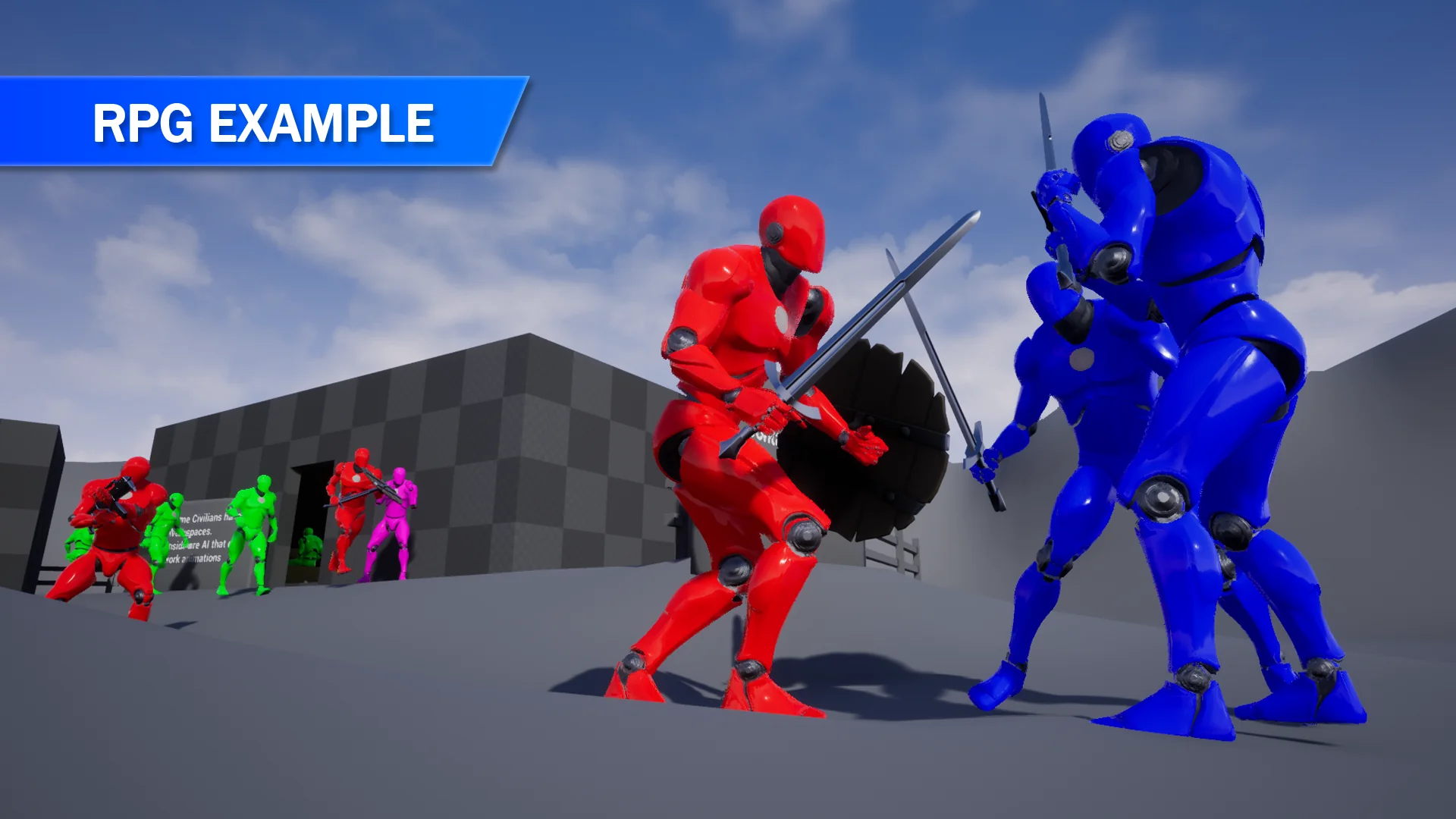
The tags attached to the toolkit sketch a wider map than a single genre: shooter, RPG, parkour, flying, multiplayer, simulation, alongside AI, NPC, intelligent, artificial and Blueprint. Read together, they describe a system that has been pointed at very different kinds of projects — ones with combat, ones with traversal, ones with airborne characters, ones with networked sessions, ones that are more systemic than narrative.
What that means in practice is that the toolkit is not making assumptions about your game's core loop. If your project is a shooter, the guards and hostiles come from the same behavior foundation as the civilians behind the front line. If it is an RPG, the companion and the townsperson are variations on a shared idea. If it is a simulation, the ambient population is the point rather than the backdrop. The generic design is what allows one package to be credible across those cases, and it is also the reason the state-and-tag structure matters more than any single preset behavior.
Where the Boss AI Toolkit Takes Over
The toolkit's role becomes clearer when set against its combat-oriented counterpart, the Boss AI Toolkit, which is a separate system for building boss fights — a simple-to-integrate, highly customizable boss encounter creation tool aimed at RPG and FPS projects that need epic boss enemies.
The division is useful for planning. General inhabitants, patrols, followers and ambient population sit with the AI Behavior Toolkit; the large, authored, set-piece confrontation sits with the boss system. A project can reasonably want both, and knowing which layer owns which kind of character keeps the behavior work from sprawling into one undifferentiated mass of AI logic.
Deciding Whether It Belongs in Your Build
If your project already has characters, levels and a loop, and what is missing is the layer that makes those characters decide things, the AI Behavior Toolkit is aimed squarely at that gap. It suits teams that want believable behavior quickly, that plan to keep tuning it, and that need the same foundation to serve friendly, neutral and hostile characters without writing each one from scratch. If the AI you need is a single authored boss encounter rather than a population of inhabitants, that is the other toolkit's territory. In both cases the practical test is the same: count how many distinct kinds of character you have to bring to life, and check whether one shared state-and-tag foundation can carry them.
 Gameplay Features
 Gameplay Features
 Gameplay Features