"8652e693bd7bbc55"{"id":"1002985","slug":"air-strike","title":"Air Strike","category":"Gameplay Features","engine":"4.19+,5.0+","assetVersion":"","engineVersion":"Engine Version: 4.19+,5.0+","tag":"Gameplay Features","accent":"blue","visual":"mech","summary":"Air Strike lets players spawn a plane from the mini map to bomb a target or drop supplies, built in Blueprints with multiplayer and mobile support.","platform":"Unreal Engine","indexPolicy":"index","publishedAt":"2026-11-25T09:49:14.550Z","updatedAt":"2026-11-25T09:49:14.550Z","sourceNotes":[],"fileContents":[],"compatibility":["Unreal Engine","Engine Version: 4.19+,5.0+"],"featuredImage":{"alt":"Air Strike","src":"/wp-content/uploads/published/2026/11/cc365b24066b-15735d0c-b2fb-43a8-959e-47a1b1b7a2e6-74eefd188c.webp"},"hasDownloadLink":true,"downloads":0,"terms":[{"taxonomy":"category","slug":"gameplay-features","name":"Gameplay Features"}],"galleryImages":[{"src":"/wp-content/uploads/published/2026/11/698ebb4c91be-aad58956-72a6-4cab-8679-0ba5ab53b3a1-1cd30a1ec1.webp","alt":"Air Strike"},{"src":"/wp-content/uploads/published/2026/11/8099d05144af-f9058ef3-4758-42a7-ab1f-dccf5eb8c89e-47489c2ae7.webp","alt":"Air Strike"},{"src":"/wp-content/uploads/published/2026/11/415b7fc332c5-f2be6c49-4a59-4f1d-92f7-3ea19b76bd2d-75182e41dd.webp","alt":"Air Strike"},{"src":"/wp-content/uploads/published/2026/11/fb3ecd48c909-f2fbaae2-51c2-4d65-9d38-758910d5e334-29c65a710c.webp","alt":"Air Strike"}],"accessPanel":{"kind":"resource","title":"Get this resource","safetyNote":"Resources are manually reviewed before listing to improve quality and reduce obvious risks.","fileName":"Air Strike.7z","resourceType":"Resource archive","versions":[]},"contentHtml":"\u003ch2\u003eThe Mini Map Is Where the Call Comes From\u003c/h2\u003e\n\u003cp\u003eFire support in most projects is a set piece. A designer drops a trigger volume, wires a sequence, and the player walks into it at the moment the level intends. The plane arrives on schedule and never on request. Air Strike reverses that arrangement: the player spawns the plane, and the target is a location they select on the mini map instead of a marker buried somewhere in the level.\u003c/p\u003e\n\u003cp\u003eThat one change moves the decision into the middle of an encounter. The mini map stops being a navigation readout and becomes the interface for calling in support. What used to be an authored moment becomes an action the player initiates, aimed at a spot they picked themselves, with a plane arriving over that location to bomb it or drop supplies onto it.\u003c/p\u003e \u003ch2\u003eAn Air Strike That Drops Whatever You Point It At\u003c/h2\u003e\n\u003cp\u003eThe system is not tied to a single payload. A drop delivers a selected actor, and the examples given are a bomb and an ammo box — one offensive, one logistical. That pairing says a lot about how the mechanic reads in play. The same call-in can be an attack on a position or a resupply of a friendly one, and the only thing that changes is which actor the plane releases.\u003c/p\u003e \u003ch3\u003eBombs, Ammo Boxes, and Other Selected Actors\u003c/h3\u003e\n\u003cp\u003eBecause the payload is an actor rather than a baked-in effect, the call-in inherits its meaning from what it carries. A plane that releases a bomb reads as a strike. A plane that releases an ammo box reads as support. Between those two poles, most of the practical ground a call-in feature needs is already covered, and any other actor in the project is eligible for the same treatment once it is pointed at.\u003c/p\u003e\n\u003cp\u003eThis is the part that keeps the feature from becoming scenery. If the payload is a variable in the setup rather than a fixed piece of content, then a mission that needs a different result does not need a different system — it needs a different actor.\u003c/p\u003e \u003ch2\u003eAir Strike Logic Built Entirely in Blueprints\u003c/h2\u003e\n\u003cp\u003eEverything in the package is Blueprint-based; the feature list puts it at 100% Blueprints. Nothing in the workflow requires stepping outside the visual scripting environment to read, adjust, or extend what is there. For a team already working in Blueprints, the plane spawn, the drop, and the mini map selection stay open to inspection — the logic can be followed node by node rather than treated as a black box.\u003c/p\u003e\n\u003cp\u003eSetup is described as easy, and that is the practical counterpart to a Blueprint-only build. Three things have to line up: the selection step on the mini map, the spawned plane, and the actor that leaves it. A designer can get a working call-in in place and then reopen the graph to change the order of events, the actor being delivered, or the way the marked location is translated into an arrival point.\u003c/p\u003e\n\u003cp\u003eBlueprint-only also decides who can maintain the feature after the first pass. The person who wires it up in the editor can come back to it later without a code review, a build step, or a programmer's calendar. On a small team that difference is often the whole argument.\u003c/p\u003e \u003ch2\u003eTuning the Air Strike Without Rewriting It\u003c/h2\u003e\n\u003cp\u003eCustomization is called out as high, and payload selection is the clearest place to see it. Swapping the delivered actor changes the entire character of the call. An attack run becomes a resupply, or a resupply becomes an attack run, and the arrival and selection flow stay as they were.\u003c/p\u003e\n\u003cp\u003eThe second tuning surface is the location itself. Since the target comes from the mini map, the questions a designer will ask are about precision — how tight the chosen point is, how the plane's arrival relates to it, and whether the marked spot is read as a point or as an area. Those are the dials worth reaching for when the call-in needs to feel more forgiving in one mission and more demanding in the next.\u003c/p\u003e\n\u003cp\u003eBoth of these live inside the Blueprint setup rather than behind a content pack. That is what makes the customization claim hold up: the feature is meant to be adjusted in place, on the project's own terms, instead of being adopted as-is or replaced.\u003c/p\u003e \u003ch2\u003eMultiplayer and Mobile Air Strike Support\u003c/h2\u003e\n\u003cp\u003eMultiplayer support is listed, and the mechanic suits it. A call-in that one player requests and everyone else watches is a shared event rather than a private effect, which puts weight on where the plane and the drop are seen to happen. A strike that reads clearly to the player who called it and to the players standing nearby is doing the job the feature is built for.\u003c/p\u003e\n\u003cp\u003eMobile support is listed as well, and it changes how the mini map step should be read. A selection made on a touchscreen carries different constraints than one made with a mouse or a stick, and having mobile in scope means the call-in is meant to survive that input model rather than assume a desktop setup with a cursor and a keyboard.\u003c/p\u003e\n\u003cp\u003eTaken together, those two lines set the audience for the feature: matches with more than one player in them, on hardware that is not necessarily a PC.\u003c/p\u003e \u003ch2\u003eWhere the Call-In Sits in a Production\u003c/h2\u003e\n\u003cp\u003eAir Strike is a single mechanic, packaged whole. It covers the request, the spawn, and the delivery, and it stops there rather than trying to be a combat framework. That scope is what makes it easy to place in a project: a mission type that needs player-requested support — a defense that hinges on resupply, an assault that hinges on a bombing run — can be built on top of it without the team first building the call-in themselves.\u003c/p\u003e\n\u003cp\u003eThe practical takeaway is about ordering. Get the drop location selection working against the project's mini map first, because that is the step every other part depends on. Then point the payload at the actor the mission actually needs. Everything else — the plane, the arrival, the multiplayer visibility, the mobile input path — hangs off those two decisions, and in a Blueprint-only system both of them are a short walk from the graph you already have open.\u003c/p\u003e\n\n\u003ch2\u003eMore From The Same Workflow\u003c/h2\u003e\n\u003cul\u003e\n\u003cli\u003e\u003ca href=\"https://3dcghub.com/battle-royale-air-drop/\" rel=\"noopener noreferrer\"\u003eBattle Royale - Air Drop\u003c/a\u003e\u003c/li\u003e\n\u003cli\u003e\u003ca href=\"https://3dcghub.com/advanced-game-gui-with-multiplayer/\" rel=\"noopener noreferrer\"\u003eAdvanced Game GUI with Multiplayer\u003c/a\u003e\u003c/li\u003e\n\u003cli\u003e\u003ca href=\"https://3dcghub.com/super-powers/\" rel=\"noopener noreferrer\"\u003eSuper Powers\u003c/a\u003e\u003c/li\u003e\n\u003cli\u003e\u003ca href=\"https://3dcghub.com/target-lock-system/\" rel=\"noopener noreferrer\"\u003eTarget Lock System\u003c/a\u003e\u003c/li\u003e\n\u003cli\u003e\u003ca href=\"https://3dcghub.com/rpg-compass-ui-system/\" rel=\"noopener noreferrer\"\u003eRPG Compass UI System\u003c/a\u003e\u003c/li\u003e\n\u003c/ul\u003e","contentTextLength":6020,"navigation":{"current":6,"total":4911,"previous":{"id":"1002986","slug":"amt-asymmetrical-multiplayer-template-4-vs-1","title":"AMT (Asymmetrical Multiplayer Template, 4 vs 1)","category":"Action-Adventure","platform":"Unreal Engine","updatedAt":"2026-11-25T09:49:46.615Z"},"next":{"id":"1002984","slug":"ai-behavior-toolkit","title":"AI Behavior Toolkit","category":"Gameplay Features","platform":"Unreal Engine","updatedAt":"2026-11-25T09:48:02.962Z"}},"relatedResources":[{"id":"1002307","slug":"battle-royale-air-drop","title":"Battle Royale - Air Drop","category":"Gameplay Features","engine":"4.27+,5.0+","assetVersion":"","engineVersion":"Engine Version: 4.27+,5.0+","tag":"Gameplay Features","accent":"blue","visual":"mech","summary":"A Blueprint-driven air drop system for battle royale matches, with control over zone radius, fall height, fall speed, box types and drop timing, plus full multi","platform":"Unreal Engine","indexPolicy":"index","publishedAt":"2026-11-06T06:10:17.528Z","updatedAt":"2026-11-06T06:10:17.528Z","sourceNotes":[],"fileContents":[],"compatibility":["Unreal Engine","Engine Version: 4.27+,5.0+"],"featuredImage":{"alt":"Battle Royale - Air Drop","src":"/wp-content/uploads/published/2026/11/de9cd9d41c3c-11b29b44-ad2d-4d8a-a160-2ecef28e6ee1-6cf82fcd83.webp"},"fileSizeBytes":42638124,"hasDownloadLink":true,"downloads":0},{"id":"1002977","slug":"advanced-game-gui-with-multiplayer","title":"Advanced Game GUI with Multiplayer","category":"Gameplay Features","engine":"4.26+,5.0+","assetVersion":"","engineVersion":"Engine Version: 4.26+,5.0+","tag":"Gameplay Features","accent":"blue","visual":"mech","summary":"A multiplayer GUI package with lobby, session, pause, connection, and settings screens, plus Steam nickname handling, max FPS control, and a player points compo","platform":"Unreal Engine","indexPolicy":"index","publishedAt":"2026-11-25T09:09:33.318Z","updatedAt":"2026-11-25T09:09:33.318Z","sourceNotes":[],"fileContents":[],"compatibility":["Unreal Engine","Engine Version: 4.26+,5.0+"],"featuredImage":{"alt":"Advanced Game GUI with Multiplayer","src":"/wp-content/uploads/published/2026/11/d19856178101-5a9a0f49-ab06-4b0a-978e-32f892002dc8-61d338b33d.webp"},"hasDownloadLink":true,"downloads":0},{"id":"1002844","slug":"super-powers","title":"Super Powers","category":"Gameplay Features","engine":"4.25+,5.0+","assetVersion":"","engineVersion":"Engine Version: 4.25+,5.0+","tag":"Gameplay Features","accent":"blue","visual":"mech","summary":"Explore the Super Powers asset framework featuring multiplayer-ready skills, elemental flame, force fields, flying, and time-manipulation blueprints.","platform":"Unreal Engine","indexPolicy":"index","publishedAt":"2026-11-20T12:25:43.122Z","updatedAt":"2026-11-20T12:25:43.122Z","sourceNotes":[],"fileContents":[],"compatibility":["Unreal Engine","Engine Version: 4.25+,5.0+"],"featuredImage":{"alt":"Super Powers","src":"/wp-content/uploads/published/2026/11/8a53dd7e701c-b4c77631-1777-4172-b265-e78e11c6fbd5-30ec06796b.webp"},"fileSizeBytes":37168551,"hasDownloadLink":true,"downloads":0}]}[{"id":4225,"sourceId":4225,"taxonomyId":4225,"taxonomy":"category","slug":"asset-library","name":"Asset Library","parentId":null,"count":4765,"hasChildren":true,"href":"/","seoTitle":"Free Game Assets Library | 3DCGHUB","seoDescription":"Browse free Unreal Engine, Unity, Blender assets and game development tutorials on 3DCGHUB with previews, compatibility notes, and secure downloads.","sitemapEnabled":true,"children":[{"id":4227,"sourceId":4227,"taxonomyId":4227,"taxonomy":"category","slug":"blender-add-ons-plugins","name":"Blender Add-ons \u0026 Plugins","parentId":4225,"count":10,"hasChildren":false,"href":"/category/blender-add-ons-plugins/","seoTitle":"Free Blender Add-ons \u0026 Plugins | 3DCGHUB","seoDescription":"Browse free Blender Add-ons \u0026 Plugins tools for Blender on 3DCGHUB: curated downloads with preview images, compatibility notes and secure download access.","sitemapEnabled":true},{"id":514,"sourceId":514,"taxonomyId":514,"taxonomy":"category","slug":"unity-2","name":"Unity","parentId":4225,"count":453,"hasChildren":true,"href":"/category/unity-2/","seoTitle":"Free Unity Assets | 3DCGHUB","seoDescription":"Browse free Unity resources on 3DCGHUB: curated downloads with preview images, compatibility notes and secure download access.","sitemapEnabled":true,"children":[{"id":523,"sourceId":523,"taxonomyId":523,"taxonomy":"category","slug":"2d","name":"2D","parentId":514,"count":1,"hasChildren":true,"href":"/category/2d/","seoTitle":"Free Unity 2D | 3DCGHUB","seoDescription":"Browse free 2D assets for Unity on 3DCGHUB: curated downloads with preview images, compatibility notes and secure download access.","sitemapEnabled":true},{"id":515,"sourceId":515,"taxonomyId":515,"taxonomy":"category","slug":"3d-unity-2","name":"3D","parentId":514,"count":162,"hasChildren":true,"href":"/category/3d-unity-2/","seoTitle":"Free Unity 3D Assets | 3DCGHUB","seoDescription":"Browse free 3D assets for Unity on 3DCGHUB: curated downloads with preview images, compatibility notes and secure download access.","sitemapEnabled":true},{"id":565,"sourceId":565,"taxonomyId":565,"taxonomy":"category","slug":"add-ons","name":"Add-Ons","parentId":514,"count":2,"hasChildren":false,"href":"/category/add-ons/","seoTitle":"Free Unity Add-Ons | 3DCGHUB","seoDescription":"Browse free Add-Ons assets for Unity on 3DCGHUB: curated downloads with preview images, compatibility notes and secure download access.","sitemapEnabled":true},{"id":529,"sourceId":529,"taxonomyId":529,"taxonomy":"category","slug":"audio-unity-2","name":"Audio","parentId":514,"count":1,"hasChildren":true,"href":"/category/audio-unity-2/","seoTitle":"Free Unity Audio | 3DCGHUB","seoDescription":"Browse free Audio for Unity on 3DCGHUB: curated downloads with preview images, compatibility notes and secure download access.","sitemapEnabled":true},{"id":557,"sourceId":557,"taxonomyId":557,"taxonomy":"category","slug":"templates","name":"Templates","parentId":514,"count":36,"hasChildren":true,"href":"/category/templates/","seoTitle":"Free Unity Templates | 3DCGHUB","seoDescription":"Browse free Unity project templates on 3DCGHUB. Starter kits with previews, compatibility notes, and secure download access.","sitemapEnabled":true},{"id":533,"sourceId":533,"taxonomyId":533,"taxonomy":"category","slug":"tools-unity-2","name":"Tools","parentId":514,"count":0,"hasChildren":true,"href":"/category/tools-unity-2/","sitemapEnabled":true},{"id":554,"sourceId":554,"taxonomyId":554,"taxonomy":"category","slug":"vfx-unity-2","name":"VFX","parentId":514,"count":4,"hasChildren":true,"href":"/category/vfx-unity-2/","seoTitle":"Free Unity VFX | 3DCGHUB","seoDescription":"Browse free VFX for Unity on 3DCGHUB: curated downloads with preview images, compatibility notes and secure download access.","sitemapEnabled":true}]},{"id":511,"sourceId":511,"taxonomyId":511,"taxonomy":"category","slug":"unreal-engine-2","name":"Unreal Engine","parentId":4225,"count":4303,"hasChildren":true,"href":"/category/unreal-engine-2/","seoTitle":"Free Unreal Engine Assets | 3DCGHUB","seoDescription":"Browse free Unreal Engine resources on 3DCGHUB: curated downloads with preview images, compatibility notes and secure download access.","sitemapEnabled":true,"children":[{"id":54,"sourceId":54,"taxonomyId":54,"taxonomy":"category","slug":"3d","name":"3D","parentId":511,"count":2434,"hasChildren":true,"href":"/category/3d/","seoTitle":"Free Unreal Engine 3D | 3DCGHUB","seoDescription":"Browse free 3D assets for Unreal Engine on 3DCGHUB: curated downloads with preview images, compatibility notes and secure download access.","sitemapEnabled":true},{"id":441,"sourceId":441,"taxonomyId":441,"taxonomy":"category","slug":"animations","name":"Animations","parentId":511,"count":245,"hasChildren":true,"href":"/category/animations/","seoTitle":"Free Unreal Engine Animations | 3DCGHUB","seoDescription":"Browse free Animations for Unreal Engine on 3DCGHUB: curated downloads with preview images, compatibility notes and secure download access.","sitemapEnabled":true},{"id":446,"sourceId":446,"taxonomyId":446,"taxonomy":"category","slug":"audio","name":"Audio","parentId":511,"count":63,"hasChildren":true,"href":"/category/audio/","seoTitle":"Free Unreal Engine Audio Resources | 3DCGHUB","seoDescription":"Browse free Unreal Engine audio resources including sound effects, voices, dialogue, and ambient sounds. Curated free downloads on 3DCGHUB.","sitemapEnabled":true},{"id":466,"sourceId":466,"taxonomyId":466,"taxonomy":"category","slug":"game-systems","name":"Game Systems","parentId":511,"count":366,"hasChildren":true,"href":"/category/game-systems/","seoTitle":"Free Unreal Engine Game Systems | 3DCGHUB","seoDescription":"Browse free Game Systems tools for Unreal Engine on 3DCGHUB: curated downloads with preview images, compatibility notes and secure download access.","sitemapEnabled":true},{"id":478,"sourceId":478,"taxonomyId":478,"taxonomy":"category","slug":"game-templates","name":"Game Templates","parentId":511,"count":151,"hasChildren":true,"href":"/category/game-templates/","seoTitle":"Free Unreal Engine Game Templates | 3DCGHUB","seoDescription":"Browse free Game Templates for Unreal Engine on 3DCGHUB: curated downloads with preview images, compatibility notes and secure download access.","sitemapEnabled":true},{"id":432,"sourceId":432,"taxonomyId":432,"taxonomy":"category","slug":"hdri","name":"HDRI","parentId":511,"count":6,"hasChildren":true,"href":"/category/hdri/","seoTitle":"Free Unreal Engine HDRI | 3DCGHUB","seoDescription":"Browse free Unreal Engine HDRI skies and lighting maps on 3DCGHUB. Environment lighting with previews and secure downloads.","sitemapEnabled":true},{"id":228,"sourceId":228,"taxonomyId":228,"taxonomy":"category","slug":"material-and-textures","name":"Material \u0026 Textures","parentId":511,"count":172,"hasChildren":true,"href":"/category/material-and-textures/","seoTitle":"Free Unreal Engine Material \u0026 Textures | 3DCGHUB","seoDescription":"Browse free Material \u0026 Textures for Unreal Engine on 3DCGHUB: curated downloads with preview images, compatibility notes and secure download access.","sitemapEnabled":true},{"id":298,"sourceId":298,"taxonomyId":298,"taxonomy":"category","slug":"sprites-and-flipbooks","name":"Sprites \u0026 Flipbooks","parentId":511,"count":18,"hasChildren":true,"href":"/category/sprites-and-flipbooks/","seoTitle":"Free Unreal Engine Sprites \u0026 Flipbooks | 3DCGHUB","seoDescription":"Browse free Sprites \u0026 Flipbooks assets for Unreal Engine on 3DCGHUB: curated downloads with preview images, compatibility notes and secure download access.","sitemapEnabled":true},{"id":489,"sourceId":489,"taxonomyId":489,"taxonomy":"category","slug":"tools-and-plugins","name":"Tools \u0026 Plugins","parentId":511,"count":390,"hasChildren":true,"href":"/category/tools-and-plugins/","seoTitle":"Free Unreal Engine Tools \u0026 Plugins | 3DCGHUB","seoDescription":"Browse free Tools \u0026 Plugins for Unreal Engine on 3DCGHUB: curated downloads with preview images, compatibility notes and secure download access.","sitemapEnabled":true},{"id":459,"sourceId":459,"taxonomyId":459,"taxonomy":"category","slug":"ui","name":"UI","parentId":511,"count":45,"hasChildren":true,"href":"/category/ui/","seoTitle":"Free Unreal Engine UI | 3DCGHUB","seoDescription":"Browse free UI for Unreal Engine on 3DCGHUB: curated downloads with preview images, compatibility notes and secure download access.","sitemapEnabled":true},{"id":450,"sourceId":450,"taxonomyId":450,"taxonomy":"category","slug":"vfx","name":"VFX","parentId":511,"count":413,"hasChildren":true,"href":"/category/vfx/","seoTitle":"Free Unreal Engine VFX | 3DCGHUB","seoDescription":"Browse free VFX for Unreal Engine on 3DCGHUB: curated downloads with preview images, compatibility notes and secure download access.","sitemapEnabled":true}]}]},{"id":4222,"sourceId":4222,"taxonomyId":4222,"taxonomy":"category","slug":"tutorial-library","name":"Tutorial Library","parentId":null,"count":117,"hasChildren":false,"href":"/tutorials/","seoTitle":"Free Game Development Tutorial Library | 3DCGHUB","seoDescription":"Browse free game development tutorials for Unreal Engine, Unity, Blender, and more on 3DCGHUB with practical workflows and secure downloads.","sitemapEnabled":true}]
Resource screenshots
1 / 4
Asset drops
Daily Asset Drops
Follow 3DCGHUB on Telegram for daily Unreal, Unity & Blender drops and curated CC0 releases.
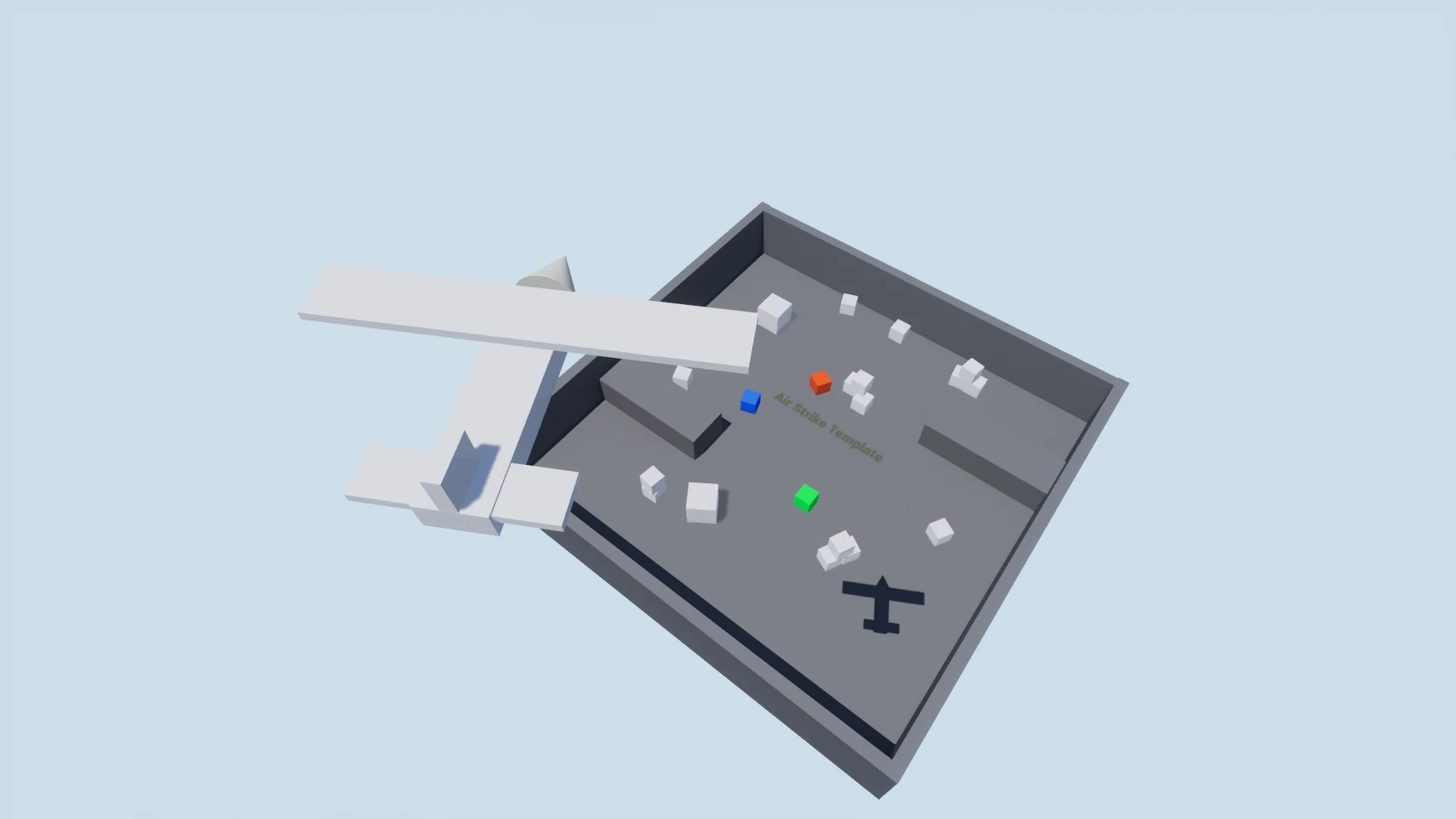
Fire support in most projects is a set piece. A designer drops a trigger volume, wires a sequence, and the player walks into it at the moment the level intends. The plane arrives on schedule and never on request. Air Strike reverses that arrangement: the player spawns the plane, and the target is a location they select on the mini map instead of a marker buried somewhere in the level.
That one change moves the decision into the middle of an encounter. The mini map stops being a navigation readout and becomes the interface for calling in support. What used to be an authored moment becomes an action the player initiates, aimed at a spot they picked themselves, with a plane arriving over that location to bomb it or drop supplies onto it.
An Air Strike That Drops Whatever You Point It At
The system is not tied to a single payload. A drop delivers a selected actor, and the examples given are a bomb and an ammo box — one offensive, one logistical. That pairing says a lot about how the mechanic reads in play. The same call-in can be an attack on a position or a resupply of a friendly one, and the only thing that changes is which actor the plane releases.
Bombs, Ammo Boxes, and Other Selected Actors
Because the payload is an actor rather than a baked-in effect, the call-in inherits its meaning from what it carries. A plane that releases a bomb reads as a strike. A plane that releases an ammo box reads as support. Between those two poles, most of the practical ground a call-in feature needs is already covered, and any other actor in the project is eligible for the same treatment once it is pointed at.
This is the part that keeps the feature from becoming scenery. If the payload is a variable in the setup rather than a fixed piece of content, then a mission that needs a different result does not need a different system — it needs a different actor.
Air Strike Logic Built Entirely in Blueprints
Everything in the package is Blueprint-based; the feature list puts it at 100% Blueprints. Nothing in the workflow requires stepping outside the visual scripting environment to read, adjust, or extend what is there. For a team already working in Blueprints, the plane spawn, the drop, and the mini map selection stay open to inspection — the logic can be followed node by node rather than treated as a black box.
Setup is described as easy, and that is the practical counterpart to a Blueprint-only build. Three things have to line up: the selection step on the mini map, the spawned plane, and the actor that leaves it. A designer can get a working call-in in place and then reopen the graph to change the order of events, the actor being delivered, or the way the marked location is translated into an arrival point.
Blueprint-only also decides who can maintain the feature after the first pass. The person who wires it up in the editor can come back to it later without a code review, a build step, or a programmer's calendar. On a small team that difference is often the whole argument.
Tuning the Air Strike Without Rewriting It
Customization is called out as high, and payload selection is the clearest place to see it. Swapping the delivered actor changes the entire character of the call. An attack run becomes a resupply, or a resupply becomes an attack run, and the arrival and selection flow stay as they were.
The second tuning surface is the location itself. Since the target comes from the mini map, the questions a designer will ask are about precision — how tight the chosen point is, how the plane's arrival relates to it, and whether the marked spot is read as a point or as an area. Those are the dials worth reaching for when the call-in needs to feel more forgiving in one mission and more demanding in the next.
Both of these live inside the Blueprint setup rather than behind a content pack. That is what makes the customization claim hold up: the feature is meant to be adjusted in place, on the project's own terms, instead of being adopted as-is or replaced.
Multiplayer and Mobile Air Strike Support
Multiplayer support is listed, and the mechanic suits it. A call-in that one player requests and everyone else watches is a shared event rather than a private effect, which puts weight on where the plane and the drop are seen to happen. A strike that reads clearly to the player who called it and to the players standing nearby is doing the job the feature is built for.
Mobile support is listed as well, and it changes how the mini map step should be read. A selection made on a touchscreen carries different constraints than one made with a mouse or a stick, and having mobile in scope means the call-in is meant to survive that input model rather than assume a desktop setup with a cursor and a keyboard.
Taken together, those two lines set the audience for the feature: matches with more than one player in them, on hardware that is not necessarily a PC.
Where the Call-In Sits in a Production
Air Strike is a single mechanic, packaged whole. It covers the request, the spawn, and the delivery, and it stops there rather than trying to be a combat framework. That scope is what makes it easy to place in a project: a mission type that needs player-requested support — a defense that hinges on resupply, an assault that hinges on a bombing run — can be built on top of it without the team first building the call-in themselves.
The practical takeaway is about ordering. Get the drop location selection working against the project's mini map first, because that is the step every other part depends on. Then point the payload at the actor the mission actually needs. Everything else — the plane, the arrival, the multiplayer visibility, the mobile input path — hangs off those two decisions, and in a Blueprint-only system both of them are a short walk from the graph you already have open.
 Gameplay Features
 Gameplay Features
 Gameplay Features