"95fdaf16012263fa"{"id":"1002307","slug":"battle-royale-air-drop","title":"Battle Royale - Air Drop","category":"Gameplay Features","engine":"4.27+,5.0+","assetVersion":"","engineVersion":"Engine Version: 4.27+,5.0+","tag":"Gameplay Features","accent":"blue","visual":"mech","summary":"A Blueprint-driven air drop system for battle royale matches, with control over zone radius, fall height, fall speed, box types and drop timing, plus full multi","platform":"Unreal Engine","indexPolicy":"index","publishedAt":"2026-11-06T06:10:17.528Z","updatedAt":"2026-11-06T06:10:17.528Z","sourceNotes":[],"fileContents":[],"compatibility":["Unreal Engine","Engine Version: 4.27+,5.0+"],"featuredImage":{"alt":"Battle Royale - Air Drop","src":"/wp-content/uploads/published/2026/11/de9cd9d41c3c-11b29b44-ad2d-4d8a-a160-2ecef28e6ee1-6cf82fcd83.webp"},"hasDownloadLink":true,"downloads":0,"terms":[{"taxonomy":"category","slug":"gameplay-features","name":"Gameplay Features"}],"galleryImages":[{"src":"/wp-content/uploads/published/2026/11/e9126294e5a7-f8f6959a-62bf-4784-bc5f-50543de9a092-7de02eb21d.webp","alt":"Battle Royale - Air Drop"},{"src":"/wp-content/uploads/published/2026/11/bce31ba5dc3e-6cc211cd-e62d-487d-b33a-95f9188465f8-5d3866d516.webp","alt":"Battle Royale - Air Drop"},{"src":"/wp-content/uploads/published/2026/11/d23ba0902ce3-9b949c69-397d-435b-bf59-f980bf832bc9-afcb91fafe.webp","alt":"Battle Royale - Air Drop"},{"src":"/wp-content/uploads/published/2026/11/676bd27f453b-bc86ec3c-89b9-4461-a423-e8aa7d91f43e-f591f9cf21.webp","alt":"Battle Royale - Air Drop"},{"src":"/wp-content/uploads/published/2026/11/364b50231032-3be8ec26-8747-49d2-830b-2f5b5483e6e9-b618efaceb.webp","alt":"Battle Royale - Air Drop"}],"accessPanel":{"kind":"resource","title":"Get this resource","eyebrow":"Free resource","message":"3DCGHUB is the service provider for this listing. Access is fulfilled through the official publisher channel.","fileName":"Battle Royale - Air Drop.7z","safetyNote":"Resources are manually reviewed before listing to improve quality and reduce obvious risks.","actionLabel":"Get this resource","resourceType":"Resource archive","versions":[]},"contentHtml":"\u003ch2\u003eLoot that arrives from above, in a map that expects it\u003c/h2\u003e\n\u003cp\u003eA battle royale match keeps re-deciding where players should be, and a supply drop is one of the few events that redirects that decision mid-round. Battle Royale - Air Drop supplies the event itself: boxes descend into the level, and the scramble for them becomes part of the match. The format it targets is the one players already know from titles like FNBR and PUBG, where a crate in the open is worth more attention than any marker on the map.\u003c/p\u003e\n\u003cp\u003eThis is a script asset, not a model pack. The work it performs happens during play rather than in the editor viewport, which shifts where the effort goes on your side. A crate mesh can be placed in a scene quickly; the behaviour surrounding it — where it lands, how long players wait, which boxes come down and how often — is what actually manufactures the moment. The controls here stay focused on that delivery layer: where, how high, how fast, what kind, and on what schedule. Everything else about your map remains yours to define.\u003c/p\u003e \u003ch2\u003eRadius, fall height and fall speed set the shape of a drop\u003c/h2\u003e\n\u003cp\u003eThree values define the physical character of every drop, and each one changes how a match reads.\u003c/p\u003e\n\u003cp\u003eThe radius of the zone sets the area the boxes are distributed into. A tight radius pulls the drop into something close to a single point, and a landing zone that concentrated turns into a fight almost immediately. Widen it and the same drop becomes a spread of separate objectives, each one a smaller contest rather than one large one. Since the value is exposed, the same asset can produce both readings in different matches or on different parts of the map.\u003c/p\u003e\n\u003cp\u003eThe height the boxes fall from, and the speed at which they fall, work as a pair. Altitude buys visibility: boxes dropping from higher up give players more time to see them, orient toward them and decide whether the trip is worth it. Speed trims that window back down. Run a high release with a slow descent and you get a long, legible approach that players can plan around; bring the release lower or push the speed up and the drop becomes a shorter notice event that rewards whoever was already nearby. Adjusting both together is how you move a drop between those two extremes without touching anything else in the system.\u003c/p\u003e \u003ch2\u003eChoosing between a fixed cadence and randomised boxes\u003c/h2\u003e\n\u003cp\u003eScheduling is handled in two distinct ways, and the list of box types can be randomised independently of either.\u003c/p\u003e\n\u003cp\u003eRandomising the types of boxes means consecutive drops do not have to arrive looking the same. If your project distinguishes between crate variants — and the lootbox framing suggests it might — that variation can be left to the system rather than authored by hand for every drop.\u003c/p\u003e\n\u003cp\u003eThe timing side gives you a choice of control style. You can set a fixed time for falling boxes, which produces a dependable rhythm that players can learn and plan around; drops arrive on a schedule and the map develops a predictable pulse. Or you can set a random gap between the drop boxes together with the number of boxes, which loosens that rhythm considerably. The number of boxes controls how much of an event each drop is, while the random gap keeps players from timing it. Both approaches sit in the same set of settings, so switching between a scripted-feeling match and a more unpredictable one does not require swapping assets.\u003c/p\u003e \u003ch2\u003eFull multiplayer support for a shared event\u003c/h2\u003e\n\u003cp\u003eAn air drop is inherently communal — a box that only one client can see is not a drop at all. The system carries full multiplayer support, which is the baseline requirement for anything that makes players converge on the same location at the same time. Because the radius, height, speed, box selection and timing are all configurable parameters rather than baked-in behaviour, the drop behaviour you tune is the behaviour that runs in a networked match.\u003c/p\u003e \u003ch2\u003eHow it sits beside the rest of a battle royale toolkit\u003c/h2\u003e\n\u003cp\u003eThe drop is one component in a wider set the creator has produced for this genre: Battle Royale - Zone, Kill Feed, Circle Damage Indicator Component, Damage Text, AI Turret Component, Drivable Submarine with buoyancy, and Drivable Boat. A demo and tutorial video accompanies the drop asset, which is useful for seeing the fall parameters in motion before deciding how to set your own.\u003c/p\u003e\n\u003cp\u003eRead as a group, those pieces map onto the recurring events of a match — the shrinking play area, the notification layer, the incoming damage feedback, the vehicles, and now the sky-borne crate. If your project already handles the circle or the kill feed, the drop slots in as another event of the same kind rather than as a separate framework to reconcile. Its settings are self-contained: the zone value describes the drop's own landing area, and no dependency on the other systems is implied by the parameters listed.\u003c/p\u003e \u003ch2\u003eWhere it earns its place in a project\u003c/h2\u003e\n\u003cp\u003eReach for this when the map needs a second reason for players to move — something that creates a location worth crossing open ground for, and does so on a schedule you can shape. The three physical values let you decide whether a drop is a slow, widely visible invitation or a fast, local surprise. The two timing modes let you decide whether players can learn the rhythm or have to react to it. Randomised box types keep the deliveries from looking identical.\u003c/p\u003e\n\u003cp\u003eIf your battle royale build already has a circle, a kill feed and damage feedback in place, the air drop is a natural next event to add: the parameters are exposed, the multiplayer requirement is covered, and the behaviour you tune in the editor is the behaviour that plays out when the boxes start coming down.\u003c/p\u003e\n\n\u003ch2\u003eRelated Resources Worth Checking\u003c/h2\u003e\n\u003cul\u003e\n\u003cli\u003e\u003ca href=\"https://3dcghub.com/inventory-for-battle-royale-v1-1/\" rel=\"noopener noreferrer\"\u003eInventory for Battle Royale v1.1\u003c/a\u003e\u003c/li\u003e\n\u003cli\u003e\u003ca href=\"https://3dcghub.com/battle-royale-zone-with-minimap/\" rel=\"noopener noreferrer\"\u003eBattle Royale Zone With Minimap\u003c/a\u003e\u003c/li\u003e\n\u003cli\u003e\u003ca href=\"https://3dcghub.com/smart-traffic-light/\" rel=\"noopener noreferrer\"\u003eSmart Traffic Light\u003c/a\u003e\u003c/li\u003e\n\u003cli\u003e\u003ca href=\"https://3dcghub.com/advanced-battle-royale-template/\" rel=\"noopener noreferrer\"\u003eAdvanced Battle Royale Template\u003c/a\u003e\u003c/li\u003e\n\u003cli\u003e\u003ca href=\"https://3dcghub.com/smart-cable-connector/\" rel=\"noopener noreferrer\"\u003eSmart Cable Connector\u003c/a\u003e\u003c/li\u003e\n\u003c/ul\u003e","contentTextLength":5809,"navigation":{"current":61,"total":4291,"previous":{"id":"1002308","slug":"bullet-hole-decals","title":"Bullet Hole Decals","category":"Damage \u0026 Grunge","platform":"Unreal Engine","updatedAt":"2026-11-06T06:11:21.207Z"},"next":{"id":"1002285","slug":"eduquill-for-unreal-engine","title":"EduQuill for Unreal Engine – Safe Imports and Project Health Toolkit (UE 5.8)","category":"Engine Tools","platform":"Unreal Engine","updatedAt":"2026-11-05T13:26:47.761Z"}},"relatedResources":[{"id":"1001640","slug":"inventory-for-battle-royale-v1-1","title":"Inventory for Battle Royale v1.1","category":"Gameplay Features","engine":"4.26+,5.0+","assetVersion":"","engineVersion":"Engine Version: 4.26+,5.0+","tag":"Gameplay Features","accent":"blue","visual":"mech","summary":"Explore Inventory for Battle Royale v1.1, featuring networked inventory, loot chests, crafting, health and shield mechanics, and clean Blueprints.","platform":"Unreal Engine","indexPolicy":"index","publishedAt":"2026-10-13T02:22:40.598Z","updatedAt":"2026-10-13T02:22:40.598Z","sourceNotes":[],"fileContents":[],"compatibility":["Unreal Engine","Engine Version: 4.26+,5.0+"],"featuredImage":{"alt":"Inventory for Battle Royale v1.1","src":"/wp-content/uploads/published/2026/10/9ecef3719bb5-7767b398-2c33-4015-875a-cae5683083b3-48dc8d86af.webp"},"hasDownloadLink":true,"downloads":0},{"id":"10577","slug":"battle-royale-zone-with-minimap","title":"Battle Royale Zone With Minimap","category":"Gameplay Features","engine":"4.27,5.0+","assetVersion":"Engine version: 4.27,5.0+","engineVersion":"4.23","tag":"Gameplay Features","accent":"blue","visual":"audio","summary":"Enhance your survival game with a Battle Royale Zone With Minimap system that tracks zone transitions and actor locations at runtime. This tool includes a configurable zone and an interactive overview map.","platform":"Unreal Engine","indexPolicy":"index","publishedAt":"2026-03-03T15:45:05.000Z","updatedAt":"2026-04-19T15:49:59.000Z","sourceNotes":[],"fileContents":[],"compatibility":["Unreal Engine","Engine version: 4.27,5.0+"],"featuredImage":{"alt":"Battle Royale Zone With Minimap","src":"https://3dcghub.com/wp-content/uploads/2026/03/17fb69dc-4ff9-487a-ba07-954a7ee7931e.webp"},"hasDownloadLink":true,"downloads":0},{"id":"1002309","slug":"cargo-delivery-inventory-system","title":"Cargo Delivery Inventory System","category":"Gameplay Features","engine":"4.23+,5.0+","assetVersion":"","engineVersion":"Engine Version: 4.23+,5.0+","tag":"Gameplay Features","accent":"blue","visual":"mech","summary":"A blueprint-based cargo delivery pack where packages drop into a level, tune through parameters, extend through child blueprints, and show visible damage.","platform":"Unreal Engine","indexPolicy":"index","publishedAt":"2026-11-06T06:12:19.870Z","updatedAt":"2026-11-06T06:12:19.870Z","sourceNotes":[],"fileContents":[],"compatibility":["Unreal Engine","Engine Version: 4.23+,5.0+"],"featuredImage":{"alt":"Cargo Delivery Inventory System","src":"/wp-content/uploads/published/2026/11/9b565f7ba538-fb653dc4-f641-43c0-891e-61f4d06392f9-691b2ad221.webp"},"hasDownloadLink":true,"downloads":0}]}
Gameplay Features
Battle Royale - Air Drop
A Blueprint-driven air drop system for battle royale matches, with control over zone radius, fall height, fall speed, box types and drop timing, plus full multi
Loot that arrives from above, in a map that expects it
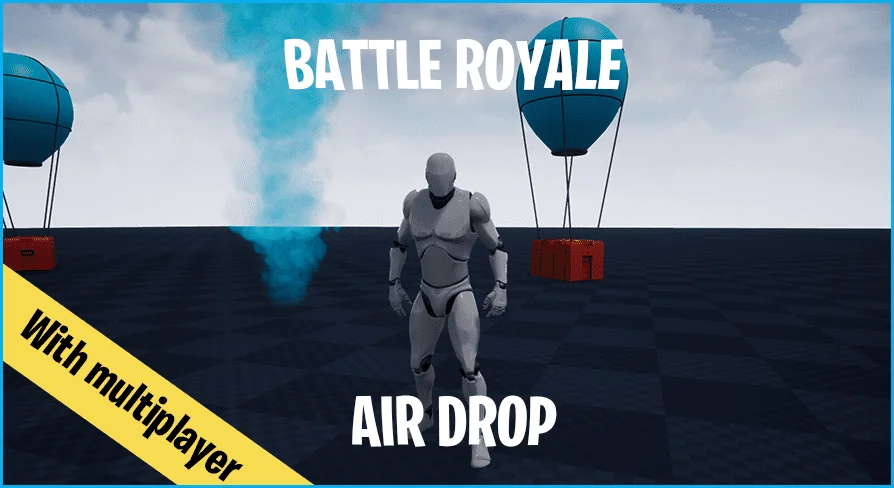
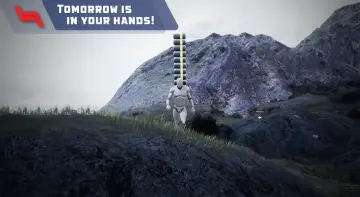
A battle royale match keeps re-deciding where players should be, and a supply drop is one of the few events that redirects that decision mid-round. Battle Royale - Air Drop supplies the event itself: boxes descend into the level, and the scramble for them becomes part of the match. The format it targets is the one players already know from titles like FNBR and PUBG, where a crate in the open is worth more attention than any marker on the map.
This is a script asset, not a model pack. The work it performs happens during play rather than in the editor viewport, which shifts where the effort goes on your side. A crate mesh can be placed in a scene quickly; the behaviour surrounding it — where it lands, how long players wait, which boxes come down and how often — is what actually manufactures the moment. The controls here stay focused on that delivery layer: where, how high, how fast, what kind, and on what schedule. Everything else about your map remains yours to define.
Radius, fall height and fall speed set the shape of a drop
Three values define the physical character of every drop, and each one changes how a match reads.
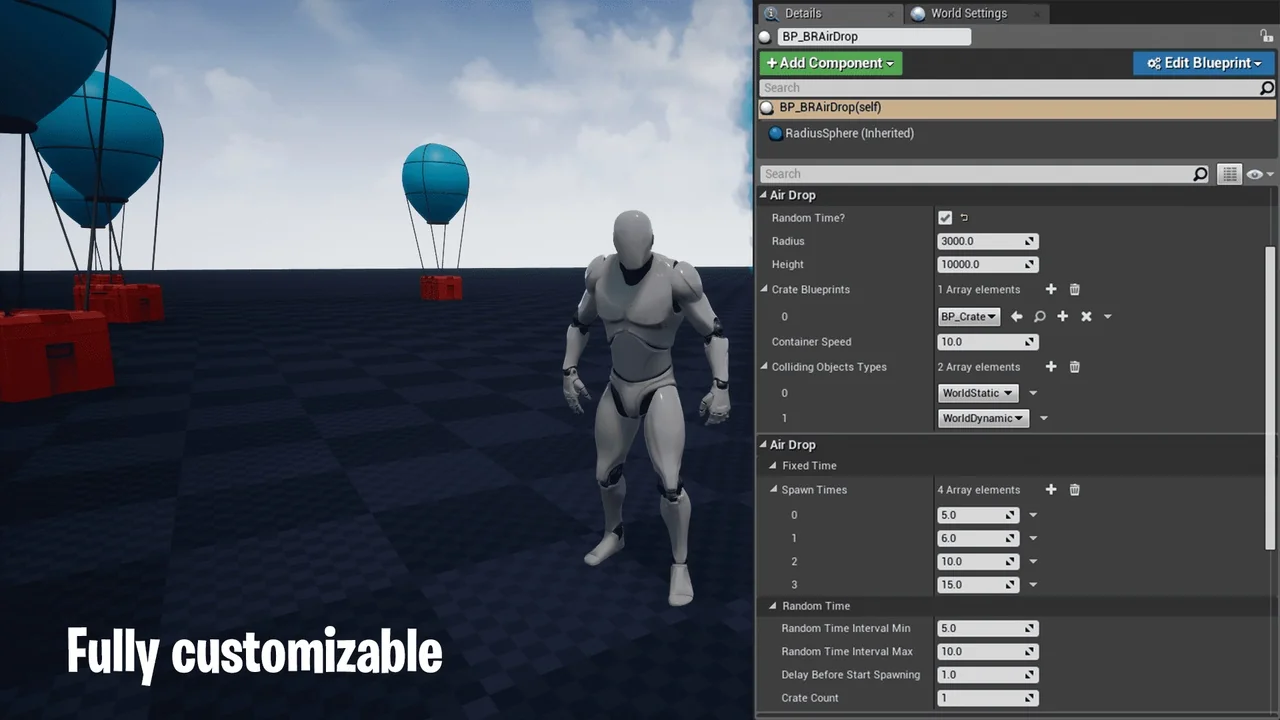
The radius of the zone sets the area the boxes are distributed into. A tight radius pulls the drop into something close to a single point, and a landing zone that concentrated turns into a fight almost immediately. Widen it and the same drop becomes a spread of separate objectives, each one a smaller contest rather than one large one. Since the value is exposed, the same asset can produce both readings in different matches or on different parts of the map.
The height the boxes fall from, and the speed at which they fall, work as a pair. Altitude buys visibility: boxes dropping from higher up give players more time to see them, orient toward them and decide whether the trip is worth it. Speed trims that window back down. Run a high release with a slow descent and you get a long, legible approach that players can plan around; bring the release lower or push the speed up and the drop becomes a shorter notice event that rewards whoever was already nearby. Adjusting both together is how you move a drop between those two extremes without touching anything else in the system.
Choosing between a fixed cadence and randomised boxes
Scheduling is handled in two distinct ways, and the list of box types can be randomised independently of either.
Randomising the types of boxes means consecutive drops do not have to arrive looking the same. If your project distinguishes between crate variants — and the lootbox framing suggests it might — that variation can be left to the system rather than authored by hand for every drop.
The timing side gives you a choice of control style. You can set a fixed time for falling boxes, which produces a dependable rhythm that players can learn and plan around; drops arrive on a schedule and the map develops a predictable pulse. Or you can set a random gap between the drop boxes together with the number of boxes, which loosens that rhythm considerably. The number of boxes controls how much of an event each drop is, while the random gap keeps players from timing it. Both approaches sit in the same set of settings, so switching between a scripted-feeling match and a more unpredictable one does not require swapping assets.
Full multiplayer support for a shared event
An air drop is inherently communal — a box that only one client can see is not a drop at all. The system carries full multiplayer support, which is the baseline requirement for anything that makes players converge on the same location at the same time. Because the radius, height, speed, box selection and timing are all configurable parameters rather than baked-in behaviour, the drop behaviour you tune is the behaviour that runs in a networked match.
How it sits beside the rest of a battle royale toolkit
The drop is one component in a wider set the creator has produced for this genre: Battle Royale - Zone, Kill Feed, Circle Damage Indicator Component, Damage Text, AI Turret Component, Drivable Submarine with buoyancy, and Drivable Boat. A demo and tutorial video accompanies the drop asset, which is useful for seeing the fall parameters in motion before deciding how to set your own.
Read as a group, those pieces map onto the recurring events of a match — the shrinking play area, the notification layer, the incoming damage feedback, the vehicles, and now the sky-borne crate. If your project already handles the circle or the kill feed, the drop slots in as another event of the same kind rather than as a separate framework to reconcile. Its settings are self-contained: the zone value describes the drop's own landing area, and no dependency on the other systems is implied by the parameters listed.
Where it earns its place in a project
Reach for this when the map needs a second reason for players to move — something that creates a location worth crossing open ground for, and does so on a schedule you can shape. The three physical values let you decide whether a drop is a slow, widely visible invitation or a fast, local surprise. The two timing modes let you decide whether players can learn the rhythm or have to react to it. Randomised box types keep the deliveries from looking identical.
If your battle royale build already has a circle, a kill feed and damage feedback in place, the air drop is a natural next event to add: the parameters are exposed, the multiplayer requirement is covered, and the behaviour you tune in the editor is the behaviour that plays out when the boxes start coming down.
 Gameplay Features
 Gameplay Features
 Gameplay Features
 Gameplay Features