"216a1d817ec3ca8a"{"id":"1002285","slug":"eduquill-for-unreal-engine","title":"EduQuill for Unreal Engine – Safe Imports and Project Health Toolkit (UE 5.8)","category":"Engine Tools","engine":"UE 5.8","assetVersion":"1.1.0","engineVersion":"UE 5.8","tag":"Engine Tools","accent":"blue","visual":"mech","summary":"EduQuill for Unreal Engine: reviewed imports and project health checks. Current build is UE 5.8 on Windows x64; UE 5.7, 5.6 and 5.4 builds are planned.","platform":"Unreal Engine","indexPolicy":"index","publishedAt":"2026-11-03T16:15:25.353Z","updatedAt":"2026-11-05T13:26:47.761Z","sourceNotes":[],"fileContents":[],"compatibility":["Unreal Engine","Engine version: 5.8","Windows x64","Service: 3DCGHUB"],"featuredImage":{"alt":"Project Doctor: findings with the reason, impact and a preview of each fix","src":"/wp-content/uploads/published/2026/11/4-project-doctor-caaffab62c.png"},"hasDownloadLink":false,"downloads":0,"terms":[{"taxonomy":"category","slug":"engine-tools-tools-and-plugins","name":"Engine Tools"}],"galleryImages":[{"src":"/wp-content/uploads/published/2026/11/4-review-content-pack-5500e4ed87.png","alt":"Import review: what the download is, its engine and the plugins it needs"},{"src":"/wp-content/uploads/published/2026/11/07-texture-stats-dc31ee1b2d.png","alt":"Texture Statistics with one-click compression, streaming and size limits"},{"src":"/wp-content/uploads/published/2026/11/03-performance-7f8d2fbcf0.png","alt":"Performance: the largest assets in the package and content cooked although nothing uses it"},{"src":"/wp-content/uploads/published/2026/11/04-build-check-ebb46a355d.png","alt":"Pre-build Check: release hazards caught before the cook"},{"src":"/wp-content/uploads/published/2026/11/05-asset-cleaner-d5651e5110.png","alt":"Asset Cleaner: unused assets, what is safe to remove and what needs a look"},{"src":"/wp-content/uploads/published/2026/11/08-channel-packer-9465ccacfb.png","alt":"Channel Packer: ORM maps packed inside the engine"},{"src":"/wp-content/uploads/published/2026/11/09-placement-73f02fb712.png","alt":"Placement: drop props with physics, randomize them and line them up"}],"accessPanel":{"href":"https://eduquill.com/bridge","kind":"resource","versions":[{"href":"https://eduquill.com/bridge","note":"Current public build (1.1.0)","label":"Unreal Engine 5.8","engine":"5.8","status":"available","platform":"Windows x64"},{"note":"Build not released yet","label":"Unreal Engine 5.7","engine":"5.7","status":"planned","platform":"Windows x64"},{"note":"Build not released yet","label":"Unreal Engine 5.6","engine":"5.6","status":"planned","platform":"Windows x64"},{"note":"Build not released yet","label":"Unreal Engine 5.4","engine":"5.4","status":"planned","platform":"Windows x64"}],"safetyNote":"3DCGHUB handles the listing and service; access is fulfilled through the official publisher channel.","actionLabel":"Get this resource","resourceType":"Unreal Engine plugin","eyebrow":"Free resource","title":"Get this resource","message":"3DCGHUB is the service provider for this listing. Access is fulfilled through the official publisher channel.","fileName":""},"contentHtml":"\u003cp\u003eEduQuill for Unreal Engine is an editor plugin that does two jobs inside the editor: it brings project files into your project safely, and it checks the whole project for the problems that usually show up too late, such as oversized textures, Blueprints that tick every frame, test maps headed for the build and missing translations.\u003c/p\u003e\n\u003cp\u003eThe current public build targets \u003cstrong\u003eUnreal Engine 5.8 on Windows x64\u003c/strong\u003e. Builds for UE 5.7, 5.6 and 5.4 are planned and are shown as not released yet; this page does not offer a file before that build exists.\u003c/p\u003e\n\u003cp\u003e\u003cstrong\u003eService note:\u003c/strong\u003e 3DCGHUB is the service provider for this listing. Access is fulfilled through the official publisher channel.\u003c/p\u003e\n\n\u003ch2\u003eImports you can review before anything is written\u003c/h2\u003e\n\u003cp\u003ePaste a share link, pick a file from your EduQuill workspace or open a saved link. The plugin imports in resumable, checksum-verified chunks, unpacks the archive (split archives such as .part1.rar, .7z.001 and .z01 too) and then shows a review before it writes a single file:\u003c/p\u003e\n\u003cul\u003e\n\u003cli\u003e\u003cstrong\u003eWhat the file is:\u003c/strong\u003e a content pack, a plugin, a complete project or loose assets.\u003c/li\u003e\n\u003cli\u003e\u003cstrong\u003eWhich engine saved it\u003c/strong\u003e, compared with the editor you have open.\u003c/li\u003e\n\u003cli\u003e\u003cstrong\u003eWhich plugins it needs.\u003c/strong\u003e Installed-but-disabled plugins can be switched on after a backup of the project file; missing ones are listed.\u003c/li\u003e\n\u003cli\u003e\u003cstrong\u003eWhere each item goes.\u003c/strong\u003e Content packs go into Content, plugins into Plugins, and a complete project opens in its own folder instead of being merged into yours.\u003c/li\u003e\n\u003c/ul\u003e\n\u003cp\u003eExisting files are never overwritten unless you choose to replace them.\u003c/p\u003e\n\n\u003ch2\u003eA health check for the whole project\u003c/h2\u003e\n\u003cp\u003eThe \u003cstrong\u003eHealth\u003c/strong\u003e page runs every check in one pass and gives the project a score, the findings per page and the most expensive problems first. Scans never change the project.\u003c/p\u003e\n\u003cul\u003e\n\u003cli\u003e\u003cstrong\u003eProject Doctor:\u003c/strong\u003e oversized and non-power-of-two textures, unused assets, missing Nanite or LODs on high-poly meshes, oversized lights and duplicate meshes, text not ready for localization and broken references in Data Tables. Each finding explains why it matters and previews the fix.\u003c/li\u003e\n\u003cli\u003e\u003cstrong\u003eScene Doctor:\u003c/strong\u003e static flags, overlapping meshes, LODs and shadow casters in the open level.\u003c/li\u003e\n\u003cli\u003e\u003cstrong\u003ePerformance:\u003c/strong\u003e Blueprints that tick every frame, costly calls such as GetAllActorsOfClass inside Tick, and material permutations that blow up shader counts.\u003c/li\u003e\n\u003cli\u003e\u003cstrong\u003ePre-build Check:\u003c/strong\u003e test maps, staging endpoints, debug switches and Developers folders headed for the build. It runs when a cook starts and stops it on errors, and CI can run it as a commandlet.\u003c/li\u003e\n\u003c/ul\u003e\n\n\u003ch2\u003eOptimize and clean up\u003c/h2\u003e\n\u003cul\u003e\n\u003cli\u003e\u003cstrong\u003eTexture Statistics:\u003c/strong\u003e estimated memory per texture group, pixel format and size, with one-click compression, streaming and size limits for the textures you select. Each fix is checked again afterwards and undone if it did not help.\u003c/li\u003e\n\u003cli\u003e\u003cstrong\u003eResource Audit\u003c/strong\u003e and \u003cstrong\u003ePerformance Capture:\u003c/strong\u003e find the heaviest assets and record frame timings in play, with an on-screen overlay.\u003c/li\u003e\n\u003cli\u003e\u003cstrong\u003eAsset Cleaner\u003c/strong\u003e and \u003cstrong\u003eDisk Usage:\u003c/strong\u003e find unused assets and the folders that take the most space, and clean up without breaking references.\u003c/li\u003e\n\u003c/ul\u003e\n\n\u003ch2\u003eEveryday art tools\u003c/h2\u003e\n\u003cul\u003e\n\u003cli\u003e\u003cstrong\u003eChannel Packer:\u003c/strong\u003e packs ORM maps inside the engine and creates the material instance.\u003c/li\u003e\n\u003cli\u003e\u003cstrong\u003ePhysics Placement:\u003c/strong\u003e selected props fall, tip and pile up in the viewport; keep the result in one undo step or put everything back.\u003c/li\u003e\n\u003c/ul\u003e\n\u003cp\u003eTasks Unreal already does well, such as painting foliage, the Property Matrix and batch renaming, are left to Unreal's own tools.\u003c/p\u003e\n\n\u003ch2\u003eFree and Pro\u003c/h2\u003e\n\u003cp\u003eSigning in, the CC0 browser workspace and every scan are free. One-click fixes, exported reports, the art tools and the command-line version are part of Pro. Plans and current prices are on \u003ca href=\"https://eduquill.com/pricing\" rel=\"noopener noreferrer\"\u003eeduquill.com/pricing\u003c/a\u003e.\u003c/p\u003e\n\n\u003ch2\u003eRequirements and versions\u003c/h2\u003e\n\u003cul\u003e\n\u003cli\u003eUnreal Engine 5.8 on Windows 10 or 11 for the current 1.1.0 build.\u003c/li\u003e\n\u003cli\u003eUE 5.7, 5.6 and 5.4 builds are planned, not released. The version list on this page marks them as unavailable instead of linking to a missing file.\u003c/li\u003e\n\u003cli\u003eA free account is required. Sign-in uses a code you confirm in the browser.\u003c/li\u003e\n\u003cli\u003eThe plugin installs per project and can be removed without touching your assets. It updates itself from inside the editor.\u003c/li\u003e\n\u003c/ul\u003e\n\n\u003ch2\u003eGet this plugin\u003c/h2\u003e\n\u003cp\u003e3DCGHUB handles the listing and service. Access is fulfilled through the official publisher channel. Use the version list on this page for the released 5.8 build; questions and bug reports can be sent from \u003cstrong\u003eFeedback \u0026amp; problems\u003c/strong\u003e inside the plugin window.\u003c/p\u003e","contentTextLength":4237,"navigation":{"current":1,"total":4230,"next":{"id":"1002306","slug":"floors-and-walls-vol-1-photoscanned-textures","title":"Floors and Walls Vol.1 Photoscanned textures","category":"Nature \u0026 Plants","platform":"Unreal Engine","updatedAt":"2026-11-05T10:06:31.464Z"}},"relatedResources":[{"id":"1001169","slug":"safe-pawn","title":"Safe Pawn","category":"Engine Tools","engine":"5.2 - 5.7","assetVersion":"Asset Version: 1.0","engineVersion":"Engine Version: 5.2 - 5.7","tag":"Engine Tools","accent":"blue","visual":"mech","summary":"SafePawn for Unreal Engine 5 modifies the PlayerController to prevent automatic character pawn destruction when players leave persistent world games.","platform":"Unreal Engine","indexPolicy":"index","publishedAt":"2026-09-17T02:11:00.909Z","updatedAt":"2026-09-17T02:11:00.909Z","sourceNotes":[],"fileContents":[],"compatibility":["Unreal Engine","Asset Version: 1.0","Engine Version: 5.2 - 5.7"],"featuredImage":{"alt":"Safe Pawn","src":"/wp-content/uploads/published/2026/09/33a58fdd08cf-4a3c005b-b4e8-43cb-8bc7-9fac8cbc02da-78e913ae1b.webp"},"hasDownloadLink":true,"downloads":1},{"id":"13732","slug":"blend-file-importer","title":"Blend File Importer","category":"Engine Tools","engine":"4.27 - 5.8","assetVersion":"Asset Version: 1.5 - 1.9.4","engineVersion":"Engine version: 4.27 - 5.8","tag":"Engine Tools","accent":"blue","visual":"animation","summary":"The Blend File Importer plugin enables a seamless connection between Blender and Unreal Engine. By allowing direct .blend file imports and automatic re-importing, it significantly speeds up the 3D asset pipeline.","platform":"Unreal Engine","indexPolicy":"index","publishedAt":"2026-03-11T09:51:51.000Z","updatedAt":"2026-07-30T10:55:24.261Z","sourceNotes":[],"fileContents":[],"compatibility":["Unreal Engine","Asset Version: 1.5 - 1.9.4","Engine version: 4.27 - 5.8"],"featuredImage":{"alt":"Blend File Importer","src":"https://3dcghub.com/wp-content/uploads/2026/03/800a0491-1743-4f2e-bd98-be5a1b0d2cae.webp"},"hasDownloadLink":true,"downloads":2},{"id":"14035","slug":"groom-export","title":"Groom Export","category":"Engine Tools","engine":"5.5","assetVersion":"Engine version: 5.5","engineVersion":"Asset Version:1.0","tag":"Engine Tools","accent":"blue","visual":"character","summary":"Groom Export provides a streamlined way to convert engine-based groom files into the abc format. This tool ensures compatibility across different engine versions and resolves previous import issues with Maya.","platform":"Unreal Engine","indexPolicy":"index","publishedAt":"2026-03-11T13:17:17.000Z","updatedAt":"2026-04-19T15:45:55.000Z","sourceNotes":[],"fileContents":[],"compatibility":["Unreal Engine","Engine version: 5.5","Asset Version: 1.0"],"featuredImage":{"alt":"Groom Export","src":"https://3dcghub.com/wp-content/uploads/2026/03/49a11aab-3f78-47ba-88a3-2edc105cc12e.webp"},"hasDownloadLink":true,"downloads":0}]}
Engine Tools
EduQuill for Unreal Engine – Safe Imports and Project Health Toolkit (UE 5.8)
EduQuill for Unreal Engine: reviewed imports and project health checks. Current build is UE 5.8 on Windows x64; UE 5.7, 5.6 and 5.4 builds are planned.
Category:Unreal Engine,Engine ToolsPlatform: Unreal EngineEngine version: 5.8Service: 3DCGHUBPublished: Nov 3, 2026Updated: Nov 5, 2026
Engine Tools
Resource overview
EduQuill for Unreal Engine is an editor plugin that does two jobs inside the editor: it brings project files into your project safely, and it checks the whole project for the problems that usually show up too late, such as oversized textures, Blueprints that tick every frame, test maps headed for the build and missing translations.
The current public build targets Unreal Engine 5.8 on Windows x64. Builds for UE 5.7, 5.6 and 5.4 are planned and are shown as not released yet; this page does not offer a file before that build exists.
Service note: 3DCGHUB is the service provider for this listing. Access is fulfilled through the official publisher channel.
Imports you can review before anything is written
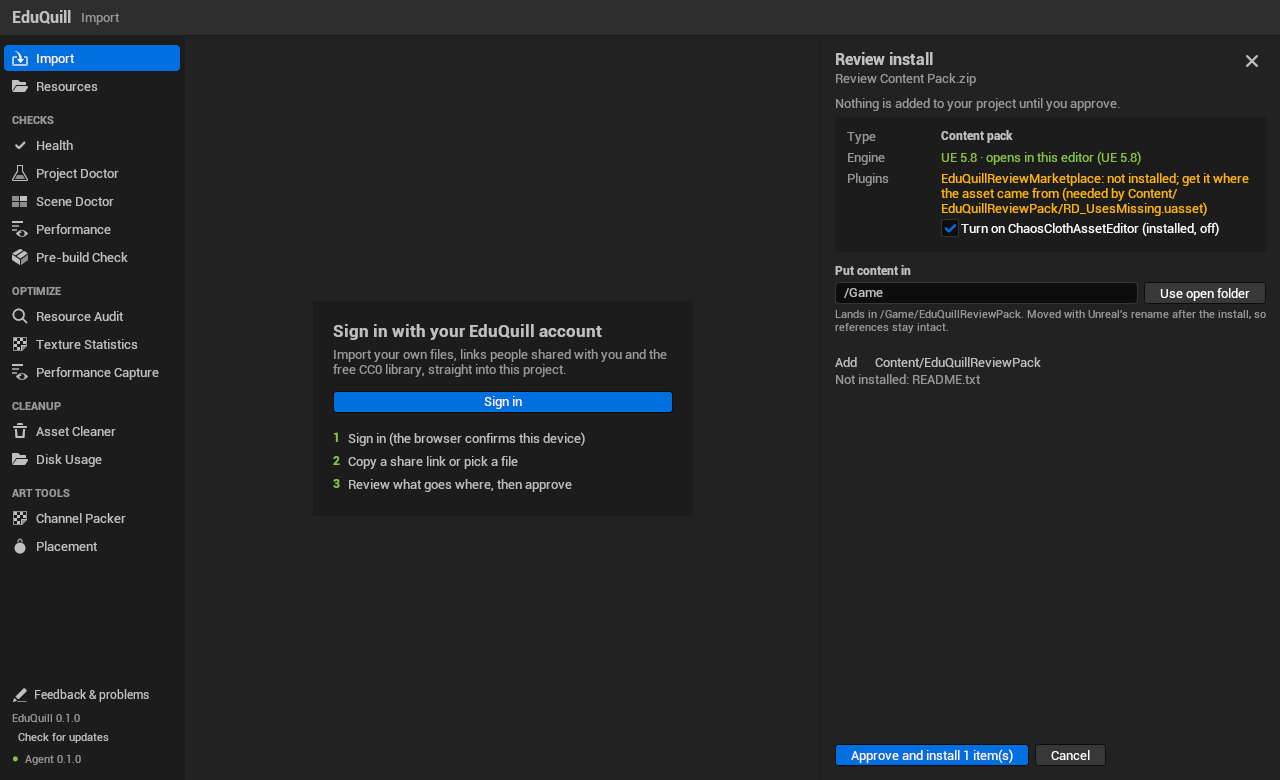
Paste a share link, pick a file from your EduQuill workspace or open a saved link. The plugin imports in resumable, checksum-verified chunks, unpacks the archive (split archives such as .part1.rar, .7z.001 and .z01 too) and then shows a review before it writes a single file:
What the file is: a content pack, a plugin, a complete project or loose assets.
Which engine saved it, compared with the editor you have open.
Which plugins it needs. Installed-but-disabled plugins can be switched on after a backup of the project file; missing ones are listed.
Where each item goes. Content packs go into Content, plugins into Plugins, and a complete project opens in its own folder instead of being merged into yours.
Existing files are never overwritten unless you choose to replace them.
A health check for the whole project
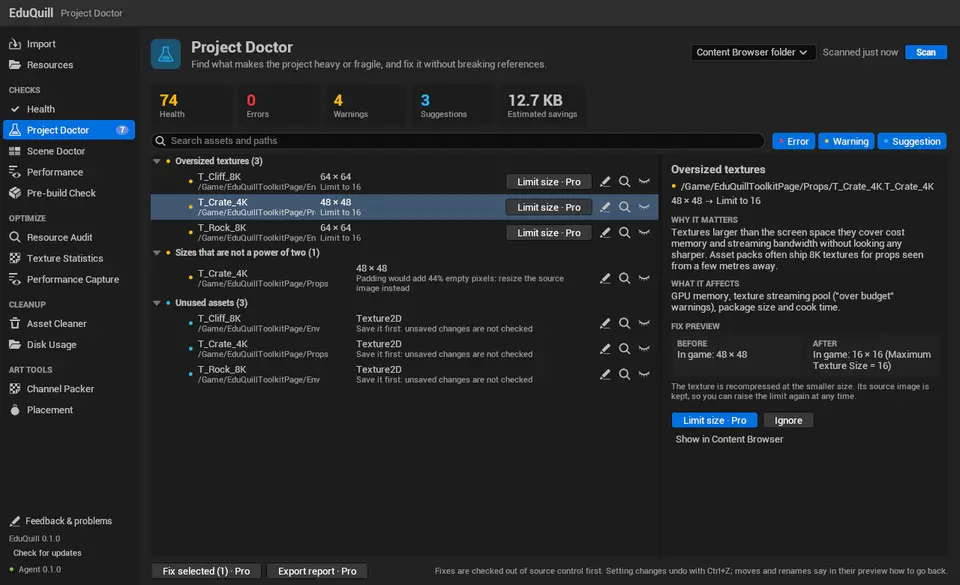
The Health page runs every check in one pass and gives the project a score, the findings per page and the most expensive problems first. Scans never change the project.
Project Doctor: oversized and non-power-of-two textures, unused assets, missing Nanite or LODs on high-poly meshes, oversized lights and duplicate meshes, text not ready for localization and broken references in Data Tables. Each finding explains why it matters and previews the fix.
Scene Doctor: static flags, overlapping meshes, LODs and shadow casters in the open level.
Performance: Blueprints that tick every frame, costly calls such as GetAllActorsOfClass inside Tick, and material permutations that blow up shader counts.
Pre-build Check: test maps, staging endpoints, debug switches and Developers folders headed for the build. It runs when a cook starts and stops it on errors, and CI can run it as a commandlet.
Optimize and clean up
Texture Statistics: estimated memory per texture group, pixel format and size, with one-click compression, streaming and size limits for the textures you select. Each fix is checked again afterwards and undone if it did not help.
Resource Audit and Performance Capture: find the heaviest assets and record frame timings in play, with an on-screen overlay.
Asset Cleaner and Disk Usage: find unused assets and the folders that take the most space, and clean up without breaking references.
Everyday art tools
Channel Packer: packs ORM maps inside the engine and creates the material instance.
Physics Placement: selected props fall, tip and pile up in the viewport; keep the result in one undo step or put everything back.
Tasks Unreal already does well, such as painting foliage, the Property Matrix and batch renaming, are left to Unreal's own tools.
Free and Pro
Signing in, the CC0 browser workspace and every scan are free. One-click fixes, exported reports, the art tools and the command-line version are part of Pro. Plans and current prices are on eduquill.com/pricing.
Requirements and versions
Unreal Engine 5.8 on Windows 10 or 11 for the current 1.1.0 build.
UE 5.7, 5.6 and 5.4 builds are planned, not released. The version list on this page marks them as unavailable instead of linking to a missing file.
A free account is required. Sign-in uses a code you confirm in the browser.
The plugin installs per project and can be removed without touching your assets. It updates itself from inside the editor.
Get this plugin
3DCGHUB handles the listing and service. Access is fulfilled through the official publisher channel. Use the version list on this page for the released 5.8 build; questions and bug reports can be sent from Feedback & problems inside the plugin window.
Preview Gallery
Resource screenshots
7 curated preview images
1 / 7
Free resource
Get this resource
3DCGHUB is the service provider for this listing. Access is fulfilled through the official publisher channel.
 Engine Tools
 Engine Tools
 Engine Tools
 Engine Tools