"95fdaf16012263fa"{"id":"1002309","slug":"cargo-delivery-inventory-system","title":"Cargo Delivery Inventory System","category":"Gameplay Features","engine":"4.23+,5.0+","assetVersion":"","engineVersion":"Engine Version: 4.23+,5.0+","tag":"Gameplay Features","accent":"blue","visual":"mech","summary":"A blueprint-based cargo delivery pack where packages drop into a level, tune through parameters, extend through child blueprints, and show visible damage.","platform":"Unreal Engine","indexPolicy":"index","publishedAt":"2026-11-06T06:12:19.870Z","updatedAt":"2026-11-06T06:12:19.870Z","sourceNotes":[],"fileContents":[],"compatibility":["Unreal Engine","Engine Version: 4.23+,5.0+"],"featuredImage":{"alt":"Cargo Delivery Inventory System","src":"/wp-content/uploads/published/2026/11/9b565f7ba538-fb653dc4-f641-43c0-891e-61f4d06392f9-691b2ad221.webp"},"hasDownloadLink":true,"downloads":0,"terms":[{"taxonomy":"category","slug":"gameplay-features","name":"Gameplay Features"}],"galleryImages":[{"src":"/wp-content/uploads/published/2026/11/19db66edfd26-c7fd76c2-dffc-4770-ad5b-3ea9b6a3b30f-fc7ff924f9.webp","alt":"Cargo Delivery Inventory System"},{"src":"/wp-content/uploads/published/2026/11/ca6c521c0dac-e463d7bc-0806-4f49-bd6c-9a62119e306e-73d3321031.webp","alt":"Cargo Delivery Inventory System"},{"src":"/wp-content/uploads/published/2026/11/36d62b8ea1d5-2b191233-4371-400b-9daf-22780f362442-4bcd098fdf.webp","alt":"Cargo Delivery Inventory System"},{"src":"/wp-content/uploads/published/2026/11/5a3bd6e0d3b6-7b5ac919-8ad5-40db-81c1-dad1feb8507a-eec2e371d9.webp","alt":"Cargo Delivery Inventory System"},{"src":"/wp-content/uploads/published/2026/11/b026745498ac-2937d954-668f-489b-b91a-a87791849464-5880f0685b.webp","alt":"Cargo Delivery Inventory System"},{"src":"/wp-content/uploads/published/2026/11/10df076ad154-7b42bf85-810f-447a-8621-249593a911ff-0d2c8da70f.webp","alt":"Cargo Delivery Inventory System"},{"src":"/wp-content/uploads/published/2026/11/dcbbe351c1f9-7850853f-ca7d-43eb-b039-c129b08bdce7-0f589f7ebb.webp","alt":"Cargo Delivery Inventory System"}],"accessPanel":{"kind":"resource","title":"Get this resource","eyebrow":"Free resource","message":"3DCGHUB is the service provider for this listing. Access is fulfilled through the official publisher channel.","fileName":"Cargo Delivery Inventory System.7z","safetyNote":"Resources are manually reviewed before listing to improve quality and reduce obvious risks.","actionLabel":"Get this resource","resourceType":"Resource archive","versions":[]},"contentHtml":"\u003cp\u003eLoading docks, warehouse yards, a van backed up to a ramp, parcels that slip off a pallet and tumble across concrete — those are the scenes the Cargo Delivery Inventory System is meant to fill. The pack is a blueprint-driven framework for cargo delivery themed games, and everything in it points at one workflow: get packages into a level quickly, then decide how they behave and how they show wear.\u003c/p\u003e \u003cp\u003eThe structure isn't welded to a single game type. It's meant to be dropped into a project and adjusted, with the package carrying the visible state a delivery game actually needs — how beat up the cargo is after the trip.\u003c/p\u003e \u003ch2\u003eDrag, drop, adjust the parameters\u003c/h2\u003e \u003cp\u003ePackages enter a level by drag and drop. Pick a package blueprint, place it where the cargo belongs, open its parameters, change the values. That single cycle covers most of the placement work — no spawner to wire, no custom event chain to get a box sitting on the ground.\u003c/p\u003e \u003cp\u003eModifying parameters is the intended way to vary cargo across a scene. The same blueprint gets reused from placement to placement, and what changes are the exposed values, which keeps level layout and package behavior as separate tasks. The blueprints are described as very easy to use, and keeping adjustments on parameters is a large part of why.\u003c/p\u003e \u003ch2\u003eChild blueprints are how the cargo set grows\u003c/h2\u003e \u003cp\u003eAnything beyond the packages that ship with the pack starts with a child blueprint. Branch off the base package and the new variant inherits the same foundation while taking on whatever the project needs from it. That is the mechanism behind the pack's claim of being infinitely expandable — not a fixed library of cargo types, but a base you copy and modify.\u003c/p\u003e \u003cp\u003eThe modular tag fits the same idea. Each package stands on its own, placeable and tunable without dragging a parallel system along with it, and new pieces come from the same lineage instead of a second framework. For a project expecting more than a handful of cargo types, that distinction separates adding an asset from reworking a system.\u003c/p\u003e \u003ch2\u003eWhat the damage strip puts on screen\u003c/h2\u003e \u003cp\u003ePackages take damage from falling or rolling around. That covers handling rather than scripted events — the fumble off the forklift, the crate that rolls down a slope — and the included package shows the result directly on its surface. A damage strip runs across it and its color changes to reflect the damage taken.\u003c/p\u003e \u003cp\u003eReading condition off the package changes how a delivery scene communicates. Damage is visible in the world instead of tracked somewhere off to the side, and the color shift is what gives all that falling and rolling weight in the first place.\u003c/p\u003e \u003ch2\u003eA demo project, and the rest of the feature set\u003c/h2\u003e \u003cp\u003eA demo project ships alongside the blueprints, and it's the quickest way to see the pieces in the order they matter: packages placed in a scene, parameters set, damage accumulating as they get handled badly. Working from the demo beats guessing at intended values.\u003c/p\u003e \u003cp\u003eBeyond the package damage behavior, the pack carries a wider set of features tied to the delivery theme. Those sit alongside the core loop rather than replacing it — placement, parameter adjustment, and child-blueprint variants stay the center of gravity.\u003c/p\u003e \u003ch2\u003eBlueprint scripting under an adventure framing\u003c/h2\u003e \u003cp\u003eThe pack is tagged Adventure, System, Modular, Advanced, Script, Realistic, Cargo, Inventory, Blueprint. Those labels track what the blueprints actually do:\u003c/p\u003e \u003cul\u003e\n\u003cli\u003eScript and Advanced point to blueprint logic rather than a content-only drop\u003c/li\u003e\n\u003cli\u003eModular matches the child-blueprint structure and the per-package placement\u003c/li\u003e\n\u003cli\u003eRealistic covers the handling — cargo that reacts to being dropped and rolled\u003c/li\u003e\n\u003cli\u003eAdventure and Cargo describe the delivery framing itself\u003c/li\u003e\n\u003c/ul\u003e \u003cp\u003eThe inventory naming points at the package side of the system, the part a player handles rather than the level it sits in.\u003c/p\u003e \u003ch2\u003eA delivery game in a matter of hours\u003c/h2\u003e \u003cp\u003eThe claim attached to the pack is that a delivery game comes together in hours. That follows from the earlier pieces lining up: packages that drop in without wiring, parameters that change behavior without touching graphs, child blueprints that extend the set, and damage feedback that already renders on the model. Each one removes a step someone would otherwise build by hand.\u003c/p\u003e \u003cp\u003eUnderstanding cost stays low too. The blueprints are described as easy to understand as well as easy to use, which counts when a project changes hands or when a second designer needs to place packages without a walkthrough.\u003c/p\u003e \u003cp\u003eThe expansion path stays open in the same way. A delivery game can begin as a few parcels on a dock and grow as more cargo types and handling scenarios get added through child blueprints, without the original package setup needing to be rebuilt.\u003c/p\u003e \u003ch2\u003eWhere the package system earns its place\u003c/h2\u003e \u003cp\u003eReach for this one when the cargo is the gameplay: parcels that get stacked, hauled, dropped, and judged by the state they arrive in. The blueprint foundation, the parameter-driven placement, the child-blueprint variants, and the color-changing damage strip all serve that specific loop, and a project built on handling cargo will find the pieces already in place.\u003c/p\u003e \u003cp\u003eIf the delivery design turns on something outside that loop, you'd be adapting a package system rather than extending one that already fits — worth knowing before the first box gets moved.\u003c/p\u003e\n\n\u003ch2\u003eMore From The Same Workflow\u003c/h2\u003e\n\u003cul\u003e\n\u003cli\u003e\u003ca href=\"https://3dcghub.com/inventory-for-battle-royale-v1-1/\" rel=\"noopener noreferrer\"\u003eInventory for Battle Royale v1.1\u003c/a\u003e\u003c/li\u003e\n\u003cli\u003e\u003ca href=\"https://3dcghub.com/inventory-and-stat-system/\" rel=\"noopener noreferrer\"\u003eInventory and Stat System\u003c/a\u003e\u003c/li\u003e\n\u003cli\u003e\u003ca href=\"https://3dcghub.com/inventory-system-pro-by-moonville/\" rel=\"noopener noreferrer\"\u003eInventory System Pro by Moonville\u003c/a\u003e\u003c/li\u003e\n\u003cli\u003e\u003ca href=\"https://3dcghub.com/pawnshop-system/\" rel=\"noopener noreferrer\"\u003ePawnshop System\u003c/a\u003e\u003c/li\u003e\n\u003cli\u003e\u003ca href=\"https://3dcghub.com/inventory-system/\" rel=\"noopener noreferrer\"\u003eInventory System\u003c/a\u003e\u003c/li\u003e\n\u003c/ul\u003e","contentTextLength":5440,"navigation":{"current":59,"total":4291,"previous":{"id":"1002310","slug":"character-captain","title":"Character Captain","category":"Characters \u0026 Creatures","platform":"Unreal Engine","updatedAt":"2026-11-06T06:13:00.506Z"},"next":{"id":"1002308","slug":"bullet-hole-decals","title":"Bullet Hole Decals","category":"Damage \u0026 Grunge","platform":"Unreal Engine","updatedAt":"2026-11-06T06:11:21.207Z"}},"relatedResources":[{"id":"1001640","slug":"inventory-for-battle-royale-v1-1","title":"Inventory for Battle Royale v1.1","category":"Gameplay Features","engine":"4.26+,5.0+","assetVersion":"","engineVersion":"Engine Version: 4.26+,5.0+","tag":"Gameplay Features","accent":"blue","visual":"mech","summary":"Explore Inventory for Battle Royale v1.1, featuring networked inventory, loot chests, crafting, health and shield mechanics, and clean Blueprints.","platform":"Unreal Engine","indexPolicy":"index","publishedAt":"2026-10-13T02:22:40.598Z","updatedAt":"2026-10-13T02:22:40.598Z","sourceNotes":[],"fileContents":[],"compatibility":["Unreal Engine","Engine Version: 4.26+,5.0+"],"featuredImage":{"alt":"Inventory for Battle Royale v1.1","src":"/wp-content/uploads/published/2026/10/9ecef3719bb5-7767b398-2c33-4015-875a-cae5683083b3-48dc8d86af.webp"},"hasDownloadLink":true,"downloads":0},{"id":"1002065","slug":"inventory-and-stat-system","title":"Inventory and Stat System","category":"Gameplay Features","engine":"5.0+","assetVersion":"","engineVersion":"Engine Version: 5.0+","tag":"Gameplay Features","accent":"blue","visual":"mech","summary":"Examine the Inventory and Stat System, featuring data table storage, DRS stat effects, simple crafting, multi-currency shops, and server-side replication.","platform":"Unreal Engine","indexPolicy":"index","publishedAt":"2026-10-26T15:23:17.162Z","updatedAt":"2026-10-26T15:23:17.162Z","sourceNotes":[],"fileContents":[],"compatibility":["Unreal Engine","Engine Version: 5.0+"],"featuredImage":{"alt":"Inventory and Stat System","src":"/wp-content/uploads/published/2026/10/52b372526cbb-99321cab-8384-4288-92dd-778a616e1b11-4417077d12.webp"},"hasDownloadLink":true,"downloads":1},{"id":"1001617","slug":"inventory-system-pro-by-moonville","title":"Inventory System Pro by Moonville","category":"Gameplay Features","engine":"5.4+","assetVersion":"","engineVersion":"Engine Version: 5.4+","tag":"Gameplay Features","accent":"blue","visual":"mech","summary":"Inventory System Pro delivers a Blueprint-only toolkit featuring uniform and jigsaw grids, survival mechanics, and combat equipment for Unreal Engine.","platform":"Unreal Engine","indexPolicy":"index","publishedAt":"2026-10-11T01:45:57.813Z","updatedAt":"2026-10-11T01:45:57.813Z","sourceNotes":[],"fileContents":[],"compatibility":["Unreal Engine","Engine Version: 5.4+"],"featuredImage":{"alt":"Inventory System Pro by Moonville","src":"/wp-content/uploads/published/2026/10/cff3dc4ff029-f198679a-e82f-4dd8-b6af-a92f2cff2487-78f73d85b7.webp"},"hasDownloadLink":true,"downloads":1}]}
Gameplay Features
Cargo Delivery Inventory System
A blueprint-based cargo delivery pack where packages drop into a level, tune through parameters, extend through child blueprints, and show visible damage.
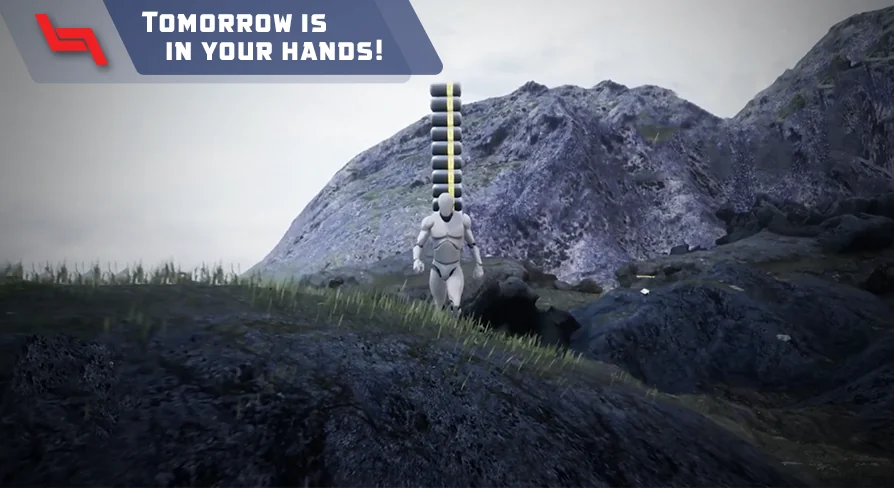
Loading docks, warehouse yards, a van backed up to a ramp, parcels that slip off a pallet and tumble across concrete — those are the scenes the Cargo Delivery Inventory System is meant to fill. The pack is a blueprint-driven framework for cargo delivery themed games, and everything in it points at one workflow: get packages into a level quickly, then decide how they behave and how they show wear.
The structure isn't welded to a single game type. It's meant to be dropped into a project and adjusted, with the package carrying the visible state a delivery game actually needs — how beat up the cargo is after the trip.
Drag, drop, adjust the parameters
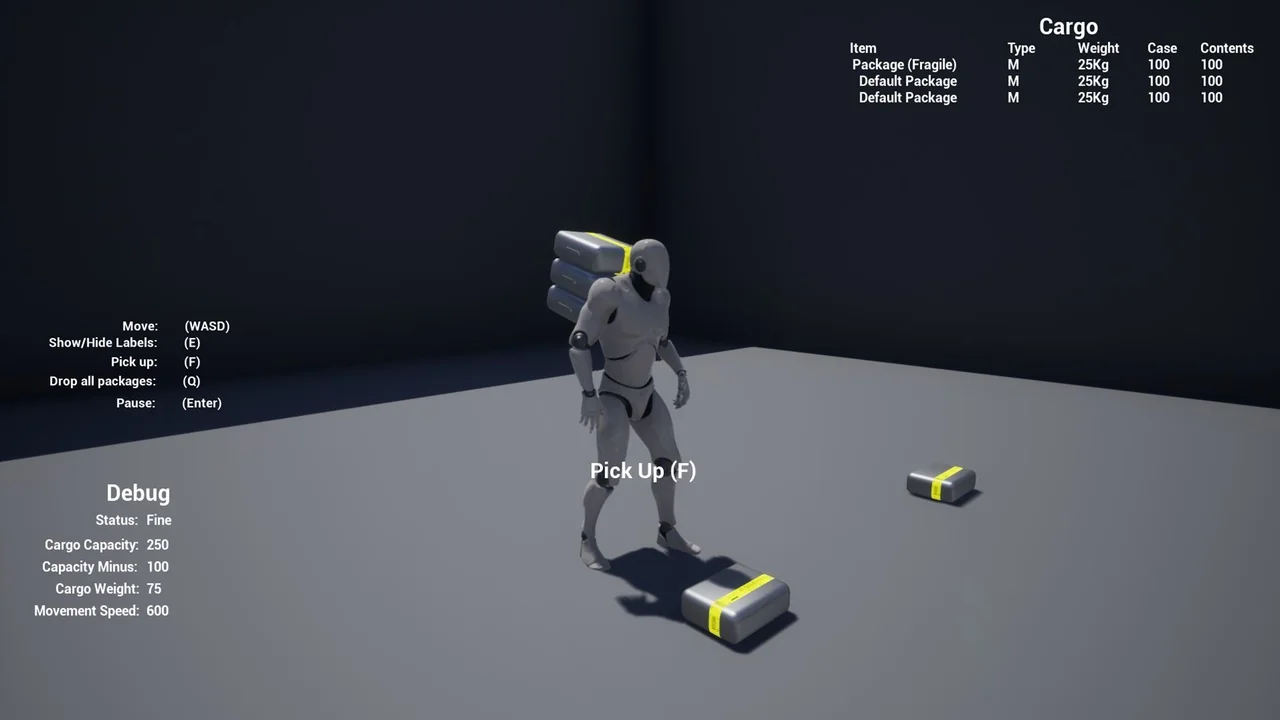
Packages enter a level by drag and drop. Pick a package blueprint, place it where the cargo belongs, open its parameters, change the values. That single cycle covers most of the placement work — no spawner to wire, no custom event chain to get a box sitting on the ground.
Modifying parameters is the intended way to vary cargo across a scene. The same blueprint gets reused from placement to placement, and what changes are the exposed values, which keeps level layout and package behavior as separate tasks. The blueprints are described as very easy to use, and keeping adjustments on parameters is a large part of why.
Child blueprints are how the cargo set grows
Anything beyond the packages that ship with the pack starts with a child blueprint. Branch off the base package and the new variant inherits the same foundation while taking on whatever the project needs from it. That is the mechanism behind the pack's claim of being infinitely expandable — not a fixed library of cargo types, but a base you copy and modify.
The modular tag fits the same idea. Each package stands on its own, placeable and tunable without dragging a parallel system along with it, and new pieces come from the same lineage instead of a second framework. For a project expecting more than a handful of cargo types, that distinction separates adding an asset from reworking a system.
What the damage strip puts on screen
Packages take damage from falling or rolling around. That covers handling rather than scripted events — the fumble off the forklift, the crate that rolls down a slope — and the included package shows the result directly on its surface. A damage strip runs across it and its color changes to reflect the damage taken.
Reading condition off the package changes how a delivery scene communicates. Damage is visible in the world instead of tracked somewhere off to the side, and the color shift is what gives all that falling and rolling weight in the first place.
A demo project, and the rest of the feature set
A demo project ships alongside the blueprints, and it's the quickest way to see the pieces in the order they matter: packages placed in a scene, parameters set, damage accumulating as they get handled badly. Working from the demo beats guessing at intended values.
Beyond the package damage behavior, the pack carries a wider set of features tied to the delivery theme. Those sit alongside the core loop rather than replacing it — placement, parameter adjustment, and child-blueprint variants stay the center of gravity.
Blueprint scripting under an adventure framing
The pack is tagged Adventure, System, Modular, Advanced, Script, Realistic, Cargo, Inventory, Blueprint. Those labels track what the blueprints actually do:
Script and Advanced point to blueprint logic rather than a content-only drop
Modular matches the child-blueprint structure and the per-package placement
Realistic covers the handling — cargo that reacts to being dropped and rolled
Adventure and Cargo describe the delivery framing itself
The inventory naming points at the package side of the system, the part a player handles rather than the level it sits in.
A delivery game in a matter of hours
The claim attached to the pack is that a delivery game comes together in hours. That follows from the earlier pieces lining up: packages that drop in without wiring, parameters that change behavior without touching graphs, child blueprints that extend the set, and damage feedback that already renders on the model. Each one removes a step someone would otherwise build by hand.
Understanding cost stays low too. The blueprints are described as easy to understand as well as easy to use, which counts when a project changes hands or when a second designer needs to place packages without a walkthrough.
The expansion path stays open in the same way. A delivery game can begin as a few parcels on a dock and grow as more cargo types and handling scenarios get added through child blueprints, without the original package setup needing to be rebuilt.
Where the package system earns its place
Reach for this one when the cargo is the gameplay: parcels that get stacked, hauled, dropped, and judged by the state they arrive in. The blueprint foundation, the parameter-driven placement, the child-blueprint variants, and the color-changing damage strip all serve that specific loop, and a project built on handling cargo will find the pieces already in place.
If the delivery design turns on something outside that loop, you'd be adapting a package system rather than extending one that already fits — worth knowing before the first box gets moved.
 Gameplay Features
 Gameplay Features
 Gameplay Features
 Gameplay Features