"95fdaf16012263fa"{"id":"1002310","slug":"character-captain","title":"Character Captain","category":"Characters \u0026 Creatures","engine":"4.18+,5.0+","assetVersion":"","engineVersion":"Engine Version: 4.18+,5.0+","tag":"Characters","accent":"blue","visual":"character","summary":"Character Captain is a lowpoly NPC captain for sea-themed games, with script and Animation Blueprint tags plus a compatibility note for 56 creature animations.","platform":"Unreal Engine","indexPolicy":"index","publishedAt":"2026-11-06T06:13:00.506Z","updatedAt":"2026-11-06T06:13:00.506Z","sourceNotes":[],"fileContents":[],"compatibility":["Unreal Engine","Engine Version: 4.18+,5.0+"],"featuredImage":{"alt":"Character Captain","src":"/wp-content/uploads/published/2026/11/66d000342486-6d157691-6795-48a1-9a2d-ec6f288e887a-66c06219fb.webp"},"hasDownloadLink":true,"downloads":0,"terms":[{"taxonomy":"category","slug":"characters-and-creatures","name":"Characters \u0026 Creatures"}],"galleryImages":[{"src":"/wp-content/uploads/published/2026/11/38c976c920af-010b8e50-4a9f-4c58-a26e-6fd2b738b04c-240003bf07.webp","alt":"Character Captain"},{"src":"/wp-content/uploads/published/2026/11/1540baa0b97f-9901cdc4-d46c-47c2-ae63-e384e689ad8c-87dd947cee.webp","alt":"Character Captain"},{"src":"/wp-content/uploads/published/2026/11/e82532c5b70a-218e8ced-7bc3-42f4-a2bc-7cd9d5129233-aa41f9613e.webp","alt":"Character Captain"},{"src":"/wp-content/uploads/published/2026/11/d2e6b26b167f-75628cf0-c152-46a7-908b-e2fa67af2b39-1bf1430415.webp","alt":"Character Captain"}],"accessPanel":{"kind":"resource","title":"Get this resource","eyebrow":"Free resource","message":"3DCGHUB is the service provider for this listing. Access is fulfilled through the official publisher channel.","fileName":"Content.7z","safetyNote":"Resources are manually reviewed before listing to improve quality and reduce obvious risks.","actionLabel":"Get this resource","resourceType":"Resource archive","versions":[]},"contentHtml":"\u003ch2\u003eA captain placed in sea-themed scenes\u003c/h2\u003e\n\u003cp\u003eCharacter Captain enters a scene as an NPC captain. The stated use is broad: the character can appear in games about the sea and in any scenes. That is a placement proposition first. The tags do not tie the captain to a fixed camera, a single environment, or one scripted moment. They identify a captain character, an NPC role, a lowpoly style, a script, and an Animation Blueprint.\u003c/p\u003e\n\u003cp\u003eScene builders feel the difference between a character and a prop quickly. A captain can occupy deck space, stand at a harbor edge, or hold a background position while the player moves through the environment. The captain does not need to be the center of every shot. Character Captain is positioned for sea-themed games and for any scenes, which leaves the surrounding context to the project.\u003c/p\u003e \u003ch2\u003eWhat the Character Captain tags tell a team\u003c/h2\u003e\n\u003cp\u003eThe tags are Lowpoly, Script, NPC, Captain, Character, and Animation Blueprint. Each narrows the handoff. Lowpoly describes the visual register. NPC describes the role in a scene. Captain gives the character identity. Character is the broad asset class. Script and Animation Blueprint point to the setup layer that a developer should inspect when integrating the captain.\u003c/p\u003e\n\u003cp\u003eThat mix is more specific than a static character model tag alone. A lowpoly captain could be a display piece; the NPC tag places the captain among the characters that populate a scene. The Script tag adds a code-side element to check. The Animation Blueprint tag adds an animation-side element to check. A team can use those tags to route review: character or environment art for the lowpoly form, gameplay or systems for the script, animation for the blueprint.\u003c/p\u003e \u003ch2\u003eAnimation Blueprint and script as implementation points\u003c/h2\u003e\n\u003cp\u003eWhen Character Captain is brought into a project, the Animation Blueprint and script are the first places to look. The Animation Blueprint tag says animation logic is represented in the asset's structure. The Script tag says a code component accompanies the character. Neither tag spells out a particular state machine, a particular behavior tree, or a particular set of inputs. They identify the layers a developer will need to open, read, and connect to the surrounding game.\u003c/p\u003e\n\u003cp\u003eAn NPC captain in a sea game may need only a modest presence: a figure in the scene while the player passes by. The implementation question is whether the script and Animation Blueprint already establish that presence or whether they are starting points for project-specific behavior. The tags support the first reading as a direction to inspect, not a guarantee of finished behavior. Open both layers before placing the captain in a level, then confirm how they are meant to run.\u003c/p\u003e \u003ch2\u003e56 animations for creatures in the compatibility detail\u003c/h2\u003e\n\u003cp\u003eA compatibility detail cites 56 animations for creatures. That number deserves separation from the captain's own setup. It is a compatibility detail, not a claim that the captain carries 56 creature animations. It tells a team that the asset has a stated relationship to a creature animation set of that size. Before integrating Character Captain, confirm what the relationship means in practice: whether the captain shares an animation framework, whether the creature set sits alongside the captain, or whether the count affects the surrounding project.\u003c/p\u003e\n\u003cp\u003eThe note also makes the Animation Blueprint tag more concrete. An animation blueprint is where animation logic is organized, and a figure of 56 creature animations gives the animation side a number to check. A small scene with one captain NPC may not need to touch that layer. A project that already uses a creature animation library will want to know how the captain's blueprint sits alongside it. The count and the creature category are the concrete items to check; the integration work is matching that detail to the project's existing animation setup.\u003c/p\u003e \u003ch2\u003eLowpoly captain in a sea-game scene\u003c/h2\u003e\n\u003cp\u003eLowpoly is a style decision as much as a technical one. A lowpoly captain can sit in a sea-themed environment without pulling the scene toward high-detail realism. That makes the character useful where the captain is one part of a wider composition: a ship, a port, a shoreline, or an interior. Character Captain is positioned for games about the sea in any scenes, so the captain is not tied to one environment type. The lowpoly tag keeps that flexibility in the visual language of the scene.\u003c/p\u003e\n\u003cp\u003eFor an NPC, visual consistency matters more than isolated detail. A captain who reads clearly at a distance can hold a position without competing with the player's focus. Lowpoly is the only style detail in the tag set, and it sets expectations: this is a character built in a lowpoly direction, not a photoreal portrait. Scene builders can use that to decide where the captain fits and how close the camera should get. The captain's stated use across sea-themed games and any scenes supports a role that moves across environments not just one fixed backdrop.\u003c/p\u003e \u003ch2\u003ePlacing an NPC captain without overbuilding the scene\u003c/h2\u003e\n\u003cp\u003eThe NPC tag is the most useful production signal. It tells a team that Character Captain is meant to populate a scene, not to serve as the player's avatar. That changes the integration checklist. An NPC captain needs a place to stand, a reason to be visible, and a relationship to the scene's flow. The script and Animation Blueprint tags indicate that some of that relationship is expressed in the asset's setup, while the lowpoly tag keeps the visual detail in a lowpoly register.\u003c/p\u003e\n\u003cp\u003eA sea game can use a captain in a direct role or a peripheral one. No quest, dialogue system, or combat role is named in the tags. The stated use is a character for games about the sea in any scenes. That is a wide brief, and the honest reading is that the captain is a character asset with an NPC role, not a complete game system. The team still supplies the scene context, the placement, and the surrounding logic. Character Captain supplies the captain, the lowpoly form, and the script and Animation Blueprint layers named in the tags.\u003c/p\u003e \u003ch2\u003eWhat to check before using Character Captain\u003c/h2\u003e\n\u003cp\u003eStart with the two setup layers named in the tags: the script and the Animation Blueprint. Confirm how they are meant to be opened and connected in the project. Then check the compatibility detail for the 56 animations for creatures. The note is separate from the captain's role as an NPC, and a team should know whether it affects the captain's animation setup or the wider project. Finally, place the captain in a test scene that matches the intended sea-game environment. The lowpoly style and the NPC role are the clearest usage signals; the scene test shows whether the captain reads correctly at the distance and scale the game needs.\u003c/p\u003e\n\u003cp\u003eCharacter Captain is a narrow asset with a clear identity: a lowpoly captain NPC with a script and an Animation Blueprint in its tags, usable in sea-themed games and in any scenes. The 56-animation creature compatibility detail is the item that needs a direct question before integration. Everything else follows from the captain's role in the scene. For teams evaluating the asset, the strongest takeaway is to treat it as an NPC character with setup layers to inspect, not as a scene-agnostic prop or a complete gameplay package.\u003c/p\u003e\n\n\u003ch2\u003eContinue Browsing Similar Packs\u003c/h2\u003e\n\u003cul\u003e\n\u003cli\u003e\u003ca href=\"https://3dcghub.com/underwater-odyssey/\" rel=\"noopener noreferrer\"\u003eUnderwater odyssey\u003c/a\u003e\u003c/li\u003e\n\u003cli\u003e\u003ca href=\"https://3dcghub.com/cartoon-zombies-pack/\" rel=\"noopener noreferrer\"\u003eCartoon Zombies (Pack)\u003c/a\u003e\u003c/li\u003e\n\u003cli\u003e\u003ca href=\"https://3dcghub.com/monster-beetle-pack/\" rel=\"noopener noreferrer\"\u003eMonster_Beetle_Pack\u003c/a\u003e\u003c/li\u003e\n\u003cli\u003e\u003ca href=\"https://3dcghub.com/medical-worker-01/\" rel=\"noopener noreferrer\"\u003eMedical Worker 01\u003c/a\u003e\u003c/li\u003e\n\u003cli\u003e\u003ca href=\"https://3dcghub.com/camel-fantasy/\" rel=\"noopener noreferrer\"\u003eCamel Fantasy\u003c/a\u003e\u003c/li\u003e\n\u003c/ul\u003e","contentTextLength":7387,"navigation":{"current":58,"total":4291,"previous":{"id":"1002311","slug":"circle-damage-indicator-component","title":"Circle Damage Indicator Component","category":"Widgets \u0026 Controls","platform":"Unreal Engine","updatedAt":"2026-11-06T06:13:47.602Z"},"next":{"id":"1002309","slug":"cargo-delivery-inventory-system","title":"Cargo Delivery Inventory System","category":"Gameplay Features","platform":"Unreal Engine","updatedAt":"2026-11-06T06:12:19.870Z"}},"relatedResources":[{"id":"1000900","slug":"underwater-odyssey","title":"Underwater odyssey","category":"Characters \u0026 Creatures","engine":"4.26+,5.0+","assetVersion":"","engineVersion":"Engine Version: 4.26+,5.0+","tag":"Characters","accent":"blue","visual":"character","summary":"Underwater odyssey brings a lowpoly fantasy crew—captain, sailors, diver—plus a big ship and bathyscaphe, with 56 creature animations.","platform":"Unreal Engine","indexPolicy":"index","publishedAt":"2026-08-06T05:02:54.022Z","updatedAt":"2026-08-06T05:02:54.022Z","sourceNotes":[],"fileContents":[],"compatibility":["Unreal Engine","Engine Version: 4.26+,5.0+"],"featuredImage":{"alt":"Underwater odyssey","src":"/wp-content/uploads/published/2026/08/ced42c084e6c-fdb70e23-72ba-4fa7-9e03-7261c6e95629-721df3fc9c.webp"},"hasDownloadLink":true,"downloads":1},{"id":"1001622","slug":"cartoon-zombies-pack","title":"Cartoon Zombies (Pack)","category":"Characters \u0026 Creatures","engine":"4.18+,5.0+","assetVersion":"","engineVersion":"Engine Version: 4.18+,5.0+","tag":"Characters","accent":"blue","visual":"character","summary":"Explore Cartoon Zombies (Pack) for mobile games and fantasy horror projects, featuring lowpoly characters compatible with 56 Animations For Creatures.","platform":"Unreal Engine","indexPolicy":"index","publishedAt":"2026-10-13T01:53:49.828Z","updatedAt":"2026-10-13T01:53:49.828Z","sourceNotes":[],"fileContents":[],"compatibility":["Unreal Engine","Engine Version: 4.18+,5.0+"],"featuredImage":{"alt":"Cartoon Zombies (Pack)","src":"/wp-content/uploads/published/2026/10/f0cf6260b47b-e6203bcf-4879-4017-8327-62b05d57c93c-82adc7c50d.webp"},"hasDownloadLink":true,"downloads":0},{"id":"1001612","slug":"monster-beetle-pack","title":"Monster_Beetle_Pack","category":"Characters \u0026 Creatures","engine":"4.18+,5.0+","assetVersion":"","engineVersion":"Engine Version: 4.18+,5.0+","tag":"Characters","accent":"blue","visual":"character","summary":"Examine the technical geometry, animation counts, and 4096x4096 UV mapping across all seven creatures in the Monster_Beetle_Pack collection.","platform":"Unreal Engine","indexPolicy":"index","publishedAt":"2026-10-10T16:55:05.925Z","updatedAt":"2026-10-10T16:55:05.925Z","sourceNotes":[],"fileContents":[],"compatibility":["Unreal Engine","Engine Version: 4.18+,5.0+"],"featuredImage":{"alt":"Monster_Beetle_Pack","src":"/wp-content/uploads/published/2026/10/8bafb1873962-ee385f0b-e5aa-44eb-899a-74a6c5b2b1e6-61fffc8ef4.webp"},"hasDownloadLink":true,"downloads":4}]}
Characters
Character Captain
Character Captain is a lowpoly NPC captain for sea-themed games, with script and Animation Blueprint tags plus a compatibility note for 56 creature animations.
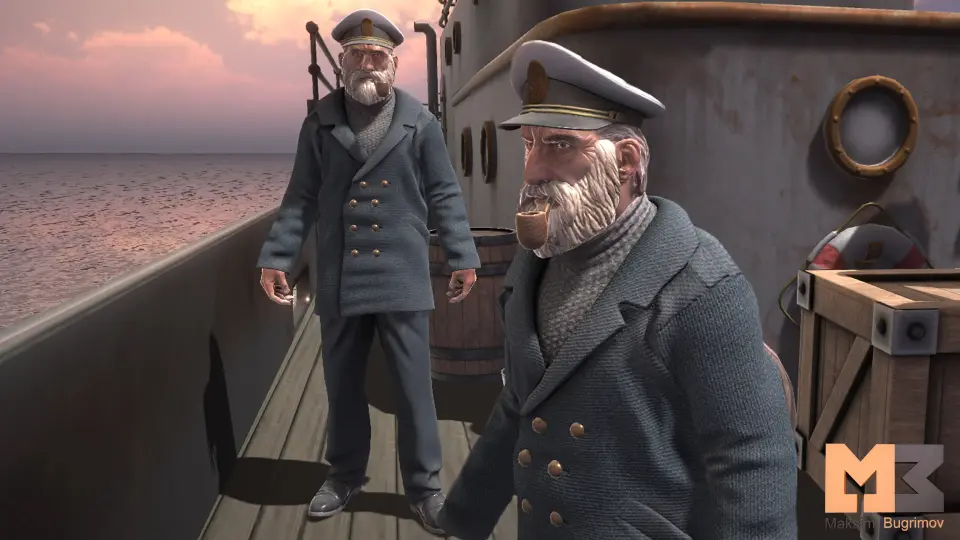
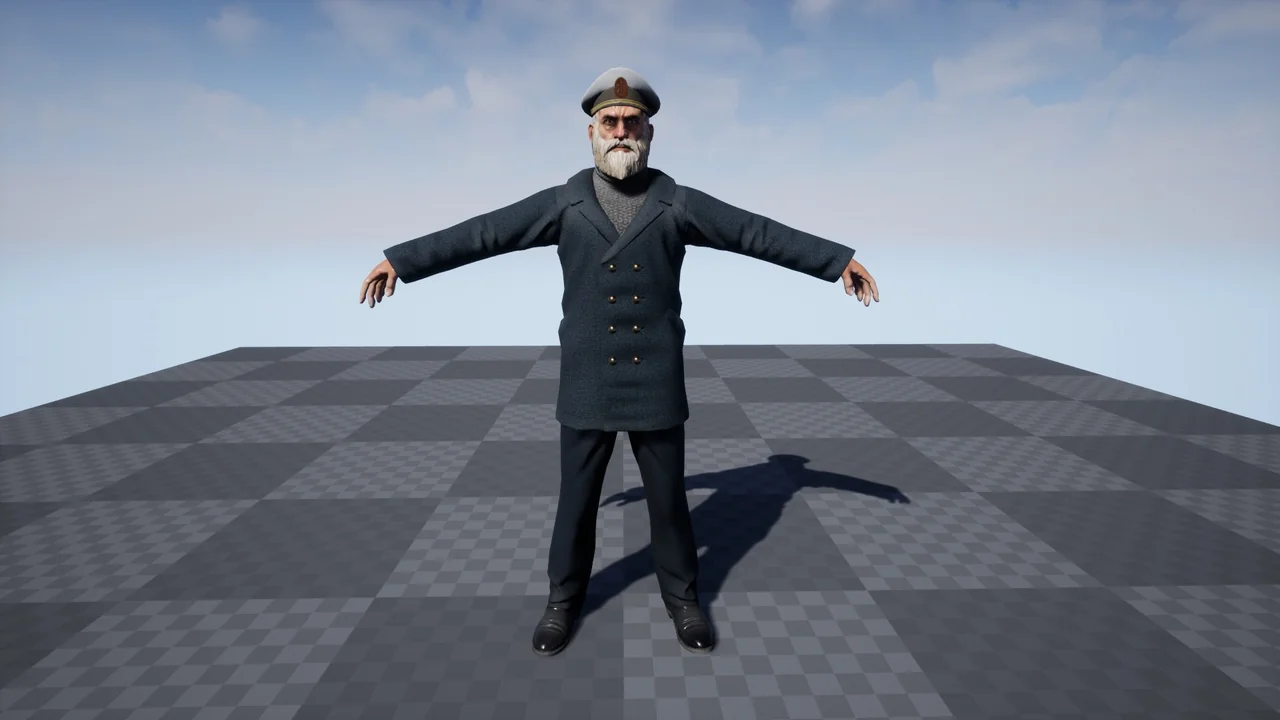
Character Captain enters a scene as an NPC captain. The stated use is broad: the character can appear in games about the sea and in any scenes. That is a placement proposition first. The tags do not tie the captain to a fixed camera, a single environment, or one scripted moment. They identify a captain character, an NPC role, a lowpoly style, a script, and an Animation Blueprint.
Scene builders feel the difference between a character and a prop quickly. A captain can occupy deck space, stand at a harbor edge, or hold a background position while the player moves through the environment. The captain does not need to be the center of every shot. Character Captain is positioned for sea-themed games and for any scenes, which leaves the surrounding context to the project.
What the Character Captain tags tell a team
The tags are Lowpoly, Script, NPC, Captain, Character, and Animation Blueprint. Each narrows the handoff. Lowpoly describes the visual register. NPC describes the role in a scene. Captain gives the character identity. Character is the broad asset class. Script and Animation Blueprint point to the setup layer that a developer should inspect when integrating the captain.
That mix is more specific than a static character model tag alone. A lowpoly captain could be a display piece; the NPC tag places the captain among the characters that populate a scene. The Script tag adds a code-side element to check. The Animation Blueprint tag adds an animation-side element to check. A team can use those tags to route review: character or environment art for the lowpoly form, gameplay or systems for the script, animation for the blueprint.
Animation Blueprint and script as implementation points
When Character Captain is brought into a project, the Animation Blueprint and script are the first places to look. The Animation Blueprint tag says animation logic is represented in the asset's structure. The Script tag says a code component accompanies the character. Neither tag spells out a particular state machine, a particular behavior tree, or a particular set of inputs. They identify the layers a developer will need to open, read, and connect to the surrounding game.
An NPC captain in a sea game may need only a modest presence: a figure in the scene while the player passes by. The implementation question is whether the script and Animation Blueprint already establish that presence or whether they are starting points for project-specific behavior. The tags support the first reading as a direction to inspect, not a guarantee of finished behavior. Open both layers before placing the captain in a level, then confirm how they are meant to run.
56 animations for creatures in the compatibility detail
A compatibility detail cites 56 animations for creatures. That number deserves separation from the captain's own setup. It is a compatibility detail, not a claim that the captain carries 56 creature animations. It tells a team that the asset has a stated relationship to a creature animation set of that size. Before integrating Character Captain, confirm what the relationship means in practice: whether the captain shares an animation framework, whether the creature set sits alongside the captain, or whether the count affects the surrounding project.
The note also makes the Animation Blueprint tag more concrete. An animation blueprint is where animation logic is organized, and a figure of 56 creature animations gives the animation side a number to check. A small scene with one captain NPC may not need to touch that layer. A project that already uses a creature animation library will want to know how the captain's blueprint sits alongside it. The count and the creature category are the concrete items to check; the integration work is matching that detail to the project's existing animation setup.
Lowpoly captain in a sea-game scene
Lowpoly is a style decision as much as a technical one. A lowpoly captain can sit in a sea-themed environment without pulling the scene toward high-detail realism. That makes the character useful where the captain is one part of a wider composition: a ship, a port, a shoreline, or an interior. Character Captain is positioned for games about the sea in any scenes, so the captain is not tied to one environment type. The lowpoly tag keeps that flexibility in the visual language of the scene.
For an NPC, visual consistency matters more than isolated detail. A captain who reads clearly at a distance can hold a position without competing with the player's focus. Lowpoly is the only style detail in the tag set, and it sets expectations: this is a character built in a lowpoly direction, not a photoreal portrait. Scene builders can use that to decide where the captain fits and how close the camera should get. The captain's stated use across sea-themed games and any scenes supports a role that moves across environments not just one fixed backdrop.
Placing an NPC captain without overbuilding the scene
The NPC tag is the most useful production signal. It tells a team that Character Captain is meant to populate a scene, not to serve as the player's avatar. That changes the integration checklist. An NPC captain needs a place to stand, a reason to be visible, and a relationship to the scene's flow. The script and Animation Blueprint tags indicate that some of that relationship is expressed in the asset's setup, while the lowpoly tag keeps the visual detail in a lowpoly register.
A sea game can use a captain in a direct role or a peripheral one. No quest, dialogue system, or combat role is named in the tags. The stated use is a character for games about the sea in any scenes. That is a wide brief, and the honest reading is that the captain is a character asset with an NPC role, not a complete game system. The team still supplies the scene context, the placement, and the surrounding logic. Character Captain supplies the captain, the lowpoly form, and the script and Animation Blueprint layers named in the tags.
What to check before using Character Captain
Start with the two setup layers named in the tags: the script and the Animation Blueprint. Confirm how they are meant to be opened and connected in the project. Then check the compatibility detail for the 56 animations for creatures. The note is separate from the captain's role as an NPC, and a team should know whether it affects the captain's animation setup or the wider project. Finally, place the captain in a test scene that matches the intended sea-game environment. The lowpoly style and the NPC role are the clearest usage signals; the scene test shows whether the captain reads correctly at the distance and scale the game needs.
Character Captain is a narrow asset with a clear identity: a lowpoly captain NPC with a script and an Animation Blueprint in its tags, usable in sea-themed games and in any scenes. The 56-animation creature compatibility detail is the item that needs a direct question before integration. Everything else follows from the captain's role in the scene. For teams evaluating the asset, the strongest takeaway is to treat it as an NPC character with setup layers to inspect, not as a scene-agnostic prop or a complete gameplay package.
 Characters
 Characters
 Characters
 Characters