"148d1066ed74e216"{"id":"1002955","slug":"cross-platform-voice-chat-pro","title":"Cross-Platform Voice Chat Pro","category":"Network \u0026 Multiplayer","engine":"4.26, 5.5 - 5.6","assetVersion":"Asset Version: 1.0 - 1.0V2P13","engineVersion":"Engine Version: 4.26, 5.5 - 5.6","tag":"Network","accent":"blue","visual":"mech","summary":"Integrate proximity, team, and global multiplayer voice chat across Windows, mobile, and VR headsets using Unreal Engine Blueprint and C++ tools.","platform":"Unreal Engine","indexPolicy":"index","publishedAt":"2026-11-22T07:12:51.498Z","updatedAt":"2026-11-22T07:12:51.498Z","sourceNotes":[],"fileContents":[],"compatibility":["Unreal Engine","Asset Version: 1.0 - 1.0V2P13","Engine Version: 4.26, 5.5 - 5.6"],"featuredImage":{"alt":"Cross-Platform Voice Chat Pro","src":"/wp-content/uploads/published/2026/11/dc543c6b8860-7a2f6c7c-fe43-4256-b678-28be778d0612-bba1bc3107.webp"},"fileSizeBytes":1635043,"hasDownloadLink":true,"downloads":0,"terms":[{"taxonomy":"category","slug":"network-and-multiplayer-tools-and-plugins","name":"Network \u0026 Multiplayer"}],"galleryImages":[{"src":"/wp-content/uploads/published/2026/11/09a912ddda6a-6c4d31c3-ff60-4ef7-8ba9-db167245ae2c-6adb834a10.webp","alt":"Cross-Platform Voice Chat Pro"},{"src":"/wp-content/uploads/published/2026/11/3686af4b0792-426086a2-7293-49f1-8634-0bae72ea87b3-334dee031e.webp","alt":"Cross-Platform Voice Chat Pro"},{"src":"/wp-content/uploads/published/2026/11/6ec365d1628c-e9b641ae-0fd8-4699-a991-f06cf8c864ea-ef645db52c.webp","alt":"Cross-Platform Voice Chat Pro"},{"src":"/wp-content/uploads/published/2026/11/1a05049dbd31-a1e63a74-0435-4db9-ae17-9dfd91bbf1c2-175ec82d29.webp","alt":"Cross-Platform Voice Chat Pro"},{"src":"/wp-content/uploads/published/2026/11/50e19365d211-a299d723-f5fd-40f0-9fbb-de2a96369e8d-8a765040ff.webp","alt":"Cross-Platform Voice Chat Pro"},{"src":"/wp-content/uploads/published/2026/11/6471d2d91557-944f07e4-b03e-4e73-903e-10304cc2abd9-014e120b68.webp","alt":"Cross-Platform Voice Chat Pro"},{"src":"/wp-content/uploads/published/2026/11/59db45219614-a298b720-2747-4756-af33-10587ba1d594-3c07692e1d.webp","alt":"Cross-Platform Voice Chat Pro"}],"accessPanel":{"kind":"resource","title":"Get this resource","safetyNote":"Resources are manually reviewed before listing to improve quality and reduce obvious risks.","fileName":"Cross-Platform Voice Chat Pro.7z","resourceType":"Resource archive","versions":[]},"contentHtml":"\u003cp\u003eMultiplayer titles rely heavily on voice communication to establish immersion, enable tactical coordination, and bring cooperative game loops to life. Whether building an intense extraction scenario, a spatial horror title, or a team arena shooter, managing how players communicate in real time requires robust network handling and versatile audio routing. Cross-Platform Voice Chat Pro addresses these technical challenges within Unreal Engine, enabling teams to build global broadcasts, team radio frequencies, and position-dependent proximity voice systems in either Blueprint or C++ without needing deep architectural modifications to the game project.\u003c/p\u003e \u003ch2\u003eConfiguring Voice Chat Modalities: Proximity, Team, and Global\u003c/h2\u003e\n\u003cp\u003eGameplay systems impose different rules on who should hear an audio feed at any given moment. In cooperative survival or atmospheric horror titles, such as games reminiscent of R.E.P.O., proximity voice chat shapes the moment-to-moment tension. Spatial 3D sound attenuation ensures that player voices emanate directly from their character models, quieting over distance and signaling position to both allies and potential threats. When a player moves out of earshot, the conversation naturally fades, encouraging players to cluster together or rely on line-of-sight coordination.\u003c/p\u003e \u003cp\u003eFor competitive and tactical titles inspired by Counter Strike or Fortnite, spatial realism takes a backseat to strategic clarity. The plugin facilitates team-focused voice channels and radio systems using 2D sound routing. In these scenarios, teammates receive clear, non-spatialized voice audio independent of their coordinate space in the level, ensuring that tactical callouts reach every squad member evenly. When open lobbies or overarching social hubs are required, global voice chat operates across all connected users without proximity barriers, providing an accessible baseline for match setup and community interactions.\u003c/p\u003e \u003ch2\u003eCross-Platform Voice Infrastructure Across VR and Mobile\u003c/h2\u003e\n\u003cp\u003eModern multiplayer games frequently deploy across drastically different hardware environments, making platform compatibility a fundamental requirement. The tool supports native runtime environments spanning Windows desktop systems, Android devices, and iOS mobile devices. This cross-device capability ensures that mobile users running touchscreen interfaces can coordinate seamlessly with desktop players sharing the same multiplayer session.\u003c/p\u003e \u003cp\u003eVirtual reality hardware introduces unique demands on voice pipelines due to hardware constraints and the absolute necessity of accurate spatial perception. The plugin provides dedicated support for Oculus Quest 1, Oculus Quest 2, Oculus Quest 3, and Oculus Rift. Because standalone headsets operate under constrained mobile processing envelopes, running voice processing directly on the device without introducing frame drops or audio latency is critical for maintaining presence and avoiding motion discomfort.\u003c/p\u003e \u003cp\u003eOn the server side, network deployments frequently run on headless infrastructure. The system accommodates dedicated servers running on either Linux or Windows platforms. This setup allows game logic and voice routing to exist within standardized, scalable server hosts rather than requiring peer-to-peer compromise, retaining full consistency with standard production server architectures.\u003c/p\u003e \u003ch2\u003eReal-Time Signal Processing and Chain Effect Tuning\u003c/h2\u003e\n\u003cp\u003eRaw voice capture rarely matches the artistic style of a stylized game world. To bridge this gap, developers can manipulate audio output using Chain Effect processing. This system allows projects to apply distinctive filters to raw audio streams at runtime, transforming standard voice capture into immersive in-universe audio. For example, a tactical radio or walkie-talkie effect can introduce bandpass filtering, slight distortion, or crackle to mimic military radio hardware, reinforcing the sensation of holding a physical communication device.\u003c/p\u003e \u003cp\u003eBeyond cosmetic adjustments, the pipeline provides low-level input control. Users can select specific microphone hardware directly from system lists, designate input sample rates, and adjust runtime microphone gain. Developers also have access to runtime raw microphone input data in the form of raw PCM data. Having immediate access to uncompressed PCM buffers allows technical audio designers to build responsive mechanics, such as triggering in-game monster AI when a player speaks above a specific volume threshold or visualizing real-time sound waves on HUD monitors.\u003c/p\u003e \u003ch2\u003eNetwork Architecture, Opus Compression, and Server Routing\u003c/h2\u003e\n\u003cp\u003eTransmitting real-time audio across online sessions can easily overwhelm client bandwidth if left unmanaged. To prevent network congestion, the plugin utilizes the Opus audio codec to compress captured voice data before network transmission. Opus provides high-fidelity speech encoding at low bitrates, balancing acoustic clarity against packet overhead.\u003c/p\u003e \u003cp\u003eTo further conserve resources, developers can manually define the Opus codec frames per second. Selecting higher frame rates reduces latency at the expense of more frequent packet dispatch, while lower settings combine audio frames into fewer transmissions to ease network load. The server routing logic ensures optimization by delivering compressed voice data exclusively to relevant clients. Instead of broadcasting every voice packet to every connected player, the server evaluates proximity and team channel membership, discarding irrelevant network packets at the server level so clients only process the audio streams they are meant to hear.\u003c/p\u003e \u003cp\u003eUnderpinning this infrastructure is full compatibility with the standard Unreal Engine network API, utilizing Remote Procedure Calls (RPCs) and replicated variables. The system operates alongside any standard UE4 Online Subsystem configuration, avoiding proprietary networking bridges and allowing developers to drop voice functionality directly into established replication graphs.\u003c/p\u003e \u003ch2\u003ePlayer Moderation, Production Implementations, and Project Setup\u003c/h2\u003e\n\u003cp\u003eManaging voice in live multiplayer environments demands straightforward administrative controls. Built-in moderation features let players mute individual participants or execute a mute-all command when silence is required. Player names can be passed alongside audio identifiers, enabling the creation of dynamic communication overlays, speaker indicators, and scoreboard UI elements. A complete Demo UI comes integrated, illustrating how to link microphone selection menus, volume sliders, speaker lists, and mute toggles directly to player interfaces.\u003c/p\u003e \u003cp\u003eThe system has proven its operational stability across several shipped indie and mid-tier commercial releases, including titles such as Abiotic Factor, The Matriarch, PlaneShift, and Kingdom of Atham: Crown of the Champions. These games demonstrate the plugin's adaptability across varied design formats, including cooperative survival scenarios, social deduction mechanics, and expansive role-playing environments.\u003c/p\u003e \u003cp\u003eVersion support spans both major engine generations. For modern pipelines, Unreal Engine 5 releases are supported across UE 5.0 through UE 5.7, backed by sample projects covering versions 5.1 through 5.8. For teams maintaining existing production branches, Unreal Engine 4 is supported on versions 4.25, 4.26, and 4.27, with legacy sample projects available for versions 4.25 through 5.0. By accommodating both C++ workflows and complete Blueprint visual scripting, the framework integrates into complex projects cleanly, providing a dependable solution for multiplayer voice across any deployment target.\u003c/p\u003e\n\n\u003ch2\u003eMore From The Same Workflow\u003c/h2\u003e\n\u003cul\u003e\n\u003cli\u003e\u003ca href=\"https://3dcghub.com/multiplayer-server-browser-master-server-server-listing/\" rel=\"noopener noreferrer\"\u003eMultiplayer Server Browser - Master Server - Server Listing\u003c/a\u003e\u003c/li\u003e\n\u003cli\u003e\u003ca href=\"https://3dcghub.com/eos-integration-kit/\" rel=\"noopener noreferrer\"\u003eEOS Integration Kit\u003c/a\u003e\u003c/li\u003e\n\u003cli\u003e\u003ca href=\"https://3dcghub.com/n00dinteract/\" rel=\"noopener noreferrer\"\u003en00dInteract\u003c/a\u003e\u003c/li\u003e\n\u003cli\u003e\u003ca href=\"https://3dcghub.com/unreal-engine-5-multiplayer-prop-hunt-game-smartpoly/\" rel=\"noopener noreferrer\"\u003eUnreal Engine 5 Multiplayer Prop Hunt Game - SmartPoly\u003c/a\u003e\u003c/li\u003e\n\u003cli\u003e\u003ca href=\"https://3dcghub.com/multiplayer-with-blueprints-aws/\" rel=\"noopener noreferrer\"\u003eMultiplayer with Blueprints (AWS)\u003c/a\u003e\u003c/li\u003e\n\u003c/ul\u003e","contentTextLength":7806,"navigation":{"current":15,"total":4890,"previous":{"id":"1002956","slug":"utility-ai-wise-feline-ultimate-v3-npc-memory-emotions-smart-objects-gas","title":"Utility AI - Wise Feline Ultimate V3 (NPC Memory, Emotions, Smart Objects, GAS)","category":"Artificial Intelligence","platform":"Unreal Engine","updatedAt":"2026-11-22T07:45:59.630Z"},"next":{"id":"1002954","slug":"ultimate-multiplayer-survival-pack-v6","title":"Ultimate Multiplayer Survival Pack V6","category":"Action-Adventure","platform":"Unreal Engine","updatedAt":"2026-11-22T07:09:06.466Z"}},"relatedResources":[{"id":"1002928","slug":"multiplayer-server-browser-master-server-server-listing","title":"Multiplayer Server Browser - Master Server - Server Listing","category":"Network \u0026 Multiplayer","engine":"4.25 - 5.4","assetVersion":"Asset Version: 1.0","engineVersion":"Engine Version: 4.25 - 5.4","tag":"Network","accent":"blue","visual":"mech","summary":"Implement cross-platform matchmaking and session discovery in Unreal Engine 4 using a lightweight external C master server and native plugin.","platform":"Unreal Engine","indexPolicy":"index","publishedAt":"2026-11-21T23:06:05.910Z","updatedAt":"2026-11-21T23:06:05.910Z","sourceNotes":[],"fileContents":[],"compatibility":["Unreal Engine","Asset Version: 1.0","Engine Version: 4.25 - 5.4"],"featuredImage":{"alt":"Multiplayer Server Browser - Master Server - Server Listing","src":"/wp-content/uploads/published/2026/11/6e68e3276c37-70ddce61-78f9-4cea-af64-cf1df82c5a58-3c019079ba.webp"},"fileSizeBytes":883578,"hasDownloadLink":true,"downloads":0},{"id":"1000154","slug":"eos-integration-kit","title":"EOS Integration Kit","category":"Network \u0026 Multiplayer","engine":"5.5 - 5.6","assetVersion":"Asset Version:4.6.2 - 4.8.5","engineVersion":"Engine Version: 5.5 - 5.6","tag":"Network","accent":"blue","visual":"mech","summary":"An Unreal Engine plugin for Epic Online Services that brings authentication, matchmaking, voice chat, storage, stats, leaderboards, and more into one workflow.","platform":"Unreal Engine","indexPolicy":"index","publishedAt":"2026-06-18T21:44:15.499Z","updatedAt":"2026-06-18T21:44:15.499Z","sourceNotes":[],"fileContents":[],"compatibility":["Unreal Engine","Asset Version:4.6.2 - 4.8.5","Engine Version: 5.5 - 5.6"],"featuredImage":{"alt":"EOS Integration Kit","src":"/wp-content/uploads/published/2026/06/d23399efa666-8ac3c106-13e9-405f-803e-82cc6e8e7f48-e62b93acec.webp"},"fileSizeBytes":1826534932,"hasDownloadLink":true,"downloads":0},{"id":"1001823","slug":"n00dinteract","title":"n00dInteract","category":"Network \u0026 Multiplayer","engine":"5.7","assetVersion":"Asset Version: 1.0.3","engineVersion":"Engine Version: 5.7","tag":"Network","accent":"blue","visual":"mech","summary":"Explore n00dInteract, a network-replicated interaction framework for desktop platforms featuring four distinct interaction types and conditional handling.","platform":"Unreal Engine","indexPolicy":"index","publishedAt":"2026-10-21T08:16:16.707Z","updatedAt":"2026-10-21T08:16:16.707Z","sourceNotes":[],"fileContents":[],"compatibility":["Unreal Engine","Asset Version: 1.0.3","Engine Version: 5.7"],"featuredImage":{"alt":"n00dInteract","src":"/wp-content/uploads/published/2026/10/a0427d38698b-07865053-9aa4-4296-bcf2-40b9855fca88-f9c12817cb.webp"},"fileSizeBytes":182620575,"hasDownloadLink":true,"downloads":0}]}[{"id":4225,"sourceId":4225,"taxonomyId":4225,"taxonomy":"category","slug":"asset-library","name":"Asset Library","parentId":null,"count":4744,"hasChildren":true,"href":"/","seoTitle":"Free Game Assets Library | 3DCGHUB","seoDescription":"Browse free Unreal Engine, Unity, Blender assets and game development tutorials on 3DCGHUB with previews, compatibility notes, and secure downloads.","sitemapEnabled":true,"children":[{"id":4227,"sourceId":4227,"taxonomyId":4227,"taxonomy":"category","slug":"blender-add-ons-plugins","name":"Blender Add-ons \u0026 Plugins","parentId":4225,"count":10,"hasChildren":false,"href":"/category/blender-add-ons-plugins/","seoTitle":"Free Blender Add-ons \u0026 Plugins | 3DCGHUB","seoDescription":"Browse free Blender Add-ons \u0026 Plugins tools for Blender on 3DCGHUB: curated downloads with preview images, compatibility notes and secure download access.","sitemapEnabled":true},{"id":514,"sourceId":514,"taxonomyId":514,"taxonomy":"category","slug":"unity-2","name":"Unity","parentId":4225,"count":453,"hasChildren":true,"href":"/category/unity-2/","seoTitle":"Free Unity Assets | 3DCGHUB","seoDescription":"Browse free Unity resources on 3DCGHUB: curated downloads with preview images, compatibility notes and secure download access.","sitemapEnabled":true,"children":[{"id":523,"sourceId":523,"taxonomyId":523,"taxonomy":"category","slug":"2d","name":"2D","parentId":514,"count":1,"hasChildren":true,"href":"/category/2d/","seoTitle":"Free Unity 2D | 3DCGHUB","seoDescription":"Browse free 2D assets for Unity on 3DCGHUB: curated downloads with preview images, compatibility notes and secure download access.","sitemapEnabled":true},{"id":515,"sourceId":515,"taxonomyId":515,"taxonomy":"category","slug":"3d-unity-2","name":"3D","parentId":514,"count":162,"hasChildren":true,"href":"/category/3d-unity-2/","seoTitle":"Free Unity 3D Assets | 3DCGHUB","seoDescription":"Browse free 3D assets for Unity on 3DCGHUB: curated downloads with preview images, compatibility notes and secure download access.","sitemapEnabled":true},{"id":565,"sourceId":565,"taxonomyId":565,"taxonomy":"category","slug":"add-ons","name":"Add-Ons","parentId":514,"count":2,"hasChildren":false,"href":"/category/add-ons/","seoTitle":"Free Unity Add-Ons | 3DCGHUB","seoDescription":"Browse free Add-Ons assets for Unity on 3DCGHUB: curated downloads with preview images, compatibility notes and secure download access.","sitemapEnabled":true},{"id":529,"sourceId":529,"taxonomyId":529,"taxonomy":"category","slug":"audio-unity-2","name":"Audio","parentId":514,"count":1,"hasChildren":true,"href":"/category/audio-unity-2/","seoTitle":"Free Unity Audio | 3DCGHUB","seoDescription":"Browse free Audio for Unity on 3DCGHUB: curated downloads with preview images, compatibility notes and secure download access.","sitemapEnabled":true},{"id":557,"sourceId":557,"taxonomyId":557,"taxonomy":"category","slug":"templates","name":"Templates","parentId":514,"count":36,"hasChildren":true,"href":"/category/templates/","seoTitle":"Free Unity Templates | 3DCGHUB","seoDescription":"Browse free Unity project templates on 3DCGHUB. Starter kits with previews, compatibility notes, and secure download access.","sitemapEnabled":true},{"id":533,"sourceId":533,"taxonomyId":533,"taxonomy":"category","slug":"tools-unity-2","name":"Tools","parentId":514,"count":0,"hasChildren":true,"href":"/category/tools-unity-2/","sitemapEnabled":true},{"id":554,"sourceId":554,"taxonomyId":554,"taxonomy":"category","slug":"vfx-unity-2","name":"VFX","parentId":514,"count":4,"hasChildren":true,"href":"/category/vfx-unity-2/","seoTitle":"Free Unity VFX | 3DCGHUB","seoDescription":"Browse free VFX for Unity on 3DCGHUB: curated downloads with preview images, compatibility notes and secure download access.","sitemapEnabled":true}]},{"id":511,"sourceId":511,"taxonomyId":511,"taxonomy":"category","slug":"unreal-engine-2","name":"Unreal Engine","parentId":4225,"count":4282,"hasChildren":true,"href":"/category/unreal-engine-2/","seoTitle":"Free Unreal Engine Assets | 3DCGHUB","seoDescription":"Browse free Unreal Engine resources on 3DCGHUB: curated downloads with preview images, compatibility notes and secure download access.","sitemapEnabled":true,"children":[{"id":54,"sourceId":54,"taxonomyId":54,"taxonomy":"category","slug":"3d","name":"3D","parentId":511,"count":2428,"hasChildren":true,"href":"/category/3d/","seoTitle":"Free Unreal Engine 3D | 3DCGHUB","seoDescription":"Browse free 3D assets for Unreal Engine on 3DCGHUB: curated downloads with preview images, compatibility notes and secure download access.","sitemapEnabled":true},{"id":441,"sourceId":441,"taxonomyId":441,"taxonomy":"category","slug":"animations","name":"Animations","parentId":511,"count":245,"hasChildren":true,"href":"/category/animations/","seoTitle":"Free Unreal Engine Animations | 3DCGHUB","seoDescription":"Browse free Animations for Unreal Engine on 3DCGHUB: curated downloads with preview images, compatibility notes and secure download access.","sitemapEnabled":true},{"id":446,"sourceId":446,"taxonomyId":446,"taxonomy":"category","slug":"audio","name":"Audio","parentId":511,"count":63,"hasChildren":true,"href":"/category/audio/","seoTitle":"Free Unreal Engine Audio Resources | 3DCGHUB","seoDescription":"Browse free Unreal Engine audio resources including sound effects, voices, dialogue, and ambient sounds. Curated free downloads on 3DCGHUB.","sitemapEnabled":true},{"id":466,"sourceId":466,"taxonomyId":466,"taxonomy":"category","slug":"game-systems","name":"Game Systems","parentId":511,"count":356,"hasChildren":true,"href":"/category/game-systems/","seoTitle":"Free Unreal Engine Game Systems | 3DCGHUB","seoDescription":"Browse free Game Systems tools for Unreal Engine on 3DCGHUB: curated downloads with preview images, compatibility notes and secure download access.","sitemapEnabled":true},{"id":478,"sourceId":478,"taxonomyId":478,"taxonomy":"category","slug":"game-templates","name":"Game Templates","parentId":511,"count":150,"hasChildren":true,"href":"/category/game-templates/","seoTitle":"Free Unreal Engine Game Templates | 3DCGHUB","seoDescription":"Browse free Game Templates for Unreal Engine on 3DCGHUB: curated downloads with preview images, compatibility notes and secure download access.","sitemapEnabled":true},{"id":432,"sourceId":432,"taxonomyId":432,"taxonomy":"category","slug":"hdri","name":"HDRI","parentId":511,"count":6,"hasChildren":true,"href":"/category/hdri/","seoTitle":"Free Unreal Engine HDRI | 3DCGHUB","seoDescription":"Browse free Unreal Engine HDRI skies and lighting maps on 3DCGHUB. Environment lighting with previews and secure downloads.","sitemapEnabled":true},{"id":228,"sourceId":228,"taxonomyId":228,"taxonomy":"category","slug":"material-and-textures","name":"Material \u0026 Textures","parentId":511,"count":172,"hasChildren":true,"href":"/category/material-and-textures/","seoTitle":"Free Unreal Engine Material \u0026 Textures | 3DCGHUB","seoDescription":"Browse free Material \u0026 Textures for Unreal Engine on 3DCGHUB: curated downloads with preview images, compatibility notes and secure download access.","sitemapEnabled":true},{"id":298,"sourceId":298,"taxonomyId":298,"taxonomy":"category","slug":"sprites-and-flipbooks","name":"Sprites \u0026 Flipbooks","parentId":511,"count":17,"hasChildren":true,"href":"/category/sprites-and-flipbooks/","seoTitle":"Free Unreal Engine Sprites \u0026 Flipbooks | 3DCGHUB","seoDescription":"Browse free Sprites \u0026 Flipbooks assets for Unreal Engine on 3DCGHUB: curated downloads with preview images, compatibility notes and secure download access.","sitemapEnabled":true},{"id":489,"sourceId":489,"taxonomyId":489,"taxonomy":"category","slug":"tools-and-plugins","name":"Tools \u0026 Plugins","parentId":511,"count":390,"hasChildren":true,"href":"/category/tools-and-plugins/","seoTitle":"Free Unreal Engine Tools \u0026 Plugins | 3DCGHUB","seoDescription":"Browse free Tools \u0026 Plugins for Unreal Engine on 3DCGHUB: curated downloads with preview images, compatibility notes and secure download access.","sitemapEnabled":true},{"id":459,"sourceId":459,"taxonomyId":459,"taxonomy":"category","slug":"ui","name":"UI","parentId":511,"count":43,"hasChildren":true,"href":"/category/ui/","seoTitle":"Free Unreal Engine UI | 3DCGHUB","seoDescription":"Browse free UI for Unreal Engine on 3DCGHUB: curated downloads with preview images, compatibility notes and secure download access.","sitemapEnabled":true},{"id":450,"sourceId":450,"taxonomyId":450,"taxonomy":"category","slug":"vfx","name":"VFX","parentId":511,"count":412,"hasChildren":true,"href":"/category/vfx/","seoTitle":"Free Unreal Engine VFX | 3DCGHUB","seoDescription":"Browse free VFX for Unreal Engine on 3DCGHUB: curated downloads with preview images, compatibility notes and secure download access.","sitemapEnabled":true}]}]},{"id":4222,"sourceId":4222,"taxonomyId":4222,"taxonomy":"category","slug":"tutorial-library","name":"Tutorial Library","parentId":null,"count":117,"hasChildren":false,"href":"/tutorials/","seoTitle":"Free Game Development Tutorial Library | 3DCGHUB","seoDescription":"Browse free game development tutorials for Unreal Engine, Unity, Blender, and more on 3DCGHUB with practical workflows and secure downloads.","sitemapEnabled":true}]
Resource screenshots
1 / 7
Join our channel
Follow 3DCGHUB on Telegram for new resource drops, migration updates, and community notices.
Multiplayer titles rely heavily on voice communication to establish immersion, enable tactical coordination, and bring cooperative game loops to life. Whether building an intense extraction scenario, a spatial horror title, or a team arena shooter, managing how players communicate in real time requires robust network handling and versatile audio routing. Cross-Platform Voice Chat Pro addresses these technical challenges within Unreal Engine, enabling teams to build global broadcasts, team radio frequencies, and position-dependent proximity voice systems in either Blueprint or C++ without needing deep architectural modifications to the game project.
Configuring Voice Chat Modalities: Proximity, Team, and Global
Gameplay systems impose different rules on who should hear an audio feed at any given moment. In cooperative survival or atmospheric horror titles, such as games reminiscent of R.E.P.O., proximity voice chat shapes the moment-to-moment tension. Spatial 3D sound attenuation ensures that player voices emanate directly from their character models, quieting over distance and signaling position to both allies and potential threats. When a player moves out of earshot, the conversation naturally fades, encouraging players to cluster together or rely on line-of-sight coordination.
For competitive and tactical titles inspired by Counter Strike or Fortnite, spatial realism takes a backseat to strategic clarity. The plugin facilitates team-focused voice channels and radio systems using 2D sound routing. In these scenarios, teammates receive clear, non-spatialized voice audio independent of their coordinate space in the level, ensuring that tactical callouts reach every squad member evenly. When open lobbies or overarching social hubs are required, global voice chat operates across all connected users without proximity barriers, providing an accessible baseline for match setup and community interactions.
Cross-Platform Voice Infrastructure Across VR and Mobile
Modern multiplayer games frequently deploy across drastically different hardware environments, making platform compatibility a fundamental requirement. The tool supports native runtime environments spanning Windows desktop systems, Android devices, and iOS mobile devices. This cross-device capability ensures that mobile users running touchscreen interfaces can coordinate seamlessly with desktop players sharing the same multiplayer session.
Virtual reality hardware introduces unique demands on voice pipelines due to hardware constraints and the absolute necessity of accurate spatial perception. The plugin provides dedicated support for Oculus Quest 1, Oculus Quest 2, Oculus Quest 3, and Oculus Rift. Because standalone headsets operate under constrained mobile processing envelopes, running voice processing directly on the device without introducing frame drops or audio latency is critical for maintaining presence and avoiding motion discomfort.
On the server side, network deployments frequently run on headless infrastructure. The system accommodates dedicated servers running on either Linux or Windows platforms. This setup allows game logic and voice routing to exist within standardized, scalable server hosts rather than requiring peer-to-peer compromise, retaining full consistency with standard production server architectures.
Real-Time Signal Processing and Chain Effect Tuning
Raw voice capture rarely matches the artistic style of a stylized game world. To bridge this gap, developers can manipulate audio output using Chain Effect processing. This system allows projects to apply distinctive filters to raw audio streams at runtime, transforming standard voice capture into immersive in-universe audio. For example, a tactical radio or walkie-talkie effect can introduce bandpass filtering, slight distortion, or crackle to mimic military radio hardware, reinforcing the sensation of holding a physical communication device.
Beyond cosmetic adjustments, the pipeline provides low-level input control. Users can select specific microphone hardware directly from system lists, designate input sample rates, and adjust runtime microphone gain. Developers also have access to runtime raw microphone input data in the form of raw PCM data. Having immediate access to uncompressed PCM buffers allows technical audio designers to build responsive mechanics, such as triggering in-game monster AI when a player speaks above a specific volume threshold or visualizing real-time sound waves on HUD monitors.
Network Architecture, Opus Compression, and Server Routing
Transmitting real-time audio across online sessions can easily overwhelm client bandwidth if left unmanaged. To prevent network congestion, the plugin utilizes the Opus audio codec to compress captured voice data before network transmission. Opus provides high-fidelity speech encoding at low bitrates, balancing acoustic clarity against packet overhead.
To further conserve resources, developers can manually define the Opus codec frames per second. Selecting higher frame rates reduces latency at the expense of more frequent packet dispatch, while lower settings combine audio frames into fewer transmissions to ease network load. The server routing logic ensures optimization by delivering compressed voice data exclusively to relevant clients. Instead of broadcasting every voice packet to every connected player, the server evaluates proximity and team channel membership, discarding irrelevant network packets at the server level so clients only process the audio streams they are meant to hear.
Underpinning this infrastructure is full compatibility with the standard Unreal Engine network API, utilizing Remote Procedure Calls (RPCs) and replicated variables. The system operates alongside any standard UE4 Online Subsystem configuration, avoiding proprietary networking bridges and allowing developers to drop voice functionality directly into established replication graphs.
Player Moderation, Production Implementations, and Project Setup
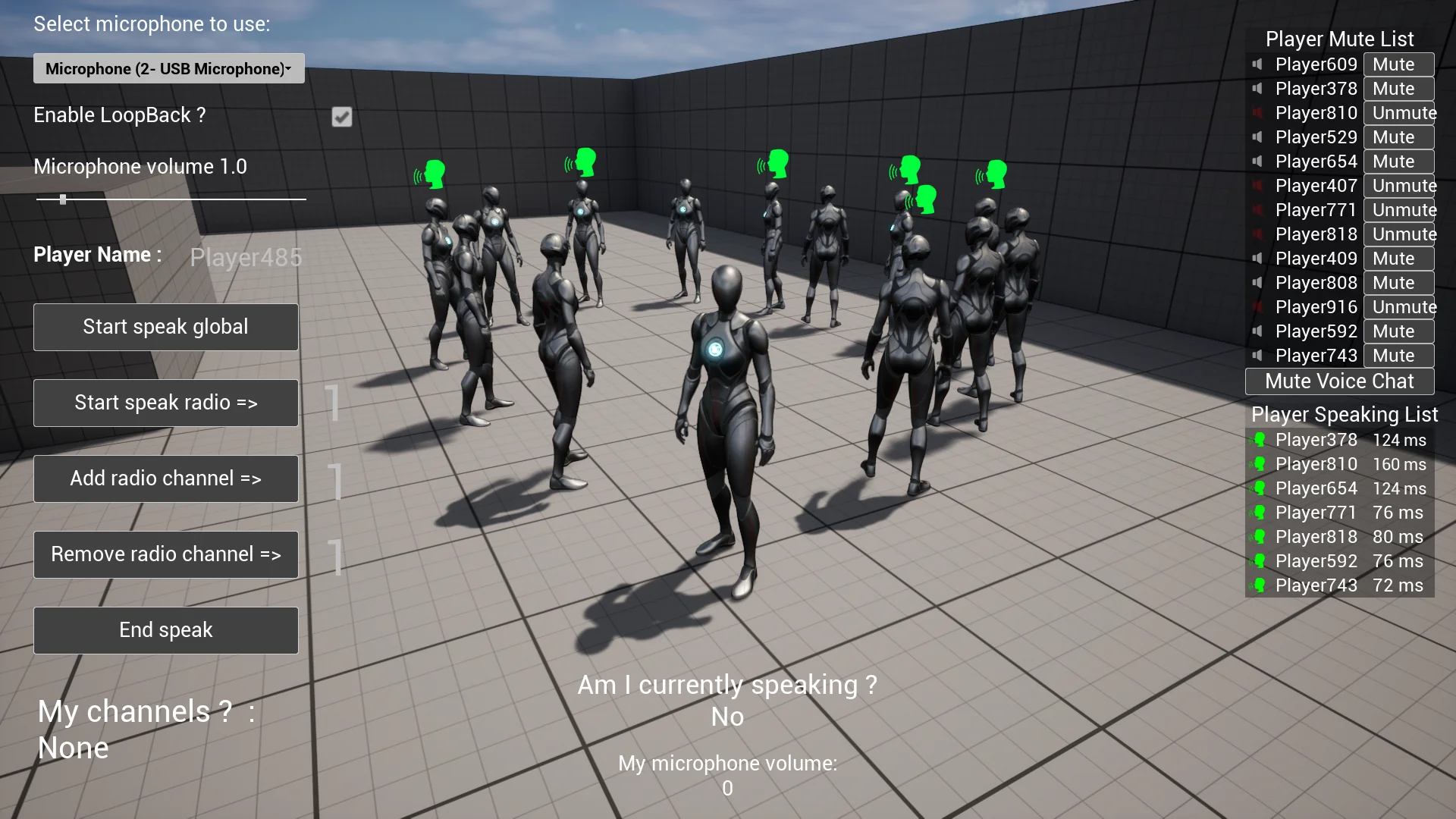
Managing voice in live multiplayer environments demands straightforward administrative controls. Built-in moderation features let players mute individual participants or execute a mute-all command when silence is required. Player names can be passed alongside audio identifiers, enabling the creation of dynamic communication overlays, speaker indicators, and scoreboard UI elements. A complete Demo UI comes integrated, illustrating how to link microphone selection menus, volume sliders, speaker lists, and mute toggles directly to player interfaces.
The system has proven its operational stability across several shipped indie and mid-tier commercial releases, including titles such as Abiotic Factor, The Matriarch, PlaneShift, and Kingdom of Atham: Crown of the Champions. These games demonstrate the plugin's adaptability across varied design formats, including cooperative survival scenarios, social deduction mechanics, and expansive role-playing environments.
Version support spans both major engine generations. For modern pipelines, Unreal Engine 5 releases are supported across UE 5.0 through UE 5.7, backed by sample projects covering versions 5.1 through 5.8. For teams maintaining existing production branches, Unreal Engine 4 is supported on versions 4.25, 4.26, and 4.27, with legacy sample projects available for versions 4.25 through 5.0. By accommodating both C++ workflows and complete Blueprint visual scripting, the framework integrates into complex projects cleanly, providing a dependable solution for multiplayer voice across any deployment target.
 Network
 Network
 Network