"8652e693bd7bbc55"{"id":"1002970","slug":"3d-radar","title":"3D Radar","category":"Gameplay Features","engine":"4.18+,5.0+","assetVersion":"","engineVersion":"Engine Version: 4.18+,5.0+","tag":"Gameplay Features","accent":"blue","visual":"mech","summary":"Two Blueprints: a radar actor that finds other actors and plots them in its local 3D space, plus a return component driven by faction, type and range.","platform":"Unreal Engine","indexPolicy":"index","publishedAt":"2026-11-25T08:44:46.149Z","updatedAt":"2026-11-25T08:44:46.149Z","sourceNotes":[],"fileContents":[],"compatibility":["Unreal Engine","Engine Version: 4.18+,5.0+"],"featuredImage":{"alt":"3D Radar","src":"/wp-content/uploads/published/2026/11/ef2f44d47b75-9a63a70e-77f1-44c8-b618-c65b719bc7d4-e0542fafd5.webp"},"hasDownloadLink":true,"downloads":0,"terms":[{"taxonomy":"category","slug":"gameplay-features","name":"Gameplay Features"}],"galleryImages":[{"src":"/wp-content/uploads/published/2026/11/87e2d21d73b8-8cddff6f-84fa-408e-8db9-7eb03d75f87b-3d559b6e81.webp","alt":"3D Radar"},{"src":"/wp-content/uploads/published/2026/11/41166c6d4e0f-2652a7ce-9abb-4e09-9bf5-d89737c3432c-27ac7d89fc.webp","alt":"3D Radar"},{"src":"/wp-content/uploads/published/2026/11/d4ccd2b71d23-d69810e5-0126-43f8-b362-cec5a3be14a2-4b3a44a9d3.webp","alt":"3D Radar"},{"src":"/wp-content/uploads/published/2026/11/ef7d04c39da5-65d4bba6-983e-45da-b524-7921e0dbfaf8-35bfecac6c.webp","alt":"3D Radar"},{"src":"/wp-content/uploads/published/2026/11/5478223f8254-696aaa89-59d5-48e7-bd5d-af00290301cc-8d412e138e.webp","alt":"3D Radar"},{"src":"/wp-content/uploads/published/2026/11/6655976cace4-e9123279-1e32-45a7-a0d3-3acafa3c4ef5-f70599cbed.webp","alt":"3D Radar"},{"src":"/wp-content/uploads/published/2026/11/ec1d7d5ca682-5b64d809-2ac0-456f-bd79-40b9262029ed-974d7659ec.webp","alt":"3D Radar"}],"accessPanel":{"kind":"resource","title":"Get this resource","safetyNote":"Resources are manually reviewed before listing to improve quality and reduce obvious risks.","fileName":"Content.7z","resourceType":"Resource archive","versions":[]},"contentHtml":"\u003cp\u003eA scene full of actors says nothing about itself. Nothing in the world announces which contacts are close, which of them count as friendly, or at what distance a contact stops being worth showing, so all of that has to be authored somewhere. 3D Radar puts the authoring on two ends: the device that scans, and the objects that agree to be found.\u003c/p\u003e\n\u003cp\u003eTwo main Blueprints do the work. The 3D Radar actor searches for other actors and displays them in its own local 3D space. The Radar Return component is the other half, placed on any actor that should be able to appear on a radar actor. Everything between those two pieces is configuration: how a contact is classified, what it looks like from a given viewpoint, how far out it stays visible, and whether it appears at all.\u003c/p\u003e \u003ch2\u003eThe Two-Blueprint Split Behind 3D Radar\u003c/h2\u003e\n\u003cp\u003eDetection and representation stay apart. One Blueprint searches and draws; the other is a marker saying an actor is eligible to be found.\u003c/p\u003e\n\u003cp\u003eThat separation changes how much work it takes to add a contact. Nothing needs to inherit from a radar-specific class, and the radar actor carries no hand-built list of things to track. An actor becomes visible by receiving the Radar Return component, and the radar actor discovers it through its own search. Because the display is drawn in the radar's local 3D space, contacts are positioned relative to the device rather than to one fixed world origin, which is what lets more than one radar read the same actor correctly at the same time. That second point carries the rest of the system: every rule about stance, appearance and range only becomes interesting when two radars can look at one contact and reach different conclusions.\u003c/p\u003e \u003ch2\u003eFaction Stance Decides How a Radar Return Looks\u003c/h2\u003e\n\u003cp\u003eThe Radar Return component holds the options that make a contact legible: what type of actor it is, and which faction it belongs to. It also carries options for different meshes or Materials, chosen according to its faction stance from the point of view of the radar actor looking at it.\u003c/p\u003e\n\u003cp\u003eStance is evaluated per viewer, so the setup is not a colour swap. One actor might show up as a blue friendly on one radar and then show up as a red hostile on another. Pushed further, on hostile radars that same actor can appear as a supposedly friendly unit with a different appearance, which opens the door to electronic warfare in a project that wants deception rather than clean identification. The actor in the world never changes; the reading of it does.\u003c/p\u003e\n\u003cp\u003eRange multipliers sit on the same component and govern how visible the actor is. A contact can be made easier to see from friendlies than from enemies, so identification distance and identification appearance both end up as relationships between two actors instead of fixed properties of one.\u003c/p\u003e \u003ch3\u003eTwo Range Controls That Answer Different Questions\u003c/h3\u003e\n\u003cp\u003eThe range multiplier on the component and the range options on the radar actor are separate dials, and keeping them straight saves a lot of confused tuning. The multiplier belongs to the actor being watched and shapes how strongly it registers for that particular viewer. The radar actor's own options belong to the device and decide the distances at which whole categories of returns appear.\u003c/p\u003e\n\u003cp\u003eRead together, the pair covers both one-off exceptions and broad policy. A single stealthy contact can be pulled back in visibility from everyone except its own side while the radar keeps its general distances untouched. Or the radar can be tuned by type while each contact keeps its default multiplier. Neither control has to be rebuilt to use the other.\u003c/p\u003e \u003ch2\u003eType and Distance Filtering on the Radar Actor\u003c/h2\u003e\n\u003cp\u003eClassification on the component would be noise if the radar could not act on it. The 3D Radar actor carries a large number of options controlling at what ranges different types of returns show up, and whether they show up at all.\u003c/p\u003e\n\u003cp\u003eBecause the type is declared on the component and the distance rules live on the radar actor, filtering stays centralized per device. One radar can be set to ignore a whole category of returns while another on the same map keeps them. Distances per type can be pulled in or pushed out independently, which is the practical difference between a short-range scanner concerned only with its immediate surroundings and a wide sweep that surfaces distant contacts and drops close clutter. The options go as far as removing returns entirely, not merely shortening how far out they are drawn.\u003c/p\u003e \u003ch2\u003eFading Returns at the Edge of the Display\u003c/h2\u003e\n\u003cp\u003eRadar return materials can fade in and out smoothly at the edge of the display, so a contact approaching the boundary thins away instead of popping off.\u003c/p\u003e\n\u003cp\u003eOne condition comes attached. The fade only works when the radar is using spherical search dimensions rather than cubic ones. A radar configured with cubic dimensions loses the soft edge entirely, which turns the choice of search volume into a visual decision as much as a shape decision. Settle that early, before range tuning begins, because it constrains which radars in a project can have the fade at all.\u003c/p\u003e \u003ch2\u003eSwapping Meshes, Materials, Horizon and Grid\u003c/h2\u003e\n\u003cp\u003eAll visuals are exposed as modifiable variables. Returns accept any mesh or Material, and the same holds for the radar's own visuals, the horizon and the grid included.\u003c/p\u003e\n\u003cp\u003eAppearance work therefore lands with whoever is art-directing the project rather than with the system's author. A holographic presentation, a diegetic cockpit readout, or something deliberately plain all come from the same Blueprint with different variables assigned. Restyling is a matter of swapping assets, not rebuilding logic.\u003c/p\u003e \u003ch3\u003eWhat the Demonstration Art Covers\u003c/h3\u003e\n\u003cp\u003eA couple of art assets and Textures are included for demonstration purposes. They are enough to watch the system run and to see what each visual slot expects, and they read as a starting point rather than a finished art set. The mesh and Material variables are where a project's own look replaces them.\u003c/p\u003e \u003ch2\u003eWhere 3D Radar Sits in a Build\u003c/h2\u003e\n\u003cp\u003eScenes where contacts are objects in the world rather than rows in a UI list are the natural fit: fighters and turrets tracked across space, holographic presentations that need to show relative position, and maps where more than one device scans the same population of actors. Modularity is the reason it settles in quickly in those settings, since the component can be added to whatever already exists in the scene without a parallel representation layer being built alongside it.\u003c/p\u003e\n\u003cp\u003eThe early payoff is a working contact display before final art exists. Later passes replace the demonstration meshes and Materials with production ones and retune the per-type distances without touching the logic that connects the two Blueprints. What remains is a decision about which actors receive the Radar Return component and how each radar actor's ranges and search shape are set for the scene it lives in.\u003c/p\u003e\n\n\u003ch2\u003eContinue Browsing Similar Packs\u003c/h2\u003e\n\u003cul\u003e\n\u003cli\u003e\u003ca href=\"https://3dcghub.com/fight-game-select-character/\" rel=\"noopener noreferrer\"\u003eFight Game Select Character\u003c/a\u003e\u003c/li\u003e\n\u003cli\u003e\u003ca href=\"https://3dcghub.com/radar-system-with-minimap/\" rel=\"noopener noreferrer\"\u003eRadar System with Minimap\u003c/a\u003e\u003c/li\u003e\n\u003cli\u003e\u003ca href=\"https://3dcghub.com/daforma-vertex-shader-based-3d-deformation-effectors/\" rel=\"noopener noreferrer\"\u003edaforma - Vertex Shader based 3D Deformation Effectors\u003c/a\u003e\u003c/li\u003e\n\u003cli\u003e\u003ca href=\"https://3dcghub.com/3d-tilemap-simple-helper/\" rel=\"noopener noreferrer\"\u003e3D Tilemap - Simple Helper\u003c/a\u003e\u003c/li\u003e\n\u003cli\u003e\u003ca href=\"https://3dcghub.com/projectile-arcs/\" rel=\"noopener noreferrer\"\u003eProjectile Arcs\u003c/a\u003e\u003c/li\u003e\n\u003c/ul\u003e","contentTextLength":7036,"navigation":{"current":21,"total":4911,"previous":{"id":"1002971","slug":"abandoned-hatchback-car","title":"Abandoned Hatchback Car","category":"Cars \u0026 Trucks","platform":"Unreal Engine","updatedAt":"2026-11-25T08:45:38.112Z"},"next":{"id":"1002969","slug":"2d-endless-runner-platform-kit","title":"2D Endless Runner Platform Kit","category":"Environments","platform":"Unreal Engine","updatedAt":"2026-11-25T08:43:39.114Z"}},"relatedResources":[{"id":"1002304","slug":"fight-game-select-character","title":"Fight Game Select Character","category":"Gameplay Features","engine":"4.26+,5.0+","assetVersion":"","engineVersion":"Engine Version: 4.26+,5.0+","tag":"Gameplay Features","accent":"blue","visual":"character","summary":"A Blueprint kit for fighting games: data-table rosters and stages, an automatic 3D character select grid, start menu HUD, health and energy bars, and camera and","platform":"Unreal Engine","indexPolicy":"index","publishedAt":"2026-11-05T10:04:37.850Z","updatedAt":"2026-11-05T10:04:37.850Z","sourceNotes":[],"fileContents":[],"compatibility":["Unreal Engine","Engine Version: 4.26+,5.0+"],"featuredImage":{"alt":"Fight Game Select Character","src":"/wp-content/uploads/published/2026/11/a51b60b826d5-6c8f6a9a-58b2-415a-810d-3c6a7747031e-6ac7fc7c3a.webp"},"fileSizeBytes":50677138,"hasDownloadLink":true,"downloads":0},{"id":"1002162","slug":"radar-system-with-minimap","title":"Radar System with Minimap","category":"Gameplay Features","engine":"5.0+","assetVersion":"","engineVersion":"Engine Version: 5.0+","tag":"Gameplay Features","accent":"blue","visual":"mech","summary":"A configurable radar and minimap UI for Unreal Engine projects, featuring HLSL radar arcs, POI scene capture filtering, and dynamic distance markers.","platform":"Unreal Engine","indexPolicy":"index","publishedAt":"2026-10-29T10:06:01.181Z","updatedAt":"2026-10-29T10:06:01.181Z","sourceNotes":[],"fileContents":[],"compatibility":["Unreal Engine","Engine Version: 5.0+"],"featuredImage":{"alt":"Radar System with Minimap","src":"/wp-content/uploads/published/2026/10/b9b8808d8f4f-7a937fcd-bd67-47ed-ab29-fe692af506db-b8804ad024.webp"},"fileSizeBytes":12389445,"hasDownloadLink":true,"downloads":0},{"id":"1001995","slug":"daforma-vertex-shader-based-3d-deformation-effectors","title":"daforma - Vertex Shader based 3D Deformation Effectors","category":"Gameplay Features","engine":"5.0+","assetVersion":"","engineVersion":"Engine Version: 5.0+","tag":"Gameplay Features","accent":"blue","visual":"mech","summary":"Explore daforma, an interactive vertex shader deformation toolkit using Advanced BP Effect actors and HISM grids for real-time ripple, warp, and Lumen effects.","platform":"Unreal Engine","indexPolicy":"index","publishedAt":"2026-10-26T12:14:03.022Z","updatedAt":"2026-10-26T12:14:03.022Z","sourceNotes":[],"fileContents":[],"compatibility":["Unreal Engine","Engine Version: 5.0+"],"featuredImage":{"alt":"daforma - Vertex Shader based 3D Deformation Effectors","src":"/wp-content/uploads/published/2026/10/a22ce2a73410-5d0fe4d5-eb06-4722-a1ae-0083113c6806-3acb7f20fe.webp"},"fileSizeBytes":741811963,"hasDownloadLink":true,"downloads":0}]}[{"id":4225,"sourceId":4225,"taxonomyId":4225,"taxonomy":"category","slug":"asset-library","name":"Asset Library","parentId":null,"count":4765,"hasChildren":true,"href":"/","seoTitle":"Free Game Assets Library | 3DCGHUB","seoDescription":"Browse free Unreal Engine, Unity, Blender assets and game development tutorials on 3DCGHUB with previews, compatibility notes, and secure downloads.","sitemapEnabled":true,"children":[{"id":4227,"sourceId":4227,"taxonomyId":4227,"taxonomy":"category","slug":"blender-add-ons-plugins","name":"Blender Add-ons \u0026 Plugins","parentId":4225,"count":10,"hasChildren":false,"href":"/category/blender-add-ons-plugins/","seoTitle":"Free Blender Add-ons \u0026 Plugins | 3DCGHUB","seoDescription":"Browse free Blender Add-ons \u0026 Plugins tools for Blender on 3DCGHUB: curated downloads with preview images, compatibility notes and secure download access.","sitemapEnabled":true},{"id":514,"sourceId":514,"taxonomyId":514,"taxonomy":"category","slug":"unity-2","name":"Unity","parentId":4225,"count":453,"hasChildren":true,"href":"/category/unity-2/","seoTitle":"Free Unity Assets | 3DCGHUB","seoDescription":"Browse free Unity resources on 3DCGHUB: curated downloads with preview images, compatibility notes and secure download access.","sitemapEnabled":true,"children":[{"id":523,"sourceId":523,"taxonomyId":523,"taxonomy":"category","slug":"2d","name":"2D","parentId":514,"count":1,"hasChildren":true,"href":"/category/2d/","seoTitle":"Free Unity 2D | 3DCGHUB","seoDescription":"Browse free 2D assets for Unity on 3DCGHUB: curated downloads with preview images, compatibility notes and secure download access.","sitemapEnabled":true},{"id":515,"sourceId":515,"taxonomyId":515,"taxonomy":"category","slug":"3d-unity-2","name":"3D","parentId":514,"count":162,"hasChildren":true,"href":"/category/3d-unity-2/","seoTitle":"Free Unity 3D Assets | 3DCGHUB","seoDescription":"Browse free 3D assets for Unity on 3DCGHUB: curated downloads with preview images, compatibility notes and secure download access.","sitemapEnabled":true},{"id":565,"sourceId":565,"taxonomyId":565,"taxonomy":"category","slug":"add-ons","name":"Add-Ons","parentId":514,"count":2,"hasChildren":false,"href":"/category/add-ons/","seoTitle":"Free Unity Add-Ons | 3DCGHUB","seoDescription":"Browse free Add-Ons assets for Unity on 3DCGHUB: curated downloads with preview images, compatibility notes and secure download access.","sitemapEnabled":true},{"id":529,"sourceId":529,"taxonomyId":529,"taxonomy":"category","slug":"audio-unity-2","name":"Audio","parentId":514,"count":1,"hasChildren":true,"href":"/category/audio-unity-2/","seoTitle":"Free Unity Audio | 3DCGHUB","seoDescription":"Browse free Audio for Unity on 3DCGHUB: curated downloads with preview images, compatibility notes and secure download access.","sitemapEnabled":true},{"id":557,"sourceId":557,"taxonomyId":557,"taxonomy":"category","slug":"templates","name":"Templates","parentId":514,"count":36,"hasChildren":true,"href":"/category/templates/","seoTitle":"Free Unity Templates | 3DCGHUB","seoDescription":"Browse free Unity project templates on 3DCGHUB. Starter kits with previews, compatibility notes, and secure download access.","sitemapEnabled":true},{"id":533,"sourceId":533,"taxonomyId":533,"taxonomy":"category","slug":"tools-unity-2","name":"Tools","parentId":514,"count":0,"hasChildren":true,"href":"/category/tools-unity-2/","sitemapEnabled":true},{"id":554,"sourceId":554,"taxonomyId":554,"taxonomy":"category","slug":"vfx-unity-2","name":"VFX","parentId":514,"count":4,"hasChildren":true,"href":"/category/vfx-unity-2/","seoTitle":"Free Unity VFX | 3DCGHUB","seoDescription":"Browse free VFX for Unity on 3DCGHUB: curated downloads with preview images, compatibility notes and secure download access.","sitemapEnabled":true}]},{"id":511,"sourceId":511,"taxonomyId":511,"taxonomy":"category","slug":"unreal-engine-2","name":"Unreal Engine","parentId":4225,"count":4303,"hasChildren":true,"href":"/category/unreal-engine-2/","seoTitle":"Free Unreal Engine Assets | 3DCGHUB","seoDescription":"Browse free Unreal Engine resources on 3DCGHUB: curated downloads with preview images, compatibility notes and secure download access.","sitemapEnabled":true,"children":[{"id":54,"sourceId":54,"taxonomyId":54,"taxonomy":"category","slug":"3d","name":"3D","parentId":511,"count":2434,"hasChildren":true,"href":"/category/3d/","seoTitle":"Free Unreal Engine 3D | 3DCGHUB","seoDescription":"Browse free 3D assets for Unreal Engine on 3DCGHUB: curated downloads with preview images, compatibility notes and secure download access.","sitemapEnabled":true},{"id":441,"sourceId":441,"taxonomyId":441,"taxonomy":"category","slug":"animations","name":"Animations","parentId":511,"count":245,"hasChildren":true,"href":"/category/animations/","seoTitle":"Free Unreal Engine Animations | 3DCGHUB","seoDescription":"Browse free Animations for Unreal Engine on 3DCGHUB: curated downloads with preview images, compatibility notes and secure download access.","sitemapEnabled":true},{"id":446,"sourceId":446,"taxonomyId":446,"taxonomy":"category","slug":"audio","name":"Audio","parentId":511,"count":63,"hasChildren":true,"href":"/category/audio/","seoTitle":"Free Unreal Engine Audio Resources | 3DCGHUB","seoDescription":"Browse free Unreal Engine audio resources including sound effects, voices, dialogue, and ambient sounds. Curated free downloads on 3DCGHUB.","sitemapEnabled":true},{"id":466,"sourceId":466,"taxonomyId":466,"taxonomy":"category","slug":"game-systems","name":"Game Systems","parentId":511,"count":366,"hasChildren":true,"href":"/category/game-systems/","seoTitle":"Free Unreal Engine Game Systems | 3DCGHUB","seoDescription":"Browse free Game Systems tools for Unreal Engine on 3DCGHUB: curated downloads with preview images, compatibility notes and secure download access.","sitemapEnabled":true},{"id":478,"sourceId":478,"taxonomyId":478,"taxonomy":"category","slug":"game-templates","name":"Game Templates","parentId":511,"count":151,"hasChildren":true,"href":"/category/game-templates/","seoTitle":"Free Unreal Engine Game Templates | 3DCGHUB","seoDescription":"Browse free Game Templates for Unreal Engine on 3DCGHUB: curated downloads with preview images, compatibility notes and secure download access.","sitemapEnabled":true},{"id":432,"sourceId":432,"taxonomyId":432,"taxonomy":"category","slug":"hdri","name":"HDRI","parentId":511,"count":6,"hasChildren":true,"href":"/category/hdri/","seoTitle":"Free Unreal Engine HDRI | 3DCGHUB","seoDescription":"Browse free Unreal Engine HDRI skies and lighting maps on 3DCGHUB. Environment lighting with previews and secure downloads.","sitemapEnabled":true},{"id":228,"sourceId":228,"taxonomyId":228,"taxonomy":"category","slug":"material-and-textures","name":"Material \u0026 Textures","parentId":511,"count":172,"hasChildren":true,"href":"/category/material-and-textures/","seoTitle":"Free Unreal Engine Material \u0026 Textures | 3DCGHUB","seoDescription":"Browse free Material \u0026 Textures for Unreal Engine on 3DCGHUB: curated downloads with preview images, compatibility notes and secure download access.","sitemapEnabled":true},{"id":298,"sourceId":298,"taxonomyId":298,"taxonomy":"category","slug":"sprites-and-flipbooks","name":"Sprites \u0026 Flipbooks","parentId":511,"count":18,"hasChildren":true,"href":"/category/sprites-and-flipbooks/","seoTitle":"Free Unreal Engine Sprites \u0026 Flipbooks | 3DCGHUB","seoDescription":"Browse free Sprites \u0026 Flipbooks assets for Unreal Engine on 3DCGHUB: curated downloads with preview images, compatibility notes and secure download access.","sitemapEnabled":true},{"id":489,"sourceId":489,"taxonomyId":489,"taxonomy":"category","slug":"tools-and-plugins","name":"Tools \u0026 Plugins","parentId":511,"count":390,"hasChildren":true,"href":"/category/tools-and-plugins/","seoTitle":"Free Unreal Engine Tools \u0026 Plugins | 3DCGHUB","seoDescription":"Browse free Tools \u0026 Plugins for Unreal Engine on 3DCGHUB: curated downloads with preview images, compatibility notes and secure download access.","sitemapEnabled":true},{"id":459,"sourceId":459,"taxonomyId":459,"taxonomy":"category","slug":"ui","name":"UI","parentId":511,"count":45,"hasChildren":true,"href":"/category/ui/","seoTitle":"Free Unreal Engine UI | 3DCGHUB","seoDescription":"Browse free UI for Unreal Engine on 3DCGHUB: curated downloads with preview images, compatibility notes and secure download access.","sitemapEnabled":true},{"id":450,"sourceId":450,"taxonomyId":450,"taxonomy":"category","slug":"vfx","name":"VFX","parentId":511,"count":413,"hasChildren":true,"href":"/category/vfx/","seoTitle":"Free Unreal Engine VFX | 3DCGHUB","seoDescription":"Browse free VFX for Unreal Engine on 3DCGHUB: curated downloads with preview images, compatibility notes and secure download access.","sitemapEnabled":true}]}]},{"id":4222,"sourceId":4222,"taxonomyId":4222,"taxonomy":"category","slug":"tutorial-library","name":"Tutorial Library","parentId":null,"count":117,"hasChildren":false,"href":"/tutorials/","seoTitle":"Free Game Development Tutorial Library | 3DCGHUB","seoDescription":"Browse free game development tutorials for Unreal Engine, Unity, Blender, and more on 3DCGHUB with practical workflows and secure downloads.","sitemapEnabled":true}]
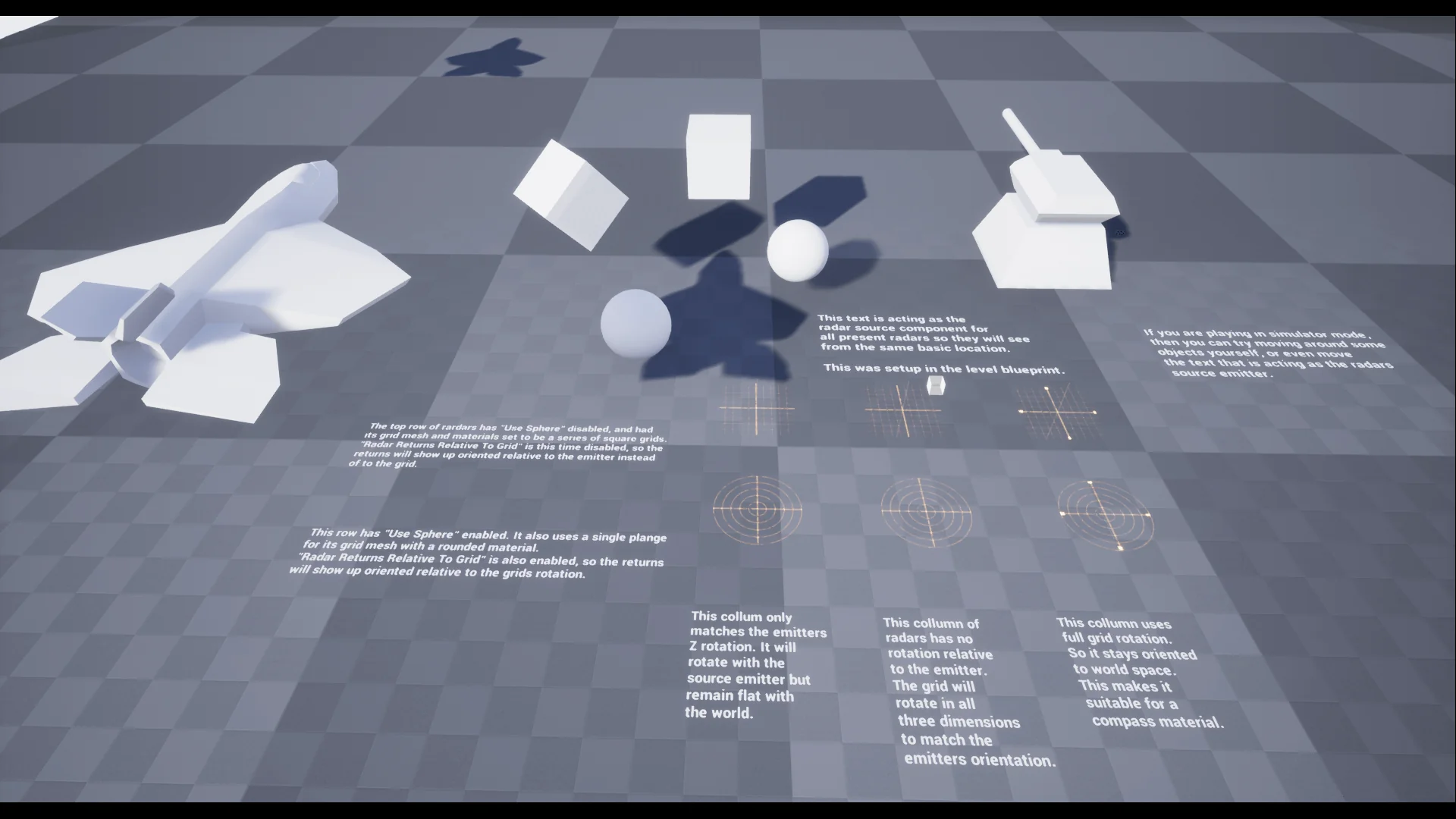
Resource screenshots
1 / 7
Asset drops
Daily Asset Drops
Follow 3DCGHUB on Telegram for daily Unreal, Unity & Blender drops and curated CC0 releases.
A scene full of actors says nothing about itself. Nothing in the world announces which contacts are close, which of them count as friendly, or at what distance a contact stops being worth showing, so all of that has to be authored somewhere. 3D Radar puts the authoring on two ends: the device that scans, and the objects that agree to be found.
Two main Blueprints do the work. The 3D Radar actor searches for other actors and displays them in its own local 3D space. The Radar Return component is the other half, placed on any actor that should be able to appear on a radar actor. Everything between those two pieces is configuration: how a contact is classified, what it looks like from a given viewpoint, how far out it stays visible, and whether it appears at all.
The Two-Blueprint Split Behind 3D Radar
Detection and representation stay apart. One Blueprint searches and draws; the other is a marker saying an actor is eligible to be found.
That separation changes how much work it takes to add a contact. Nothing needs to inherit from a radar-specific class, and the radar actor carries no hand-built list of things to track. An actor becomes visible by receiving the Radar Return component, and the radar actor discovers it through its own search. Because the display is drawn in the radar's local 3D space, contacts are positioned relative to the device rather than to one fixed world origin, which is what lets more than one radar read the same actor correctly at the same time. That second point carries the rest of the system: every rule about stance, appearance and range only becomes interesting when two radars can look at one contact and reach different conclusions.
Faction Stance Decides How a Radar Return Looks
The Radar Return component holds the options that make a contact legible: what type of actor it is, and which faction it belongs to. It also carries options for different meshes or Materials, chosen according to its faction stance from the point of view of the radar actor looking at it.
Stance is evaluated per viewer, so the setup is not a colour swap. One actor might show up as a blue friendly on one radar and then show up as a red hostile on another. Pushed further, on hostile radars that same actor can appear as a supposedly friendly unit with a different appearance, which opens the door to electronic warfare in a project that wants deception rather than clean identification. The actor in the world never changes; the reading of it does.
Range multipliers sit on the same component and govern how visible the actor is. A contact can be made easier to see from friendlies than from enemies, so identification distance and identification appearance both end up as relationships between two actors instead of fixed properties of one.
Two Range Controls That Answer Different Questions
The range multiplier on the component and the range options on the radar actor are separate dials, and keeping them straight saves a lot of confused tuning. The multiplier belongs to the actor being watched and shapes how strongly it registers for that particular viewer. The radar actor's own options belong to the device and decide the distances at which whole categories of returns appear.
Read together, the pair covers both one-off exceptions and broad policy. A single stealthy contact can be pulled back in visibility from everyone except its own side while the radar keeps its general distances untouched. Or the radar can be tuned by type while each contact keeps its default multiplier. Neither control has to be rebuilt to use the other.
Type and Distance Filtering on the Radar Actor
Classification on the component would be noise if the radar could not act on it. The 3D Radar actor carries a large number of options controlling at what ranges different types of returns show up, and whether they show up at all.
Because the type is declared on the component and the distance rules live on the radar actor, filtering stays centralized per device. One radar can be set to ignore a whole category of returns while another on the same map keeps them. Distances per type can be pulled in or pushed out independently, which is the practical difference between a short-range scanner concerned only with its immediate surroundings and a wide sweep that surfaces distant contacts and drops close clutter. The options go as far as removing returns entirely, not merely shortening how far out they are drawn.
Fading Returns at the Edge of the Display
Radar return materials can fade in and out smoothly at the edge of the display, so a contact approaching the boundary thins away instead of popping off.
One condition comes attached. The fade only works when the radar is using spherical search dimensions rather than cubic ones. A radar configured with cubic dimensions loses the soft edge entirely, which turns the choice of search volume into a visual decision as much as a shape decision. Settle that early, before range tuning begins, because it constrains which radars in a project can have the fade at all.
Swapping Meshes, Materials, Horizon and Grid
All visuals are exposed as modifiable variables. Returns accept any mesh or Material, and the same holds for the radar's own visuals, the horizon and the grid included.
Appearance work therefore lands with whoever is art-directing the project rather than with the system's author. A holographic presentation, a diegetic cockpit readout, or something deliberately plain all come from the same Blueprint with different variables assigned. Restyling is a matter of swapping assets, not rebuilding logic.
What the Demonstration Art Covers
A couple of art assets and Textures are included for demonstration purposes. They are enough to watch the system run and to see what each visual slot expects, and they read as a starting point rather than a finished art set. The mesh and Material variables are where a project's own look replaces them.
Where 3D Radar Sits in a Build
Scenes where contacts are objects in the world rather than rows in a UI list are the natural fit: fighters and turrets tracked across space, holographic presentations that need to show relative position, and maps where more than one device scans the same population of actors. Modularity is the reason it settles in quickly in those settings, since the component can be added to whatever already exists in the scene without a parallel representation layer being built alongside it.
The early payoff is a working contact display before final art exists. Later passes replace the demonstration meshes and Materials with production ones and retune the per-type distances without touching the logic that connects the two Blueprints. What remains is a decision about which actors receive the Radar Return component and how each radar actor's ranges and search shape are set for the scene it lives in.
 Gameplay Features
 Gameplay Features
 Gameplay Features