"7cee950366b2d3dd"{"id":"1002304","slug":"fight-game-select-character","title":"Fight Game Select Character","category":"Gameplay Features","engine":"4.26+,5.0+","assetVersion":"","engineVersion":"Engine Version: 4.26+,5.0+","tag":"Gameplay Features","accent":"blue","visual":"character","summary":"A Blueprint kit for fighting games: data-table rosters and stages, an automatic 3D character select grid, start menu HUD, health and energy bars, and camera and","platform":"Unreal Engine","indexPolicy":"index","publishedAt":"2026-11-05T10:04:37.850Z","updatedAt":"2026-11-05T10:04:37.850Z","sourceNotes":[],"fileContents":[],"compatibility":["Unreal Engine","Engine Version: 4.26+,5.0+"],"featuredImage":{"alt":"Fight Game Select Character","src":"/wp-content/uploads/published/2026/11/a51b60b826d5-6c8f6a9a-58b2-415a-810d-3c6a7747031e-6ac7fc7c3a.webp"},"hasDownloadLink":true,"downloads":0,"terms":[{"taxonomy":"category","slug":"gameplay-features","name":"Gameplay Features"}],"galleryImages":[{"src":"/wp-content/uploads/published/2026/11/e03b5d4fc72b-bb6c3c2a-b937-4150-b814-ff7733bff7a0-572dd6c4e5.webp","alt":"Fight Game Select Character"},{"src":"/wp-content/uploads/published/2026/11/5e47ce384e46-aa1c75eb-9e2d-4e12-a6dd-9b14eafffa2c-629f86b0d7.webp","alt":"Fight Game Select Character"},{"src":"/wp-content/uploads/published/2026/11/68510bd15076-fa032a3c-96b6-42d1-ab07-bf6f6865a3e5-3ecfcc3195.webp","alt":"Fight Game Select Character"},{"src":"/wp-content/uploads/published/2026/11/64a4c22d9ca4-ba3c601b-d408-4cc0-97b5-0f55b17367b7-5d1f1ca604.webp","alt":"Fight Game Select Character"},{"src":"/wp-content/uploads/published/2026/11/b578c13908b8-c25e0e0a-9526-481f-a18f-bcd9e1f13fca-fa35ec6e96.webp","alt":"Fight Game Select Character"},{"src":"/wp-content/uploads/published/2026/11/5011a43d9c3c-8c31cc9a-410c-497c-b622-06457b9d9007-9a6b167f0c.webp","alt":"Fight Game Select Character"}],"accessPanel":{"kind":"resource","title":"Get this resource","eyebrow":"Free resource","message":"3DCGHUB is a discovery service. EduQuill provides the file, account, quotas and delivery.","fileName":"Fight Game Select Character.7z","safetyNote":"Resources are manually reviewed before listing to improve quality and reduce obvious risks.","actionLabel":"Get from EduQuill","resourceType":"Resource archive","versions":[]},"contentHtml":"\u003cp\u003eA versus screen where a row of fighters stands on a grid, a start menu that gets players in and out of the match, and a gameplay layout holding health, energy and a running clock — that path from pressing start to the first punch is what this kit lays out. Fight Game Select Character is assembled from Blueprints, and the pieces are arranged so a roster and a set of stages can be slotted in rather than rebuilt.\u003c/p\u003e \u003ch2\u003eThe roster lives in a data table\u003c/h2\u003e\n\u003cp\u003eCharacters and stages enter the project through a data table. That single decision shapes everything downstream: the selection screen does not need a hand-built slot for every fighter, and the stage list does not need its own separate plumbing. Entries go into the table, and the other pieces read from it.\u003c/p\u003e\n\u003cp\u003eLevels load by their names, so stage switching stays inside the same system as the roster. A developer adding a fighter or an extra arena is editing data rather than pulling apart the HUD layout or the match logic. For a small roster this keeps setup short; for a larger one it keeps the same structure from turning into a pile of one-off blueprints.\u003c/p\u003e\n\u003cp\u003eNamePlayers runs automatically on the selection screen. Player names are filled in without anyone typing them per slot, which matters most when the roster grows and manual labelling would be the first thing to fall out of date.\u003c/p\u003e \u003ch2\u003eNamePlayers and a three-dimensional grid of fighters\u003c/h2\u003e\n\u003cp\u003eThe select-player HUD is a clean layout built specifically for a character selection screen, and its centrepiece is a real-time grid of 3D actors. The fighters standing in that grid are the actual 3D assets rather than flat portraits swapped in and out — the roster reads as a lineup of bodies in space, which is the visual language fighting-game players already expect from a select screen.\u003c/p\u003e\n\u003cp\u003e\n\u003ch3\u003eSizing the grid before anything else\u003c/h3\u003e\n\u003cp\u003eThe grid ships as a basic 16-slot arrangement, with the character count entered as a value. That number is what determines how many fighters the selection screen carries, so the same layout serves a compact starting roster or a fuller one without a redesign. Deciding the count early is the practical first step, because it sets how much of the grid the player scrolls through on the way to their pick.\u003c/p\u003e \u003ch2\u003eStart menu, in-match layout, and the pieces on screen\u003c/h2\u003e\n\u003cp\u003eTwo HUDs bracket the session. Menu Start is a basic entry and exit menu, closing the loop so a player can get into the game and back out again without a separate front end being shaped by it. The gameplay layout is the cleaner of the two: health bar, energy bar, an automatic time count, and a large image area at the top of the screen.\u003c/p\u003e\n\u003cul\u003e\n\u003cli\u003eHealth bar for each fighter\u003c/li\u003e\n\u003cli\u003eEnergy bar alongside it\u003c/li\u003e\n\u003cli\u003eTime count that runs automatically\u003c/li\u003e\n\u003cli\u003eA big image across the top of the screen\u003c/li\u003e\n\u003c/ul\u003e\n\u003cp\u003eThe clock needs no input to start counting, and the bars are already positioned as a matched pair — the kind of layout work that is tedious to place by hand and easy to leave half-finished.\u003c/p\u003e \u003ch2\u003eCamera and spawn Blueprints that follow you into any level\u003c/h2\u003e\n\u003cp\u003eTwo Blueprints handle jobs that would otherwise be rebuilt level by level. One spawns players automatically for any level in the project; the other controls the camera automatically. Between them, a new stage can be brought in without re-authoring the opening sequence of spawn and camera framing each time.\u003c/p\u003e\n\u003cp\u003eThe Blueprints themselves are described as simple codes ready to drag and drop into the level, so the assembly work is placement rather than graph construction. Combined with name-based level loading, this is the part of the kit that carries the most weight once a project has more than one arena: the same spawn and camera behaviour applies everywhere, and a stage only needs its entry in the table.\u003c/p\u003e \u003ch2\u003eTwo controllers at once, and the moves underneath\u003c/h2\u003e\n\u003cp\u003eThe kit supports two controllers at the same time, which is the minimum a fighting game can function on and the first thing that breaks when a selection flow is ported from a single-player template. Both pads are accounted for from the select screen through to the match.\u003c/p\u003e\n\u003cp\u003eBasic moves for fighting games are included: front, back, crouch and jump. These four cover the ground layer of a fight — advancing, retreating, dropping into a stance, and leaving the floor. They are a movement base rather than a moveset, and the kit treats them that way.\u003c/p\u003e \u003cp\u003eFight Game Select Character suits a project that already knows what its fighters and stages look like and needs the connective tissue between them: a table to hold the roster, a select screen that renders those fighters in 3D, a start menu, a match HUD, and spawn and camera logic that stops at nothing when a new level is added. The four basic moves mark where the kit stops and where a combat system of your own would begin.\u003c/p\u003e\n\n\u003ch2\u003eContinue Browsing Similar Packs\u003c/h2\u003e\n\u003cul\u003e\n\u003cli\u003e\u003ca href=\"https://3dcghub.com/advanced-framework-vr-mobile-desktop/\" rel=\"noopener noreferrer\"\u003eAdvanced Framework - VR, Mobile \u0026amp; Desktop\u003c/a\u003e\u003c/li\u003e\n\u003cli\u003e\u003ca href=\"https://3dcghub.com/project-sunrise-interaction-dialogue-quest-system/\" rel=\"noopener noreferrer\"\u003eProject Sunrise - Interaction, Dialogue \u0026amp; Quest System\u003c/a\u003e\u003c/li\u003e\n\u003cli\u003e\u003ca href=\"https://3dcghub.com/virtual-reality-character-flying/\" rel=\"noopener noreferrer\"\u003eVirtual Reality Character Flying\u003c/a\u003e\u003c/li\u003e\n\u003cli\u003e\u003ca href=\"https://3dcghub.com/rpg-compass-ui-system/\" rel=\"noopener noreferrer\"\u003eRPG Compass UI System\u003c/a\u003e\u003c/li\u003e\n\u003cli\u003e\u003ca href=\"https://3dcghub.com/fade-camera-occluders/\" rel=\"noopener noreferrer\"\u003eFade Camera Occluders\u003c/a\u003e\u003c/li\u003e\n\u003c/ul\u003e","contentTextLength":4931,"navigation":{"current":4,"total":4230,"previous":{"id":"1002305","slug":"floating-animations","title":"Floating Animations","category":"Variety","platform":"Unreal Engine","updatedAt":"2026-11-05T10:05:43.874Z"},"next":{"id":"1002303","slug":"fence-chainlink","title":"Fence Chainlink","category":"Tools, Objects \u0026 Decor","platform":"Unreal Engine","updatedAt":"2026-11-05T10:04:02.958Z"}},"relatedResources":[{"id":"28394","slug":"advanced-framework-vr-mobile-desktop","title":"Advanced Framework - VR, Mobile \u0026 Desktop","category":"Gameplay Features","engine":"5.0+","assetVersion":"Engine version: 5.0+","engineVersion":"","tag":"Gameplay Features","accent":"blue","visual":"luts","summary":"Advanced Framework is a production-ready foundation for VR, desktop, and mobile applications. It combines first-person control setups, interaction systems, multiplayer replication, navigation modes, and adaptable UI tools in one package.","platform":"Unreal Engine","indexPolicy":"index","publishedAt":"2026-05-12T09:33:53.000Z","updatedAt":"2026-05-12T09:33:54.000Z","sourceNotes":[],"fileContents":[],"compatibility":["Unreal Engine","Engine version: 5.0+"],"featuredImage":{"alt":"Advanced Framework - VR, Mobile \u0026 Desktop","src":"https://3dcghub.com/wp-content/uploads/2026/05/98ecd66b1773_1af6d69e-fbe1-435d-abdf-cc772ef3b31f.webp"},"hasDownloadLink":true,"downloads":0},{"id":"28091","slug":"project-sunrise-interaction-dialogue-quest-system","title":"Project Sunrise - Interaction, Dialogue \u0026 Quest System","category":"Gameplay Features","engine":"5.5+","assetVersion":"Engine version: 5.5+","engineVersion":"","tag":"Gameplay Features","accent":"blue","visual":"luts","summary":"Project Sunrise combines interaction, dialogue, and quest tools inside a blueprint-only project aimed at speeding up early gameplay setup. It also includes actor collection, save, and UI stack systems, plus an example map that shows how the pieces work in p...","platform":"Unreal Engine","indexPolicy":"index","publishedAt":"2026-05-04T08:15:01.000Z","updatedAt":"2026-05-04T08:15:03.000Z","sourceNotes":[],"fileContents":[],"compatibility":["Unreal Engine","Engine version: 5.5+"],"featuredImage":{"alt":"Project Sunrise - Interaction, Dialogue \u0026 Quest System","src":"https://3dcghub.com/wp-content/uploads/2026/05/ae19ba5e5924_45a421ec-6361-4baa-b5f8-5a7f889edc99.webp"},"hasDownloadLink":true,"downloads":0},{"id":"1002261","slug":"virtual-reality-character-flying","title":"Virtual Reality Character Flying","category":"Gameplay Features","engine":"4.27,5.0+","assetVersion":"","engineVersion":"Engine Version: 4.27,5.0+","tag":"Gameplay Features","accent":"blue","visual":"character","summary":"Explore the Virtual Reality Character Flying Blueprint project, featuring smooth walking, continuous turning, gestural flight acceleration, and input controls.","platform":"Unreal Engine","indexPolicy":"index","publishedAt":"2026-10-29T16:20:51.486Z","updatedAt":"2026-10-29T16:20:51.486Z","sourceNotes":[],"fileContents":[],"compatibility":["Unreal Engine","Engine Version: 4.27,5.0+"],"featuredImage":{"alt":"Virtual Reality Character Flying","src":"/wp-content/uploads/published/2026/10/cae457bf8790-a8442b34-ea49-4636-bbca-98b5b7021a9f-dbdc518865.webp"},"hasDownloadLink":true,"downloads":0}]}
Gameplay Features
Fight Game Select Character
A Blueprint kit for fighting games: data-table rosters and stages, an automatic 3D character select grid, start menu HUD, health and energy bars, and camera and
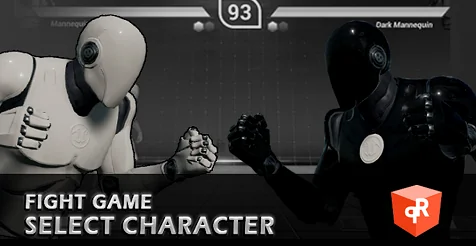
A versus screen where a row of fighters stands on a grid, a start menu that gets players in and out of the match, and a gameplay layout holding health, energy and a running clock — that path from pressing start to the first punch is what this kit lays out. Fight Game Select Character is assembled from Blueprints, and the pieces are arranged so a roster and a set of stages can be slotted in rather than rebuilt.
The roster lives in a data table
Characters and stages enter the project through a data table. That single decision shapes everything downstream: the selection screen does not need a hand-built slot for every fighter, and the stage list does not need its own separate plumbing. Entries go into the table, and the other pieces read from it.
Levels load by their names, so stage switching stays inside the same system as the roster. A developer adding a fighter or an extra arena is editing data rather than pulling apart the HUD layout or the match logic. For a small roster this keeps setup short; for a larger one it keeps the same structure from turning into a pile of one-off blueprints.
NamePlayers runs automatically on the selection screen. Player names are filled in without anyone typing them per slot, which matters most when the roster grows and manual labelling would be the first thing to fall out of date.
NamePlayers and a three-dimensional grid of fighters
The select-player HUD is a clean layout built specifically for a character selection screen, and its centrepiece is a real-time grid of 3D actors. The fighters standing in that grid are the actual 3D assets rather than flat portraits swapped in and out — the roster reads as a lineup of bodies in space, which is the visual language fighting-game players already expect from a select screen.
Sizing the grid before anything else
The grid ships as a basic 16-slot arrangement, with the character count entered as a value. That number is what determines how many fighters the selection screen carries, so the same layout serves a compact starting roster or a fuller one without a redesign. Deciding the count early is the practical first step, because it sets how much of the grid the player scrolls through on the way to their pick.
Start menu, in-match layout, and the pieces on screen
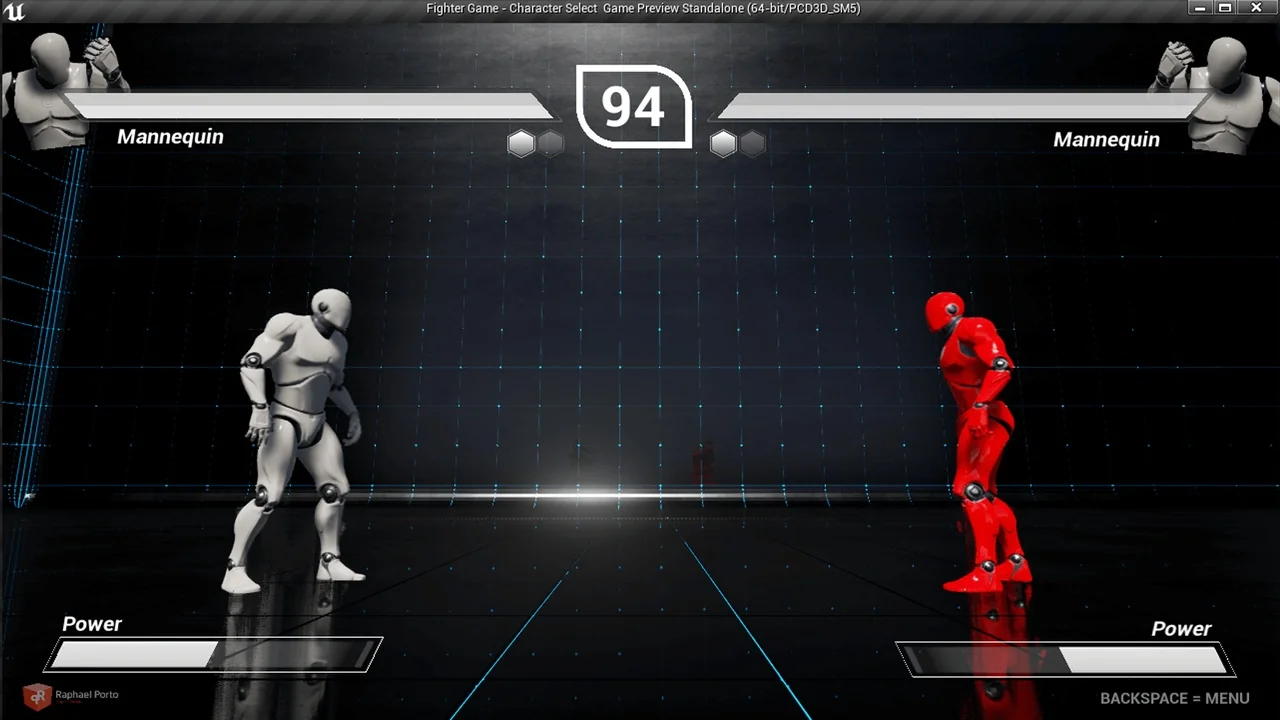
Two HUDs bracket the session. Menu Start is a basic entry and exit menu, closing the loop so a player can get into the game and back out again without a separate front end being shaped by it. The gameplay layout is the cleaner of the two: health bar, energy bar, an automatic time count, and a large image area at the top of the screen.
Health bar for each fighter
Energy bar alongside it
Time count that runs automatically
A big image across the top of the screen
The clock needs no input to start counting, and the bars are already positioned as a matched pair — the kind of layout work that is tedious to place by hand and easy to leave half-finished.
Camera and spawn Blueprints that follow you into any level
Two Blueprints handle jobs that would otherwise be rebuilt level by level. One spawns players automatically for any level in the project; the other controls the camera automatically. Between them, a new stage can be brought in without re-authoring the opening sequence of spawn and camera framing each time.
The Blueprints themselves are described as simple codes ready to drag and drop into the level, so the assembly work is placement rather than graph construction. Combined with name-based level loading, this is the part of the kit that carries the most weight once a project has more than one arena: the same spawn and camera behaviour applies everywhere, and a stage only needs its entry in the table.
Two controllers at once, and the moves underneath
The kit supports two controllers at the same time, which is the minimum a fighting game can function on and the first thing that breaks when a selection flow is ported from a single-player template. Both pads are accounted for from the select screen through to the match.
Basic moves for fighting games are included: front, back, crouch and jump. These four cover the ground layer of a fight — advancing, retreating, dropping into a stance, and leaving the floor. They are a movement base rather than a moveset, and the kit treats them that way.
Fight Game Select Character suits a project that already knows what its fighters and stages look like and needs the connective tissue between them: a table to hold the roster, a select screen that renders those fighters in 3D, a start menu, a match HUD, and spawn and camera logic that stops at nothing when a new level is added. The four basic moves mark where the kit stops and where a combat system of your own would begin.
 Gameplay Features
 Gameplay Features
 Gameplay Features
 Gameplay Features