"efaa631e936fd3ee"{"id":"1002261","slug":"virtual-reality-character-flying","title":"Virtual Reality Character Flying","category":"Gameplay Features","engine":"4.27,5.0+","assetVersion":"","engineVersion":"Engine Version: 4.27,5.0+","tag":"Gameplay Features","accent":"blue","visual":"character","summary":"Explore the Virtual Reality Character Flying Blueprint project, featuring smooth walking, continuous turning, gestural flight acceleration, and input controls.","platform":"Unreal Engine","publishedAt":"2026-10-29T16:20:51.486Z","updatedAt":"2026-10-29T16:20:51.486Z","sourceNotes":[],"fileContents":[],"compatibility":["Unreal Engine","Engine Version: 4.27,5.0+"],"featuredImage":{"alt":"Virtual Reality Character Flying","src":"/wp-content/uploads/published/2026/10/cae457bf8790-a8442b34-ea49-4636-bbca-98b5b7021a9f-dbdc518865.webp"},"hasDownloadLink":true,"downloads":0,"terms":[{"taxonomy":"category","slug":"gameplay-features","name":"Gameplay Features"}],"galleryImages":[{"src":"/wp-content/uploads/published/2026/10/7a07f3d0c49a-660920c9-b8ee-43f1-93ba-5faa4977ffff-c1367a6690.webp","alt":"Virtual Reality Character Flying"},{"src":"/wp-content/uploads/published/2026/10/1a2d4dbbdc4c-45a8d5ee-3a38-414c-ae97-76e342f1a767-1299862030.webp","alt":"Virtual Reality Character Flying"},{"src":"/wp-content/uploads/published/2026/10/2edb0a6eb893-a05efc2b-7703-4e92-afa2-69bed2cd8b87-d75beaaf2e.webp","alt":"Virtual Reality Character Flying"}],"accessPanel":{"kind":"resource","title":"Download this resource","eyebrow":"Free Download","message":"Log in or create a free account to start your download.","fileName":"Virtual Reality Character Flying.7z","safetyNote":"Resources are manually reviewed before listing to improve quality and reduce obvious risks.","actionLabel":"Download Free","resourceType":"Resource archive"},"contentHtml":"\u003ch2\u003eSpatial Freedom in Immersive Virtual Reality Environments\u003c/h2\u003e\u003cp\u003eVirtual environments that feature significant verticality, such as towering open landscapes, high-ceiling structures, or expansive fantasy expanses, require locomotion systems that venture far beyond traditional horizontal walking. When a project transitions from grounded spatial exploration to unrestricted mid-air navigation, player interaction hinges on how seamlessly those movement states interface with one another. Virtual Reality Character Flying tackles this exact traversal challenge by providing a functional Blueprint setup where standard pedestrian locomotion and fully three-dimensional flight operate within a unified character architecture.\u003c/p\u003e\u003cp\u003eRather than locking the player into a single locomotion paradigm, the system accommodates ground-level positioning and high-altitude surveying within the same session. Grounded users can inspect spatial details up close, position themselves relative to level geometry, and immediately take to the air when wide-area mobility becomes necessary. By combining smooth locomotion principles with a dedicated flight state, the setup supports scenes where vertical volume is just as interactive as the floor plane beneath the player.\u003c/p\u003e\u003ch2\u003eSmooth Turn and Walk Movement on Foot\u003c/h2\u003e\u003cp\u003eBefore launching into the air, the character relies on an established ground-based locomotion pipeline designed to give players predictable physical presence within virtual space. Directional input is cleanly split across the primary controller interfaces to keep navigation intuitive and consistent with common spatial control conventions:\u003c/p\u003e\u003cul\u003e\u003cli\u003e\u003cstrong\u003eLeft Thumb Stick:\u003c/strong\u003e Manages forward movement, driving the character along the horizontal plane relative to controller orientation or player gaze.\u003c/li\u003e\u003cli\u003e\u003cstrong\u003eRight Thumb Stick:\u003c/strong\u003e Governs smooth turning, granting the user full yaw control over their rotational heading without jarring snap intervals.\u003c/li\u003e\u003cli\u003e\u003cstrong\u003eButton (B) Single Press:\u003c/strong\u003e Triggers a standard jump, allowing players to clear low-profile obstacles, hop across broken terrain, or negotiate basic elevation shifts without entering flight mode.\u003c/li\u003e\u003c/ul\u003e\u003cp\u003eBy pairing forward thumbstick translation on one hand with continuous rotational turning on the other, the ground setup provides a familiar, continuous movement model. Players maintain direct control over their trajectory when walking across surfaces, approaching interactive items, or aligning their line of sight before initiating aerial flight.\u003c/p\u003e\u003ch2\u003eAirborne Navigation and the Button Control Scheme\u003c/h2\u003e\u003cp\u003eThe transition from ground interaction to airborne movement is handled through direct button input mappings that govern state changes and vertical displacement. Once airborne, the character moves freely throughout three-dimensional space, utilizing dedicated elevation inputs on the face buttons alongside continuous directional tracking via the thumbsticks.\u003c/p\u003e\u003cp\u003eFlight state transitions and vertical velocity are structured around distinct press and hold behaviors:\u003c/p\u003e\u003cul\u003e\u003cli\u003e\u003cstrong\u003ePress (B) Twice:\u003c/strong\u003e Initiates flight mode, detaching the character from ground collision and enabling freeform aerial mobility.\u003c/li\u003e\u003cli\u003e\u003cstrong\u003eHold Down (B):\u003c/strong\u003e Drives positive vertical displacement, propelling the character upward along the vertical axis for as long as the input remains depressed.\u003c/li\u003e\u003cli\u003e\u003cstrong\u003eHold Down (A):\u003c/strong\u003e Initiates negative vertical displacement, directing the character downward to descend toward lower vantage points or target landing zones.\u003c/li\u003e\u003cli\u003e\u003cstrong\u003ePress (A) Twice:\u003c/strong\u003e Immediately halts flight mode, disabling aerial suspension and returning the character to standard gravity and ground-walking mechanics.\u003c/li\u003e\u003c/ul\u003e\u003cp\u003eThis layout creates a clear separation between upward ascension and downward descent while preventing accidental toggling. Requiring a double-press on the (B) button to launch and a double-press on the (A) button to land or stop flying ensures that players do not inadvertently drop out of the air while adjusting vertical elevation. Thumbstick navigation remains active during flight, letting the user steer forward with the left thumbstick and adjust yaw with the right thumbstick while simultaneously modulating altitude.\u003c/p\u003e\u003ch2\u003eFist Posture and Flight Acceleration Dynamics\u003c/h2\u003e\u003cp\u003eBeyond traditional controller inputs, Virtual Reality Character Flying introduces a physical, gesture-based velocity mechanic: curling the character hands into a fist causes the character to fly faster. This interaction anchors the flight experience directly to user posture, bridging raw button-driven locomotion with natural hand presence.\u003c/p\u003e\u003cp\u003eIn standard flight, the base movement speed allows for controlled maneuvering, suitable for navigating close to structures, threading through narrow passages, or landing cleanly on designated platforms. When players close their hands into fists, the system activates an acceleration boost. This secondary speed tier allows the user to traverse long stretches of open airspace rapidly without requiring separate slider menus or thumbstick clicks. The physical act of clenching the hands provides immediate kinetic feedback within the virtual environment, shifting the feeling of movement from passive vehicular steering to active, embodied flight.\u003c/p\u003e\u003ch2\u003eBlueprint Architecture for Virtual Reality Drivable Vehicle Logic\u003c/h2\u003e\u003cp\u003eImplemented entirely through Blueprints, the project operates within the Virtual Reality Drivable Vehicle functional classification. Treating the player pawn with vehicle-like mobility principles allows the locomotion script to cleanly separate state handling between walking, jumping, hovering, ascending, and accelerated flight. Because the system is structured as a Blueprint, its core mechanics—ranging from jump impulses to flight velocity thresholds and gesture detection—remain accessible for inspection and adjustment.\u003c/p\u003e\u003cp\u003eDevelopers working on interactive simulations, aerial sandboxes, or open-ended VR experiences benefit from a framework that solves fundamental movement mechanics out of the box. Whether used as a prototyping baseline for specialized superhero-style aerial gameplay or as an exploratory traversal tool for inspecting massive digital sets, Virtual Reality Character Flying provides the complete operational logic needed to walk, turn, leap, take off, and accelerate through virtual skies.\u003c/p\u003e\n\n\u003ch2\u003eContinue Browsing Similar Packs\u003c/h2\u003e\n\u003cul\u003e\n\u003cli\u003e\u003ca href=\"https://3dcghub.com/combat-drone/\" title=\"Combat Drone\"\u003eCombat Drone\u003c/a\u003e\u003c/li\u003e\n\u003cli\u003e\u003ca href=\"https://3dcghub.com/dynamic-flight-with-blueprints/\" title=\"Dynamic Flight with Blueprints\"\u003eDynamic Flight with Blueprints\u003c/a\u003e\u003c/li\u003e\n\u003cli\u003e\u003ca href=\"https://3dcghub.com/flying-drones-with-blueprints/\" title=\"Flying Drones With Blueprints\"\u003eFlying Drones With Blueprints\u003c/a\u003e\u003c/li\u003e\n\u003cli\u003e\u003ca href=\"https://3dcghub.com/checkpoint-course-creator/\" title=\"Checkpoint Course Creator\"\u003eCheckpoint Course Creator\u003c/a\u003e\u003c/li\u003e\n\u003cli\u003e\u003ca href=\"https://3dcghub.com/fade-camera-occluders/\" title=\"Fade Camera Occluders\"\u003eFade Camera Occluders\u003c/a\u003e\u003c/li\u003e\n\u003c/ul\u003e","contentTextLength":6340,"navigation":{"current":24,"total":4209,"previous":{"id":"1002262","slug":"virtual-studios-vol-1-scene-5","title":"Virtual Studios Vol 1 Scene 5","category":"Buildings \u0026 Architecture","platform":"Unreal Engine","updatedAt":"2026-10-29T16:22:42.201Z"},"next":{"id":"1002260","slug":"vintage-scifi-pack-vol-9-server-computers","title":"Vintage SciFi Pack VOL 9 Server computers","category":"Electronics \u0026 Technology","platform":"Unreal Engine","updatedAt":"2026-10-29T16:20:34.124Z"}},"relatedResources":[{"id":"1000574","slug":"combat-drone","title":"Combat Drone","category":"Gameplay Features","engine":"4.27+,5.0+","assetVersion":"","engineVersion":"Engine Version: 4.27+,5.0+","tag":"Gameplay Features","accent":"blue","visual":"mech","summary":"Combat Drone is a Blueprint component for Unreal Engine featuring a controllable flying pawn and AI logic, compatible with engine versions 4.27 through 5.6.","platform":"Unreal Engine","publishedAt":"2026-07-16T22:28:44.557Z","updatedAt":"2026-10-24T04:34:34.705Z","sourceNotes":[],"fileContents":[],"compatibility":["Unreal Engine","Engine Version: 4.27+,5.0+"],"featuredImage":{"alt":"Combat Drone","src":"/wp-content/uploads/published/2026/07/e50469e73388-fa787e2d-e3bb-4c39-923d-d38969ed0f15-0aad1eba2f.webp"},"hasDownloadLink":true,"downloads":0},{"id":"10793","slug":"dynamic-flight-with-blueprints","title":"Dynamic Flight with Blueprints","category":"Gameplay Features","engine":"4.26+,5.0+","assetVersion":"Engine version: 4.26+,5.0+","engineVersion":"4.18","tag":"Gameplay Features","accent":"blue","visual":"audio","summary":"Enhance your project with a comprehensive third-person flight system. This set includes animations, additive poses, and Blueprints designed for dynamic motion and easy integration.","platform":"Unreal Engine","publishedAt":"2026-03-03T16:14:20.000Z","updatedAt":"2026-04-19T15:49:56.000Z","sourceNotes":[],"fileContents":[],"compatibility":["Unreal Engine","Engine version: 4.26+,5.0+"],"featuredImage":{"alt":"Dynamic Flight with Blueprints","src":"https://3dcghub.com/wp-content/uploads/2026/03/5d459532-5562-4a4a-b3c6-38bdd3793c27.webp"},"hasDownloadLink":true,"downloads":0},{"id":"1001880","slug":"flying-drones-with-blueprints","title":"Flying Drones With Blueprints","category":"Military","engine":"4.24+,5.0+","assetVersion":"","engineVersion":"Engine Version: 4.24+,5.0+","tag":"Military","accent":"blue","visual":"mech","summary":"Explore Flying Drones With Blueprints for Unreal Engine 5.1+, featuring five low-poly drone designs, interactive character possession, and material parameters.","platform":"Unreal Engine","publishedAt":"2026-10-22T11:20:40.615Z","updatedAt":"2026-10-22T11:20:40.615Z","sourceNotes":[],"fileContents":[],"compatibility":["Unreal Engine","Engine Version: 4.24+,5.0+"],"featuredImage":{"alt":"Flying Drones With Blueprints","src":"/wp-content/uploads/published/2026/10/f5c1d21ebbbf-e75530b8-52a6-40d4-b3da-5b51dc2bd1af-1b7a625fff.webp"},"hasDownloadLink":true,"downloads":0}]}
Gameplay Features
Virtual Reality Character Flying
Explore the Virtual Reality Character Flying Blueprint project, featuring smooth walking, continuous turning, gestural flight acceleration, and input controls.
Spatial Freedom in Immersive Virtual Reality Environments
Virtual environments that feature significant verticality, such as towering open landscapes, high-ceiling structures, or expansive fantasy expanses, require locomotion systems that venture far beyond traditional horizontal walking. When a project transitions from grounded spatial exploration to unrestricted mid-air navigation, player interaction hinges on how seamlessly those movement states interface with one another. Virtual Reality Character Flying tackles this exact traversal challenge by providing a functional Blueprint setup where standard pedestrian locomotion and fully three-dimensional flight operate within a unified character architecture.
Rather than locking the player into a single locomotion paradigm, the system accommodates ground-level positioning and high-altitude surveying within the same session. Grounded users can inspect spatial details up close, position themselves relative to level geometry, and immediately take to the air when wide-area mobility becomes necessary. By combining smooth locomotion principles with a dedicated flight state, the setup supports scenes where vertical volume is just as interactive as the floor plane beneath the player.
Smooth Turn and Walk Movement on Foot
Before launching into the air, the character relies on an established ground-based locomotion pipeline designed to give players predictable physical presence within virtual space. Directional input is cleanly split across the primary controller interfaces to keep navigation intuitive and consistent with common spatial control conventions:
Left Thumb Stick: Manages forward movement, driving the character along the horizontal plane relative to controller orientation or player gaze.
Right Thumb Stick: Governs smooth turning, granting the user full yaw control over their rotational heading without jarring snap intervals.
Button (B) Single Press: Triggers a standard jump, allowing players to clear low-profile obstacles, hop across broken terrain, or negotiate basic elevation shifts without entering flight mode.
By pairing forward thumbstick translation on one hand with continuous rotational turning on the other, the ground setup provides a familiar, continuous movement model. Players maintain direct control over their trajectory when walking across surfaces, approaching interactive items, or aligning their line of sight before initiating aerial flight.
Airborne Navigation and the Button Control Scheme
The transition from ground interaction to airborne movement is handled through direct button input mappings that govern state changes and vertical displacement. Once airborne, the character moves freely throughout three-dimensional space, utilizing dedicated elevation inputs on the face buttons alongside continuous directional tracking via the thumbsticks.
Flight state transitions and vertical velocity are structured around distinct press and hold behaviors:
Press (B) Twice: Initiates flight mode, detaching the character from ground collision and enabling freeform aerial mobility.
Hold Down (B): Drives positive vertical displacement, propelling the character upward along the vertical axis for as long as the input remains depressed.
Hold Down (A): Initiates negative vertical displacement, directing the character downward to descend toward lower vantage points or target landing zones.
Press (A) Twice: Immediately halts flight mode, disabling aerial suspension and returning the character to standard gravity and ground-walking mechanics.
This layout creates a clear separation between upward ascension and downward descent while preventing accidental toggling. Requiring a double-press on the (B) button to launch and a double-press on the (A) button to land or stop flying ensures that players do not inadvertently drop out of the air while adjusting vertical elevation. Thumbstick navigation remains active during flight, letting the user steer forward with the left thumbstick and adjust yaw with the right thumbstick while simultaneously modulating altitude.
Fist Posture and Flight Acceleration Dynamics
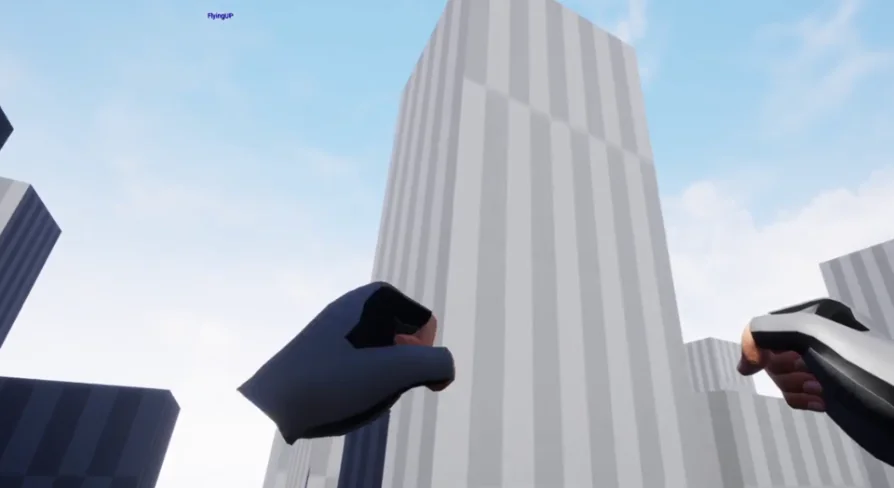
Beyond traditional controller inputs, Virtual Reality Character Flying introduces a physical, gesture-based velocity mechanic: curling the character hands into a fist causes the character to fly faster. This interaction anchors the flight experience directly to user posture, bridging raw button-driven locomotion with natural hand presence.
In standard flight, the base movement speed allows for controlled maneuvering, suitable for navigating close to structures, threading through narrow passages, or landing cleanly on designated platforms. When players close their hands into fists, the system activates an acceleration boost. This secondary speed tier allows the user to traverse long stretches of open airspace rapidly without requiring separate slider menus or thumbstick clicks. The physical act of clenching the hands provides immediate kinetic feedback within the virtual environment, shifting the feeling of movement from passive vehicular steering to active, embodied flight.
Blueprint Architecture for Virtual Reality Drivable Vehicle Logic
Implemented entirely through Blueprints, the project operates within the Virtual Reality Drivable Vehicle functional classification. Treating the player pawn with vehicle-like mobility principles allows the locomotion script to cleanly separate state handling between walking, jumping, hovering, ascending, and accelerated flight. Because the system is structured as a Blueprint, its core mechanics—ranging from jump impulses to flight velocity thresholds and gesture detection—remain accessible for inspection and adjustment.
Developers working on interactive simulations, aerial sandboxes, or open-ended VR experiences benefit from a framework that solves fundamental movement mechanics out of the box. Whether used as a prototyping baseline for specialized superhero-style aerial gameplay or as an exploratory traversal tool for inspecting massive digital sets, Virtual Reality Character Flying provides the complete operational logic needed to walk, turn, leap, take off, and accelerate through virtual skies.
 Gameplay Features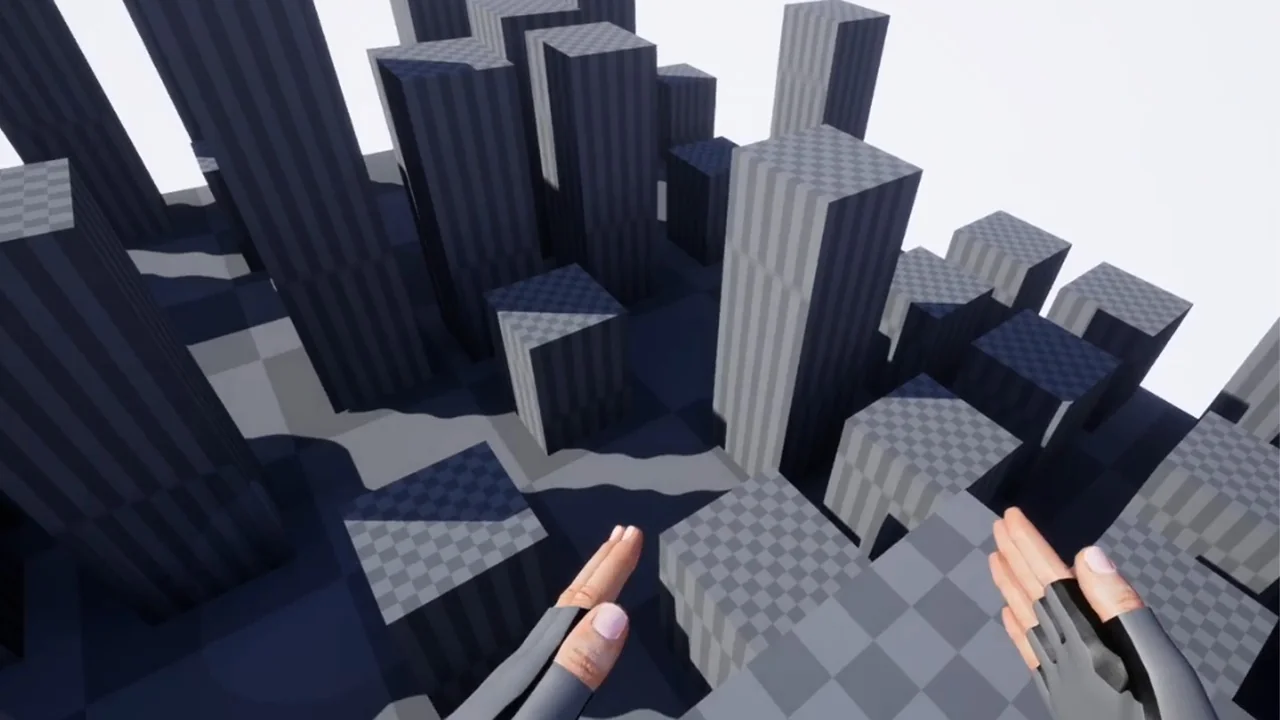
 Gameplay Features
 Gameplay Features
 Military