"a19e0535960bd083"{"id":"1002017","slug":"fade-camera-occluders","title":"Fade Camera Occluders","category":"Gameplay Features","engine":"4.26+,5.0+","assetVersion":"","engineVersion":"Engine Version: 4.26+,5.0+","tag":"Gameplay Features","accent":"blue","visual":"mech","summary":"Keep characters visible with Fade Camera Occluders, a 100% Blueprint component that fades static and skeletal meshes blocking the camera view.","platform":"Unreal Engine","publishedAt":"2026-10-26T12:56:17.838Z","updatedAt":"2026-10-26T12:56:17.838Z","sourceNotes":[],"fileContents":[],"compatibility":["Unreal Engine","Engine Version: 4.26+,5.0+"],"featuredImage":{"alt":"Fade Camera Occluders","src":"/wp-content/uploads/published/2026/10/d9d34e7d5aaa-edc584d7-865e-4401-9925-8368ca97634b-e405fd6672.webp"},"hasDownloadLink":true,"downloads":0,"terms":[{"taxonomy":"category","slug":"gameplay-features","name":"Gameplay Features"}],"galleryImages":[{"src":"/wp-content/uploads/published/2026/10/27bbdd420a32-f47eeee4-1e59-46a0-a01e-c1f275779fd2-8884aa370e.webp","alt":"Fade Camera Occluders"},{"src":"/wp-content/uploads/published/2026/10/de097788a8bc-b8cfa89c-2cc0-45d8-9d22-809502f282bc-fee6796b06.webp","alt":"Fade Camera Occluders"},{"src":"/wp-content/uploads/published/2026/10/4ab9d613bcfa-48a72a85-9564-48d7-b514-5aa513101fa6-4645be71cc.webp","alt":"Fade Camera Occluders"},{"src":"/wp-content/uploads/published/2026/10/521b3689dab6-e644f19e-18f7-46d1-b904-109f7b1d702f-e9597a7772.webp","alt":"Fade Camera Occluders"}],"accessPanel":{"kind":"resource","title":"Download this resource","eyebrow":"Free Download","message":"Log in or create a free account to start your download.","fileName":"Content.7z","safetyNote":"Resources are manually reviewed before listing to improve quality and reduce obvious risks.","actionLabel":"Download Free","resourceType":"Resource archive"},"contentHtml":"\u003ch2\u003eMaintaining Line of Sight with Fade Camera Occluders\u003c/h2\u003e\n\u003cp\u003eThird-person perspective projects frequently struggle with camera obstruction in confined environments. When an avatar navigates narrow corridors, dense interior architecture, or tight urban spaces, static walls and level props readily slip between the viewpoint and the player. Without a dedicated handling mechanism, the viewport gets blocked by opaque surfaces, disorienting the player and severing the visual connection to the playable character. Fade Camera Occluders addresses this mechanical friction by identifying obstructing geometry directly in front of the lens and fading it out smoothly to keep the character in clear view.\u003c/p\u003e\n\u003cp\u003eThis visual technique mirrors the behavior found across prominent AAA productions, where retaining visual clarity during action sequences is paramount. Rather than forcing the camera to snap abruptly forward or clipping through surfaces, the occluding geometry dissolves into transparency. The character stays framed properly within the scene, allowing navigation and combat to continue uninterrupted even as structural surfaces pass immediately before the camera lens.\u003c/p\u003e \u003ch2\u003eDetecting Static and Skeletal Mesh Geometry in Front of the Camera\u003c/h2\u003e\n\u003cp\u003eObstructions in real-time scenes are rarely limited to simple, immovable background walls. Modern levels mix rigid structural elements with articulated or animated objects that share the space. Fade Camera Occluders evaluates every occluder positioned between the camera position and the focal target, handling both static meshes and skeletal meshes equally.\u003c/p\u003e\n\u003cp\u003eA static mesh such as a structural pillar, low ceiling, partition wall, or hanging architectural beam triggers the fade response as soon as it interrupts the line of sight. Similarly, a skeletal mesh—whether that represents an animated machinery prop, an environmental creature, or a secondary figure—registers under the same detection routine. By checking across both mesh types, the component avoids common edge cases where dynamic objects remain fully opaque and obscure the view while surrounding static architecture dissolves away.\u003c/p\u003e \u003ch2\u003eHandling Blueprint Components and Nested Wall Meshes\u003c/h2\u003e\n\u003cp\u003eEnvironment production often relies on prefabricated Blueprints rather than raw individual meshes placed directly into the level viewport. Walls, modular door frames, interactive environmental props, and decorative set pieces are frequently bundled into complex Blueprint actors composed of multiple child components. Standard line trace routines that only examine root actors or unbundled meshes can miss nested geometry or fail to apply render changes to subcomponents properly.\u003c/p\u003e\n\u003cp\u003eFade Camera Occluders accounts for this workflow by detecting occluders even when they exist as nested components inside an external Blueprint. When a player ducks behind an elaborate assembly—such as a complex modular wall Blueprint containing trim meshes, frames, and collision volumes—the detection system targets the specific mesh component obstructing the lens. The component alters the render state of that obstructing element directly, ensuring that modular level building workflows do not break transparency behavior.\u003c/p\u003e \u003ch2\u003eCustom Transparency Colors and Transition Styles\u003c/h2\u003e\n\u003cp\u003eVisual presentation requirements vary widely across projects. Some art directions demand a subtle, neutral dissolve that preserves environmental lighting, while others benefit from distinct tinted silhouettes or stylized transparency effects. Fade Camera Occluders includes straightforward controls to adjust the underlying color of the transparency effect.\u003c/p\u003e\n\u003cp\u003eShifting the transparency color provides a simple way to align the visual feedback with a project's user interface palette or artistic tone. Beyond basic color adjustments, the component supports custom styling for teams wanting a distinct transition aesthetic. Creators can implement alternate transition styles to control how the material reveals or conceals occluded surfaces, matching the presentation to realistic simulations, high-contrast arcade games, or stylized sci-fi interfaces.\u003c/p\u003e \u003ch2\u003eProject Fit for Character Visibility and Occlusion Systems\u003c/h2\u003e\n\u003cp\u003eConstructed entirely as a 100% Blueprint component, Fade Camera Occluders drops directly into Unreal Engine projects without requiring C++ compilation or custom source code modifications. This makes the tool accessible to technical artists, level designers, and independent developers building gameplay prototypes or final production builds inside visual scripting pipelines.\u003c/p\u003e\n\u003cp\u003eThe system fits neatly into action games, platformers, RPGs, and third-person exploratory titles where environments feature varied verticality or dense interior layouts. Because it tracks both static and skeletal geometry across nested actor hierarchies while offering simple transparency color controls and expandable transition styles, it serves as a dependable camera management component for keeping player characters visible across complex scenes.\u003c/p\u003e\n\n\u003ch2\u003eRelated Resources Worth Checking\u003c/h2\u003e\n\u003cul\u003e\n\u003cli\u003e\u003ca href=\"https://3dcghub.com/advanced-fade-objects-pro-object-fading-with-tags-colors-and-multiplayer/\" title=\"Advanced Fade Objects PRO – Object Fading with Tags, Colors and Multiplayer\"\u003eAdvanced Fade Objects PRO – Object Fading with Tags, Colors and Multiplayer\u003c/a\u003e\u003c/li\u003e\n\u003cli\u003e\u003ca href=\"https://3dcghub.com/easy-combat-finisher/\" title=\"Easy Combat Finisher\"\u003eEasy Combat Finisher\u003c/a\u003e\u003c/li\u003e\n\u003cli\u003e\u003ca href=\"https://3dcghub.com/advanced-character-camera-and-functions/\" title=\"Advanced Character Camera And Functions\"\u003eAdvanced Character Camera And Functions\u003c/a\u003e\u003c/li\u003e\n\u003cli\u003e\u003ca href=\"https://3dcghub.com/customizable-bodycam-component/\" title=\"Customizable Bodycam Component\"\u003eCustomizable Bodycam Component\u003c/a\u003e\u003c/li\u003e\n\u003cli\u003e\u003ca href=\"https://3dcghub.com/advanced-bodycam-vhs-body-camera-component-with-video-effects/\" title=\"Advanced BodyCam / VHS - Body Camera Component with Video Effects\"\u003eAdvanced BodyCam / VHS - Body Camera Component with Video Effects\u003c/a\u003e\u003c/li\u003e\n\u003c/ul\u003e","contentTextLength":5236,"navigation":{"current":74,"total":4026,"previous":{"id":"1002018","slug":"fantasy-barbarian","title":"Fantasy Barbarian","category":"Characters \u0026 Creatures","platform":"Unreal Engine","updatedAt":"2026-10-26T12:56:46.442Z"},"next":{"id":"1002016","slug":"fabric-material-pack-v4-20-pcs-4k-material","title":"Fabric Material Pack V4 - 20 Pcs 4k Material","category":"Fabric \u0026 Clothing","platform":"Unreal Engine","updatedAt":"2026-10-26T12:55:39.072Z"}},"relatedResources":[{"id":"14967","slug":"advanced-fade-objects-pro-object-fading-with-tags-colors-and-multiplayer","title":"Advanced Fade Objects PRO – Object Fading with Tags, Colors and Multiplayer","category":"Gameplay Features","engine":"4.26 - 5.8","assetVersion":"Asset Version: 1.1 - 1.4.1","engineVersion":"Engine version: 4.26 - 5.8","tag":"Gameplay Features","accent":"blue","visual":"audio","summary":"Enhance your game's visibility with Advanced Fade Objects PRO. This C++ powered plugin automates object transparency between the camera and character for a smoother player experience.","platform":"Unreal Engine","publishedAt":"2026-03-12T07:09:41.000Z","updatedAt":"2026-07-29T12:55:52.438Z","sourceNotes":[],"fileContents":[],"compatibility":["Unreal Engine","Asset Version: 1.1 - 1.4.1","Engine version: 4.26 - 5.8"],"featuredImage":{"alt":"Advanced Fade Objects PRO – Object Fading with Tags, Colors and Multiplayer","src":"https://3dcghub.com/wp-content/uploads/2026/03/b42cd28c-8fea-4b0f-a37a-48aa5fe8a212.webp"},"hasDownloadLink":true,"downloads":1},{"id":"27592","slug":"easy-combat-finisher","title":"Easy Combat Finisher","category":"Gameplay Features","engine":"4.26+,5.0+","assetVersion":"Engine version: 4.26+,5.0+","engineVersion":"","tag":"Gameplay Features","accent":"blue","visual":"luts","summary":"Easy Combat Finisher handles two-character finisher scenes by lining up positions, rotations, and montage playback from a datatable. It also adds camera control, timing tools, and a Finisher-Adjust System for spacing.","platform":"Unreal Engine","publishedAt":"2026-04-26T12:17:46.000Z","updatedAt":"2026-04-26T12:17:47.000Z","sourceNotes":[],"fileContents":[],"compatibility":["Unreal Engine","Engine version: 4.26+,5.0+"],"featuredImage":{"alt":"Easy Combat Finisher","src":"https://3dcghub.com/wp-content/uploads/2026/04/333d34d99d45_a5f899e0-2631-4a45-8842-cc8f2687d5d4.webp"},"hasDownloadLink":true,"downloads":0},{"id":"10474","slug":"advanced-character-camera-and-functions","title":"Advanced Character Camera And Functions","category":"Gameplay Features","engine":"4.27,5.0+","assetVersion":"Engine version: 4.27,5.0+","engineVersion":"4.19","tag":"Gameplay Features","accent":"blue","visual":"character","summary":"Elevate your project's visual quality with the Advanced Character Camera And Functions pack. This component-based system is easy to set up and highly configurable for various game genres.","platform":"Unreal Engine","publishedAt":"2026-03-03T15:28:54.000Z","updatedAt":"2026-04-19T15:50:01.000Z","sourceNotes":[],"fileContents":[],"compatibility":["Unreal Engine","Engine version: 4.27,5.0+"],"featuredImage":{"alt":"Advanced Character Camera And Functions","src":"https://3dcghub.com/wp-content/uploads/2026/03/40aac1d3-1f66-45bb-9592-28058bf55a32.webp"},"hasDownloadLink":true,"downloads":0}]}
Gameplay Features
Fade Camera Occluders
Keep characters visible with Fade Camera Occluders, a 100% Blueprint component that fades static and skeletal meshes blocking the camera view.
Maintaining Line of Sight with Fade Camera Occluders
Third-person perspective projects frequently struggle with camera obstruction in confined environments. When an avatar navigates narrow corridors, dense interior architecture, or tight urban spaces, static walls and level props readily slip between the viewpoint and the player. Without a dedicated handling mechanism, the viewport gets blocked by opaque surfaces, disorienting the player and severing the visual connection to the playable character. Fade Camera Occluders addresses this mechanical friction by identifying obstructing geometry directly in front of the lens and fading it out smoothly to keep the character in clear view.
This visual technique mirrors the behavior found across prominent AAA productions, where retaining visual clarity during action sequences is paramount. Rather than forcing the camera to snap abruptly forward or clipping through surfaces, the occluding geometry dissolves into transparency. The character stays framed properly within the scene, allowing navigation and combat to continue uninterrupted even as structural surfaces pass immediately before the camera lens.
Detecting Static and Skeletal Mesh Geometry in Front of the Camera
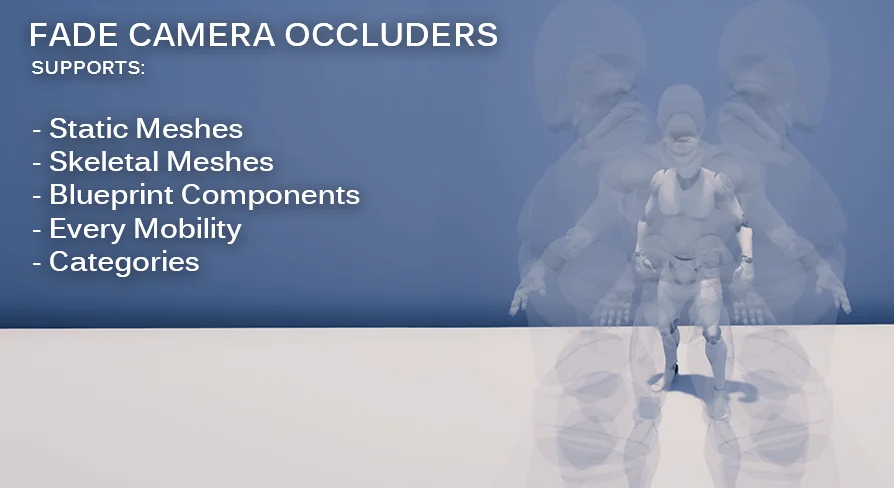
Obstructions in real-time scenes are rarely limited to simple, immovable background walls. Modern levels mix rigid structural elements with articulated or animated objects that share the space. Fade Camera Occluders evaluates every occluder positioned between the camera position and the focal target, handling both static meshes and skeletal meshes equally.
A static mesh such as a structural pillar, low ceiling, partition wall, or hanging architectural beam triggers the fade response as soon as it interrupts the line of sight. Similarly, a skeletal mesh—whether that represents an animated machinery prop, an environmental creature, or a secondary figure—registers under the same detection routine. By checking across both mesh types, the component avoids common edge cases where dynamic objects remain fully opaque and obscure the view while surrounding static architecture dissolves away.
Handling Blueprint Components and Nested Wall Meshes
Environment production often relies on prefabricated Blueprints rather than raw individual meshes placed directly into the level viewport. Walls, modular door frames, interactive environmental props, and decorative set pieces are frequently bundled into complex Blueprint actors composed of multiple child components. Standard line trace routines that only examine root actors or unbundled meshes can miss nested geometry or fail to apply render changes to subcomponents properly.
Fade Camera Occluders accounts for this workflow by detecting occluders even when they exist as nested components inside an external Blueprint. When a player ducks behind an elaborate assembly—such as a complex modular wall Blueprint containing trim meshes, frames, and collision volumes—the detection system targets the specific mesh component obstructing the lens. The component alters the render state of that obstructing element directly, ensuring that modular level building workflows do not break transparency behavior.
Custom Transparency Colors and Transition Styles
Visual presentation requirements vary widely across projects. Some art directions demand a subtle, neutral dissolve that preserves environmental lighting, while others benefit from distinct tinted silhouettes or stylized transparency effects. Fade Camera Occluders includes straightforward controls to adjust the underlying color of the transparency effect.
Shifting the transparency color provides a simple way to align the visual feedback with a project's user interface palette or artistic tone. Beyond basic color adjustments, the component supports custom styling for teams wanting a distinct transition aesthetic. Creators can implement alternate transition styles to control how the material reveals or conceals occluded surfaces, matching the presentation to realistic simulations, high-contrast arcade games, or stylized sci-fi interfaces.
Project Fit for Character Visibility and Occlusion Systems
Constructed entirely as a 100% Blueprint component, Fade Camera Occluders drops directly into Unreal Engine projects without requiring C++ compilation or custom source code modifications. This makes the tool accessible to technical artists, level designers, and independent developers building gameplay prototypes or final production builds inside visual scripting pipelines.
The system fits neatly into action games, platformers, RPGs, and third-person exploratory titles where environments feature varied verticality or dense interior layouts. Because it tracks both static and skeletal geometry across nested actor hierarchies while offering simple transparency color controls and expandable transition styles, it serves as a dependable camera management component for keeping player characters visible across complex scenes.
 Gameplay Features
 Gameplay Features
 Gameplay Features
 Gameplay Features