"efaa631e936fd3ee"{"id":"1002262","slug":"virtual-studios-vol-1-scene-5","title":"Virtual Studios Vol 1 Scene 5","category":"Buildings \u0026 Architecture","engine":"5.2+","assetVersion":"","engineVersion":"Engine Version: 5.2+","tag":"Buildings","accent":"blue","visual":"mech","summary":"Virtual Studios Vol 1 Scene 5 brings real-time virtual production to Unreal Engine with Lumen lighting, Nanite geometry, and modular stage setups.","platform":"Unreal Engine","publishedAt":"2026-10-29T16:22:42.201Z","updatedAt":"2026-10-29T16:22:42.201Z","sourceNotes":[],"fileContents":[],"compatibility":["Unreal Engine","Engine Version: 5.2+"],"featuredImage":{"alt":"Virtual Studios Vol 1 Scene 5","src":"/wp-content/uploads/published/2026/10/18b57b3badd1-7e0fb93d-e147-4c34-8372-4ea93ae3e8ce-db2446f785.webp"},"hasDownloadLink":true,"downloads":0,"terms":[{"taxonomy":"category","slug":"buildings-and-architecture","name":"Buildings \u0026 Architecture"}],"galleryImages":[{"src":"/wp-content/uploads/published/2026/10/839d3b5b755e-5e569f54-4767-4e8f-8f23-d4aa2c06dc05-39a1c3a0f4.webp","alt":"Virtual Studios Vol 1 Scene 5"},{"src":"/wp-content/uploads/published/2026/10/f1dc3d43a435-a6adc6f9-730d-4857-a830-6648fa53eadf-25102451fc.webp","alt":"Virtual Studios Vol 1 Scene 5"},{"src":"/wp-content/uploads/published/2026/10/3d902b3be2e8-eaab3b42-fd5c-48db-9cdf-257b735ed59c-9db9143602.webp","alt":"Virtual Studios Vol 1 Scene 5"},{"src":"/wp-content/uploads/published/2026/10/8113a4954bee-0975c73e-6817-4086-9dee-c287d2b0748e-683774fce1.webp","alt":"Virtual Studios Vol 1 Scene 5"}],"accessPanel":{"kind":"resource","title":"Download this resource","eyebrow":"Free Download","message":"Log in or create a free account to start your download.","fileName":"Virtual Studios Vol 1 Scene 5.7z","safetyNote":"Resources are manually reviewed before listing to improve quality and reduce obvious risks.","actionLabel":"Download Free","resourceType":"Resource archive"},"contentHtml":"\u003ch2\u003eDeploying Virtual Studios Vol 1 Scene 5 for Real-Time Virtual Production\u003c/h2\u003e\u003cp\u003eConstructing a broadcast-ready virtual environment often stalls when developers must manually balance complex architectural geometry, surface shaders, and real-time lighting fixtures before a single camera track is even tested.\u003c/p\u003e\u003cp\u003eVirtual Studios Vol 1 Scene 5 solves this staging hurdle by supplying a fully configured, high-quality 3D interior environment built specifically for virtual reality and real-time virtual production workflows. Compatible natively with Unreal Engine 5.2, the scene integrates industrial architectural forms with modern television studio styling. Presenters, digital avatars, or tracked camera feeds can be integrated directly onto the set, utilizing its structured floor plan, studio furniture, and distinct visual framing to deliver polished broadcasts without the overhead of building an entire studio soundstage from scratch.\u003c/p\u003e\u003ch2\u003eConfiguring Lumen Dynamic Global Illumination in Project Settings\u003c/h2\u003e\u003cp\u003eBelievable studio lighting requires real-time bounce light and precise specular reflections that adapt immediately whenever physical cameras or digital stage elements reposition.\u003c/p\u003e\u003cp\u003eThis 3D scene fully supports Lumen dynamic global illumination and reflections to produce photorealistic ambient light interaction across every interior surface. To activate these visual features correctly, open Project Settings and navigate directly to the Rendering category. Under both the Dynamic Global Illumination and Reflections subcategories, select Lumen as the active system. Once enabled, the custom shaders, reflective glass surfaces, polished metals, and modern plastic paneling across the studio react accurately to scene luminance. This setup eliminates the need for time-consuming pre-baked lightmaps, allowing operators to adjust studio colors, intensities, and contrast in real time during live broadcast production.\u003c/p\u003e\u003ch2\u003eNanite Meshes and Optimization Updates in Unreal Engine 5.4\u003c/h2\u003e\u003cp\u003eMoving a project into newer iterations of Unreal Engine introduces architectural improvements designed to maintain stable frame pacing under demanding graphics loads.\u003c/p\u003e\u003cp\u003eFor workflows migrating to Unreal Engine 5.4, Virtual Studios Vol 1 Scene 5 receives dedicated updates to maximize geometry and rendering efficiency. Within the 5.4 release, all static meshes that do not utilize translucency are converted into Nanite geometry. This conversion enables the dense structural framing, fixtures, and interior furniture to render with seamless level-of-detail transitions, dramatically decreasing draw call overhead. Additionally, all scene meshes and textures have undergone thorough optimization alongside minor environmental corrections, preserving crisp surface fidelity while delivering the frame rates required for live broadcast output and real-time VR tracking.\u003c/p\u003e\u003ch2\u003eShared Stagelamp Assets Across the Virtual Studios Collection\u003c/h2\u003e\u003cp\u003eControlling focal depth and visual separation on a studio floor depends heavily on directional lighting hardware positioned strategically around the talent area.\u003c/p\u003e\u003cp\u003eIllumination within Virtual Studios Vol 1 Scene 5 is anchored by specialized prop fixtures designated as SM_AI_VS_vol1_05_stagelamp_A and SM_AI_VS_vol1_05_stagelamp_B. These fixtures cast focused spotlights with vivid blue and red color accents, establishing strong rim lights, fill tones, and distinct atmospheric moods suitable for high-energy esports tournaments or late-night broadcast broadcasts. Because these exact stage lamp assets are shared across Virtual Studios Vol 1 Scene 1, Virtual Studios Vol 1 Scene 2, Virtual Studios Vol 1 Scene 3, and Virtual Studios Vol 1 Scene 4, production teams working across the entire Virtual Studios Vol 1 collection can maintain visual continuity when switching between different studio layouts or combining multi-room broadcast stages.\u003c/p\u003e\u003ch2\u003eHardware Specifications for High-Quality Real-Time Rendering\u003c/h2\u003e\u003cp\u003eRunning high-fidelity dynamic illumination, Nanite rendering, and live camera tracking places significant throughput demands on the host workstation.\u003c/p\u003e\u003cp\u003eTo ensure smooth operational stability and uninterrupted playback, the recommended hardware configuration specifies an Intel i7 processor supported by 32 GB of system RAM on a 64-bit operating system. This baseline compute power gives Unreal Engine ample memory overhead to handle uncompressed texture streaming, high-density geometry pipelines, and complex shader evaluations without hitching. Maintaining these hardware specifications ensures that live studio operators can manipulate viewport views, sequence lighting cues, and manage real-time composites simultaneously without dropping critical broadcast frames.\u003c/p\u003e\u003ch2\u003eBroadcast and Esports Studio Implementation\u003c/h2\u003e\u003cp\u003eModern studio broadcasting demands flexible set dressing that accommodates talk shows, competitive gaming coverage, and corporate presentations without appearing generic.\u003c/p\u003e\u003cp\u003eThe visual signature of Virtual Studios Vol 1 Scene 5 balances clean industrial modernism with vibrant stage technology. Metal framework, transparent glass, custom plastic shaders, and curated furniture come together under high-contrast blue and red spotlighting to frame presentation areas cleanly. Whether placed behind a live-streamed esports commentary desk, utilized as an interactive VR stage, or adapted as a digital backcloth for television broadcasts, the environment provides an immediate, cohesive virtual set engineered to drop cleanly into active real-time production pipelines.\u003c/p\u003e\n\n\u003ch2\u003eContinue Browsing Similar Packs\u003c/h2\u003e\n\u003cul\u003e\n\u003cli\u003e\u003ca href=\"https://3dcghub.com/museum-and-gallery-archinteriors-vol-10-scene-2/\" title=\"Museum and Gallery - Archinteriors Vol 10 Scene 2\"\u003eMuseum and Gallery - Archinteriors Vol 10 Scene 2\u003c/a\u003e\u003c/li\u003e\n\u003cli\u003e\u003ca href=\"https://3dcghub.com/ghost-town-vol-4-abandoned-houses/\" title=\"Ghost Town VOL.4 - Abandoned Houses\"\u003eGhost Town VOL.4 - Abandoned Houses\u003c/a\u003e\u003c/li\u003e\n\u003cli\u003e\u003ca href=\"https://3dcghub.com/sofas-and-pillows-vol-1/\" title=\"Sofas and pillows vol. 1\"\u003eSofas and pillows vol. 1\u003c/a\u003e\u003c/li\u003e\n\u003cli\u003e\u003ca href=\"https://3dcghub.com/hospital-combo-prop-pack-vol-1-6/\" title=\"Hospital - COMBO Prop Pack (VOL 1-6)\"\u003eHospital - COMBO Prop Pack (VOL 1-6)\u003c/a\u003e\u003c/li\u003e\n\u003cli\u003e\u003ca href=\"https://3dcghub.com/hq-pendant-lamps-vol-2/\" title=\"HQ Pendant Lamps Vol. 2\"\u003eHQ Pendant Lamps Vol. 2\u003c/a\u003e\u003c/li\u003e\n\u003c/ul\u003e","contentTextLength":5681,"navigation":{"current":23,"total":4209,"previous":{"id":"1002263","slug":"volumetric-spotlight-with-shadow","title":"Volumetric Spotlight with Shadow","category":"Variety","platform":"Unreal Engine","updatedAt":"2026-10-29T16:24:43.164Z"},"next":{"id":"1002261","slug":"virtual-reality-character-flying","title":"Virtual Reality Character Flying","category":"Gameplay Features","platform":"Unreal Engine","updatedAt":"2026-10-29T16:20:51.486Z"}},"relatedResources":[{"id":"1002080","slug":"museum-and-gallery-archinteriors-vol-10-scene-2","title":"Museum and Gallery - Archinteriors Vol 10 Scene 2","category":"Buildings \u0026 Architecture","engine":"5.2+","assetVersion":"","engineVersion":"Engine Version: 5.2+","tag":"Buildings","accent":"blue","visual":"mech","summary":"A real-time art exhibition interior built for Unreal Engine, featuring Nanite sculptures, contemporary installations, and realistic Lumen lighting.","platform":"Unreal Engine","publishedAt":"2026-10-26T15:49:41.447Z","updatedAt":"2026-10-26T15:49:41.447Z","sourceNotes":[],"fileContents":[],"compatibility":["Unreal Engine","Engine Version: 5.2+"],"featuredImage":{"alt":"Museum and Gallery - Archinteriors Vol 10 Scene 2","src":"/wp-content/uploads/published/2026/10/a3284a5eb62c-4f88453b-3663-4b92-a910-c389bb91883a-5bba41512f.webp"},"hasDownloadLink":true,"downloads":0},{"id":"1000013","slug":"ghost-town-vol-4-abandoned-houses","title":"Ghost Town VOL.4 - Abandoned Houses","category":"Buildings \u0026 Architecture","engine":"5.1+","assetVersion":"","engineVersion":"5.1+","tag":"Buildings","accent":"blue","visual":"mech","summary":"A 146-mesh Unreal Engine 5.4 pack of abandoned wooden houses and modular parts for ghost towns, horror scenes, and cinematic environment work.","platform":"Unreal Engine","publishedAt":"2026-05-19T18:11:54.983Z","updatedAt":"2026-05-22T20:13:21.456Z","sourceNotes":[],"fileContents":[],"compatibility":["Unreal Engine","Engine version: 5.1+"],"featuredImage":{"alt":"Ghost Town VOL.4 - Abandoned Houses","src":"/wp-content/uploads/published/2026/05/c2a9f8a13b62-88496c60-0822-49e7-8648-63135b487172-ca279bfeae.webp"},"hasDownloadLink":true,"downloads":1},{"id":"1002204","slug":"sofas-and-pillows-vol-1","title":"Sofas and pillows vol. 1","category":"Buildings \u0026 Architecture","engine":"4.18+,5.0+","assetVersion":"","engineVersion":"Engine Version: 4.18+,5.0+","tag":"Buildings","accent":"blue","visual":"mech","summary":"Sofas and pillows vol. 1 delivers 18 real-time sofas with optimized geometry for close-up fidelity and VR headset performance in architectural scenes.","platform":"Unreal Engine","publishedAt":"2026-10-29T14:47:41.922Z","updatedAt":"2026-10-29T14:47:41.922Z","sourceNotes":[],"fileContents":[],"compatibility":["Unreal Engine","Engine Version: 4.18+,5.0+"],"featuredImage":{"alt":"Sofas and pillows vol. 1","src":"/wp-content/uploads/published/2026/10/63866627e4aa-ae00be3b-235e-4c97-851c-f2b1a0a88f81-a82d7fa896.webp"},"hasDownloadLink":true,"downloads":0}]}
Buildings
Virtual Studios Vol 1 Scene 5
Virtual Studios Vol 1 Scene 5 brings real-time virtual production to Unreal Engine with Lumen lighting, Nanite geometry, and modular stage setups.
Deploying Virtual Studios Vol 1 Scene 5 for Real-Time Virtual Production
Constructing a broadcast-ready virtual environment often stalls when developers must manually balance complex architectural geometry, surface shaders, and real-time lighting fixtures before a single camera track is even tested.
Virtual Studios Vol 1 Scene 5 solves this staging hurdle by supplying a fully configured, high-quality 3D interior environment built specifically for virtual reality and real-time virtual production workflows. Compatible natively with Unreal Engine 5.2, the scene integrates industrial architectural forms with modern television studio styling. Presenters, digital avatars, or tracked camera feeds can be integrated directly onto the set, utilizing its structured floor plan, studio furniture, and distinct visual framing to deliver polished broadcasts without the overhead of building an entire studio soundstage from scratch.
Configuring Lumen Dynamic Global Illumination in Project Settings
Believable studio lighting requires real-time bounce light and precise specular reflections that adapt immediately whenever physical cameras or digital stage elements reposition.
This 3D scene fully supports Lumen dynamic global illumination and reflections to produce photorealistic ambient light interaction across every interior surface. To activate these visual features correctly, open Project Settings and navigate directly to the Rendering category. Under both the Dynamic Global Illumination and Reflections subcategories, select Lumen as the active system. Once enabled, the custom shaders, reflective glass surfaces, polished metals, and modern plastic paneling across the studio react accurately to scene luminance. This setup eliminates the need for time-consuming pre-baked lightmaps, allowing operators to adjust studio colors, intensities, and contrast in real time during live broadcast production.
Nanite Meshes and Optimization Updates in Unreal Engine 5.4
Moving a project into newer iterations of Unreal Engine introduces architectural improvements designed to maintain stable frame pacing under demanding graphics loads.
For workflows migrating to Unreal Engine 5.4, Virtual Studios Vol 1 Scene 5 receives dedicated updates to maximize geometry and rendering efficiency. Within the 5.4 release, all static meshes that do not utilize translucency are converted into Nanite geometry. This conversion enables the dense structural framing, fixtures, and interior furniture to render with seamless level-of-detail transitions, dramatically decreasing draw call overhead. Additionally, all scene meshes and textures have undergone thorough optimization alongside minor environmental corrections, preserving crisp surface fidelity while delivering the frame rates required for live broadcast output and real-time VR tracking.
Shared Stagelamp Assets Across the Virtual Studios Collection
Controlling focal depth and visual separation on a studio floor depends heavily on directional lighting hardware positioned strategically around the talent area.
Illumination within Virtual Studios Vol 1 Scene 5 is anchored by specialized prop fixtures designated as SM_AI_VS_vol1_05_stagelamp_A and SM_AI_VS_vol1_05_stagelamp_B. These fixtures cast focused spotlights with vivid blue and red color accents, establishing strong rim lights, fill tones, and distinct atmospheric moods suitable for high-energy esports tournaments or late-night broadcast broadcasts. Because these exact stage lamp assets are shared across Virtual Studios Vol 1 Scene 1, Virtual Studios Vol 1 Scene 2, Virtual Studios Vol 1 Scene 3, and Virtual Studios Vol 1 Scene 4, production teams working across the entire Virtual Studios Vol 1 collection can maintain visual continuity when switching between different studio layouts or combining multi-room broadcast stages.
Hardware Specifications for High-Quality Real-Time Rendering
Running high-fidelity dynamic illumination, Nanite rendering, and live camera tracking places significant throughput demands on the host workstation.
To ensure smooth operational stability and uninterrupted playback, the recommended hardware configuration specifies an Intel i7 processor supported by 32 GB of system RAM on a 64-bit operating system. This baseline compute power gives Unreal Engine ample memory overhead to handle uncompressed texture streaming, high-density geometry pipelines, and complex shader evaluations without hitching. Maintaining these hardware specifications ensures that live studio operators can manipulate viewport views, sequence lighting cues, and manage real-time composites simultaneously without dropping critical broadcast frames.
Broadcast and Esports Studio Implementation
Modern studio broadcasting demands flexible set dressing that accommodates talk shows, competitive gaming coverage, and corporate presentations without appearing generic.
The visual signature of Virtual Studios Vol 1 Scene 5 balances clean industrial modernism with vibrant stage technology. Metal framework, transparent glass, custom plastic shaders, and curated furniture come together under high-contrast blue and red spotlighting to frame presentation areas cleanly. Whether placed behind a live-streamed esports commentary desk, utilized as an interactive VR stage, or adapted as a digital backcloth for television broadcasts, the environment provides an immediate, cohesive virtual set engineered to drop cleanly into active real-time production pipelines.
 Buildings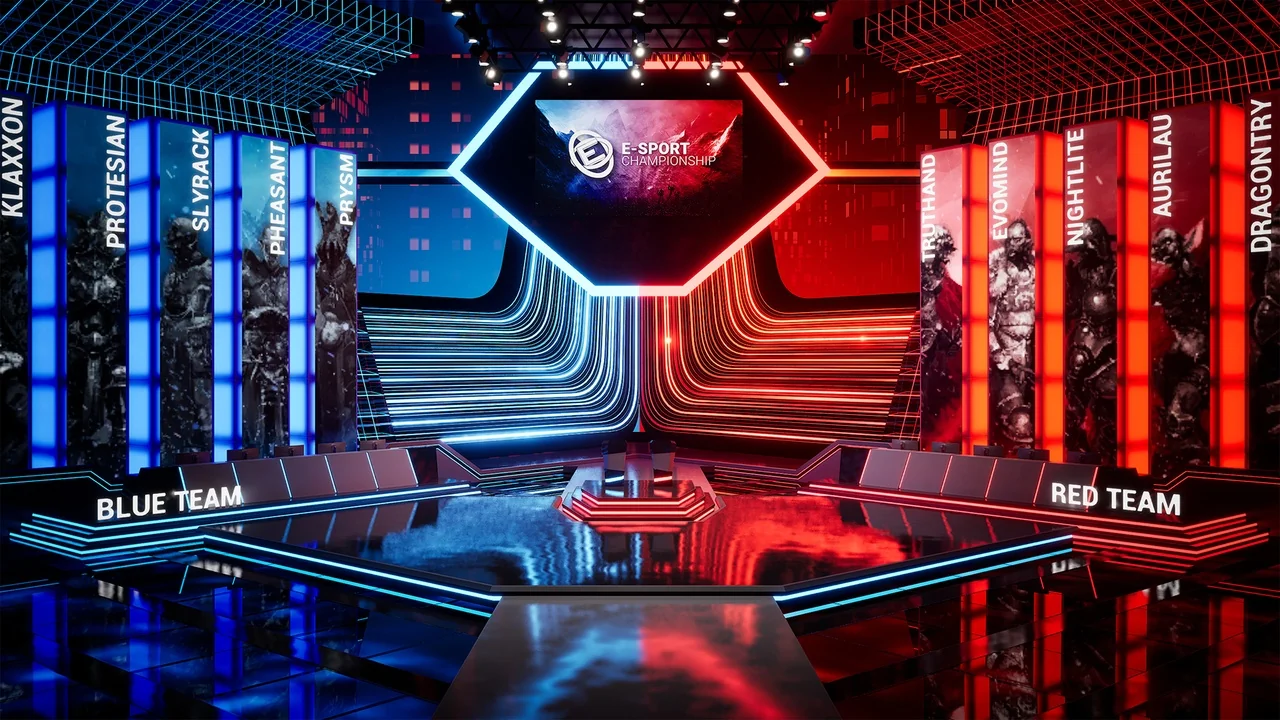
 Buildings
 Buildings
 Buildings