"7cee950366b2d3dd"{"id":"1002303","slug":"fence-chainlink","title":"Fence Chainlink","category":"Tools, Objects \u0026 Decor","engine":"4.10+,5.0+","assetVersion":"","engineVersion":"Engine Version: 4.10+,5.0+","tag":"Tools","accent":"blue","visual":"mech","summary":"A chainlink fence system of 15 grid-based modular meshes, 2.5 meters tall, with 3 and 6 meter spans and LODs included for perimeter scenes.","platform":"Unreal Engine","indexPolicy":"index","publishedAt":"2026-11-05T10:04:02.958Z","updatedAt":"2026-11-05T10:04:02.958Z","sourceNotes":[],"fileContents":[],"compatibility":["Unreal Engine","Engine Version: 4.10+,5.0+"],"featuredImage":{"alt":"Fence Chainlink","src":"/wp-content/uploads/published/2026/11/8e05bc9c6f6c-82a25bf7-58c2-4a4e-a4f9-8dd742762ebb-36cff261c8.webp"},"hasDownloadLink":true,"downloads":0,"terms":[{"taxonomy":"category","slug":"tools-objects-and-decor","name":"Tools, Objects \u0026 Decor"}],"galleryImages":[{"src":"/wp-content/uploads/published/2026/11/67d87f8ff6fe-4e9eb66f-fe74-4381-b4fc-2bc2fa77405a-cd66072e2e.webp","alt":"Fence Chainlink"},{"src":"/wp-content/uploads/published/2026/11/c11b1f4d2756-c70f4f83-def3-44bc-8391-3a3a8732bda7-e6bf176f4c.webp","alt":"Fence Chainlink"},{"src":"/wp-content/uploads/published/2026/11/cf1354924fba-d1cc8a8b-0387-4c04-a9ec-edc15b5a6ca2-262f1c5ba3.webp","alt":"Fence Chainlink"},{"src":"/wp-content/uploads/published/2026/11/b801d95e4478-587e61aa-8e16-4ac4-bb55-f06e3583f372-ead7f90485.webp","alt":"Fence Chainlink"}],"accessPanel":{"kind":"resource","title":"Get this resource","eyebrow":"Free resource","message":"3DCGHUB is a discovery service. EduQuill provides the file, account, quotas and delivery.","fileName":"Content.7z","safetyNote":"Resources are manually reviewed before listing to improve quality and reduce obvious risks.","actionLabel":"Get from EduQuill","resourceType":"Resource archive","versions":[]},"contentHtml":"\u003cp\u003eChainlink is the fence people stop noticing. It runs behind a depot, splits a parking lot from a service yard, wraps a substation, and marks the edge of a lot where nothing has been built yet. Getting that boundary into a scene is usually a choice between a texture on a flat plane that collapses the moment the camera walks up to it, or a hand-assembled run of posts and mesh that swallows an afternoon. Fence Chainlink takes the second path and packages it: 15 modular meshes laid out on a grid, standing 2.5 meters tall, with spans of 3 and 6 meters and LODs included.\u003c/p\u003e \u003ch2\u003e15 modular meshes, laid out on a grid\u003c/h2\u003e \u003cp\u003eThe modularity here is literal rather than a marketing label. The set is split into 15 separate meshes, and each one sits on a grid, so segments meet cleanly when a run is extended piece by piece. That matters more than it sounds. A fence is one of the few objects in a scene that is almost always repeated — dozens of times, sometimes hundreds — and any misalignment between segments compounds across the whole line. Grid-based pieces remove that drift.\u003c/p\u003e \u003cp\u003eThe other consequence is flexibility. Because the boundary is assembled from parts rather than delivered as one long strip, a run can follow the shape a level actually needs instead of the shape a single mesh was authored around. Blockout changes, an extra yard added late, a boundary that has to jog around a building: all of it is a placement problem rather than a remodeling problem.\u003c/p\u003e \u003ch2\u003e2.5 meters tall, spanning 3 and 6 meters\u003c/h2\u003e \u003cp\u003eTwo span lengths cover the practical range of a chainlink run. Six-meter sections do the long, unbroken stretches — the back of an industrial lot, the far side of a compound, anywhere the fence is doing distance work and nobody is counting segments. Three-meter sections handle the tighter stretches, where a six-meter piece would overshoot the gap or crowd a corner of the layout.\u003c/p\u003e \u003cp\u003eThe 2.5 meter height is a deliberate, specific figure. It reads as a real perimeter barrier — tall enough that a person does not see over it casually, short enough that it never becomes a wall. That distinction shapes how a scene reads: a chainlink run at this height says \u003cem\u003eControlled access\u003c/em\u003e Rather than \u003cem\u003eFortification\u003c/em\u003e. It is the height of a site boundary, not a prison or a military installation, which is exactly the register most industrial, commercial, and back-lot environments need.\u003c/p\u003e \u003ch2\u003eLODs are part of the set, not an afterthought\u003c/h2\u003e \u003cp\u003eChainlink is a difficult shape to view at distance. The mesh is fine, open, and full of small repeating holes, which is precisely the geometry that shimmers and crawls when it is pushed far from the camera. The set ships with LODs included, so a fence that recedes toward the horizon does not have to carry full detail at every distance.\u003c/p\u003e \u003ch3\u003eWhere that shows up in practice\u003c/h3\u003e \u003cp\u003ePerimeter fences are rarely hero assets, but they are almost always long. They are seen from vehicles, from aerial establishing shots, from the far end of a yard where the boundary is a line on the horizon rather than an object. LODs are what let that line stay stable instead of boiling with aliasing, and having them authored as part of the 15-mesh set means the switch is already built into the pieces rather than bolted on later by whoever inherits the scene.\u003c/p\u003e \u003ch2\u003eA Prop tag, and why the category is useful\u003c/h2\u003e \u003cp\u003eFence Chainlink is tagged as a Prop. In a working library that is a small but real convenience: the set sorts with scene-dressing objects rather than with architecture or environment kits, so it surfaces when someone is searching for the things that populate a space rather than the things that define it. The tag also sets expectations correctly. This is not a level-defining structure; it is the repeatable element you instance along an edge and forget about, which is the role a chainlink boundary actually plays in most environments.\u003c/p\u003e \u003ch2\u003eChainlink alongside the Fence Concrete System\u003c/h2\u003e \u003cp\u003eThe set is compatible with the Fence Concrete System, which opens up the mixed-boundary approach that real sites use constantly. A single property will often run concrete panels along the face that needs weight and permanence, then switch to chainlink where the boundary only has to keep people out. Having both systems able to share a scene means that transition can happen inside one layout instead of forcing an entire site to commit to one fencing style.\u003c/p\u003e \u003cp\u003eFor anyone already working with the concrete system, this is the natural companion piece — the lighter, cheaper-looking span that fills the long edges between the sections that are meant to be noticed.\u003c/p\u003e \u003ch2\u003eReading the set as a whole\u003c/h2\u003e \u003cp\u003eWhat the numbers describe is a fence built for repetition and distance. Fifteen grid-based meshes give the run its flexibility. The two spans — 3 and 6 meters — give it rhythm across both tight and open stretches. The 2.5 meter height fixes it at perimeter scale. The included LODs keep it readable as it recedes. None of those details are decorative; each one addresses a specific problem that shows up when a fence stops being a single object and becomes a boundary running through an entire environment.\u003c/p\u003e \u003cp\u003eIf a project needs a chainlink perimeter that holds up close and at range, and the layout is likely to shift during production, the grid-based modularity and the dual span lengths are the parts worth weighing. If the boundary is a one-off detail in the middle distance, the LODs and the Prop classification make it easy to place and easy to leave alone.\u003c/p\u003e\n\n\u003ch2\u003eMore From The Same Workflow\u003c/h2\u003e\n\u003cul\u003e\n\u003cli\u003e\u003ca href=\"https://3dcghub.com/post-soviet-souvenirs/\" rel=\"noopener noreferrer\"\u003ePost Soviet Souvenirs\u003c/a\u003e\u003c/li\u003e\n\u003cli\u003e\u003ca href=\"https://3dcghub.com/scifi-capsules-props-3/\" rel=\"noopener noreferrer\"\u003eSciFi Capsules Props 3\u003c/a\u003e\u003c/li\u003e\n\u003cli\u003e\u003ca href=\"https://3dcghub.com/crystals/\" rel=\"noopener noreferrer\"\u003eCrystals\u003c/a\u003e\u003c/li\u003e\n\u003cli\u003e\u003ca href=\"https://3dcghub.com/carcasses/\" rel=\"noopener noreferrer\"\u003eCarcasses\u003c/a\u003e\u003c/li\u003e\n\u003cli\u003e\u003ca href=\"https://3dcghub.com/american-bar/\" rel=\"noopener noreferrer\"\u003eAmerican Bar\u003c/a\u003e\u003c/li\u003e\n\u003c/ul\u003e","contentTextLength":5523,"navigation":{"current":5,"total":4230,"previous":{"id":"1002304","slug":"fight-game-select-character","title":"Fight Game Select Character","category":"Gameplay Features","platform":"Unreal Engine","updatedAt":"2026-11-05T10:04:37.850Z"},"next":{"id":"1002302","slug":"female-movement-animset-pro","title":"Female Movement Animset Pro","category":"Locomotion / Gaits","platform":"Unreal Engine","updatedAt":"2026-11-05T10:03:37.017Z"}},"relatedResources":[{"id":"1002153","slug":"post-soviet-souvenirs","title":"Post Soviet Souvenirs","category":"Tools, Objects \u0026 Decor","engine":"4.18+,5.0+","assetVersion":"","engineVersion":"Engine Version: 4.18+,5.0+","tag":"Tools","accent":"blue","visual":"mech","summary":"Examine the Post Soviet Souvenirs prop pack, developed for the Twin Soul demo to bring realistic wear and AAA fidelity to horror, adventure, and shooter scenes.","platform":"Unreal Engine","indexPolicy":"index","publishedAt":"2026-10-29T09:56:51.207Z","updatedAt":"2026-10-29T09:56:51.207Z","sourceNotes":[],"fileContents":[],"compatibility":["Unreal Engine","Engine Version: 4.18+,5.0+"],"featuredImage":{"alt":"Post Soviet Souvenirs","src":"/wp-content/uploads/published/2026/10/2b9e0d366bd2-ae110d77-071f-4421-bea8-b13b16563bb2-2dfaf47b5f.webp"},"hasDownloadLink":true,"downloads":2},{"id":"1002193","slug":"scifi-capsules-props-3","title":"SciFi Capsules Props 3","category":"Tools, Objects \u0026 Decor","engine":"4.20+,5.0+","assetVersion":"","engineVersion":"Engine Version: 4.20+,5.0+","tag":"Tools","accent":"blue","visual":"mech","summary":"Discover SciFi Capsules Props 3, featuring 14 game-ready capsules, 9 caps, dual-material glass setups, and blueprints for rapid level variation.","platform":"Unreal Engine","indexPolicy":"index","publishedAt":"2026-10-29T14:37:02.306Z","updatedAt":"2026-10-29T14:37:02.306Z","sourceNotes":[],"fileContents":[],"compatibility":["Unreal Engine","Engine Version: 4.20+,5.0+"],"featuredImage":{"alt":"SciFi Capsules Props 3","src":"/wp-content/uploads/published/2026/10/62c1867b2e52-01ebe196-49ba-4cd7-bcc3-ad0adddd9b4f-bdc88a98f8.webp"},"hasDownloadLink":true,"downloads":1},{"id":"1002084","slug":"crystals","title":"Crystals","category":"Tools, Objects \u0026 Decor","engine":"4.22+,5.0+","assetVersion":"","engineVersion":"Engine Version: 4.22+,5.0+","tag":"Tools","accent":"blue","visual":"mech","summary":"A close look at Crystals, featuring ten dynamic crystal materials with integrated visual shader effects, character appearance use, and dissolve behaviors.","platform":"Unreal Engine","indexPolicy":"index","publishedAt":"2026-10-26T15:53:48.524Z","updatedAt":"2026-10-26T15:53:48.524Z","sourceNotes":[],"fileContents":[],"compatibility":["Unreal Engine","Engine Version: 4.22+,5.0+"],"featuredImage":{"alt":"Crystals","src":"/wp-content/uploads/published/2026/10/3d3f811432f4-9db3a354-b1c7-4c83-a6d9-ed03c8d2dd66-15ba8596de.webp"},"hasDownloadLink":true,"downloads":1}]}
Tools
Fence Chainlink
A chainlink fence system of 15 grid-based modular meshes, 2.5 meters tall, with 3 and 6 meter spans and LODs included for perimeter scenes.
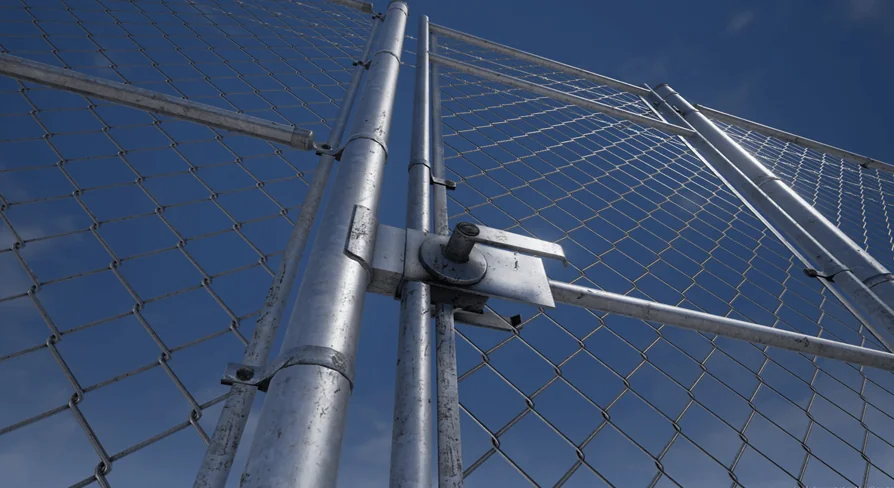
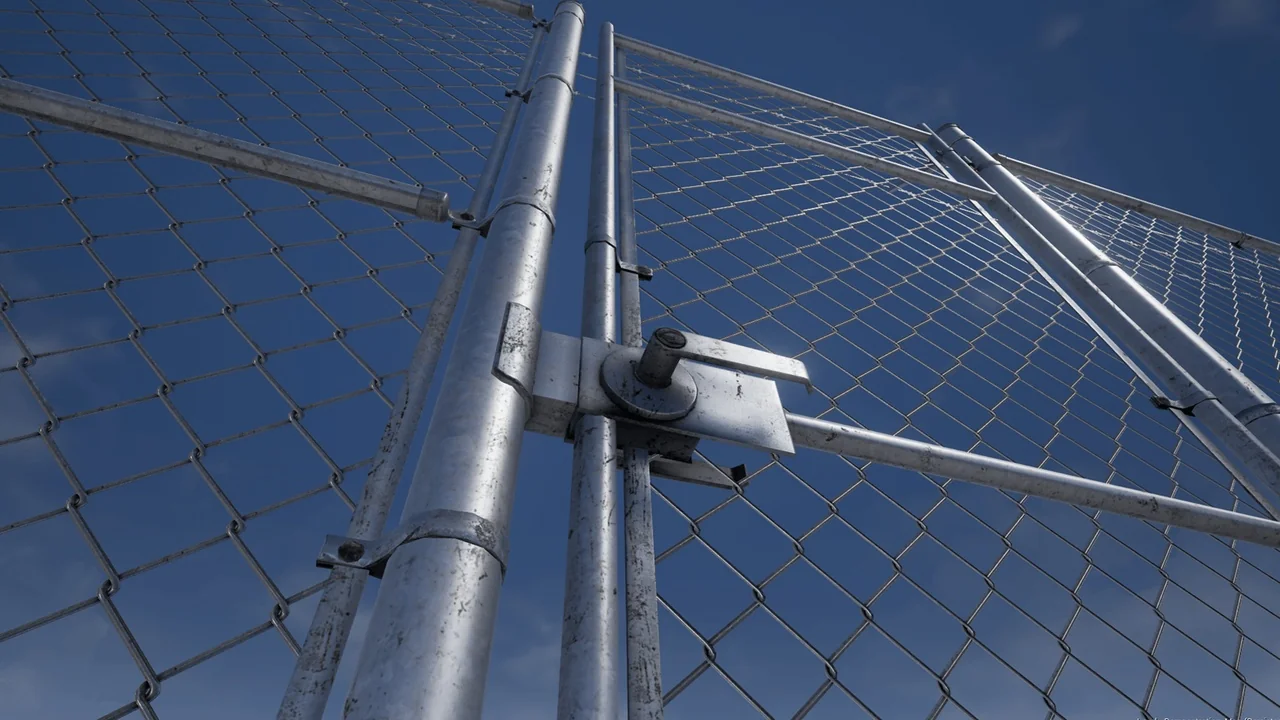
Chainlink is the fence people stop noticing. It runs behind a depot, splits a parking lot from a service yard, wraps a substation, and marks the edge of a lot where nothing has been built yet. Getting that boundary into a scene is usually a choice between a texture on a flat plane that collapses the moment the camera walks up to it, or a hand-assembled run of posts and mesh that swallows an afternoon. Fence Chainlink takes the second path and packages it: 15 modular meshes laid out on a grid, standing 2.5 meters tall, with spans of 3 and 6 meters and LODs included.
15 modular meshes, laid out on a grid
The modularity here is literal rather than a marketing label. The set is split into 15 separate meshes, and each one sits on a grid, so segments meet cleanly when a run is extended piece by piece. That matters more than it sounds. A fence is one of the few objects in a scene that is almost always repeated — dozens of times, sometimes hundreds — and any misalignment between segments compounds across the whole line. Grid-based pieces remove that drift.
The other consequence is flexibility. Because the boundary is assembled from parts rather than delivered as one long strip, a run can follow the shape a level actually needs instead of the shape a single mesh was authored around. Blockout changes, an extra yard added late, a boundary that has to jog around a building: all of it is a placement problem rather than a remodeling problem.
2.5 meters tall, spanning 3 and 6 meters
Two span lengths cover the practical range of a chainlink run. Six-meter sections do the long, unbroken stretches — the back of an industrial lot, the far side of a compound, anywhere the fence is doing distance work and nobody is counting segments. Three-meter sections handle the tighter stretches, where a six-meter piece would overshoot the gap or crowd a corner of the layout.
The 2.5 meter height is a deliberate, specific figure. It reads as a real perimeter barrier — tall enough that a person does not see over it casually, short enough that it never becomes a wall. That distinction shapes how a scene reads: a chainlink run at this height says Controlled access Rather than Fortification. It is the height of a site boundary, not a prison or a military installation, which is exactly the register most industrial, commercial, and back-lot environments need.
LODs are part of the set, not an afterthought
Chainlink is a difficult shape to view at distance. The mesh is fine, open, and full of small repeating holes, which is precisely the geometry that shimmers and crawls when it is pushed far from the camera. The set ships with LODs included, so a fence that recedes toward the horizon does not have to carry full detail at every distance.
Where that shows up in practice
Perimeter fences are rarely hero assets, but they are almost always long. They are seen from vehicles, from aerial establishing shots, from the far end of a yard where the boundary is a line on the horizon rather than an object. LODs are what let that line stay stable instead of boiling with aliasing, and having them authored as part of the 15-mesh set means the switch is already built into the pieces rather than bolted on later by whoever inherits the scene.
A Prop tag, and why the category is useful
Fence Chainlink is tagged as a Prop. In a working library that is a small but real convenience: the set sorts with scene-dressing objects rather than with architecture or environment kits, so it surfaces when someone is searching for the things that populate a space rather than the things that define it. The tag also sets expectations correctly. This is not a level-defining structure; it is the repeatable element you instance along an edge and forget about, which is the role a chainlink boundary actually plays in most environments.
Chainlink alongside the Fence Concrete System
The set is compatible with the Fence Concrete System, which opens up the mixed-boundary approach that real sites use constantly. A single property will often run concrete panels along the face that needs weight and permanence, then switch to chainlink where the boundary only has to keep people out. Having both systems able to share a scene means that transition can happen inside one layout instead of forcing an entire site to commit to one fencing style.
For anyone already working with the concrete system, this is the natural companion piece — the lighter, cheaper-looking span that fills the long edges between the sections that are meant to be noticed.
Reading the set as a whole
What the numbers describe is a fence built for repetition and distance. Fifteen grid-based meshes give the run its flexibility. The two spans — 3 and 6 meters — give it rhythm across both tight and open stretches. The 2.5 meter height fixes it at perimeter scale. The included LODs keep it readable as it recedes. None of those details are decorative; each one addresses a specific problem that shows up when a fence stops being a single object and becomes a boundary running through an entire environment.
If a project needs a chainlink perimeter that holds up close and at range, and the layout is likely to shift during production, the grid-based modularity and the dual span lengths are the parts worth weighing. If the boundary is a one-off detail in the middle distance, the LODs and the Prop classification make it easy to place and easy to leave alone.
 Tools
 Tools
 Tools
 Tools