"7aa4acc705f0d80b"{"id":"1001929","slug":"3d-tilemap-simple-helper","title":"3D Tilemap - Simple Helper","category":"Gameplay Features","engine":"5.1+","assetVersion":"","engineVersion":"Engine Version: 5.1+","tag":"Gameplay Features","accent":"blue","visual":"mech","summary":"Draw 2D grid shapes to instantly lay out 3D modular tiles. Learn how the 3D Tilemap - Simple Helper speeds up terrain workflows and environment styling.","platform":"Unreal Engine","publishedAt":"2026-10-24T11:06:32.986Z","updatedAt":"2026-10-24T11:06:32.986Z","sourceNotes":[],"fileContents":[],"compatibility":["Unreal Engine","Engine Version: 5.1+"],"featuredImage":{"alt":"3D Tilemap - Simple Helper","src":"/wp-content/uploads/published/2026/10/3e1f0b474e19-a0c39f08-f29f-40aa-903a-02f2ca50436f-59511827e8.webp"},"hasDownloadLink":true,"downloads":0,"terms":[{"taxonomy":"category","slug":"gameplay-features","name":"Gameplay Features"}],"galleryImages":[{"src":"/wp-content/uploads/published/2026/10/925e42c5a2e6-2e8c331b-b61a-4ddd-ab1e-1a4788d494ee-10ecd6ced4.webp","alt":"3D Tilemap - Simple Helper"},{"src":"/wp-content/uploads/published/2026/10/de11f625c407-608eecf4-0431-4ff8-a091-943e9785666e-b094e5bddc.webp","alt":"3D Tilemap - Simple Helper"},{"src":"/wp-content/uploads/published/2026/10/85e215f08adb-db19748d-59e6-4853-bc04-ee955567bc82-4148ac1994.webp","alt":"3D Tilemap - Simple Helper"},{"src":"/wp-content/uploads/published/2026/10/ad7da1582493-090b7689-5507-4953-97b5-d637889620ec-8a375c87b3.webp","alt":"3D Tilemap - Simple Helper"},{"src":"/wp-content/uploads/published/2026/10/2f23be09aef9-0646e541-f462-4dc3-a3af-afe71b894ee5-84ca3f16a5.webp","alt":"3D Tilemap - Simple Helper"}],"accessPanel":{"kind":"resource","title":"Download this resource","eyebrow":"Free Download","message":"Log in or create a free account to start your download.","fileName":"Content.7z","safetyNote":"Resources are manually reviewed before listing to improve quality and reduce obvious risks.","actionLabel":"Download Free","resourceType":"Resource archive"},"contentHtml":"\u003ch2\u003eEliminating Manual Tile Placement in Modular Terrain\u003c/h2\u003e\u003cp\u003eConstructing modular scenes from individual environmental blocks often turns into a tedious chore. Positioning objects one by one in a 3D viewport requires constant camera adjustments, precise axis gizmo tweaks, and continuous checking for seam alignment. When a project calls for extensive modular terrain, hand-placing dozens or hundreds of mesh pieces drains time that could be spent refining visual balance or gameplay flow.\u003c/p\u003e\u003cp\u003e3D Tilemap - Simple Helper addresses this exact production bottleneck. Built as a script and Blueprint level tool compatible with Chains Creator, it replaces repetitive unit-by-unit object placement with a clear, grid-based drawing workflow. Instead of dragging each mesh into the scene and nudging its coordinates manually, creators interact with a dedicated 2D interface where simple sketched layouts materialize directly as 3D geometry in the surrounding level.\u003c/p\u003e\u003ch2\u003eDrawing on the 2D Grid for 3D Environments\u003c/h2\u003e\u003cp\u003eAt the center of this workflow is a top-down planar representation of the scene. The tool provides a clean 2D grid interface where developers draw shapes that correspond to modular components. As shapes take form on this grid, the system automatically translates those selections into physical tiles positioned throughout the 3D space.\u003c/p\u003e\u003cp\u003eThis drawing approach mirrors the speed of classic 2D level editing while maintaining the structural depth of fully realized 3D geometry. Sketching shapes on a flat surface allows creators to establish terrain boundaries, build pathways, and fill open areas in seconds. Visualizing the layout from an organized grid perspective minimizes placement errors, gaps between adjoining assets, and uneven heights that frequently happen during freehand viewport manipulation.\u003c/p\u003e\u003ch2\u003eApplying Different Styles Across Modular 3D Tiles\u003c/h2\u003e\u003cp\u003eLarge projects rarely rely on a single visual theme. Distinct zones such as rocky outcroppings, grassy clearings, paved courtyards, or underground pathways require unique sets of modular pieces to keep visual interest alive. Switching between these asset groups manually during placement often leads to asset mix-ups and inconsistent asset scaling.\u003c/p\u003e\u003cp\u003eThe system accommodates varied biomes by allowing users to define different styles for different environments. By setting up distinct environmental profiles, level designers can rapidly alter the appearance of drawn terrain paths and zones without discarding the foundational grid logic. This modular styling speeds up the process of applying 3D tilesets, letting designers adapt a single layout across diverse landscape themes or shift visual aesthetics rapidly when iterating on level designs.\u003c/p\u003e\u003ch2\u003eDocumentation Breakdown: Setup, Buttons, and 3D Tile Requirements\u003c/h2\u003e\u003cp\u003eImplementing custom tools into an active level-building pipeline can sometimes bring friction if user interfaces and asset prerequisites are unclear. 3D Tilemap - Simple Helper comes with complete documentation created to guide users past common setup hurdles and operational questions.\u003c/p\u003e\u003cp\u003eThe accompanying documentation details every component of the system:\u003c/p\u003e\u003cul\u003e\u003cli\u003e\u003cstrong\u003eInterface controls:\u003c/strong\u003e A thorough description of every single button found inside the tool window, detailing its operational purpose and effect on the grid.\u003c/li\u003e\u003cli\u003e\u003cstrong\u003eStep-by-step setup:\u003c/strong\u003e Clear instructions that walk developers through initializing the system and preparing their scenes for grid-based tile generation.\u003c/li\u003e\u003cli\u003e\u003cstrong\u003eTool usage guidelines:\u003c/strong\u003e Practical steps showing how to actively draw, manipulate, and generate layouts inside the workspace.\u003c/li\u003e\u003cli\u003e\u003cstrong\u003e3D tile requirements:\u003c/strong\u003e Explicit technical criteria that external modular meshes must meet before being linked into the tool, preventing scaling bugs, pivot mismatches, and orientation errors.\u003c/li\u003e\u003c/ul\u003e\u003cp\u003eHaving clear mesh requirements laid out beforehand ensures that technical artists know exactly how to prep custom modular pieces. Once tile meshes match the documented specifications, hooking them into the interface profiles proceeds cleanly.\u003c/p\u003e\u003ch2\u003eLearning Through the Included Styles and Demo Map\u003c/h2\u003e\u003cp\u003eTo help users grasp the grid-to-3D pipeline immediately, the package includes two different styles of tiles out of the box. These prefabricated sets demonstrate how modular components align across the grid, offering direct references for how assets should be configured and grouped into visual presets.\u003c/p\u003e\u003cp\u003eAlongside these two tile styles, a demo map featuring assorted meshes is included directly within the project files. Rather than configuring assets from a blank scene, level designers can inspect the active demo map to see how the interface buttons interact with real level geometry. Exploring this test space provides immediate clarity on shape drawing, layer styling, and mesh spawning behavior.\u003c/p\u003e\u003ch2\u003eStreamlined Terrain Construction for Level Designers\u003c/h2\u003e\u003cp\u003e3D Tilemap - Simple Helper serves developers who want the structural speed of 2D tilemaps combined with the graphical presence of modern 3D modular environments. By bridging the gap between flat grid sketching and automated 3D mesh placement, the tool removes the mechanical strain of placing terrain pieces piece by piece. Level builders, technical artists, and environment creators can focus directly on world composition, testing layouts quickly and executing environmental ideas with minimal friction.\u003c/p\u003e\n\n\u003ch2\u003eRelated Resources Worth Checking\u003c/h2\u003e\n\u003cul\u003e\n\u003cli\u003e\u003ca href=\"https://3dcghub.com/basic-locomotion-system-replicated/\" title=\"Basic Locomotion System (REPLICATED)\"\u003eBasic Locomotion System (REPLICATED)\u003c/a\u003e\u003c/li\u003e\n\u003cli\u003e\u003ca href=\"https://3dcghub.com/physics-collision-sound/\" title=\"Physics Collision Sound\"\u003ePhysics Collision Sound\u003c/a\u003e\u003c/li\u003e\n\u003cli\u003e\u003ca href=\"https://3dcghub.com/simple-screen-damage-indicator/\" title=\"Simple Screen Damage Indicator\"\u003eSimple Screen Damage Indicator\u003c/a\u003e\u003c/li\u003e\n\u003cli\u003e\u003ca href=\"https://3dcghub.com/simple-to-do-list/\" title=\"Simple To Do List\"\u003eSimple To Do List\u003c/a\u003e\u003c/li\u003e\n\u003cli\u003e\u003ca href=\"https://3dcghub.com/advanced-scope/\" title=\"Advanced Scope\"\u003eAdvanced Scope\u003c/a\u003e\u003c/li\u003e\n\u003c/ul\u003e","contentTextLength":5442,"navigation":{"current":61,"total":3925,"previous":{"id":"1001930","slug":"400-noise-texture-mega-pack","title":"400 Noise Texture Mega Pack","category":"Building \u0026 Human-made","platform":"Unreal Engine","updatedAt":"2026-10-24T11:09:34.236Z"},"next":{"id":"1001928","slug":"3d-lasers","title":"3D Lasers","category":"Spells \u0026 Combat","platform":"Unreal Engine","updatedAt":"2026-10-24T11:05:58.511Z"}},"relatedResources":[{"id":"1000980","slug":"basic-locomotion-system-replicated","title":"Basic Locomotion System (REPLICATED)","category":"Gameplay Features","engine":"5.0+","assetVersion":"","engineVersion":"Engine Version: 5.0+","tag":"Gameplay Features","accent":"blue","visual":"animation","summary":"A ground-up locomotion system for the UE5 Skeleton using Lyra animations, built as a simple third-person template with MetaHuman integration and multiplayer inv","platform":"Unreal Engine","publishedAt":"2026-08-18T05:57:51.717Z","updatedAt":"2026-08-18T05:57:51.717Z","sourceNotes":[],"fileContents":[],"compatibility":["Unreal Engine","Engine Version: 5.0+"],"featuredImage":{"alt":"Basic Locomotion System (REPLICATED)","src":"/wp-content/uploads/published/2026/08/497370037da8-24315aeb-c8a9-4077-aa37-d1119fdcf17d-0970e54182.webp"},"hasDownloadLink":true,"downloads":4},{"id":"1001063","slug":"physics-collision-sound","title":"Physics Collision Sound","category":"Gameplay Features","engine":"5.3+","assetVersion":"","engineVersion":"Engine Version: 5.3+","tag":"Gameplay Features","accent":"blue","visual":"mech","summary":"Physics Collision Sound adds material-aware hit, slide, roll, and water audio to any Unreal mesh with a simple drag-and-drop Blueprint workflow.","platform":"Unreal Engine","publishedAt":"2026-09-03T13:17:54.533Z","updatedAt":"2026-09-03T13:17:54.533Z","sourceNotes":[],"fileContents":[],"compatibility":["Audio","Engine Version: 5.3+"],"featuredImage":{"alt":"Physics Collision Sound","src":"/wp-content/uploads/published/2026/09/05c916db7e98-eff97865-a529-4495-b2bb-27b0ce374707-e1e1376bbe.webp"},"hasDownloadLink":true,"downloads":1},{"id":"1000775","slug":"simple-screen-damage-indicator","title":"Simple Screen Damage Indicator","category":"Gameplay Features","engine":"5.4+","assetVersion":"","engineVersion":"Engine Version: 5.4+","tag":"Gameplay Features","accent":"blue","visual":"mech","summary":"A 100% Blueprint visual feedback system displaying a blood splatter overlay on hazard damage. Built for single-player prototyping with local multiplayer UI rend","platform":"Unreal Engine","publishedAt":"2026-07-28T18:07:04.744Z","updatedAt":"2026-07-28T18:07:04.744Z","sourceNotes":[],"fileContents":[],"compatibility":["Unreal Engine","Engine Version: 5.4+"],"featuredImage":{"alt":"Simple Screen Damage Indicator","src":"/wp-content/uploads/published/2026/07/5369eff53b58-641db878-ef1c-4892-ab16-112ae9023f3c-f070c8732a.webp"},"hasDownloadLink":true,"downloads":2}]}
Gameplay Features
3D Tilemap - Simple Helper
Draw 2D grid shapes to instantly lay out 3D modular tiles. Learn how the 3D Tilemap - Simple Helper speeds up terrain workflows and environment styling.
Eliminating Manual Tile Placement in Modular Terrain
Constructing modular scenes from individual environmental blocks often turns into a tedious chore. Positioning objects one by one in a 3D viewport requires constant camera adjustments, precise axis gizmo tweaks, and continuous checking for seam alignment. When a project calls for extensive modular terrain, hand-placing dozens or hundreds of mesh pieces drains time that could be spent refining visual balance or gameplay flow.
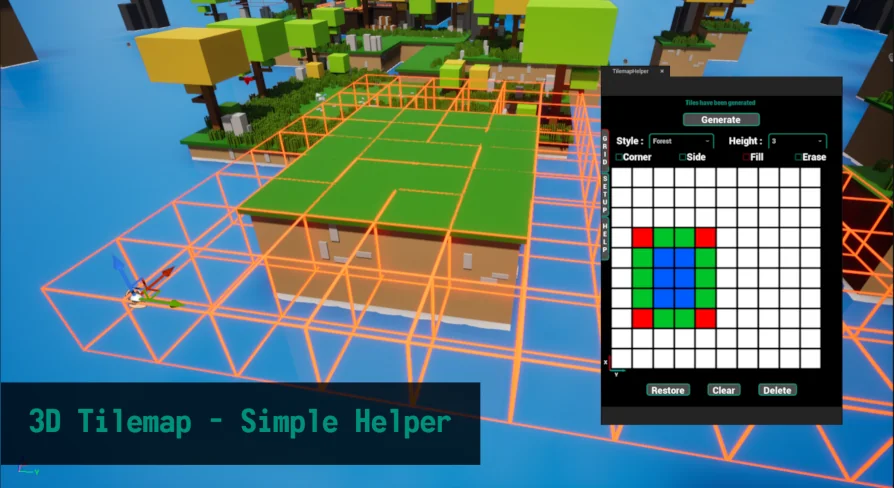
3D Tilemap - Simple Helper addresses this exact production bottleneck. Built as a script and Blueprint level tool compatible with Chains Creator, it replaces repetitive unit-by-unit object placement with a clear, grid-based drawing workflow. Instead of dragging each mesh into the scene and nudging its coordinates manually, creators interact with a dedicated 2D interface where simple sketched layouts materialize directly as 3D geometry in the surrounding level.
Drawing on the 2D Grid for 3D Environments
At the center of this workflow is a top-down planar representation of the scene. The tool provides a clean 2D grid interface where developers draw shapes that correspond to modular components. As shapes take form on this grid, the system automatically translates those selections into physical tiles positioned throughout the 3D space.
This drawing approach mirrors the speed of classic 2D level editing while maintaining the structural depth of fully realized 3D geometry. Sketching shapes on a flat surface allows creators to establish terrain boundaries, build pathways, and fill open areas in seconds. Visualizing the layout from an organized grid perspective minimizes placement errors, gaps between adjoining assets, and uneven heights that frequently happen during freehand viewport manipulation.
Applying Different Styles Across Modular 3D Tiles
Large projects rarely rely on a single visual theme. Distinct zones such as rocky outcroppings, grassy clearings, paved courtyards, or underground pathways require unique sets of modular pieces to keep visual interest alive. Switching between these asset groups manually during placement often leads to asset mix-ups and inconsistent asset scaling.
The system accommodates varied biomes by allowing users to define different styles for different environments. By setting up distinct environmental profiles, level designers can rapidly alter the appearance of drawn terrain paths and zones without discarding the foundational grid logic. This modular styling speeds up the process of applying 3D tilesets, letting designers adapt a single layout across diverse landscape themes or shift visual aesthetics rapidly when iterating on level designs.
Documentation Breakdown: Setup, Buttons, and 3D Tile Requirements
Implementing custom tools into an active level-building pipeline can sometimes bring friction if user interfaces and asset prerequisites are unclear. 3D Tilemap - Simple Helper comes with complete documentation created to guide users past common setup hurdles and operational questions.
The accompanying documentation details every component of the system:
Interface controls: A thorough description of every single button found inside the tool window, detailing its operational purpose and effect on the grid.
Step-by-step setup: Clear instructions that walk developers through initializing the system and preparing their scenes for grid-based tile generation.
Tool usage guidelines: Practical steps showing how to actively draw, manipulate, and generate layouts inside the workspace.
3D tile requirements: Explicit technical criteria that external modular meshes must meet before being linked into the tool, preventing scaling bugs, pivot mismatches, and orientation errors.
Having clear mesh requirements laid out beforehand ensures that technical artists know exactly how to prep custom modular pieces. Once tile meshes match the documented specifications, hooking them into the interface profiles proceeds cleanly.
Learning Through the Included Styles and Demo Map
To help users grasp the grid-to-3D pipeline immediately, the package includes two different styles of tiles out of the box. These prefabricated sets demonstrate how modular components align across the grid, offering direct references for how assets should be configured and grouped into visual presets.
Alongside these two tile styles, a demo map featuring assorted meshes is included directly within the project files. Rather than configuring assets from a blank scene, level designers can inspect the active demo map to see how the interface buttons interact with real level geometry. Exploring this test space provides immediate clarity on shape drawing, layer styling, and mesh spawning behavior.
Streamlined Terrain Construction for Level Designers
3D Tilemap - Simple Helper serves developers who want the structural speed of 2D tilemaps combined with the graphical presence of modern 3D modular environments. By bridging the gap between flat grid sketching and automated 3D mesh placement, the tool removes the mechanical strain of placing terrain pieces piece by piece. Level builders, technical artists, and environment creators can focus directly on world composition, testing layouts quickly and executing environmental ideas with minimal friction.
 Gameplay Features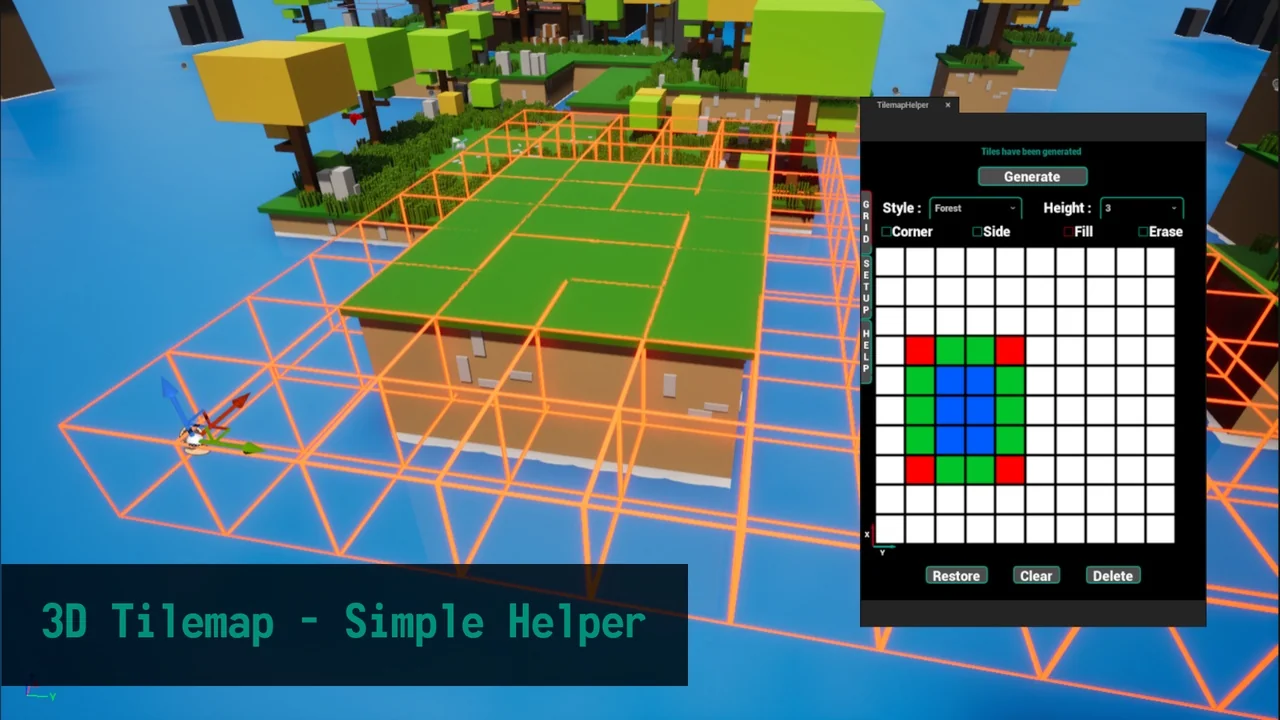
 Gameplay Features
 Gameplay Features
 Gameplay Features