"7aa4acc705f0d80b"{"id":"1001928","slug":"3d-lasers","title":"3D Lasers","category":"Spells \u0026 Combat","engine":"4.27+,5.0+","assetVersion":"","engineVersion":"Engine Version: 4.27+,5.0+","tag":"Spells \u0026 Combat","accent":"blue","visual":"mech","summary":"Implement 10 unique 3D Lasers in Unreal Engine with standalone child-blueprints, runtime hit-position logic, distance controls, and Niagara compatibility.","platform":"Unreal Engine","publishedAt":"2026-10-24T11:05:58.511Z","updatedAt":"2026-10-24T11:05:58.511Z","sourceNotes":[],"fileContents":[],"compatibility":["Unreal Engine","Engine Version: 4.27+,5.0+"],"featuredImage":{"alt":"3D Lasers","src":"/wp-content/uploads/published/2026/10/4f56fc1408db-42a908ab-e189-4575-9fda-9bce0954dd4f-4578e630cc.webp"},"hasDownloadLink":true,"downloads":0,"terms":[{"taxonomy":"category","slug":"spells-and-combat","name":"Spells \u0026 Combat"}],"galleryImages":[{"src":"/wp-content/uploads/published/2026/10/b2acc4f81a5f-ab40a949-5a4f-4a87-8be8-264da590dfe6-1b0436e36c.webp","alt":"3D Lasers"},{"src":"/wp-content/uploads/published/2026/10/8ee87de12f7e-7683b104-c0bd-48bc-bcb9-dca5eaf5e398-f0fc286b4f.webp","alt":"3D Lasers"},{"src":"/wp-content/uploads/published/2026/10/99a2200cae38-67fdfe36-e57b-4a58-8cd5-375d3a47a241-cc3c56051a.webp","alt":"3D Lasers"},{"src":"/wp-content/uploads/published/2026/10/5490877917ff-8a12f8db-eda0-43f0-88b5-87846d9669bc-50d8666e4f.webp","alt":"3D Lasers"},{"src":"/wp-content/uploads/published/2026/10/13c38a1ab848-1b88db5c-b0f5-4ebc-9826-396687f450e9-84ac885e42.webp","alt":"3D Lasers"},{"src":"/wp-content/uploads/published/2026/10/3d3c3d436be5-b7c89558-7f85-4601-9ab5-869121894ac2-3313af6de6.webp","alt":"3D Lasers"},{"src":"/wp-content/uploads/published/2026/10/5e50b293d824-53d0fe8d-15b7-4a73-b8ca-aa8658afc65d-7df9f1dc6f.webp","alt":"3D Lasers"},{"src":"/wp-content/uploads/published/2026/10/04a5524bf42b-e6511aca-6f30-473a-aaad-023d32857231-8d1e710af9.webp","alt":"3D Lasers"},{"src":"/wp-content/uploads/published/2026/10/0e2df1fce002-261bc8be-e431-4f35-a9ff-aa3255439884-9dc71f0e95.webp","alt":"3D Lasers"},{"src":"/wp-content/uploads/published/2026/10/2816a90c63ad-7f68d0e3-bc58-4018-a5ee-557bd1054bfb-fb3eac05dc.webp","alt":"3D Lasers"}],"accessPanel":{"kind":"resource","title":"Download this resource","eyebrow":"Free Download","message":"Log in or create a free account to start your download.","fileName":"Content.7z","safetyNote":"Resources are manually reviewed before listing to improve quality and reduce obvious risks.","actionLabel":"Download Free","resourceType":"Resource archive"},"contentHtml":"\u003ch2\u003eDeploying 3D Lasers Through Child-Blueprint Architecture\u003c/h2\u003e\u003cp\u003eIntegrating visual beam effects into an interactive project requires a solid technical framework for spawning, firing, and terminating energy rays. The 3D Lasers asset establishes its pipeline around an organized blueprint hierarchy rather than leaving visual systems disconnected from gameplay logic. At the core of the implementation is a demonstration shooting blueprint that serves as a functional testbed. This harness illustrates how fire events can be triggered, how targets are detected, and how energy beams connect the firing origin to dynamic target points in three-dimensional space.\u003c/p\u003e\u003cp\u003eRather than tethering the visual effects permanently to this single demonstration setup, the asset separates each of the 10 unique lasers into an independent child-blueprint. Every individual child-blueprint contains the logic and properties necessary to function on its own. This modular decoupling allows technical artists and gameplay developers to bypass the demonstration rig entirely when constructing custom combat systems. Because each child-blueprint operates autonomously, developers can attach individual laser actors to custom weapon sockets, vehicle hardpoints, automated defensive turrets, or environmental sci-fi apparatus without carrying unwanted dependencies from the test scene.\u003c/p\u003e\u003ch2\u003eRuntime Play Mode and Hit Position Calculations\u003c/h2\u003e\u003cp\u003eA central technical characteristic of these visual beam systems is their operational dependency on runtime execution. The lasers do not render their active beam trajectories in the static editor viewport. They function exclusively during play mode. This operational rule stems directly from the visual calculation pipeline: the beam geometry and endpoint registration rely on real-time hit position data delivered through Blueprint logic.\u003c/p\u003e\u003cp\u003eWhen entering play mode, the firing logic computes the endpoint vector of the shot. The receiving child-blueprint accepts this dynamic hit position and maps the visual beam between the origin and the target surface. Because the hit position is fed into the blueprint during runtime execution, the system dynamically calculates where the energy beam terminates against solid geometry, characters, or environmental targets. This architecture prevents visual clipping through walls and eliminates static beam trails that fail to respond to moving obstacles. At the point of impact, the system aligns visual hit and flash elements to the calculated coordinates, ensuring that sparks, flashes, and impact energy synchronize precisely with the physical contact point.\u003c/p\u003e\u003ch2\u003eConfiguring Max Laser Distance and Blueprint Scale Controls\u003c/h2\u003e\u003cp\u003eControlling beam travel and dimensional volume is managed directly through blueprint properties rather than requiring manual shader edits or external asset adjustments. Each individual child-blueprint exposes dedicated settings for maximum laser distance. Within these parameters, developers can define the absolute range limit for a given beam effect. When a target is beyond this specified threshold—or when a ray trace fails to encounter any blocking geometry—the child-blueprint limits the beam extension to the configured maximum distance, preventing rays from projecting infinitely across open levels.\u003c/p\u003e\u003cp\u003eVisual volume and thickness adjustments are handled natively inside Unreal Engine. Starting from Unreal Engine 5.0, developers can scale the visual presence of each laser directly via the Scale option in the Blueprint transform settings. Altering these standard transform components lets artists adjust the girth, length, and proportional intensity of the beam to match different weapon calibers or environmental scales. A heavy industrial sci-fi cutting beam can be enlarged using standard uniform or non-uniform scaling, while a pinpoint tactical rifle laser can be scaled down to a fine trace, all within the standard actor details panel.\u003c/p\u003e\u003ch2\u003eStylistic Variations Across the 10 Unique Lasers\u003c/h2\u003e\u003cp\u003eThe collection supplies 10 distinct laser designs, providing varied visual identities suited for diverse sci-fi, high-energy, and tactical combat scenarios. These variations cover a broad spectrum of visual themes, utilizing distinct visual properties that range from concentrated fire rays to unstable electrical arcs.\u003c/p\u003e\u003cul\u003e\u003cli\u003e\u003cstrong\u003eElectric and Electricity FX:\u003c/strong\u003e High-frequency energy discharges characterized by fluctuating visual paths, bright electrical flashes, and unstable energy arcs suited for tech-based weaponry.\u003c/li\u003e\u003cli\u003e\u003cstrong\u003eFire and Heat Rays:\u003c/strong\u003e Dense, radiant energy conduits that deliver the impression of high thermal mass and destructive combustion upon the hit location.\u003c/li\u003e\u003cli\u003e\u003cstrong\u003eSci-Fi Beams:\u003c/strong\u003e Clean, focused directional beams intended for futuristic small arms, starship cannons, and automated security sensors.\u003c/li\u003e\u003cli\u003e\u003cstrong\u003eStylized Energy Paths:\u003c/strong\u003e Expressive, readable visual beams that maintain clear gameplay readability in fast-paced action sequences with distinct flash and hit indicators.\u003c/li\u003e\u003c/ul\u003e\u003cp\u003eEach distinct preset includes dedicated beam visuals, terminal hit effects, and launch flashes, maintaining stylistic consistency from the moment of discharge through to terminal impact.\u003c/p\u003e\u003ch2\u003eNiagara Architecture and Projectile Compatibility\u003c/h2\u003e\u003cp\u003eThe particle elements in 3D Lasers are constructed within the Niagara visual effects framework, tapping into modern particle handling for clean emitter execution, responsive ribbon or mesh beam updates, and consistent rendering during high-speed actor movement. This Niagara baseline ensures that spark sprays, terminal flashes, and ambient beam electricity react naturally within contemporary engine pipelines.\u003c/p\u003e\u003cp\u003eFor projects requiring unified ballistic and energy systems, the asset features established compatibility with Niagara Projectiles Vol.2. This compatibility makes it straightforward to coordinate continuous beam fire with discrete projectile trajectories, enabling developers to build layered weapon platforms that switch seamlessly between sustained beam output and rapid-fire plasma projectiles without encountering asset conflicts or disparate visual styles. Combined with the self-contained child-blueprint architecture and direct distance controls, the collection delivers a modular visual toolkit ready for direct deployment in active gameplay scenarios.\u003c/p\u003e\n\n\u003ch2\u003eMore From The Same Workflow\u003c/h2\u003e\n\u003cul\u003e\n\u003cli\u003e\u003ca href=\"https://3dcghub.com/niagara-ray-vfx-pack-remaster/\" title=\"Niagara Ray VFX Pack Remaster\"\u003eNiagara Ray VFX Pack Remaster\u003c/a\u003e\u003c/li\u003e\n\u003cli\u003e\u003ca href=\"https://3dcghub.com/cosmic-vfx/\" title=\"Cosmic VFX\"\u003eCosmic VFX\u003c/a\u003e\u003c/li\u003e\n\u003cli\u003e\u003ca href=\"https://3dcghub.com/niagara-toon-projectiles-2/\" title=\"Niagara Toon Projectiles 2\"\u003eNiagara Toon Projectiles 2\u003c/a\u003e\u003c/li\u003e\n\u003cli\u003e\u003ca href=\"https://3dcghub.com/advanced-magic-fx-13/\" title=\"Advanced Magic FX 13\"\u003eAdvanced Magic FX 13\u003c/a\u003e\u003c/li\u003e\n\u003cli\u003e\u003ca href=\"https://3dcghub.com/vehicle-nitro-vfx-pack/\" title=\"Vehicle Nitro VFX Pack\"\u003eVehicle Nitro VFX Pack\u003c/a\u003e\u003c/li\u003e\n\u003c/ul\u003e","contentTextLength":6369,"navigation":{"current":62,"total":3925,"previous":{"id":"1001929","slug":"3d-tilemap-simple-helper","title":"3D Tilemap - Simple Helper","category":"Gameplay Features","platform":"Unreal Engine","updatedAt":"2026-10-24T11:06:32.986Z"},"next":{"id":"1001927","slug":"30-preacher-npc-mocap-animations","title":"30 Preacher NPC Mocap Animations","category":"Gestures","platform":"Unreal Engine","updatedAt":"2026-10-24T11:05:05.323Z"}},"relatedResources":[{"id":"1000858","slug":"niagara-ray-vfx-pack-remaster","title":"Niagara Ray VFX Pack Remaster","category":"Spells \u0026 Combat","engine":"4.26+,5.0+","assetVersion":"","engineVersion":"Engine Version: 4.26+,5.0+","tag":"Spells \u0026 Combat","accent":"blue","visual":"mech","summary":"Niagara Ray VFX Pack Remaster offers 12 unique ray effect sets and 36 Niagara FX, with Energy-Ray-Hit vfx in every set for spell, laser, holy, and void visuals.","platform":"Unreal Engine","publishedAt":"2026-08-05T06:17:53.049Z","updatedAt":"2026-08-05T06:17:53.049Z","sourceNotes":[],"fileContents":[],"compatibility":["Unreal Engine","Engine Version: 4.26+,5.0+"],"featuredImage":{"alt":"Niagara Ray VFX Pack Remaster","src":"/wp-content/uploads/published/2026/08/e41c6f408e21-5e74f38b-0136-41fe-a304-7953b1a00ca2-199493769d.webp"},"hasDownloadLink":true,"downloads":1},{"id":"16214","slug":"cosmic-vfx","title":"Cosmic VFX","category":"Spells \u0026 Combat","engine":"5.2+","assetVersion":"Engine version: 5.2+","engineVersion":"5.2","tag":"Spells \u0026 Combat","accent":"blue","visual":"animation","summary":"Enhance your game's visual appeal with the Cosmic VFX pack. This collection features a variety of space-themed effects like meteors, lasers, and magic circles, all optimized for real-time performance.","platform":"Unreal Engine","publishedAt":"2026-03-12T16:31:14.000Z","updatedAt":"2026-04-19T15:44:36.000Z","sourceNotes":[],"fileContents":[],"compatibility":["Unreal Engine","Engine version: 5.2+"],"featuredImage":{"alt":"Cosmic VFX","src":"https://3dcghub.com/wp-content/uploads/2026/03/56b1daf8-ff37-4a1d-909a-e07fc6d57717.webp"},"hasDownloadLink":true,"downloads":1},{"id":"1001542","slug":"niagara-toon-projectiles-2","title":"Niagara Toon Projectiles 2","category":"Spells \u0026 Combat","engine":"4.27+,5.0+","assetVersion":"","engineVersion":"Engine Version: 4.27+,5.0+","tag":"Spells \u0026 Combat","accent":"blue","visual":"mech","summary":"A close look at Niagara Toon Projectiles 2, featuring 15 stylized projectiles, paired hit and flash effects, distance spawning, and child blueprints.","platform":"Unreal Engine","publishedAt":"2026-10-09T17:35:04.454Z","updatedAt":"2026-10-09T17:35:04.454Z","sourceNotes":[],"fileContents":[],"compatibility":["Unreal Engine","Engine Version: 4.27+,5.0+"],"featuredImage":{"alt":"Niagara Toon Projectiles 2","src":"/wp-content/uploads/published/2026/10/ad84b8acd4a4-a2f1f772-720f-4ee9-9458-9f0a74d9748a-8844d17f77.webp"},"hasDownloadLink":true,"downloads":4}]}
Spells & Combat
3D Lasers
Implement 10 unique 3D Lasers in Unreal Engine with standalone child-blueprints, runtime hit-position logic, distance controls, and Niagara compatibility.
Deploying 3D Lasers Through Child-Blueprint Architecture
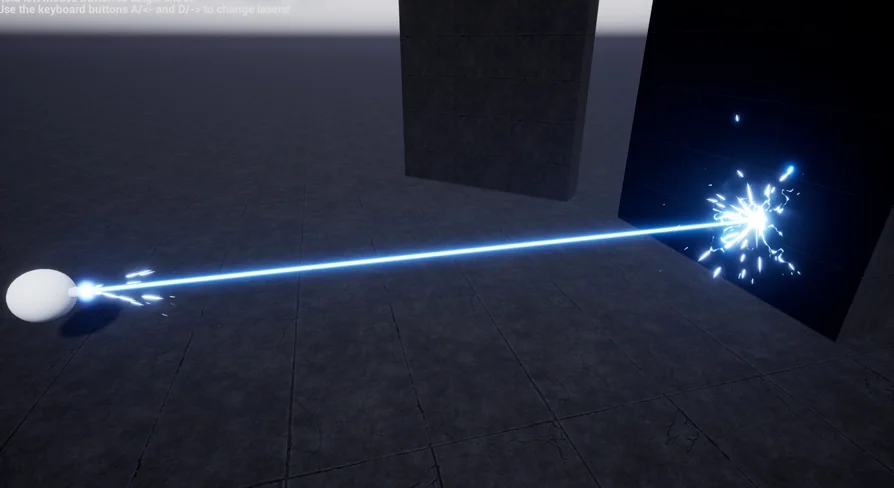
Integrating visual beam effects into an interactive project requires a solid technical framework for spawning, firing, and terminating energy rays. The 3D Lasers asset establishes its pipeline around an organized blueprint hierarchy rather than leaving visual systems disconnected from gameplay logic. At the core of the implementation is a demonstration shooting blueprint that serves as a functional testbed. This harness illustrates how fire events can be triggered, how targets are detected, and how energy beams connect the firing origin to dynamic target points in three-dimensional space.
Rather than tethering the visual effects permanently to this single demonstration setup, the asset separates each of the 10 unique lasers into an independent child-blueprint. Every individual child-blueprint contains the logic and properties necessary to function on its own. This modular decoupling allows technical artists and gameplay developers to bypass the demonstration rig entirely when constructing custom combat systems. Because each child-blueprint operates autonomously, developers can attach individual laser actors to custom weapon sockets, vehicle hardpoints, automated defensive turrets, or environmental sci-fi apparatus without carrying unwanted dependencies from the test scene.
Runtime Play Mode and Hit Position Calculations
A central technical characteristic of these visual beam systems is their operational dependency on runtime execution. The lasers do not render their active beam trajectories in the static editor viewport. They function exclusively during play mode. This operational rule stems directly from the visual calculation pipeline: the beam geometry and endpoint registration rely on real-time hit position data delivered through Blueprint logic.
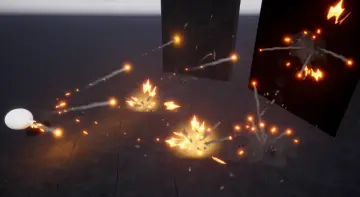
When entering play mode, the firing logic computes the endpoint vector of the shot. The receiving child-blueprint accepts this dynamic hit position and maps the visual beam between the origin and the target surface. Because the hit position is fed into the blueprint during runtime execution, the system dynamically calculates where the energy beam terminates against solid geometry, characters, or environmental targets. This architecture prevents visual clipping through walls and eliminates static beam trails that fail to respond to moving obstacles. At the point of impact, the system aligns visual hit and flash elements to the calculated coordinates, ensuring that sparks, flashes, and impact energy synchronize precisely with the physical contact point.
Configuring Max Laser Distance and Blueprint Scale Controls
Controlling beam travel and dimensional volume is managed directly through blueprint properties rather than requiring manual shader edits or external asset adjustments. Each individual child-blueprint exposes dedicated settings for maximum laser distance. Within these parameters, developers can define the absolute range limit for a given beam effect. When a target is beyond this specified threshold—or when a ray trace fails to encounter any blocking geometry—the child-blueprint limits the beam extension to the configured maximum distance, preventing rays from projecting infinitely across open levels.
Visual volume and thickness adjustments are handled natively inside Unreal Engine. Starting from Unreal Engine 5.0, developers can scale the visual presence of each laser directly via the Scale option in the Blueprint transform settings. Altering these standard transform components lets artists adjust the girth, length, and proportional intensity of the beam to match different weapon calibers or environmental scales. A heavy industrial sci-fi cutting beam can be enlarged using standard uniform or non-uniform scaling, while a pinpoint tactical rifle laser can be scaled down to a fine trace, all within the standard actor details panel.
Stylistic Variations Across the 10 Unique Lasers
The collection supplies 10 distinct laser designs, providing varied visual identities suited for diverse sci-fi, high-energy, and tactical combat scenarios. These variations cover a broad spectrum of visual themes, utilizing distinct visual properties that range from concentrated fire rays to unstable electrical arcs.
Electric and Electricity FX: High-frequency energy discharges characterized by fluctuating visual paths, bright electrical flashes, and unstable energy arcs suited for tech-based weaponry.
Fire and Heat Rays: Dense, radiant energy conduits that deliver the impression of high thermal mass and destructive combustion upon the hit location.
Sci-Fi Beams: Clean, focused directional beams intended for futuristic small arms, starship cannons, and automated security sensors.
Stylized Energy Paths: Expressive, readable visual beams that maintain clear gameplay readability in fast-paced action sequences with distinct flash and hit indicators.
Each distinct preset includes dedicated beam visuals, terminal hit effects, and launch flashes, maintaining stylistic consistency from the moment of discharge through to terminal impact.
Niagara Architecture and Projectile Compatibility
The particle elements in 3D Lasers are constructed within the Niagara visual effects framework, tapping into modern particle handling for clean emitter execution, responsive ribbon or mesh beam updates, and consistent rendering during high-speed actor movement. This Niagara baseline ensures that spark sprays, terminal flashes, and ambient beam electricity react naturally within contemporary engine pipelines.
For projects requiring unified ballistic and energy systems, the asset features established compatibility with Niagara Projectiles Vol.2. This compatibility makes it straightforward to coordinate continuous beam fire with discrete projectile trajectories, enabling developers to build layered weapon platforms that switch seamlessly between sustained beam output and rapid-fire plasma projectiles without encountering asset conflicts or disparate visual styles. Combined with the self-contained child-blueprint architecture and direct distance controls, the collection delivers a modular visual toolkit ready for direct deployment in active gameplay scenarios.
 Spells & Combat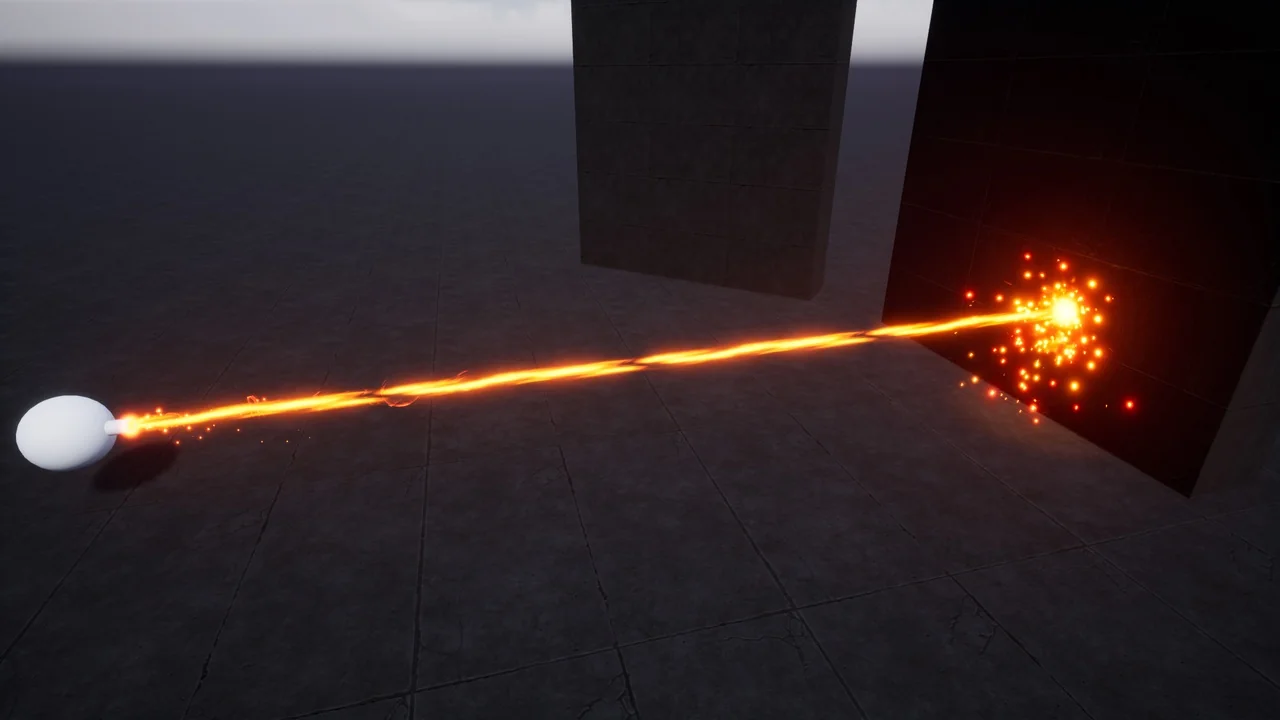
 Spells & Combat
 Spells & Combat
 Spells & Combat