"a7cfa646d0d8ae55"{"id":"1000881","slug":"simple-to-do-list","title":"Simple To Do List","category":"Gameplay Features","engine":"5.6+","assetVersion":"","engineVersion":"Engine Version: 5.6+","tag":"Gameplay Features","accent":"blue","visual":"mech","summary":"Simple To Do List is a task organizer with multiple categories and Completed, Pending, Canceled statuses. It pairs with Jumpscare Pack X for horror game project","platform":"Unreal Engine","publishedAt":"2026-08-05T15:28:38.744Z","updatedAt":"2026-08-05T15:28:38.744Z","sourceNotes":[],"fileContents":[],"compatibility":["Unreal Engine","Engine Version: 5.6+"],"featuredImage":{"alt":"Simple To Do List","src":"/wp-content/uploads/published/2026/08/df55ee7f7820-23378402-1e93-4c67-89bb-2a4f738ec74e-f7b9e32150.webp"},"hasDownloadLink":true,"downloads":0,"terms":[{"taxonomy":"category","slug":"gameplay-features","name":"Gameplay Features"}],"galleryImages":[{"src":"/wp-content/uploads/published/2026/08/fc5c5d7db519-a8ced9b6-be14-4b71-9735-a0a0af5d979f-74b1c3b6fa.webp","alt":"Simple To Do List"},{"src":"/wp-content/uploads/published/2026/08/14070a4d7f64-7af2af74-0032-4055-b163-5b73351a2a93-459e360fe7.webp","alt":"Simple To Do List"},{"src":"/wp-content/uploads/published/2026/08/c1426e8b3bc2-a2e9626f-ee1a-4100-b452-60a64436d127-c3a67b9cef.webp","alt":"Simple To Do List"},{"src":"/wp-content/uploads/published/2026/08/df6aa7338dff-c2d9d21a-7ca1-43ae-a04c-6ab1ef8638fc-25c48d8f7b.webp","alt":"Simple To Do List"}],"accessPanel":{"kind":"resource","title":"Download this resource","eyebrow":"Free Download","message":"Log in or create a free account to start your download.","fileName":"Content.7z","safetyNote":"Resources are manually reviewed before listing to improve quality and reduce obvious risks.","actionLabel":"Download Free","resourceType":"Resource archive"},"contentHtml":"\u003cp\u003e\u003cem\u003eSimple To Do List\u003c/em\u003e keeps task management straightforward by giving every task a home in a category and a visible status. Instead of forcing all to-dos into a single flat list, the system lets you group work by priority, project, or area of life. The package then offers a lightweight organizer that can stay embedded in a production tool or User Interface (UI) and still keep a whole project's outstanding work visible at a glance. Its whole purpose is to simplify task management and boost productivity, and it does so without overwhelming the user with configuration.\u003c/p\u003e\n\n\u003ch2\u003eCategorize Tasks the Same Way the Work Actually Divides\u003c/h2\u003e\n\n\u003cp\u003eThe category system is the 1st layer of organization. You can create multiple categories, so tasks aren't buried under 1 long list. For a production team, that might mean separate categories for environment art, programming, and sound design. For an individual, it could be categories for work, household, and personal goals. The system specifically lists priorities, projects, and different aspects of life as those grouping options. This flexibility comes from the ability to name and create categories as needed, without any rigid preset structure. Because each category holds its own set of tasks, the system doubles as a mini-project board, with tasks grouped visually instead of through tags or colors. \u003cem\u003eSimple To Do List\u003c/em\u003e eliminates the mental overhead of deciding which bucket a task belongs to, because you can effortlessly group tasks into categories. The tags include \u003cem\u003eOrganizer\u003c/em\u003e and \u003cem\u003eManager\u003c/em\u003e, which reinforces the idea that categories are not just labels; they are the structural core of the entire system.\u003c/p\u003e\n\n\u003ch2\u003e3 Statuses That Leave No Room for Ambiguity\u003c/h2\u003e\n\n\u003cp\u003eEvery task in \u003cem\u003eSimple To Do List\u003c/em\u003e can be marked with 1 of 3 statuses:\u003c/p\u003e\n\n\u003cul\u003e\n \u003cli\u003e\u003cstrong\u003eCompleted\u003c/strong\u003e – for tasks that are finished and can be checked off.\u003c/li\u003e\n \u003cli\u003e\u003cstrong\u003ePending\u003c/strong\u003e – for tasks that still need attention.\u003c/li\u003e\n \u003cli\u003e\u003cstrong\u003eCanceled\u003c/strong\u003e – for tasks that are no longer relevant.\u003c/li\u003e\n\u003c/ul\u003e\n\n\u003cp\u003eThis trio covers the full life cycle of a task without overcomplicating things. Completed tasks give a clear sense of progress, pending tasks remain the active workload, and canceled tasks are removed from the active stack but still tracked. That last status matters because it prevents half-finished work from cluttering the list. The system gives you complete control over tasks, letting you know which ones are done and which are still waiting. For a long-running project, having a canceled status also creates an honest record of decisions that changed along the way. Marking a task with 1 of these statuses is the core interaction, and the labels stay visible so anyone using the Widget immediately understands the state of every item.\u003c/p\u003e\n\n\u003ch2\u003eA Widget Built for Editor, Interface, and Blueprint Workflows\u003c/h2\u003e\n\n\u003cp\u003eThe asset's tag list includes \u003cem\u003eEditor\u003c/em\u003e, \u003cem\u003eWidget\u003c/em\u003e, \u003cem\u003eBlueprint\u003c/em\u003e, \u003cem\u003eUserinterface\u003c/em\u003e, \u003cem\u003eManager\u003c/em\u003e, \u003cem\u003eJournal\u003c/em\u003e, \u003cem\u003eAdministration\u003c/em\u003e, \u003cem\u003eSave\u003c/em\u003e, \u003cem\u003eDaily\u003c/em\u003e, and \u003cem\u003eWriting\u003c/em\u003e. That combination of tags places it firmly in the category of UI development tools, which is consistent with the idea of a to-do list Widget that lives inside a larger system. It can be dropped into a project as a UI element, used as an Editor utility, or wired into a game's system through Blueprint. The minimal style mentioned in the tags keeps the visual footprint small, so it fits interfaces that would rather not draw attention to their to-do list. The presence of \u003cem\u003eSave\u003c/em\u003e and \u003cem\u003eDaily\u003c/em\u003e in the tags also suggests a system that can persist state across sessions and track recurring or daily tasks, which makes it more than a disposable mockup. Tags like \u003cem\u003eWriting\u003c/em\u003e, \u003cem\u003eNote\u003c/em\u003e, \u003cem\u003eJournal\u003c/em\u003e, and \u003cem\u003eAdministration\u003c/em\u003e point to use cases that go beyond game development, so the same Widget can serve a designer's personal notes or an admin panel in a production tool.\u003c/p\u003e\n\n\u003ch2\u003eCompatibility with \u003cem\u003eJumpscare Pack X – Horror Game\u003c/em\u003e\u003c/h2\u003e\n\n\u003cp\u003eThe compatibility note pairs \u003cem\u003eSimple To Do List\u003c/em\u003e with \u003cem\u003eJumpscare Pack X – Horror Game\u003c/em\u003e. That indicates the to-do list system has been tested or designed alongside a horror game pack. In a horror project, task tracking could be used for objective checklists, debugging linear scares, or organizing the development process itself. The connection doesn't add new features to the to-do list; it simply means the system works in a project that already uses \u003cem\u003eJumpscare Pack X – Horror Game\u003c/em\u003e assets. For teams building with that pack, the to-do list can slot next to it without extra setup friction. Because the to-do list is a UI Widget, it can be placed over a game Viewport or inside an Editor panel without disturbing the visuals of the horror scene. The compatibility note does not list any special conditions, so developers can expect the Widget to behave the same way it would in any other project.\u003c/p\u003e\n\n\u003cp\u003eWhat makes \u003cem\u003eSimple To Do List\u003c/em\u003e valuable is not any single feature but the combination. Categories give structure, and statuses give closure. A task that enters a category as Pending moves to Completed when finished, or to Canceled when it no longer matters. That creates a clean record of what was planned, what was done, and what was eventually cut. For a solo developer juggling multiple projects or a small team tracking asset production, that kind of straightforward tracking reduces the need for external tools. When a to-do list is this easy to use, the list itself stops being something to manage and starts being something that helps you manage everything else.\u003c/p\u003e\n\n\u003ch2\u003eContinue Browsing Similar Packs\u003c/h2\u003e\n\u003cul\u003e\n\u003cli\u003e\u003ca href=\"https://3dcghub.com/simple-screen-damage-indicator/\" title=\"Simple Screen Damage Indicator\"\u003eSimple Screen Damage Indicator\u003c/a\u003e\u003c/li\u003e\n\u003cli\u003e\u003ca href=\"https://3dcghub.com/advanced-scope/\" title=\"Advanced Scope\"\u003eAdvanced Scope\u003c/a\u003e\u003c/li\u003e\n\u003cli\u003e\u003ca href=\"https://3dcghub.com/cinematic-duel-system/\" title=\"Cinematic Duel System\"\u003eCinematic Duel System\u003c/a\u003e\u003c/li\u003e\n\u003cli\u003e\u003ca href=\"https://3dcghub.com/gaming-health-widget/\" title=\"Gaming Health Widget\"\u003eGaming Health Widget\u003c/a\u003e\u003c/li\u003e\n\u003cli\u003e\u003ca href=\"https://3dcghub.com/city-traffic-pro/\" title=\"City Traffic Pro\"\u003eCity Traffic Pro\u003c/a\u003e\u003c/li\u003e\n\u003c/ul\u003e","contentTextLength":5454,"navigation":{"current":368,"total":3167,"previous":{"id":"1000882","slug":"skateboarding-system","title":"Skateboarding System","category":"Vehicles \u0026 Transportation","platform":"Unreal Engine","updatedAt":"2026-08-05T16:13:49.545Z"},"next":{"id":"1000880","slug":"silent-walking-animations","title":"Silent Walking Animations","category":"Locomotion / Gaits","platform":"Unreal Engine","updatedAt":"2026-08-05T15:25:57.406Z"}},"relatedResources":[{"id":"1000775","slug":"simple-screen-damage-indicator","title":"Simple Screen Damage Indicator","category":"Gameplay Features","engine":"5.4+","assetVersion":"","engineVersion":"Engine Version: 5.4+","tag":"Gameplay Features","accent":"blue","visual":"mech","summary":"A 100% Blueprint visual feedback system displaying a blood splatter overlay on hazard damage. Built for single-player prototyping with local multiplayer UI rend","platform":"Unreal Engine","publishedAt":"2026-07-28T18:07:04.744Z","updatedAt":"2026-07-28T18:07:04.744Z","sourceNotes":[],"fileContents":[],"compatibility":["Unreal Engine","Engine Version: 5.4+"],"featuredImage":{"alt":"Simple Screen Damage Indicator","src":"/wp-content/uploads/published/2026/07/5369eff53b58-641db878-ef1c-4892-ab16-112ae9023f3c-f070c8732a.webp"},"hasDownloadLink":true,"downloads":1},{"id":"1000980","slug":"basic-locomotion-system-replicated","title":"Basic Locomotion System (REPLICATED)","category":"Gameplay Features","engine":"5.0+","assetVersion":"","engineVersion":"Engine Version: 5.0+","tag":"Gameplay Features","accent":"blue","visual":"animation","summary":"A ground-up locomotion system for the UE5 Skeleton using Lyra animations, built as a simple third-person template with MetaHuman integration and multiplayer inv","platform":"Unreal Engine","publishedAt":"2026-08-18T05:57:51.717Z","updatedAt":"2026-08-18T05:57:51.717Z","sourceNotes":[],"fileContents":[],"compatibility":["Unreal Engine","Engine Version: 5.0+"],"featuredImage":{"alt":"Basic Locomotion System (REPLICATED)","src":"/wp-content/uploads/published/2026/08/497370037da8-24315aeb-c8a9-4077-aa37-d1119fdcf17d-0970e54182.webp"},"hasDownloadLink":true,"downloads":1},{"id":"1001063","slug":"physics-collision-sound","title":"Physics Collision Sound","category":"Gameplay Features","engine":"5.3+","assetVersion":"","engineVersion":"Engine Version: 5.3+","tag":"Gameplay Features","accent":"blue","visual":"mech","summary":"Physics Collision Sound adds material-aware hit, slide, roll, and water audio to any Unreal mesh with a simple drag-and-drop Blueprint workflow.","platform":"Unreal Engine","publishedAt":"2026-09-03T13:17:54.533Z","updatedAt":"2026-09-03T13:17:54.533Z","sourceNotes":[],"fileContents":[],"compatibility":["Audio","Engine Version: 5.3+"],"featuredImage":{"alt":"Physics Collision Sound","src":"/wp-content/uploads/published/2026/09/05c916db7e98-eff97865-a529-4495-b2bb-27b0ce374707-e1e1376bbe.webp"},"hasDownloadLink":true,"downloads":0}]}
Gameplay Features
Simple To Do List
Simple To Do List is a task organizer with multiple categories and Completed, Pending, Canceled statuses. It pairs with Jumpscare Pack X for horror game project
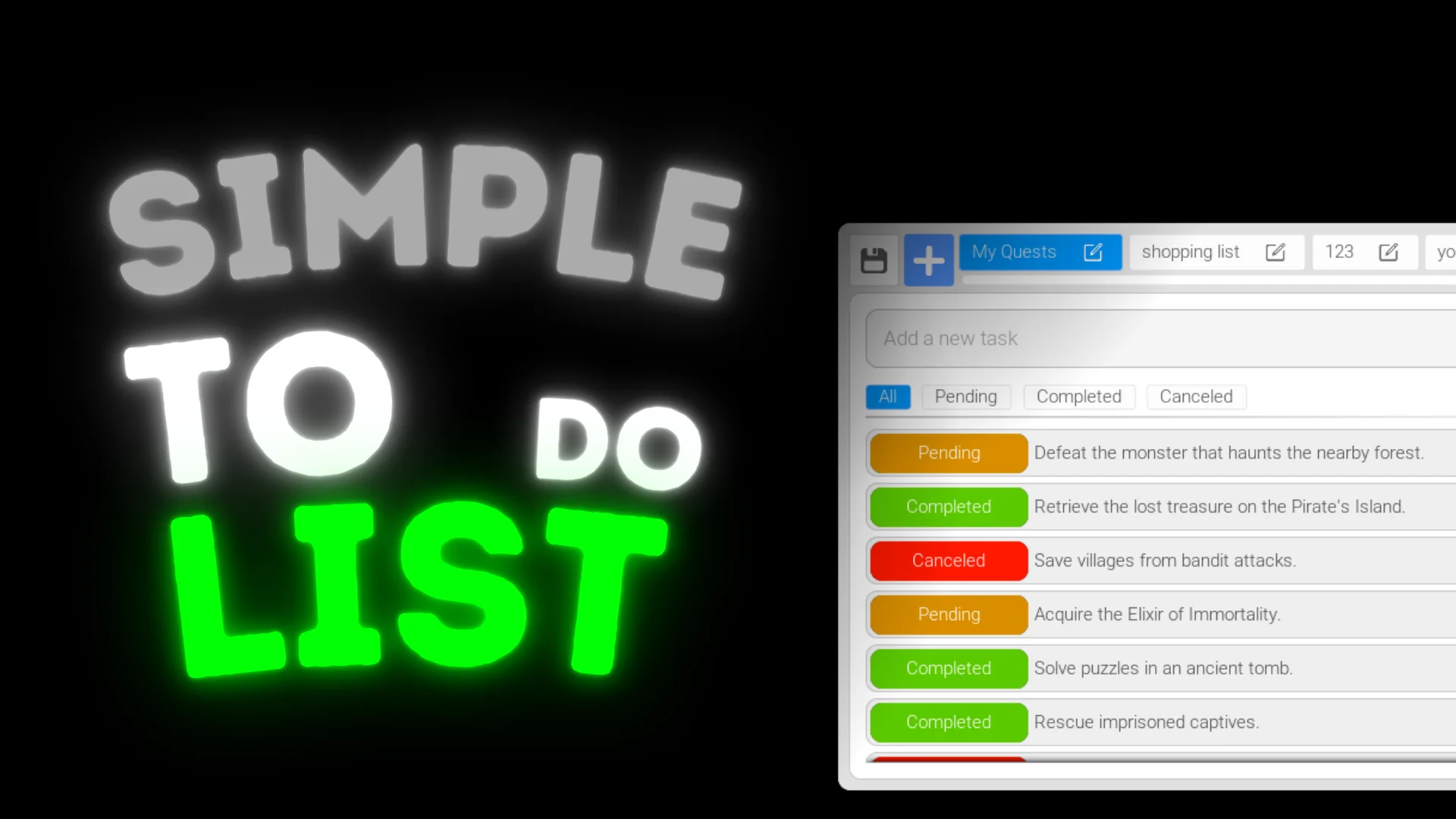
Simple To Do List keeps task management straightforward by giving every task a home in a category and a visible status. Instead of forcing all to-dos into a single flat list, the system lets you group work by priority, project, or area of life. The package then offers a lightweight organizer that can stay embedded in a production tool or User Interface (UI) and still keep a whole project's outstanding work visible at a glance. Its whole purpose is to simplify task management and boost productivity, and it does so without overwhelming the user with configuration.
Categorize Tasks the Same Way the Work Actually Divides
The category system is the 1st layer of organization. You can create multiple categories, so tasks aren't buried under 1 long list. For a production team, that might mean separate categories for environment art, programming, and sound design. For an individual, it could be categories for work, household, and personal goals. The system specifically lists priorities, projects, and different aspects of life as those grouping options. This flexibility comes from the ability to name and create categories as needed, without any rigid preset structure. Because each category holds its own set of tasks, the system doubles as a mini-project board, with tasks grouped visually instead of through tags or colors. Simple To Do List eliminates the mental overhead of deciding which bucket a task belongs to, because you can effortlessly group tasks into categories. The tags include Organizer and Manager, which reinforces the idea that categories are not just labels; they are the structural core of the entire system.
3 Statuses That Leave No Room for Ambiguity
Every task in Simple To Do List can be marked with 1 of 3 statuses:
Completed – for tasks that are finished and can be checked off.
Pending – for tasks that still need attention.
Canceled – for tasks that are no longer relevant.
This trio covers the full life cycle of a task without overcomplicating things. Completed tasks give a clear sense of progress, pending tasks remain the active workload, and canceled tasks are removed from the active stack but still tracked. That last status matters because it prevents half-finished work from cluttering the list. The system gives you complete control over tasks, letting you know which ones are done and which are still waiting. For a long-running project, having a canceled status also creates an honest record of decisions that changed along the way. Marking a task with 1 of these statuses is the core interaction, and the labels stay visible so anyone using the Widget immediately understands the state of every item.
A Widget Built for Editor, Interface, and Blueprint Workflows
The asset's tag list includes Editor, Widget, Blueprint, Userinterface, Manager, Journal, Administration, Save, Daily, and Writing. That combination of tags places it firmly in the category of UI development tools, which is consistent with the idea of a to-do list Widget that lives inside a larger system. It can be dropped into a project as a UI element, used as an Editor utility, or wired into a game's system through Blueprint. The minimal style mentioned in the tags keeps the visual footprint small, so it fits interfaces that would rather not draw attention to their to-do list. The presence of Save and Daily in the tags also suggests a system that can persist state across sessions and track recurring or daily tasks, which makes it more than a disposable mockup. Tags like Writing, Note, Journal, and Administration point to use cases that go beyond game development, so the same Widget can serve a designer's personal notes or an admin panel in a production tool.
Compatibility with Jumpscare Pack X – Horror Game
The compatibility note pairs Simple To Do List with Jumpscare Pack X – Horror Game. That indicates the to-do list system has been tested or designed alongside a horror game pack. In a horror project, task tracking could be used for objective checklists, debugging linear scares, or organizing the development process itself. The connection doesn't add new features to the to-do list; it simply means the system works in a project that already uses Jumpscare Pack X – Horror Game assets. For teams building with that pack, the to-do list can slot next to it without extra setup friction. Because the to-do list is a UI Widget, it can be placed over a game Viewport or inside an Editor panel without disturbing the visuals of the horror scene. The compatibility note does not list any special conditions, so developers can expect the Widget to behave the same way it would in any other project.
What makes Simple To Do List valuable is not any single feature but the combination. Categories give structure, and statuses give closure. A task that enters a category as Pending moves to Completed when finished, or to Canceled when it no longer matters. That creates a clean record of what was planned, what was done, and what was eventually cut. For a solo developer juggling multiple projects or a small team tracking asset production, that kind of straightforward tracking reduces the need for external tools. When a to-do list is this easy to use, the list itself stops being something to manage and starts being something that helps you manage everything else.
 Gameplay Features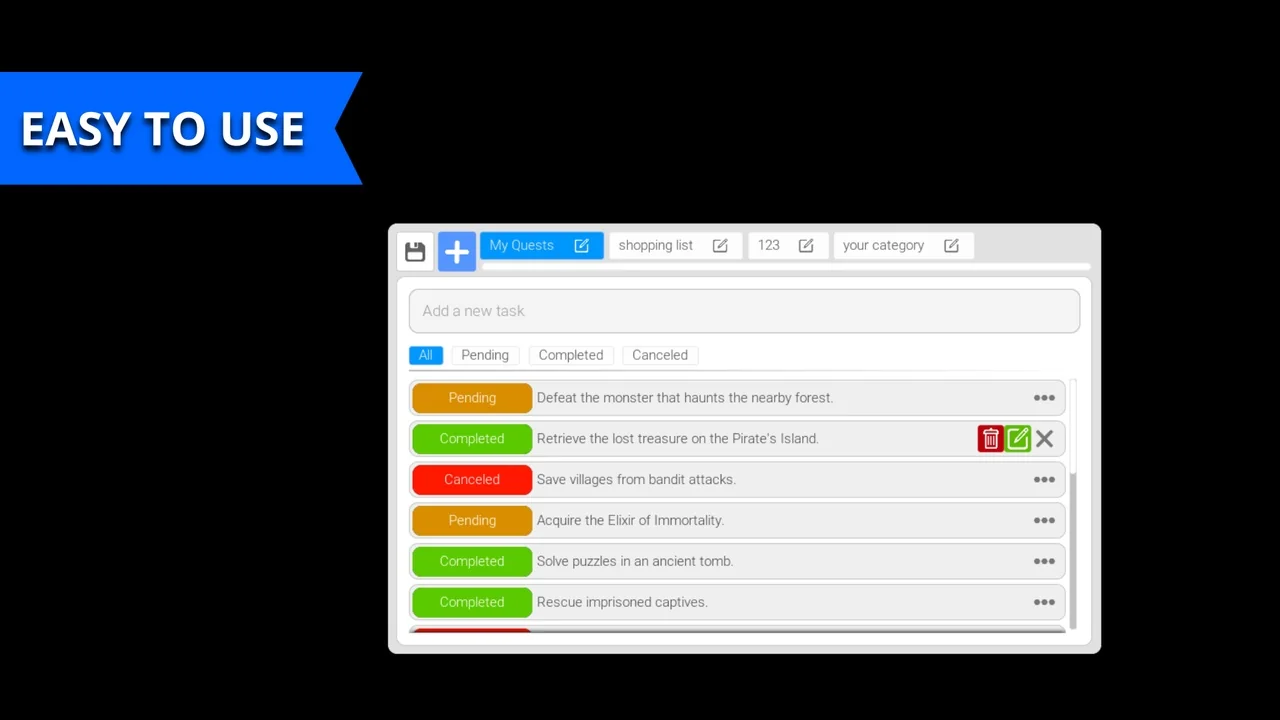
 Gameplay Features
 Gameplay Features
 Gameplay Features