"26aaab8a5d5ed4fc"{"id":"22842","slug":"voicegpt","title":"VoiceGPT","category":"Generative AI","engine":"Original Unity version: 6000.2.7","assetVersion":"Original Unity version: 6000.2.7","engineVersion":"Asset Version:1.2.2","tag":"Generative AI","accent":"cyan","visual":"character","summary":"VoiceGPT brings life-like AI voice generation directly into the Unity Editor environment. By leveraging local hardware, developers can clone voices in seconds and master audio tracks without leaving their workspace.","platform":"Unity","publishedAt":"2026-04-06T14:12:53.000Z","updatedAt":"2026-04-19T15:37:00.000Z","sourceNotes":[],"fileContents":[],"compatibility":["Unity","Original Unity version: 6000.2.7","Asset Version: 1.2.2"],"featuredImage":{"alt":"VoiceGPT","src":"https://3dcghub.com/wp-content/uploads/2026/04/6065db54e983_3d4d5969-ae06-488c-a86f-3d7a4940d8dd_1280x720_stretch.webp"},"hasDownloadLink":true,"downloads":0,"terms":[{"taxonomy":"category","slug":"generative-ai","name":"Generative AI"},{"taxonomy":"post_tag","slug":"audio","name":"Audio"},{"taxonomy":"post_tag","slug":"plugins","name":"Plugins"},{"taxonomy":"post_tag","slug":"unity","name":"Unity"}],"galleryImages":[{"src":"https://3dcghub.com/wp-content/uploads/2026/04/e3aa41e46a74_94c451b2-4516-49e2-97f3-7440dfd758ea_scaled.webp","alt":"VoiceGPT"},{"src":"https://3dcghub.com/wp-content/uploads/2026/04/3af405e2f4d8_f2bbca50-3462-47ed-981e-cf1d03334df9_scaled.webp","alt":"VoiceGPT"},{"src":"https://3dcghub.com/wp-content/uploads/2026/04/f5ef09016cdd_91f618dd-847f-4ea5-9977-7d8fe935d635_scaled.webp","alt":"VoiceGPT"},{"src":"https://3dcghub.com/wp-content/uploads/2026/04/d5b74f7c8b24_74aa2cfe-096e-4fd5-87df-70821f22cfeb_scaled.webp","alt":"VoiceGPT"},{"src":"https://3dcghub.com/wp-content/uploads/2026/04/3b8c6f29c348_ff2c2fda-8ed1-4c21-9e77-05317535be3e_scaled.webp","alt":"VoiceGPT"},{"src":"https://3dcghub.com/wp-content/uploads/2026/04/278a2839965e_d59f92de-c857-4d36-b047-dd083debc0a1_scaled.webp","alt":"VoiceGPT"},{"src":"https://3dcghub.com/wp-content/uploads/2026/04/c5098b955cf2_318c0acc-7f3c-4d14-9933-53e3af6ca4d7_scaled.webp","alt":"VoiceGPT"}],"accessPanel":{"kind":"resource","title":"Access this resource","eyebrow":"Free Download","message":"Log in or create a free account to start your download.","fileName":"VoiceGPT v1.2.2.7z","safetyNote":"All resources are 100% manually reviewed to eliminate all risks.","actionLabel":"Download Free","resourceType":"Resource archive"},"contentHtml":"\u003ch2\u003eLocal Large Audio Model Integration\u003c/h2\u003e\n\u003cp\u003eVoiceGPT functions as a Large Audio Model (LAM) designed specifically for the Unity environment. It utilizes a series of networks and libraries to facilitate life-like voice generation through deep learning. Unlike many generative AI tools that rely on cloud-based processing, this asset operates entirely offline on local hardware. This architectural choice ensures that the audio generation process remains contained within the developer's local system, catering to workflows that require high levels of privacy or those working in environments with restricted internet access. The tool is built to function strictly within the editor, providing a dedicated pipeline for generating assets before they are finalized for a project.\u003c/p\u003e\n\n\u003ch2\u003eRapid Voice Cloning and Generation\u003c/h2\u003e\n\u003cp\u003eThe core functionality of the system revolves around its ability to recreate specific vocal characteristics with minimal input. The voice cloning feature is designed for speed, requiring only a 3-6 second audio clip to replicate a specific voice. This capability is supported through both local and server-based models, offering flexibility in how the cloning is processed. For broader applications, the text-to-voice converter allows developers to input text and generate spoken audio instantly. Users can choose from a library of 60 distinct voice options or use their own cloned voices to narrate project content. As of version 0.1.6, the model is specialized for English, supporting various accents within that language.\u003c/p\u003e\n\n\u003ch2\u003eEmotional Modulation and Parameter Controls\u003c/h2\u003e\n\u003cp\u003eTo move beyond flat, synthetic speech, the offline version of the tool provides specific modulation controls. Developers can manipulate emotional values and diffusion parameters to alter the tone and delivery of the generated speech. By adjusting these settings, it is possible to fine-tune how closely the output matches the original source voice or to shift the performance to better fit a specific narrative need. This level of granular control over the AI model's output allows for the customization of speech patterns, ensuring the generated audio aligns with the intended mood of a scene.\u003c/p\u003e\n\n\u003ch2\u003eIntegrated Audio Post-Production Suite\u003c/h2\u003e\n\u003cp\u003eBeyond simple generation, the package includes a suite of tools for refining audio clips without requiring external software. The editor script presents these options in a single, organized panel. A built-in preview waveform display allows for immediate playback within the editor. This interface includes a play head that can be scrubbed to any point in the clip, accompanied by timestamps and a graphic representation of the waveform for visual clarity. \u003c/p\u003e\n\u003cp\u003eFor more technical adjustments, the asset features a user-friendly GUI for trimming audio. This is particularly useful for removing silence or unwanted segments from the beginning or end of a generated clip. Additionally, multiple clips can be combined into a single file through an intuitive interface that allows users to select, rearrange, and merge audio segments seamlessly. Mastering is further supported by a 6-band equalizer. This tool provides sliders for gain, pitch, and frequency bands, enabling developers to equalize tracks and balance the audio profile directly within the workspace.\u003c/p\u003e\n\n\u003ch2\u003eOptimizing the Editor Workspace\u003c/h2\u003e\n\u003cp\u003eThe design philosophy behind the tool emphasizes efficiency by keeping all audio tasks within the Unity Editor. By consolidating generation, cloning, trimming, and equalization into one workspace, the developer reduces the need to switch between different external services or software packages. This centralized approach simplifies asset management and streamlines the content creation pipeline, as all generated audio assets are immediately available within the project structure. The interface is designed to keep all controls neatly organized in one panel, ensuring that the process of mastering and combining audio tracks remains accessible during the development cycle.\u003c/p\u003e\n\n\u003ch2\u003eExplore Similar Assets\u003c/h2\u003e\n\u003cul\u003e\n\u003cli\u003e\u003ca href=\"https://3dcghub.com/dialogue-system-for-unity/\" title=\"Dialogue System for Unity\"\u003eDialogue System for Unity\u003c/a\u003e\u003c/li\u003e\n\u003cli\u003e\u003ca href=\"https://3dcghub.com/ambient-sounds-interactive-soundscapes-for-unity-6/\" title=\"Ambient Sounds – Interactive Soundscapes for Unity 6\"\u003eAmbient Sounds – Interactive Soundscapes for Unity 6\u003c/a\u003e\u003c/li\u003e\n\u003cli\u003e\u003ca href=\"https://3dcghub.com/pegasus-flythroughs-for-unity-6/\" title=\"Pegasus – Flythroughs for Unity 6\"\u003ePegasus – Flythroughs for Unity 6\u003c/a\u003e\u003c/li\u003e\n\u003cli\u003e\u003ca href=\"https://3dcghub.com/motion-matching-for-unity/\" title=\"Motion Matching for Unity\"\u003eMotion Matching for Unity\u003c/a\u003e\u003c/li\u003e\n\u003cli\u003e\u003ca href=\"https://3dcghub.com/deepvoice-ai-text-to-voice/\" title=\"DeepVoice AI – Text To Voice\"\u003eDeepVoice AI – Text To Voice\u003c/a\u003e\u003c/li\u003e\n\u003c/ul\u003e\n\n\u003ch2\u003eAsset Gallery\u003c/h2\u003e","contentTextLength":4192,"navigation":{"current":3259,"total":3400,"previous":{"id":"22854","slug":"aline","title":"ALINE","category":"GUI","platform":"Unity","updatedAt":"2026-04-19T15:37:00.000Z"},"next":{"id":"22887","slug":"modern-ui-pack","title":"Modern UI Pack","category":"GUI","platform":"Unity","updatedAt":"2026-04-19T15:36:59.000Z"}},"relatedResources":[{"id":"22832","slug":"deepvoice-ai-text-to-voice","title":"DeepVoice AI - Text To Voice","category":"Generative AI","engine":"Original Unity version: 6000.2.13","assetVersion":"Original Unity version: 6000.2.13","engineVersion":"Asset Version:2.1.3","tag":"Generative AI","accent":"cyan","visual":"character","summary":"DeepVoice AI is a text-to-speech solution for Unity that generates life-like narration and dialogue directly within the editor. It provides a no-code interface for processing voice-overs across all scriptable render pipelines.","platform":"Unity","publishedAt":"2026-04-06T14:11:05.000Z","updatedAt":"2026-04-19T15:37:01.000Z","sourceNotes":[],"fileContents":[],"compatibility":["Unity","Original Unity version: 6000.2.13","Asset Version: 2.1.3"],"featuredImage":{"alt":"DeepVoice AI - Text To Voice","src":"https://3dcghub.com/wp-content/uploads/2026/04/da1c8a7e21ab_be38ed81-71ea-41d0-9bc9-1895cd3ef913_1280x720_stretch.webp"},"hasDownloadLink":true,"downloads":0},{"id":"22383","slug":"hand-finger-tracking-windows","title":"Hand \u0026 Finger Tracking [Windows]","category":"AI-ML Integration","engine":"Original Unity version: 2022.3.31","assetVersion":"Original Unity version: 2022.3.31","engineVersion":"Asset Version:1.2","tag":"AI-ML Integration","accent":"cyan","visual":"audio","summary":"This plugin brings high-performance AI hand tracking to the Unity Editor and Windows standalone builds, allowing for the detection of 22 specific finger joints in both 2D and 3D space.","platform":"Unity","publishedAt":"2026-04-06T07:52:14.000Z","updatedAt":"2026-04-19T15:37:20.000Z","sourceNotes":[],"fileContents":[],"compatibility":["Unity","Original Unity version: 2022.3.31","Asset Version: 1.2"],"featuredImage":{"alt":"Hand \u0026 Finger Tracking [Windows]","src":"https://3dcghub.com/wp-content/uploads/2026/04/02aa26a16e75_c899cda1-ef0b-49a6-b25d-583ade216069_1280x720_stretch.webp"},"hasDownloadLink":true,"downloads":0},{"id":"22612","slug":"behavior-designer-behavior-trees-for-everyone","title":"Behavior Designer - Behavior Trees for Everyone","category":"Behavior AI","engine":"Original Unity version: 2019.4.0","assetVersion":"Original Unity version: 2019.4.0","engineVersion":"Asset Version:1.7.12","tag":"Behavior AI","accent":"cyan","visual":"city","summary":"Behavior Designer provides a mature behavior tree framework for Unity projects, combining a visual editor with a high-performance runtime. It enables developers to create complex AI logic through a data-oriented design that prioritizes stability across mobi...","platform":"Unity","publishedAt":"2026-04-06T13:27:20.000Z","updatedAt":"2026-04-19T15:37:09.000Z","sourceNotes":[],"fileContents":[],"compatibility":["Unity","Original Unity version: 2019.4.0","Asset Version: 1.7.12"],"featuredImage":{"alt":"Behavior Designer - Behavior Trees for Everyone","src":"https://3dcghub.com/wp-content/uploads/2026/04/b1de0425a478_c4058bef-eb5c-41f4-82c4-ee4f3818ddd6_1280x720_stretch.webp"},"hasDownloadLink":true,"downloads":5}]}
Generative AI
VoiceGPT
VoiceGPT brings life-like AI voice generation directly into the Unity Editor environment. By leveraging local hardware, developers can clone voices in seconds and master audio tracks without leaving their workspace.
VoiceGPT functions as a Large Audio Model (LAM) designed specifically for the Unity environment. It utilizes a series of networks and libraries to facilitate life-like voice generation through deep learning. Unlike many generative AI tools that rely on cloud-based processing, this asset operates entirely offline on local hardware. This architectural choice ensures that the audio generation process remains contained within the developer's local system, catering to workflows that require high levels of privacy or those working in environments with restricted internet access. The tool is built to function strictly within the editor, providing a dedicated pipeline for generating assets before they are finalized for a project.
Rapid Voice Cloning and Generation
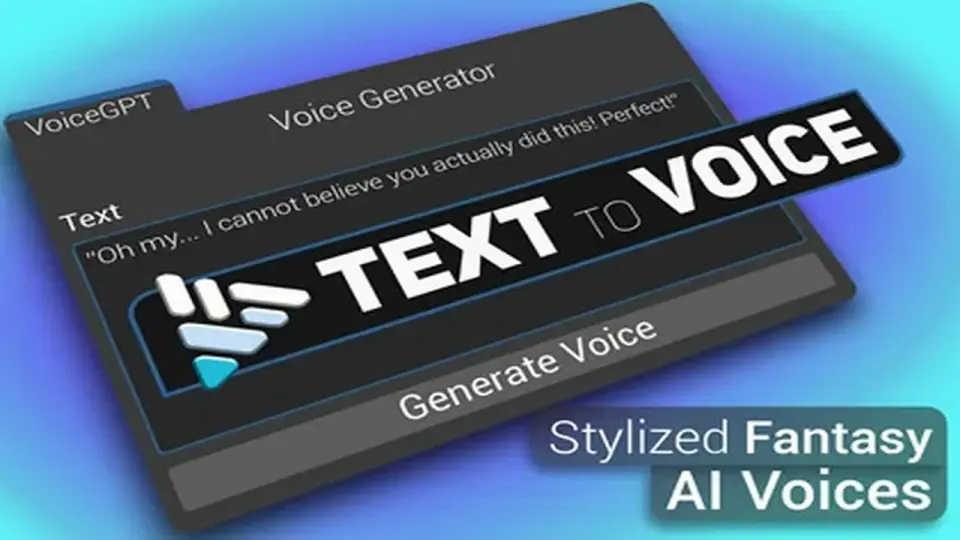
The core functionality of the system revolves around its ability to recreate specific vocal characteristics with minimal input. The voice cloning feature is designed for speed, requiring only a 3-6 second audio clip to replicate a specific voice. This capability is supported through both local and server-based models, offering flexibility in how the cloning is processed. For broader applications, the text-to-voice converter allows developers to input text and generate spoken audio instantly. Users can choose from a library of 60 distinct voice options or use their own cloned voices to narrate project content. As of version 0.1.6, the model is specialized for English, supporting various accents within that language.
Emotional Modulation and Parameter Controls
To move beyond flat, synthetic speech, the offline version of the tool provides specific modulation controls. Developers can manipulate emotional values and diffusion parameters to alter the tone and delivery of the generated speech. By adjusting these settings, it is possible to fine-tune how closely the output matches the original source voice or to shift the performance to better fit a specific narrative need. This level of granular control over the AI model's output allows for the customization of speech patterns, ensuring the generated audio aligns with the intended mood of a scene.
Integrated Audio Post-Production Suite
Beyond simple generation, the package includes a suite of tools for refining audio clips without requiring external software. The editor script presents these options in a single, organized panel. A built-in preview waveform display allows for immediate playback within the editor. This interface includes a play head that can be scrubbed to any point in the clip, accompanied by timestamps and a graphic representation of the waveform for visual clarity.
For more technical adjustments, the asset features a user-friendly GUI for trimming audio. This is particularly useful for removing silence or unwanted segments from the beginning or end of a generated clip. Additionally, multiple clips can be combined into a single file through an intuitive interface that allows users to select, rearrange, and merge audio segments seamlessly. Mastering is further supported by a 6-band equalizer. This tool provides sliders for gain, pitch, and frequency bands, enabling developers to equalize tracks and balance the audio profile directly within the workspace.
Optimizing the Editor Workspace
The design philosophy behind the tool emphasizes efficiency by keeping all audio tasks within the Unity Editor. By consolidating generation, cloning, trimming, and equalization into one workspace, the developer reduces the need to switch between different external services or software packages. This centralized approach simplifies asset management and streamlines the content creation pipeline, as all generated audio assets are immediately available within the project structure. The interface is designed to keep all controls neatly organized in one panel, ensuring that the process of mastering and combining audio tracks remains accessible during the development cycle.
 Generative AI
 Generative AI
![Hand & Finger Tracking [Windows]](/_img/360/wp-content/uploads/2026/04/02aa26a16e75_c899cda1-ef0b-49a6-b25d-583ade216069_1280x720_stretch.webp) AI-ML Integration
AI-ML Integration Behavior AI