"26aaab8a5d5ed4fc"{"id":"22854","slug":"aline","title":"ALINE","category":"GUI","engine":"Original Unity version: 2020.3.48","assetVersion":"Original Unity version: 2020.3.48","engineVersion":"Asset Version:1.7.8","tag":"GUI","accent":"cyan","visual":"animation","summary":"ALINE serves as a high-performance alternative to Unity's native Debug.Draw and Gizmo systems, offering anti-aliased lines and support for rendering within standalone builds.","platform":"Unity","publishedAt":"2026-04-06T14:14:36.000Z","updatedAt":"2026-04-19T15:37:00.000Z","sourceNotes":[],"fileContents":[],"compatibility":["Unity","Original Unity version: 2020.3.48","Asset Version: 1.7.8"],"featuredImage":{"alt":"ALINE","src":"https://3dcghub.com/wp-content/uploads/2026/04/b15e4d530d8b_3ac1f72f-8963-45a5-977f-dcf243eba951_1280x720_stretch.webp"},"hasDownloadLink":true,"downloads":0,"terms":[{"taxonomy":"category","slug":"gui-tools-unity-2","name":"GUI"},{"taxonomy":"post_tag","slug":"tools","name":"Tools"},{"taxonomy":"post_tag","slug":"ui","name":"UI"},{"taxonomy":"post_tag","slug":"unity","name":"Unity"}],"galleryImages":[{"src":"https://3dcghub.com/wp-content/uploads/2026/04/258e67883245_d3705930-4b45-4d5a-8d4f-a4bac67cb227_scaled.webp","alt":"ALINE"},{"src":"https://3dcghub.com/wp-content/uploads/2026/04/d89636952f87_e60f2952-0559-4e06-99eb-0f6e978ec9ae_scaled.webp","alt":"ALINE"},{"src":"https://3dcghub.com/wp-content/uploads/2026/04/30611119ed29_55ad8565-dee7-4260-8588-5a303db0ee7b_scaled.webp","alt":"ALINE"},{"src":"https://3dcghub.com/wp-content/uploads/2026/04/d11bf986483f_14069923-473c-44ad-9771-6d9e17fdfdab_scaled.webp","alt":"ALINE"},{"src":"https://3dcghub.com/wp-content/uploads/2026/04/3f723ac57b28_38e68416-52aa-4d80-9eef-eee0756d10db_scaled.webp","alt":"ALINE"},{"src":"https://3dcghub.com/wp-content/uploads/2026/04/2ef02e84e5ab_b6e63ae8-acab-43f3-b0ab-ecb98ed7ea2c_scaled.webp","alt":"ALINE"},{"src":"https://3dcghub.com/wp-content/uploads/2026/04/0e5715fa94c0_1e701950-8744-4d16-9ada-3dfe6c9a1ad8_scaled.webp","alt":"ALINE"},{"src":"https://3dcghub.com/wp-content/uploads/2026/04/35af9f1cb7c4_cb3d1b04-0b00-4655-99a6-46dab2110c67_scaled.webp","alt":"ALINE"},{"src":"https://3dcghub.com/wp-content/uploads/2026/04/926f89c53212_223da7d3-1e74-4730-9345-66a24f57957d_scaled.webp","alt":"ALINE"}],"accessPanel":{"kind":"resource","title":"Access this resource","eyebrow":"Free Download","message":"Log in or create a free account to start your download.","fileName":"ALINE v1.7.8 (06 May 2025).7z","safetyNote":"All resources are 100% manually reviewed to eliminate all risks.","actionLabel":"Download Free","resourceType":"Resource archive"},"contentHtml":"\u003ch2\u003eModernizing Visualization in Unity\u003c/h2\u003e\n\u003cp\u003eALINE is designed as a complete replacement for the native Debug.Draw and Gizmo drawing systems within Unity. While the built-in APIs provide basic functionality for visualizing data in the editor, they often suffer from performance bottlenecks and inconsistent behavior across different render pipelines. This tool provides a more flexible and consistent API that is built to handle the demands of complex projects, offering higher rendering quality and a broader set of features than the standard engine defaults.\u003c/p\u003e\n\u003cp\u003eThe package has been a core component of the A* Pathfinding Project, one of the most established AI solutions in the Unity ecosystem. This lineage suggests the tool is optimized for high-density data visualization, such as pathfinding nodes and complex spatial graphs, where performance and clarity are critical.\u003c/p\u003e\n\n\u003ch2\u003eDebugging Within the High-Performance C# Job System\u003c/h2\u003e\n\u003cp\u003eOne of the primary challenges when working with Unity's Data-Oriented Technology Stack (DOTS) is the difficulty of visualizing what is happening inside optimized code. Standard drawing commands typically cannot be called from within Burst-compiled jobs or ECS systems. ALINE addresses this limitation by allowing developers to draw debug lines directly from within Burst and ECS jobs. This capability makes it significantly easier to debug high-performance systems by providing immediate visual feedback on the state of entities and job-processed data without leaving the optimized environment.\u003c/p\u003e\n\u003cp\u003ePerformance remains a priority throughout the package. It is engineered to outperform the standard Unity APIs significantly in many scenarios. This efficiency allows developers to visualize thousands of primitives simultaneously without the frame-rate degradation that often accompanies heavy use of native gizmo commands.\u003c/p\u003e\n\n\u003ch2\u003eVisual Quality and Standalone Rendering\u003c/h2\u003e\n\u003cp\u003eBeyond simple editor debugging, ALINE is capable of rendering lines and primitives in standalone builds. This functionality is particularly useful for developers creating in-game level editors or those who require a specific visual aesthetic, such as a high-tech or sci-fi interface. The rendering engine produces perfectly anti-aliased lines even in environments where MSAA or post-processing effects are disabled. This ensures that UI elements, outlines, and diagnostic overlays remain sharp and professional across different hardware configurations.\u003c/p\u003e\n\u003cp\u003eThe tool supports a variety of visual parameters, including variable line widths and the ability to draw text labels directly over 3D objects in the scene. These features allow for much more sophisticated data overlays than what is possible with standard engine tools. Recent updates have further expanded the visual library, adding specific primitives like 3D rings (annuli) and their 2D counterparts (Draw.xz.WireRing and Draw.xz.SolidRing), which are useful for representing ranges, impact zones, or selection circles.\u003c/p\u003e\n\n\u003ch2\u003eTechnical Integration and Pipeline Support\u003c/h2\u003e\n\u003cp\u003eALINE is built to be compatible with a wide range of Unity versions and rendering setups. It supports the Built-in Render Pipeline, the High Definition Render Pipeline (HDRP), and the Universal Render Pipeline (URP), as well as custom Scriptable Render Pipelines (SRP). This broad compatibility ensures that visualization tools remain consistent even if a project migrates between pipelines.\u003c/p\u003e\n\u003cp\u003eTechnical details for the package include:\u003c/p\u003e\n\u003cul\u003e\n \u003cli\u003eCompatibility with Unity versions 2020.3.48 and 2022.3.62.\u003c/li\u003e\n \u003cli\u003eFull support for URP 17.4 and higher.\u003c/li\u003e\n \u003cli\u003eIntegration with VR environments, including specific fixes for foveated rendering in URP.\u003c/li\u003e\n \u003cli\u003eUPM package signing for improved security and authenticity.\u003c/li\u003e\n\u003c/ul\u003e\n\u003cp\u003eRecent maintenance has focused on optimizing memory usage by eliminating small garbage collection (GC) allocations and resolving memory leaks related to prefab references in the Unity Editor. These refinements contribute to a stable development environment, particularly during long debugging sessions.\u003c/p\u003e\n\n\u003ch2\u003eExpanded Primitives and Examples\u003c/h2\u003e\n\u003cp\u003eThe package includes 57 assets that provide various primitives and example implementations. A notable addition is an animated sci-fi interface example scene, which demonstrates how the drawing primitives can be used for more than just debugging. By utilizing the tool's high-performance primitives, developers can create dynamic, animated UI elements that exist within the 3D world space. The inclusion of specialized shapes like WireRing and SolidRing allows for precise spatial representation, whether the developer is working in a full 3D environment or a 2D top-down (XZ) layout.\u003c/p\u003e\n\u003cp\u003eFor developers who require consistent, high-quality visualization that works across both the editor and the final game build, ALINE provides a robust framework that bypasses the limitations of native Unity drawing calls. Its ability to operate within the high-performance job system makes it a specialized tool for those working with modern Unity workflows.\u003c/p\u003e\n\n\u003ch2\u003eMore From The Same Workflow\u003c/h2\u003e\n\u003cul\u003e\n\u003cli\u003e\u003ca href=\"https://3dcghub.com/dialogue-system-for-unity/\" title=\"Dialogue System for Unity\"\u003eDialogue System for Unity\u003c/a\u003e\u003c/li\u003e\n\u003cli\u003e\u003ca href=\"https://3dcghub.com/ambient-sounds-interactive-soundscapes-for-unity-6/\" title=\"Ambient Sounds – Interactive Soundscapes for Unity 6\"\u003eAmbient Sounds – Interactive Soundscapes for Unity 6\u003c/a\u003e\u003c/li\u003e\n\u003cli\u003e\u003ca href=\"https://3dcghub.com/pegasus-flythroughs-for-unity-6/\" title=\"Pegasus – Flythroughs for Unity 6\"\u003ePegasus – Flythroughs for Unity 6\u003c/a\u003e\u003c/li\u003e\n\u003cli\u003e\u003ca href=\"https://3dcghub.com/motion-matching-for-unity/\" title=\"Motion Matching for Unity\"\u003eMotion Matching for Unity\u003c/a\u003e\u003c/li\u003e\n\u003cli\u003e\u003ca href=\"https://3dcghub.com/voicegpt/\" title=\"VoiceGPT\"\u003eVoiceGPT\u003c/a\u003e\u003c/li\u003e\n\u003c/ul\u003e\n\n\u003ch2\u003eAsset Gallery\u003c/h2\u003e","contentTextLength":5160,"navigation":{"current":3258,"total":3400,"previous":{"id":"22863","slug":"ams-ui-soft-mask","title":"AMS UI Soft Mask","category":"GUI","platform":"Unity","updatedAt":"2026-04-19T15:37:00.000Z"},"next":{"id":"22842","slug":"voicegpt","title":"VoiceGPT","category":"Generative AI","platform":"Unity","updatedAt":"2026-04-19T15:37:00.000Z"}},"relatedResources":[{"id":"22887","slug":"modern-ui-pack","title":"Modern UI Pack","category":"GUI","engine":"Original Unity version: 2020.3.48","assetVersion":"Original Unity version: 2020.3.48","engineVersion":"Asset Version:5.5.25","tag":"GUI","accent":"cyan","visual":"audio","summary":"Modern UI Pack provides a clean and stylish collection of UI elements built on Unity's native UGUI system. It allows developers to manage global interface styles through a centralized UI Manager and includes a library of over 18 diverse components.","platform":"Unity","publishedAt":"2026-04-07T13:15:33.000Z","updatedAt":"2026-04-19T15:36:59.000Z","sourceNotes":[],"fileContents":[],"compatibility":["Unity","Original Unity version: 2020.3.48","Asset Version: 5.5.25"],"featuredImage":{"alt":"Modern UI Pack","src":"https://3dcghub.com/wp-content/uploads/2026/04/f07cbb586526_e78dc796-d096-45fd-a24a-6c73277bed8d_1280x720_stretch.webp"},"hasDownloadLink":true,"downloads":1},{"id":"22934","slug":"world-map-2d-edition-2","title":"World Map 2D Edition 2","category":"GUI","engine":"Original Unity version: 2022.3.24","assetVersion":"Original Unity version: 2022.3.24","engineVersion":"Asset Version:10.0.1","tag":"GUI","accent":"cyan","visual":"character","summary":"World Map 2D Edition 2 provides a fully interactive, offline geopolitical framework for Unity, featuring procedural frontiers for over 200 countries and extensive customization via a built-in map editor.","platform":"Unity","publishedAt":"2026-04-07T13:28:05.000Z","updatedAt":"2026-04-19T15:36:56.000Z","sourceNotes":[],"fileContents":[],"compatibility":["Unity","Original Unity version: 2022.3.24","Asset Version: 10.0.1"],"featuredImage":{"alt":"World Map 2D Edition 2","src":"https://3dcghub.com/wp-content/uploads/2026/04/d4bb055ea98e_eb5eaa8c-e41b-4c6d-a258-05a9582c69c2_1280x720_stretch.webp"},"hasDownloadLink":true,"downloads":3},{"id":"22863","slug":"ams-ui-soft-mask","title":"AMS UI Soft Mask","category":"GUI","engine":"Original Unity version: 2021.3.45","assetVersion":"Original Unity version: 2021.3.45","engineVersion":"Asset Version:2.0.0","tag":"GUI","accent":"cyan","visual":"luts","summary":"AMS UI Soft Mask provides a specialized solution for Unity developers looking to move beyond binary masking into smooth, gradient-based UI transitions and layered effects.","platform":"Unity","publishedAt":"2026-04-07T13:15:07.000Z","updatedAt":"2026-04-19T15:37:00.000Z","sourceNotes":[],"fileContents":[],"compatibility":["Unity","Original Unity version: 2021.3.45","Asset Version: 2.0.0"],"featuredImage":{"alt":"AMS UI Soft Mask","src":"https://3dcghub.com/wp-content/uploads/2026/04/f1f6be6a825a_fec01d0d-b870-495b-9b23-93adc6ed3e56_1280x720_stretch.webp"},"hasDownloadLink":true,"downloads":0}]}
GUI
ALINE
ALINE serves as a high-performance alternative to Unity's native Debug.Draw and Gizmo systems, offering anti-aliased lines and support for rendering within standalone builds.
ALINE is designed as a complete replacement for the native Debug.Draw and Gizmo drawing systems within Unity. While the built-in APIs provide basic functionality for visualizing data in the editor, they often suffer from performance bottlenecks and inconsistent behavior across different render pipelines. This tool provides a more flexible and consistent API that is built to handle the demands of complex projects, offering higher rendering quality and a broader set of features than the standard engine defaults.
The package has been a core component of the A* Pathfinding Project, one of the most established AI solutions in the Unity ecosystem. This lineage suggests the tool is optimized for high-density data visualization, such as pathfinding nodes and complex spatial graphs, where performance and clarity are critical.
Debugging Within the High-Performance C# Job System
One of the primary challenges when working with Unity's Data-Oriented Technology Stack (DOTS) is the difficulty of visualizing what is happening inside optimized code. Standard drawing commands typically cannot be called from within Burst-compiled jobs or ECS systems. ALINE addresses this limitation by allowing developers to draw debug lines directly from within Burst and ECS jobs. This capability makes it significantly easier to debug high-performance systems by providing immediate visual feedback on the state of entities and job-processed data without leaving the optimized environment.
Performance remains a priority throughout the package. It is engineered to outperform the standard Unity APIs significantly in many scenarios. This efficiency allows developers to visualize thousands of primitives simultaneously without the frame-rate degradation that often accompanies heavy use of native gizmo commands.
Visual Quality and Standalone Rendering
Beyond simple editor debugging, ALINE is capable of rendering lines and primitives in standalone builds. This functionality is particularly useful for developers creating in-game level editors or those who require a specific visual aesthetic, such as a high-tech or sci-fi interface. The rendering engine produces perfectly anti-aliased lines even in environments where MSAA or post-processing effects are disabled. This ensures that UI elements, outlines, and diagnostic overlays remain sharp and professional across different hardware configurations.
The tool supports a variety of visual parameters, including variable line widths and the ability to draw text labels directly over 3D objects in the scene. These features allow for much more sophisticated data overlays than what is possible with standard engine tools. Recent updates have further expanded the visual library, adding specific primitives like 3D rings (annuli) and their 2D counterparts (Draw.xz.WireRing and Draw.xz.SolidRing), which are useful for representing ranges, impact zones, or selection circles.
Technical Integration and Pipeline Support
ALINE is built to be compatible with a wide range of Unity versions and rendering setups. It supports the Built-in Render Pipeline, the High Definition Render Pipeline (HDRP), and the Universal Render Pipeline (URP), as well as custom Scriptable Render Pipelines (SRP). This broad compatibility ensures that visualization tools remain consistent even if a project migrates between pipelines.
Technical details for the package include:
Compatibility with Unity versions 2020.3.48 and 2022.3.62.
Full support for URP 17.4 and higher.
Integration with VR environments, including specific fixes for foveated rendering in URP.
UPM package signing for improved security and authenticity.
Recent maintenance has focused on optimizing memory usage by eliminating small garbage collection (GC) allocations and resolving memory leaks related to prefab references in the Unity Editor. These refinements contribute to a stable development environment, particularly during long debugging sessions.
Expanded Primitives and Examples
The package includes 57 assets that provide various primitives and example implementations. A notable addition is an animated sci-fi interface example scene, which demonstrates how the drawing primitives can be used for more than just debugging. By utilizing the tool's high-performance primitives, developers can create dynamic, animated UI elements that exist within the 3D world space. The inclusion of specialized shapes like WireRing and SolidRing allows for precise spatial representation, whether the developer is working in a full 3D environment or a 2D top-down (XZ) layout.
For developers who require consistent, high-quality visualization that works across both the editor and the final game build, ALINE provides a robust framework that bypasses the limitations of native Unity drawing calls. Its ability to operate within the high-performance job system makes it a specialized tool for those working with modern Unity workflows.
 GUI
GUI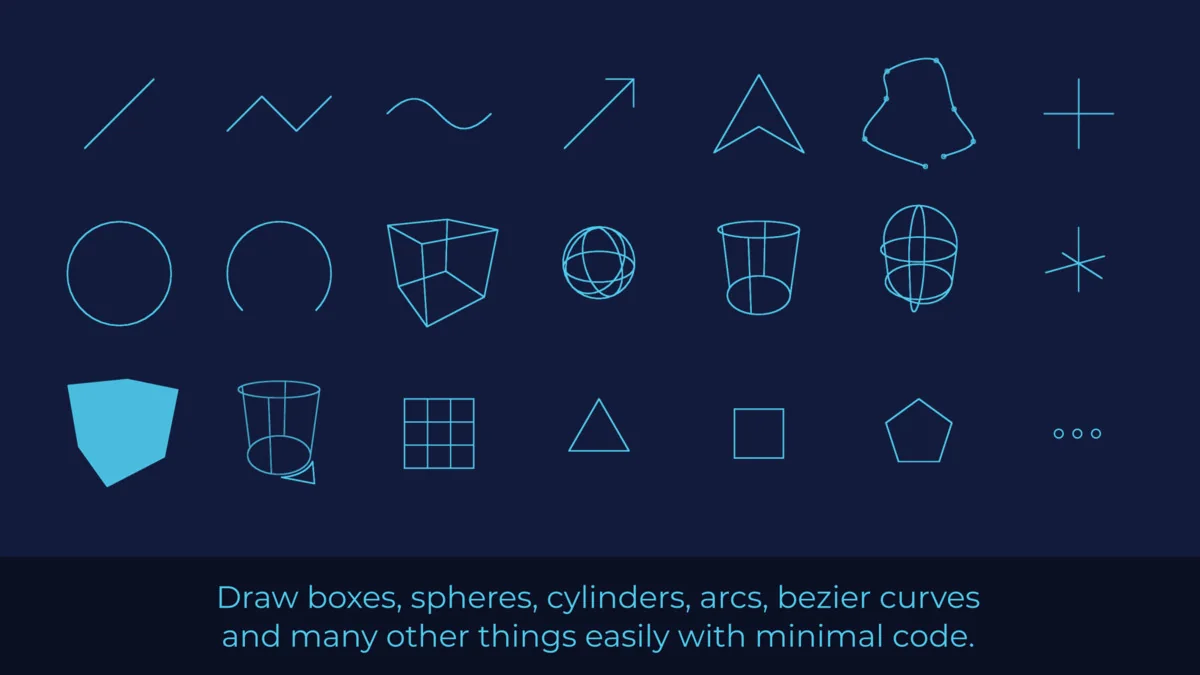
 GUI
GUI GUI
GUI GUI
GUI