"26aaab8a5d5ed4fc"{"id":"22887","slug":"modern-ui-pack","title":"Modern UI Pack","category":"GUI","engine":"Original Unity version: 2020.3.48","assetVersion":"Original Unity version: 2020.3.48","engineVersion":"Asset Version:5.5.25","tag":"GUI","accent":"cyan","visual":"audio","summary":"Modern UI Pack provides a clean and stylish collection of UI elements built on Unity's native UGUI system. It allows developers to manage global interface styles through a centralized UI Manager and includes a library of over 18 diverse components.","platform":"Unity","publishedAt":"2026-04-07T13:15:33.000Z","updatedAt":"2026-04-19T15:36:59.000Z","sourceNotes":[],"fileContents":[],"compatibility":["Unity","Original Unity version: 2020.3.48","Asset Version: 5.5.25"],"featuredImage":{"alt":"Modern UI Pack","src":"https://3dcghub.com/wp-content/uploads/2026/04/f07cbb586526_e78dc796-d096-45fd-a24a-6c73277bed8d_1280x720_stretch.webp"},"hasDownloadLink":true,"downloads":1,"terms":[{"taxonomy":"category","slug":"gui-tools-unity-2","name":"GUI"},{"taxonomy":"post_tag","slug":"tools","name":"Tools"},{"taxonomy":"post_tag","slug":"ui","name":"UI"},{"taxonomy":"post_tag","slug":"unity","name":"Unity"}],"galleryImages":[{"src":"https://3dcghub.com/wp-content/uploads/2026/04/6729281f30d9_256b3ad9-2458-4dd3-a55e-f7e3a9e1cc62_scaled.webp","alt":"Modern UI Pack"},{"src":"https://3dcghub.com/wp-content/uploads/2026/04/0317ad541039_64f5ed07-8b67-4a65-8036-9d2f2f5c4bab_scaled.webp","alt":"Modern UI Pack"},{"src":"https://3dcghub.com/wp-content/uploads/2026/04/b7338860b423_d06e3d72-16f6-4e15-b6ba-31634787ca8f_scaled.webp","alt":"Modern UI Pack"},{"src":"https://3dcghub.com/wp-content/uploads/2026/04/36a5465c5e14_5de7942e-163a-4e2e-bd36-7a978c92eb14_scaled.webp","alt":"Modern UI Pack"},{"src":"https://3dcghub.com/wp-content/uploads/2026/04/0a9cd0f8bb34_fda5e247-2fd1-49f8-a7bb-22fb6cce7e54_scaled.webp","alt":"Modern UI Pack"},{"src":"https://3dcghub.com/wp-content/uploads/2026/04/851df628f3c8_3575711a-ef02-4277-94b7-3919c327d097_scaled.webp","alt":"Modern UI Pack"},{"src":"https://3dcghub.com/wp-content/uploads/2026/04/254c63398584_a797fbfa-8712-4ca6-8246-eb6866700665_scaled.webp","alt":"Modern UI Pack"},{"src":"https://3dcghub.com/wp-content/uploads/2026/04/309177b1a7b3_68651382-6599-4677-9243-b646b2243b8f_scaled.webp","alt":"Modern UI Pack"},{"src":"https://3dcghub.com/wp-content/uploads/2026/04/19c955e8488c_c00b0f6b-040d-4fcd-a2f2-273e75c5a549_scaled.webp","alt":"Modern UI Pack"},{"src":"https://3dcghub.com/wp-content/uploads/2026/04/4e2687dd2eaf_30911ccf-2ac1-4770-82b2-9ee3669fa83f_scaled.webp","alt":"Modern UI Pack"}],"accessPanel":{"kind":"resource","title":"Access this resource","eyebrow":"Free Download","message":"Log in or create a free account to start your download.","fileName":"Modern UI Pack v5.5.25.7z","safetyNote":"All resources are 100% manually reviewed to eliminate all risks.","actionLabel":"Download Free","resourceType":"Resource archive"},"contentHtml":"\u003ch2\u003eCentralized UI Management and Workflow\u003c/h2\u003e\n\u003cp\u003eModern UI Pack is designed for developers who need a clean and minimalistic interface system that integrates directly with Unity's native UI (UGUI). Unlike traditional UI setups where individual objects require manual adjustment, this package utilizes a dedicated UI Manager. This tool allows for global changes across the entire interface within seconds, ensuring visual consistency throughout a project. By centralizing the look and feel, the UI Manager reduces the time spent on repetitive tasks such as updating color schemes or font styles across multiple menus.\u003c/p\u003e\n\u003cp\u003eThe workflow is further supported by specific editor tools integrated into the Unity interface. These tools enable the addition or modification of UI components without requiring external software or direct code manipulation. This approach is intended to streamline the development process, allowing creators to focus on layout and functionality rather than the technical overhead of manual component configuration.\u003c/p\u003e\n\n\u003ch2\u003eComprehensive Component Library\u003c/h2\u003e\n\u003cp\u003eThe package includes over 18 diverse UI elements, ranging from standard interactive objects to more complex data visualization tools. Developers have access to basic components such as buttons, switches, toggles, and sliders, as well as more specialized assets like pie charts and radial sliders. For navigation and organization, the pack provides window managers, modal windows, and horizontal selectors.\u003c/p\u003e\n\u003cp\u003eTo assist with immediate implementation, the resource features a fully-functional demo scene. This scene demonstrates the intended behavior and aesthetic of the included components, which include:\u003c/p\u003e\n\u003cul\u003e\n \u003cli\u003eAnimated Icons and standard Icons\u003c/li\u003e\n \u003cli\u003eDropdowns and Multi-Selectable Dropdowns\u003c/li\u003e\n \u003cli\u003eContext Menus and Tooltips\u003c/li\u003e\n \u003cli\u003eInput Fields and Sliced Borders\u003c/li\u003e\n \u003cli\u003eNotifications and Progress Bars\u003c/li\u003e\n\u003c/ul\u003e\n\u003cp\u003eRecent updates have also refined the asset library, adding specific social icons like the Twitter X icon and updating existing ones like the Discord icon to maintain modern branding standards.\u003c/p\u003e\n\n\u003ch2\u003eTechnical Integration and Requirements\u003c/h2\u003e\n\u003cp\u003eModern UI Pack is built specifically for the native Unity UI (UGUI) system and is not compatible with the newer UI Toolkit (formerly UIElements). This focus on UGUI ensures that developers can continue using existing third-party UGUI extensions alongside the pack. A critical requirement for using this package is TextMesh Pro, which must be installed to handle all text-based components.\u003c/p\u003e\n\u003cp\u003eCompatibility extends across all major rendering pipelines, including the Built-in, Universal Render Pipeline (URP), and High Definition Render Pipeline (HDRP). It also supports both the legacy input system and the new Unity input system, making it adaptable to various project architectures and target platforms listed in the Unity build window.\u003c/p\u003e\n\n\u003ch2\u003eVersion History and Project Maintenance\u003c/h2\u003e\n\u003cp\u003eOriginally published in 2021, the pack has undergone various iterations to improve stability and feature sets. Recent changelogs indicate fixes for UI Manager editor shortcuts and the addition of a 'Check Dispose' option for tooltips. For developers managing long-term projects, it is recommended to back up the Modern UI Pack directory before performing major updates to avoid potential conflicts with existing customizations.\u003c/p\u003e\n\u003cp\u003eWhile Modern UI Pack remains a robust choice for UGUI-based projects, it is also part of a broader ecosystem that includes Evo UI, which serves as a successor for those looking for the next evolution of the developer's interface tools.\u003c/p\u003e\n\n\u003ch3\u003ePractical Integration Note\u003c/h3\u003e\n\u003cp\u003eWhen integrating the Modern UI Pack into a production environment, ensure that TextMesh Pro is correctly configured in your project first. Use the provided demo scene to verify component interactions across your chosen rendering pipeline, as the pack is designed to function across Built-in, URP, and HDRP environments without additional configuration.\u003c/p\u003e\n\n\u003ch2\u003eMore From The Same Workflow\u003c/h2\u003e\n\u003cul\u003e\n\u003cli\u003e\u003ca href=\"https://3dcghub.com/uma-for-rpg-builder/\" title=\"UMA for RPG Builder\"\u003eUMA for RPG Builder\u003c/a\u003e\u003c/li\u003e\n\u003cli\u003e\u003ca href=\"https://3dcghub.com/survival-engine-crafting-building-farming/\" title=\"Survival Engine – Crafting, Building, Farming\"\u003eSurvival Engine – Crafting, Building, Farming\u003c/a\u003e\u003c/li\u003e\n\u003cli\u003e\u003ca href=\"https://3dcghub.com/classic-city-builder-kit/\" title=\"Classic City Builder Kit\"\u003eClassic City Builder Kit\u003c/a\u003e\u003c/li\u003e\n\u003cli\u003e\u003ca href=\"https://3dcghub.com/picture-quiz-plus/\" title=\"Picture Quiz Plus\"\u003ePicture Quiz Plus\u003c/a\u003e\u003c/li\u003e\n\u003cli\u003e\u003ca href=\"https://3dcghub.com/stage-equipment-devices-and-spotlight/\" title=\"Stage equipment – devices and spotlight\"\u003eStage equipment – devices and spotlight\u003c/a\u003e\u003c/li\u003e\n\u003c/ul\u003e\n\n\u003ch2\u003eAsset Gallery\u003c/h2\u003e","contentTextLength":4085,"navigation":{"current":3260,"total":3400,"previous":{"id":"22842","slug":"voicegpt","title":"VoiceGPT","category":"Generative AI","platform":"Unity","updatedAt":"2026-04-19T15:37:00.000Z"},"next":{"id":"22874","slug":"enhancedscroller","title":"EnhancedScroller","category":"GUI","platform":"Unity","updatedAt":"2026-04-19T15:36:59.000Z"}},"relatedResources":[{"id":"22854","slug":"aline","title":"ALINE","category":"GUI","engine":"Original Unity version: 2020.3.48","assetVersion":"Original Unity version: 2020.3.48","engineVersion":"Asset Version:1.7.8","tag":"GUI","accent":"cyan","visual":"animation","summary":"ALINE serves as a high-performance alternative to Unity's native Debug.Draw and Gizmo systems, offering anti-aliased lines and support for rendering within standalone builds.","platform":"Unity","publishedAt":"2026-04-06T14:14:36.000Z","updatedAt":"2026-04-19T15:37:00.000Z","sourceNotes":[],"fileContents":[],"compatibility":["Unity","Original Unity version: 2020.3.48","Asset Version: 1.7.8"],"featuredImage":{"alt":"ALINE","src":"https://3dcghub.com/wp-content/uploads/2026/04/b15e4d530d8b_3ac1f72f-8963-45a5-977f-dcf243eba951_1280x720_stretch.webp"},"hasDownloadLink":true,"downloads":0},{"id":"18206","slug":"heat-complete-modern-ui","title":"Heat - Complete Modern UI","category":"GUI","engine":"Original Unity version: 2021.3.37","assetVersion":"Original Unity version: 2021.3.37","engineVersion":"Asset Version:1.1.6","tag":"GUI","accent":"cyan","visual":"mech","summary":"Heat - Complete Modern UI provides a comprehensive toolkit for building stylish, high-performance interfaces in Unity. This modern asset includes over 15 unique components and integrated systems for achievements and localization.","platform":"Unity","publishedAt":"2026-03-15T16:29:04.000Z","updatedAt":"2026-04-19T15:43:22.000Z","sourceNotes":[],"fileContents":[],"compatibility":["Unity","Original Unity version: 2021.3.37","Asset Version: 1.1.6"],"featuredImage":{"alt":"Heat - Complete Modern UI","src":"https://3dcghub.com/wp-content/uploads/2026/03/86c2b5a04d6b_b594a41f-2d15-4485-9360-2399635a178e_1280x720_stretch.webp"},"hasDownloadLink":true,"downloads":1},{"id":"22934","slug":"world-map-2d-edition-2","title":"World Map 2D Edition 2","category":"GUI","engine":"Original Unity version: 2022.3.24","assetVersion":"Original Unity version: 2022.3.24","engineVersion":"Asset Version:10.0.1","tag":"GUI","accent":"cyan","visual":"character","summary":"World Map 2D Edition 2 provides a fully interactive, offline geopolitical framework for Unity, featuring procedural frontiers for over 200 countries and extensive customization via a built-in map editor.","platform":"Unity","publishedAt":"2026-04-07T13:28:05.000Z","updatedAt":"2026-04-19T15:36:56.000Z","sourceNotes":[],"fileContents":[],"compatibility":["Unity","Original Unity version: 2022.3.24","Asset Version: 10.0.1"],"featuredImage":{"alt":"World Map 2D Edition 2","src":"https://3dcghub.com/wp-content/uploads/2026/04/d4bb055ea98e_eb5eaa8c-e41b-4c6d-a258-05a9582c69c2_1280x720_stretch.webp"},"hasDownloadLink":true,"downloads":3}]}
GUI
Modern UI Pack
Modern UI Pack provides a clean and stylish collection of UI elements built on Unity's native UGUI system. It allows developers to manage global interface styles through a centralized UI Manager and includes a library of over 18 diverse components.
Modern UI Pack is designed for developers who need a clean and minimalistic interface system that integrates directly with Unity's native UI (UGUI). Unlike traditional UI setups where individual objects require manual adjustment, this package utilizes a dedicated UI Manager. This tool allows for global changes across the entire interface within seconds, ensuring visual consistency throughout a project. By centralizing the look and feel, the UI Manager reduces the time spent on repetitive tasks such as updating color schemes or font styles across multiple menus.
The workflow is further supported by specific editor tools integrated into the Unity interface. These tools enable the addition or modification of UI components without requiring external software or direct code manipulation. This approach is intended to streamline the development process, allowing creators to focus on layout and functionality rather than the technical overhead of manual component configuration.
Comprehensive Component Library
The package includes over 18 diverse UI elements, ranging from standard interactive objects to more complex data visualization tools. Developers have access to basic components such as buttons, switches, toggles, and sliders, as well as more specialized assets like pie charts and radial sliders. For navigation and organization, the pack provides window managers, modal windows, and horizontal selectors.
To assist with immediate implementation, the resource features a fully-functional demo scene. This scene demonstrates the intended behavior and aesthetic of the included components, which include:
Animated Icons and standard Icons
Dropdowns and Multi-Selectable Dropdowns
Context Menus and Tooltips
Input Fields and Sliced Borders
Notifications and Progress Bars
Recent updates have also refined the asset library, adding specific social icons like the Twitter X icon and updating existing ones like the Discord icon to maintain modern branding standards.
Technical Integration and Requirements
Modern UI Pack is built specifically for the native Unity UI (UGUI) system and is not compatible with the newer UI Toolkit (formerly UIElements). This focus on UGUI ensures that developers can continue using existing third-party UGUI extensions alongside the pack. A critical requirement for using this package is TextMesh Pro, which must be installed to handle all text-based components.
Compatibility extends across all major rendering pipelines, including the Built-in, Universal Render Pipeline (URP), and High Definition Render Pipeline (HDRP). It also supports both the legacy input system and the new Unity input system, making it adaptable to various project architectures and target platforms listed in the Unity build window.
Version History and Project Maintenance
Originally published in 2021, the pack has undergone various iterations to improve stability and feature sets. Recent changelogs indicate fixes for UI Manager editor shortcuts and the addition of a 'Check Dispose' option for tooltips. For developers managing long-term projects, it is recommended to back up the Modern UI Pack directory before performing major updates to avoid potential conflicts with existing customizations.
While Modern UI Pack remains a robust choice for UGUI-based projects, it is also part of a broader ecosystem that includes Evo UI, which serves as a successor for those looking for the next evolution of the developer's interface tools.
Practical Integration Note
When integrating the Modern UI Pack into a production environment, ensure that TextMesh Pro is correctly configured in your project first. Use the provided demo scene to verify component interactions across your chosen rendering pipeline, as the pack is designed to function across Built-in, URP, and HDRP environments without additional configuration.
 GUI
GUI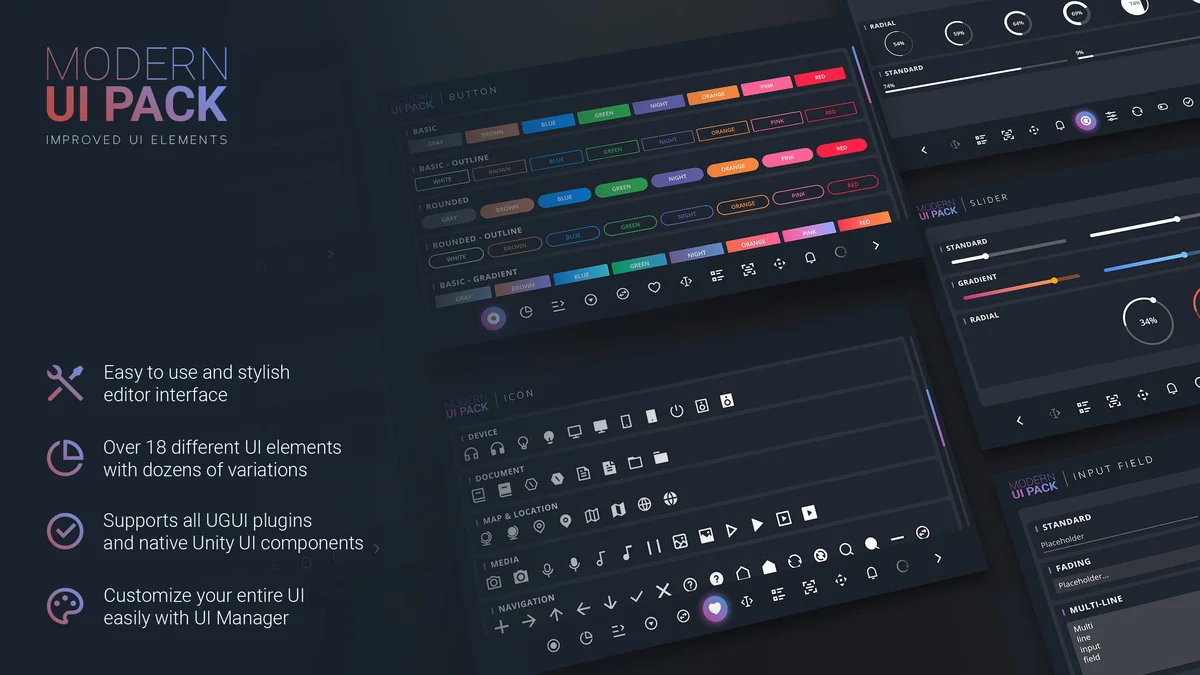
 GUI
GUI GUI
GUI GUI
GUI