"6207cfb8f6a5764f"{"id":"22874","slug":"enhancedscroller","title":"EnhancedScroller","category":"GUI","engine":"Original Unity version: 2017.4.8","assetVersion":"Original Unity version: 2017.4.8","engineVersion":"Asset Version:2.40.1","tag":"GUI","accent":"cyan","visual":"mech","summary":"EnhancedScroller provides a solution for handling massive lists within Unity's UI system by virtualizing data and recycling elements. This approach eliminates the performance overhead of object destruction and garbage collection in data-heavy interfaces.","platform":"Unity","publishedAt":"2026-04-07T13:16:36.000Z","updatedAt":"2026-04-19T15:36:59.000Z","sourceNotes":[],"fileContents":[],"compatibility":["Unity","Original Unity version: 2017.4.8","Asset Version: 2.40.1"],"featuredImage":{"alt":"EnhancedScroller","src":"https://3dcghub.com/wp-content/uploads/2026/04/7aa1aa2a68f3_4b21b95b-86a5-4d3b-9e14-6ed08ba3a3a7_1280x720_stretch.webp"},"hasDownloadLink":true,"downloads":0,"terms":[{"taxonomy":"category","slug":"gui-tools-unity-2","name":"GUI"},{"taxonomy":"post_tag","slug":"game-systems","name":"Game Systems"},{"taxonomy":"post_tag","slug":"ui","name":"UI"},{"taxonomy":"post_tag","slug":"unity","name":"Unity"}],"galleryImages":[{"src":"https://3dcghub.com/wp-content/uploads/2026/04/99d263f9aefa_308a57a7-a609-4def-aceb-f82925a30b93_scaled.webp","alt":"EnhancedScroller"},{"src":"https://3dcghub.com/wp-content/uploads/2026/04/ba5b32ea90b0_8822007c-1257-42d5-a4c3-dec8113e4a1c_scaled.webp","alt":"EnhancedScroller"},{"src":"https://3dcghub.com/wp-content/uploads/2026/04/c65eca68d72a_58e76c0f-cc26-4bdb-8a47-5812f523a145_scaled.webp","alt":"EnhancedScroller"},{"src":"https://3dcghub.com/wp-content/uploads/2026/04/cb47ab5ff32e_cf2bc96b-07ee-40dd-b8f7-dff8af5042db_scaled.webp","alt":"EnhancedScroller"},{"src":"https://3dcghub.com/wp-content/uploads/2026/04/4942d496bee7_9cec298a-336c-4405-8438-f66d41e6a0ea_scaled.webp","alt":"EnhancedScroller"},{"src":"https://3dcghub.com/wp-content/uploads/2026/04/0855f0ee7039_2fa546e9-10b2-488c-8ac4-f528e753c95f_scaled.webp","alt":"EnhancedScroller"},{"src":"https://3dcghub.com/wp-content/uploads/2026/04/0d8d97f58d84_20288b1b-410d-465f-a470-e18a36fd18fd_scaled.webp","alt":"EnhancedScroller"},{"src":"https://3dcghub.com/wp-content/uploads/2026/04/7b1be6d6e149_11210a4e-0f26-4155-a978-2848ef86f51c_scaled.webp","alt":"EnhancedScroller"}],"accessPanel":{"kind":"resource","title":"Access this resource","eyebrow":"Free Download","message":"Log in or create a free account to start your download.","fileName":"EnhancedScroller v2.40.1 (11 Nov 2024).7z","safetyNote":"All resources are 100% manually reviewed to eliminate all risks.","actionLabel":"Download Free","resourceType":"Resource archive"},"contentHtml":"\u003ch2\u003eOptimizing Large Data Displays in Unity\u003c/h2\u003e\n\nManaging extensive data lists within a user interface often presents performance challenges, particularly on mobile platforms where memory and processing power are limited. EnhancedScroller addresses these constraints by virtualizing data, a process that ensures only the elements currently visible to the user are active. Instead of instantiating thousands of UI elements simultaneously, the system uses a small pool of elements to represent thousands of rows. This efficiency reduces the processing load and significantly lowers memory consumption during runtime.\n\nOne of the core technical advantages of this system is the avoidance of object destruction. Because the scroller recycles list items rather than destroying and recreating them, the platform does not have to trigger frequent garbage collection cycles. This lead to a smoother user experience, as garbage collection is a common cause of frame rate stutters in Unity applications. The tool is designed to work directly on top of Unity’s built-in UI system components, allowing developers to integrate it into existing projects without abandoning standard UI workflows.\n\n\u003ch2\u003eThe MVC Approach to List Management\u003c/h2\u003e\n\nThe architecture of EnhancedScroller follows a Model-View-Controller (MVC) framework, which enforces a strict separation of concerns. Under this paradigm, the scroller itself remains unaware of the specific data it displays or how that data is visually presented. Its primary responsibility is the management of the list mechanics. This separation allows for a cleaner codebase where the data logic and the visual cell representation are handled independently.\n\nLists are data-driven and generated dynamically. This means developers do not need to manually set up every list item at design time. Instead, the scroller populates the interface based on the data provided at runtime. This dynamic creation is essential for projects involving unpredictable data lengths or real-time updates, ensuring the UI remains responsive to the underlying data model.\n\n\u003ch2\u003eCustomization and Layout Control\u003c/h2\u003e\n\nFlexibility in layout is maintained through support for both global and individual cell sizing. Developers can choose to have all cells share the same dimensions or assign unique sizes to each cell, accommodating diverse content types within a single list. To enhance the navigation experience, the tool includes optional snapping functionality. This allows the scroller to lock cells into specific positions, ensuring that items are always aligned correctly within the viewport.\n\nFor projects requiring a continuous stream of information, an optional looping feature enables infinite lists. This is particularly useful for menus or galleries where the data needs to wrap around seamlessly. To smooth out the interaction, the scroller utilizes tweening for jumping and snapping transitions. These eased transitions prevent jarring movements when the scroller is forced to a specific index or when it settles into a snapped position.\n\n\u003ch2\u003eTechnical Implementation and Compatibility\u003c/h2\u003e\n\nThe package includes 196 assets and provides the full C# source code, allowing for deep inspection and modification to suit specific project requirements. Because the source code is accessible, developers can better understand the underlying recycling logic and extend the MVC framework as needed. The asset also comes with demos and tutorials to illustrate different implementation scenarios, ranging from basic lists to complex dynamic layouts.\n\nCompatibility spans several generations of the Unity engine, supporting versions from 2017.4.8 through to 6000.0.42. It is also designed to function across various render pipelines. Whether a project is utilizing the Built-in Render Pipeline, the Universal Render Pipeline (URP), or the High Definition Render Pipeline (HDRP), the tool maintains its functionality. It also supports Custom Scriptable Render Pipelines (SRP), making it a versatile choice for developers working across different visual standards and performance targets.\n\n\u003ch2\u003eResource Efficiency for Mobile Development\u003c/h2\u003e\n\nThe focus on virtualization and recycling makes this tool specifically relevant for mobile-friendly development. By keeping the UI element count low, the scroller ensures that the draw call count remains manageable even when dealing with thousands of data points. This efficiency is critical for maintaining high frame rates on handheld devices. Because the scroller focuses purely on the management of the list and the recycling of the views, it provides a specialized solution for developers who need to bridge the gap between large data sets and performant Unity UI implementations.\n\n\u003ch2\u003eMore From The Same Workflow\u003c/h2\u003e\n\u003cul\u003e\n\u003cli\u003e\u003ca href=\"https://3dcghub.com/dialogue-system-for-unity/\" title=\"Dialogue System for Unity\"\u003eDialogue System for Unity\u003c/a\u003e\u003c/li\u003e\n\u003cli\u003e\u003ca href=\"https://3dcghub.com/ambient-sounds-interactive-soundscapes-for-unity-6/\" title=\"Ambient Sounds – Interactive Soundscapes for Unity 6\"\u003eAmbient Sounds – Interactive Soundscapes for Unity 6\u003c/a\u003e\u003c/li\u003e\n\u003cli\u003e\u003ca href=\"https://3dcghub.com/pegasus-flythroughs-for-unity-6/\" title=\"Pegasus – Flythroughs for Unity 6\"\u003ePegasus – Flythroughs for Unity 6\u003c/a\u003e\u003c/li\u003e\n\u003cli\u003e\u003ca href=\"https://3dcghub.com/motion-matching-for-unity/\" title=\"Motion Matching for Unity\"\u003eMotion Matching for Unity\u003c/a\u003e\u003c/li\u003e\n\u003cli\u003e\u003ca href=\"https://3dcghub.com/aline/\" title=\"ALINE\"\u003eALINE\u003c/a\u003e\u003c/li\u003e\n\u003c/ul\u003e","contentTextLength":4887,"navigation":{"current":3276,"total":3415,"previous":{"id":"22887","slug":"modern-ui-pack","title":"Modern UI Pack","category":"GUI","platform":"Unity","updatedAt":"2026-04-19T15:36:59.000Z"},"next":{"id":"22899","slug":"settings-game-options-unified-menu-generator","title":"Settings \u0026 Game Options - Unified Menu Generator","category":"GUI","platform":"Unity","updatedAt":"2026-04-19T15:36:58.000Z"}},"relatedResources":[{"id":"22899","slug":"settings-game-options-unified-menu-generator","title":"Settings \u0026 Game Options - Unified Menu Generator","category":"GUI","engine":"Original Unity version: 2020.3.30","assetVersion":"Original Unity version: 2020.3.30","engineVersion":"Asset Version:1.41","tag":"GUI","accent":"cyan","visual":"city","summary":"This unified menu generator provides a streamlined workflow for creating game options across all Unity render pipelines. It features modular prefabs, cross-platform input support, and a code-free ScriptableObject-based architecture.","platform":"Unity","publishedAt":"2026-04-07T13:16:45.000Z","updatedAt":"2026-04-19T15:36:58.000Z","sourceNotes":[],"fileContents":[],"compatibility":["Unity","Original Unity version: 2020.3.30","Asset Version: 1.41"],"featuredImage":{"alt":"Settings \u0026 Game Options - Unified Menu Generator","src":"https://3dcghub.com/wp-content/uploads/2026/04/8df375fb52ee_3f79a122-adf1-4433-8f77-22d5d150b182_1280x720_stretch.webp"},"hasDownloadLink":true,"downloads":0},{"id":"22934","slug":"world-map-2d-edition-2","title":"World Map 2D Edition 2","category":"GUI","engine":"Original Unity version: 2022.3.24","assetVersion":"Original Unity version: 2022.3.24","engineVersion":"Asset Version:10.0.1","tag":"GUI","accent":"cyan","visual":"character","summary":"World Map 2D Edition 2 provides a fully interactive, offline geopolitical framework for Unity, featuring procedural frontiers for over 200 countries and extensive customization via a built-in map editor.","platform":"Unity","publishedAt":"2026-04-07T13:28:05.000Z","updatedAt":"2026-04-19T15:36:56.000Z","sourceNotes":[],"fileContents":[],"compatibility":["Unity","Original Unity version: 2022.3.24","Asset Version: 10.0.1"],"featuredImage":{"alt":"World Map 2D Edition 2","src":"https://3dcghub.com/wp-content/uploads/2026/04/d4bb055ea98e_eb5eaa8c-e41b-4c6d-a258-05a9582c69c2_1280x720_stretch.webp"},"hasDownloadLink":true,"downloads":3},{"id":"22927","slug":"ui-particle-image","title":"UI Particle Image","category":"GUI","engine":"Original Unity version: 2020.3.0","assetVersion":"Original Unity version: 2020.3.0","engineVersion":"Asset Version:1.2.2","tag":"GUI","accent":"cyan","visual":"luts","summary":"UI Particle Image provides a specialized framework for adding dynamic, multithreaded particle effects directly to the Unity UI canvas. By bypassing the standard Shuriken system, it offers unique controls for attractors, masking, and complex motion modifiers...","platform":"Unity","publishedAt":"2026-04-07T13:24:09.000Z","updatedAt":"2026-04-19T15:36:57.000Z","sourceNotes":[],"fileContents":[],"compatibility":["Unity","Original Unity version: 2020.3.0","Asset Version: 1.2.2"],"featuredImage":{"alt":"UI Particle Image","src":"https://3dcghub.com/wp-content/uploads/2026/04/0df7844f0d2d_953c67d9-00a1-4212-8f4d-69a0375a7fab_1280x720_stretch.webp"},"hasDownloadLink":true,"downloads":2}]}
GUI
EnhancedScroller
EnhancedScroller provides a solution for handling massive lists within Unity's UI system by virtualizing data and recycling elements. This approach eliminates the performance overhead of object destruction and garbage collection in data-heavy interfaces.
Managing extensive data lists within a user interface often presents performance challenges, particularly on mobile platforms where memory and processing power are limited. EnhancedScroller addresses these constraints by virtualizing data, a process that ensures only the elements currently visible to the user are active. Instead of instantiating thousands of UI elements simultaneously, the system uses a small pool of elements to represent thousands of rows. This efficiency reduces the processing load and significantly lowers memory consumption during runtime.
One of the core technical advantages of this system is the avoidance of object destruction. Because the scroller recycles list items rather than destroying and recreating them, the platform does not have to trigger frequent garbage collection cycles. This lead to a smoother user experience, as garbage collection is a common cause of frame rate stutters in Unity applications. The tool is designed to work directly on top of Unity’s built-in UI system components, allowing developers to integrate it into existing projects without abandoning standard UI workflows.
The MVC Approach to List Management
The architecture of EnhancedScroller follows a Model-View-Controller (MVC) framework, which enforces a strict separation of concerns. Under this paradigm, the scroller itself remains unaware of the specific data it displays or how that data is visually presented. Its primary responsibility is the management of the list mechanics. This separation allows for a cleaner codebase where the data logic and the visual cell representation are handled independently.
Lists are data-driven and generated dynamically. This means developers do not need to manually set up every list item at design time. Instead, the scroller populates the interface based on the data provided at runtime. This dynamic creation is essential for projects involving unpredictable data lengths or real-time updates, ensuring the UI remains responsive to the underlying data model.
Customization and Layout Control
Flexibility in layout is maintained through support for both global and individual cell sizing. Developers can choose to have all cells share the same dimensions or assign unique sizes to each cell, accommodating diverse content types within a single list. To enhance the navigation experience, the tool includes optional snapping functionality. This allows the scroller to lock cells into specific positions, ensuring that items are always aligned correctly within the viewport.
For projects requiring a continuous stream of information, an optional looping feature enables infinite lists. This is particularly useful for menus or galleries where the data needs to wrap around seamlessly. To smooth out the interaction, the scroller utilizes tweening for jumping and snapping transitions. These eased transitions prevent jarring movements when the scroller is forced to a specific index or when it settles into a snapped position.
Technical Implementation and Compatibility
The package includes 196 assets and provides the full C# source code, allowing for deep inspection and modification to suit specific project requirements. Because the source code is accessible, developers can better understand the underlying recycling logic and extend the MVC framework as needed. The asset also comes with demos and tutorials to illustrate different implementation scenarios, ranging from basic lists to complex dynamic layouts.
Compatibility spans several generations of the Unity engine, supporting versions from 2017.4.8 through to 6000.0.42. It is also designed to function across various render pipelines. Whether a project is utilizing the Built-in Render Pipeline, the Universal Render Pipeline (URP), or the High Definition Render Pipeline (HDRP), the tool maintains its functionality. It also supports Custom Scriptable Render Pipelines (SRP), making it a versatile choice for developers working across different visual standards and performance targets.
Resource Efficiency for Mobile Development
The focus on virtualization and recycling makes this tool specifically relevant for mobile-friendly development. By keeping the UI element count low, the scroller ensures that the draw call count remains manageable even when dealing with thousands of data points. This efficiency is critical for maintaining high frame rates on handheld devices. Because the scroller focuses purely on the management of the list and the recycling of the views, it provides a specialized solution for developers who need to bridge the gap between large data sets and performant Unity UI implementations.
 GUI
GUI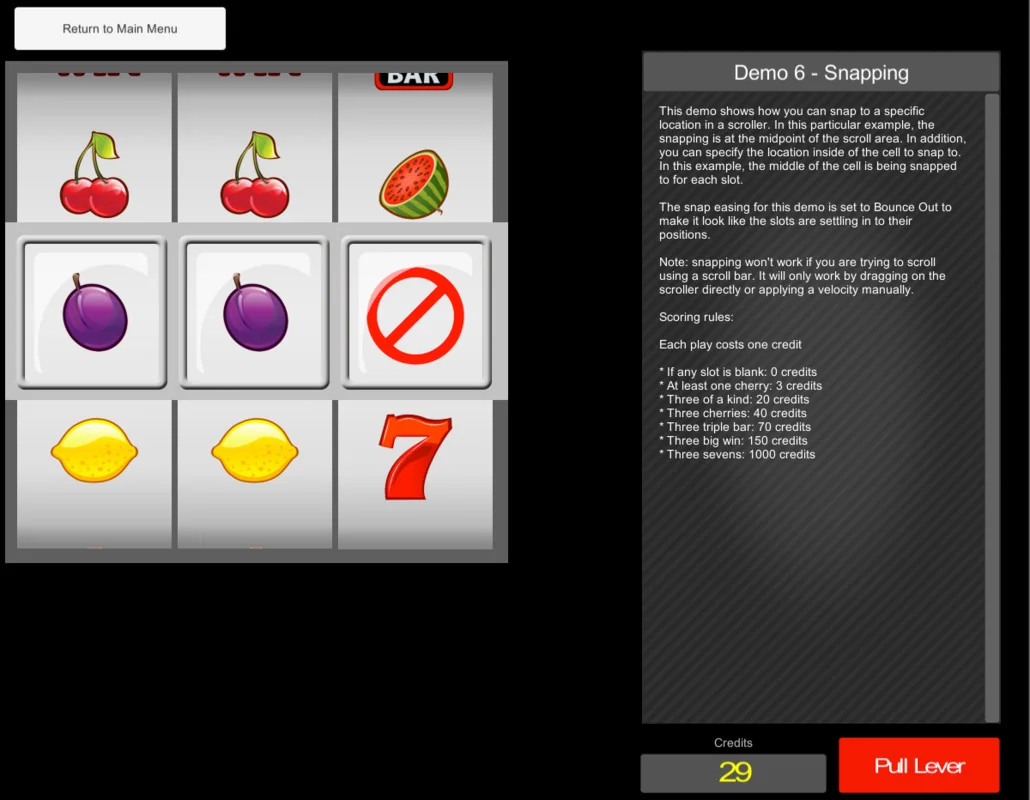
 GUI
GUI GUI
GUI GUI
GUI