"03fb4cdb4570dd17"{"id":"22927","slug":"ui-particle-image","title":"UI Particle Image","category":"GUI","engine":"Original Unity version: 2020.3.0","assetVersion":"Original Unity version: 2020.3.0","engineVersion":"Asset Version:1.2.2","tag":"GUI","accent":"cyan","visual":"luts","summary":"UI Particle Image provides a specialized framework for adding dynamic, multithreaded particle effects directly to the Unity UI canvas. By bypassing the standard Shuriken system, it offers unique controls for attractors, masking, and complex motion modifiers...","platform":"Unity","publishedAt":"2026-04-07T13:24:09.000Z","updatedAt":"2026-04-19T15:36:57.000Z","sourceNotes":[],"fileContents":[],"compatibility":["Unity","Original Unity version: 2020.3.0","Asset Version: 1.2.2"],"featuredImage":{"alt":"UI Particle Image","src":"https://3dcghub.com/wp-content/uploads/2026/04/0df7844f0d2d_953c67d9-00a1-4212-8f4d-69a0375a7fab_1280x720_stretch.webp"},"hasDownloadLink":true,"downloads":2,"terms":[{"taxonomy":"category","slug":"gui-tools-unity-2","name":"GUI"},{"taxonomy":"post_tag","slug":"ui","name":"UI"},{"taxonomy":"post_tag","slug":"unity","name":"Unity"},{"taxonomy":"post_tag","slug":"vfx","name":"VFX"}],"galleryImages":[{"src":"https://3dcghub.com/wp-content/uploads/2026/04/fba7038d1544_c81ab627-beff-45d2-ae55-a99e6c237218_scaled.webp","alt":"UI Particle Image"},{"src":"https://3dcghub.com/wp-content/uploads/2026/04/5916a474f374_2327eeb7-d5ef-4ad8-82bf-a5e831ba4fdb_scaled.webp","alt":"UI Particle Image"},{"src":"https://3dcghub.com/wp-content/uploads/2026/04/1638d8733cd8_514c0746-27bb-45c6-8e36-2037e322c16c_scaled.webp","alt":"UI Particle Image"},{"src":"https://3dcghub.com/wp-content/uploads/2026/04/eb1e8d1ef59c_53600423-6836-4246-a5a0-461b2874912e_scaled.webp","alt":"UI Particle Image"},{"src":"https://3dcghub.com/wp-content/uploads/2026/04/133afdbeba10_eda8213c-ba47-4a40-a230-4cab8a4de7d1_scaled.webp","alt":"UI Particle Image"},{"src":"https://3dcghub.com/wp-content/uploads/2026/04/1f9702300027_c5d2dc01-3773-4bd4-b035-101b5797210f_scaled.webp","alt":"UI Particle Image"},{"src":"https://3dcghub.com/wp-content/uploads/2026/04/dd2b94ce0bb7_94529507-cd9c-4613-81d4-7cc0ffdcf9c2_scaled.webp","alt":"UI Particle Image"}],"accessPanel":{"kind":"resource","title":"Access this resource","eyebrow":"Free Download","message":"Log in or create a free account to start your download.","fileName":"UI Particle Image v1.2.2.7z","safetyNote":"All resources are 100% manually reviewed to eliminate all risks.","actionLabel":"Download Free","resourceType":"Resource archive"},"contentHtml":"\u003ch2\u003eDynamic Interface Motion with UI Particle Image\u003c/h2\u003e\n\u003cp\u003eUI Particle Image offers a specialized solution for developers looking to integrate high-quality particle effects directly into their game's user interface. Unlike standard particle systems that often require complex workarounds to function correctly within a UI canvas, this tool is built from scratch as a \u003ccode\u003eMaskableGraphic\u003c/code\u003e. This architectural choice ensures that effects behave like native UI elements, respecting the layout and rendering rules of the Unity UI system.\u003c/p\u003e\n\n\u003cp\u003eThe system is designed to be accessible, allowing for the creation of visual effects such as sparkling buttons, loot transitions, or environmental UI flourishes with minimal setup. Developers can begin by generating a new object via the GameObject menu or by utilizing the included collection of over 12 demo scenes and starter particles. These templates provide a functional foundation for understanding how individual settings—ranging from emitter shapes to movement modifiers—interact to create complex visuals.\u003c/p\u003e\n\n\u003ch2\u003eAdvanced Movement and Behavioral Control\u003c/h2\u003e\n\u003cp\u003eOne of the core strengths of UI Particle Image is the variety of movement modifiers that dictate how particles behave once emitted. Rather than relying on simple linear paths, the system includes several physics-inspired modifiers:\u003c/p\u003e\n\u003cul\u003e\n \u003cli\u003e\u003cstrong\u003eAttractors:\u003c/strong\u003e These allow particles to be drawn toward specific points on the UI, which is particularly useful for mechanics like currency flying into a player's inventory icon or mana particles gathering around a skill button.\u003c/li\u003e\n \u003cli\u003e\u003cstrong\u003eVortex and Noise:\u003c/strong\u003e These add organic, swirling motion to particles, preventing them from appearing too mechanical or predictable.\u003c/li\u003e\n \u003cli\u003e\u003cstrong\u003eGravity and Velocity:\u003c/strong\u003e Standard forces that can be applied to simulate weight or explosive bursts within the interface.\u003c/li\u003e\n\u003c/ul\u003e\n\u003cp\u003eThe simulation supports both scaled and unscaled time, giving developers the flexibility to have UI effects continue playing even when the game is paused. This is a critical feature for maintaining a polished feel during menu interactions where the rest of the game world may be frozen.\u003c/p\u003e\n\n\u003ch2\u003eNative UI Integration and Masking\u003c/h2\u003e\n\u003cp\u003eBecause UI Particle Image is derived from the \u003ccode\u003eMaskableGraphic\u003c/code\u003e class, it solves several common headaches associated with particles in a canvas. It supports standard UI masking, meaning particles will be correctly clipped when they move outside the boundaries of a scroll rect or a specific UI panel. This is often a significant technical hurdle when using Unity's built-in Shuriken system for UI purposes.\u003c/p\u003e\n\n\u003cp\u003eAlso, the system supports both Overlay and Camera canvas modes, ensuring compatibility regardless of how a project's UI is structured. It can also function as a raycast target, allowing particles themselves to respond to player input or block interactions with elements behind them. For more complex visual requirements, the system supports Texture Sheet Animation, enabling the use of animated sprites within the particle stream, and includes a dedicated trail renderer for adding motion blur or light-streak effects to individual particles.\u003c/p\u003e\n\n\u003ch2\u003ePerformance-Oriented Architecture\u003c/h2\u003e\n\u003cp\u003ePerformance is a primary consideration for UI systems, especially on mobile platforms. UI Particle Image addresses this by utilizing a multithreaded simulation, offloading the heavy lifting of particle calculations from the main thread. This helps maintain a consistent frame rate even when dozens of particle systems are active simultaneously. Additionally, the entire system is optimized to use only a single draw call, significantly reducing the rendering overhead.\u003c/p\u003e\n\n\u003cp\u003eThe workflow is further streamlined by the ability to simulate and preview particles directly in the Unity Editor without entering Play Mode. This real-time feedback loop allows for rapid iteration on particle life, color gradients, and emitter shapes. The system includes various emitter shapes to suit different UI layouts, including Point, Circle, Rectangle, Line, and Directional emitters.\u003c/p\u003e\n\n\u003ch2\u003eTechnical Flexibility and Pipeline Support\u003c/h2\u003e\n\u003cp\u003eUI Particle Image is designed to work across various rendering pipelines, making it a versatile tool for different project types. It maintains compatibility with most third-party UI and Sprite shaders, allowing developers to apply custom visual styles to their particles without breaking the system's core functionality. For those who need deep integration, a comprehensive C# API is available, enabling granular control over particle states and the triggering of specific events through code.\u003c/p\u003e\n\n\u003cp\u003eIt is important to note that this system is a standalone solution designed specifically for the UI canvas. It does not support Unity's built-in Shuriken particle system, as it was built from the ground up to address the specific limitations of UI rendering. Future updates are planned to include a Shuriken converter and mesh particle support, which will further bridge the gap between world-space effects and interface-bound visuals.\u003c/p\u003e\n\n\u003cp\u003eBy providing a simplified yet powerful settings panel, UI Particle Image allows for the creation of professional-grade effects that were previously difficult to implement within the Unity UI framework. Whether it is through the use of sub-particles in a single system or the application of complex movement modifiers, the tool provides the necessary features to make game interfaces feel more reactive and visually engaging.\u003c/p\u003e\n\n\u003ch2\u003eContinue Browsing Similar Packs\u003c/h2\u003e\n\u003cul\u003e\n\u003cli\u003e\u003ca href=\"https://3dcghub.com/modern-ui-pack/\" title=\"Modern UI Pack\"\u003eModern UI Pack\u003c/a\u003e\u003c/li\u003e\n\u003cli\u003e\u003ca href=\"https://3dcghub.com/ams-ui-soft-mask/\" title=\"AMS UI Soft Mask\"\u003eAMS UI Soft Mask\u003c/a\u003e\u003c/li\u003e\n\u003cli\u003e\u003ca href=\"https://3dcghub.com/uma-for-rpg-builder/\" title=\"UMA for RPG Builder\"\u003eUMA for RPG Builder\u003c/a\u003e\u003c/li\u003e\n\u003cli\u003e\u003ca href=\"https://3dcghub.com/survival-engine-crafting-building-farming/\" title=\"Survival Engine – Crafting, Building, Farming\"\u003eSurvival Engine – Crafting, Building, Farming\u003c/a\u003e\u003c/li\u003e\n\u003cli\u003e\u003ca href=\"https://3dcghub.com/classic-city-builder-kit/\" title=\"Classic City Builder Kit\"\u003eClassic City Builder Kit\u003c/a\u003e\u003c/li\u003e\n\u003c/ul\u003e\n\n\u003ch2\u003eAsset Gallery\u003c/h2\u003e","contentTextLength":5531,"navigation":{"current":3289,"total":3426,"previous":{"id":"22899","slug":"settings-game-options-unified-menu-generator","title":"Settings \u0026 Game Options - Unified Menu Generator","category":"GUI","platform":"Unity","updatedAt":"2026-04-19T15:36:58.000Z"},"next":{"id":"22917","slug":"true-shadow-ui-soft-shadow-and-glow","title":"True Shadow - UI Soft Shadow and Glow","category":"GUI","platform":"Unity","updatedAt":"2026-04-19T15:36:57.000Z"}},"relatedResources":[{"id":"22917","slug":"true-shadow-ui-soft-shadow-and-glow","title":"True Shadow - UI Soft Shadow and Glow","category":"GUI","engine":"Original Unity version: 2020.3.48","assetVersion":"Original Unity version: 2020.3.48","engineVersion":"Asset Version:1.12.2","tag":"GUI","accent":"cyan","visual":"animation","summary":"True Shadow replaces manually baked textures with a real-time generation system for soft shadows and glows within Unity. It supports complex neumorphic designs and integrates across all major render pipelines.","platform":"Unity","publishedAt":"2026-04-07T13:24:01.000Z","updatedAt":"2026-04-19T15:36:57.000Z","sourceNotes":[],"fileContents":[],"compatibility":["Unity","Original Unity version: 2020.3.48","Asset Version: 1.12.2"],"featuredImage":{"alt":"True Shadow - UI Soft Shadow and Glow","src":"https://3dcghub.com/wp-content/uploads/2026/04/db8ed2563b4f_fd4f2569-97ef-43cf-85cb-a62896e55d94_1280x720_stretch.webp"},"hasDownloadLink":true,"downloads":0},{"id":"23725","slug":"3d-games-effects-bundle-1","title":"3D Games Effects Bundle 1","category":"Particles","engine":"Original Unity version: 2020.3.16","assetVersion":"Original Unity version: 2020.3.16","engineVersion":"Asset Version:1.6","tag":"Particles","accent":"cyan","visual":"city","summary":"3D Games Effects Bundle 1 brings 97 sprite-sheet animations into one Unity package, with six volumes and a small showroom level included. It fits HUD work, 2D and 3D games, mobile projects, VR, and other scenes that need direct visual impact without particl...","platform":"Unity","publishedAt":"2026-04-11T16:49:35.000Z","updatedAt":"2026-04-19T15:35:12.000Z","sourceNotes":[],"fileContents":[],"compatibility":["Unity","Original Unity version: 2020.3.16","Asset Version: 1.6"],"featuredImage":{"alt":"3D Games Effects Bundle 1","src":"https://3dcghub.com/wp-content/uploads/2026/04/dcdac1791029_32db77c9-71f3-4100-b67e-706f8c9a8fe0_1280x720_stretch.webp"},"hasDownloadLink":true,"downloads":0},{"id":"22904","slug":"storytelling-splash-effect","title":"Storytelling Splash Effect","category":"GUI","engine":"Original Unity version: 2018.4.36","assetVersion":"Original Unity version: 2018.4.36","engineVersion":"Asset Version:1.22","tag":"GUI","accent":"cyan","visual":"character","summary":"The Storytelling Splash Effect provides a specialized workflow for Unity’s GUI system, allowing developers to move beyond standard transitions using dissolve textures and animator-controlled curves.","platform":"Unity","publishedAt":"2026-04-07T13:19:36.000Z","updatedAt":"2026-04-19T15:36:57.000Z","sourceNotes":[],"fileContents":[],"compatibility":["Unity","Original Unity version: 2018.4.36","Asset Version: 1.22"],"featuredImage":{"alt":"Storytelling Splash Effect","src":"https://3dcghub.com/wp-content/uploads/2026/04/bacd71a5239a_20c9ede2-c28f-4a20-8358-4e573738a973_1280x720_stretch.webp"},"hasDownloadLink":true,"downloads":0}]}
GUI
UI Particle Image
UI Particle Image provides a specialized framework for adding dynamic, multithreaded particle effects directly to the Unity UI canvas. By bypassing the standard Shuriken system, it offers unique controls for attractors, masking, and complex motion modifiers...
UI Particle Image offers a specialized solution for developers looking to integrate high-quality particle effects directly into their game's user interface. Unlike standard particle systems that often require complex workarounds to function correctly within a UI canvas, this tool is built from scratch as a MaskableGraphic. This architectural choice ensures that effects behave like native UI elements, respecting the layout and rendering rules of the Unity UI system.
The system is designed to be accessible, allowing for the creation of visual effects such as sparkling buttons, loot transitions, or environmental UI flourishes with minimal setup. Developers can begin by generating a new object via the GameObject menu or by utilizing the included collection of over 12 demo scenes and starter particles. These templates provide a functional foundation for understanding how individual settings—ranging from emitter shapes to movement modifiers—interact to create complex visuals.
Advanced Movement and Behavioral Control
One of the core strengths of UI Particle Image is the variety of movement modifiers that dictate how particles behave once emitted. Rather than relying on simple linear paths, the system includes several physics-inspired modifiers:
Attractors: These allow particles to be drawn toward specific points on the UI, which is particularly useful for mechanics like currency flying into a player's inventory icon or mana particles gathering around a skill button.
Vortex and Noise: These add organic, swirling motion to particles, preventing them from appearing too mechanical or predictable.
Gravity and Velocity: Standard forces that can be applied to simulate weight or explosive bursts within the interface.
The simulation supports both scaled and unscaled time, giving developers the flexibility to have UI effects continue playing even when the game is paused. This is a critical feature for maintaining a polished feel during menu interactions where the rest of the game world may be frozen.
Native UI Integration and Masking
Because UI Particle Image is derived from the MaskableGraphic class, it solves several common headaches associated with particles in a canvas. It supports standard UI masking, meaning particles will be correctly clipped when they move outside the boundaries of a scroll rect or a specific UI panel. This is often a significant technical hurdle when using Unity's built-in Shuriken system for UI purposes.
Also, the system supports both Overlay and Camera canvas modes, ensuring compatibility regardless of how a project's UI is structured. It can also function as a raycast target, allowing particles themselves to respond to player input or block interactions with elements behind them. For more complex visual requirements, the system supports Texture Sheet Animation, enabling the use of animated sprites within the particle stream, and includes a dedicated trail renderer for adding motion blur or light-streak effects to individual particles.
Performance-Oriented Architecture
Performance is a primary consideration for UI systems, especially on mobile platforms. UI Particle Image addresses this by utilizing a multithreaded simulation, offloading the heavy lifting of particle calculations from the main thread. This helps maintain a consistent frame rate even when dozens of particle systems are active simultaneously. Additionally, the entire system is optimized to use only a single draw call, significantly reducing the rendering overhead.
The workflow is further streamlined by the ability to simulate and preview particles directly in the Unity Editor without entering Play Mode. This real-time feedback loop allows for rapid iteration on particle life, color gradients, and emitter shapes. The system includes various emitter shapes to suit different UI layouts, including Point, Circle, Rectangle, Line, and Directional emitters.
Technical Flexibility and Pipeline Support
UI Particle Image is designed to work across various rendering pipelines, making it a versatile tool for different project types. It maintains compatibility with most third-party UI and Sprite shaders, allowing developers to apply custom visual styles to their particles without breaking the system's core functionality. For those who need deep integration, a comprehensive C# API is available, enabling granular control over particle states and the triggering of specific events through code.
It is important to note that this system is a standalone solution designed specifically for the UI canvas. It does not support Unity's built-in Shuriken particle system, as it was built from the ground up to address the specific limitations of UI rendering. Future updates are planned to include a Shuriken converter and mesh particle support, which will further bridge the gap between world-space effects and interface-bound visuals.
By providing a simplified yet powerful settings panel, UI Particle Image allows for the creation of professional-grade effects that were previously difficult to implement within the Unity UI framework. Whether it is through the use of sub-particles in a single system or the application of complex movement modifiers, the tool provides the necessary features to make game interfaces feel more reactive and visually engaging.
 GUI
GUI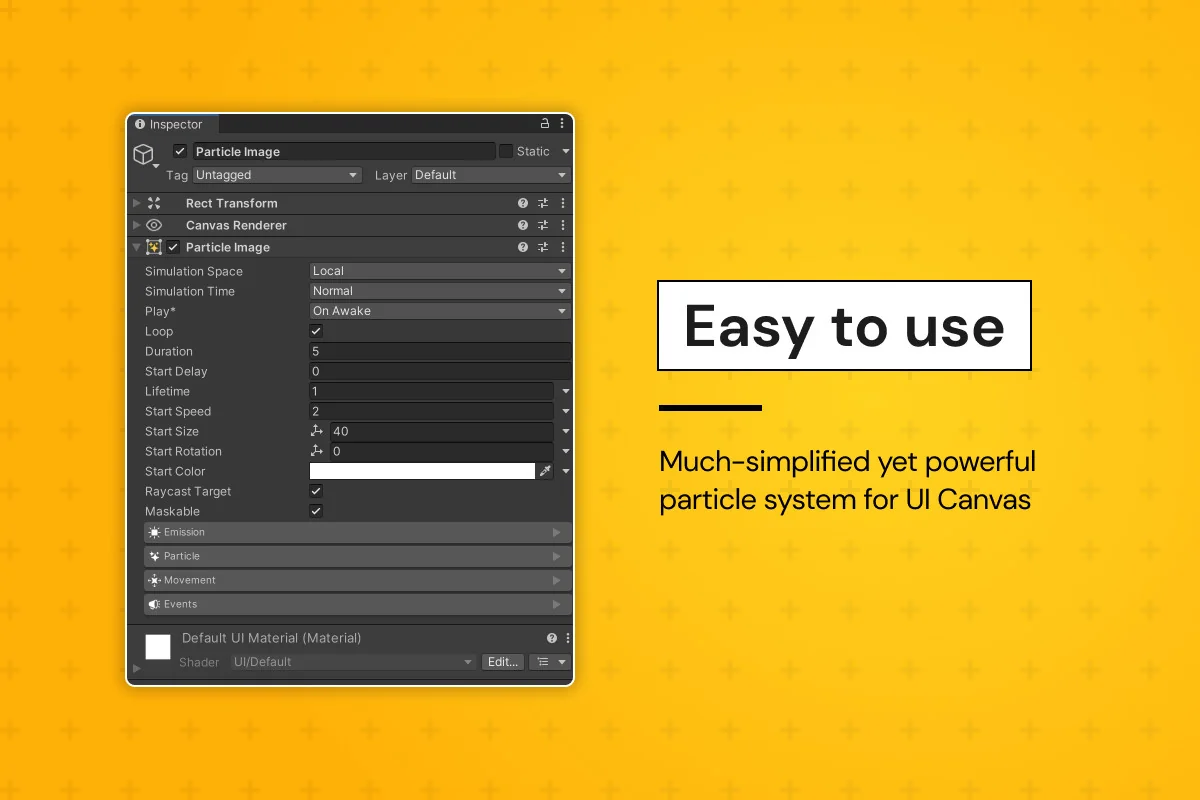
 GUI
GUI Particles
 GUI
GUI