"2ce90d1a6b5aea67"{"id":"1001464","slug":"objective-path-guide","title":"Objective Path Guide","category":"Gameplay Features","engine":"5.6+","assetVersion":"","engineVersion":"Engine Version: 5.6+","tag":"Gameplay Features","accent":"blue","visual":"mech","summary":"Objective Path Guide provides Blueprint path calculation and Niagara visual effects to guide players to targets or waypoints with a single function call.","platform":"Unreal Engine","publishedAt":"2026-10-08T07:54:53.692Z","updatedAt":"2026-10-08T07:54:53.692Z","sourceNotes":[],"fileContents":[],"compatibility":["Unreal Engine","Engine Version: 5.6+"],"featuredImage":{"alt":"Objective Path Guide","src":"/wp-content/uploads/published/2026/10/35294cf1efc9-b9fb2a17-db8e-4e73-a260-37cf6217f642-5eeaaa7ef7.webp"},"hasDownloadLink":true,"downloads":0,"terms":[{"taxonomy":"category","slug":"gameplay-features","name":"Gameplay Features"}],"galleryImages":[{"src":"/wp-content/uploads/published/2026/10/0195c5d24d9e-5b6f1fcf-71f3-4e81-9703-5ac6ac1c88fe-977009eff7.webp","alt":"Objective Path Guide"},{"src":"/wp-content/uploads/published/2026/10/4804ec06fce8-c01418d4-b698-436c-aa60-59d4f1d160a1-743d8415b1.webp","alt":"Objective Path Guide"},{"src":"/wp-content/uploads/published/2026/10/9e2d786ac375-e5ba8701-ab6c-422a-a5bc-eb2af2e331ed-9cdf40bfb6.webp","alt":"Objective Path Guide"},{"src":"/wp-content/uploads/published/2026/10/824410095eb8-0b0cea6d-f827-499b-b8f2-5d24c4282209-fd3c1baccc.webp","alt":"Objective Path Guide"},{"src":"/wp-content/uploads/published/2026/10/f523643f4199-9f3067da-4cdd-4651-8f4f-fa715845bd2c-b08db93246.webp","alt":"Objective Path Guide"},{"src":"/wp-content/uploads/published/2026/10/0f278a0115aa-30af4c22-cb06-4165-b1a4-0335cef91d9e-c15e618de8.webp","alt":"Objective Path Guide"}],"accessPanel":{"kind":"resource","title":"Download this resource","eyebrow":"Free Download","message":"Log in or create a free account to start your download.","fileName":"Content.7z","safetyNote":"Resources are manually reviewed before listing to improve quality and reduce obvious risks.","actionLabel":"Download Free","resourceType":"Resource archive"},"contentHtml":"\u003cp\u003eA visual marker that springs forward from a player character and traces a bright course across the terrain immediately clarifies where the player needs to go. Rather than relying solely on static compass markers or screen-space user interface arrows, drawing a physical effect directly in the 3D environment grounds player navigation inside the world itself. Objective Path Guide accomplishes this by rendering real-time trails that direct players toward specific points of interest, target actors, or sequential quest checkpoints.\u003c/p\u003e \u003ch2\u003eDirect Pathfinding and Waypoint Route Calculation\u003c/h2\u003e\n\u003cp\u003eTriggering a visual guide within the system requires only a single function call, which takes either a world location or an objective actor as its target. Once initiated, the logic determines the path that the guidance effect should trace across the level. The system handles routing in two distinct ways depending on the layout of the environment and the intended flow of the game.\u003c/p\u003e\n\u003cp\u003eFor open environments with clear lines of sight, the system can compute a direct line toward the destination. In complex layouts, indoor environments, or multi-tiered levels where a straight vector would collide with walls and geometry, the system uses waypoints. Designers can lay out sequential routes that guide players through corridors, doors, and specific milestones before reaching the final objective. This dual approach allows the navigation guide to support linear story encounters, maze-like dungeons, and open terrain without forcing a single rigid routing method.\u003c/p\u003e \u003ch2\u003eCustomizing Visuals with Niagara Systems and Scratch Modules\u003c/h2\u003e\n\u003cp\u003eGuiding effects must match the visual identity of the project, whether that involves a magical wisp in a fantasy setting, a digital spline in a science fiction corridor, or a subtle dust trail in an adventure game. Objective Path Guide delegates its particle rendering to Unreal Engine's Niagara framework, providing multiple layers of visual adjustment.\u003c/p\u003e\n\u003cp\u003eThe asset package includes three standalone Niagara systems supported by eight custom scratch Niagara modules. These scratch modules expose fine control over particle behavior, path sampling, ribbon or sprite alignment, and trail dissolution. Alongside the particle systems, three dedicated materials handle the shading and rendering surfaces for the effects. Developers can tweak ribbon width, velocity, emission density, color curves, and dissolve timing to fit realistic, stylized, or minimalist art styles without rewriting core logic.\u003c/p\u003e \u003ch2\u003eCore Blueprint Architecture and Asset Breakdown\u003c/h2\u003e\n\u003cp\u003eThe underlying framework operates purely through Blueprints, eliminating the need to compile C++ source files or configure complex code bindings. This makes incorporating the guide into an ongoing production straightforward, as the components can be dropped directly into existing character controllers, game modes, or quest managers.\u003c/p\u003e\n\u003cp\u003eThe package contains the following base elements:\u003c/p\u003e\n\u003cul\u003e \u003cli\u003e\u003cstrong\u003e4 Core Blueprints:\u003c/strong\u003e Handle path calculations, function executions, target tracking, and visual spawning.\u003c/li\u003e \u003cli\u003e\u003cstrong\u003e2 Enumerations:\u003c/strong\u003e Manage path state handling, routing styles, and display parameters cleanly across functions.\u003c/li\u003e \u003cli\u003e\u003cstrong\u003e3 Materials:\u003c/strong\u003e Supply the visual textures and surface parameters used across the particle trails.\u003c/li\u003e \u003cli\u003e\u003cstrong\u003e3 Niagara Systems:\u003c/strong\u003e Deliver distinct base particle effects for trail presentation.\u003c/li\u003e \u003cli\u003e\u003cstrong\u003e8 Scratch Niagara Modules:\u003c/strong\u003e Provide specialized math and parameter controls within the Niagara emitters.\u003c/li\u003e\n\u003c/ul\u003e \u003ch2\u003eDemonstration Levels and Customization Examples\u003c/h2\u003e\n\u003cp\u003eTo showcase how the path calculations interface with different visual profiles, the package includes two complete demonstration levels. These levels serve as sandbox environments to test direct path calculations against waypoint-assisted routing in real time.\u003c/p\u003e\n\u003cp\u003eWithin the demo content, developers have access to 11 sample Blueprints. Seven of these Blueprints focus specifically on customization examples, demonstrating how to modify emission shapes, path follow speeds, visual densities, and material parameter overrides. Studying these practical setups offers a direct roadmap for adjusting parameters when configuring unique quest markers or custom wayfinding mechanics.\u003c/p\u003e \u003ch2\u003ePlatform Scope and Single-Player Execution\u003c/h2\u003e\n\u003cp\u003eThe system is developed for the Windows platform and operates as a client-side navigation solution. Network replication is not included natively within the provided Blueprints. In multiplayer setups, the function call is best executed locally on the client player's machine so each user generates their own individual path without passing trail particle data across the server network.\u003c/p\u003e\n\u003cp\u003eBecause the calculations execute with minimal overhead from a single function call, developers working on single-player quest systems, open-world exploration titles, or narrative-driven adventures gain an adaptable tool for directing player focus across any level layout.\u003c/p\u003e\n\n\u003ch2\u003eExplore Similar Assets\u003c/h2\u003e\n\u003cul\u003e\n\u003cli\u003e\u003ca href=\"https://3dcghub.com/path-tracer-toolkit/\" title=\"Path Tracer Toolkit\"\u003ePath Tracer Toolkit\u003c/a\u003e\u003c/li\u003e\n\u003cli\u003e\u003ca href=\"https://3dcghub.com/open-world-ai-spawn-system/\" title=\"Open World AI Spawn System\"\u003eOpen World AI Spawn System\u003c/a\u003e\u003c/li\u003e\n\u003cli\u003e\u003ca href=\"https://3dcghub.com/ultimate-quest-manager/\" title=\"Ultimate Quest Manager\"\u003eUltimate Quest Manager\u003c/a\u003e\u003c/li\u003e\n\u003cli\u003e\u003ca href=\"https://3dcghub.com/next-gen-destruction-toolkit/\" title=\"Next Gen Destruction Toolkit\"\u003eNext Gen Destruction Toolkit\u003c/a\u003e\u003c/li\u003e\n\u003cli\u003e\u003ca href=\"https://3dcghub.com/ultimate-spell-system/\" title=\"Ultimate Spell System\"\u003eUltimate Spell System\u003c/a\u003e\u003c/li\u003e\n\u003c/ul\u003e","contentTextLength":4991,"navigation":{"current":90,"total":3488,"previous":{"id":"1001465","slug":"old-catacombs","title":"Old Catacombs","category":"Dungeon","platform":"Unreal Engine","updatedAt":"2026-10-08T07:55:21.087Z"},"next":{"id":"1001463","slug":"npc-queue-system","title":"NPC Queue system","category":"Gameplay Features","platform":"Unreal Engine","updatedAt":"2026-10-08T07:53:54.377Z"}},"relatedResources":[{"id":"11043","slug":"path-tracer-toolkit","title":"Path Tracer Toolkit","category":"Gameplay Features","engine":"4.27,5.0+","assetVersion":"Engine version: 4.27,5.0+","engineVersion":"4.27","tag":"Gameplay Features","accent":"blue","visual":"city","summary":"The Path Tracer Toolkit provides a comprehensive Blueprint solution for generating paths and borders manually or via runtime point arrays. It includes advanced customization, procedural materials, and performance-optimizing texture baking.","platform":"Unreal Engine","publishedAt":"2026-03-03T16:47:08.000Z","updatedAt":"2026-04-19T15:49:51.000Z","sourceNotes":[],"fileContents":[],"compatibility":["Unreal Engine","Engine version: 4.27,5.0+"],"featuredImage":{"alt":"Path Tracer Toolkit","src":"https://3dcghub.com/wp-content/uploads/2026/03/fd42f630-b95d-4396-bf4a-af676428ed24.webp"},"hasDownloadLink":true,"downloads":1},{"id":"11034","slug":"open-world-ai-spawn-system","title":"Open World AI Spawn System","category":"Gameplay Features","engine":"5.0+","assetVersion":"Engine version: 5.0+","engineVersion":"4.17","tag":"Gameplay Features","accent":"blue","visual":"luts","summary":"Manage large-scale environments efficiently with this distance-based spawning solution. This system replaces complex trigger box setups with a streamlined Blueprint approach.","platform":"Unreal Engine","publishedAt":"2026-03-03T16:45:30.000Z","updatedAt":"2026-04-19T15:49:51.000Z","sourceNotes":[],"fileContents":[],"compatibility":["Unreal Engine","Engine version: 5.0+"],"featuredImage":{"alt":"Open World AI Spawn System","src":"https://3dcghub.com/wp-content/uploads/2026/03/0420256b-a6c6-42f9-9432-86d4eb46c9ac.webp"},"hasDownloadLink":true,"downloads":0},{"id":"1001126","slug":"ultimate-quest-manager","title":"Ultimate Quest Manager","category":"Gameplay Features","engine":"5.4+","assetVersion":"","engineVersion":"Engine Version: 5.4+","tag":"Gameplay Features","accent":"blue","visual":"mech","summary":"Unlimited quest sequences, data-table-driven objectives, compass markers, quest log, save/load progress, and World Composition support for Unreal projects.","platform":"Unreal Engine","publishedAt":"2026-09-07T13:28:12.204Z","updatedAt":"2026-09-07T13:28:12.204Z","sourceNotes":[],"fileContents":[],"compatibility":["Unreal Engine","Engine Version: 5.4+"],"featuredImage":{"alt":"Ultimate Quest Manager","src":"/wp-content/uploads/published/2026/09/941b63979a17-934194ee-e1a7-4655-9a66-f57e9dc8b34c-b6ef6e7074.webp"},"hasDownloadLink":true,"downloads":0}]}
Gameplay Features
Objective Path Guide
Objective Path Guide provides Blueprint path calculation and Niagara visual effects to guide players to targets or waypoints with a single function call.
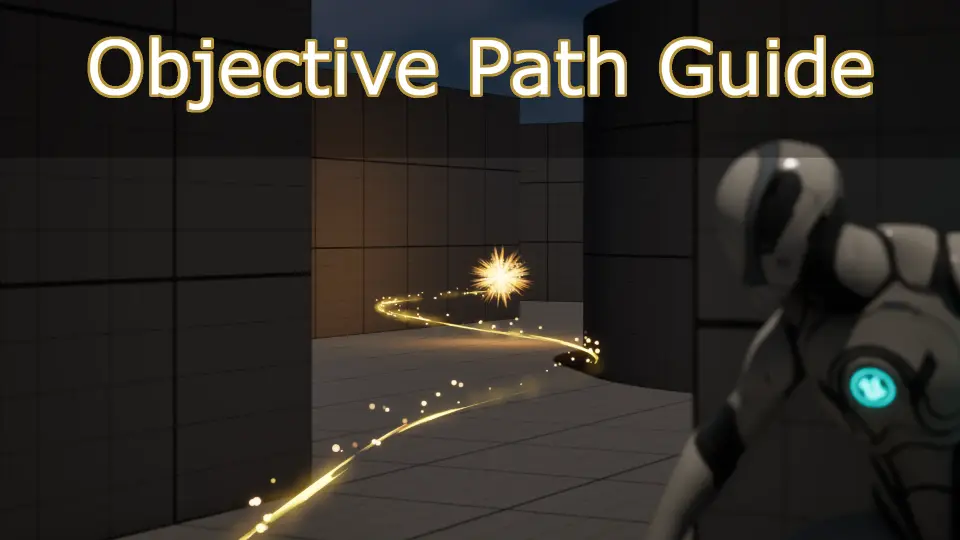
A visual marker that springs forward from a player character and traces a bright course across the terrain immediately clarifies where the player needs to go. Rather than relying solely on static compass markers or screen-space user interface arrows, drawing a physical effect directly in the 3D environment grounds player navigation inside the world itself. Objective Path Guide accomplishes this by rendering real-time trails that direct players toward specific points of interest, target actors, or sequential quest checkpoints.
Direct Pathfinding and Waypoint Route Calculation
Triggering a visual guide within the system requires only a single function call, which takes either a world location or an objective actor as its target. Once initiated, the logic determines the path that the guidance effect should trace across the level. The system handles routing in two distinct ways depending on the layout of the environment and the intended flow of the game.
For open environments with clear lines of sight, the system can compute a direct line toward the destination. In complex layouts, indoor environments, or multi-tiered levels where a straight vector would collide with walls and geometry, the system uses waypoints. Designers can lay out sequential routes that guide players through corridors, doors, and specific milestones before reaching the final objective. This dual approach allows the navigation guide to support linear story encounters, maze-like dungeons, and open terrain without forcing a single rigid routing method.
Customizing Visuals with Niagara Systems and Scratch Modules
Guiding effects must match the visual identity of the project, whether that involves a magical wisp in a fantasy setting, a digital spline in a science fiction corridor, or a subtle dust trail in an adventure game. Objective Path Guide delegates its particle rendering to Unreal Engine's Niagara framework, providing multiple layers of visual adjustment.
The asset package includes three standalone Niagara systems supported by eight custom scratch Niagara modules. These scratch modules expose fine control over particle behavior, path sampling, ribbon or sprite alignment, and trail dissolution. Alongside the particle systems, three dedicated materials handle the shading and rendering surfaces for the effects. Developers can tweak ribbon width, velocity, emission density, color curves, and dissolve timing to fit realistic, stylized, or minimalist art styles without rewriting core logic.
Core Blueprint Architecture and Asset Breakdown
The underlying framework operates purely through Blueprints, eliminating the need to compile C++ source files or configure complex code bindings. This makes incorporating the guide into an ongoing production straightforward, as the components can be dropped directly into existing character controllers, game modes, or quest managers.
The package contains the following base elements:
4 Core Blueprints: Handle path calculations, function executions, target tracking, and visual spawning.
2 Enumerations: Manage path state handling, routing styles, and display parameters cleanly across functions.
3 Materials: Supply the visual textures and surface parameters used across the particle trails.
3 Niagara Systems: Deliver distinct base particle effects for trail presentation.
8 Scratch Niagara Modules: Provide specialized math and parameter controls within the Niagara emitters.
Demonstration Levels and Customization Examples
To showcase how the path calculations interface with different visual profiles, the package includes two complete demonstration levels. These levels serve as sandbox environments to test direct path calculations against waypoint-assisted routing in real time.
Within the demo content, developers have access to 11 sample Blueprints. Seven of these Blueprints focus specifically on customization examples, demonstrating how to modify emission shapes, path follow speeds, visual densities, and material parameter overrides. Studying these practical setups offers a direct roadmap for adjusting parameters when configuring unique quest markers or custom wayfinding mechanics.
Platform Scope and Single-Player Execution
The system is developed for the Windows platform and operates as a client-side navigation solution. Network replication is not included natively within the provided Blueprints. In multiplayer setups, the function call is best executed locally on the client player's machine so each user generates their own individual path without passing trail particle data across the server network.
Because the calculations execute with minimal overhead from a single function call, developers working on single-player quest systems, open-world exploration titles, or narrative-driven adventures gain an adaptable tool for directing player focus across any level layout.
 Gameplay Features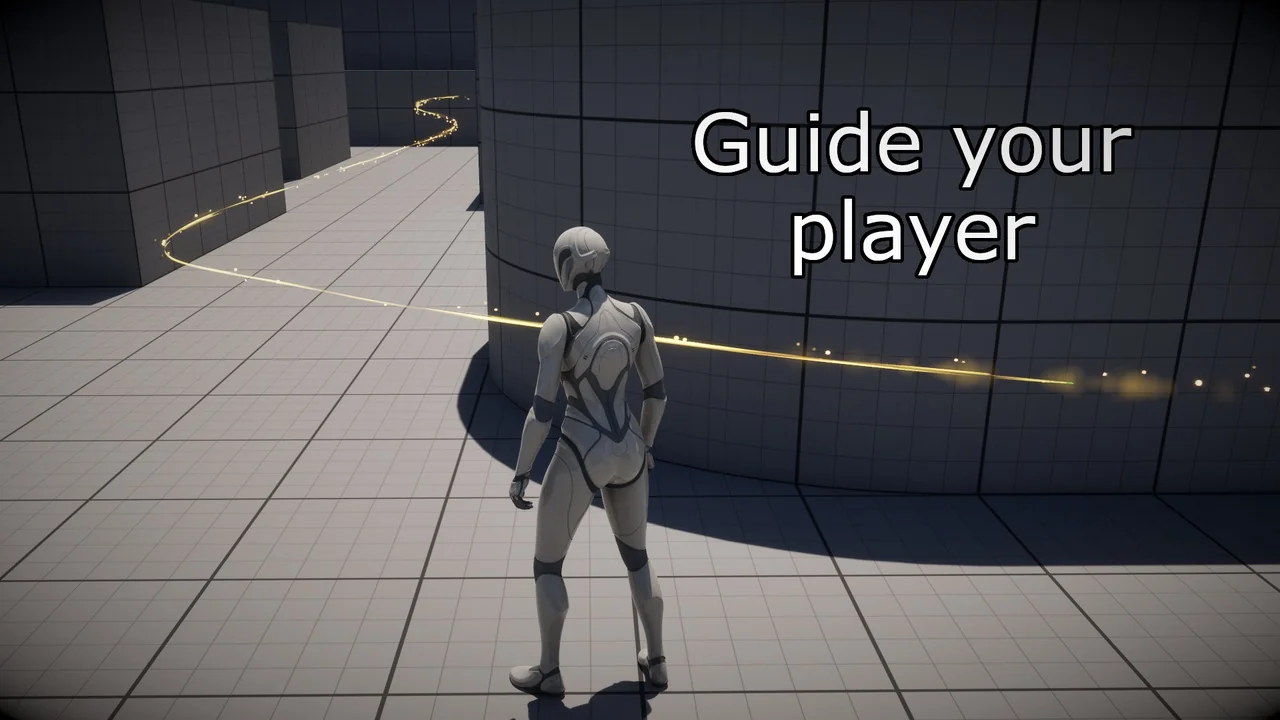
 Gameplay Features
 Gameplay Features
 Gameplay Features