"e8ac1c6ae51ee3e2"{"id":"1003051","slug":"obi-fluid","title":"Obi Fluid","category":"Physics","engine":"7.2","assetVersion":"Original Unity version: 6000.0.82f1","engineVersion":"Asset Version: 7.2","tag":"Physics","accent":"cyan","visual":"mech","summary":"Obi Fluid is a particle-based Unity physics engine for small-to-medium fluid effects: emitters, force zones, SDF colliders and ShaderGraph shading on Unity 6.","platform":"Unity","indexPolicy":"index","publishedAt":"2026-11-26T15:57:26.411Z","updatedAt":"2026-11-26T15:57:26.411Z","sourceNotes":[],"fileContents":[],"compatibility":["Unity","Original Unity version: 6000.0.82f1","Asset Version: 7.2"],"featuredImage":{"alt":"Obi Fluid","src":"/wp-content/uploads/published/2026/11/d7b8c218d2fd-91d2ae47-fb65-4d3d-8837-31d08031784c-1280x720-stretch-7dee3f377f.webp"},"fileSizeBytes":6073157,"hasDownloadLink":true,"downloads":0,"terms":[{"taxonomy":"category","slug":"physics-tools-unity-2","name":"Physics"}],"galleryImages":[{"src":"/wp-content/uploads/published/2026/11/d47fcbcf9f9e-05edf71d-4c1b-454b-aee4-c492c57d5a7a-scaled-7d2350b25a.webp","alt":"Obi Fluid"},{"src":"/wp-content/uploads/published/2026/11/6b84ad81636c-f15f6ad2-f206-426a-bdce-3b2c537bb3d2-scaled-aae351a871.webp","alt":"Obi Fluid"},{"src":"/wp-content/uploads/published/2026/11/a68f0281616b-ab87bbbe-77e1-4b15-ac42-dbd760d28c4b-scaled-09d12fc2c5.webp","alt":"Obi Fluid"},{"src":"/wp-content/uploads/published/2026/11/c72902e900f8-37fbdf92-f7ed-4e66-a629-7a9fd9810565-scaled-a5b681067b.webp","alt":"Obi Fluid"},{"src":"/wp-content/uploads/published/2026/11/d8db5f898f22-c26945b6-f87b-40d3-907a-6131a8ac2613-scaled-b3fdf8d651.webp","alt":"Obi Fluid"},{"src":"/wp-content/uploads/published/2026/11/9ac02e5c081a-ec3d86a9-3d0a-489b-b3dd-b365bb5b6f9c-scaled-e9dde8a93d.webp","alt":"Obi Fluid"},{"src":"/wp-content/uploads/published/2026/11/da7d53497571-f27061bd-6828-433e-8fe8-37870a042cac-scaled-52b372e177.webp","alt":"Obi Fluid"}],"accessPanel":{"kind":"resource","title":"Get this resource","safetyNote":"Resources are manually reviewed before listing to improve quality and reduce obvious risks.","fileFormat":".7z","resourceType":"Resource archive","versions":[]},"contentHtml":"\u003ch2\u003eWhat Ships Inside Obi Fluid\u003c/h2\u003e\n\u003cp\u003eObi Fluid is a particle-based physics engine for Unity, delivered as a unitypackage of roughly 5.9 MB. Unpacked, it creates an Assets/Obi directory holding the engine's scripts, a custom editor, runtime resources and sample content, with a QuickstartGuide_fluid.pdf and a CHANGELOG_fluid.txt sitting alongside the code. A manifest travels with the package and pins the surrounding dependencies: Burst 1.8.30, Collections 2.6.8, Jobs 0.70.0-preview.7, Mathematics 1.3.2 and ShaderGraph 17.0.4.\u003c/p\u003e\n\u003cp\u003eThose dependencies map onto the way the simulation actually runs. The CPU path leans on Burst, Jobs, Collections and Mathematics; the GPU path needs compute shader support from the target hardware. The same engine can be driven by either, so the choice is a performance decision rather than a different toolset.\u003c/p\u003e\n\u003cp\u003eThe working parts are few and each has a clear job. Solvers advance particles each frame. Emitters spawn them in custom shapes. Force zones and void zones reshape behaviour in space. Renderers and a surface mesher turn the particle cloud into something visible, and a set of collider components translates Unity's physics shapes into the particle world so fluid and scene geometry understand one another.\u003c/p\u003e \u003ch2\u003eHow Obi Fluid Moves, Sticks and Splashes\u003c/h2\u003e\n\u003cp\u003eEverything here starts with particles, and the engine is set up so those particles behave like a range of deformable materials beyond one canned liquid. Fluids react to each other, which is what makes mixed-material scenes possible. They can affect rigid bodies and be affected by them in both directions, to the point of making an object float or sink. They can also stick to surfaces when stickiness is dialled up.\u003c/p\u003e\n\u003cp\u003eSimulation space is unbounded — the fluid is not confined to a fixed domain, so a stream can travel wherever emitters and colliders send it. Camera culling is optional: fluids that are not visible to any camera can stop updating their simulation, which buys back frame time in scenes with several separated pools or streams.\u003c/p\u003e\n\u003ch3\u003eEmitters, force zones and void zones\u003c/h3\u003e\n\u003cp\u003eEmitters accept custom shapes, so a spout, a crack in a wall or a nozzle profile can define where particles appear. Emitters also carry an inherit-velocity property that lets the fluid take on a percentage of the emitter's own velocity, which is useful for anything attached to a moving object.\u003c/p\u003e\n\u003cp\u003eForce zones can take on the shape of any collider and run in radial, linear or vortex modes — a vortex zone inside a tube, a radial push around a spinning fan, a linear current across a channel. Each zone also has a colour parameter that tints the particles entering it, a small touch that makes invisible forces legible in a scene. Void zones do the opposite: they kill particles that enter, or shorten their lifetime, which is how a drain or a cleanup boundary is expressed.\u003c/p\u003e \u003ch2\u003eThe Fluid Properties Worth Tuning\u003c/h2\u003e\n\u003cp\u003eViscosity, density, surface tension, stickiness and vorticity are all adjustable, and several of them can be set per particle rather than only globally. High viscosity produces buckling and coiling rather than a uniform syrup, which is the difference between a convincing thick pour and a stretched blob. Multi-phase setups support high density ratios, so a heavy fluid and a light one can share a simulation without one dissolving into the other.\u003c/p\u003e\n\u003cp\u003eResolution is handled by a single parameter, so raising detail on an effect does not mean re-authoring it. Fluids of different resolution can interact in the same simulation, which lets a hero splash run dense while the surrounding spray stays cheap.\u003c/p\u003e\n\u003cp\u003eSolvers can optionally enforce boundary limits so particles cannot escape a defined volume. That replaces the common workaround of lining a scene with invisible colliders just to keep fluid contained. A newer vorticity model uses a micropolar formulation, and barolinic vorticity extends the same machinery toward more realistic gas behaviour.\u003c/p\u003e \u003ch2\u003eColliders and Two-Way Rigid Body Contact\u003c/h2\u003e\n\u003cp\u003eThe collider bridge covers Box, Sphere, Capsule, Mesh, Character, Terrain and distance field (SDF) shapes. That spread matters for interaction design: a character capsule can wade through a stream, a terrain patch can channel runoff, and an SDF can describe a shape too awkward for primitive colliders. The two-way interaction means those bodies push the fluid and the fluid pushes back.\u003c/p\u003e\n\u003cp\u003eLarger scenes benefit from the optimisation applied to static colliders — they are skipped entirely during the solver update. Renderers gained object layer support and render layer masks, so what the fluid renders against can be separated from what it simulates against. A Synchronous Fixed solver synchronisation mode offers tighter integration with rigidbody physics, while particle lifetimes are managed by the solver backend rather than the emitter component, which pays off noticeably when particle counts climb.\u003c/p\u003e \u003ch2\u003eRendering Fluids and the Unity 6 Baseline\u003c/h2\u003e\n\u003cp\u003eFluid shaders can be authored in ShaderGraph, so the look of the liquid is open to the same node workflow as the rest of a project. Transparent fluid rendering supports URP's RenderGraph API, and foam and diffuse particles use an approximate volumetric lighting mode that can receive and cast shadows in URP. Foam and diffuse particles also gained collider collision detection on the compute backend only.\u003c/p\u003e\n\u003cp\u003eVersion 7.2 raises the minimum to Unity 6000.0.82f1 and supports the Built-in pipeline, HDRP and URP at that version. RenderGraph is now required for fluid rendering, since the compatibility layer for older non-RenderGraph versions was removed. The same release adds support for Unity 6.5's EntityId API for GameObjects.\u003c/p\u003e\n\u003cp\u003eAnyone moving from an older release should plan for real work: Obi 7 is a major update that requires redoing the setup of most existing Obi-related functionality. New projects are the natural home for it, and an existing project that must migrate needs scheduled time rather than a drop-in swap.\u003c/p\u003e \u003ch2\u003eWhere Fluid Effects Fit, and Where They Don't\u003c/h2\u003e\n\u003cp\u003eThe intended scope is tight and worth respecting. Small to medium scale fluid simulations, 2D fluid game mechanics, dripping fluid and splash effects all sit comfortably inside it. Large scale simulation, oceans, lakes, rivers and floods do not — those are explicitly out of scope, and reaching for a particle solver to fill a lake will cost far more than it returns.\u003c/p\u003e\n\u003cp\u003eFluid simulation is a demanding task in any engine, and the performance implications deserve attention before the first emitter is placed rather than after. The tools for managing that cost are present: resolution control, mixed-resolution fluids, camera culling, static collider skipping and a GPU backend. What the package is set up to handle is controlled, close-up liquid — a drip from a pipe, a splash against a boot, a viscous pour, a 2D mechanic built on flowing particles — with the physics knobs exposed and the scene interaction accounted for.\u003c/p\u003e\n\n\u003ch2\u003eMore From The Same Workflow\u003c/h2\u003e\n\u003cul\u003e\n\u003cli\u003e\u003ca href=\"https://3dcghub.com/obi-rope/\" rel=\"noopener noreferrer\"\u003eObi Rope\u003c/a\u003e\u003c/li\u003e\n\u003cli\u003e\u003ca href=\"https://3dcghub.com/toolkit-for-unity-physics-2026/\" rel=\"noopener noreferrer\"\u003eToolkit for Unity Physics 2026\u003c/a\u003e\u003c/li\u003e\n\u003cli\u003e\u003ca href=\"https://3dcghub.com/dynamic-water-physics-2/\" rel=\"noopener noreferrer\"\u003eDynamic Water Physics 2\u003c/a\u003e\u003c/li\u003e\n\u003cli\u003e\u003ca href=\"https://3dcghub.com/projectile-toolkit-3/\" rel=\"noopener noreferrer\"\u003eProjectile Toolkit 3\u003c/a\u003e\u003c/li\u003e\n\u003cli\u003e\u003ca href=\"https://3dcghub.com/easy-collider-editor/\" rel=\"noopener noreferrer\"\u003eEasy Collider Editor\u003c/a\u003e\u003c/li\u003e\n\u003c/ul\u003e","contentTextLength":7020,"navigation":{"current":1,"total":4972,"next":{"id":"1002917","slug":"exe-extension-and-process-management","title":".exe Extension \u0026 Process Management","category":"Engine Tools","platform":"Unreal Engine","updatedAt":"2026-11-26T14:39:23.751Z"}},"relatedResources":[{"id":"23463","slug":"obi-rope","title":"Obi Rope","category":"Physics","engine":"Original Unity version: 2021.3.4","assetVersion":"Original Unity version: 2021.3.4","engineVersion":"Asset Version:7.0.4","tag":"Physics","accent":"cyan","visual":"luts","summary":"Obi Rope brings rope, rod, and bone-driven motion into a single Unity workflow. It combines particle-based simulation with spline editing, runtime changes, and collision handling across the scene.","platform":"Unity","indexPolicy":"index","publishedAt":"2026-04-09T17:29:24.000Z","updatedAt":"2026-04-19T15:35:25.000Z","sourceNotes":[],"fileContents":[],"compatibility":["Unity","Original Unity version: 2021.3.4","Asset Version: 7.0.4"],"featuredImage":{"alt":"Obi Rope","src":"https://3dcghub.com/wp-content/uploads/2026/04/f05dc02eb4ed_86bbe084-97b0-41ec-a77f-fafe275ca866_1280x720_stretch.webp"},"fileSizeBytes":12346154,"hasDownloadLink":true,"downloads":3},{"id":"23504","slug":"toolkit-for-unity-physics-2026","title":"Toolkit for Unity Physics 2026","category":"Physics","engine":"Original Unity version: 6000.0.59","assetVersion":"Original Unity version: 6000.0.59","engineVersion":"Asset Version:4.0.0","tag":"Physics","accent":"cyan","visual":"mech","summary":"Toolkit for Unity Physics 2026 brings together physics-based systems that plug into Unity’s built-in Physics behaviours. It focuses on projectile control, buoyancy, ropes, force effects, and softbody-like behaviour, with APIs, structs, and scripts meant t...","platform":"Unity","indexPolicy":"index","publishedAt":"2026-04-09T17:49:35.000Z","updatedAt":"2026-04-19T15:35:23.000Z","sourceNotes":[],"fileContents":[],"compatibility":["Unity","Original Unity version: 6000.0.59","Asset Version: 4.0.0"],"featuredImage":{"alt":"Toolkit for Unity Physics 2026","src":"https://3dcghub.com/wp-content/uploads/2026/04/df343032ce3d_79616528-337f-4786-b053-f513e366a42e_1280x720_stretch.webp"},"fileSizeBytes":3531287,"hasDownloadLink":true,"downloads":0},{"id":"23402","slug":"dynamic-water-physics-2","title":"Dynamic Water Physics 2","category":"Physics","engine":"Original Unity version: 6000.0.40","assetVersion":"Original Unity version: 6000.0.40","engineVersion":"Asset Version:2.19","tag":"Physics","accent":"cyan","visual":"animation","summary":"Dynamic Water Physics 2 simulates buoyancy and hydrodynamics from mesh data, so objects of any shape or size can react to water above or below the surface. It also includes ship and submarine controls, multiplayer support, and integration with several water...","platform":"Unity","indexPolicy":"index","publishedAt":"2026-04-09T17:12:42.000Z","updatedAt":"2026-04-19T15:35:27.000Z","sourceNotes":[],"fileContents":[],"compatibility":["Unity","Original Unity version: 6000.0.40","Asset Version: 2.19"],"featuredImage":{"alt":"Dynamic Water Physics 2","src":"https://3dcghub.com/wp-content/uploads/2026/04/2ac563dda735_8b3979b6-a239-417a-987b-9d7669fa86f6_1280x720_stretch.webp"},"fileSizeBytes":352383827,"hasDownloadLink":true,"downloads":4}]}[{"id":4225,"sourceId":4225,"taxonomyId":4225,"taxonomy":"category","slug":"asset-library","name":"Asset Library","parentId":null,"count":4825,"hasChildren":true,"href":"/","seoTitle":"Free Game Assets Library | 3DCGHUB","seoDescription":"Browse free Unreal Engine, Unity, Blender assets and game development tutorials on 3DCGHUB with previews, compatibility notes, and secure downloads.","sitemapEnabled":true,"children":[{"id":4227,"sourceId":4227,"taxonomyId":4227,"taxonomy":"category","slug":"blender-add-ons-plugins","name":"Blender Add-ons \u0026 Plugins","parentId":4225,"count":10,"hasChildren":false,"href":"/category/blender-add-ons-plugins/","seoTitle":"Free Blender Add-ons \u0026 Plugins | 3DCGHUB","seoDescription":"Browse free Blender Add-ons \u0026 Plugins tools for Blender on 3DCGHUB: curated downloads with preview images, compatibility notes and secure download access.","sitemapEnabled":true},{"id":514,"sourceId":514,"taxonomyId":514,"taxonomy":"category","slug":"unity-2","name":"Unity","parentId":4225,"count":454,"hasChildren":true,"href":"/category/unity-2/","seoTitle":"Free Unity Assets | 3DCGHUB","seoDescription":"Browse free Unity resources on 3DCGHUB: curated downloads with preview images, compatibility notes and secure download access.","sitemapEnabled":true,"children":[{"id":523,"sourceId":523,"taxonomyId":523,"taxonomy":"category","slug":"2d","name":"2D","parentId":514,"count":1,"hasChildren":true,"href":"/category/2d/","seoTitle":"Free Unity 2D | 3DCGHUB","seoDescription":"Browse free 2D assets for Unity on 3DCGHUB: curated downloads with preview images, compatibility notes and secure download access.","sitemapEnabled":true},{"id":515,"sourceId":515,"taxonomyId":515,"taxonomy":"category","slug":"3d-unity-2","name":"3D","parentId":514,"count":162,"hasChildren":true,"href":"/category/3d-unity-2/","seoTitle":"Free Unity 3D Assets | 3DCGHUB","seoDescription":"Browse free 3D assets for Unity on 3DCGHUB: curated downloads with preview images, compatibility notes and secure download access.","sitemapEnabled":true},{"id":565,"sourceId":565,"taxonomyId":565,"taxonomy":"category","slug":"add-ons","name":"Add-Ons","parentId":514,"count":2,"hasChildren":false,"href":"/category/add-ons/","seoTitle":"Free Unity Add-Ons | 3DCGHUB","seoDescription":"Browse free Add-Ons assets for Unity on 3DCGHUB: curated downloads with preview images, compatibility notes and secure download access.","sitemapEnabled":true},{"id":529,"sourceId":529,"taxonomyId":529,"taxonomy":"category","slug":"audio-unity-2","name":"Audio","parentId":514,"count":1,"hasChildren":true,"href":"/category/audio-unity-2/","seoTitle":"Free Unity Audio | 3DCGHUB","seoDescription":"Browse free Audio for Unity on 3DCGHUB: curated downloads with preview images, compatibility notes and secure download access.","sitemapEnabled":true},{"id":557,"sourceId":557,"taxonomyId":557,"taxonomy":"category","slug":"templates","name":"Templates","parentId":514,"count":36,"hasChildren":true,"href":"/category/templates/","seoTitle":"Free Unity Templates | 3DCGHUB","seoDescription":"Browse free Unity project templates on 3DCGHUB. Starter kits with previews, compatibility notes, and secure download access.","sitemapEnabled":true},{"id":533,"sourceId":533,"taxonomyId":533,"taxonomy":"category","slug":"tools-unity-2","name":"Tools","parentId":514,"count":139,"hasChildren":true,"href":"/category/tools-unity-2/","sitemapEnabled":true},{"id":554,"sourceId":554,"taxonomyId":554,"taxonomy":"category","slug":"vfx-unity-2","name":"VFX","parentId":514,"count":4,"hasChildren":true,"href":"/category/vfx-unity-2/","seoTitle":"Free Unity VFX | 3DCGHUB","seoDescription":"Browse free VFX for Unity on 3DCGHUB: curated downloads with preview images, compatibility notes and secure download access.","sitemapEnabled":true}]},{"id":511,"sourceId":511,"taxonomyId":511,"taxonomy":"category","slug":"unreal-engine-2","name":"Unreal Engine","parentId":4225,"count":4362,"hasChildren":true,"href":"/category/unreal-engine-2/","seoTitle":"Free Unreal Engine Assets | 3DCGHUB","seoDescription":"Browse free Unreal Engine resources on 3DCGHUB: curated downloads with preview images, compatibility notes and secure download access.","sitemapEnabled":true,"children":[{"id":54,"sourceId":54,"taxonomyId":54,"taxonomy":"category","slug":"3d","name":"3D","parentId":511,"count":2441,"hasChildren":true,"href":"/category/3d/","seoTitle":"Free Unreal Engine 3D | 3DCGHUB","seoDescription":"Browse free 3D assets for Unreal Engine on 3DCGHUB: curated downloads with preview images, compatibility notes and secure download access.","sitemapEnabled":true},{"id":441,"sourceId":441,"taxonomyId":441,"taxonomy":"category","slug":"animations","name":"Animations","parentId":511,"count":275,"hasChildren":true,"href":"/category/animations/","seoTitle":"Free Unreal Engine Animations | 3DCGHUB","seoDescription":"Browse free Animations for Unreal Engine on 3DCGHUB: curated downloads with preview images, compatibility notes and secure download access.","sitemapEnabled":true},{"id":446,"sourceId":446,"taxonomyId":446,"taxonomy":"category","slug":"audio","name":"Audio","parentId":511,"count":63,"hasChildren":true,"href":"/category/audio/","seoTitle":"Free Unreal Engine Audio Resources | 3DCGHUB","seoDescription":"Browse free Unreal Engine audio resources including sound effects, voices, dialogue, and ambient sounds. Curated free downloads on 3DCGHUB.","sitemapEnabled":true},{"id":466,"sourceId":466,"taxonomyId":466,"taxonomy":"category","slug":"game-systems","name":"Game Systems","parentId":511,"count":381,"hasChildren":true,"href":"/category/game-systems/","seoTitle":"Free Unreal Engine Game Systems | 3DCGHUB","seoDescription":"Browse free Game Systems tools for Unreal Engine on 3DCGHUB: curated downloads with preview images, compatibility notes and secure download access.","sitemapEnabled":true},{"id":478,"sourceId":478,"taxonomyId":478,"taxonomy":"category","slug":"game-templates","name":"Game Templates","parentId":511,"count":155,"hasChildren":true,"href":"/category/game-templates/","seoTitle":"Free Unreal Engine Game Templates | 3DCGHUB","seoDescription":"Browse free Game Templates for Unreal Engine on 3DCGHUB: curated downloads with preview images, compatibility notes and secure download access.","sitemapEnabled":true},{"id":432,"sourceId":432,"taxonomyId":432,"taxonomy":"category","slug":"hdri","name":"HDRI","parentId":511,"count":6,"hasChildren":true,"href":"/category/hdri/","seoTitle":"Free Unreal Engine HDRI | 3DCGHUB","seoDescription":"Browse free Unreal Engine HDRI skies and lighting maps on 3DCGHUB. Environment lighting with previews and secure downloads.","sitemapEnabled":true},{"id":228,"sourceId":228,"taxonomyId":228,"taxonomy":"category","slug":"material-and-textures","name":"Material \u0026 Textures","parentId":511,"count":172,"hasChildren":true,"href":"/category/material-and-textures/","seoTitle":"Free Unreal Engine Material \u0026 Textures | 3DCGHUB","seoDescription":"Browse free Material \u0026 Textures for Unreal Engine on 3DCGHUB: curated downloads with preview images, compatibility notes and secure download access.","sitemapEnabled":true},{"id":298,"sourceId":298,"taxonomyId":298,"taxonomy":"category","slug":"sprites-and-flipbooks","name":"Sprites \u0026 Flipbooks","parentId":511,"count":18,"hasChildren":true,"href":"/category/sprites-and-flipbooks/","seoTitle":"Free Unreal Engine Sprites \u0026 Flipbooks | 3DCGHUB","seoDescription":"Browse free Sprites \u0026 Flipbooks assets for Unreal Engine on 3DCGHUB: curated downloads with preview images, compatibility notes and secure download access.","sitemapEnabled":true},{"id":489,"sourceId":489,"taxonomyId":489,"taxonomy":"category","slug":"tools-and-plugins","name":"Tools \u0026 Plugins","parentId":511,"count":391,"hasChildren":true,"href":"/category/tools-and-plugins/","seoTitle":"Free Unreal Engine Tools \u0026 Plugins | 3DCGHUB","seoDescription":"Browse free Tools \u0026 Plugins for Unreal Engine on 3DCGHUB: curated downloads with preview images, compatibility notes and secure download access.","sitemapEnabled":true},{"id":459,"sourceId":459,"taxonomyId":459,"taxonomy":"category","slug":"ui","name":"UI","parentId":511,"count":47,"hasChildren":true,"href":"/category/ui/","seoTitle":"Free Unreal Engine UI | 3DCGHUB","seoDescription":"Browse free UI for Unreal Engine on 3DCGHUB: curated downloads with preview images, compatibility notes and secure download access.","sitemapEnabled":true},{"id":450,"sourceId":450,"taxonomyId":450,"taxonomy":"category","slug":"vfx","name":"VFX","parentId":511,"count":413,"hasChildren":true,"href":"/category/vfx/","seoTitle":"Free Unreal Engine VFX | 3DCGHUB","seoDescription":"Browse free VFX for Unreal Engine on 3DCGHUB: curated downloads with preview images, compatibility notes and secure download access.","sitemapEnabled":true}]}]},{"id":4222,"sourceId":4222,"taxonomyId":4222,"taxonomy":"category","slug":"tutorial-library","name":"Tutorial Library","parentId":null,"count":117,"hasChildren":false,"href":"/tutorials/","seoTitle":"Free Game Development Tutorial Library | 3DCGHUB","seoDescription":"Browse free game development tutorials for Unreal Engine, Unity, Blender, and more on 3DCGHUB with practical workflows and secure downloads.","sitemapEnabled":true}]
Resource screenshots
1 / 7
Asset drops
Daily Asset Drops
Follow 3DCGHUB on Telegram for daily Unreal, Unity & Blender drops and curated CC0 releases.
Resources are manually reviewed before listing to improve quality and reduce obvious risks.
Reviewed archive
Physics
Obi Fluid
Obi Fluid is a particle-based Unity physics engine for small-to-medium fluid effects: emitters, force zones, SDF colliders and ShaderGraph shading on Unity 6.
Obi Fluid is a particle-based physics engine for Unity, delivered as a unitypackage of roughly 5.9 MB. Unpacked, it creates an Assets/Obi directory holding the engine's scripts, a custom editor, runtime resources and sample content, with a QuickstartGuide_fluid.pdf and a CHANGELOG_fluid.txt sitting alongside the code. A manifest travels with the package and pins the surrounding dependencies: Burst 1.8.30, Collections 2.6.8, Jobs 0.70.0-preview.7, Mathematics 1.3.2 and ShaderGraph 17.0.4.
Those dependencies map onto the way the simulation actually runs. The CPU path leans on Burst, Jobs, Collections and Mathematics; the GPU path needs compute shader support from the target hardware. The same engine can be driven by either, so the choice is a performance decision rather than a different toolset.
The working parts are few and each has a clear job. Solvers advance particles each frame. Emitters spawn them in custom shapes. Force zones and void zones reshape behaviour in space. Renderers and a surface mesher turn the particle cloud into something visible, and a set of collider components translates Unity's physics shapes into the particle world so fluid and scene geometry understand one another.
How Obi Fluid Moves, Sticks and Splashes
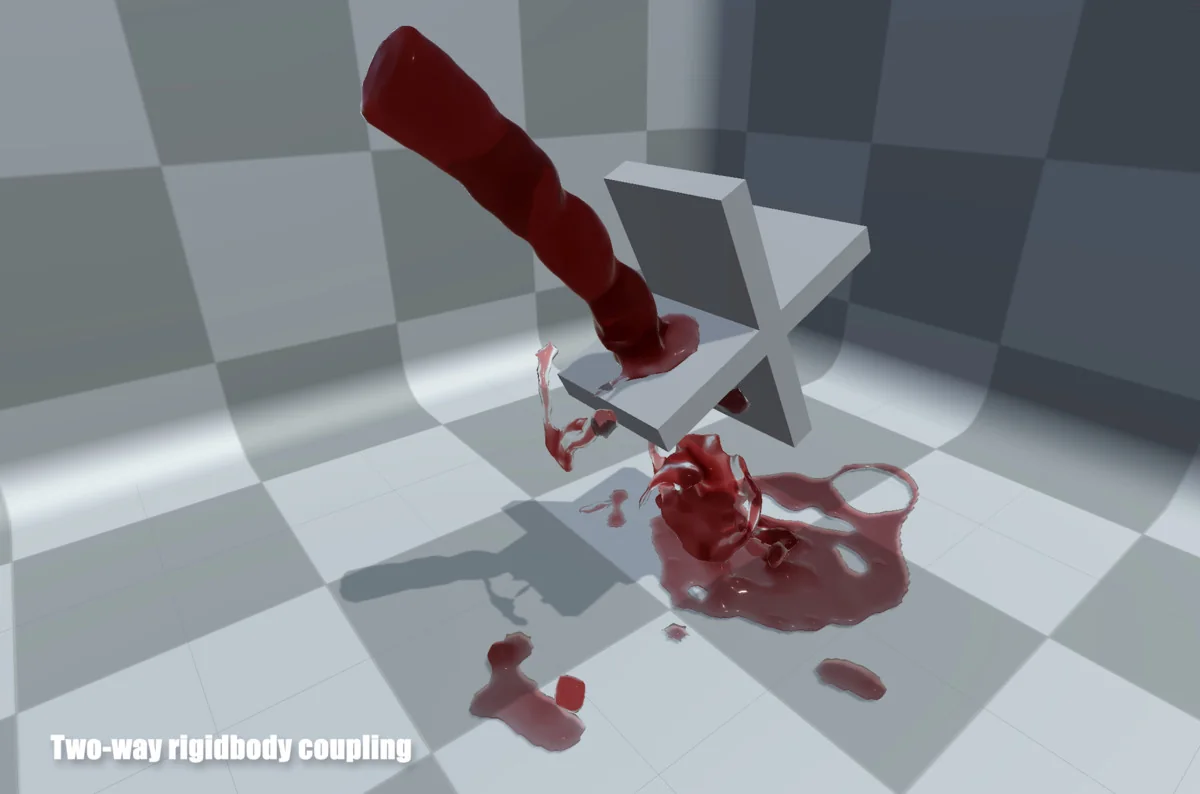
Everything here starts with particles, and the engine is set up so those particles behave like a range of deformable materials beyond one canned liquid. Fluids react to each other, which is what makes mixed-material scenes possible. They can affect rigid bodies and be affected by them in both directions, to the point of making an object float or sink. They can also stick to surfaces when stickiness is dialled up.
Simulation space is unbounded — the fluid is not confined to a fixed domain, so a stream can travel wherever emitters and colliders send it. Camera culling is optional: fluids that are not visible to any camera can stop updating their simulation, which buys back frame time in scenes with several separated pools or streams.
Emitters, force zones and void zones
Emitters accept custom shapes, so a spout, a crack in a wall or a nozzle profile can define where particles appear. Emitters also carry an inherit-velocity property that lets the fluid take on a percentage of the emitter's own velocity, which is useful for anything attached to a moving object.
Force zones can take on the shape of any collider and run in radial, linear or vortex modes — a vortex zone inside a tube, a radial push around a spinning fan, a linear current across a channel. Each zone also has a colour parameter that tints the particles entering it, a small touch that makes invisible forces legible in a scene. Void zones do the opposite: they kill particles that enter, or shorten their lifetime, which is how a drain or a cleanup boundary is expressed.
The Fluid Properties Worth Tuning
Viscosity, density, surface tension, stickiness and vorticity are all adjustable, and several of them can be set per particle rather than only globally. High viscosity produces buckling and coiling rather than a uniform syrup, which is the difference between a convincing thick pour and a stretched blob. Multi-phase setups support high density ratios, so a heavy fluid and a light one can share a simulation without one dissolving into the other.
Resolution is handled by a single parameter, so raising detail on an effect does not mean re-authoring it. Fluids of different resolution can interact in the same simulation, which lets a hero splash run dense while the surrounding spray stays cheap.
Solvers can optionally enforce boundary limits so particles cannot escape a defined volume. That replaces the common workaround of lining a scene with invisible colliders just to keep fluid contained. A newer vorticity model uses a micropolar formulation, and barolinic vorticity extends the same machinery toward more realistic gas behaviour.
Colliders and Two-Way Rigid Body Contact
The collider bridge covers Box, Sphere, Capsule, Mesh, Character, Terrain and distance field (SDF) shapes. That spread matters for interaction design: a character capsule can wade through a stream, a terrain patch can channel runoff, and an SDF can describe a shape too awkward for primitive colliders. The two-way interaction means those bodies push the fluid and the fluid pushes back.
Larger scenes benefit from the optimisation applied to static colliders — they are skipped entirely during the solver update. Renderers gained object layer support and render layer masks, so what the fluid renders against can be separated from what it simulates against. A Synchronous Fixed solver synchronisation mode offers tighter integration with rigidbody physics, while particle lifetimes are managed by the solver backend rather than the emitter component, which pays off noticeably when particle counts climb.
Rendering Fluids and the Unity 6 Baseline
Fluid shaders can be authored in ShaderGraph, so the look of the liquid is open to the same node workflow as the rest of a project. Transparent fluid rendering supports URP's RenderGraph API, and foam and diffuse particles use an approximate volumetric lighting mode that can receive and cast shadows in URP. Foam and diffuse particles also gained collider collision detection on the compute backend only.
Version 7.2 raises the minimum to Unity 6000.0.82f1 and supports the Built-in pipeline, HDRP and URP at that version. RenderGraph is now required for fluid rendering, since the compatibility layer for older non-RenderGraph versions was removed. The same release adds support for Unity 6.5's EntityId API for GameObjects.
Anyone moving from an older release should plan for real work: Obi 7 is a major update that requires redoing the setup of most existing Obi-related functionality. New projects are the natural home for it, and an existing project that must migrate needs scheduled time rather than a drop-in swap.
Where Fluid Effects Fit, and Where They Don't
The intended scope is tight and worth respecting. Small to medium scale fluid simulations, 2D fluid game mechanics, dripping fluid and splash effects all sit comfortably inside it. Large scale simulation, oceans, lakes, rivers and floods do not — those are explicitly out of scope, and reaching for a particle solver to fill a lake will cost far more than it returns.
Fluid simulation is a demanding task in any engine, and the performance implications deserve attention before the first emitter is placed rather than after. The tools for managing that cost are present: resolution control, mixed-resolution fluids, camera culling, static collider skipping and a GPU backend. What the package is set up to handle is controlled, close-up liquid — a drip from a pipe, a splash against a boot, a viscous pour, a 2D mechanic built on flowing particles — with the physics knobs exposed and the scene interaction accounted for.