"2596237520a17fbf"{"id":"1002917","slug":"exe-extension-and-process-management","title":".exe Extension \u0026 Process Management","category":"Engine Tools","engine":"4.26 - 5.6","assetVersion":"Asset Version: 3.0 - 6.4","engineVersion":"Engine Version: 4.26 - 5.6","tag":"Engine Tools","accent":"blue","visual":"mech","summary":"Execute, monitor, and terminate external.exe applications inside Unreal Engine with 24 dedicated Blueprint and C++ nodes from UE4.26 to UE5.8.","platform":"Unreal Engine","indexPolicy":"index","publishedAt":"2026-11-21T15:46:43.853Z","updatedAt":"2026-11-21T15:46:43.853Z","sourceNotes":[],"fileContents":[],"compatibility":["Unreal Engine","Asset Version: 3.0 - 6.4","Engine Version: 4.26 - 5.6"],"featuredImage":{"alt":".exe Extension \u0026 Process Management","src":"/wp-content/uploads/published/2026/11/fce15fceeccd-abf13b05-3491-4b18-96ba-e7aeef5fa0dd-3838d14618.webp"},"fileSizeBytes":81788076,"hasDownloadLink":true,"downloads":0,"terms":[{"taxonomy":"category","slug":"engine-tools-tools-and-plugins","name":"Engine Tools"}],"galleryImages":[{"src":"/wp-content/uploads/published/2026/11/5d772f13bf15-5fc28ecb-4c8a-44d3-a3c7-91c71fff81a0-0cfbcc55ef.webp","alt":".exe Extension \u0026 Process Management"},{"src":"/wp-content/uploads/published/2026/11/96de288ccb4b-2f35f6c7-c684-4ab8-9a64-6b1a3a2722b5-c07ab4e249.webp","alt":".exe Extension \u0026 Process Management"},{"src":"/wp-content/uploads/published/2026/11/9587fb2b6b8a-619f523c-c0f5-4401-a77c-9ed56ba5d83b-d3998d5920.webp","alt":".exe Extension \u0026 Process Management"},{"src":"/wp-content/uploads/published/2026/11/b278e6d888f3-8de3934a-df46-4ae4-81ff-f76678747a61-7bf9bde04a.webp","alt":".exe Extension \u0026 Process Management"},{"src":"/wp-content/uploads/published/2026/11/a0088ba3257d-41c03856-2e7d-44a4-af30-f60d361419ab-5be96c78bf.webp","alt":".exe Extension \u0026 Process Management"},{"src":"/wp-content/uploads/published/2026/11/5d08362fcf64-1b3060d6-ccf5-4adb-a377-c0a4536312f6-84786438d3.webp","alt":".exe Extension \u0026 Process Management"},{"src":"/wp-content/uploads/published/2026/11/fa1fb6df8a65-9b8a453f-c305-4819-a3ea-e2cbba28d749-041e9c6c38.webp","alt":".exe Extension \u0026 Process Management"},{"src":"/wp-content/uploads/published/2026/11/24479ceb1224-21218b05-836e-4dd6-a127-85c5e2dd5d2c-2f7a496d2a.webp","alt":".exe Extension \u0026 Process Management"},{"src":"/wp-content/uploads/published/2026/11/77b7e30996a3-931ccdff-ffcf-408a-b574-2c8145ffc8aa-660be1eda9.webp","alt":".exe Extension \u0026 Process Management"},{"src":"/wp-content/uploads/published/2026/11/7c537755df9b-82732460-f39b-41c5-9ec6-5e2ffe84595a-32f04f8429.webp","alt":".exe Extension \u0026 Process Management"}],"contentHtml":"\u003cp\u003eRunning external operating system processes directly from an active Unreal Engine session introduces broad capabilities for standalone applications, utility software, and complex multi-application pipelines. The.exe Extension \u0026 Process Management plugin bridges the gap between engine runtime logic and the host system, providing the tools required to launch external software, inspect active tasks, and shut down designated programs without leaving the engine environment.\u003c/p\u003e \u003ch2\u003eProcess Execution and System Oversight Inside Unreal Engine\u003c/h2\u003e\n\u003cp\u003eInteracting with host binaries directly from engine scripts requires dedicated pathways that avoid thread locking or uncontrolled child processes. This plugin targets that specific bridge, allowing developers to execute arbitrary.exe files on demand, track running tasks, and force the termination of specific processes when conditions require it.\u003c/p\u003e\n\u003cp\u003eSystem administrators, simulation architects, and interactive media creators frequently face scenarios where Unreal Engine serves as the central graphical hub while specialized computational tasks, companion tools, or secondary scripts run outside the primary viewport. By establishing direct execution commands, an application can trigger background tasks, pass control to third-party tools, or orchestrate parallel tools that exist outside the compiled engine project files.\u003c/p\u003e\n\u003cp\u003eBeyond simple one-way launching, the plugin provides detailed oversight into the state of running processes. Querying active binaries provides developers with the operational data needed to verify whether an external process started correctly, confirm its continued background execution, and handle cleanup protocols when that external software finishes its work or hangs unexpectedly.\u003c/p\u003e \u003ch2\u003eTwenty-Four Nodes for Process Management and Runtime Control\u003c/h2\u003e\n\u003cp\u003eAt the center of the package is a suite of 24 functions and nodes exposed to both visual scripting and native programming environments. Every function is prepared for dual use in Blueprint graphs and C++ codebases, letting gameplay designers script procedural triggers in editor graphs while core engine programmers integrate process commands directly into custom engine subsystems or native game modules.\u003c/p\u003e\n\u003cp\u003eThe node library covers three distinct phases of external task handling:\u003c/p\u003e\n\u003cul\u003e \u003cli\u003e\u003cstrong\u003eExecution controls:\u003c/strong\u003e Nodes responsible for locating, triggering, and running target.exe binaries on the operating system.\u003c/li\u003e \u003cli\u003e\u003cstrong\u003eInspection and monitoring:\u003c/strong\u003e Query nodes that return specific details about running processes, reporting active binary states to engine logic.\u003c/li\u003e \u003cli\u003e\u003cstrong\u003eTermination routines:\u003c/strong\u003e Operational nodes designed to shut down or terminate external tasks directly from in-engine events.\u003c/li\u003e\n\u003c/ul\u003e\n\u003cp\u003eThe underlying implementation focuses on clean, organized, and efficient code paths. Full source code access is supplied, allowing engineering teams to audit system calls, tailor execution parameters for bespoke environments, or compile custom binary targets across diverse project architectures.\u003c/p\u003e \u003ch2\u003eLaunching, Switching, and Safeguarding Projects with the.exe Extension\u003c/h2\u003e\n\u003cp\u003eDirect executable handling unlocks concrete system-level features that standard engine libraries do not natively address. Practical production pipelines apply these tools across several distinct architectures:\u003c/p\u003e\n\u003cp\u003e\u003cstrong\u003eCustom Game Launchers:\u003c/strong\u003e Building standalone launchers inside Unreal Engine allows studio front-ends to check local dependencies, download supplementary packages, and launch the primary game client binary once prerequisites are met. Because the plugin handles both invocation and process discovery, a launcher can verify the status of the launched client and react accordingly if the secondary game process shuts down.\u003c/p\u003e\n\u003cp\u003e\u003cstrong\u003eAnti-Cheat and Security Safeguards:\u003c/strong\u003e Real-time process monitoring enables runtime cheat detection routines. A running project can scan the active process table on the host machine to detect known malicious tools, unauthorized injectors, or suspicious binaries running concurrently with the simulation. If a blacklisted program is detected, engine logic can immediately execute a termination command to halt the unauthorized program or shut down the secure client.\u003c/p\u003e\n\u003cp\u003e\u003cstrong\u003eRuntime Project Switching:\u003c/strong\u003e For enterprise setups, training simulators, or multi-part experiences divided into separate compiled executables, the plugin enables seamless handoffs. One project can launch a secondary Unreal Engine application and close itself down, allowing smooth transitions between vastly different technical environments or decoupled levels without maintaining massive, all-in-one builds.\u003c/p\u003e\n\u003cp\u003e\u003cstrong\u003eIn-Engine Task Managers:\u003c/strong\u003e Dedicated diagnostic displays or internal tools can aggregate running process data directly into Slate or UMG interfaces. Teams building kiosk software, museum installations, or production rigs can assemble custom task managers to supervise auxiliary utility tools, monitor hardware-adjacent software, and terminate frozen tasks directly from a touch-screen HUD.\u003c/p\u003e \u003ch2\u003eIntegration Scope Across Engine Generations\u003c/h2\u003e\n\u003cp\u003eMaintained through version V.7.0, the toolset spans an exceptionally wide engine compatibility range, functioning across Unreal Engine 4.26 through Unreal Engine 5.8. This broad coverage allows studios locked into legacy UE4 builds to deploy the same process management routines used by teams leveraging the newest UE5 iterations.\u003c/p\u003e\n\u003cp\u003eThe plugin is also designed to work alongside companion tools within broader production bundles, including the Nodes Bundle and standalone companion utilities such as the Window Extension plugin and the.bat Extension plugin. When paired with window management tools, developers gain the ability to launch an external.exe and immediately manipulate its host operating system window, creating unified desktop experiences from disparate standalone applications.\u003c/p\u003e\n\u003cp\u003eShipped under a per-seat license that covers commercial and non-commercial projects, the plugin provides full codebase access with organized architecture, documented node behaviors, tutorial video documentation, and active changelog tracking for teams requiring reliable system execution utilities inside Unreal Engine.\u003c/p\u003e\n\n\u003ch2\u003eMore From The Same Workflow\u003c/h2\u003e\n\u003cul\u003e\n\u003cli\u003e\u003ca href=\"https://3dcghub.com/async-blueprints-extension/\" rel=\"noopener noreferrer\"\u003eAsync Blueprints Extension\u003c/a\u003e\u003c/li\u003e\n\u003cli\u003e\u003ca href=\"https://3dcghub.com/agora-static-mesh-thumbnail-render-extension/\" rel=\"noopener noreferrer\"\u003eAgora Static Mesh Thumbnail Render Extension\u003c/a\u003e\u003c/li\u003e\n\u003cli\u003e\u003ca href=\"https://3dcghub.com/blueprintjson/\" rel=\"noopener noreferrer\"\u003eBlueprintJSON\u003c/a\u003e\u003c/li\u003e\n\u003cli\u003e\u003ca href=\"https://3dcghub.com/blueprint-assist/\" rel=\"noopener noreferrer\"\u003eBlueprint Assist\u003c/a\u003e\u003c/li\u003e\n\u003cli\u003e\u003ca href=\"https://3dcghub.com/le-http-request/\" rel=\"noopener noreferrer\"\u003eLE Http Request\u003c/a\u003e\u003c/li\u003e\n\u003c/ul\u003e","contentTextLength":6222,"navigation":{"current":2,"total":4839,"previous":{"id":"13636","slug":"dialogue-plugin","title":"Dialogue Plugin","category":"Dialog Systems","platform":"Unreal Engine","updatedAt":"2026-11-21T19:04:51.413Z"},"next":{"id":"1002916","slug":"loading-screen-with-load-percentage","title":"Loading Screen With Load Percentage","category":"Engine Tools","platform":"Unreal Engine","updatedAt":"2026-11-21T15:45:23.734Z"}},"relatedResources":[{"id":"13699","slug":"async-blueprints-extension","title":"Async Blueprints Extension","category":"Engine Tools","engine":"5.7","assetVersion":"Engine version: 5.7","engineVersion":"Asset Version:1.6.1","tag":"Engine Tools","accent":"blue","visual":"mech","summary":"The Async Blueprints Extension offers a simple, object-oriented approach to handling asynchronous tasks. This tool streamlines threading and variable management within your project.","platform":"Unreal Engine","indexPolicy":"noindex","publishedAt":"2026-03-11T09:43:07.000Z","updatedAt":"2026-04-19T15:46:23.000Z","sourceNotes":[],"fileContents":[],"compatibility":["Unreal Engine","Engine version: 5.7","Asset Version: 1.6.1"],"featuredImage":{"alt":"Async Blueprints Extension","src":"https://3dcghub.com/wp-content/uploads/2026/03/9861d440-1082-434a-b436-8abbdf38ba3f.webp"},"fileSizeBytes":23408948,"hasDownloadLink":true,"downloads":0},{"id":"1002905","slug":"agora-static-mesh-thumbnail-render-extension","title":"Agora Static Mesh Thumbnail Render Extension","category":"Engine Tools","engine":"4.26 - 5.3","assetVersion":"Asset Version: 1.0","engineVersion":"Engine Version: 4.26 - 5.3","tag":"Engine Tools","accent":"blue","visual":"mech","summary":"Display essential static mesh information and detailed preview data directly inside the Content Browser with the Agora editor plugin.","platform":"Unreal Engine","indexPolicy":"index","publishedAt":"2026-11-21T15:36:22.699Z","updatedAt":"2026-11-21T15:36:22.699Z","sourceNotes":[],"fileContents":[],"compatibility":["Unreal Engine","Asset Version: 1.0","Engine Version: 4.26 - 5.3"],"featuredImage":{"alt":"Agora Static Mesh Thumbnail Render Extension","src":"/wp-content/uploads/published/2026/11/8c3d61aa8314-3f9d0bfe-b027-4a68-a13c-54894f7c5712-19c9dd927b.webp"},"fileSizeBytes":23007956,"hasDownloadLink":true,"downloads":0},{"id":"13767","slug":"blueprintjson","title":"BlueprintJSON","category":"Engine Tools","engine":"4.23 - 5.8","assetVersion":"Asset Version:1.0 - 1.0.6","engineVersion":"Engine version: 4.23 - 5.8","tag":"Engine Tools","accent":"blue","visual":"mech","summary":"BlueprintJSON is a comprehensive library designed to bring JSON functionality to Unreal Engine Blueprints. It enables developers to read, parse, edit, and save JSON data efficiently using asynchronous processing.","platform":"Unreal Engine","indexPolicy":"noindex","publishedAt":"2026-03-11T09:59:29.000Z","updatedAt":"2026-09-29T08:30:49.387Z","sourceNotes":[],"fileContents":[],"compatibility":["Unreal Engine","Asset Version:1.0 - 1.0.6","Engine version: 4.23 - 5.8"],"featuredImage":{"alt":"BlueprintJSON","src":"https://3dcghub.com/wp-content/uploads/2026/03/635658e0-64f1-431f-b6f4-59f2fe39da17.webp"},"fileSizeBytes":314814078,"hasDownloadLink":true,"downloads":1}]}
Resource screenshots
1 / 10
Join our channel
Follow 3DCGHUB on Telegram for new resource drops, migration updates, and community notices.
Running external operating system processes directly from an active Unreal Engine session introduces broad capabilities for standalone applications, utility software, and complex multi-application pipelines. The.exe Extension & Process Management plugin bridges the gap between engine runtime logic and the host system, providing the tools required to launch external software, inspect active tasks, and shut down designated programs without leaving the engine environment.
Process Execution and System Oversight Inside Unreal Engine
Interacting with host binaries directly from engine scripts requires dedicated pathways that avoid thread locking or uncontrolled child processes. This plugin targets that specific bridge, allowing developers to execute arbitrary.exe files on demand, track running tasks, and force the termination of specific processes when conditions require it.
System administrators, simulation architects, and interactive media creators frequently face scenarios where Unreal Engine serves as the central graphical hub while specialized computational tasks, companion tools, or secondary scripts run outside the primary viewport. By establishing direct execution commands, an application can trigger background tasks, pass control to third-party tools, or orchestrate parallel tools that exist outside the compiled engine project files.
Beyond simple one-way launching, the plugin provides detailed oversight into the state of running processes. Querying active binaries provides developers with the operational data needed to verify whether an external process started correctly, confirm its continued background execution, and handle cleanup protocols when that external software finishes its work or hangs unexpectedly.
Twenty-Four Nodes for Process Management and Runtime Control
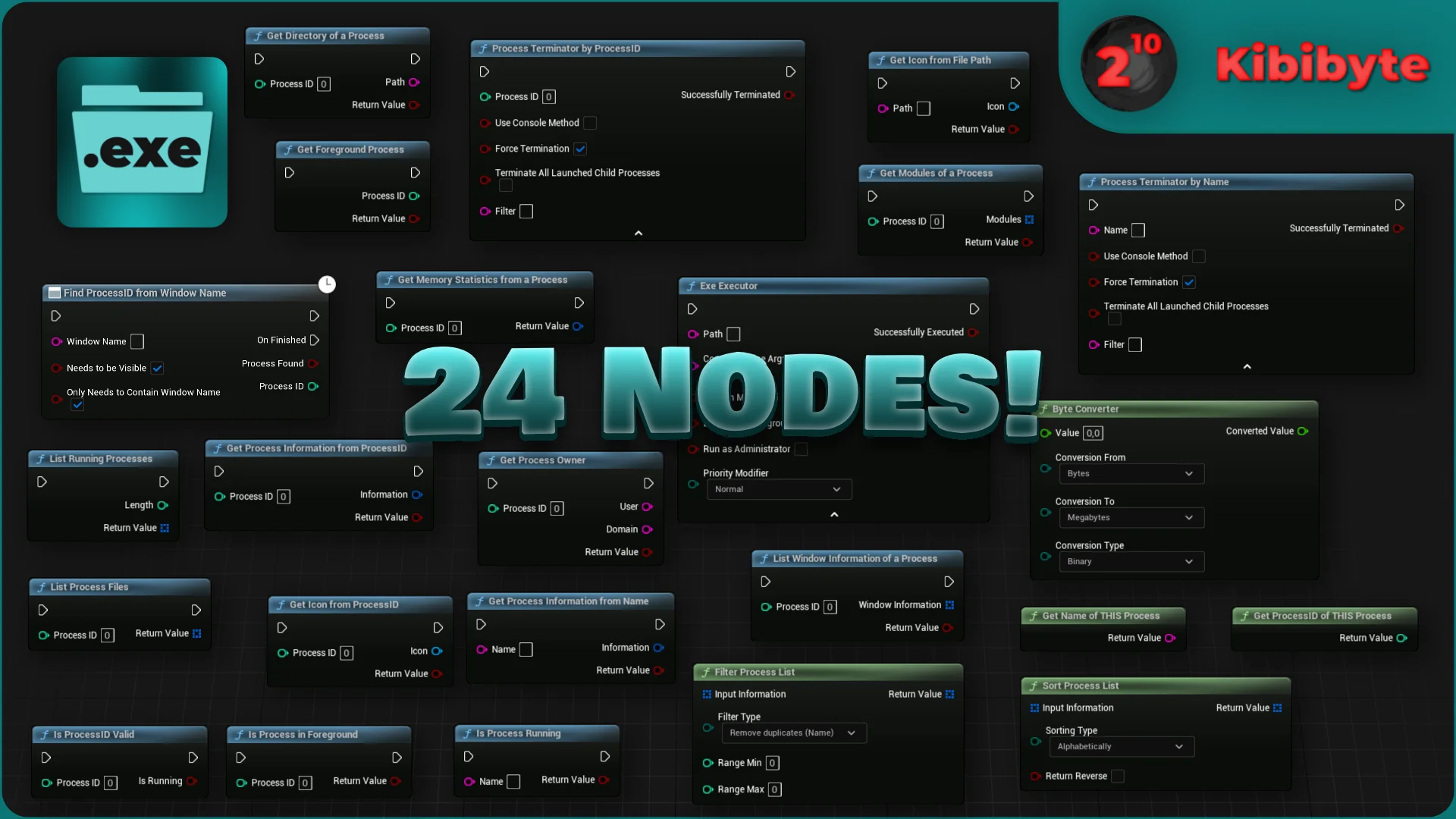
At the center of the package is a suite of 24 functions and nodes exposed to both visual scripting and native programming environments. Every function is prepared for dual use in Blueprint graphs and C++ codebases, letting gameplay designers script procedural triggers in editor graphs while core engine programmers integrate process commands directly into custom engine subsystems or native game modules.
The node library covers three distinct phases of external task handling:
Execution controls: Nodes responsible for locating, triggering, and running target.exe binaries on the operating system.
Inspection and monitoring: Query nodes that return specific details about running processes, reporting active binary states to engine logic.
Termination routines: Operational nodes designed to shut down or terminate external tasks directly from in-engine events.
The underlying implementation focuses on clean, organized, and efficient code paths. Full source code access is supplied, allowing engineering teams to audit system calls, tailor execution parameters for bespoke environments, or compile custom binary targets across diverse project architectures.
Launching, Switching, and Safeguarding Projects with the.exe Extension
Direct executable handling unlocks concrete system-level features that standard engine libraries do not natively address. Practical production pipelines apply these tools across several distinct architectures:
Custom Game Launchers: Building standalone launchers inside Unreal Engine allows studio front-ends to check local dependencies, download supplementary packages, and launch the primary game client binary once prerequisites are met. Because the plugin handles both invocation and process discovery, a launcher can verify the status of the launched client and react accordingly if the secondary game process shuts down.
Anti-Cheat and Security Safeguards: Real-time process monitoring enables runtime cheat detection routines. A running project can scan the active process table on the host machine to detect known malicious tools, unauthorized injectors, or suspicious binaries running concurrently with the simulation. If a blacklisted program is detected, engine logic can immediately execute a termination command to halt the unauthorized program or shut down the secure client.
Runtime Project Switching: For enterprise setups, training simulators, or multi-part experiences divided into separate compiled executables, the plugin enables seamless handoffs. One project can launch a secondary Unreal Engine application and close itself down, allowing smooth transitions between vastly different technical environments or decoupled levels without maintaining massive, all-in-one builds.
In-Engine Task Managers: Dedicated diagnostic displays or internal tools can aggregate running process data directly into Slate or UMG interfaces. Teams building kiosk software, museum installations, or production rigs can assemble custom task managers to supervise auxiliary utility tools, monitor hardware-adjacent software, and terminate frozen tasks directly from a touch-screen HUD.
Integration Scope Across Engine Generations
Maintained through version V.7.0, the toolset spans an exceptionally wide engine compatibility range, functioning across Unreal Engine 4.26 through Unreal Engine 5.8. This broad coverage allows studios locked into legacy UE4 builds to deploy the same process management routines used by teams leveraging the newest UE5 iterations.
The plugin is also designed to work alongside companion tools within broader production bundles, including the Nodes Bundle and standalone companion utilities such as the Window Extension plugin and the.bat Extension plugin. When paired with window management tools, developers gain the ability to launch an external.exe and immediately manipulate its host operating system window, creating unified desktop experiences from disparate standalone applications.
Shipped under a per-seat license that covers commercial and non-commercial projects, the plugin provides full codebase access with organized architecture, documented node behaviors, tutorial video documentation, and active changelog tracking for teams requiring reliable system execution utilities inside Unreal Engine.
 Engine Tools
 Engine Tools
 Engine Tools