"b00678cacce53329"{"id":"1002861","slug":"living-particles-niagara","title":"Living Particles Niagara","category":"Variety","engine":"4.23+,5.0+","assetVersion":"","engineVersion":"Engine Version: 4.23+,5.0+","tag":"Variety","accent":"blue","visual":"mech","summary":"Explore Living Particles Niagara, featuring GPU-simulated particle systems, multi-actor interactivity, gradient textures, and dynamic environment responses.","platform":"Unreal Engine","indexPolicy":"index","publishedAt":"2026-11-20T12:42:01.224Z","updatedAt":"2026-11-20T12:42:01.224Z","sourceNotes":[],"fileContents":[],"compatibility":["Unreal Engine","Engine Version: 4.23+,5.0+"],"featuredImage":{"alt":"Living Particles Niagara","src":"/wp-content/uploads/published/2026/11/66b26a401d71-4f0aa935-1d3d-4ecf-99d6-26f16bc13442-19fd59b279.webp"},"fileSizeBytes":49743017,"hasDownloadLink":true,"downloads":0,"terms":[{"taxonomy":"category","slug":"variety-vfx","name":"Variety"}],"galleryImages":[{"src":"/wp-content/uploads/published/2026/11/349328f30500-e15e0ee1-6b88-428c-9dea-130a7167b218-5b863e2c13.webp","alt":"Living Particles Niagara"},{"src":"/wp-content/uploads/published/2026/11/0aac9a1ccda7-80e9ad73-32c6-4c84-9e87-010929d64c91-3945d8d59a.webp","alt":"Living Particles Niagara"},{"src":"/wp-content/uploads/published/2026/11/b045efbb60f8-eac04944-3a53-44d6-8d33-b13ae9094ae1-4e2e06fbb9.webp","alt":"Living Particles Niagara"},{"src":"/wp-content/uploads/published/2026/11/b9b18f06db81-6007164c-7850-4337-833b-5f62aa614f90-6fdf358e2a.webp","alt":"Living Particles Niagara"},{"src":"/wp-content/uploads/published/2026/11/c6398f61c870-9089983c-5fc5-447b-ad57-f0a88f091c3c-80421a7cf4.webp","alt":"Living Particles Niagara"},{"src":"/wp-content/uploads/published/2026/11/a78ffc891e1c-208b2b38-9800-4fcf-9a6d-ef1683e64b61-2f182e1222.webp","alt":"Living Particles Niagara"},{"src":"/wp-content/uploads/published/2026/11/ff4072f98280-7b0dca48-ed82-4683-9b86-45ff5f3e9643-c3c7d3b124.webp","alt":"Living Particles Niagara"},{"src":"/wp-content/uploads/published/2026/11/fe3974880ff3-f32949b2-9e7d-4530-8d3a-b8a281d26fca-e0eee2efa5.webp","alt":"Living Particles Niagara"},{"src":"/wp-content/uploads/published/2026/11/23505f1f5db6-7ac38395-e02b-4f08-8ff1-6234aaf40837-b16369f23e.webp","alt":"Living Particles Niagara"},{"src":"/wp-content/uploads/published/2026/11/6bf425dc0a6f-1eaa993e-2dbe-4da5-8352-8f57338862f7-5fce43ccf0.webp","alt":"Living Particles Niagara"}],"accessPanel":{"kind":"resource","title":"Get this resource","safetyNote":"Resources are manually reviewed before listing to improve quality and reduce obvious risks.","fileName":"Content.7z","resourceType":"Resource archive","versions":[]},"contentHtml":"\u003cp\u003eLiving Particles Niagara provides a framework of fully customizable visual effects designed around interactive surfaces and responsive ambient elements. Built on the Niagara Particle System, the collection delivers dynamic elements such as living ground that reacts directly to character movement alongside reactive environmental atmospherics. Because the systems run via GPU particle simulation, scenes can handle heavy visual density and complex spatial interaction without placing unnecessary strain on the central processor.\u003c/p\u003e \u003ch2\u003eInteractive Ground Mechanics in Living Particles\u003c/h2\u003e\n\u003cp\u003eThe core behavior of the system centers on reactivity. When characters navigate an environment, the particle emitters respond to their coordinates and velocity, creating trails, shifts, and displacements across terrain surfaces. This interaction is not limited to an isolated hero character. The particle logic supports influence from both individual players and multiple simultaneous actors, maintaining steady frame rates even when several entities disrupt the particle field at once.\u003c/p\u003e\n\u003cp\u003eInteraction is driven through affector actors that interface directly with the particle emitters. While initial configurations support up to four active affectors, the underlying structure accommodates large-scale multi-entity tracking, expanding to accommodate wide skirmishes, crowded play areas, or roaming environmental creatures. By translating positional data from these actors into the GPU simulation stage, the ground surfaces displace, part, or pulse in direct response to gameplay events.\u003c/p\u003e \u003ch2\u003eGPU Simulation Mechanics and Niagara Affector Tracking\u003c/h2\u003e\n\u003cp\u003eRunning particle computations on the GPU allows the system to sustain large particle volumes that would otherwise bottleneck rendering pipelines on the CPU. The Niagara framework handles the velocity calculations, lifespan variations, and proximity checks directly within compute shaders. This structure allows the particles to maintain fluidity across wide open areas, dense forest floors, or cavernous spaces without sacrificing real-time fidelity.\u003c/p\u003e\n\u003cp\u003eAffector scaling forms a major component of the system's flexibility. Across different engine versions, the architecture demonstrates expanded capacity, with version 4.25 introducing support for up to 256 Affector Actors. This expanded ceiling allows developers to populate scenes with numerous dynamic objects—such as projectiles, multiple player characters, enemy squads, or moving environmental props—all influencing the surrounding particle field simultaneously. As entities pass through the particle volume, the GPU reads their positions to recalculate particle vectors and surface disturbances instantaneously.\u003c/p\u003e \u003ch2\u003eVersion Fixes and Stability in Living Particles Niagara\u003c/h2\u003e\n\u003cp\u003eAs the Niagara framework evolved through engine updates, maintenance releases targeted visual consistency and simulation precision. In version 4.26, specific adjustments corrected flickering anomalies that previously occurred during high-intensity GPU simulations. These visual artifacts, often caused by buffer updates or bounds calculations falling out of synchronization during camera transitions, were resolved to guarantee clean visual output across all frame rates.\u003c/p\u003e\n\u003cp\u003eThe 4.26 release also resolved spatial offset discrepancies encountered when running GPU simulations. Accurate offsets ensure that particle contact points align precisely with actor world positions. Without proper offset handling, particles might displace several units away from an actor's footstep or surface collision, breaking the illusion of physical contact. The corrected offset logic ensures that whether an actor is sprinting, stopping, or leaping across a surface, the reactive disturbance tracks the collision boundary exactly.\u003c/p\u003e \u003ch2\u003eVisual Range and Gradient Texture Customization\u003c/h2\u003e\n\u003cp\u003eVisual customization is exposed directly through emitter parameters, enabling adjustments to scale, velocity, color curves, lifetime, and dispersion. To support different aesthetic needs, the package includes 19 dedicated gradient textures. These color ramps allow developers to remap energy fields, surface dust, fluid transitions, and mystical glows without authoring external textures from scratch.\u003c/p\u003e\n\u003cp\u003eThe included gradient textures and parameter controls allow the effects to span multiple visual genres:\u003c/p\u003e\n\u003cul\u003e \u003cli\u003e\u003cstrong\u003eFantasy and Magic:\u003c/strong\u003e Glowing runes, ethereal floor disturbances, mystical trails, and enchanted forest soils that radiate light upon contact.\u003c/li\u003e \u003cli\u003e\u003cstrong\u003eRealistic Environments:\u003c/strong\u003e Ground dust, scattered debris, water disturbances, and responsive terrain surfaces suited for grounded simulation.\u003c/li\u003e \u003cli\u003e\u003cstrong\u003eStylized and Lowpoly Worlds:\u003c/strong\u003e Clean, high-contrast reactive shapes with punchy color transitions fitting non-photorealistic aesthetics.\u003c/li\u003e \u003cli\u003e\u003cstrong\u003eDark and Atmospheric Moods:\u003c/strong\u003e Dimly lit embers, creeping mist, shadowy floor currents, and subtle ambient particle reactions for tense settings.\u003c/li\u003e\n\u003c/ul\u003e\n\u003cp\u003eBecause every parameter inside the Niagara emitter stack remains open, artists can modify the behavior from slow-drifting aquatic motion to rapid, sharp kinetic bursts simply by adjusting values in the module tree.\u003c/p\u003e \u003ch2\u003eLevel Integration and Blueprint Workflows\u003c/h2\u003e\n\u003cp\u003eDeployment within level design pipelines relies on a direct drag-and-drop workflow. Emitters and systems can be placed immediately into scene levels, where they inherit spatial boundaries and begin responding to tagged actors without complex setup sequences. When combined with Blueprint logic, developers can toggle affector states, alter color ramps based on gameplay states, or activate living ground patches dynamically when specific game events trigger.\u003c/p\u003e\n\u003cp\u003eThe interaction between Blueprints and Niagara parameters enables gameplay-driven visual feedback. Trigger volumes can swap gradient references, adjust particle scale as health depletes, or amplify the affector radius when a character activates a special ability. The ease of dropping emitters directly into levels, paired with exposed parameters and GPU stability, makes the collection practical for rapid scene assembly across both single-player environments and multiplayer encounters.\u003c/p\u003e\n\n\u003ch2\u003eRelated Resources Worth Checking\u003c/h2\u003e\n\u003cul\u003e\n\u003cli\u003e\u003ca href=\"https://3dcghub.com/niagara-realistic-starter-vfx-pack/\" rel=\"noopener noreferrer\"\u003eNiagara Realistic Starter VFX Pack\u003c/a\u003e\u003c/li\u003e\n\u003cli\u003e\u003ca href=\"https://3dcghub.com/niagara-symbols/\" rel=\"noopener noreferrer\"\u003eNiagara Symbols\u003c/a\u003e\u003c/li\u003e\n\u003cli\u003e\u003ca href=\"https://3dcghub.com/niagara-sci-fi-starter-vfx-pack/\" rel=\"noopener noreferrer\"\u003eNiagara Sci-Fi Starter VFX Pack\u003c/a\u003e\u003c/li\u003e\n\u003cli\u003e\u003ca href=\"https://3dcghub.com/niagara-effects05/\" rel=\"noopener noreferrer\"\u003eNiagara Effects05\u003c/a\u003e\u003c/li\u003e\n\u003cli\u003e\u003ca href=\"https://3dcghub.com/niagara-effects03/\" rel=\"noopener noreferrer\"\u003eNiagara Effects03\u003c/a\u003e\u003c/li\u003e\n\u003c/ul\u003e","contentTextLength":6221,"navigation":{"current":19,"total":4797,"previous":{"id":"1002862","slug":"neonify-stylized-neon-stages-with-neon-ambience","title":"Neonify - Stylized Neon Stages with Neon Ambience","category":"Sci-Fi","platform":"Unreal Engine","updatedAt":"2026-11-20T12:44:26.339Z"},"next":{"id":"1002860","slug":"fantasy-vfx-collection","title":"FANTASY VFX COLLECTION","category":"Variety","platform":"Unreal Engine","updatedAt":"2026-11-20T12:40:56.633Z"}},"relatedResources":[{"id":"1002278","slug":"niagara-realistic-starter-vfx-pack","title":"Niagara Realistic Starter VFX Pack","category":"Variety","engine":"4.25+,5.0+","assetVersion":"","engineVersion":"Engine Version: 4.25+,5.0+","tag":"Variety","accent":"blue","visual":"mech","summary":"Examine the Niagara Realistic Starter VFX Pack, featuring 148 particle systems, transform-based scaling, and comprehensive environmental and combat effects.","platform":"Unreal Engine","indexPolicy":"index","publishedAt":"2026-10-29T16:36:27.991Z","updatedAt":"2026-10-29T16:36:27.991Z","sourceNotes":[],"fileContents":[],"compatibility":["Unreal Engine","Engine Version: 4.25+,5.0+"],"featuredImage":{"alt":"Niagara Realistic Starter VFX Pack","src":"/wp-content/uploads/published/2026/10/926adaa76d87-2c37688c-2dc0-4683-8cf4-d600fcea15d4-f5feac6fed.webp"},"fileSizeBytes":960341083,"hasDownloadLink":true,"downloads":2},{"id":"1002871","slug":"niagara-dissolution-examples","title":"Niagara Dissolution Examples","category":"Variety","engine":"4.26+,5.0+","assetVersion":"","engineVersion":"Engine Version: 4.26+,5.0+","tag":"Variety","accent":"blue","visual":"luts","summary":"Explore practical methods for static and skeletal mesh dissolution in Unreal Engine using Niagara particle systems, Blueprints, and Scene Capture 2D.","platform":"Unreal Engine","indexPolicy":"index","publishedAt":"2026-11-20T16:36:06.698Z","updatedAt":"2026-11-20T16:36:06.698Z","sourceNotes":[],"fileContents":[],"compatibility":["Unreal Engine","Engine Version: 4.26+,5.0+"],"featuredImage":{"alt":"Niagara Dissolution Examples","src":"/wp-content/uploads/published/2026/11/64b1ca88f365-f5399d97-8536-41d5-b3ea-1db17fa2985e-5d821fcbd2.webp"},"fileSizeBytes":239817559,"hasDownloadLink":true,"downloads":0},{"id":"1002825","slug":"niagara-symbols","title":"Niagara Symbols","category":"Variety","engine":"4.26+,5.0+","assetVersion":"","engineVersion":"Engine Version: 4.26+,5.0+","tag":"Variety","accent":"blue","visual":"mech","summary":"Explore Niagara Symbols, an Unreal Engine particle pack featuring alphabet letters, numbers, currency signs, glyphs, and runes for game VFX.","platform":"Unreal Engine","indexPolicy":"index","publishedAt":"2026-11-20T08:13:18.772Z","updatedAt":"2026-11-20T08:13:18.772Z","sourceNotes":[],"fileContents":[],"compatibility":["Unreal Engine","Engine Version: 4.26+,5.0+"],"featuredImage":{"alt":"Niagara Symbols","src":"/wp-content/uploads/published/2026/11/a48ce7583c7f-1daffb7b-1d7d-457f-99a6-4fee023ec38e-55650372ab.webp"},"fileSizeBytes":34569066,"hasDownloadLink":true,"downloads":0}]}
Resource screenshots
1 / 10
Join our channel
Follow 3DCGHUB on Telegram for new resource drops, migration updates, and community notices.
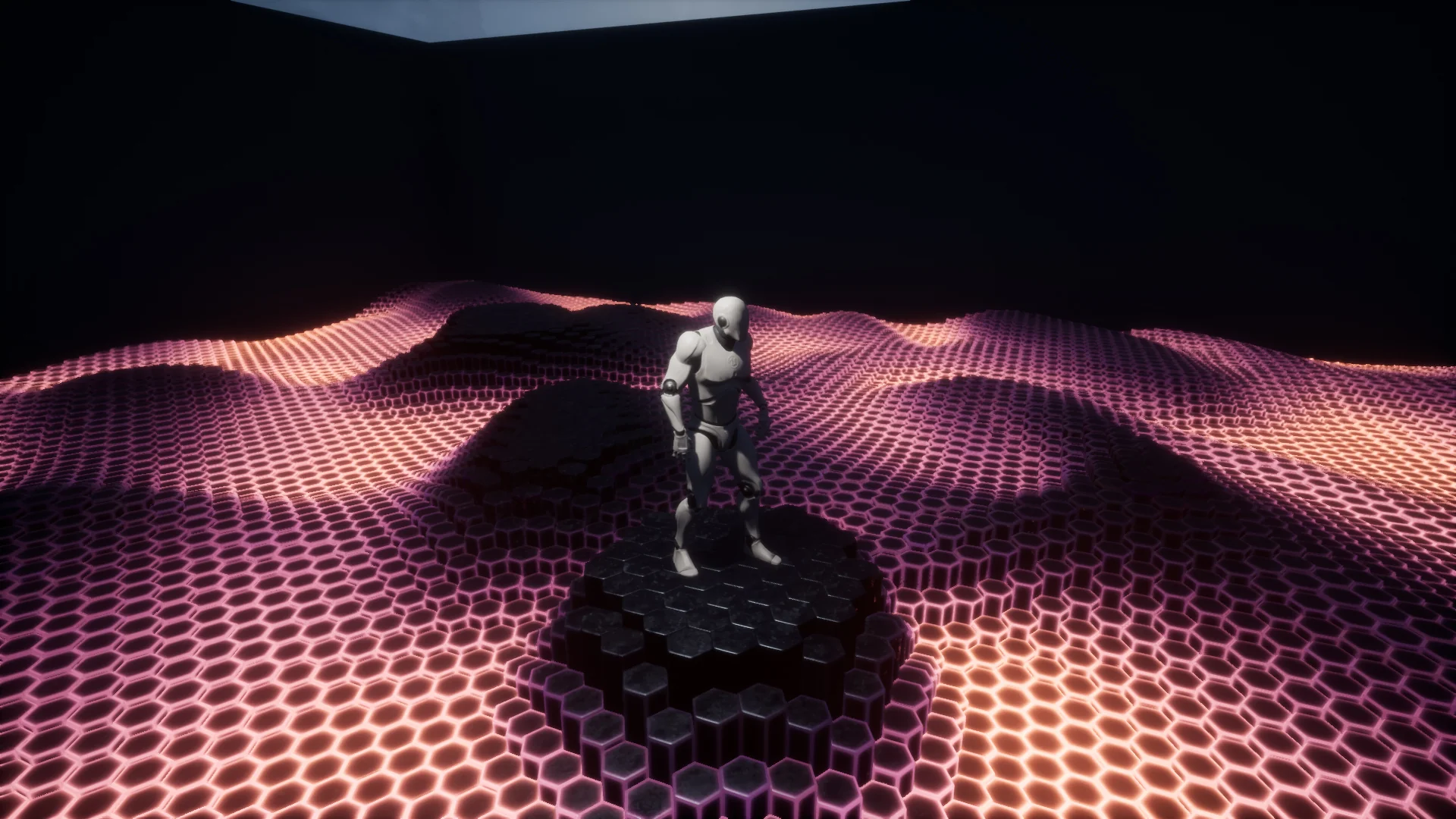
Living Particles Niagara provides a framework of fully customizable visual effects designed around interactive surfaces and responsive ambient elements. Built on the Niagara Particle System, the collection delivers dynamic elements such as living ground that reacts directly to character movement alongside reactive environmental atmospherics. Because the systems run via GPU particle simulation, scenes can handle heavy visual density and complex spatial interaction without placing unnecessary strain on the central processor.
Interactive Ground Mechanics in Living Particles
The core behavior of the system centers on reactivity. When characters navigate an environment, the particle emitters respond to their coordinates and velocity, creating trails, shifts, and displacements across terrain surfaces. This interaction is not limited to an isolated hero character. The particle logic supports influence from both individual players and multiple simultaneous actors, maintaining steady frame rates even when several entities disrupt the particle field at once.
Interaction is driven through affector actors that interface directly with the particle emitters. While initial configurations support up to four active affectors, the underlying structure accommodates large-scale multi-entity tracking, expanding to accommodate wide skirmishes, crowded play areas, or roaming environmental creatures. By translating positional data from these actors into the GPU simulation stage, the ground surfaces displace, part, or pulse in direct response to gameplay events.
GPU Simulation Mechanics and Niagara Affector Tracking
Running particle computations on the GPU allows the system to sustain large particle volumes that would otherwise bottleneck rendering pipelines on the CPU. The Niagara framework handles the velocity calculations, lifespan variations, and proximity checks directly within compute shaders. This structure allows the particles to maintain fluidity across wide open areas, dense forest floors, or cavernous spaces without sacrificing real-time fidelity.
Affector scaling forms a major component of the system's flexibility. Across different engine versions, the architecture demonstrates expanded capacity, with version 4.25 introducing support for up to 256 Affector Actors. This expanded ceiling allows developers to populate scenes with numerous dynamic objects—such as projectiles, multiple player characters, enemy squads, or moving environmental props—all influencing the surrounding particle field simultaneously. As entities pass through the particle volume, the GPU reads their positions to recalculate particle vectors and surface disturbances instantaneously.
Version Fixes and Stability in Living Particles Niagara
As the Niagara framework evolved through engine updates, maintenance releases targeted visual consistency and simulation precision. In version 4.26, specific adjustments corrected flickering anomalies that previously occurred during high-intensity GPU simulations. These visual artifacts, often caused by buffer updates or bounds calculations falling out of synchronization during camera transitions, were resolved to guarantee clean visual output across all frame rates.
The 4.26 release also resolved spatial offset discrepancies encountered when running GPU simulations. Accurate offsets ensure that particle contact points align precisely with actor world positions. Without proper offset handling, particles might displace several units away from an actor's footstep or surface collision, breaking the illusion of physical contact. The corrected offset logic ensures that whether an actor is sprinting, stopping, or leaping across a surface, the reactive disturbance tracks the collision boundary exactly.
Visual Range and Gradient Texture Customization
Visual customization is exposed directly through emitter parameters, enabling adjustments to scale, velocity, color curves, lifetime, and dispersion. To support different aesthetic needs, the package includes 19 dedicated gradient textures. These color ramps allow developers to remap energy fields, surface dust, fluid transitions, and mystical glows without authoring external textures from scratch.
The included gradient textures and parameter controls allow the effects to span multiple visual genres:
Fantasy and Magic: Glowing runes, ethereal floor disturbances, mystical trails, and enchanted forest soils that radiate light upon contact.
Realistic Environments: Ground dust, scattered debris, water disturbances, and responsive terrain surfaces suited for grounded simulation.
Stylized and Lowpoly Worlds: Clean, high-contrast reactive shapes with punchy color transitions fitting non-photorealistic aesthetics.
Dark and Atmospheric Moods: Dimly lit embers, creeping mist, shadowy floor currents, and subtle ambient particle reactions for tense settings.
Because every parameter inside the Niagara emitter stack remains open, artists can modify the behavior from slow-drifting aquatic motion to rapid, sharp kinetic bursts simply by adjusting values in the module tree.
Level Integration and Blueprint Workflows
Deployment within level design pipelines relies on a direct drag-and-drop workflow. Emitters and systems can be placed immediately into scene levels, where they inherit spatial boundaries and begin responding to tagged actors without complex setup sequences. When combined with Blueprint logic, developers can toggle affector states, alter color ramps based on gameplay states, or activate living ground patches dynamically when specific game events trigger.
The interaction between Blueprints and Niagara parameters enables gameplay-driven visual feedback. Trigger volumes can swap gradient references, adjust particle scale as health depletes, or amplify the affector radius when a character activates a special ability. The ease of dropping emitters directly into levels, paired with exposed parameters and GPU stability, makes the collection practical for rapid scene assembly across both single-player environments and multiplayer encounters.
 Variety
 Variety
 Variety