"b00678cacce53329"{"id":"1002871","slug":"niagara-dissolution-examples","title":"Niagara Dissolution Examples","category":"Variety","engine":"4.26+,5.0+","assetVersion":"","engineVersion":"Engine Version: 4.26+,5.0+","tag":"Variety","accent":"blue","visual":"luts","summary":"Explore practical methods for static and skeletal mesh dissolution in Unreal Engine using Niagara particle systems, Blueprints, and Scene Capture 2D.","platform":"Unreal Engine","indexPolicy":"index","publishedAt":"2026-11-20T16:36:06.698Z","updatedAt":"2026-11-20T16:36:06.698Z","sourceNotes":[],"fileContents":[],"compatibility":["Unreal Engine","Engine Version: 4.26+,5.0+"],"featuredImage":{"alt":"Niagara Dissolution Examples","src":"/wp-content/uploads/published/2026/11/64b1ca88f365-f5399d97-8536-41d5-b3ea-1db17fa2985e-5d821fcbd2.webp"},"fileSizeBytes":239817559,"hasDownloadLink":true,"downloads":0,"terms":[{"taxonomy":"category","slug":"variety-vfx","name":"Variety"}],"galleryImages":[{"src":"/wp-content/uploads/published/2026/11/587ec21d2f95-573919b3-fb6c-4fb8-9471-da8380b0c3a2-b49ecc4263.webp","alt":"Niagara Dissolution Examples"},{"src":"/wp-content/uploads/published/2026/11/47532138a853-a0721745-9786-4f37-a90c-cb84c16b81ee-c154dff9a6.webp","alt":"Niagara Dissolution Examples"},{"src":"/wp-content/uploads/published/2026/11/aecaff005915-49f45090-4bb9-46ae-9b58-04c2e33a452b-78179e0cc6.webp","alt":"Niagara Dissolution Examples"},{"src":"/wp-content/uploads/published/2026/11/994559560a4f-f2cc0f3e-9830-4ae0-a115-ba0e526b921a-6cdf644d81.webp","alt":"Niagara Dissolution Examples"},{"src":"/wp-content/uploads/published/2026/11/874f94715ceb-2ec24b0e-b958-4307-9bda-bfc483f79381-37aa6aee67.webp","alt":"Niagara Dissolution Examples"},{"src":"/wp-content/uploads/published/2026/11/6ec0369b230c-f4d799d6-30a8-4832-838c-751cffe3969a-f3052c7699.webp","alt":"Niagara Dissolution Examples"},{"src":"/wp-content/uploads/published/2026/11/9456c356dee2-59dda992-9d9c-473a-8a13-a7b2da6251ed-118aeddc14.webp","alt":"Niagara Dissolution Examples"},{"src":"/wp-content/uploads/published/2026/11/e2c5f8a0b970-319dd088-d2e3-4ffc-a72b-5edfae998500-005366d5f7.webp","alt":"Niagara Dissolution Examples"},{"src":"/wp-content/uploads/published/2026/11/2aee189ede28-e3876b8c-39dd-4163-a110-4d5e9024e443-4ab61bc480.webp","alt":"Niagara Dissolution Examples"},{"src":"/wp-content/uploads/published/2026/11/ec021e262ce6-1cd3d383-a9fb-46b2-b289-17e08fe813d6-58620cbb3d.webp","alt":"Niagara Dissolution Examples"}],"accessPanel":{"kind":"resource","title":"Get this resource","safetyNote":"Resources are manually reviewed before listing to improve quality and reduce obvious risks.","fileName":"Niagara Dissolution Examples.7z","resourceType":"Resource archive","versions":[]},"contentHtml":"\u003ch2\u003eVisualizing Mesh Disintegration in Real-Time Environments\u003c/h2\u003e\u003cp\u003eTransitioning geometry into dynamic visual noise, vanishing dust, or assembling energy is a fundamental staple of real-time visual effects. Whether an environment demands the mystical decay of ancient statuary, the rapid vaporization of an obstacle, or the high-tech phasing of structural barriers, mesh dissolution bridges the gap between static level architecture and reactive particle behavior. Within modern real-time workflows, handling these transitions smoothly requires tight coordination between particle logic, Blueprint automation, and rendering passes.\u003c/p\u003e\u003cp\u003eAchieving believable disintegration involves transforming structured polygonal surfaces into decentralized particle arrays without jarring pops or sudden shifts in coloration. When static geometry dissolves, visual coherence hinges on capturing the precise surface layout, spatial positions, and native coloration of the object as it ceases to be a solid entity. By leveraging modular techniques within Niagara and Blueprint event graphs, creators can deploy distinct technical strategies depending on whether the target geometry is an unmoving prop, a responsive room layout, or a deforming skeletal mesh.\u003c/p\u003e\u003ch2\u003eTexture-Driven Niagara Dissolution Approaches\u003c/h2\u003e\u003cp\u003eThe transition of a polygonal surface into a cloud of emitted elements often starts at the material layer. In primary static mesh workflows, one effective approach relies on repainting or baking material attributes into a dynamic texture, which subsequently drives particle initialization in the Niagara emitter. By offloading surface details into a texture map, the particle system reads explicit UV layout data, pixel colors, and alpha masks to determine precisely where particles should spawn, how dense they should be across specific regions of the model, and which coloration they should inherit at birth.\u003c/p\u003e\u003cp\u003eThis texture-baking pathway offers clear technical advantages when dealing with intricate surface materials containing layered procedural noise, multi-tiled textures, or distinct localized wear. Because the emitter queries the baked texture representation rather than recalculating complex material graphs per particle, the Niagara system samples direct color values and alpha thresholds efficiently. As the dissolution phase advances through Blueprint parameters, scalar values shift the clip thresholds across the texture, releasing particles only along the burning, eroding, or phasing edge of the material while extinguishing the underlying mesh surface in lockstep.\u003c/p\u003e\u003cp\u003eA parallel method bypasses texture repainting altogether by operating directly on the native materials assigned to static and skeletal meshes. Under this architecture, the mesh material graph itself exposes dynamic parameters directly controllable via Blueprints. The material handles the procedural masking, border glow, and erosion gradients across the mesh surface, while Niagara simultaneously gathers geometry data directly from the mesh surface. This allows particles to emit natively from polygonal vertices or surface areas that match the active dissolution threshold, maintaining precise material alignment across both rigid level props and dynamic assets.\u003c/p\u003e\u003ch2\u003eScene Capture 2D and GBuffer Room Dissolution Techniques\u003c/h2\u003e\u003cp\u003eFor complex visual contexts where objects interact heavily with scene lighting, atmospheric depth, or complex spatial arrangements, a third approach introduces Scene Capture 2D systems to sample position and color information directly from the viewport perspective. Rather than querying the internal material or UV space of individual assets, the capture mechanism reads the visual state of the scene and reprojects spatial and chrominance data into the particle pipeline.\u003c/p\u003e\u003cp\u003eThis capture-based methodology proves particularly valuable when handling intricate room solutions and complex environments. By tapping into GBuffer data, the system extracts critical depth, normal, and base color passes directly from the rendered geometry. Niagara then utilizes this reconstructive data stream to spawn and align particles matching the exact screen-space or world-space profiles of the captured surfaces. When dissolving an entire room segment or layered environmental cluster, GBuffer-assisted sampling eliminates the need to author unique texture-baking pipelines for every single static mesh present in the space.\u003c/p\u003e\u003cp\u003eThe integration of Scene Capture 2D facilitates seamless color continuity during large-scale transitions. Because the particles inherit their initial properties directly from the captured render buffers, they inherit ambient shadowing, baked lighting contributions, and complex shading responses that exist at the exact moment of dissolution. As the particles scatter, swirl, or drift away, the visual transition appears completely organic to the illuminated environment rather than an isolated particle overlay.\u003c/p\u003e\u003ch2\u003eReverse Examples and Skeletal Mesh Integration\u003c/h2\u003e\u003cp\u003eDissolution workflows are not strictly one-way subtractive sequences; reforming or materializing geometry requires identical math operating in an inverse direction. Through reverse dissolution workflows, scattered particle fields are driven to seek out specific surface targets on the mesh. Particles collapse toward recorded surface coordinates, interpolate their colors back to the baseline texture values, and gradually hand visual dominance back to the opaque material as the mesh solidifies into the scene.\u003c/p\u003e\u003cp\u003eExtending these methodologies to skeletal meshes introduces dynamic bone deformation and joint movement into the dissolution pipeline. While static meshes offer stationary vertex targets, skeletal meshes require Niagara systems to sample deforming surfaces across changing skin weights and bone transforms. Material-driven erosion pipelines ensure that even while a character or animated creature executes a death, defeat, or phasing animation, the dissolution boundary moves fluidly across the animated geometry, spawning particles that inherit the current velocity and pose of the underlying skeletal structure.\u003c/p\u003e\u003cp\u003eDocumentation workflows accompanying these systems provide the necessary mapping between Blueprint control structures, Niagara user parameters, and material parameter collections. Ensuring that material clipping masks and particle emission thresholds synchronize seamlessly requires calibrated timeline data inside Blueprints, guaranteeing that neither the particle emission nor the mesh fading outpaces the other during run-time execution.\u003c/p\u003e\u003ch2\u003eSelecting the Right Pipeline for Interactive Scenes\u003c/h2\u003e\u003cp\u003eEvaluating which dissolution technique to deploy depends on the specific performance budget, geometric complexity, and animation requirements of the project. For isolated environmental props and static architectural features, texture repainting and direct mesh material sampling provide precise control over erosion edges without the rendering overhead of auxiliary camera passes.\u003c/p\u003e\u003cp\u003eWhen handling broad architectural vignettes, complete chamber transitions, or situations where multiple overlapping props must disintegrate simultaneously under dynamic lighting, GBuffer-driven Scene Capture 2D methods offer unmatched environmental coherence. Meanwhile, character-driven encounters and dynamic cinematic sequences benefit most from direct skeletal mesh material synchronization, maintaining consistent physical momentum between animated bones and emitted particles throughout the dissolution sequence.\u003c/p\u003e\n\n\u003ch2\u003eRelated Resources Worth Checking\u003c/h2\u003e\n\u003cul\u003e\n\u003cli\u003e\u003ca href=\"https://3dcghub.com/lightning-electricity-vfx-pack/\" rel=\"noopener noreferrer\"\u003eLightning / Electricity VFX Pack\u003c/a\u003e\u003c/li\u003e\n\u003cli\u003e\u003ca href=\"https://3dcghub.com/niagara-realistic-starter-vfx-pack/\" rel=\"noopener noreferrer\"\u003eNiagara Realistic Starter VFX Pack\u003c/a\u003e\u003c/li\u003e\n\u003cli\u003e\u003ca href=\"https://3dcghub.com/fireworks-niagara-fx/\" rel=\"noopener noreferrer\"\u003eFireworks Niagara FX\u003c/a\u003e\u003c/li\u003e\n\u003cli\u003e\u003ca href=\"https://3dcghub.com/living-particles-niagara/\" rel=\"noopener noreferrer\"\u003eLiving Particles Niagara\u003c/a\u003e\u003c/li\u003e\n\u003cli\u003e\u003ca href=\"https://3dcghub.com/stylized-small-fishes-niagara/\" rel=\"noopener noreferrer\"\u003eStylized Small Fishes [Niagara]\u003c/a\u003e\u003c/li\u003e\n\u003c/ul\u003e","contentTextLength":7646,"navigation":{"current":9,"total":4797,"previous":{"id":"1002872","slug":"niagaraactionfx","title":"NiagaraActionFX","category":"Game Development Resource","platform":"Unreal Engine","updatedAt":"2026-11-20T16:49:32.926Z"},"next":{"id":"1002870","slug":"exhaust-particles","title":"Exhaust Particles","category":"Variety","platform":"Unreal Engine","updatedAt":"2026-11-20T16:33:04.839Z"}},"relatedResources":[{"id":"17185","slug":"lightning-electricity-vfx-pack","title":"Lightning / Electricity VFX Pack","category":"Variety","engine":"4.26+,5.0+","assetVersion":"Engine version: 4.26+,5.0+","engineVersion":"4.24","tag":"Variety","accent":"blue","visual":"city","summary":"Enhance your project with the Lightning / Electricity VFX Pack, a versatile collection of Niagara effects ranging from electric arcs to storms. This pack includes turnkey examples and VR-optimized maps for high-performance development.","platform":"Unreal Engine","indexPolicy":"noindex","publishedAt":"2026-03-13T13:55:56.000Z","updatedAt":"2026-04-19T15:43:36.000Z","sourceNotes":[],"fileContents":[],"compatibility":["Unreal Engine","Engine version: 4.26+,5.0+"],"featuredImage":{"alt":"Lightning / Electricity VFX Pack","src":"https://3dcghub.com/wp-content/uploads/2026/03/7fdd3a51-39bb-4954-9f95-8abd86e3500c.webp"},"fileSizeBytes":106285582,"hasDownloadLink":true,"downloads":3},{"id":"1002278","slug":"niagara-realistic-starter-vfx-pack","title":"Niagara Realistic Starter VFX Pack","category":"Variety","engine":"4.25+,5.0+","assetVersion":"","engineVersion":"Engine Version: 4.25+,5.0+","tag":"Variety","accent":"blue","visual":"mech","summary":"Examine the Niagara Realistic Starter VFX Pack, featuring 148 particle systems, transform-based scaling, and comprehensive environmental and combat effects.","platform":"Unreal Engine","indexPolicy":"index","publishedAt":"2026-10-29T16:36:27.991Z","updatedAt":"2026-10-29T16:36:27.991Z","sourceNotes":[],"fileContents":[],"compatibility":["Unreal Engine","Engine Version: 4.25+,5.0+"],"featuredImage":{"alt":"Niagara Realistic Starter VFX Pack","src":"/wp-content/uploads/published/2026/10/926adaa76d87-2c37688c-2dc0-4683-8cf4-d600fcea15d4-f5feac6fed.webp"},"fileSizeBytes":960341083,"hasDownloadLink":true,"downloads":2},{"id":"1002868","slug":"fireworks-niagara-fx","title":"Fireworks Niagara FX","category":"Variety","engine":"4.25+,5.0+","assetVersion":"","engineVersion":"Engine Version: 4.25+,5.0+","tag":"Variety","accent":"blue","visual":"mech","summary":"Explore Fireworks Niagara FX, featuring nine shell types, direct and rocket spawn modes, customizable shape effects, and volumetric smoke illumination.","platform":"Unreal Engine","indexPolicy":"index","publishedAt":"2026-11-20T16:31:03.944Z","updatedAt":"2026-11-20T16:31:03.944Z","sourceNotes":[],"fileContents":[],"compatibility":["Unreal Engine","Engine Version: 4.25+,5.0+"],"featuredImage":{"alt":"Fireworks Niagara FX","src":"/wp-content/uploads/published/2026/11/45478d2360d8-3ed009ea-0797-411e-bf5d-e3d5ff0227aa-8c344bc6c5.webp"},"fileSizeBytes":36424846,"hasDownloadLink":true,"downloads":0}]}
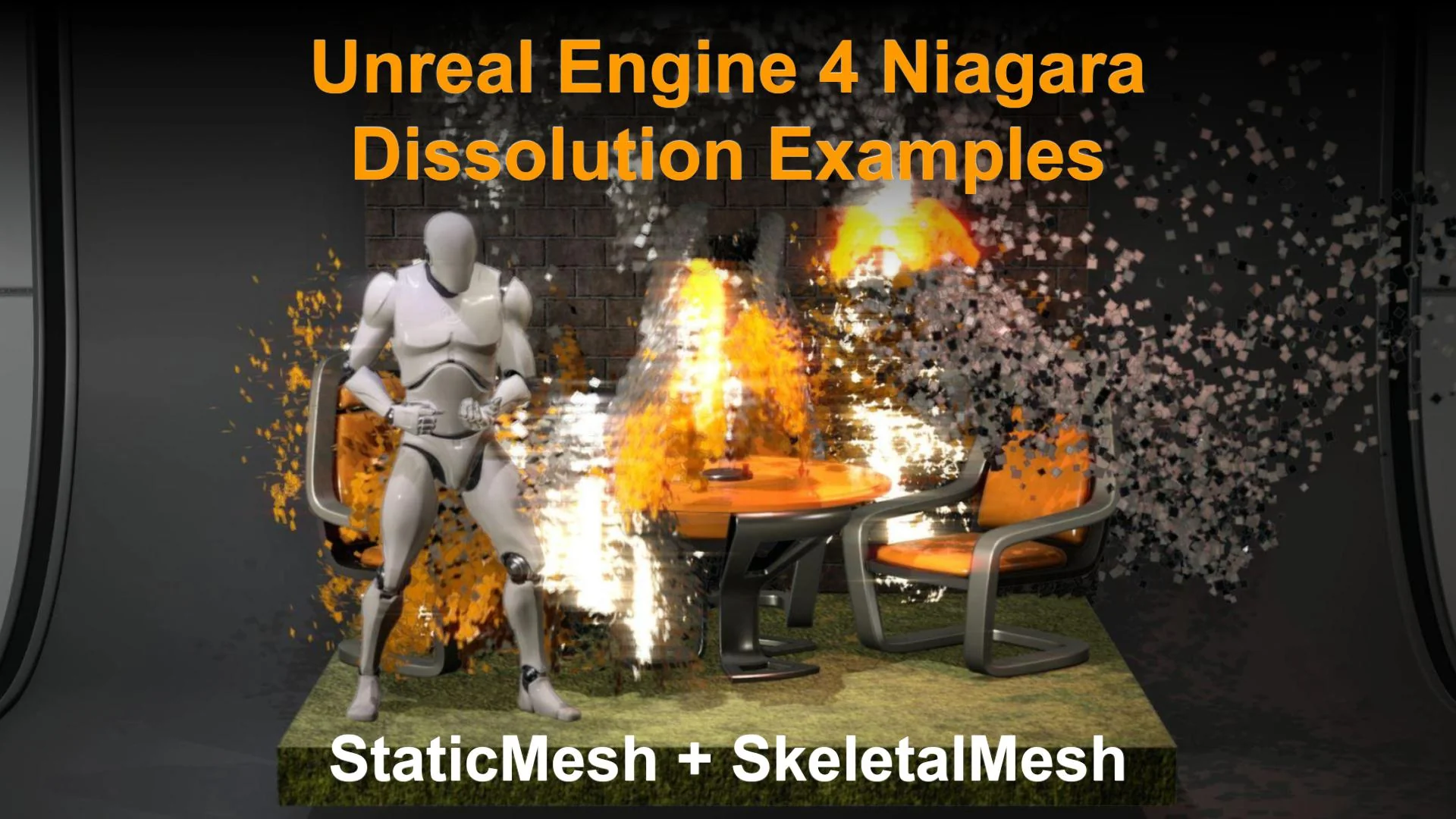
Resource screenshots
1 / 10
Join our channel
Follow 3DCGHUB on Telegram for new resource drops, migration updates, and community notices.
Visualizing Mesh Disintegration in Real-Time Environments
Transitioning geometry into dynamic visual noise, vanishing dust, or assembling energy is a fundamental staple of real-time visual effects. Whether an environment demands the mystical decay of ancient statuary, the rapid vaporization of an obstacle, or the high-tech phasing of structural barriers, mesh dissolution bridges the gap between static level architecture and reactive particle behavior. Within modern real-time workflows, handling these transitions smoothly requires tight coordination between particle logic, Blueprint automation, and rendering passes.
Achieving believable disintegration involves transforming structured polygonal surfaces into decentralized particle arrays without jarring pops or sudden shifts in coloration. When static geometry dissolves, visual coherence hinges on capturing the precise surface layout, spatial positions, and native coloration of the object as it ceases to be a solid entity. By leveraging modular techniques within Niagara and Blueprint event graphs, creators can deploy distinct technical strategies depending on whether the target geometry is an unmoving prop, a responsive room layout, or a deforming skeletal mesh.
Texture-Driven Niagara Dissolution Approaches
The transition of a polygonal surface into a cloud of emitted elements often starts at the material layer. In primary static mesh workflows, one effective approach relies on repainting or baking material attributes into a dynamic texture, which subsequently drives particle initialization in the Niagara emitter. By offloading surface details into a texture map, the particle system reads explicit UV layout data, pixel colors, and alpha masks to determine precisely where particles should spawn, how dense they should be across specific regions of the model, and which coloration they should inherit at birth.
This texture-baking pathway offers clear technical advantages when dealing with intricate surface materials containing layered procedural noise, multi-tiled textures, or distinct localized wear. Because the emitter queries the baked texture representation rather than recalculating complex material graphs per particle, the Niagara system samples direct color values and alpha thresholds efficiently. As the dissolution phase advances through Blueprint parameters, scalar values shift the clip thresholds across the texture, releasing particles only along the burning, eroding, or phasing edge of the material while extinguishing the underlying mesh surface in lockstep.
A parallel method bypasses texture repainting altogether by operating directly on the native materials assigned to static and skeletal meshes. Under this architecture, the mesh material graph itself exposes dynamic parameters directly controllable via Blueprints. The material handles the procedural masking, border glow, and erosion gradients across the mesh surface, while Niagara simultaneously gathers geometry data directly from the mesh surface. This allows particles to emit natively from polygonal vertices or surface areas that match the active dissolution threshold, maintaining precise material alignment across both rigid level props and dynamic assets.
Scene Capture 2D and GBuffer Room Dissolution Techniques
For complex visual contexts where objects interact heavily with scene lighting, atmospheric depth, or complex spatial arrangements, a third approach introduces Scene Capture 2D systems to sample position and color information directly from the viewport perspective. Rather than querying the internal material or UV space of individual assets, the capture mechanism reads the visual state of the scene and reprojects spatial and chrominance data into the particle pipeline.
This capture-based methodology proves particularly valuable when handling intricate room solutions and complex environments. By tapping into GBuffer data, the system extracts critical depth, normal, and base color passes directly from the rendered geometry. Niagara then utilizes this reconstructive data stream to spawn and align particles matching the exact screen-space or world-space profiles of the captured surfaces. When dissolving an entire room segment or layered environmental cluster, GBuffer-assisted sampling eliminates the need to author unique texture-baking pipelines for every single static mesh present in the space.
The integration of Scene Capture 2D facilitates seamless color continuity during large-scale transitions. Because the particles inherit their initial properties directly from the captured render buffers, they inherit ambient shadowing, baked lighting contributions, and complex shading responses that exist at the exact moment of dissolution. As the particles scatter, swirl, or drift away, the visual transition appears completely organic to the illuminated environment rather than an isolated particle overlay.
Reverse Examples and Skeletal Mesh Integration
Dissolution workflows are not strictly one-way subtractive sequences; reforming or materializing geometry requires identical math operating in an inverse direction. Through reverse dissolution workflows, scattered particle fields are driven to seek out specific surface targets on the mesh. Particles collapse toward recorded surface coordinates, interpolate their colors back to the baseline texture values, and gradually hand visual dominance back to the opaque material as the mesh solidifies into the scene.
Extending these methodologies to skeletal meshes introduces dynamic bone deformation and joint movement into the dissolution pipeline. While static meshes offer stationary vertex targets, skeletal meshes require Niagara systems to sample deforming surfaces across changing skin weights and bone transforms. Material-driven erosion pipelines ensure that even while a character or animated creature executes a death, defeat, or phasing animation, the dissolution boundary moves fluidly across the animated geometry, spawning particles that inherit the current velocity and pose of the underlying skeletal structure.
Documentation workflows accompanying these systems provide the necessary mapping between Blueprint control structures, Niagara user parameters, and material parameter collections. Ensuring that material clipping masks and particle emission thresholds synchronize seamlessly requires calibrated timeline data inside Blueprints, guaranteeing that neither the particle emission nor the mesh fading outpaces the other during run-time execution.
Selecting the Right Pipeline for Interactive Scenes
Evaluating which dissolution technique to deploy depends on the specific performance budget, geometric complexity, and animation requirements of the project. For isolated environmental props and static architectural features, texture repainting and direct mesh material sampling provide precise control over erosion edges without the rendering overhead of auxiliary camera passes.
When handling broad architectural vignettes, complete chamber transitions, or situations where multiple overlapping props must disintegrate simultaneously under dynamic lighting, GBuffer-driven Scene Capture 2D methods offer unmatched environmental coherence. Meanwhile, character-driven encounters and dynamic cinematic sequences benefit most from direct skeletal mesh material synchronization, maintaining consistent physical momentum between animated bones and emitted particles throughout the dissolution sequence.
 Variety
 Variety
 Variety