"f9f23ccf4eeb20e2"{"id":"1003054","slug":"customizable-deadly-traps","title":"Customizable Deadly Traps","category":"Gameplay Features","engine":"4.26+,5.0+","assetVersion":"","engineVersion":"Engine Version: 4.26+,5.0+","tag":"Gameplay Features","accent":"blue","visual":"mech","summary":"A medieval trap package built from multiple static meshes and a Blueprint framework, with pendulums, cannons, guillotines, spikes and trapdoors driven by expose","platform":"Unreal Engine","indexPolicy":"index","publishedAt":"2026-11-27T07:00:49.083Z","updatedAt":"2026-11-27T07:00:49.083Z","sourceNotes":[],"fileContents":[],"compatibility":["Unreal Engine","Engine Version: 4.26+,5.0+"],"featuredImage":{"alt":"Customizable Deadly Traps","src":"/wp-content/uploads/published/2026/11/56d183e69379-751a21dc-e5a3-45e4-bb3a-cbd817220c46-3bbb8d4c76.webp"},"fileSizeBytes":407654691,"hasDownloadLink":true,"downloads":0,"terms":[{"taxonomy":"category","slug":"gameplay-features","name":"Gameplay Features"}],"galleryImages":[{"src":"/wp-content/uploads/published/2026/11/5b0ebaf9d3d7-ccd6d720-3842-4de2-b7e7-de9b6b792560-bf1dc8da10.webp","alt":"Customizable Deadly Traps"},{"src":"/wp-content/uploads/published/2026/11/1eb028484f3e-9ecd7b87-e6ba-484b-9326-77ffcd2eb0e6-5c552e35ce.webp","alt":"Customizable Deadly Traps"},{"src":"/wp-content/uploads/published/2026/11/fe0fc2af5add-ae904bd4-0cd5-472e-9c31-4995b42084c8-f8be55ae38.webp","alt":"Customizable Deadly Traps"},{"src":"/wp-content/uploads/published/2026/11/aefbd1485b09-a6864432-58fa-4f14-b1ef-4f49bb5bf19d-a9e3916b34.webp","alt":"Customizable Deadly Traps"},{"src":"/wp-content/uploads/published/2026/11/bbd3906c67f8-29fa55b4-e4c8-4d1b-a277-31c1c0a2e9eb-29d1839269.webp","alt":"Customizable Deadly Traps"}],"accessPanel":{"kind":"resource","title":"Get this resource","safetyNote":"Resources are manually reviewed before listing to improve quality and reduce obvious risks.","fileFormat":".7z","resourceType":"Resource archive","versions":[]},"contentHtml":"\u003cp\u003eA corridor turns dangerous the moment its timing becomes readable: the axe that swings on a fixed rate, the spikes that wait for a trigger, the trapdoor that gives you one beat to cross. Customizable Deadly Traps hands over those behaviours directly. The package combines multiple static meshes with a complete Blueprint framework, so the visible trap and the logic that drives it arrive together instead of being assembled as two separate jobs. Medieval styling carries the geometry; the Blueprint settings carry everything that decides how the trap behaves once a player steps into range.\u003c/p\u003e \u003cp\u003eThat split — mesh on one side, exposed parameters on the other — is the shape of the whole thing. No one has to build a swinging pendulum from scratch or reverse-engineer a spike cycle. The work left on the table is choosing numbers.\u003c/p\u003e \u003ch2\u003eDeadly Traps as a Framework, Not a Prop Set\u003c/h2\u003e \u003cp\u003eStatic meshes on their own are scenery. A guillotine blade hanging in a doorway stays decoration until something makes it fall, reset, and fall again on an interval. The framework is what converts each mesh into a hazard, and the trap types included here follow one pattern: open the Blueprint, change the values it exposes, and the behaviour changes with them.\u003c/p\u003e \u003cp\u003eThat pattern earns its keep during balancing. A pendulum that reads well in a wide hall can feel sluggish in a narrow corridor, and the correction is a rate value rather than a re-animation. Because the settings sit on the Blueprint itself, a level designer can adjust a trap in place without sending work back to the modelling side of the project.\u003c/p\u003e \u003ch2\u003ePendulum and Projectile Traps, and What You Can Change\u003c/h2\u003e \u003cp\u003eThe pendulum trap is the most openly configurable of the set. It ships with an axe, but the swinging mesh is a setting rather than a fixed element — any mesh can be substituted, which makes the same logic usable for a blade, a hanging weight, or something stranger. From there the numbers stack up: pendulum rate controls the swing speed, wire length controls how far the pivot sits from the head, and polar angles define the arc it travels through. A coil sphere radius shapes the region the pendulum works within, and a force value is applied on impact.\u003c/p\u003e \u003cp\u003eProjectiles take a shorter list. Speed and radius are adjustable, and physics simulation can be toggled on or off — so the same projectile can behave as a straight-line hazard or as something affected by the simulation underneath it.\u003c/p\u003e \u003ch2\u003eCannon, Guillotine and Floor Spikes: Timed or Triggered\u003c/h2\u003e \u003cp\u003eThe cannon is the projectile trap's heavier sibling, with its own set of exposed values. Bullet speed, firing delay and projectile radius are all adjustable, and gravity for the projectiles can be toggled — useful when a shot should arc and drop rather than travel flat.\u003c/p\u003e \u003cp\u003eThe guillotine works on a different axis. Play rates can be adjusted, loop delay lengthens the gap between cycles, and the activation mode can be switched between trigger and timed. That single toggle changes the trap's role in a room: a timed guillotine becomes a rhythm the player learns, while a triggered one punishes a specific step.\u003c/p\u003e \u003cp\u003eFloor spikes follow the same logic with a shorter list — a speed rate for the spike movement and the same trigger-or-timed activation choice. Both traps therefore cover the two standard placements in a medieval level: the obstacle you learn and the obstacle you set off.\u003c/p\u003e \u003ch2\u003eSpinning Blades, Spinning Log, Trapdoor and Falling Spikes\u003c/h2\u003e \u003cp\u003eThe rotating traps expose counts and rates rather than arcs. Spinning blades let you set the number of blades, the revolutions per second, and the transition rates and intervals. The spinning log offers revolutions per second plus transition rates and intervals, without the blade count — its behaviour is defined by rotation speed and how it moves between states.\u003c/p\u003e \u003cp\u003eTrapdoors keep to a single exposed value: the time before closing. That is the entire design of the trap in one number, and it decides whether a player has to commit or can stroll through.\u003c/p\u003e \u003cp\u003eFalling spikes carry a fuller set. Trap height is adjustable, play and return rates control the drop and the reset, the activation mode switches between trigger and timed, and a delay time sits on top of that. Height and delay together decide whether the spikes are a warning or an ambush.\u003c/p\u003e \u003ch2\u003eCustomizable Variations Through Material Instances\u003c/h2\u003e \u003cp\u003eThe Blueprint settings define behaviour; the material side defines appearance. Material instances make it possible to push out variations of the same trap without duplicating the underlying assets, and multiple material functions are included for use in your games. Combined with the Blueprint parameters, that produces effectively infinite variations — the framework and the shading are two independent dials, and both stay open.\u003c/p\u003e \u003cp\u003eFor a medieval set, that flexibility is practical rather than decorative. Stone, rusted iron and weathered wood can coexist on the same trap type across different rooms in the same level, and the change stays in the material instance instead of multiplying the mesh count.\u003c/p\u003e \u003ch2\u003eWhere This Fits in a Build\u003c/h2\u003e \u003cp\u003eTrap packages like this typically land in the blockout-and-dressing phase, when corridors have their shape and need their hazards. Because every trap is driven by exposed settings, the same asset can serve a tutorial corridor with generous timing and a late-game gauntlet with tight intervals. The nine trap types cover the common medieval vocabulary — pendulum, projectile, cannon, guillotine, floor spikes, spinning blades, spinning log, trapdoor, falling spikes — so a designer can dress a dungeon sequence without stopping to script each hazard individually.\u003c/p\u003e \u003cp\u003eThe most concrete takeaway for a team evaluating the package: the tuning work happens on the Blueprint, in the level, at the speed of a value change. The trap meshes and the logic behind them are already paired, and the material instances keep the visual variation in the same editable layer.\u003c/p\u003e\n\n\u003ch2\u003eRelated Resources Worth Checking\u003c/h2\u003e\n\u003cul\u003e\n\u003cli\u003e\u003ca href=\"https://3dcghub.com/basic-stealth-system/\" rel=\"noopener noreferrer\"\u003eBasic Stealth System\u003c/a\u003e\u003c/li\u003e\n\u003cli\u003e\u003ca href=\"https://3dcghub.com/advanced-shield-system/\" rel=\"noopener noreferrer\"\u003eAdvanced Shield System\u003c/a\u003e\u003c/li\u003e\n\u003cli\u003e\u003ca href=\"https://3dcghub.com/rpg-compass-ui-system/\" rel=\"noopener noreferrer\"\u003eRPG Compass UI System\u003c/a\u003e\u003c/li\u003e\n\u003cli\u003e\u003ca href=\"https://3dcghub.com/advanced-multiplayer-lobby-system-v2/\" rel=\"noopener noreferrer\"\u003eAdvanced Multiplayer Lobby System V2\u003c/a\u003e\u003c/li\u003e\n\u003cli\u003e\u003ca href=\"https://3dcghub.com/multiplayer-traps-pack/\" rel=\"noopener noreferrer\"\u003eMultiplayer Traps Pack\u003c/a\u003e\u003c/li\u003e\n\u003c/ul\u003e","contentTextLength":6061,"navigation":{"current":1,"total":4975,"next":{"id":"1003053","slug":"action-jrpg-template","title":"Action jRPG Template","category":"RPG","platform":"Unreal Engine","updatedAt":"2026-11-27T05:46:38.862Z"}},"relatedResources":[{"id":"1002996","slug":"basic-stealth-system","title":"Basic Stealth System","category":"Gameplay Features","engine":"4.21+,5.0+","assetVersion":"","engineVersion":"Engine Version: 4.21+,5.0+","tag":"Gameplay Features","accent":"blue","visual":"mech","summary":"Blueprint component that swaps an actor for a customizable shimmer, with timers, glow, distortion, material functions, multiple meshes, and multiplayer support.","platform":"Unreal Engine","indexPolicy":"index","publishedAt":"2026-11-25T15:58:30.872Z","updatedAt":"2026-11-25T15:58:30.872Z","sourceNotes":[],"fileContents":[],"compatibility":["Unreal Engine","Engine Version: 4.21+,5.0+"],"featuredImage":{"alt":"Basic Stealth System","src":"/wp-content/uploads/published/2026/11/a4f0c90b4277-cf45c925-c320-41af-a8de-3d63c662a0d6-bf39b8e75c.webp"},"fileSizeBytes":20771269,"hasDownloadLink":true,"downloads":0},{"id":"1002980","slug":"advanced-shield-system","title":"Advanced Shield System","category":"Gameplay Features","engine":"4.26+,5.0+","assetVersion":"","engineVersion":"Engine Version: 4.26+,5.0+","tag":"Gameplay Features","accent":"blue","visual":"mech","summary":"A customizable shield component that layers energy shields over static and skeletal meshes, with replication, disintegration, hit feedback, and a full demo leve","platform":"Unreal Engine","indexPolicy":"index","publishedAt":"2026-11-25T09:36:49.054Z","updatedAt":"2026-11-25T09:36:49.054Z","sourceNotes":[],"fileContents":[],"compatibility":["Unreal Engine","Engine Version: 4.26+,5.0+"],"featuredImage":{"alt":"Advanced Shield System","src":"/wp-content/uploads/published/2026/11/866250ca591c-dd83e1d1-12b4-453d-98b7-7698a32ed298-9dddc07468.webp"},"fileSizeBytes":125094844,"hasDownloadLink":true,"downloads":0},{"id":"1002179","slug":"rpg-compass-ui-system","title":"RPG Compass UI System","category":"Gameplay Features","engine":"4.27+,5.0+","assetVersion":"","engineVersion":"Engine Version: 4.27+,5.0+","tag":"Gameplay Features","accent":"blue","visual":"mech","summary":"Explore the RPG Compass UI System, featuring dynamic UI widgets, customizable markable actors, visual effects, network replication, and gamepad support.","platform":"Unreal Engine","indexPolicy":"index","publishedAt":"2026-10-29T14:21:05.247Z","updatedAt":"2026-10-29T14:21:05.247Z","sourceNotes":[],"fileContents":[],"compatibility":["Unreal Engine","Engine Version: 4.27+,5.0+"],"featuredImage":{"alt":"RPG Compass UI System","src":"/wp-content/uploads/published/2026/10/e1afbde60845-f96f2024-2708-4500-b02b-68163a93b251-64844439a4.webp"},"fileSizeBytes":45515112,"hasDownloadLink":true,"downloads":0}]}[{"id":4225,"sourceId":4225,"taxonomyId":4225,"taxonomy":"category","slug":"asset-library","name":"Asset Library","parentId":null,"count":0,"hasChildren":true,"href":"/","seoTitle":"Free Game Assets Library | 3DCGHUB","seoDescription":"Browse free Unreal Engine, Unity, Blender assets and game development tutorials on 3DCGHUB with previews, compatibility notes, and secure downloads.","sitemapEnabled":true,"children":[{"id":4227,"sourceId":4227,"taxonomyId":4227,"taxonomy":"category","slug":"blender-add-ons-plugins","name":"Blender Add-ons \u0026 Plugins","parentId":4225,"count":0,"hasChildren":false,"href":"/category/blender-add-ons-plugins/","seoTitle":"Free Blender Add-ons \u0026 Plugins | 3DCGHUB","seoDescription":"Browse free Blender Add-ons \u0026 Plugins tools for Blender on 3DCGHUB: curated downloads with preview images, compatibility notes and secure download access.","sitemapEnabled":true},{"id":514,"sourceId":514,"taxonomyId":514,"taxonomy":"category","slug":"unity-2","name":"Unity","parentId":4225,"count":0,"hasChildren":true,"href":"/category/unity-2/","seoTitle":"Free Unity Assets | 3DCGHUB","seoDescription":"Browse free Unity resources on 3DCGHUB: curated downloads with preview images, compatibility notes and secure download access.","sitemapEnabled":true,"children":[{"id":523,"sourceId":523,"taxonomyId":523,"taxonomy":"category","slug":"2d","name":"2D","parentId":514,"count":0,"hasChildren":true,"href":"/category/2d/","seoTitle":"Free Unity 2D | 3DCGHUB","seoDescription":"Browse free 2D assets for Unity on 3DCGHUB: curated downloads with preview images, compatibility notes and secure download access.","sitemapEnabled":true},{"id":515,"sourceId":515,"taxonomyId":515,"taxonomy":"category","slug":"3d-unity-2","name":"3D","parentId":514,"count":0,"hasChildren":true,"href":"/category/3d-unity-2/","seoTitle":"Free Unity 3D Assets | 3DCGHUB","seoDescription":"Browse free 3D assets for Unity on 3DCGHUB: curated downloads with preview images, compatibility notes and secure download access.","sitemapEnabled":true},{"id":565,"sourceId":565,"taxonomyId":565,"taxonomy":"category","slug":"add-ons","name":"Add-Ons","parentId":514,"count":0,"hasChildren":false,"href":"/category/add-ons/","seoTitle":"Free Unity Add-Ons | 3DCGHUB","seoDescription":"Browse free Add-Ons assets for Unity on 3DCGHUB: curated downloads with preview images, compatibility notes and secure download access.","sitemapEnabled":true},{"id":529,"sourceId":529,"taxonomyId":529,"taxonomy":"category","slug":"audio-unity-2","name":"Audio","parentId":514,"count":0,"hasChildren":true,"href":"/category/audio-unity-2/","seoTitle":"Free Unity Audio | 3DCGHUB","seoDescription":"Browse free Audio for Unity on 3DCGHUB: curated downloads with preview images, compatibility notes and secure download access.","sitemapEnabled":true},{"id":557,"sourceId":557,"taxonomyId":557,"taxonomy":"category","slug":"templates","name":"Templates","parentId":514,"count":0,"hasChildren":true,"href":"/category/templates/","seoTitle":"Free Unity Templates | 3DCGHUB","seoDescription":"Browse free Unity project templates on 3DCGHUB. Starter kits with previews, compatibility notes, and secure download access.","sitemapEnabled":true},{"id":533,"sourceId":533,"taxonomyId":533,"taxonomy":"category","slug":"tools-unity-2","name":"Tools","parentId":514,"count":0,"hasChildren":true,"href":"/category/tools-unity-2/","sitemapEnabled":true},{"id":554,"sourceId":554,"taxonomyId":554,"taxonomy":"category","slug":"vfx-unity-2","name":"VFX","parentId":514,"count":0,"hasChildren":true,"href":"/category/vfx-unity-2/","seoTitle":"Free Unity VFX | 3DCGHUB","seoDescription":"Browse free VFX for Unity on 3DCGHUB: curated downloads with preview images, compatibility notes and secure download access.","sitemapEnabled":true}]},{"id":511,"sourceId":511,"taxonomyId":511,"taxonomy":"category","slug":"unreal-engine-2","name":"Unreal Engine","parentId":4225,"count":0,"hasChildren":true,"href":"/category/unreal-engine-2/","seoTitle":"Free Unreal Engine Assets | 3DCGHUB","seoDescription":"Browse free Unreal Engine resources on 3DCGHUB: curated downloads with preview images, compatibility notes and secure download access.","sitemapEnabled":true,"children":[{"id":54,"sourceId":54,"taxonomyId":54,"taxonomy":"category","slug":"3d","name":"3D","parentId":511,"count":0,"hasChildren":true,"href":"/category/3d/","seoTitle":"Free Unreal Engine 3D | 3DCGHUB","seoDescription":"Browse free 3D assets for Unreal Engine on 3DCGHUB: curated downloads with preview images, compatibility notes and secure download access.","sitemapEnabled":true},{"id":441,"sourceId":441,"taxonomyId":441,"taxonomy":"category","slug":"animations","name":"Animations","parentId":511,"count":0,"hasChildren":true,"href":"/category/animations/","seoTitle":"Free Unreal Engine Animations | 3DCGHUB","seoDescription":"Browse free Animations for Unreal Engine on 3DCGHUB: curated downloads with preview images, compatibility notes and secure download access.","sitemapEnabled":true},{"id":446,"sourceId":446,"taxonomyId":446,"taxonomy":"category","slug":"audio","name":"Audio","parentId":511,"count":0,"hasChildren":true,"href":"/category/audio/","seoTitle":"Free Unreal Engine Audio Resources | 3DCGHUB","seoDescription":"Browse free Unreal Engine audio resources including sound effects, voices, dialogue, and ambient sounds. Curated free downloads on 3DCGHUB.","sitemapEnabled":true},{"id":466,"sourceId":466,"taxonomyId":466,"taxonomy":"category","slug":"game-systems","name":"Game Systems","parentId":511,"count":0,"hasChildren":true,"href":"/category/game-systems/","seoTitle":"Free Unreal Engine Game Systems | 3DCGHUB","seoDescription":"Browse free Game Systems tools for Unreal Engine on 3DCGHUB: curated downloads with preview images, compatibility notes and secure download access.","sitemapEnabled":true},{"id":478,"sourceId":478,"taxonomyId":478,"taxonomy":"category","slug":"game-templates","name":"Game Templates","parentId":511,"count":0,"hasChildren":true,"href":"/category/game-templates/","seoTitle":"Free Unreal Engine Game Templates | 3DCGHUB","seoDescription":"Browse free Game Templates for Unreal Engine on 3DCGHUB: curated downloads with preview images, compatibility notes and secure download access.","sitemapEnabled":true},{"id":432,"sourceId":432,"taxonomyId":432,"taxonomy":"category","slug":"hdri","name":"HDRI","parentId":511,"count":0,"hasChildren":true,"href":"/category/hdri/","seoTitle":"Free Unreal Engine HDRI | 3DCGHUB","seoDescription":"Browse free Unreal Engine HDRI skies and lighting maps on 3DCGHUB. Environment lighting with previews and secure downloads.","sitemapEnabled":true},{"id":228,"sourceId":228,"taxonomyId":228,"taxonomy":"category","slug":"material-and-textures","name":"Material \u0026 Textures","parentId":511,"count":0,"hasChildren":true,"href":"/category/material-and-textures/","seoTitle":"Free Unreal Engine Material \u0026 Textures | 3DCGHUB","seoDescription":"Browse free Material \u0026 Textures for Unreal Engine on 3DCGHUB: curated downloads with preview images, compatibility notes and secure download access.","sitemapEnabled":true},{"id":298,"sourceId":298,"taxonomyId":298,"taxonomy":"category","slug":"sprites-and-flipbooks","name":"Sprites \u0026 Flipbooks","parentId":511,"count":0,"hasChildren":true,"href":"/category/sprites-and-flipbooks/","seoTitle":"Free Unreal Engine Sprites \u0026 Flipbooks | 3DCGHUB","seoDescription":"Browse free Sprites \u0026 Flipbooks assets for Unreal Engine on 3DCGHUB: curated downloads with preview images, compatibility notes and secure download access.","sitemapEnabled":true},{"id":489,"sourceId":489,"taxonomyId":489,"taxonomy":"category","slug":"tools-and-plugins","name":"Tools \u0026 Plugins","parentId":511,"count":0,"hasChildren":true,"href":"/category/tools-and-plugins/","seoTitle":"Free Unreal Engine Tools \u0026 Plugins | 3DCGHUB","seoDescription":"Browse free Tools \u0026 Plugins for Unreal Engine on 3DCGHUB: curated downloads with preview images, compatibility notes and secure download access.","sitemapEnabled":true},{"id":459,"sourceId":459,"taxonomyId":459,"taxonomy":"category","slug":"ui","name":"UI","parentId":511,"count":0,"hasChildren":true,"href":"/category/ui/","seoTitle":"Free Unreal Engine UI | 3DCGHUB","seoDescription":"Browse free UI for Unreal Engine on 3DCGHUB: curated downloads with preview images, compatibility notes and secure download access.","sitemapEnabled":true},{"id":450,"sourceId":450,"taxonomyId":450,"taxonomy":"category","slug":"vfx","name":"VFX","parentId":511,"count":0,"hasChildren":true,"href":"/category/vfx/","seoTitle":"Free Unreal Engine VFX | 3DCGHUB","seoDescription":"Browse free VFX for Unreal Engine on 3DCGHUB: curated downloads with preview images, compatibility notes and secure download access.","sitemapEnabled":true}]}]},{"id":4222,"sourceId":4222,"taxonomyId":4222,"taxonomy":"category","slug":"tutorial-library","name":"Tutorial Library","parentId":null,"count":0,"hasChildren":false,"href":"/tutorials/","seoTitle":"Free Game Development Tutorial Library | 3DCGHUB","seoDescription":"Browse free game development tutorials for Unreal Engine, Unity, Blender, and more on 3DCGHUB with practical workflows and secure downloads.","sitemapEnabled":true}]
Resource screenshots
1 / 5
Asset drops
Daily Asset Drops
Follow 3DCGHUB on Telegram for daily Unreal, Unity & Blender drops and curated CC0 releases.
Resources are manually reviewed before listing to improve quality and reduce obvious risks.
Reviewed archive
Gameplay Features
Customizable Deadly Traps
A medieval trap package built from multiple static meshes and a Blueprint framework, with pendulums, cannons, guillotines, spikes and trapdoors driven by expose
A corridor turns dangerous the moment its timing becomes readable: the axe that swings on a fixed rate, the spikes that wait for a trigger, the trapdoor that gives you one beat to cross. Customizable Deadly Traps hands over those behaviours directly. The package combines multiple static meshes with a complete Blueprint framework, so the visible trap and the logic that drives it arrive together instead of being assembled as two separate jobs. Medieval styling carries the geometry; the Blueprint settings carry everything that decides how the trap behaves once a player steps into range.
That split — mesh on one side, exposed parameters on the other — is the shape of the whole thing. No one has to build a swinging pendulum from scratch or reverse-engineer a spike cycle. The work left on the table is choosing numbers.
Deadly Traps as a Framework, Not a Prop Set
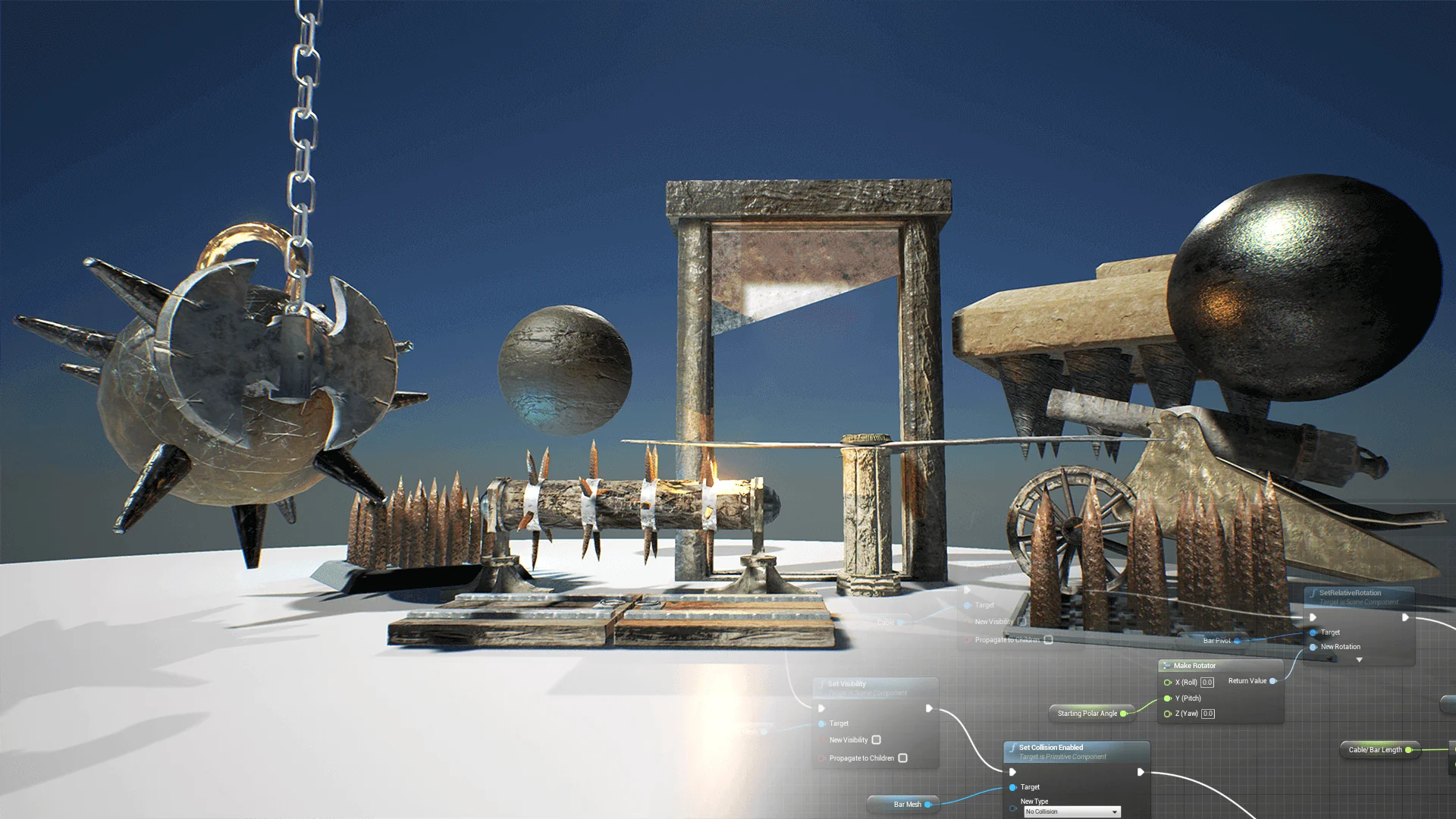
Static meshes on their own are scenery. A guillotine blade hanging in a doorway stays decoration until something makes it fall, reset, and fall again on an interval. The framework is what converts each mesh into a hazard, and the trap types included here follow one pattern: open the Blueprint, change the values it exposes, and the behaviour changes with them.
That pattern earns its keep during balancing. A pendulum that reads well in a wide hall can feel sluggish in a narrow corridor, and the correction is a rate value rather than a re-animation. Because the settings sit on the Blueprint itself, a level designer can adjust a trap in place without sending work back to the modelling side of the project.
Pendulum and Projectile Traps, and What You Can Change
The pendulum trap is the most openly configurable of the set. It ships with an axe, but the swinging mesh is a setting rather than a fixed element — any mesh can be substituted, which makes the same logic usable for a blade, a hanging weight, or something stranger. From there the numbers stack up: pendulum rate controls the swing speed, wire length controls how far the pivot sits from the head, and polar angles define the arc it travels through. A coil sphere radius shapes the region the pendulum works within, and a force value is applied on impact.
Projectiles take a shorter list. Speed and radius are adjustable, and physics simulation can be toggled on or off — so the same projectile can behave as a straight-line hazard or as something affected by the simulation underneath it.
Cannon, Guillotine and Floor Spikes: Timed or Triggered
The cannon is the projectile trap's heavier sibling, with its own set of exposed values. Bullet speed, firing delay and projectile radius are all adjustable, and gravity for the projectiles can be toggled — useful when a shot should arc and drop rather than travel flat.
The guillotine works on a different axis. Play rates can be adjusted, loop delay lengthens the gap between cycles, and the activation mode can be switched between trigger and timed. That single toggle changes the trap's role in a room: a timed guillotine becomes a rhythm the player learns, while a triggered one punishes a specific step.
Floor spikes follow the same logic with a shorter list — a speed rate for the spike movement and the same trigger-or-timed activation choice. Both traps therefore cover the two standard placements in a medieval level: the obstacle you learn and the obstacle you set off.
Spinning Blades, Spinning Log, Trapdoor and Falling Spikes
The rotating traps expose counts and rates rather than arcs. Spinning blades let you set the number of blades, the revolutions per second, and the transition rates and intervals. The spinning log offers revolutions per second plus transition rates and intervals, without the blade count — its behaviour is defined by rotation speed and how it moves between states.
Trapdoors keep to a single exposed value: the time before closing. That is the entire design of the trap in one number, and it decides whether a player has to commit or can stroll through.
Falling spikes carry a fuller set. Trap height is adjustable, play and return rates control the drop and the reset, the activation mode switches between trigger and timed, and a delay time sits on top of that. Height and delay together decide whether the spikes are a warning or an ambush.
Customizable Variations Through Material Instances
The Blueprint settings define behaviour; the material side defines appearance. Material instances make it possible to push out variations of the same trap without duplicating the underlying assets, and multiple material functions are included for use in your games. Combined with the Blueprint parameters, that produces effectively infinite variations — the framework and the shading are two independent dials, and both stay open.
For a medieval set, that flexibility is practical rather than decorative. Stone, rusted iron and weathered wood can coexist on the same trap type across different rooms in the same level, and the change stays in the material instance instead of multiplying the mesh count.
Where This Fits in a Build
Trap packages like this typically land in the blockout-and-dressing phase, when corridors have their shape and need their hazards. Because every trap is driven by exposed settings, the same asset can serve a tutorial corridor with generous timing and a late-game gauntlet with tight intervals. The nine trap types cover the common medieval vocabulary — pendulum, projectile, cannon, guillotine, floor spikes, spinning blades, spinning log, trapdoor, falling spikes — so a designer can dress a dungeon sequence without stopping to script each hazard individually.
The most concrete takeaway for a team evaluating the package: the tuning work happens on the Blueprint, in the level, at the speed of a value change. The trap meshes and the logic behind them are already paired, and the material instances keep the visual variation in the same editable layer.