"ae2217ad8e73450c"{"id":"1002996","slug":"basic-stealth-system","title":"Basic Stealth System","category":"Gameplay Features","engine":"4.21+,5.0+","assetVersion":"","engineVersion":"Engine Version: 4.21+,5.0+","tag":"Gameplay Features","accent":"blue","visual":"mech","summary":"Blueprint component that swaps an actor for a customizable shimmer, with timers, glow, distortion, material functions, multiple meshes, and multiplayer support.","platform":"Unreal Engine","indexPolicy":"index","publishedAt":"2026-11-25T15:58:30.872Z","updatedAt":"2026-11-25T15:58:30.872Z","sourceNotes":[],"fileContents":[],"compatibility":["Unreal Engine","Engine Version: 4.21+,5.0+"],"featuredImage":{"alt":"Basic Stealth System","src":"/wp-content/uploads/published/2026/11/a4f0c90b4277-cf45c925-c320-41af-a8de-3d63c662a0d6-bf39b8e75c.webp"},"hasDownloadLink":true,"downloads":0,"terms":[{"taxonomy":"category","slug":"gameplay-features","name":"Gameplay Features"}],"galleryImages":[{"src":"/wp-content/uploads/published/2026/11/45ee670e3cbc-ffb6f7b6-5ddc-46a0-b76f-5e8221125cf2-d09836314d.webp","alt":"Basic Stealth System"},{"src":"/wp-content/uploads/published/2026/11/ebfa73508211-10f6e61a-e142-4b79-97a7-43eb5344196a-4720e73545.webp","alt":"Basic Stealth System"},{"src":"/wp-content/uploads/published/2026/11/e3e3f868d277-a0756014-dc2f-427f-8a67-357c70e38c22-ded3b4ecc7.webp","alt":"Basic Stealth System"},{"src":"/wp-content/uploads/published/2026/11/d38de86aa4ba-18becc0f-fc51-41d6-be62-ec5631da6efc-324e41ed0f.webp","alt":"Basic Stealth System"},{"src":"/wp-content/uploads/published/2026/11/c5d26bb78296-7206e280-158c-446c-97f6-c33e1a8f8966-63df356ee7.webp","alt":"Basic Stealth System"},{"src":"/wp-content/uploads/published/2026/11/c02c68d1ff16-61671b29-28f1-41c9-9155-573ebdebb0bc-e9c5673cf4.webp","alt":"Basic Stealth System"}],"accessPanel":{"kind":"resource","title":"Get this resource","safetyNote":"Resources are manually reviewed before listing to improve quality and reduce obvious risks.","fileName":"Basic Stealth System.7z","resourceType":"Resource archive","versions":[]},"contentHtml":"\u003ch2\u003eHow the Shimmer Replaces an Actor\u003c/h2\u003e\n\u003cp\u003eWhen an actor is given the stealth treatment, its normal appearance gives way to a tell-tale shimmer. That is the visible behavior at the center of Basic Stealth System: a Blueprint Scene Component is attached to any actor, and the original actor is replaced by the shimmer effect. The stealth component changes the actor's own visual state into the shimmer. The effect is built as a component, so the attachment point is the actor itself. That makes the stealth state part of the object's setup rather than an external scene device. This gives a shimmer that acts as a visible clue, which fits the tell-tale part of the effect's name.\u003c/p\u003e\n\u003cp\u003eCustomization sits on top of that core replacement. The shimmer is not fixed to a single color, tempo, brightness, or distortion level; those values can be adjusted. A single actor can receive the treatment, and the same component-based approach applies to other actors that need it. The component supplies the stealth behavior, while the adjustable effects decide how strongly the shimmer announces itself. The visual result can range from a restrained surface change to a more pronounced distortion, depending on the settings used.\u003c/p\u003e \u003ch2\u003eAttaching the Stealth Component to an Actor\u003c/h2\u003e\n\u003cp\u003eThe attachment step is narrow: add the Scene Component blueprint to an actor, and the stealth effect is in place. The actor remains the object being treated, with the component supplying the replacement behavior. The original actor is then replaced by the tell-tale shimmer, so this gives visible on the actor rather than handled by a separate object. This is the same starting move whether the actor is simple or assembled from more than one part.\u003c/p\u003e\n\u003cp\u003eMultiple meshes per Stealth Component are supported. For an actor built from several mesh pieces, one Stealth Component can carry the effect across those meshes. That extends the setup beyond single-mesh props: the stealth layer can be managed at the component level while the actor still contains multiple mesh elements. A single component can therefore be the place where the shimmer is applied for a multi-mesh actor, and the original actor is still replaced by that shimmer. The attachment model stays consistent; the difference is how much mesh content the component can cover.\u003c/p\u003e \u003ch2\u003eTuning the Stealth Effect's Colors, Timers, Glow, and Distortion\u003c/h2\u003e\n\u003cp\u003eColors, timers, glow intensities, distortion amounts, and additional settings are available for tuning the shimmer. These controls determine how the effect reads in a scene. Color changes the visual signature. Glow intensity affects how much the shimmer stands forward. Distortion amount changes how much the effect warps the actor's appearance. Timers give the stealth state a time-based dimension, so the effect can be paced instead of fixed to one duration. The customization set does not stop at those named values; more settings are included alongside them.\u003c/p\u003e\n\u003cp\u003eThe practical range is broad enough that the same component can produce a subdued shimmer or a stronger, more obvious effect. Because the tuning lives on the Stealth Component attached to the actor, the changes apply to that actor's stealth treatment. The realistic style fits a shimmer that sits on the actor and alters its surface read rather than presenting a stylized icon. The component handles the replacement; the exposed values handle the look and timing.\u003c/p\u003e \u003ch2\u003eMaterial Functions and Texture Swaps for the Stealth Look\u003c/h2\u003e\n\u003cp\u003eThe included material functions are the built-in route for customizing the effect. They let the material side of the shimmer be adjusted within the supplied setup. A second route is to create your own effect by swapping out textures. That changes the visual character at the texture level while the Stealth Component continues to handle the attachment and replacement behavior. One path works through the included functions; the other works by substituting textures to produce a different look.\u003c/p\u003e\n\u003cp\u003eBoth paths keep the component's core role intact. The actor is still the target, the Scene Component blueprint is still the attachment point, and the tell-tale shimmer is still the visible outcome. What changes is the surface treatment of the shimmer, which can be shaped through the material functions or rebuilt through texture swaps. For a team that wants to adjust the provided effect, the material functions are the direct route. For a team that wants to create its own look, swapping textures provides the alternative.\u003c/p\u003e \u003ch2\u003eMultiplayer Support and the Basic Stealth System Project Workflow\u003c/h2\u003e\n\u003cp\u003eMultiplayer support is included, which puts shared-session use in scope for the asset. The stealth component is not limited to a single-player presentation detail; the same shimmer treatment can be carried into multiplayer work. That support is part of the system alongside the visual customization and multi-mesh handling.\u003c/p\u003e\n\u003cp\u003eProject setup has a specific recommended order. At this time, the system is best created in a new project and then migrated into an existing project. The purpose is to avoid overriding current project settings. That makes the migration step part of the integration path rather than an optional extra. The sequence is to establish the Basic Stealth System in a fresh project first, then move it into the target project. Teams bringing the component into an existing project should plan for that order so the current settings are not overwritten.\u003c/p\u003e \u003ch2\u003eWhat Teams Get From the Basic Stealth System\u003c/h2\u003e\n\u003cp\u003eThe asset gives teams a component-based way to replace an actor's original look with a shimmer, then tune that shimmer through color, timing, glow, distortion, and additional controls. Material functions and texture swaps cover the look, multiple meshes per component cover more complex actors, and multiplayer support covers shared-session use. The realistic, Blueprint-driven stealth approach is consistent across those parts.\u003c/p\u003e\n\u003cp\u003eFor evaluation, the concrete takeaway is the attachment model. A single Scene Component blueprint on an actor is the starting point. From there, the effect can be adjusted without changing the core behavior: the actor is replaced by the tell-tale shimmer, the component carries the stealth state, and the exposed settings decide how the shimmer presents itself. The project workflow adds one practical constraint: build in a new project first, then migrate into the existing project to avoid overriding its settings.\u003c/p\u003e\n\n\u003ch2\u003eRelated Resources Worth Checking\u003c/h2\u003e\n\u003cul\u003e\n\u003cli\u003e\u003ca href=\"https://3dcghub.com/target-lock-system/\" rel=\"noopener noreferrer\"\u003eTarget Lock System\u003c/a\u003e\u003c/li\u003e\n\u003cli\u003e\u003ca href=\"https://3dcghub.com/basic-locomotion-system-replicated/\" rel=\"noopener noreferrer\"\u003eBasic Locomotion System (REPLICATED)\u003c/a\u003e\u003c/li\u003e\n\u003cli\u003e\u003ca href=\"https://3dcghub.com/basic-interaction-widgets-and-notes/\" rel=\"noopener noreferrer\"\u003eBasic Interaction, Widgets \u0026amp; Notes\u003c/a\u003e\u003c/li\u003e\n\u003cli\u003e\u003ca href=\"https://3dcghub.com/ultimate-spell-system/\" rel=\"noopener noreferrer\"\u003eUltimate Spell System\u003c/a\u003e\u003c/li\u003e\n\u003cli\u003e\u003ca href=\"https://3dcghub.com/time-system/\" rel=\"noopener noreferrer\"\u003eTime System\u003c/a\u003e\u003c/li\u003e\n\u003c/ul\u003e","contentTextLength":6537,"navigation":{"current":48,"total":4964,"previous":{"id":"1002997","slug":"bf-helicopter","title":"BF Helicopter","category":"Game Mechanics","platform":"Unreal Engine","updatedAt":"2026-11-25T15:59:21.158Z"},"next":{"id":"1002995","slug":"barbed-wire-spline-tool","title":"Barbed Wire Spline Tool","category":"Weapons \u0026 Combat","platform":"Unreal Engine","updatedAt":"2026-11-25T15:57:42.858Z"}},"relatedResources":[{"id":"1002228","slug":"target-lock-system","title":"Target Lock System","category":"Gameplay Features","engine":"4.26+,5.0+","assetVersion":"","engineVersion":"Engine Version: 4.26+,5.0+","tag":"Gameplay Features","accent":"blue","visual":"mech","summary":"Explore the Blueprint-based Target Lock System for Unreal Engine, featuring multiplayer replication, Souls-like targeting logic, and a basic damage setup.","platform":"Unreal Engine","indexPolicy":"index","publishedAt":"2026-10-29T15:27:07.100Z","updatedAt":"2026-10-29T15:27:07.100Z","sourceNotes":[],"fileContents":[],"compatibility":["Unreal Engine","Engine Version: 4.26+,5.0+"],"featuredImage":{"alt":"Target Lock System","src":"/wp-content/uploads/published/2026/10/5649fa496f95-c155a574-3d0b-4c3a-8a6d-9a6e0ce45b2c-8bf36d7b80.webp"},"fileSizeBytes":50214033,"hasDownloadLink":true,"downloads":0},{"id":"1000980","slug":"basic-locomotion-system-replicated","title":"Basic Locomotion System (REPLICATED)","category":"Gameplay Features","engine":"5.0+","assetVersion":"","engineVersion":"Engine Version: 5.0+","tag":"Gameplay Features","accent":"blue","visual":"animation","summary":"A ground-up locomotion system for the UE5 Skeleton using Lyra animations, built as a simple third-person template with MetaHuman integration and multiplayer inv","platform":"Unreal Engine","indexPolicy":"index","publishedAt":"2026-08-18T05:57:51.717Z","updatedAt":"2026-08-18T05:57:51.717Z","sourceNotes":[],"fileContents":[],"compatibility":["Unreal Engine","Engine Version: 5.0+"],"featuredImage":{"alt":"Basic Locomotion System (REPLICATED)","src":"/wp-content/uploads/published/2026/08/497370037da8-24315aeb-c8a9-4077-aa37-d1119fdcf17d-0970e54182.webp"},"fileSizeBytes":344777582,"hasDownloadLink":true,"downloads":4},{"id":"1000726","slug":"basic-interaction-widgets-and-notes","title":"Basic Interaction, Widgets \u0026 Notes","category":"Gameplay Features","engine":"5.0+","assetVersion":"","engineVersion":"Engine Version: 5.0+","tag":"Gameplay Features","accent":"blue","visual":"mech","summary":"A blueprint-based Unreal Engine interaction system with press and hold widgets, example actors, and network replication for gameplay scenes.","platform":"Unreal Engine","indexPolicy":"index","publishedAt":"2026-07-26T15:33:40.078Z","updatedAt":"2026-07-26T15:33:40.078Z","sourceNotes":[],"fileContents":[],"compatibility":["Unreal Engine","Engine Version: 5.0+"],"featuredImage":{"alt":"Basic Interaction, Widgets \u0026 Notes","src":"/wp-content/uploads/published/2026/07/a7232b4177d4-876727ec-4e15-4101-936f-eea050f73e2e-c57e0b2af6.webp"},"fileSizeBytes":39743120,"hasDownloadLink":true,"downloads":0}]}[{"id":4225,"sourceId":4225,"taxonomyId":4225,"taxonomy":"category","slug":"asset-library","name":"Asset Library","parentId":null,"count":4817,"hasChildren":true,"href":"/","seoTitle":"Free Game Assets Library | 3DCGHUB","seoDescription":"Browse free Unreal Engine, Unity, Blender assets and game development tutorials on 3DCGHUB with previews, compatibility notes, and secure downloads.","sitemapEnabled":true,"children":[{"id":4227,"sourceId":4227,"taxonomyId":4227,"taxonomy":"category","slug":"blender-add-ons-plugins","name":"Blender Add-ons \u0026 Plugins","parentId":4225,"count":10,"hasChildren":false,"href":"/category/blender-add-ons-plugins/","seoTitle":"Free Blender Add-ons \u0026 Plugins | 3DCGHUB","seoDescription":"Browse free Blender Add-ons \u0026 Plugins tools for Blender on 3DCGHUB: curated downloads with preview images, compatibility notes and secure download access.","sitemapEnabled":true},{"id":514,"sourceId":514,"taxonomyId":514,"taxonomy":"category","slug":"unity-2","name":"Unity","parentId":4225,"count":453,"hasChildren":true,"href":"/category/unity-2/","seoTitle":"Free Unity Assets | 3DCGHUB","seoDescription":"Browse free Unity resources on 3DCGHUB: curated downloads with preview images, compatibility notes and secure download access.","sitemapEnabled":true,"children":[{"id":523,"sourceId":523,"taxonomyId":523,"taxonomy":"category","slug":"2d","name":"2D","parentId":514,"count":1,"hasChildren":true,"href":"/category/2d/","seoTitle":"Free Unity 2D | 3DCGHUB","seoDescription":"Browse free 2D assets for Unity on 3DCGHUB: curated downloads with preview images, compatibility notes and secure download access.","sitemapEnabled":true},{"id":515,"sourceId":515,"taxonomyId":515,"taxonomy":"category","slug":"3d-unity-2","name":"3D","parentId":514,"count":162,"hasChildren":true,"href":"/category/3d-unity-2/","seoTitle":"Free Unity 3D Assets | 3DCGHUB","seoDescription":"Browse free 3D assets for Unity on 3DCGHUB: curated downloads with preview images, compatibility notes and secure download access.","sitemapEnabled":true},{"id":565,"sourceId":565,"taxonomyId":565,"taxonomy":"category","slug":"add-ons","name":"Add-Ons","parentId":514,"count":2,"hasChildren":false,"href":"/category/add-ons/","seoTitle":"Free Unity Add-Ons | 3DCGHUB","seoDescription":"Browse free Add-Ons assets for Unity on 3DCGHUB: curated downloads with preview images, compatibility notes and secure download access.","sitemapEnabled":true},{"id":529,"sourceId":529,"taxonomyId":529,"taxonomy":"category","slug":"audio-unity-2","name":"Audio","parentId":514,"count":1,"hasChildren":true,"href":"/category/audio-unity-2/","seoTitle":"Free Unity Audio | 3DCGHUB","seoDescription":"Browse free Audio for Unity on 3DCGHUB: curated downloads with preview images, compatibility notes and secure download access.","sitemapEnabled":true},{"id":557,"sourceId":557,"taxonomyId":557,"taxonomy":"category","slug":"templates","name":"Templates","parentId":514,"count":36,"hasChildren":true,"href":"/category/templates/","seoTitle":"Free Unity Templates | 3DCGHUB","seoDescription":"Browse free Unity project templates on 3DCGHUB. Starter kits with previews, compatibility notes, and secure download access.","sitemapEnabled":true},{"id":533,"sourceId":533,"taxonomyId":533,"taxonomy":"category","slug":"tools-unity-2","name":"Tools","parentId":514,"count":0,"hasChildren":true,"href":"/category/tools-unity-2/","sitemapEnabled":true},{"id":554,"sourceId":554,"taxonomyId":554,"taxonomy":"category","slug":"vfx-unity-2","name":"VFX","parentId":514,"count":4,"hasChildren":true,"href":"/category/vfx-unity-2/","seoTitle":"Free Unity VFX | 3DCGHUB","seoDescription":"Browse free VFX for Unity on 3DCGHUB: curated downloads with preview images, compatibility notes and secure download access.","sitemapEnabled":true}]},{"id":511,"sourceId":511,"taxonomyId":511,"taxonomy":"category","slug":"unreal-engine-2","name":"Unreal Engine","parentId":4225,"count":4355,"hasChildren":true,"href":"/category/unreal-engine-2/","seoTitle":"Free Unreal Engine Assets | 3DCGHUB","seoDescription":"Browse free Unreal Engine resources on 3DCGHUB: curated downloads with preview images, compatibility notes and secure download access.","sitemapEnabled":true,"children":[{"id":54,"sourceId":54,"taxonomyId":54,"taxonomy":"category","slug":"3d","name":"3D","parentId":511,"count":2441,"hasChildren":true,"href":"/category/3d/","seoTitle":"Free Unreal Engine 3D | 3DCGHUB","seoDescription":"Browse free 3D assets for Unreal Engine on 3DCGHUB: curated downloads with preview images, compatibility notes and secure download access.","sitemapEnabled":true},{"id":441,"sourceId":441,"taxonomyId":441,"taxonomy":"category","slug":"animations","name":"Animations","parentId":511,"count":269,"hasChildren":true,"href":"/category/animations/","seoTitle":"Free Unreal Engine Animations | 3DCGHUB","seoDescription":"Browse free Animations for Unreal Engine on 3DCGHUB: curated downloads with preview images, compatibility notes and secure download access.","sitemapEnabled":true},{"id":446,"sourceId":446,"taxonomyId":446,"taxonomy":"category","slug":"audio","name":"Audio","parentId":511,"count":63,"hasChildren":true,"href":"/category/audio/","seoTitle":"Free Unreal Engine Audio Resources | 3DCGHUB","seoDescription":"Browse free Unreal Engine audio resources including sound effects, voices, dialogue, and ambient sounds. Curated free downloads on 3DCGHUB.","sitemapEnabled":true},{"id":466,"sourceId":466,"taxonomyId":466,"taxonomy":"category","slug":"game-systems","name":"Game Systems","parentId":511,"count":381,"hasChildren":true,"href":"/category/game-systems/","seoTitle":"Free Unreal Engine Game Systems | 3DCGHUB","seoDescription":"Browse free Game Systems tools for Unreal Engine on 3DCGHUB: curated downloads with preview images, compatibility notes and secure download access.","sitemapEnabled":true},{"id":478,"sourceId":478,"taxonomyId":478,"taxonomy":"category","slug":"game-templates","name":"Game Templates","parentId":511,"count":155,"hasChildren":true,"href":"/category/game-templates/","seoTitle":"Free Unreal Engine Game Templates | 3DCGHUB","seoDescription":"Browse free Game Templates for Unreal Engine on 3DCGHUB: curated downloads with preview images, compatibility notes and secure download access.","sitemapEnabled":true},{"id":432,"sourceId":432,"taxonomyId":432,"taxonomy":"category","slug":"hdri","name":"HDRI","parentId":511,"count":6,"hasChildren":true,"href":"/category/hdri/","seoTitle":"Free Unreal Engine HDRI | 3DCGHUB","seoDescription":"Browse free Unreal Engine HDRI skies and lighting maps on 3DCGHUB. Environment lighting with previews and secure downloads.","sitemapEnabled":true},{"id":228,"sourceId":228,"taxonomyId":228,"taxonomy":"category","slug":"material-and-textures","name":"Material \u0026 Textures","parentId":511,"count":172,"hasChildren":true,"href":"/category/material-and-textures/","seoTitle":"Free Unreal Engine Material \u0026 Textures | 3DCGHUB","seoDescription":"Browse free Material \u0026 Textures for Unreal Engine on 3DCGHUB: curated downloads with preview images, compatibility notes and secure download access.","sitemapEnabled":true},{"id":298,"sourceId":298,"taxonomyId":298,"taxonomy":"category","slug":"sprites-and-flipbooks","name":"Sprites \u0026 Flipbooks","parentId":511,"count":18,"hasChildren":true,"href":"/category/sprites-and-flipbooks/","seoTitle":"Free Unreal Engine Sprites \u0026 Flipbooks | 3DCGHUB","seoDescription":"Browse free Sprites \u0026 Flipbooks assets for Unreal Engine on 3DCGHUB: curated downloads with preview images, compatibility notes and secure download access.","sitemapEnabled":true},{"id":489,"sourceId":489,"taxonomyId":489,"taxonomy":"category","slug":"tools-and-plugins","name":"Tools \u0026 Plugins","parentId":511,"count":390,"hasChildren":true,"href":"/category/tools-and-plugins/","seoTitle":"Free Unreal Engine Tools \u0026 Plugins | 3DCGHUB","seoDescription":"Browse free Tools \u0026 Plugins for Unreal Engine on 3DCGHUB: curated downloads with preview images, compatibility notes and secure download access.","sitemapEnabled":true},{"id":459,"sourceId":459,"taxonomyId":459,"taxonomy":"category","slug":"ui","name":"UI","parentId":511,"count":47,"hasChildren":true,"href":"/category/ui/","seoTitle":"Free Unreal Engine UI | 3DCGHUB","seoDescription":"Browse free UI for Unreal Engine on 3DCGHUB: curated downloads with preview images, compatibility notes and secure download access.","sitemapEnabled":true},{"id":450,"sourceId":450,"taxonomyId":450,"taxonomy":"category","slug":"vfx","name":"VFX","parentId":511,"count":413,"hasChildren":true,"href":"/category/vfx/","seoTitle":"Free Unreal Engine VFX | 3DCGHUB","seoDescription":"Browse free VFX for Unreal Engine on 3DCGHUB: curated downloads with preview images, compatibility notes and secure download access.","sitemapEnabled":true}]}]},{"id":4222,"sourceId":4222,"taxonomyId":4222,"taxonomy":"category","slug":"tutorial-library","name":"Tutorial Library","parentId":null,"count":117,"hasChildren":false,"href":"/tutorials/","seoTitle":"Free Game Development Tutorial Library | 3DCGHUB","seoDescription":"Browse free game development tutorials for Unreal Engine, Unity, Blender, and more on 3DCGHUB with practical workflows and secure downloads.","sitemapEnabled":true}]
Resource screenshots
1 / 6
Asset drops
Daily Asset Drops
Follow 3DCGHUB on Telegram for daily Unreal, Unity & Blender drops and curated CC0 releases.
Resources are manually reviewed before listing to improve quality and reduce obvious risks.
Reviewed archive
Gameplay Features
Basic Stealth System
Blueprint component that swaps an actor for a customizable shimmer, with timers, glow, distortion, material functions, multiple meshes, and multiplayer support.
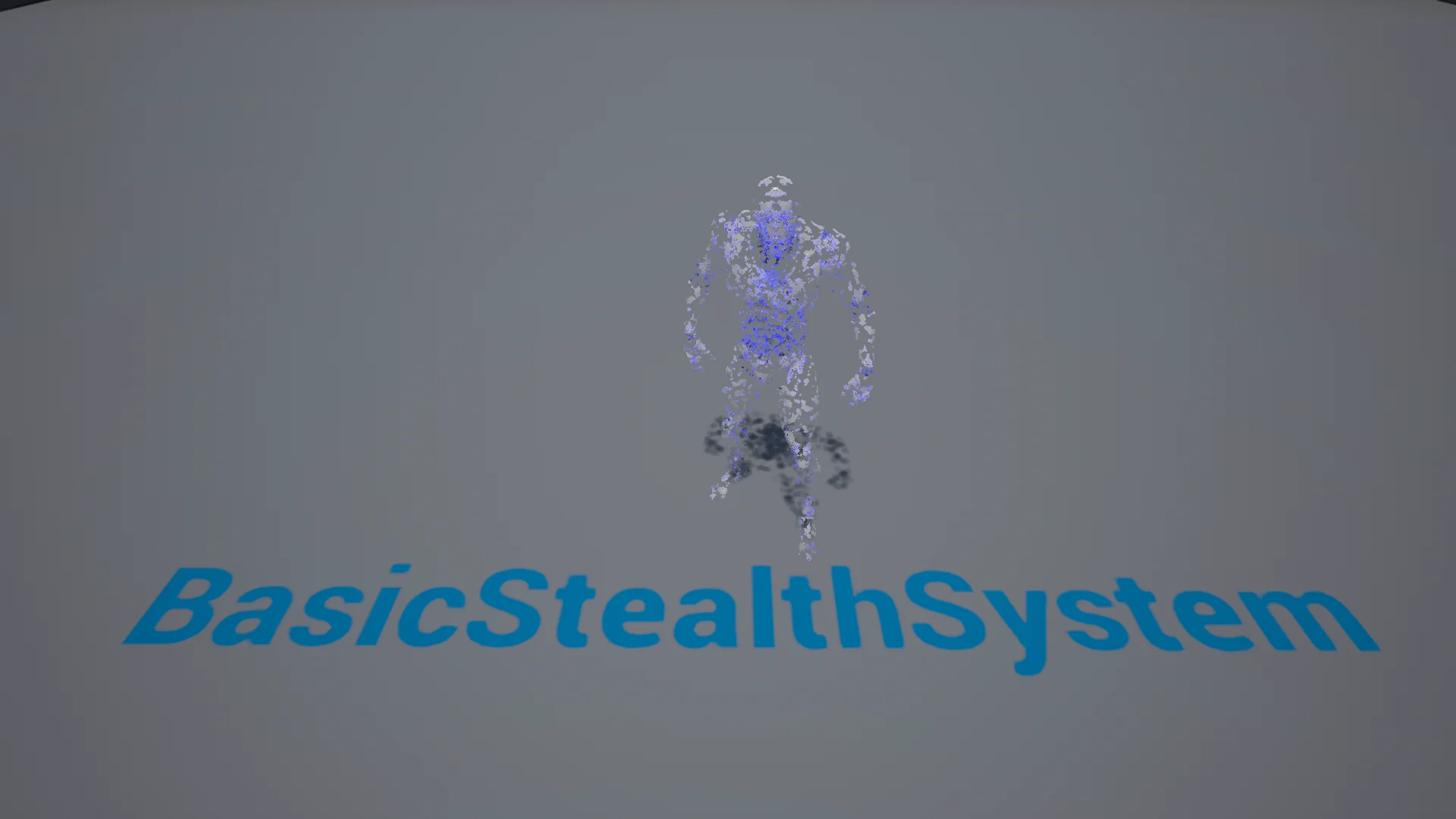
When an actor is given the stealth treatment, its normal appearance gives way to a tell-tale shimmer. That is the visible behavior at the center of Basic Stealth System: a Blueprint Scene Component is attached to any actor, and the original actor is replaced by the shimmer effect. The stealth component changes the actor's own visual state into the shimmer. The effect is built as a component, so the attachment point is the actor itself. That makes the stealth state part of the object's setup rather than an external scene device. This gives a shimmer that acts as a visible clue, which fits the tell-tale part of the effect's name.
Customization sits on top of that core replacement. The shimmer is not fixed to a single color, tempo, brightness, or distortion level; those values can be adjusted. A single actor can receive the treatment, and the same component-based approach applies to other actors that need it. The component supplies the stealth behavior, while the adjustable effects decide how strongly the shimmer announces itself. The visual result can range from a restrained surface change to a more pronounced distortion, depending on the settings used.
Attaching the Stealth Component to an Actor
The attachment step is narrow: add the Scene Component blueprint to an actor, and the stealth effect is in place. The actor remains the object being treated, with the component supplying the replacement behavior. The original actor is then replaced by the tell-tale shimmer, so this gives visible on the actor rather than handled by a separate object. This is the same starting move whether the actor is simple or assembled from more than one part.
Multiple meshes per Stealth Component are supported. For an actor built from several mesh pieces, one Stealth Component can carry the effect across those meshes. That extends the setup beyond single-mesh props: the stealth layer can be managed at the component level while the actor still contains multiple mesh elements. A single component can therefore be the place where the shimmer is applied for a multi-mesh actor, and the original actor is still replaced by that shimmer. The attachment model stays consistent; the difference is how much mesh content the component can cover.
Tuning the Stealth Effect's Colors, Timers, Glow, and Distortion
Colors, timers, glow intensities, distortion amounts, and additional settings are available for tuning the shimmer. These controls determine how the effect reads in a scene. Color changes the visual signature. Glow intensity affects how much the shimmer stands forward. Distortion amount changes how much the effect warps the actor's appearance. Timers give the stealth state a time-based dimension, so the effect can be paced instead of fixed to one duration. The customization set does not stop at those named values; more settings are included alongside them.
The practical range is broad enough that the same component can produce a subdued shimmer or a stronger, more obvious effect. Because the tuning lives on the Stealth Component attached to the actor, the changes apply to that actor's stealth treatment. The realistic style fits a shimmer that sits on the actor and alters its surface read rather than presenting a stylized icon. The component handles the replacement; the exposed values handle the look and timing.
Material Functions and Texture Swaps for the Stealth Look
The included material functions are the built-in route for customizing the effect. They let the material side of the shimmer be adjusted within the supplied setup. A second route is to create your own effect by swapping out textures. That changes the visual character at the texture level while the Stealth Component continues to handle the attachment and replacement behavior. One path works through the included functions; the other works by substituting textures to produce a different look.
Both paths keep the component's core role intact. The actor is still the target, the Scene Component blueprint is still the attachment point, and the tell-tale shimmer is still the visible outcome. What changes is the surface treatment of the shimmer, which can be shaped through the material functions or rebuilt through texture swaps. For a team that wants to adjust the provided effect, the material functions are the direct route. For a team that wants to create its own look, swapping textures provides the alternative.
Multiplayer Support and the Basic Stealth System Project Workflow
Multiplayer support is included, which puts shared-session use in scope for the asset. The stealth component is not limited to a single-player presentation detail; the same shimmer treatment can be carried into multiplayer work. That support is part of the system alongside the visual customization and multi-mesh handling.
Project setup has a specific recommended order. At this time, the system is best created in a new project and then migrated into an existing project. The purpose is to avoid overriding current project settings. That makes the migration step part of the integration path rather than an optional extra. The sequence is to establish the Basic Stealth System in a fresh project first, then move it into the target project. Teams bringing the component into an existing project should plan for that order so the current settings are not overwritten.
What Teams Get From the Basic Stealth System
The asset gives teams a component-based way to replace an actor's original look with a shimmer, then tune that shimmer through color, timing, glow, distortion, and additional controls. Material functions and texture swaps cover the look, multiple meshes per component cover more complex actors, and multiplayer support covers shared-session use. The realistic, Blueprint-driven stealth approach is consistent across those parts.
For evaluation, the concrete takeaway is the attachment model. A single Scene Component blueprint on an actor is the starting point. From there, the effect can be adjusted without changing the core behavior: the actor is replaced by the tell-tale shimmer, the component carries the stealth state, and the exposed settings decide how the shimmer presents itself. The project workflow adds one practical constraint: build in a new project first, then migrate into the existing project to avoid overriding its settings.
 Gameplay Features
 Gameplay Features
 Gameplay Features