"ae2217ad8e73450c"{"id":"1002997","slug":"bf-helicopter","title":"BF Helicopter","category":"Game Mechanics","engine":"4.19+,5.0+","assetVersion":"","engineVersion":"Engine Version: 4.19+,5.0+","tag":"Game Mechanics","accent":"blue","visual":"mech","summary":"BF Helicopter is a Blueprint aircraft with first person, third person, top-down, side-scroller and top-scroller modes, a weapon system, networking and 100+ knob","platform":"Unreal Engine","indexPolicy":"index","publishedAt":"2026-11-25T15:59:21.158Z","updatedAt":"2026-11-25T15:59:21.158Z","sourceNotes":[],"fileContents":[],"compatibility":["Unreal Engine","Engine Version: 4.19+,5.0+"],"featuredImage":{"alt":"BF Helicopter","src":"/wp-content/uploads/published/2026/11/a740e73b41fe-352bd99e-f722-43ae-ac76-9a49eab15185-cae73e354d.webp"},"hasDownloadLink":true,"downloads":0,"terms":[{"taxonomy":"category","slug":"game-mechanics","name":"Game Mechanics"}],"galleryImages":[{"src":"/wp-content/uploads/published/2026/11/fe376fd3c84a-d1c46c92-2be6-42f9-a816-c1eef86c1b09-5b8dfea889.webp","alt":"BF Helicopter"},{"src":"/wp-content/uploads/published/2026/11/832f8f6a67c3-f0fe1b8e-b953-4e8a-98fa-47c705bce988-b6b645443b.webp","alt":"BF Helicopter"},{"src":"/wp-content/uploads/published/2026/11/1eab48208bbf-29fdd528-08e4-4358-8d7b-fdfad2a30c73-37ae204cf2.webp","alt":"BF Helicopter"},{"src":"/wp-content/uploads/published/2026/11/795f33844b0c-65d7dfe8-4804-4c2d-9f1f-1fdf3dc5c146-f00be61570.webp","alt":"BF Helicopter"},{"src":"/wp-content/uploads/published/2026/11/50d2c3e58813-c5c4c318-1553-4f0b-991d-b1ce14df47a6-54a11ddadf.webp","alt":"BF Helicopter"},{"src":"/wp-content/uploads/published/2026/11/3b70bca91dab-8cd38d6b-c0a9-4687-be28-94e67103f6cb-51cc4141be.webp","alt":"BF Helicopter"},{"src":"/wp-content/uploads/published/2026/11/d9b3690a9ace-df98aa8b-22a6-4c93-a383-ecc83b4beba6-0149ca6c72.webp","alt":"BF Helicopter"}],"accessPanel":{"kind":"resource","title":"Get this resource","safetyNote":"Resources are manually reviewed before listing to improve quality and reduce obvious risks.","fileName":"BF Helicopter.7z","resourceType":"Resource archive","versions":[]},"contentHtml":"\u003cp\u003eA helicopter in a game is rarely just a vehicle. It is a camera platform, a weapon host and, in the right project, the whole reason a level is laid out the way it is. BF Helicopter approaches that from the cockpit outward: a Blueprint aircraft whose gameplay recalls the helicopters players have flown in large triple-A productions, shipped with several camera modes, a weapon system that fires without extra wiring, and network support. It was previously known as Field of Battle Helicopter and shortened to BF Helicopter for simplicity — a rename that matches the way the asset is meant to be handled, as something you drop in and fly rather than something you spend a week assembling.\u003c/p\u003e \u003ch2\u003eFive camera modes change what a Helicopter scene has to do\u003c/h2\u003e \u003cp\u003eThe most structural thing about this asset is that it does not commit you to one viewpoint. First person, third person, top down, side scroller and top scroller are all available, and each one pulls the rest of the project in a different direction.\u003c/p\u003e \u003cp\u003eIn first person, the aircraft becomes a cockpit. That is where the detail work pays off: the Blueprint carries up to 100+ knobs, which is far more than a distant third-person model needs and exactly the kind of thing someone building a study-level flight feel will want to fiddle with. A third-person camera pulls the attention back to the hull and its silhouette against terrain, and it is the natural fit for cinematic fly-bys or for missions where the player needs to read the ground below the aircraft. Top down and top scroller reframe the same aircraft as a moving shape on a playfield, where positioning matters more than interior detail — a view that suits arena combat, escort sequences or strafing runs. The side scroller is the most distinctive of the set, because it turns the helicopter into a profile moving laterally through the level, which changes how you place enemies, cover and obstacles entirely.\u003c/p\u003e \u003cp\u003eBecause all five exist inside one asset, a project can test the same flight behaviour under several framings before committing. A mission that feels flat in third person may read instantly in side-scroller view, and you can find that out without rebuilding the aircraft.\u003c/p\u003e \u003ch2\u003eSeven example helicopters and three more mode setups\u003c/h2\u003e \u003cp\u003eThe package does not hand you a single blank aircraft and wish you luck. There are 7 examples available to select from, plus 3 further examples that demonstrate different game modes. Navigating among the game types is handled with the number keys — pressing 1, 2, 3 and 4 steps through them, so you can compare the setups side by side inside the demo project.\u003c/p\u003e \u003cp\u003eFor production work, this is a menu of starting points rather than a feature list. Pick the example closest to the aircraft you actually want — the one whose proportions and configuration suit your scene — and that becomes your base. The alternate game-mode examples are worth opening even if you never ship them, because they show how the same Blueprint behaves when the camera and controls are reconfigured, which is often the fastest way to understand what the asset can absorb.\u003c/p\u003e \u003ch2\u003eWeapons and networking before you write anything\u003c/h2\u003e \u003cp\u003eAn out-of-the-box weapon system is the detail that saves the most time. Combat is usually the part of a vehicle prototype that stalls: the aircraft flies, but nothing shoots, so nobody can test whether the fight is fun. Here the weapons already exist as part of the Blueprint, which means a helicopter mission can be played and judged early, with the firing behaviour intact from the first session.\u003c/p\u003e \u003cp\u003eNetwork support sits alongside it. Multiplayer is where vehicle prototypes usually fall apart, because a helicopter that feels responsive in single player can behave very differently once two players share the same sky. Having networking present in the asset from the start lets a team test the aircraft in the conditions it will actually ship in, rather than discovering the problem after the flight model is locked.\u003c/p\u003e \u003cp\u003eDescriptors attached to the pack pull in two directions at once — realistic and stylized, lowpoly and fantasy, modular and effect-driven. In practice that reflects how flexible the Blueprint is: the same aircraft can be dressed as a grounded military machine or pushed toward something more stylised, and modular parts plus effects work are what make that reskin practical.\u003c/p\u003e \u003ch2\u003eWhere BF Helicopter lives and how it moves between projects\u003c/h2\u003e \u003cp\u003eThe Blueprint sits at a specific path inside the included project: FoBHelicopter \u0026gt; Blueprints \u0026gt; Helicopters \u0026gt; BP_Master_Helicopter. Opening it and confirming that all inputs are connected is the first real step, and it is easy to skip — a disconnected input node produces an aircraft that flies strangely rather than an obvious error.\u003c/p\u003e \u003cp\u003eMigration is the part worth slowing down for. After selecting one of the examples, you migrate that helicopter into your own working project. Once it lands there, the input check has to be repeated, because the wires can come loose in transit: input names in the destination project may differ from the ones in the package, and any mismatch leaves nodes unconnected. Treating that second check as part of the migration rather than an afterthought is what keeps the aircraft behaving the same way in its new home as it did in the demo.\u003c/p\u003e \u003ch2\u003eFour demo games and footage to judge it against\u003c/h2\u003e \u003cp\u003eFour playable demo games were made with this asset, which is a more honest test than any description. Playing them shows the modes in motion rather than as a list: first person, side scroller and top scroller are all represented in the available footage, alongside a short welcome video that introduces the set. If your project resembles any of those framings, the demo is a direct preview of how the aircraft will read on screen.\u003c/p\u003e \u003cp\u003eThe people who get the most from BF Helicopter are the ones building helicopter-centric gameplay beyond one flying prop — a side-scrolling shooter that needs a gunship, a top-down mission where the aircraft is the player's avatar, a first-person flight sequence where the knobs and cockpit matter. Enthusiasts who want something to tinker with will find plenty in the knob count, and teams that need weapons and multiplayer working before the first playtest will find that groundwork already laid.\u003c/p\u003e\n\n\u003ch2\u003eMore From The Same Workflow\u003c/h2\u003e\n\u003cul\u003e\n\u003cli\u003e\u003ca href=\"https://3dcghub.com/simple-airdrop/\" rel=\"noopener noreferrer\"\u003eSimple Airdrop\u003c/a\u003e\u003c/li\u003e\n\u003cli\u003e\u003ca href=\"https://3dcghub.com/photorealistic-helicopter/\" rel=\"noopener noreferrer\"\u003ePhotorealistic Helicopter\u003c/a\u003e\u003c/li\u003e\n\u003cli\u003e\u003ca href=\"https://3dcghub.com/attack-helicopter/\" rel=\"noopener noreferrer\"\u003eAttack Helicopter\u003c/a\u003e\u003c/li\u003e\n\u003cli\u003e\u003ca href=\"https://3dcghub.com/physics-based-helicopter/\" rel=\"noopener noreferrer\"\u003ePhysics Based Helicopter\u003c/a\u003e\u003c/li\u003e\n\u003cli\u003e\u003ca href=\"https://3dcghub.com/physically-accurate-quadcopter/\" rel=\"noopener noreferrer\"\u003ePhysically Accurate Quadcopter\u003c/a\u003e\u003c/li\u003e\n\u003c/ul\u003e","contentTextLength":6378,"navigation":{"current":47,"total":4964,"previous":{"id":"1002998","slug":"blueprint-dialogues","title":"Blueprint Dialogues","category":"Dialog Systems","platform":"Unreal Engine","updatedAt":"2026-11-25T15:59:57.063Z"},"next":{"id":"1002996","slug":"basic-stealth-system","title":"Basic Stealth System","category":"Gameplay Features","platform":"Unreal Engine","updatedAt":"2026-11-25T15:58:30.872Z"}},"relatedResources":[{"id":"1002349","slug":"simple-airdrop","title":"Simple Airdrop","category":"Game Mechanics","engine":"4.21+,5.0+","assetVersion":"","engineVersion":"Engine Version: 4.21+,5.0+","tag":"Game Mechanics","accent":"blue","visual":"mech","summary":"Simple Airdrop adds aircraft-delivered, parachute-descended crates with loot and inventory hooks, Blueprint logic, and replicated multiplayer support.","platform":"Unreal Engine","indexPolicy":"index","publishedAt":"2026-11-06T06:56:13.939Z","updatedAt":"2026-11-06T06:56:13.939Z","sourceNotes":[],"fileContents":[],"compatibility":["Unreal Engine","Engine Version: 4.21+,5.0+"],"featuredImage":{"alt":"Simple Airdrop","src":"/wp-content/uploads/published/2026/11/5956037becb8-1f63a7f6-646c-463b-8407-3c2998428e8b-0b24eaa542.webp"},"fileSizeBytes":25884389,"hasDownloadLink":true,"downloads":0},{"id":"1000171","slug":"photorealistic-helicopter","title":"Photorealistic Helicopter","category":"Aircraft","engine":"5.2+","assetVersion":"","engineVersion":"Engine Version: 5.2+","tag":"Aircraft","accent":"blue","visual":"mech","summary":"A fully controlled helicopter project with sound, interior, detailed cockpit, multiplayer support, animated doors, and keyboard, mouse, and gamepad controls.","platform":"Unreal Engine","indexPolicy":"index","publishedAt":"2026-06-19T17:08:32.476Z","updatedAt":"2026-06-19T17:08:32.476Z","sourceNotes":[],"fileContents":[],"compatibility":["Unreal Engine","Engine Version: 5.2+"],"featuredImage":{"alt":"Photorealistic Helicopter","src":"/wp-content/uploads/published/2026/06/49aa59030a5c-d075bd02-d080-4819-a3ff-4fab412892aa-e5f24caae5.webp"},"fileSizeBytes":1424844762,"hasDownloadLink":true,"downloads":2},{"id":"1000794","slug":"attack-helicopter","title":"Attack Helicopter","category":"Weapons \u0026 Combat","engine":"4.26+,5.0+","assetVersion":"","engineVersion":"Engine Version: 4.26+,5.0+","tag":"Weapons \u0026 Combat","accent":"blue","visual":"mech","summary":"An Attack Helicopter 3D model with a lowpoly, realistic rotor and weapon profile. No interior cockpit or flight blueprints included, keeping focus on external v","platform":"Unreal Engine","indexPolicy":"index","publishedAt":"2026-07-30T14:17:46.845Z","updatedAt":"2026-07-30T14:17:46.845Z","sourceNotes":[],"fileContents":[],"compatibility":["Unreal Engine","Engine Version: 4.26+,5.0+"],"featuredImage":{"alt":"Attack Helicopter","src":"/wp-content/uploads/published/2026/07/bed5627e6694-69e953be-6fb3-43f9-9628-a0dd36113303-773cca0a93.webp"},"fileSizeBytes":203518752,"hasDownloadLink":true,"downloads":0}]}[{"id":4225,"sourceId":4225,"taxonomyId":4225,"taxonomy":"category","slug":"asset-library","name":"Asset Library","parentId":null,"count":4817,"hasChildren":true,"href":"/","seoTitle":"Free Game Assets Library | 3DCGHUB","seoDescription":"Browse free Unreal Engine, Unity, Blender assets and game development tutorials on 3DCGHUB with previews, compatibility notes, and secure downloads.","sitemapEnabled":true,"children":[{"id":4227,"sourceId":4227,"taxonomyId":4227,"taxonomy":"category","slug":"blender-add-ons-plugins","name":"Blender Add-ons \u0026 Plugins","parentId":4225,"count":10,"hasChildren":false,"href":"/category/blender-add-ons-plugins/","seoTitle":"Free Blender Add-ons \u0026 Plugins | 3DCGHUB","seoDescription":"Browse free Blender Add-ons \u0026 Plugins tools for Blender on 3DCGHUB: curated downloads with preview images, compatibility notes and secure download access.","sitemapEnabled":true},{"id":514,"sourceId":514,"taxonomyId":514,"taxonomy":"category","slug":"unity-2","name":"Unity","parentId":4225,"count":453,"hasChildren":true,"href":"/category/unity-2/","seoTitle":"Free Unity Assets | 3DCGHUB","seoDescription":"Browse free Unity resources on 3DCGHUB: curated downloads with preview images, compatibility notes and secure download access.","sitemapEnabled":true,"children":[{"id":523,"sourceId":523,"taxonomyId":523,"taxonomy":"category","slug":"2d","name":"2D","parentId":514,"count":1,"hasChildren":true,"href":"/category/2d/","seoTitle":"Free Unity 2D | 3DCGHUB","seoDescription":"Browse free 2D assets for Unity on 3DCGHUB: curated downloads with preview images, compatibility notes and secure download access.","sitemapEnabled":true},{"id":515,"sourceId":515,"taxonomyId":515,"taxonomy":"category","slug":"3d-unity-2","name":"3D","parentId":514,"count":162,"hasChildren":true,"href":"/category/3d-unity-2/","seoTitle":"Free Unity 3D Assets | 3DCGHUB","seoDescription":"Browse free 3D assets for Unity on 3DCGHUB: curated downloads with preview images, compatibility notes and secure download access.","sitemapEnabled":true},{"id":565,"sourceId":565,"taxonomyId":565,"taxonomy":"category","slug":"add-ons","name":"Add-Ons","parentId":514,"count":2,"hasChildren":false,"href":"/category/add-ons/","seoTitle":"Free Unity Add-Ons | 3DCGHUB","seoDescription":"Browse free Add-Ons assets for Unity on 3DCGHUB: curated downloads with preview images, compatibility notes and secure download access.","sitemapEnabled":true},{"id":529,"sourceId":529,"taxonomyId":529,"taxonomy":"category","slug":"audio-unity-2","name":"Audio","parentId":514,"count":1,"hasChildren":true,"href":"/category/audio-unity-2/","seoTitle":"Free Unity Audio | 3DCGHUB","seoDescription":"Browse free Audio for Unity on 3DCGHUB: curated downloads with preview images, compatibility notes and secure download access.","sitemapEnabled":true},{"id":557,"sourceId":557,"taxonomyId":557,"taxonomy":"category","slug":"templates","name":"Templates","parentId":514,"count":36,"hasChildren":true,"href":"/category/templates/","seoTitle":"Free Unity Templates | 3DCGHUB","seoDescription":"Browse free Unity project templates on 3DCGHUB. Starter kits with previews, compatibility notes, and secure download access.","sitemapEnabled":true},{"id":533,"sourceId":533,"taxonomyId":533,"taxonomy":"category","slug":"tools-unity-2","name":"Tools","parentId":514,"count":0,"hasChildren":true,"href":"/category/tools-unity-2/","sitemapEnabled":true},{"id":554,"sourceId":554,"taxonomyId":554,"taxonomy":"category","slug":"vfx-unity-2","name":"VFX","parentId":514,"count":4,"hasChildren":true,"href":"/category/vfx-unity-2/","seoTitle":"Free Unity VFX | 3DCGHUB","seoDescription":"Browse free VFX for Unity on 3DCGHUB: curated downloads with preview images, compatibility notes and secure download access.","sitemapEnabled":true}]},{"id":511,"sourceId":511,"taxonomyId":511,"taxonomy":"category","slug":"unreal-engine-2","name":"Unreal Engine","parentId":4225,"count":4355,"hasChildren":true,"href":"/category/unreal-engine-2/","seoTitle":"Free Unreal Engine Assets | 3DCGHUB","seoDescription":"Browse free Unreal Engine resources on 3DCGHUB: curated downloads with preview images, compatibility notes and secure download access.","sitemapEnabled":true,"children":[{"id":54,"sourceId":54,"taxonomyId":54,"taxonomy":"category","slug":"3d","name":"3D","parentId":511,"count":2441,"hasChildren":true,"href":"/category/3d/","seoTitle":"Free Unreal Engine 3D | 3DCGHUB","seoDescription":"Browse free 3D assets for Unreal Engine on 3DCGHUB: curated downloads with preview images, compatibility notes and secure download access.","sitemapEnabled":true},{"id":441,"sourceId":441,"taxonomyId":441,"taxonomy":"category","slug":"animations","name":"Animations","parentId":511,"count":269,"hasChildren":true,"href":"/category/animations/","seoTitle":"Free Unreal Engine Animations | 3DCGHUB","seoDescription":"Browse free Animations for Unreal Engine on 3DCGHUB: curated downloads with preview images, compatibility notes and secure download access.","sitemapEnabled":true},{"id":446,"sourceId":446,"taxonomyId":446,"taxonomy":"category","slug":"audio","name":"Audio","parentId":511,"count":63,"hasChildren":true,"href":"/category/audio/","seoTitle":"Free Unreal Engine Audio Resources | 3DCGHUB","seoDescription":"Browse free Unreal Engine audio resources including sound effects, voices, dialogue, and ambient sounds. Curated free downloads on 3DCGHUB.","sitemapEnabled":true},{"id":466,"sourceId":466,"taxonomyId":466,"taxonomy":"category","slug":"game-systems","name":"Game Systems","parentId":511,"count":381,"hasChildren":true,"href":"/category/game-systems/","seoTitle":"Free Unreal Engine Game Systems | 3DCGHUB","seoDescription":"Browse free Game Systems tools for Unreal Engine on 3DCGHUB: curated downloads with preview images, compatibility notes and secure download access.","sitemapEnabled":true},{"id":478,"sourceId":478,"taxonomyId":478,"taxonomy":"category","slug":"game-templates","name":"Game Templates","parentId":511,"count":155,"hasChildren":true,"href":"/category/game-templates/","seoTitle":"Free Unreal Engine Game Templates | 3DCGHUB","seoDescription":"Browse free Game Templates for Unreal Engine on 3DCGHUB: curated downloads with preview images, compatibility notes and secure download access.","sitemapEnabled":true},{"id":432,"sourceId":432,"taxonomyId":432,"taxonomy":"category","slug":"hdri","name":"HDRI","parentId":511,"count":6,"hasChildren":true,"href":"/category/hdri/","seoTitle":"Free Unreal Engine HDRI | 3DCGHUB","seoDescription":"Browse free Unreal Engine HDRI skies and lighting maps on 3DCGHUB. Environment lighting with previews and secure downloads.","sitemapEnabled":true},{"id":228,"sourceId":228,"taxonomyId":228,"taxonomy":"category","slug":"material-and-textures","name":"Material \u0026 Textures","parentId":511,"count":172,"hasChildren":true,"href":"/category/material-and-textures/","seoTitle":"Free Unreal Engine Material \u0026 Textures | 3DCGHUB","seoDescription":"Browse free Material \u0026 Textures for Unreal Engine on 3DCGHUB: curated downloads with preview images, compatibility notes and secure download access.","sitemapEnabled":true},{"id":298,"sourceId":298,"taxonomyId":298,"taxonomy":"category","slug":"sprites-and-flipbooks","name":"Sprites \u0026 Flipbooks","parentId":511,"count":18,"hasChildren":true,"href":"/category/sprites-and-flipbooks/","seoTitle":"Free Unreal Engine Sprites \u0026 Flipbooks | 3DCGHUB","seoDescription":"Browse free Sprites \u0026 Flipbooks assets for Unreal Engine on 3DCGHUB: curated downloads with preview images, compatibility notes and secure download access.","sitemapEnabled":true},{"id":489,"sourceId":489,"taxonomyId":489,"taxonomy":"category","slug":"tools-and-plugins","name":"Tools \u0026 Plugins","parentId":511,"count":390,"hasChildren":true,"href":"/category/tools-and-plugins/","seoTitle":"Free Unreal Engine Tools \u0026 Plugins | 3DCGHUB","seoDescription":"Browse free Tools \u0026 Plugins for Unreal Engine on 3DCGHUB: curated downloads with preview images, compatibility notes and secure download access.","sitemapEnabled":true},{"id":459,"sourceId":459,"taxonomyId":459,"taxonomy":"category","slug":"ui","name":"UI","parentId":511,"count":47,"hasChildren":true,"href":"/category/ui/","seoTitle":"Free Unreal Engine UI | 3DCGHUB","seoDescription":"Browse free UI for Unreal Engine on 3DCGHUB: curated downloads with preview images, compatibility notes and secure download access.","sitemapEnabled":true},{"id":450,"sourceId":450,"taxonomyId":450,"taxonomy":"category","slug":"vfx","name":"VFX","parentId":511,"count":413,"hasChildren":true,"href":"/category/vfx/","seoTitle":"Free Unreal Engine VFX | 3DCGHUB","seoDescription":"Browse free VFX for Unreal Engine on 3DCGHUB: curated downloads with preview images, compatibility notes and secure download access.","sitemapEnabled":true}]}]},{"id":4222,"sourceId":4222,"taxonomyId":4222,"taxonomy":"category","slug":"tutorial-library","name":"Tutorial Library","parentId":null,"count":117,"hasChildren":false,"href":"/tutorials/","seoTitle":"Free Game Development Tutorial Library | 3DCGHUB","seoDescription":"Browse free game development tutorials for Unreal Engine, Unity, Blender, and more on 3DCGHUB with practical workflows and secure downloads.","sitemapEnabled":true}]
Resource screenshots
1 / 7
Asset drops
Daily Asset Drops
Follow 3DCGHUB on Telegram for daily Unreal, Unity & Blender drops and curated CC0 releases.
Resources are manually reviewed before listing to improve quality and reduce obvious risks.
Reviewed archive
Game Mechanics
BF Helicopter
BF Helicopter is a Blueprint aircraft with first person, third person, top-down, side-scroller and top-scroller modes, a weapon system, networking and 100+ knob
A helicopter in a game is rarely just a vehicle. It is a camera platform, a weapon host and, in the right project, the whole reason a level is laid out the way it is. BF Helicopter approaches that from the cockpit outward: a Blueprint aircraft whose gameplay recalls the helicopters players have flown in large triple-A productions, shipped with several camera modes, a weapon system that fires without extra wiring, and network support. It was previously known as Field of Battle Helicopter and shortened to BF Helicopter for simplicity — a rename that matches the way the asset is meant to be handled, as something you drop in and fly rather than something you spend a week assembling.
Five camera modes change what a Helicopter scene has to do
The most structural thing about this asset is that it does not commit you to one viewpoint. First person, third person, top down, side scroller and top scroller are all available, and each one pulls the rest of the project in a different direction.
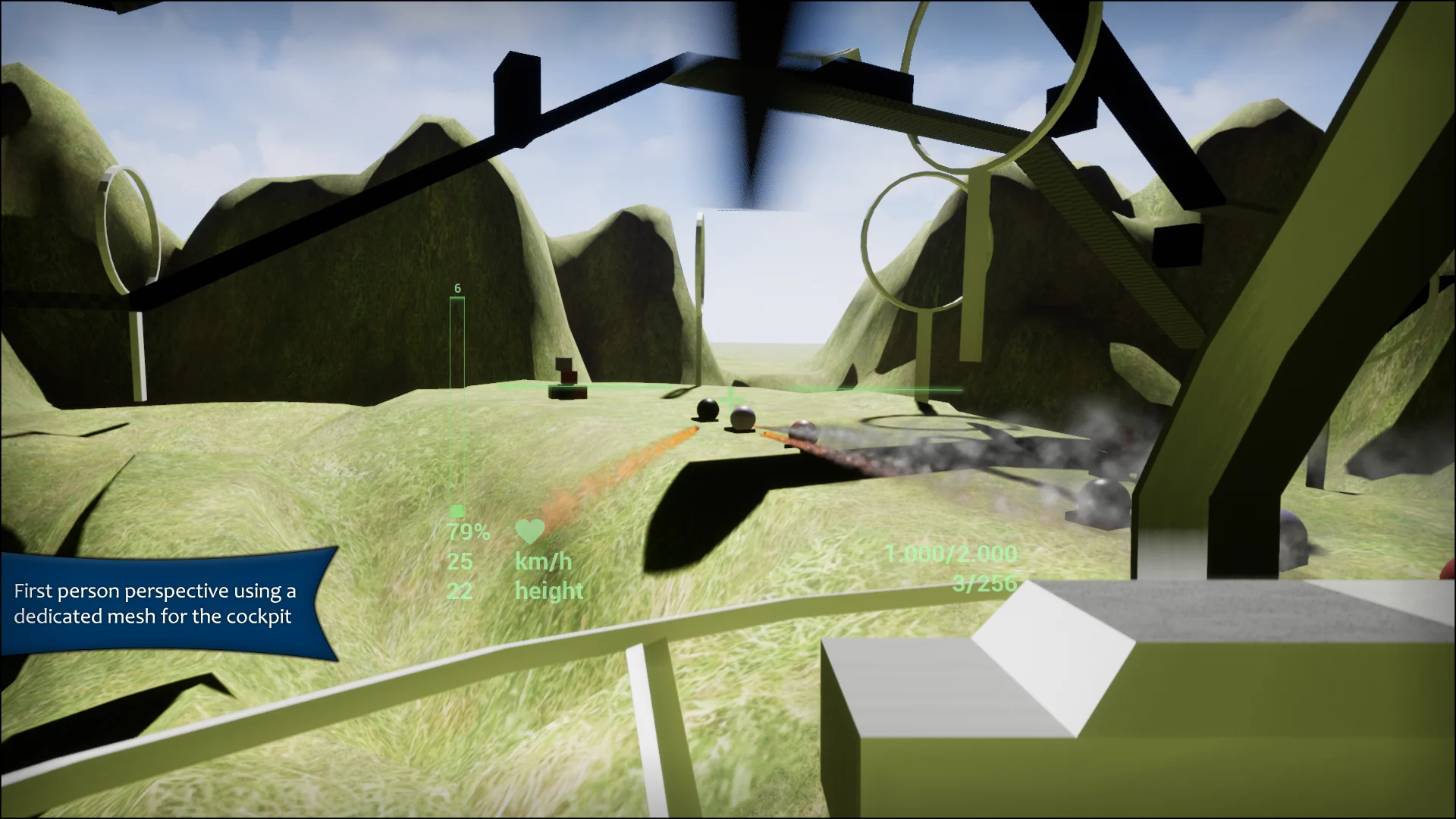
In first person, the aircraft becomes a cockpit. That is where the detail work pays off: the Blueprint carries up to 100+ knobs, which is far more than a distant third-person model needs and exactly the kind of thing someone building a study-level flight feel will want to fiddle with. A third-person camera pulls the attention back to the hull and its silhouette against terrain, and it is the natural fit for cinematic fly-bys or for missions where the player needs to read the ground below the aircraft. Top down and top scroller reframe the same aircraft as a moving shape on a playfield, where positioning matters more than interior detail — a view that suits arena combat, escort sequences or strafing runs. The side scroller is the most distinctive of the set, because it turns the helicopter into a profile moving laterally through the level, which changes how you place enemies, cover and obstacles entirely.
Because all five exist inside one asset, a project can test the same flight behaviour under several framings before committing. A mission that feels flat in third person may read instantly in side-scroller view, and you can find that out without rebuilding the aircraft.
Seven example helicopters and three more mode setups
The package does not hand you a single blank aircraft and wish you luck. There are 7 examples available to select from, plus 3 further examples that demonstrate different game modes. Navigating among the game types is handled with the number keys — pressing 1, 2, 3 and 4 steps through them, so you can compare the setups side by side inside the demo project.
For production work, this is a menu of starting points rather than a feature list. Pick the example closest to the aircraft you actually want — the one whose proportions and configuration suit your scene — and that becomes your base. The alternate game-mode examples are worth opening even if you never ship them, because they show how the same Blueprint behaves when the camera and controls are reconfigured, which is often the fastest way to understand what the asset can absorb.
Weapons and networking before you write anything
An out-of-the-box weapon system is the detail that saves the most time. Combat is usually the part of a vehicle prototype that stalls: the aircraft flies, but nothing shoots, so nobody can test whether the fight is fun. Here the weapons already exist as part of the Blueprint, which means a helicopter mission can be played and judged early, with the firing behaviour intact from the first session.
Network support sits alongside it. Multiplayer is where vehicle prototypes usually fall apart, because a helicopter that feels responsive in single player can behave very differently once two players share the same sky. Having networking present in the asset from the start lets a team test the aircraft in the conditions it will actually ship in, rather than discovering the problem after the flight model is locked.
Descriptors attached to the pack pull in two directions at once — realistic and stylized, lowpoly and fantasy, modular and effect-driven. In practice that reflects how flexible the Blueprint is: the same aircraft can be dressed as a grounded military machine or pushed toward something more stylised, and modular parts plus effects work are what make that reskin practical.
Where BF Helicopter lives and how it moves between projects
The Blueprint sits at a specific path inside the included project: FoBHelicopter > Blueprints > Helicopters > BP_Master_Helicopter. Opening it and confirming that all inputs are connected is the first real step, and it is easy to skip — a disconnected input node produces an aircraft that flies strangely rather than an obvious error.
Migration is the part worth slowing down for. After selecting one of the examples, you migrate that helicopter into your own working project. Once it lands there, the input check has to be repeated, because the wires can come loose in transit: input names in the destination project may differ from the ones in the package, and any mismatch leaves nodes unconnected. Treating that second check as part of the migration rather than an afterthought is what keeps the aircraft behaving the same way in its new home as it did in the demo.
Four demo games and footage to judge it against
Four playable demo games were made with this asset, which is a more honest test than any description. Playing them shows the modes in motion rather than as a list: first person, side scroller and top scroller are all represented in the available footage, alongside a short welcome video that introduces the set. If your project resembles any of those framings, the demo is a direct preview of how the aircraft will read on screen.
The people who get the most from BF Helicopter are the ones building helicopter-centric gameplay beyond one flying prop — a side-scrolling shooter that needs a gunship, a top-down mission where the aircraft is the player's avatar, a first-person flight sequence where the knobs and cockpit matter. Enthusiasts who want something to tinker with will find plenty in the knob count, and teams that need weapons and multiplayer working before the first playtest will find that groundwork already laid.
 Game Mechanics
 Aircraft
 Weapons & Combat