"6f9bd6df1f44a86f"{"id":"1000794","slug":"attack-helicopter","title":"Attack Helicopter","category":"Weapons \u0026 Combat","engine":"4.26+,5.0+","assetVersion":"","engineVersion":"Engine Version: 4.26+,5.0+","tag":"Weapons \u0026 Combat","accent":"blue","visual":"mech","summary":"An Attack Helicopter 3D model with a lowpoly, realistic rotor and weapon profile. No interior cockpit or flight blueprints included, keeping focus on external v","platform":"Unreal Engine","indexPolicy":"index","publishedAt":"2026-07-30T14:17:46.845Z","updatedAt":"2026-07-30T14:17:46.845Z","sourceNotes":[],"fileContents":[],"compatibility":["Unreal Engine","Engine Version: 4.26+,5.0+"],"featuredImage":{"alt":"Attack Helicopter","src":"/wp-content/uploads/published/2026/07/bed5627e6694-69e953be-6fb3-43f9-9628-a0dd36113303-773cca0a93.webp"},"hasDownloadLink":true,"downloads":0,"terms":[{"taxonomy":"category","slug":"weapons-and-combat","name":"Weapons \u0026 Combat"}],"galleryImages":[{"src":"/wp-content/uploads/published/2026/07/68c9ce70e324-a27ea7a7-a36b-4da7-84bf-e2fe8fbeae63-ab621b215b.webp","alt":"Attack Helicopter"},{"src":"/wp-content/uploads/published/2026/07/ebe813044a11-8940d9f5-8d68-4a42-8f09-e042c275c7f9-436553015c.webp","alt":"Attack Helicopter"},{"src":"/wp-content/uploads/published/2026/07/a22ea591ffc4-f39a8e1a-da9b-46b7-ade9-959ef1355b85-503b056dab.webp","alt":"Attack Helicopter"},{"src":"/wp-content/uploads/published/2026/07/4c61ca7770a7-f1fd9f08-705f-4ae2-80db-d1319c0ecb26-7fc77d3446.webp","alt":"Attack Helicopter"},{"src":"/wp-content/uploads/published/2026/07/41f2fd3f095b-1eb581bd-8625-4b02-85d4-0814fbfca296-285cd918e4.webp","alt":"Attack Helicopter"},{"src":"/wp-content/uploads/published/2026/07/840aa3e4adf3-534bf69c-77ee-4541-87e4-8eb43fa546ab-80fceb8af1.webp","alt":"Attack Helicopter"},{"src":"/wp-content/uploads/published/2026/07/2c2a06a69466-a50a2d70-675f-4fbd-b673-b15cda810e2f-28156367d3.webp","alt":"Attack Helicopter"},{"src":"/wp-content/uploads/published/2026/07/a963f4792f04-a67b7cc5-21f1-4dae-8d54-ceeb11c7973d-f4e0492ccc.webp","alt":"Attack Helicopter"},{"src":"/wp-content/uploads/published/2026/07/ee38d1f28fa3-fa24d53d-3fa1-4e91-a45a-1c2cfdc519bd-2b62b5de28.webp","alt":"Attack Helicopter"},{"src":"/wp-content/uploads/published/2026/07/b4499c1fd931-3c6a3104-eaa0-4fe9-a423-9eab669b1e1f-3b3df51842.webp","alt":"Attack Helicopter"}],"accessPanel":{"kind":"resource","title":"Download this resource","eyebrow":"Free Download","message":"Log in or create a free account to start your download.","fileName":"Content.7z","safetyNote":"Resources are manually reviewed before listing to improve quality and reduce obvious risks.","actionLabel":"Download Free","resourceType":"Resource archive"},"contentHtml":"\u003cp\u003eFinding a helicopter model that stays restrained in scope can be surprisingly difficult when a production needs a clean exterior asset rather than a plug-and-play vehicle system. The \u003cem\u003eAttack Helicopter\u003c/em\u003e package addresses that gap directly. It ships as a standalone 3D model of an armed rotorcraft, stripped of the systems that usually complicate lightweight scene drops.\u003c/p\u003e\n\n\u003cp\u003eBy excluding an interior cockpit and movement Blueprints, the asset resists the bloat that often comes with fully featured vehicle packs. That makes it a candidate for wide shots, simulation placeholders, stylized industrial compositions, and any context where the silhouette of the aircraft matters more than its internal instrumentation or flight logic.\u003c/p\u003e\n\n\u003ch2\u003eWhat Is Actually in the Attack Helicopter Package\u003c/h2\u003e\n\u003cp\u003eThe scope is unusually explicit. The package includes only the helicopter 3D model. There is no interior cockpit. There are no \u003ccode\u003eMove Blueprints\u003c/code\u003e.\u003c/p\u003e\n\n\u003cp\u003eThat definition is useful for planning. Artists know the geometry is the focus. Developers know they need to supply their own movement behavior if the helicopter needs to fly, hover, or respond to input. The asset is not a turnkey aircraft system. It is a visual component meant to sit inside a larger pipeline that handles physics, animation, and interaction elsewhere.\u003c/p\u003e\n\n\u003ch2\u003eWhere an Exterior-Only Rotorcraft Fits in a Scene\u003c/h2\u003e\n\u003cp\u003eThe tag set attached to the model paints a clear picture of intended use cases: \u003cem\u003eArmy\u003c/em\u003e, \u003cem\u003eSystem\u003c/em\u003e, \u003cem\u003eHelicopter\u003c/em\u003e, \u003cem\u003eLowpoly\u003c/em\u003e, \u003cem\u003eRotor\u003c/em\u003e, \u003cem\u003eRealistic\u003c/em\u003e, \u003cem\u003eAttack\u003c/em\u003e, \u003cem\u003eIndustrial\u003c/em\u003e, \u003cem\u003eWeapon\u003c/em\u003e, \u003cem\u003eMilitary\u003c/em\u003e, \u003cem\u003eChop\u003c/em\u003e, \u003cem\u003eAircraft\u003c/em\u003e, and \u003cem\u003eSimulation\u003c/em\u003e.\u003c/p\u003e\n\n\u003cp\u003eThose tags group into a few practical directions. For military and army scenes, the asset can act as a grounded or airborne prop reinforcing a combat environment. For industrial and simulation contexts, it can fill a hangar, a landing pad, or a wide aerial shot without dragging in unused cockpit interiors. The \u003cem\u003eLowpoly\u003c/em\u003e tag suggests the geometry is built with efficiency in mind, which matters when the model appears alongside other assets in dense scenes or when it needs to render cleanly across distance.\u003c/p\u003e\n\n\u003ch3\u003eRotor, Weapon, and Attack Staging\u003c/h3\u003e\n\u003cp\u003eThe \u003cem\u003eRotor\u003c/em\u003e and \u003cem\u003eWeapon\u003c/em\u003e tags point to visible external features that define the identity of an attack helicopter. The rotor assembly gives the model its silhouette. The weapon mounting implies hardpoints or armament geometry that reads as an armed aircraft from exterior angles.\u003c/p\u003e\n\n\u003cp\u003eFor staging, that means the \u003cem\u003eAttack Helicopter\u003c/em\u003e can hold its own in a combat frame without requiring additional detailing passes. A real-time simulation scene can place the model on a runway or helipad. A cinematic shot can use it as a static or animated background element. The \u003cem\u003eRealistic\u003c/em\u003e tag indicates that the proportions and external detailing aim for plausibility, so the aircraft reads as believable in scenes grounded in modern or near-future settings.\u003c/p\u003e\n\n\u003ch2\u003eBuilding Movement and Behavior Around the Model\u003c/h2\u003e\n\u003cp\u003eBecause movement Blueprints are not included, any flight behavior needs to be authored on the project side. That keeps the model agnostic. It can drop into a Blueprint-driven vehicle system, a scripted cinematic sequence, or a static environment setup without conflicting logic or redundant components.\u003c/p\u003e\n\n\u003cp\u003eFor developers building a simulation, the model can serve as the visual mesh for a custom flight controller. For artists, it can remain static or be animated through a separate timeline. The absence of built-in movement code means the asset will not fight an existing vehicle framework or introduce unrelated dependencies into the scene.\u003c/p\u003e\n\n\u003ch2\u003eInterior Expectations and Camera Planning\u003c/h2\u003e\n\u003cp\u003eThe package does not include an interior cockpit. That single exclusion shapes how productions plan cameras and player perspective. External third-person views, wide establishing shots, and distance framing are all viable without gaps or missing geometry. First-person cockpit sequences are not supported by this asset and would require a separate interior model if that angle is needed.\u003c/p\u003e\n\n\u003cp\u003eThis makes it easier to commit the \u003cem\u003eAttack Helicopter\u003c/em\u003e to scenarios where viewers stay outside the aircraft. A simulation with exterior-only cameras avoids the issue entirely. A cinematic sequence that cuts to the cockpit would need additional interior work, but everything visible from the outside remains covered by this single model.\u003c/p\u003e\n\n\u003ch2\u003eGenre Alignment Across Industrial and Military Productions\u003c/h2\u003e\n\u003cp\u003eThe combined tags of \u003cem\u003eIndustrial\u003c/em\u003e and \u003cem\u003eMilitary\u003c/em\u003e suggest the asset reads convincingly across both utilitarian airfield scenes and combat-oriented staging. Its \u003cem\u003eAttack Helicopter\u003c/em\u003e designation places it closer to armed service aircraft than civilian rotorcraft, while the \u003cem\u003eChop\u003c/em\u003e and \u003cem\u003eAircraft\u003c/em\u003e tags reinforce its identity as a functional flying vehicle in game and simulation environments.\u003c/p\u003e\n\n\u003cp\u003eFor a hangar diorama, the model can sit beside ground equipment and maintenance props. For a battlefield establishing shot, it can occupy a forward operating base or hover above ground units. The \u003cem\u003eRealistic\u003c/em\u003e tag means the proportions and external geometry aim for credibility in those scenes, and the \u003cem\u003eLowpoly\u003c/em\u003e tag means the mesh is structured for efficient integration rather than extreme close-up inspection of fine surface detail.\u003c/p\u003e\n\n\u003ch3\u003eStatic Defense and Ground Placement\u003c/h3\u003e\n\u003cp\u003eEven without movement Blueprints, the \u003cem\u003eAttack Helicopter\u003c/em\u003e functions as a grounded static element. It can be placed beside barricades, within fenced compounds, or on a carrier deck. The \u003cem\u003eWeapon\u003c/em\u003e and \u003cem\u003eAttack\u003c/em\u003e descriptors let the asset contribute to the tension of a scene without requiring animation. A parked helicopter with visible armament still communicates threat and scale.\u003c/p\u003e\n\n\u003cp\u003eDirectors and level designers can treat it as environmental storytelling. The helicopter does not need to fly to matter. A rotorcraft sitting idle in a base scene implies readiness. A fleet of them lined up across an airfield implies mobilization. The \u003cem\u003eRealistic\u003c/em\u003e and \u003cem\u003eMilitary\u003c/em\u003e tags back those staging choices.\u003c/p\u003e\n\n\u003ch2\u003eAnimation and Cutscene Integration\u003c/h2\u003e\n\u003cp\u003eWhile there are no \u003ccode\u003eMove Blueprints\u003c/code\u003e, the model can still be animated through sequences or timelines. A rotor spin can be driven by a simple rotation track. A takeoff or banking shot can be handled with a custom curve rather than physics logic.\u003c/p\u003e\n\n\u003cp\u003eFor a cutscene where full vehicle simulation is overkill, the \u003cem\u003eAttack Helicopter\u003c/em\u003e can be moved along a chosen path. The internal flight is not relevant in those sequences. The visual fidelity sits in the external geometry, the rotor, and the weapon loadout.\u003c/p\u003e\n\n\u003ch2\u003eSimulation and System Integration Paths\u003c/h2\u003e\n\u003cp\u003eThe \u003cem\u003eSystem\u003c/em\u003e and \u003cem\u003eSimulation\u003c/em\u003e tags point to a production where the \u003cem\u003eAttack Helicopter\u003c/em\u003e functions as a node within a larger network of assets and mechanics. In a base-management simulation, the aircraft can be a deployable element that visually exists in the world. In a strategy game, it can appear as a unit representation.\u003c/p\u003e\n\n\u003cp\u003eFor those systems, the external model is the feature that matters. The low-poly structure keeps the render budget low when multiple units share the screen. The realistic detailing keeps the units convincing at simulation camera distances. A custom behavior layer can be added by the production as needed, while the \u003cem\u003eAttack Helicopter\u003c/em\u003e provides the visual anchor.\u003c/p\u003e\n\n\u003ch2\u003eIndustrial and Base Scene Decoration\u003c/h2\u003e\n\u003cp\u003eThe \u003cem\u003eIndustrial\u003c/em\u003e tag opens a different staging lane. The helicopter can be incorporated into industrial environments such as oil platforms, construction yards, manufacturing compounds, or military-industrial facilities. In those settings, rotorcraft often serve transport, patrol, or rapid-response purposes.\u003c/p\u003e\n\n\u003cp\u003eThis asset can fill those roles visually. A helicopter parked near a control building implies site security and emergency response capability. A helicopter grounded in an industrial yard suggests maintenance downtime or rotation between industrial field operations. The \u003cem\u003eRealistic\u003c/em\u003e and \u003cem\u003eLowpoly\u003c/em\u003e nature of the model makes it compatible with facilities that already use restrained environmental geometry.\u003c/p\u003e\n\n\u003ch2\u003eWhere the Attack Helicopter Earns Its Slot\u003c/h2\u003e\n\u003cp\u003eThe \u003cem\u003eAttack Helicopter\u003c/em\u003e fits a project that needs a believable armed rotorcraft exterior without the overhead of included movement systems or interior detailing. It belongs in military, army, simulation, and industrial contexts that view the aircraft from the outside. For a production prepared to supply its own flight logic or treat the aircraft as a static and animated prop, the model provides the visual foundation.\u003c/p\u003e\n\n\u003ch2\u003eMore From The Same Workflow\u003c/h2\u003e\n\u003cul\u003e\n\u003cli\u003e\u003ca href=\"https://3dcghub.com/driveable-vehicle-ah-raider/\" rel=\"noopener noreferrer\"\u003eDriveable Vehicle : AH-Raider\u003c/a\u003e\u003c/li\u003e\n\u003cli\u003e\u003ca href=\"https://3dcghub.com/military-drones/\" rel=\"noopener noreferrer\"\u003eMilitary Drones\u003c/a\u003e\u003c/li\u003e\n\u003cli\u003e\u003ca href=\"https://3dcghub.com/physics-based-helicopter/\" rel=\"noopener noreferrer\"\u003ePhysics Based Helicopter\u003c/a\u003e\u003c/li\u003e\n\u003cli\u003e\u003ca href=\"https://3dcghub.com/photorealistic-helicopter/\" rel=\"noopener noreferrer\"\u003ePhotorealistic Helicopter\u003c/a\u003e\u003c/li\u003e\n\u003cli\u003e\u003ca href=\"https://3dcghub.com/sci-fi-arsenal-vol-3-1-2/\" rel=\"noopener noreferrer\"\u003eSci-fi Arsenal Vol 3.1\u003c/a\u003e\u003c/li\u003e\n\u003c/ul\u003e","contentTextLength":8477,"navigation":{"current":1570,"total":4218,"previous":{"id":"1000795","slug":"aurafx01","title":"AuraFX01","category":"Spells \u0026 Combat","platform":"Unreal Engine","updatedAt":"2026-07-30T14:23:20.917Z"},"next":{"id":"1000793","slug":"archery-skills-vfx-pack-niagara","title":"Archery Skills VFX Pack (Niagara)","category":"Spells \u0026 Combat","platform":"Unreal Engine","updatedAt":"2026-07-30T14:11:37.795Z"}},"relatedResources":[{"id":"5107","slug":"driveable-vehicle-ah-raider","title":"Driveable Vehicle : AH-Raider","category":"Vehicles \u0026 Transportation","engine":"5.0+","assetVersion":"Engine version: 5.0+","engineVersion":"4.16","tag":"Vehicles","accent":"blue","visual":"animation","summary":"Boost your Unreal Engine project with the AH-Raider. This drivable stealth helicopter features optimized blueprints, seven skins, and advanced weapon systems.","platform":"Unreal Engine","indexPolicy":"index","publishedAt":"2026-02-14T17:43:29.000Z","updatedAt":"2026-04-19T15:57:01.000Z","sourceNotes":[],"fileContents":[],"compatibility":["Unreal Engine","Engine version: 5.0+"],"featuredImage":{"alt":"Driveable Vehicle : AH-Raider","src":"https://3dcghub.com/wp-content/uploads/2026/02/99e4b997-773c-4bcc-b1c0-ddff44a70701.webp"},"hasDownloadLink":true,"downloads":0},{"id":"1001984","slug":"combat-missile-pack","title":"Combat Missile Pack","category":"Weapons \u0026 Combat","engine":"4.26+,5.0+","assetVersion":"","engineVersion":"Engine Version: 4.26+,5.0+","tag":"Weapons \u0026 Combat","accent":"blue","visual":"mech","summary":"Explore the Combat Missile Pack, featuring 23 scaled lowpoly missiles across five categories, aircraft wing mounts, and Z-Mech Robot Giant compatibility.","platform":"Unreal Engine","indexPolicy":"index","publishedAt":"2026-10-24T14:29:24.437Z","updatedAt":"2026-10-24T14:29:24.437Z","sourceNotes":[],"fileContents":[],"compatibility":["Unreal Engine","Engine Version: 4.26+,5.0+"],"featuredImage":{"alt":"Combat Missile Pack","src":"/wp-content/uploads/published/2026/10/4d49aee3ecd5-9f361a6f-8fb1-487b-b822-622815761136-99b50021ae.webp"},"hasDownloadLink":true,"downloads":0},{"id":"1001837","slug":"spaceship-colony-cruiser","title":"Spaceship Colony Cruiser","category":"Weapons \u0026 Combat","engine":"4.26+,5.0+","assetVersion":"","engineVersion":"Engine Version: 4.26+,5.0+","tag":"Weapons \u0026 Combat","accent":"blue","visual":"mech","summary":"Spaceship Colony Cruiser provides the Davis3D flight system, dynamic shields, customizable lasers, physics asteroids, automated turrets, and optimized shaders.","platform":"Unreal Engine","indexPolicy":"index","publishedAt":"2026-10-21T08:28:03.709Z","updatedAt":"2026-10-21T08:28:03.709Z","sourceNotes":[],"fileContents":[],"compatibility":["Unreal Engine","Engine Version: 4.26+,5.0+"],"featuredImage":{"alt":"Spaceship Colony Cruiser","src":"/wp-content/uploads/published/2026/10/54c024b5cf11-fe8acb37-eb2c-4562-8197-b28a3f0134a3-887ce93b16.webp"},"hasDownloadLink":true,"downloads":0}]}
Weapons & Combat
Attack Helicopter
An Attack Helicopter 3D model with a lowpoly, realistic rotor and weapon profile. No interior cockpit or flight blueprints included, keeping focus on external v
Finding a helicopter model that stays restrained in scope can be surprisingly difficult when a production needs a clean exterior asset rather than a plug-and-play vehicle system. The Attack Helicopter package addresses that gap directly. It ships as a standalone 3D model of an armed rotorcraft, stripped of the systems that usually complicate lightweight scene drops.
By excluding an interior cockpit and movement Blueprints, the asset resists the bloat that often comes with fully featured vehicle packs. That makes it a candidate for wide shots, simulation placeholders, stylized industrial compositions, and any context where the silhouette of the aircraft matters more than its internal instrumentation or flight logic.
What Is Actually in the Attack Helicopter Package
The scope is unusually explicit. The package includes only the helicopter 3D model. There is no interior cockpit. There are no Move Blueprints.
That definition is useful for planning. Artists know the geometry is the focus. Developers know they need to supply their own movement behavior if the helicopter needs to fly, hover, or respond to input. The asset is not a turnkey aircraft system. It is a visual component meant to sit inside a larger pipeline that handles physics, animation, and interaction elsewhere.
Where an Exterior-Only Rotorcraft Fits in a Scene
The tag set attached to the model paints a clear picture of intended use cases: Army, System, Helicopter, Lowpoly, Rotor, Realistic, Attack, Industrial, Weapon, Military, Chop, Aircraft, and Simulation.
Those tags group into a few practical directions. For military and army scenes, the asset can act as a grounded or airborne prop reinforcing a combat environment. For industrial and simulation contexts, it can fill a hangar, a landing pad, or a wide aerial shot without dragging in unused cockpit interiors. The Lowpoly tag suggests the geometry is built with efficiency in mind, which matters when the model appears alongside other assets in dense scenes or when it needs to render cleanly across distance.
Rotor, Weapon, and Attack Staging
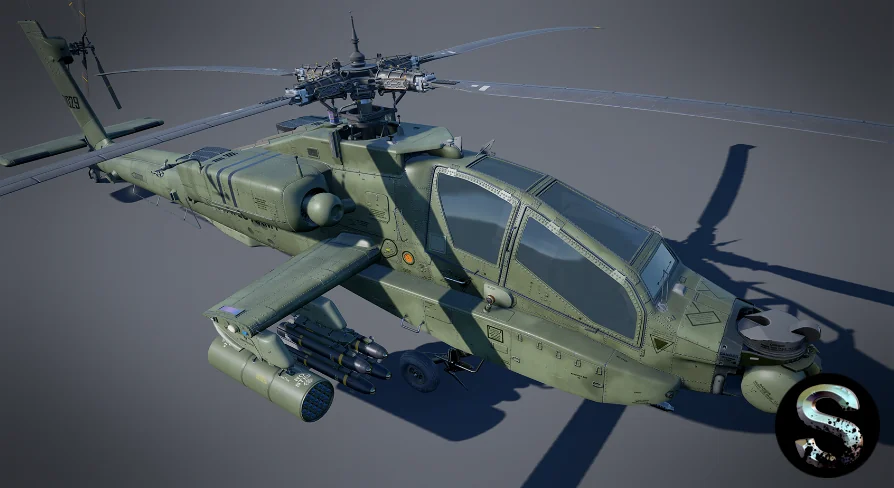
The Rotor and Weapon tags point to visible external features that define the identity of an attack helicopter. The rotor assembly gives the model its silhouette. The weapon mounting implies hardpoints or armament geometry that reads as an armed aircraft from exterior angles.
For staging, that means the Attack Helicopter can hold its own in a combat frame without requiring additional detailing passes. A real-time simulation scene can place the model on a runway or helipad. A cinematic shot can use it as a static or animated background element. The Realistic tag indicates that the proportions and external detailing aim for plausibility, so the aircraft reads as believable in scenes grounded in modern or near-future settings.
Building Movement and Behavior Around the Model
Because movement Blueprints are not included, any flight behavior needs to be authored on the project side. That keeps the model agnostic. It can drop into a Blueprint-driven vehicle system, a scripted cinematic sequence, or a static environment setup without conflicting logic or redundant components.
For developers building a simulation, the model can serve as the visual mesh for a custom flight controller. For artists, it can remain static or be animated through a separate timeline. The absence of built-in movement code means the asset will not fight an existing vehicle framework or introduce unrelated dependencies into the scene.
Interior Expectations and Camera Planning
The package does not include an interior cockpit. That single exclusion shapes how productions plan cameras and player perspective. External third-person views, wide establishing shots, and distance framing are all viable without gaps or missing geometry. First-person cockpit sequences are not supported by this asset and would require a separate interior model if that angle is needed.
This makes it easier to commit the Attack Helicopter to scenarios where viewers stay outside the aircraft. A simulation with exterior-only cameras avoids the issue entirely. A cinematic sequence that cuts to the cockpit would need additional interior work, but everything visible from the outside remains covered by this single model.
Genre Alignment Across Industrial and Military Productions
The combined tags of Industrial and Military suggest the asset reads convincingly across both utilitarian airfield scenes and combat-oriented staging. Its Attack Helicopter designation places it closer to armed service aircraft than civilian rotorcraft, while the Chop and Aircraft tags reinforce its identity as a functional flying vehicle in game and simulation environments.
For a hangar diorama, the model can sit beside ground equipment and maintenance props. For a battlefield establishing shot, it can occupy a forward operating base or hover above ground units. The Realistic tag means the proportions and external geometry aim for credibility in those scenes, and the Lowpoly tag means the mesh is structured for efficient integration rather than extreme close-up inspection of fine surface detail.
Static Defense and Ground Placement
Even without movement Blueprints, the Attack Helicopter functions as a grounded static element. It can be placed beside barricades, within fenced compounds, or on a carrier deck. The Weapon and Attack descriptors let the asset contribute to the tension of a scene without requiring animation. A parked helicopter with visible armament still communicates threat and scale.
Directors and level designers can treat it as environmental storytelling. The helicopter does not need to fly to matter. A rotorcraft sitting idle in a base scene implies readiness. A fleet of them lined up across an airfield implies mobilization. The Realistic and Military tags back those staging choices.
Animation and Cutscene Integration
While there are no Move Blueprints, the model can still be animated through sequences or timelines. A rotor spin can be driven by a simple rotation track. A takeoff or banking shot can be handled with a custom curve rather than physics logic.
For a cutscene where full vehicle simulation is overkill, the Attack Helicopter can be moved along a chosen path. The internal flight is not relevant in those sequences. The visual fidelity sits in the external geometry, the rotor, and the weapon loadout.
Simulation and System Integration Paths
The System and Simulation tags point to a production where the Attack Helicopter functions as a node within a larger network of assets and mechanics. In a base-management simulation, the aircraft can be a deployable element that visually exists in the world. In a strategy game, it can appear as a unit representation.
For those systems, the external model is the feature that matters. The low-poly structure keeps the render budget low when multiple units share the screen. The realistic detailing keeps the units convincing at simulation camera distances. A custom behavior layer can be added by the production as needed, while the Attack Helicopter provides the visual anchor.
Industrial and Base Scene Decoration
The Industrial tag opens a different staging lane. The helicopter can be incorporated into industrial environments such as oil platforms, construction yards, manufacturing compounds, or military-industrial facilities. In those settings, rotorcraft often serve transport, patrol, or rapid-response purposes.
This asset can fill those roles visually. A helicopter parked near a control building implies site security and emergency response capability. A helicopter grounded in an industrial yard suggests maintenance downtime or rotation between industrial field operations. The Realistic and Lowpoly nature of the model makes it compatible with facilities that already use restrained environmental geometry.
Where the Attack Helicopter Earns Its Slot
The Attack Helicopter fits a project that needs a believable armed rotorcraft exterior without the overhead of included movement systems or interior detailing. It belongs in military, army, simulation, and industrial contexts that view the aircraft from the outside. For a production prepared to supply its own flight logic or treat the aircraft as a static and animated prop, the model provides the visual foundation.
 Weapons & Combat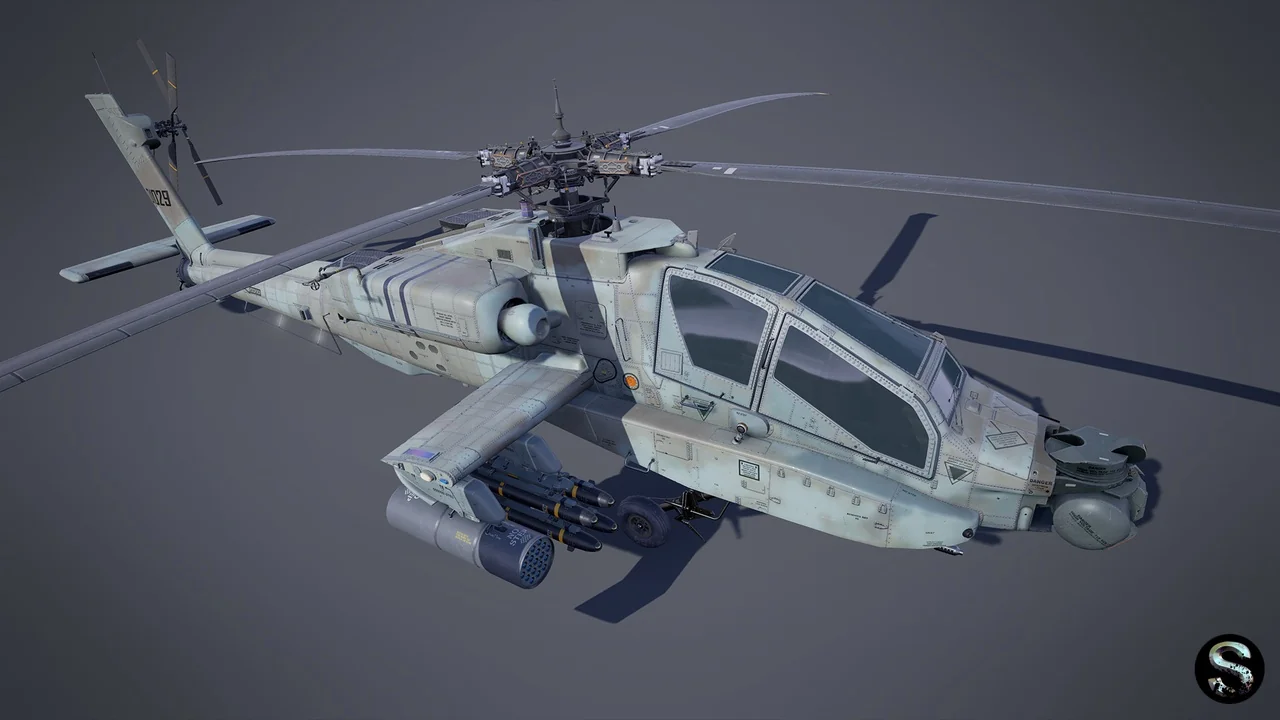
 Vehicles
 Weapons & Combat
 Weapons & Combat