"6f9bd6df1f44a86f"{"id":"1000795","slug":"aurafx01","title":"AuraFX01","category":"Spells \u0026 Combat","engine":"4.26+,5.0+","assetVersion":"","engineVersion":"Engine Version: 4.26+,5.0+","tag":"Spells \u0026 Combat","accent":"blue","visual":"mech","summary":"AuraFX01 delivers 30 aura effects across Fire, Water, Wind, Thunder, and Dark attributes, with Cascade LODs and a Niagara version for Unreal Engine 4.26 and lat","platform":"Unreal Engine","indexPolicy":"index","publishedAt":"2026-07-30T14:23:20.917Z","updatedAt":"2026-07-30T14:23:20.917Z","sourceNotes":[],"fileContents":[],"compatibility":["Unreal Engine","Engine Version: 4.26+,5.0+"],"featuredImage":{"alt":"AuraFX01","src":"/wp-content/uploads/published/2026/07/10827e9a39ef-18979b48-61cc-444e-9d4e-c228f6a57978-b399b80598.webp"},"hasDownloadLink":true,"downloads":1,"terms":[{"taxonomy":"category","slug":"spells-and-combat","name":"Spells \u0026 Combat"}],"galleryImages":[{"src":"/wp-content/uploads/published/2026/07/e8349615df63-bf2b2151-eb1d-4daf-a41b-e9499cae325b-45383f1668.webp","alt":"AuraFX01"},{"src":"/wp-content/uploads/published/2026/07/72f8d2f322f7-ab9b3b3a-6b39-4840-875b-90f7162f1d20-7dfbe99879.webp","alt":"AuraFX01"},{"src":"/wp-content/uploads/published/2026/07/1f17e44eecd9-265d449d-0b48-4704-8fa0-a3785b1f4dc1-03c696d050.webp","alt":"AuraFX01"},{"src":"/wp-content/uploads/published/2026/07/f1d921b0217e-412713a1-43ae-4043-8992-11a4bd55913b-4ad8d35131.webp","alt":"AuraFX01"},{"src":"/wp-content/uploads/published/2026/07/15bb02c2b62b-333bf9b8-48fd-472c-b073-65df1334d36e-1bf9fa8caa.webp","alt":"AuraFX01"}],"accessPanel":{"kind":"resource","title":"Download this resource","eyebrow":"Free Download","message":"Log in or create a free account to start your download.","fileName":"Content.7z","safetyNote":"Resources are manually reviewed before listing to improve quality and reduce obvious risks.","actionLabel":"Download Free","resourceType":"Resource archive"},"contentHtml":"\u003ch2\u003eStarting with \u003cem\u003eAuraFX01\u003c/em\u003e in a Particle-Driven Workflow\u003c/h2\u003e\n\u003cp\u003eProject pipelines that need layered magic auras often run into a wall: single-effect packs force artists to assemble conflicting visual languages across incompatible emitter systems. \u003cem\u003eAuraFX01\u003c/em\u003e attacks that gap by shipping 30 aura effects within a single library, each grouped under a shared elemental vocabulary. Fire, Water, Wind, Thunder, and Dark sit alongside other attributes, giving effect artists a consistent palette to draw from instead of mixing assets from unrelated packs.\u003c/p\u003e\n\n\u003cp\u003eThat elemental framing matters when a combat system or character state needs distinct visual identities for each damage type or buff tier. 30 effects across five named attributes plus an \"etc.\" category means roughly six distinct visual approaches per element, enough variety to cover primary casts, sustained channels, hit reactions, and area markers without repeating the same emitter.\u003c/p\u003e\n\n\u003ch3\u003eThirty Aura Effects Across Elemental Attributes\u003c/h3\u003e\n\u003cp\u003eEach aura in the package is tied to one of several elemental or thematic attributes. The named categories—Fire, Water, Wind, Thunder, and Dark—map to common gameplay damage types, status effects, or character alignments. Any additional attributes fill out the remaining slots, though the specific naming for those is left open. What is clear is that the effect count is deliberate: 30 discrete auras, each intended to function as a standalone visual rather than a variation of a single base emitter.\u003c/p\u003e\n\n\u003cp\u003eFor setup, that means an artist working on a character sheet or ability bar can assign unique aura IDs per skill without cherry-picking from mismatched third-party assets. The library's internal consistency across attributes keeps the visual language tight, which is useful when a single project cycles through many visual states tied to the same character or encounter.\u003c/p\u003e\n\n\u003ch2\u003eParticle LOD Setup in Cascade\u003c/h2\u003e\n\u003cp\u003eThe Cascade-based effects in \u003cem\u003eAuraFX01\u003c/em\u003e include particle Level of Detail (LOD) setups. LOD configurations in Cascade let each effect scale its emitter complexity based on the camera's distance to the particle system. When a character enveloped in a Fire aura moves far from the viewpoint, the LOD switches in and reduces the particle count or simulation cost automatically.\u003c/p\u003e\n\n\u003cp\u003eThat setup has direct production implications. Large encounters with multiple aura-bearing characters can tax the GPU if every emitter runs at full complexity regardless of screen real estate. Cascade LODs address that by stepping down simulation cost on distant Actors, preserving frame budget without manual intervention per effect. Artists placing the auras do not need to script distance-based toggles—the LOD logic sits inside the particle system itself.\u003c/p\u003e\n\n\u003cp\u003eWorking with the Cascade versions means artists comfortable with Unreal Engine's legacy particle workflow can open each aura, inspect the LOD transitions, and tune the step-down thresholds to match specific scene scales or performance targets. The LODs are part of the package, not an after-the-fact modification.\u003c/p\u003e\n\n\u003ch3\u003eNiagaraFX Integration for UE 4.26 and Later\u003c/h3\u003e\n\u003cp\u003eOn August 2, 2021, a \u003ccode\u003eNiagaraFX\u003c/code\u003e version was added to \u003cem\u003eAuraFX01\u003c/em\u003e, compatible with Unreal Engine 4.26 and later. This opens a second implementation path beyond Cascade. Projects already migrated to Niagara, or teams standardizing on Unreal's modern particle stack, can pull the auras directly into a Niagara-driven pipeline rather than maintaining legacy Cascade systems alongside new work.\u003c/p\u003e\n\n\u003cp\u003eTo use the \u003ccode\u003eNiagaraFX\u003c/code\u003e version, the \u003ccode\u003eNiagara\u003c/code\u003e plugin must be active in the project. This is a project-level setting in Unreal Engine, and the requirement is straightforward: no plugin, no \u003ccode\u003eNiagaraFX\u003c/code\u003e. Teams integrating \u003cem\u003eAuraFX01\u003c/em\u003e into an existing Unreal Engine 4.26+ build should verify the plugin state before importing the effects to avoid silent failures or missing emitter references.\u003c/p\u003e\n\n\u003cp\u003eHaving both Cascade and Niagara versions available means the package fits two distinct project generations. Legacy builds on Cascade keep the LOD-equipped workflow, while current-generation projects on Niagara get the auras in the native modern format without a forced rewrite.\u003c/p\u003e\n\n\u003ch2\u003eDemo Verification Before Committing to Implementation\u003c/h2\u003e\n\u003cp\u003eTwo demo videos exist for \u003cem\u003eAuraFX01\u003c/em\u003e, one for the Niagara version and one for the Cascade version. Watching the relevant clip before importing the effects into a project lets artists confirm the visual language matches the intended art direction. Each video shows the auras in motion, which is particularly useful for judging scale, motion speed, and element-specific behavior like the difference between a Wind aura's drift and a Thunder aura's snap.\u003c/p\u003e\n\n\u003cp\u003eThe separation of Niagara and Cascade demos also reflects the two implementation tracks. Artists can preview the exact version they plan to use rather than extrapolating from a clip shot in the other system. This matters because particle behavior can shift between Cascade and Niagara even when the core concept is identical.\u003c/p\u003e\n\n\u003ch3\u003eVisual Effect Tagging and Magic-System Fit\u003c/h3\u003e\n\u003cp\u003e\u003cem\u003eAuraFX01\u003c/em\u003e carries tags including \u003cem\u003eVisual\u003c/em\u003e, \u003cem\u003eEffect\u003c/em\u003e, \u003cem\u003eNiagara\u003c/em\u003e, \u003cem\u003eVisualEffect\u003c/em\u003e, and \u003cem\u003eMagic\u003c/em\u003e. The tags place the package firmly in the visual-effects category with a magic-system focus. For teams organizing asset libraries by tag or building smart-content systems in Unreal projects, those tags provide a lookup path for finding the auras when browsing large asset vaults.\u003c/p\u003e\n\n\u003cp\u003eThe \u003cem\u003eMagic\u003c/em\u003e tag specifically signals that these auras are intended for fantastical or ability-driven contexts, not realistic simulation or environmental particle work. That keeps the package's creative scope clear: spell casts, character buffs, elemental infusions, and similar combat or RPG-adjacent magic moments.\u003c/p\u003e\n\n\u003ch2\u003eProduction-Ready Positioning and Dual-System Maintenance\u003c/h2\u003e\n\u003cp\u003e\u003cem\u003eAuraFX01\u003c/em\u003e's dual-system approach—Cascade with LODs and \u003ccode\u003eNiagaraFX\u003c/code\u003e for UE 4.26+—gives the package a longer shelf life than single-system packs. Teams on older Unreal builds can deploy the Cascade auras with the built-in LOD optimization intact. Teams on current builds can use the \u003ccode\u003eNiagaraFX\u003c/code\u003e version and stay within their preferred particle workflow without carrying deprecated systems forward.\u003c/p\u003e\n\n\u003cp\u003eThe presence of particle LODs on the Cascade side indicates the effects are built with real-time performance in mind, not just cinematic rendering. LOD-enabled particle systems are a production-tested way to manage frame budgets in gameplay scenarios where camera distance fluctuates constantly. Artists working on large-scale encounters can place multiple aura-equipped characters in a scene and rely on the LOD logic to keep the particle simulation cost proportional to screen relevance.\u003c/p\u003e\n\n\u003cp\u003eFor ongoing maintenance, the dated Niagara addition (August 2, 2021) and the stated Unreal Engine 4.26+ compatibility baseline give teams a concrete reference point for engine-version matching. Projects that have moved past UE 4.26 can adopt the \u003ccode\u003eNiagaraFX\u003c/code\u003e version directly, while projects still on Cascade retain full access to the original LOD-equipped effects.\u003c/p\u003e\n\n\u003ch2\u003eExplore Similar Assets\u003c/h2\u003e\n\u003cul\u003e\n\u003cli\u003e\u003ca href=\"https://3dcghub.com/sky-open-vfx/\" rel=\"noopener noreferrer\"\u003eSky Open VFX\u003c/a\u003e\u003c/li\u003e\n\u003cli\u003e\u003ca href=\"https://3dcghub.com/water-magic-niagara/\" rel=\"noopener noreferrer\"\u003eWater Magic Niagara\u003c/a\u003e\u003c/li\u003e\n\u003cli\u003e\u003ca href=\"https://3dcghub.com/environment-vfx-pack-high-quality/\" rel=\"noopener noreferrer\"\u003eEnvironment VFX Pack - High Quality\u003c/a\u003e\u003c/li\u003e\n\u003cli\u003e\u003ca href=\"https://3dcghub.com/assassin-spell-vfx-pack/\" rel=\"noopener noreferrer\"\u003eAssassin Spell VFX Pack\u003c/a\u003e\u003c/li\u003e\n\u003cli\u003e\u003ca href=\"https://3dcghub.com/magic-cast-vfx/\" rel=\"noopener noreferrer\"\u003eMagic Cast VFX\u003c/a\u003e\u003c/li\u003e\n\u003c/ul\u003e","contentTextLength":7097,"navigation":{"current":1569,"total":4218,"previous":{"id":"1000796","slug":"blueprint-mesh-extractor","title":"Blueprint Mesh Extractor","category":"Engine Tools","platform":"Unreal Engine","updatedAt":"2026-07-30T14:29:11.117Z"},"next":{"id":"1000794","slug":"attack-helicopter","title":"Attack Helicopter","category":"Weapons \u0026 Combat","platform":"Unreal Engine","updatedAt":"2026-07-30T14:17:46.845Z"}},"relatedResources":[{"id":"1001860","slug":"advanced-magic-fx-13","title":"Advanced Magic FX 13","category":"Spells \u0026 Combat","engine":"4.26+,5.0+","assetVersion":"","engineVersion":"Engine Version: 4.26+,5.0+","tag":"Spells \u0026 Combat","accent":"blue","visual":"mech","summary":"Implement Advanced Magic FX 13 across Niagara and Cascade workflows, featuring elemental storms, cutter and stab impacts, healing visual effects, and particle L","platform":"Unreal Engine","indexPolicy":"index","publishedAt":"2026-10-22T10:53:40.573Z","updatedAt":"2026-10-22T10:53:40.573Z","sourceNotes":[],"fileContents":[],"compatibility":["Unreal Engine","Engine Version: 4.26+,5.0+"],"featuredImage":{"alt":"Advanced Magic FX 13","src":"/wp-content/uploads/published/2026/10/56f53f668171-7291f32c-6b8b-40c3-bb89-0b6787685c87-2017c52e2f.webp"},"hasDownloadLink":true,"downloads":1},{"id":"1001294","slug":"mixed-magic-spell-vfx-pack","title":"Mixed Magic - Spell VFX Pack","category":"Spells \u0026 Combat","engine":"5.0+","assetVersion":"","engineVersion":"Engine Version: 5.0+","tag":"Spells \u0026 Combat","accent":"blue","visual":"mech","summary":"Mixed Magic - Spell VFX Pack supplies 26 elemental spells across fire, dark, water, lightning, and ice, featuring optimized Niagara effects and modular setups.","platform":"Unreal Engine","indexPolicy":"index","publishedAt":"2026-10-01T16:45:14.765Z","updatedAt":"2026-10-01T16:45:14.765Z","sourceNotes":[],"fileContents":[],"compatibility":["Unreal Engine","Engine Version: 5.0+"],"featuredImage":{"alt":"Mixed Magic - Spell VFX Pack","src":"/wp-content/uploads/published/2026/10/ef0800e3666d-b2bcf8aa-d8f2-463e-ac03-e36462e93277-64b5a9843e.webp"},"hasDownloadLink":true,"downloads":4},{"id":"16838","slug":"water-magic-niagara","title":"Water Magic Niagara","category":"Spells \u0026 Combat","engine":"5.0+","assetVersion":"Engine version: 5.0+","engineVersion":"5.0","tag":"Spells \u0026 Combat","accent":"blue","visual":"animation","summary":"Enhance your project with Water Magic Niagara, a specialized collection of aquatic visual effects. This pack allows for easy customization of size and color to fit any magical gameplay scenario.","platform":"Unreal Engine","indexPolicy":"index","publishedAt":"2026-03-12T18:03:54.000Z","updatedAt":"2026-04-19T15:43:41.000Z","sourceNotes":[],"fileContents":[],"compatibility":["Unreal Engine","Engine version: 5.0+"],"featuredImage":{"alt":"Water Magic Niagara","src":"https://3dcghub.com/wp-content/uploads/2026/03/cb921e64-127c-40c5-869f-c9c1dbc93b27.webp"},"hasDownloadLink":true,"downloads":7}]}
Spells & Combat
AuraFX01
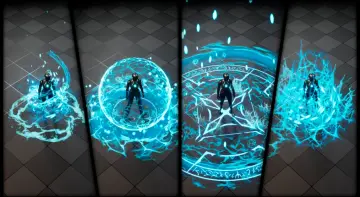
AuraFX01 delivers 30 aura effects across Fire, Water, Wind, Thunder, and Dark attributes, with Cascade LODs and a Niagara version for Unreal Engine 4.26 and lat
Starting with AuraFX01 in a Particle-Driven Workflow
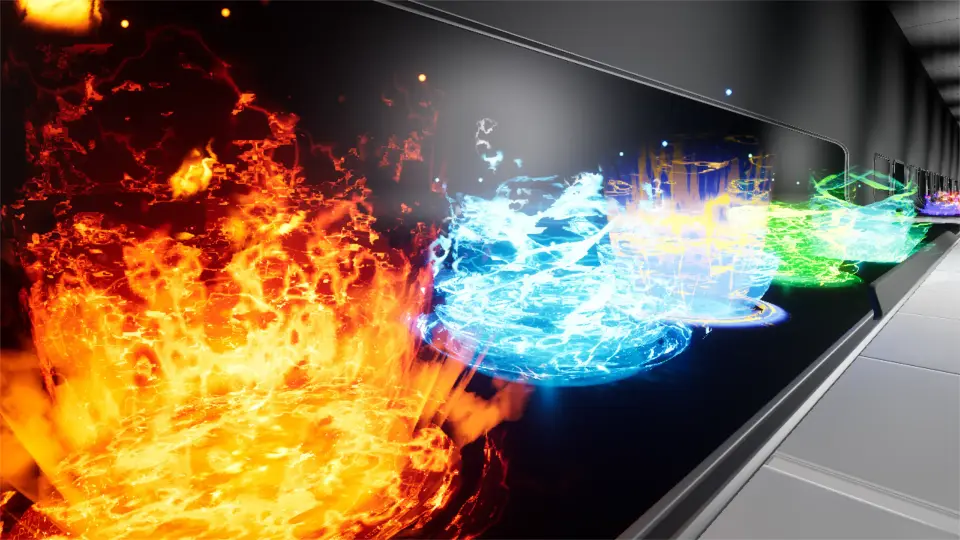
Project pipelines that need layered magic auras often run into a wall: single-effect packs force artists to assemble conflicting visual languages across incompatible emitter systems. AuraFX01 attacks that gap by shipping 30 aura effects within a single library, each grouped under a shared elemental vocabulary. Fire, Water, Wind, Thunder, and Dark sit alongside other attributes, giving effect artists a consistent palette to draw from instead of mixing assets from unrelated packs.
That elemental framing matters when a combat system or character state needs distinct visual identities for each damage type or buff tier. 30 effects across five named attributes plus an "etc." category means roughly six distinct visual approaches per element, enough variety to cover primary casts, sustained channels, hit reactions, and area markers without repeating the same emitter.
Thirty Aura Effects Across Elemental Attributes
Each aura in the package is tied to one of several elemental or thematic attributes. The named categories—Fire, Water, Wind, Thunder, and Dark—map to common gameplay damage types, status effects, or character alignments. Any additional attributes fill out the remaining slots, though the specific naming for those is left open. What is clear is that the effect count is deliberate: 30 discrete auras, each intended to function as a standalone visual rather than a variation of a single base emitter.
For setup, that means an artist working on a character sheet or ability bar can assign unique aura IDs per skill without cherry-picking from mismatched third-party assets. The library's internal consistency across attributes keeps the visual language tight, which is useful when a single project cycles through many visual states tied to the same character or encounter.
Particle LOD Setup in Cascade
The Cascade-based effects in AuraFX01 include particle Level of Detail (LOD) setups. LOD configurations in Cascade let each effect scale its emitter complexity based on the camera's distance to the particle system. When a character enveloped in a Fire aura moves far from the viewpoint, the LOD switches in and reduces the particle count or simulation cost automatically.
That setup has direct production implications. Large encounters with multiple aura-bearing characters can tax the GPU if every emitter runs at full complexity regardless of screen real estate. Cascade LODs address that by stepping down simulation cost on distant Actors, preserving frame budget without manual intervention per effect. Artists placing the auras do not need to script distance-based toggles—the LOD logic sits inside the particle system itself.
Working with the Cascade versions means artists comfortable with Unreal Engine's legacy particle workflow can open each aura, inspect the LOD transitions, and tune the step-down thresholds to match specific scene scales or performance targets. The LODs are part of the package, not an after-the-fact modification.
NiagaraFX Integration for UE 4.26 and Later
On August 2, 2021, a NiagaraFX version was added to AuraFX01, compatible with Unreal Engine 4.26 and later. This opens a second implementation path beyond Cascade. Projects already migrated to Niagara, or teams standardizing on Unreal's modern particle stack, can pull the auras directly into a Niagara-driven pipeline rather than maintaining legacy Cascade systems alongside new work.
To use the NiagaraFX version, the Niagara plugin must be active in the project. This is a project-level setting in Unreal Engine, and the requirement is straightforward: no plugin, no NiagaraFX. Teams integrating AuraFX01 into an existing Unreal Engine 4.26+ build should verify the plugin state before importing the effects to avoid silent failures or missing emitter references.
Having both Cascade and Niagara versions available means the package fits two distinct project generations. Legacy builds on Cascade keep the LOD-equipped workflow, while current-generation projects on Niagara get the auras in the native modern format without a forced rewrite.
Demo Verification Before Committing to Implementation
Two demo videos exist for AuraFX01, one for the Niagara version and one for the Cascade version. Watching the relevant clip before importing the effects into a project lets artists confirm the visual language matches the intended art direction. Each video shows the auras in motion, which is particularly useful for judging scale, motion speed, and element-specific behavior like the difference between a Wind aura's drift and a Thunder aura's snap.
The separation of Niagara and Cascade demos also reflects the two implementation tracks. Artists can preview the exact version they plan to use rather than extrapolating from a clip shot in the other system. This matters because particle behavior can shift between Cascade and Niagara even when the core concept is identical.
Visual Effect Tagging and Magic-System Fit
AuraFX01 carries tags including Visual, Effect, Niagara, VisualEffect, and Magic. The tags place the package firmly in the visual-effects category with a magic-system focus. For teams organizing asset libraries by tag or building smart-content systems in Unreal projects, those tags provide a lookup path for finding the auras when browsing large asset vaults.
The Magic tag specifically signals that these auras are intended for fantastical or ability-driven contexts, not realistic simulation or environmental particle work. That keeps the package's creative scope clear: spell casts, character buffs, elemental infusions, and similar combat or RPG-adjacent magic moments.
Production-Ready Positioning and Dual-System Maintenance
AuraFX01's dual-system approach—Cascade with LODs and NiagaraFX for UE 4.26+—gives the package a longer shelf life than single-system packs. Teams on older Unreal builds can deploy the Cascade auras with the built-in LOD optimization intact. Teams on current builds can use the NiagaraFX version and stay within their preferred particle workflow without carrying deprecated systems forward.
The presence of particle LODs on the Cascade side indicates the effects are built with real-time performance in mind, not just cinematic rendering. LOD-enabled particle systems are a production-tested way to manage frame budgets in gameplay scenarios where camera distance fluctuates constantly. Artists working on large-scale encounters can place multiple aura-equipped characters in a scene and rely on the LOD logic to keep the particle simulation cost proportional to screen relevance.
For ongoing maintenance, the dated Niagara addition (August 2, 2021) and the stated Unreal Engine 4.26+ compatibility baseline give teams a concrete reference point for engine-version matching. Projects that have moved past UE 4.26 can adopt the NiagaraFX version directly, while projects still on Cascade retain full access to the original LOD-equipped effects.
 Spells & Combat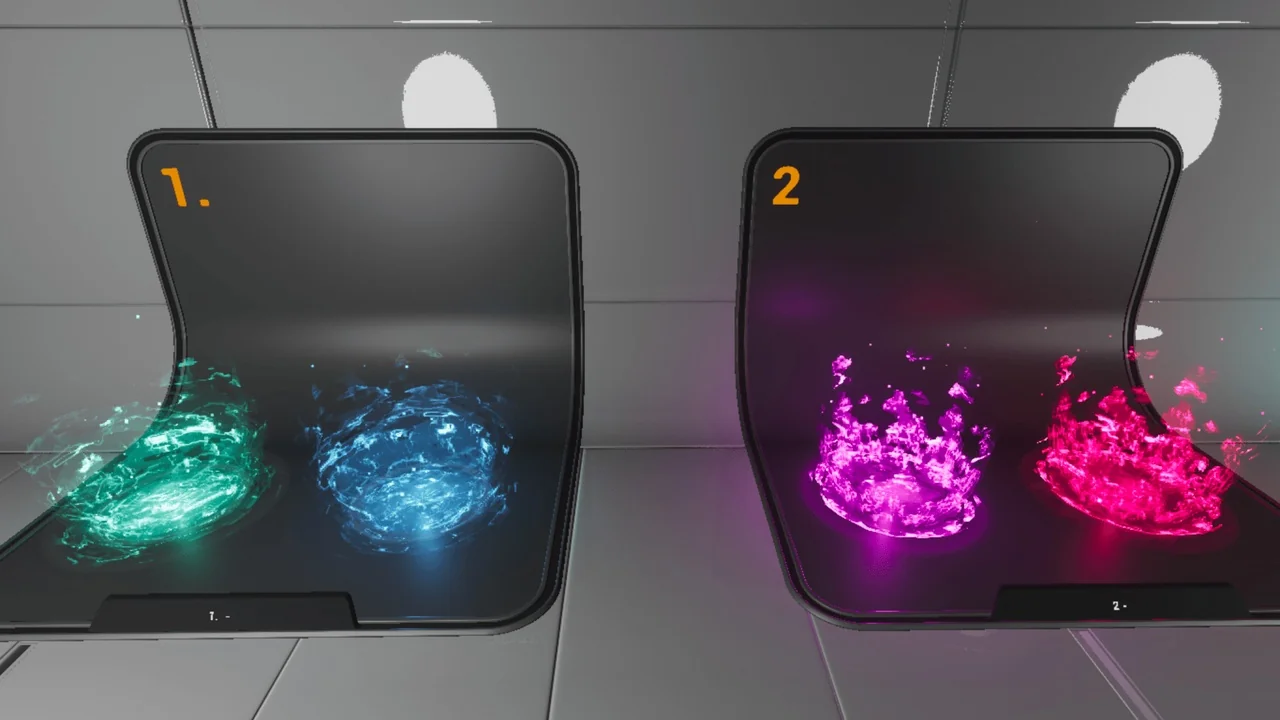
 Spells & Combat
 Spells & Combat
 Spells & Combat