"ae2217ad8e73450c"{"id":"1002998","slug":"blueprint-dialogues","title":"Blueprint Dialogues","category":"Dialog Systems","engine":"4.26+,5.0+","assetVersion":"","engineVersion":"Engine Version: 4.26+,5.0+","tag":"Dialog Systems","accent":"blue","visual":"mech","summary":"Blueprint Dialogues combines Blueprint, UMG and actor components with data-driven conversation authoring for branching and non-branching dialogue.","platform":"Unreal Engine","indexPolicy":"index","publishedAt":"2026-11-25T15:59:57.063Z","updatedAt":"2026-11-25T15:59:57.063Z","sourceNotes":[],"fileContents":[],"compatibility":["Unreal Engine","Engine Version: 4.26+,5.0+"],"featuredImage":{"alt":"Blueprint Dialogues","src":"/wp-content/uploads/published/2026/11/c59e9133bd3d-317fc7de-a7dd-4867-ae8e-2cacd86a4517-53d13bbc4d.webp"},"hasDownloadLink":true,"downloads":0,"terms":[{"taxonomy":"category","slug":"dialog-systems","name":"Dialog Systems"}],"galleryImages":[{"src":"/wp-content/uploads/published/2026/11/fabfd075bf58-37d7f766-971b-453d-8bb6-723983548310-a70bf5218f.webp","alt":"Blueprint Dialogues"},{"src":"/wp-content/uploads/published/2026/11/d7c27f563f99-6ddf4733-088e-479c-99a3-e8604dd080e6-2190ba67d6.webp","alt":"Blueprint Dialogues"},{"src":"/wp-content/uploads/published/2026/11/6b363124818d-f21c81f1-80d9-451d-844b-3140ac818131-b0ff22754b.webp","alt":"Blueprint Dialogues"},{"src":"/wp-content/uploads/published/2026/11/753cb37c9cc5-20c02dfc-dec7-40a5-844f-dc224a340909-544513837e.webp","alt":"Blueprint Dialogues"}],"accessPanel":{"kind":"resource","title":"Get this resource","safetyNote":"Resources are manually reviewed before listing to improve quality and reduce obvious risks.","fileName":"Blueprint Dialogues.7z","resourceType":"Resource archive","versions":[]},"contentHtml":"\u003ch2\u003eBlueprint and UMG as the Starting Point\u003c/h2\u003e\n\u003cp\u003eImplementation begins in Blueprint and UMG, with actor components forming part of the system's structure. The dialogue and scripting system is assembled from those pieces. In practice, the Blueprint side carries the system's logic and the UMG side handles the visible conversation layer, while actor components give the setup a component-based shape inside the project.\u003c/p\u003e\n\u003cp\u003eThat arrangement affects where a developer starts. Before any line of conversation reaches the screen, the Blueprint/UMG setup and its components have to be in place. The same system covers basic text-only dialogue and more complex non-linear conversations.\u003c/p\u003e\n\u003cp\u003eKeeping the interface in UMG also means the presentation layer is not a fixed, unchangeable frame. Configurable interface options and custom interface layouts are part of what the system supports, so the dialogue display can be arranged for the project rather than treated as an untouchable widget.\u003c/p\u003e \u003ch2\u003eData-Driven Dialogues: Spreadsheet or Datatable Rows\u003c/h2\u003e\n\u003cp\u003eConversation content lives in data. The data-driven design gives content creators a choice: work in a spreadsheet editor, or edit directly in UE4's datatable row editor. Both routes are supported, which lets a writer stay in a familiar tabular workspace or move into the engine's row editor when that is more convenient.\u003c/p\u003e\n\u003cp\u003eThis is more than a convenience for bulk text. The same data-driven setup is where inline text formatting tools come into play, and it is the layer that feeds the dialogues that appear at run time. Conversation material is prepared as data and then consumed by the system; the authoring work happens in the chosen data surface.\u003c/p\u003e\n\u003cp\u003eBecause the authoring surface can be a spreadsheet or a datatable row editor, the workflow can adapt to different production habits. A writer who prefers columns and rows can stay there. A developer who wants to inspect or adjust entries inside UE4 can work in the datatable row editor. The data-driven design accommodates either choice without changing the type of conversation the project can produce.\u003c/p\u003e \u003ch2\u003eHow Response Options Decide Branching at Run Time\u003c/h2\u003e\n\u003cp\u003eBranching and non-branching styles are both supported, and the choice between them is not a fixed setting made once and then locked. The style is determined at run time according to the response options provided by the developer. Response options are therefore the practical control point: when the conversation offers them, the system can follow a branching style; without them, the exchange can remain non-branching.\u003c/p\u003e\n\u003cp\u003eThis runtime decision keeps one system usable for different conversation shapes. A short text-only exchange and a more involved non-linear conversation can both sit in the same dialogue and scripting system. The developer supplies the response options that fit the moment, and the system resolves the style while the conversation is running; it is not chosen in advance as a permanent mode.\u003c/p\u003e\n\u003cp\u003eFor content planning, the implication is straightforward. Response options should be treated as part of the conversation data, not as an afterthought added at the end. They determine whether the player is presented with a choice point, and they are the mechanism by which the runtime knows to move into a branching flow.\u003c/p\u003e \u003ch2\u003eDialogues with Formatting, Inline Images, and Variable Text\u003c/h2\u003e\n\u003cp\u003eThe text layer goes beyond plain strings. Inline text formatting tools allow the presentation of dialogue text to be shaped within the content, and inline images can appear as part of the conversation. Variable text lets a line carry values that are not fixed at authoring time. Together, these capabilities mean a conversation can remain text-only when that is all it needs, or become more expressive without switching to a different dialogue system.\u003c/p\u003e\n\u003cp\u003eFormatting and inline images are especially relevant to the data-driven authoring path. A content creator working in a spreadsheet or in datatable rows can prepare lines that include formatting and images, so the visual treatment travels with the conversation data. Variable text adds another layer: the displayed line can incorporate changing values instead of reading as a single static sentence.\u003c/p\u003e\n\u003cp\u003eThese tools sit alongside the system's other conversation features rather than replacing them. The same dialogue can use formatted text, inline images, and variable text while also relying on response options, audio, or scripted events. The package then offers a range that starts at basic text-only dialogue and extends to non-linear conversations with richer presentation.\u003c/p\u003e \u003ch2\u003eAudio Playback and Scripted Event Triggers\u003c/h2\u003e\n\u003cp\u003eAudio playback is part of the conversation feature set. Dialogue can include audio as it runs, giving the exchange a sound layer alongside its text and interface. The system also supports scripted event triggers and conditions, which extends dialogue beyond the display of lines and response options.\u003c/p\u003e\n\u003cp\u003eTriggers and conditions are authored as part of the dialogue and scripting system. A trigger can be tied to a scripted event, and conditions can be present within the conversation flow. They are general capabilities of the system, available when a conversation needs to do more than present text and wait for a response.\u003c/p\u003e\n\u003cp\u003ePlacing audio, triggers, and conditions in the same system as the dialogue keeps the conversation from being only a cosmetic layer. The content can carry scripted behavior and conditional logic while still using the same data-driven authoring approach and the same UMG presentation layer.\u003c/p\u003e \u003ch2\u003eDialogues with Custom Interface Layouts\u003c/h2\u003e\n\u003cp\u003eInterface options are configurable, and custom interface layouts are supported. Since UMG is part of the system's construction, the conversation's visible form is not limited to one fixed arrangement. A project can configure the interface and build layouts that suit the dialogue it presents, whether the conversation is a simple text-only exchange or a more complex non-linear sequence.\u003c/p\u003e\n\u003cp\u003eCustom layouts work together with the content-side features rather than standing apart from them. Formatted text, inline images, variable text, audio playback, response options, and scripted events all exist within a system that also exposes interface configuration. The layout layer is another part of the same dialogue setup, not a replacement for the conversation data.\u003c/p\u003e\n\u003cp\u003eThe practical split is clear enough: author conversation content as data, let response options resolve branching at run time, and use UMG to control how the exchange appears. A team can begin with basic text-only dialogue and later use the same system for non-linear conversations with formatting, images, variables, audio, triggers, conditions, and custom layouts. That continuity—from data entry through runtime branching to the interface—is the useful shape of Blueprint Dialogues.\u003c/p\u003e\n\n\u003ch2\u003eMore From The Same Workflow\u003c/h2\u003e\n\u003cul\u003e\n\u003cli\u003e\u003ca href=\"https://3dcghub.com/anon-s-dialogue-system/\" rel=\"noopener noreferrer\"\u003eAnon\u0026#039;s Dialogue System\u003c/a\u003e\u003c/li\u003e\n\u003cli\u003e\u003ca href=\"https://3dcghub.com/dialogue-builder/\" rel=\"noopener noreferrer\"\u003eDialogue Builder\u003c/a\u003e\u003c/li\u003e\n\u003cli\u003e\u003ca href=\"https://3dcghub.com/handy-quest-system/\" rel=\"noopener noreferrer\"\u003eHandy Quest System\u003c/a\u003e\u003c/li\u003e\n\u003cli\u003e\u003ca href=\"https://3dcghub.com/logic-driver-pro-blueprint-editor-for-dialogue-quest-combat-and-fsm-systems/\" rel=\"noopener noreferrer\"\u003eLogic Driver Pro - Blueprint Editor for Dialogue, Quest, Combat \u0026amp; FSM Systems\u003c/a\u003e\u003c/li\u003e\n\u003cli\u003e\u003ca href=\"https://3dcghub.com/grab-component-system/\" rel=\"noopener noreferrer\"\u003eGrab Component System\u003c/a\u003e\u003c/li\u003e\n\u003c/ul\u003e","contentTextLength":6975,"navigation":{"current":46,"total":4964,"previous":{"id":"1002999","slug":"bp-keypad-ui","title":"BP Keypad UI","category":"Characters \u0026 Creatures","platform":"Unreal Engine","updatedAt":"2026-11-25T16:01:29.635Z"},"next":{"id":"1002997","slug":"bf-helicopter","title":"BF Helicopter","category":"Game Mechanics","platform":"Unreal Engine","updatedAt":"2026-11-25T15:59:21.158Z"}},"relatedResources":[{"id":"1001619","slug":"anon-s-dialogue-system","title":"Anon's Dialogue System","category":"Dialog Systems","engine":"4.17+,5.0+","assetVersion":"","engineVersion":"Engine Version: 4.17+,5.0+","tag":"Dialog Systems","accent":"blue","visual":"mech","summary":"Explore Anon's Dialogue System, a modular dialogue framework supporting Blueprint and data table setups with Anon's Usable System compatibility.","platform":"Unreal Engine","indexPolicy":"index","publishedAt":"2026-10-13T01:48:36.473Z","updatedAt":"2026-10-13T01:48:36.473Z","sourceNotes":[],"fileContents":[],"compatibility":["Unreal Engine","Engine Version: 4.17+,5.0+"],"featuredImage":{"alt":"Anon's Dialogue System","src":"/wp-content/uploads/published/2026/10/edd5d1d9fec7-bfb61f77-a2aa-49e7-9629-7fe56a358b69-e0766cfc9d.webp"},"fileSizeBytes":24848661,"hasDownloadLink":true,"downloads":1},{"id":"1002921","slug":"dialogue-builder","title":"Dialogue Builder","category":"Dialog Systems","engine":"4.25 - 5.6","assetVersion":"Asset Version: 1.2 - 1.10","engineVersion":"Engine Version: 4.25 - 5.6","tag":"Dialog Systems","accent":"blue","visual":"mech","summary":"Build character conversations in Unreal Engine 5 with Dialogue Builder, featuring Blueprint Editor workflows, dual animation variables, and localization.","platform":"Unreal Engine","indexPolicy":"index","publishedAt":"2026-11-21T22:44:59.391Z","updatedAt":"2026-11-21T22:44:59.391Z","sourceNotes":[],"fileContents":[],"compatibility":["Unreal Engine","Asset Version: 1.2 - 1.10","Engine Version: 4.25 - 5.6"],"featuredImage":{"alt":"Dialogue Builder","src":"/wp-content/uploads/published/2026/11/c6e8fb94b483-625d1a17-f89f-4076-b2c9-5f2883d078c5-67069c13ce.webp"},"fileSizeBytes":5516937,"hasDownloadLink":true,"downloads":1},{"id":"1002047","slug":"handy-quest-system","title":"Handy Quest System","category":"Dialog Systems","engine":"4.26+,5.0+","assetVersion":"","engineVersion":"Engine Version: 4.26+,5.0+","tag":"Dialog Systems","accent":"blue","visual":"mech","summary":"A streamlined Blueprint quest and mission framework for setting up interactive objectives quickly using the HandyquestGameInstance setup.","platform":"Unreal Engine","indexPolicy":"index","publishedAt":"2026-10-26T14:58:36.941Z","updatedAt":"2026-10-26T14:58:36.941Z","sourceNotes":[],"fileContents":[],"compatibility":["Unreal Engine","Engine Version: 4.26+,5.0+"],"featuredImage":{"alt":"Handy Quest System","src":"/wp-content/uploads/published/2026/10/81ab0bd405df-8327027b-b4e3-4b8e-9d3f-78758d21e31f-839c82831c.webp"},"fileSizeBytes":41519168,"hasDownloadLink":true,"downloads":0}]}[{"id":4225,"sourceId":4225,"taxonomyId":4225,"taxonomy":"category","slug":"asset-library","name":"Asset Library","parentId":null,"count":4817,"hasChildren":true,"href":"/","seoTitle":"Free Game Assets Library | 3DCGHUB","seoDescription":"Browse free Unreal Engine, Unity, Blender assets and game development tutorials on 3DCGHUB with previews, compatibility notes, and secure downloads.","sitemapEnabled":true,"children":[{"id":4227,"sourceId":4227,"taxonomyId":4227,"taxonomy":"category","slug":"blender-add-ons-plugins","name":"Blender Add-ons \u0026 Plugins","parentId":4225,"count":10,"hasChildren":false,"href":"/category/blender-add-ons-plugins/","seoTitle":"Free Blender Add-ons \u0026 Plugins | 3DCGHUB","seoDescription":"Browse free Blender Add-ons \u0026 Plugins tools for Blender on 3DCGHUB: curated downloads with preview images, compatibility notes and secure download access.","sitemapEnabled":true},{"id":514,"sourceId":514,"taxonomyId":514,"taxonomy":"category","slug":"unity-2","name":"Unity","parentId":4225,"count":453,"hasChildren":true,"href":"/category/unity-2/","seoTitle":"Free Unity Assets | 3DCGHUB","seoDescription":"Browse free Unity resources on 3DCGHUB: curated downloads with preview images, compatibility notes and secure download access.","sitemapEnabled":true,"children":[{"id":523,"sourceId":523,"taxonomyId":523,"taxonomy":"category","slug":"2d","name":"2D","parentId":514,"count":1,"hasChildren":true,"href":"/category/2d/","seoTitle":"Free Unity 2D | 3DCGHUB","seoDescription":"Browse free 2D assets for Unity on 3DCGHUB: curated downloads with preview images, compatibility notes and secure download access.","sitemapEnabled":true},{"id":515,"sourceId":515,"taxonomyId":515,"taxonomy":"category","slug":"3d-unity-2","name":"3D","parentId":514,"count":162,"hasChildren":true,"href":"/category/3d-unity-2/","seoTitle":"Free Unity 3D Assets | 3DCGHUB","seoDescription":"Browse free 3D assets for Unity on 3DCGHUB: curated downloads with preview images, compatibility notes and secure download access.","sitemapEnabled":true},{"id":565,"sourceId":565,"taxonomyId":565,"taxonomy":"category","slug":"add-ons","name":"Add-Ons","parentId":514,"count":2,"hasChildren":false,"href":"/category/add-ons/","seoTitle":"Free Unity Add-Ons | 3DCGHUB","seoDescription":"Browse free Add-Ons assets for Unity on 3DCGHUB: curated downloads with preview images, compatibility notes and secure download access.","sitemapEnabled":true},{"id":529,"sourceId":529,"taxonomyId":529,"taxonomy":"category","slug":"audio-unity-2","name":"Audio","parentId":514,"count":1,"hasChildren":true,"href":"/category/audio-unity-2/","seoTitle":"Free Unity Audio | 3DCGHUB","seoDescription":"Browse free Audio for Unity on 3DCGHUB: curated downloads with preview images, compatibility notes and secure download access.","sitemapEnabled":true},{"id":557,"sourceId":557,"taxonomyId":557,"taxonomy":"category","slug":"templates","name":"Templates","parentId":514,"count":36,"hasChildren":true,"href":"/category/templates/","seoTitle":"Free Unity Templates | 3DCGHUB","seoDescription":"Browse free Unity project templates on 3DCGHUB. Starter kits with previews, compatibility notes, and secure download access.","sitemapEnabled":true},{"id":533,"sourceId":533,"taxonomyId":533,"taxonomy":"category","slug":"tools-unity-2","name":"Tools","parentId":514,"count":0,"hasChildren":true,"href":"/category/tools-unity-2/","sitemapEnabled":true},{"id":554,"sourceId":554,"taxonomyId":554,"taxonomy":"category","slug":"vfx-unity-2","name":"VFX","parentId":514,"count":4,"hasChildren":true,"href":"/category/vfx-unity-2/","seoTitle":"Free Unity VFX | 3DCGHUB","seoDescription":"Browse free VFX for Unity on 3DCGHUB: curated downloads with preview images, compatibility notes and secure download access.","sitemapEnabled":true}]},{"id":511,"sourceId":511,"taxonomyId":511,"taxonomy":"category","slug":"unreal-engine-2","name":"Unreal Engine","parentId":4225,"count":4355,"hasChildren":true,"href":"/category/unreal-engine-2/","seoTitle":"Free Unreal Engine Assets | 3DCGHUB","seoDescription":"Browse free Unreal Engine resources on 3DCGHUB: curated downloads with preview images, compatibility notes and secure download access.","sitemapEnabled":true,"children":[{"id":54,"sourceId":54,"taxonomyId":54,"taxonomy":"category","slug":"3d","name":"3D","parentId":511,"count":2441,"hasChildren":true,"href":"/category/3d/","seoTitle":"Free Unreal Engine 3D | 3DCGHUB","seoDescription":"Browse free 3D assets for Unreal Engine on 3DCGHUB: curated downloads with preview images, compatibility notes and secure download access.","sitemapEnabled":true},{"id":441,"sourceId":441,"taxonomyId":441,"taxonomy":"category","slug":"animations","name":"Animations","parentId":511,"count":269,"hasChildren":true,"href":"/category/animations/","seoTitle":"Free Unreal Engine Animations | 3DCGHUB","seoDescription":"Browse free Animations for Unreal Engine on 3DCGHUB: curated downloads with preview images, compatibility notes and secure download access.","sitemapEnabled":true},{"id":446,"sourceId":446,"taxonomyId":446,"taxonomy":"category","slug":"audio","name":"Audio","parentId":511,"count":63,"hasChildren":true,"href":"/category/audio/","seoTitle":"Free Unreal Engine Audio Resources | 3DCGHUB","seoDescription":"Browse free Unreal Engine audio resources including sound effects, voices, dialogue, and ambient sounds. Curated free downloads on 3DCGHUB.","sitemapEnabled":true},{"id":466,"sourceId":466,"taxonomyId":466,"taxonomy":"category","slug":"game-systems","name":"Game Systems","parentId":511,"count":381,"hasChildren":true,"href":"/category/game-systems/","seoTitle":"Free Unreal Engine Game Systems | 3DCGHUB","seoDescription":"Browse free Game Systems tools for Unreal Engine on 3DCGHUB: curated downloads with preview images, compatibility notes and secure download access.","sitemapEnabled":true},{"id":478,"sourceId":478,"taxonomyId":478,"taxonomy":"category","slug":"game-templates","name":"Game Templates","parentId":511,"count":155,"hasChildren":true,"href":"/category/game-templates/","seoTitle":"Free Unreal Engine Game Templates | 3DCGHUB","seoDescription":"Browse free Game Templates for Unreal Engine on 3DCGHUB: curated downloads with preview images, compatibility notes and secure download access.","sitemapEnabled":true},{"id":432,"sourceId":432,"taxonomyId":432,"taxonomy":"category","slug":"hdri","name":"HDRI","parentId":511,"count":6,"hasChildren":true,"href":"/category/hdri/","seoTitle":"Free Unreal Engine HDRI | 3DCGHUB","seoDescription":"Browse free Unreal Engine HDRI skies and lighting maps on 3DCGHUB. Environment lighting with previews and secure downloads.","sitemapEnabled":true},{"id":228,"sourceId":228,"taxonomyId":228,"taxonomy":"category","slug":"material-and-textures","name":"Material \u0026 Textures","parentId":511,"count":172,"hasChildren":true,"href":"/category/material-and-textures/","seoTitle":"Free Unreal Engine Material \u0026 Textures | 3DCGHUB","seoDescription":"Browse free Material \u0026 Textures for Unreal Engine on 3DCGHUB: curated downloads with preview images, compatibility notes and secure download access.","sitemapEnabled":true},{"id":298,"sourceId":298,"taxonomyId":298,"taxonomy":"category","slug":"sprites-and-flipbooks","name":"Sprites \u0026 Flipbooks","parentId":511,"count":18,"hasChildren":true,"href":"/category/sprites-and-flipbooks/","seoTitle":"Free Unreal Engine Sprites \u0026 Flipbooks | 3DCGHUB","seoDescription":"Browse free Sprites \u0026 Flipbooks assets for Unreal Engine on 3DCGHUB: curated downloads with preview images, compatibility notes and secure download access.","sitemapEnabled":true},{"id":489,"sourceId":489,"taxonomyId":489,"taxonomy":"category","slug":"tools-and-plugins","name":"Tools \u0026 Plugins","parentId":511,"count":390,"hasChildren":true,"href":"/category/tools-and-plugins/","seoTitle":"Free Unreal Engine Tools \u0026 Plugins | 3DCGHUB","seoDescription":"Browse free Tools \u0026 Plugins for Unreal Engine on 3DCGHUB: curated downloads with preview images, compatibility notes and secure download access.","sitemapEnabled":true},{"id":459,"sourceId":459,"taxonomyId":459,"taxonomy":"category","slug":"ui","name":"UI","parentId":511,"count":47,"hasChildren":true,"href":"/category/ui/","seoTitle":"Free Unreal Engine UI | 3DCGHUB","seoDescription":"Browse free UI for Unreal Engine on 3DCGHUB: curated downloads with preview images, compatibility notes and secure download access.","sitemapEnabled":true},{"id":450,"sourceId":450,"taxonomyId":450,"taxonomy":"category","slug":"vfx","name":"VFX","parentId":511,"count":413,"hasChildren":true,"href":"/category/vfx/","seoTitle":"Free Unreal Engine VFX | 3DCGHUB","seoDescription":"Browse free VFX for Unreal Engine on 3DCGHUB: curated downloads with preview images, compatibility notes and secure download access.","sitemapEnabled":true}]}]},{"id":4222,"sourceId":4222,"taxonomyId":4222,"taxonomy":"category","slug":"tutorial-library","name":"Tutorial Library","parentId":null,"count":117,"hasChildren":false,"href":"/tutorials/","seoTitle":"Free Game Development Tutorial Library | 3DCGHUB","seoDescription":"Browse free game development tutorials for Unreal Engine, Unity, Blender, and more on 3DCGHUB with practical workflows and secure downloads.","sitemapEnabled":true}]
Resource screenshots
1 / 4
Asset drops
Daily Asset Drops
Follow 3DCGHUB on Telegram for daily Unreal, Unity & Blender drops and curated CC0 releases.
Implementation begins in Blueprint and UMG, with actor components forming part of the system's structure. The dialogue and scripting system is assembled from those pieces. In practice, the Blueprint side carries the system's logic and the UMG side handles the visible conversation layer, while actor components give the setup a component-based shape inside the project.
That arrangement affects where a developer starts. Before any line of conversation reaches the screen, the Blueprint/UMG setup and its components have to be in place. The same system covers basic text-only dialogue and more complex non-linear conversations.
Keeping the interface in UMG also means the presentation layer is not a fixed, unchangeable frame. Configurable interface options and custom interface layouts are part of what the system supports, so the dialogue display can be arranged for the project rather than treated as an untouchable widget.
Data-Driven Dialogues: Spreadsheet or Datatable Rows
Conversation content lives in data. The data-driven design gives content creators a choice: work in a spreadsheet editor, or edit directly in UE4's datatable row editor. Both routes are supported, which lets a writer stay in a familiar tabular workspace or move into the engine's row editor when that is more convenient.
This is more than a convenience for bulk text. The same data-driven setup is where inline text formatting tools come into play, and it is the layer that feeds the dialogues that appear at run time. Conversation material is prepared as data and then consumed by the system; the authoring work happens in the chosen data surface.
Because the authoring surface can be a spreadsheet or a datatable row editor, the workflow can adapt to different production habits. A writer who prefers columns and rows can stay there. A developer who wants to inspect or adjust entries inside UE4 can work in the datatable row editor. The data-driven design accommodates either choice without changing the type of conversation the project can produce.
How Response Options Decide Branching at Run Time
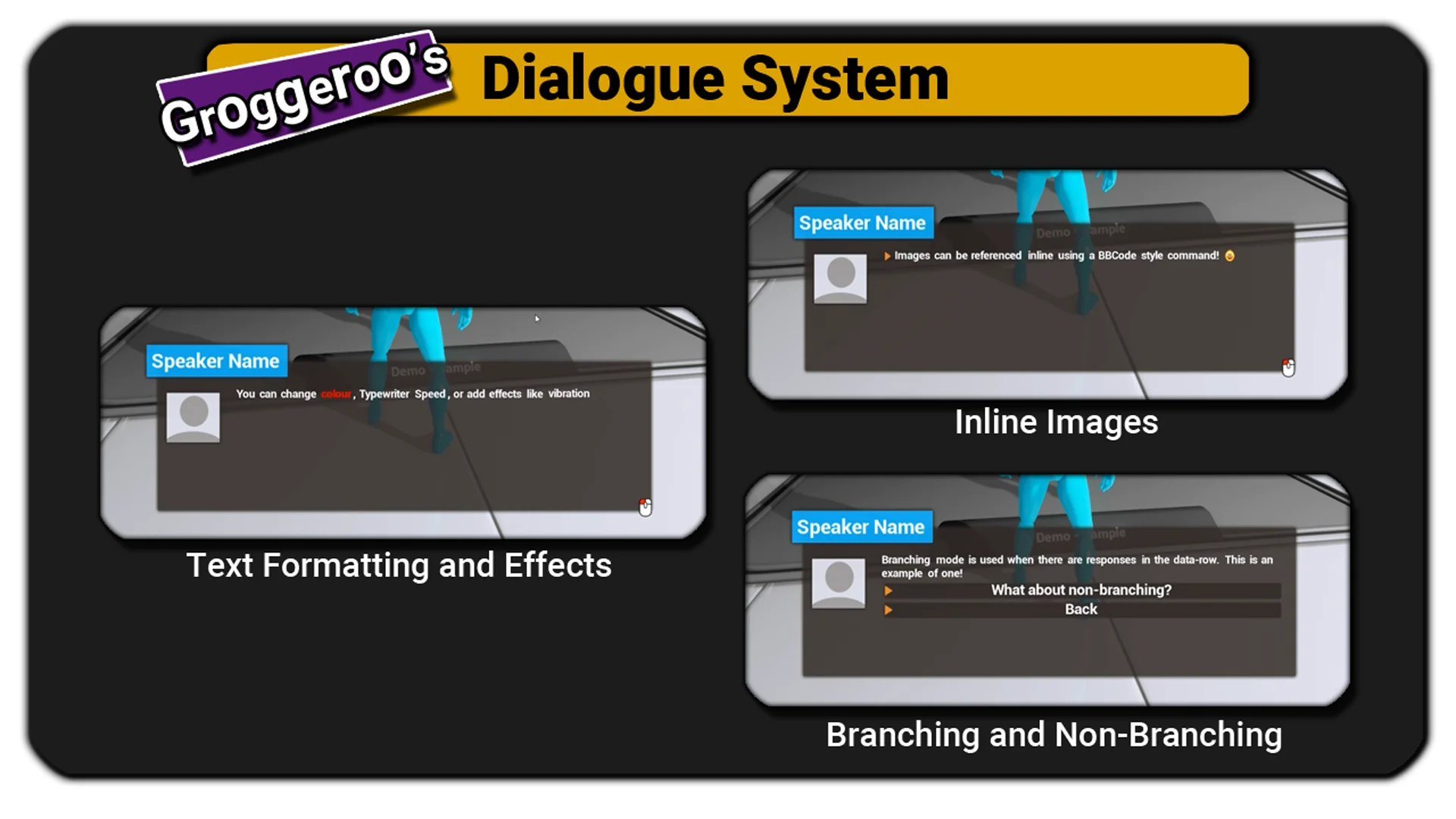
Branching and non-branching styles are both supported, and the choice between them is not a fixed setting made once and then locked. The style is determined at run time according to the response options provided by the developer. Response options are therefore the practical control point: when the conversation offers them, the system can follow a branching style; without them, the exchange can remain non-branching.
This runtime decision keeps one system usable for different conversation shapes. A short text-only exchange and a more involved non-linear conversation can both sit in the same dialogue and scripting system. The developer supplies the response options that fit the moment, and the system resolves the style while the conversation is running; it is not chosen in advance as a permanent mode.
For content planning, the implication is straightforward. Response options should be treated as part of the conversation data, not as an afterthought added at the end. They determine whether the player is presented with a choice point, and they are the mechanism by which the runtime knows to move into a branching flow.
Dialogues with Formatting, Inline Images, and Variable Text
The text layer goes beyond plain strings. Inline text formatting tools allow the presentation of dialogue text to be shaped within the content, and inline images can appear as part of the conversation. Variable text lets a line carry values that are not fixed at authoring time. Together, these capabilities mean a conversation can remain text-only when that is all it needs, or become more expressive without switching to a different dialogue system.
Formatting and inline images are especially relevant to the data-driven authoring path. A content creator working in a spreadsheet or in datatable rows can prepare lines that include formatting and images, so the visual treatment travels with the conversation data. Variable text adds another layer: the displayed line can incorporate changing values instead of reading as a single static sentence.
These tools sit alongside the system's other conversation features rather than replacing them. The same dialogue can use formatted text, inline images, and variable text while also relying on response options, audio, or scripted events. The package then offers a range that starts at basic text-only dialogue and extends to non-linear conversations with richer presentation.
Audio Playback and Scripted Event Triggers
Audio playback is part of the conversation feature set. Dialogue can include audio as it runs, giving the exchange a sound layer alongside its text and interface. The system also supports scripted event triggers and conditions, which extends dialogue beyond the display of lines and response options.
Triggers and conditions are authored as part of the dialogue and scripting system. A trigger can be tied to a scripted event, and conditions can be present within the conversation flow. They are general capabilities of the system, available when a conversation needs to do more than present text and wait for a response.
Placing audio, triggers, and conditions in the same system as the dialogue keeps the conversation from being only a cosmetic layer. The content can carry scripted behavior and conditional logic while still using the same data-driven authoring approach and the same UMG presentation layer.
Dialogues with Custom Interface Layouts
Interface options are configurable, and custom interface layouts are supported. Since UMG is part of the system's construction, the conversation's visible form is not limited to one fixed arrangement. A project can configure the interface and build layouts that suit the dialogue it presents, whether the conversation is a simple text-only exchange or a more complex non-linear sequence.
Custom layouts work together with the content-side features rather than standing apart from them. Formatted text, inline images, variable text, audio playback, response options, and scripted events all exist within a system that also exposes interface configuration. The layout layer is another part of the same dialogue setup, not a replacement for the conversation data.
The practical split is clear enough: author conversation content as data, let response options resolve branching at run time, and use UMG to control how the exchange appears. A team can begin with basic text-only dialogue and later use the same system for non-linear conversations with formatting, images, variables, audio, triggers, conditions, and custom layouts. That continuity—from data entry through runtime branching to the interface—is the useful shape of Blueprint Dialogues.
 Dialog Systems
 Dialog Systems
 Dialog Systems