"ae2217ad8e73450c"{"id":"1002999","slug":"bp-keypad-ui","title":"BP Keypad UI","category":"Characters \u0026 Creatures","engine":"4.26+,5.0+","assetVersion":"","engineVersion":"Engine Version: 4.26+,5.0+","tag":"Characters","accent":"blue","visual":"character","summary":"BP Keypad UI handles 4-digit numeric code entry, spreadsheet-driven master data, placed actor population, and automatic per-session saving.","platform":"Unreal Engine","indexPolicy":"index","publishedAt":"2026-11-25T16:01:29.635Z","updatedAt":"2026-11-25T16:01:29.635Z","sourceNotes":[],"fileContents":[],"compatibility":["Unreal Engine","Engine Version: 4.26+,5.0+"],"featuredImage":{"alt":"BP Keypad UI","src":"/wp-content/uploads/published/2026/11/6d33f954905d-00bdcb54-12ca-464f-9773-f6674d57f44c-88add8c1cf.webp"},"hasDownloadLink":true,"downloads":0,"terms":[{"taxonomy":"category","slug":"characters-and-creatures","name":"Characters \u0026 Creatures"}],"galleryImages":[{"src":"/wp-content/uploads/published/2026/11/613606b5a3ab-5ef4462f-bb40-4d75-b58a-4d450616e8a0-32512807bf.webp","alt":"BP Keypad UI"},{"src":"/wp-content/uploads/published/2026/11/451c79dbd753-e386db41-c239-4e7a-b566-f14914007d7c-79aaa70379.webp","alt":"BP Keypad UI"}],"accessPanel":{"kind":"resource","title":"Get this resource","safetyNote":"Resources are manually reviewed before listing to improve quality and reduce obvious risks.","fileName":"Content.7z","resourceType":"Resource archive","versions":[]},"contentHtml":"\u003ch2\u003eSpawning and Integrating the BP Keypad UI\u003c/h2\u003e\u003cp\u003eSummoning an on-screen numeric keypad requires a clean bridge between physical level actors and screen-space user input. In projects where a character must pause in front of an obstacle to input numeric information, BP Keypad UI provides a ready-made interface layer that appears on demand. The user encounters an interactive prompt, triggers the interface, and inputs a standard 4-digit numeric code. Instead of spending development time authoring custom widget animations, script logic, and input routing rules from scratch, the system establishes a direct input framework out of the box.\u003c/p\u003e\u003cp\u003eInput handling within the user interface responds directly to player selections, registering numeric button presses and assembling them into the required 4-digit string. This pattern fits cleanly into standard Blueprint gameplay flows. When an interaction occurs in the world, the keypad interface takes focus, captures the user input through its dedicated UI scripts, and executes verification routines before returning control to standard character gameplay. Because the interface is structured as a modular Blueprint tool, invoking it requires minimal wiring from whatever actor triggers the sequence.\u003c/p\u003e\u003ch2\u003eSpreadsheet-Driven Master Data for Keypad Codes\u003c/h2\u003e\u003cp\u003eManaging lock combinations directly inside individual actor instances often introduces human error and creates maintenance headaches during level revisions. BP Keypad UI addresses this by allowing the master code set to be defined through easily editable spreadsheet data populated by the game designer. Storing combinations externally or within centralized tabular datasets allows designers to rebalance puzzle sequences, update access passcodes, and reorganize level progression without manually searching through placed scene geometry to adjust code variables.\u003c/p\u003e\u003cp\u003eThe master data set houses the target 4-digit passcodes that the UI checks against. When the player enters four numbers on the numeric pad, the system queries the designer-specified master dataset to determine whether the combination is valid. This verification step is completely decoupled from the cosmetic appearance of the keypad, ensuring that whether a designer is configuring an entry code for a vault door or a terminal passcode for a side quest, the internal validation workflow behaves identically and relies on the same centralized data pipeline.\u003c/p\u003e\u003ch2\u003eAutomatic Population Across Placed Scene Actors\u003c/h2\u003e\u003cp\u003eLevel placement often requires placing multiple interactive keypad objects across expansive environments. A central strength of BP Keypad UI is its ability to automatically populate code values directly to actors placed in the scene. Rather than requiring developers to manually pipe variables into every door frame, safe box, or terminal console, the underlying Blueprint scripting automatically handles the distribution of dataset values to their corresponding world actors.\u003c/p\u003e\u003cp\u003eBecause actors can be placed anywhere throughout a level, this automated population minimizes repetitive setup tasks. Designers can drop interactive objects wherever environmental storytelling or puzzle design dictates. The script logic establishes the link between the world actor and the centralized code set, ensuring that when the player interacts with that specific placed actor, the keypad interface knows which code entry to validate against. The reliance on standard interface workflows and Blueprint messaging keeps actor dependencies clean and prevents level blueprints from becoming cluttered with custom keypad event dispatchers.\u003c/p\u003e\u003ch2\u003eSession Persistence and Completed State Tracking\u003c/h2\u003e\u003cp\u003eTracking player progression through locked doors and solved terminals requires consistent state persistence. BP Keypad UI includes automatic save and load handling configured per game session. When a player successfully enters a correct 4-digit code and completes an interaction, that completed status is logged and retained. If the player leaves the area, interacts with other systems, and returns later in the same session, the actor maintains its completed state rather than resetting to a locked condition.\u003c/p\u003e\u003cp\u003eThis persistence layer tracks both the specific keypad code values and the completion states of placed actors. The automatic save and load functionality eliminates the need to author bespoke save-game structures merely to remember which locks have been picked or bypassed. The interface checks the completion log immediately upon being summoned; if an actor has already been unlocked, the interaction can bypass the code entry sequence entirely or reflect its solved status visually.\u003c/p\u003e\u003ch2\u003eSimulating Security Locks, ATMs, and Mobile Interfaces\u003c/h2\u003e\u003cp\u003eA numeric keypad interface represents a ubiquitous mechanical requirement across multiple genres. BP Keypad UI is designed to serve a broad range of thematic scenarios that require player code entry:\u003c/p\u003e\u003cul\u003e\u003cli\u003e\u003cstrong\u003ePhysical Security Locks:\u003c/strong\u003e Vault doors, storage lockers, security gates, and containment rooms requiring specific 4-digit authorization pins.\u003c/li\u003e\u003cli\u003e\u003cstrong\u003eHacking Devices:\u003c/strong\u003e Handheld diagnostic tools or electronic bypass decks where entering the correct sequence overrides environmental security systems.\u003c/li\u003e\u003cli\u003e\u003cstrong\u003eAutomated Teller Machines (ATMs):\u003c/strong\u003e In-game banking or cash terminals requiring account pin authorization to complete financial transactions or story beats.\u003c/li\u003e\u003cli\u003e\u003cstrong\u003eMobile and Smart Device Screens:\u003c/strong\u003e In-game mobile phone passcodes, tablet unlock screens, or digital entry systems styled like modern touchscreen devices.\u003c/li\u003e\u003c/ul\u003e\u003cp\u003eBy handling the underlying interaction scripting, user input capture, spreadsheet-backed master values, and actor population routines, the system allows development teams to focus purely on context, art dressing, and puzzle design rather than rebuilding numerical UI input logic for every new project.\u003c/p\u003e\n\n\u003ch2\u003eExplore Similar Assets\u003c/h2\u003e\n\u003cul\u003e\n\u003cli\u003e\u003ca href=\"https://3dcghub.com/stylized-male-and-female-characters-with-assets-and-ui/\" rel=\"noopener noreferrer\"\u003eStylized Male and Female characters, with assets and UI\u003c/a\u003e\u003c/li\u003e\n\u003cli\u003e\u003ca href=\"https://3dcghub.com/visai-companion-modern-ai-framework/\" rel=\"noopener noreferrer\"\u003eVisAI - Companion - Modern AI Framework\u003c/a\u003e\u003c/li\u003e\n\u003cli\u003e\u003ca href=\"https://3dcghub.com/butterflies-collection-bp-niagara-ai/\" rel=\"noopener noreferrer\"\u003eButterflies Collection (BP, Niagara + AI)\u003c/a\u003e\u003c/li\u003e\n\u003cli\u003e\u003ca href=\"https://3dcghub.com/ar-navigation/\" rel=\"noopener noreferrer\"\u003eAR Navigation\u003c/a\u003e\u003c/li\u003e\n\u003cli\u003e\u003ca href=\"https://3dcghub.com/cyberpunk-rpg-ui/\" rel=\"noopener noreferrer\"\u003eCyberpunk RPG UI\u003c/a\u003e\u003c/li\u003e\n\u003c/ul\u003e","contentTextLength":5963,"navigation":{"current":45,"total":4964,"previous":{"id":"1003000","slug":"brutal-axe-shield-animset","title":"Brutal Axe Shield AnimSet","category":"Combat","platform":"Unreal Engine","updatedAt":"2026-11-25T16:03:47.462Z"},"next":{"id":"1002998","slug":"blueprint-dialogues","title":"Blueprint Dialogues","category":"Dialog Systems","platform":"Unreal Engine","updatedAt":"2026-11-25T15:59:57.063Z"}},"relatedResources":[{"id":"1000104","slug":"stylized-male-and-female-characters-with-assets-and-ui","title":"Stylized Male and Female characters, with assets and UI","category":"Characters \u0026 Creatures","engine":"Engine Version: 4.27,5.0+","assetVersion":"Engine Version: 4.27,5.0+","engineVersion":"","tag":"Characters","accent":"blue","visual":"character","summary":"A stylized modular character bundle for Unreal projects with nine body variants, Epic skeleton support, improved third-person animations, and UI demos.","platform":"Unreal Engine","indexPolicy":"index","publishedAt":"2026-06-07T16:04:14.141Z","updatedAt":"2026-06-07T16:04:14.141Z","sourceNotes":[],"fileContents":[],"compatibility":["Unreal Engine","Engine Version: 4.27,5.0+"],"featuredImage":{"alt":"Stylized Male and Female characters, with assets and UI","src":"/wp-content/uploads/published/2026/06/669af5bdf8c7-56aa6c7b-9504-4541-9f15-538e3992fe82-234ddb292c.webp"},"fileSizeBytes":346011054,"hasDownloadLink":true,"downloads":0},{"id":"1000904","slug":"visai-companion-modern-ai-framework","title":"VisAI - Companion - Modern AI Framework","category":"Characters \u0026 Creatures","engine":"4.26+,5.0+","assetVersion":"","engineVersion":"Engine Version: 4.26+,5.0+","tag":"Characters","accent":"blue","visual":"character","summary":"Modern multiplayer-ready AI framework for RPGs with relationship-driven companion behavior, command UI, interaction system, and detailed example map.","platform":"Unreal Engine","indexPolicy":"index","publishedAt":"2026-08-06T05:14:19.512Z","updatedAt":"2026-08-06T05:14:19.512Z","sourceNotes":[],"fileContents":[],"compatibility":["Unreal Engine","Engine Version: 4.26+,5.0+"],"featuredImage":{"alt":"VisAI - Companion - Modern AI Framework","src":"/wp-content/uploads/published/2026/08/f36621fe8598-3cb25636-0a21-4666-aa5a-30c1a53d8a4a-1dee5f108d.webp"},"fileSizeBytes":103654734,"hasDownloadLink":true,"downloads":0},{"id":"1840","slug":"butterflies-collection-bp-niagara-ai","title":"Butterflies Collection (BP, Niagara + AI)","category":"Characters \u0026 Creatures","engine":"4.26+,5.0+","assetVersion":"Engine version: 4.26+,5.0+","engineVersion":"4.24","tag":"Characters","accent":"blue","visual":"character","summary":"Enhance your Unreal Engine projects with this low-poly butterfly collection. Features Niagara particles and AI-driven blueprints for realistic environments.","platform":"Unreal Engine","indexPolicy":"noindex","publishedAt":"2026-02-06T22:06:39.000Z","updatedAt":"2026-04-19T15:58:28.000Z","sourceNotes":[],"fileContents":[],"compatibility":["Unreal Engine","Engine version: 4.26+,5.0+"],"featuredImage":{"alt":"Butterflies Collection (BP, Niagara + AI)","src":"https://3dcghub.com/wp-content/uploads/2026/02/07c4998f-4ec9-4ca5-bf6f-7f76e6aade95.webp"},"fileSizeBytes":646812016,"hasDownloadLink":true,"downloads":0}]}[{"id":4225,"sourceId":4225,"taxonomyId":4225,"taxonomy":"category","slug":"asset-library","name":"Asset Library","parentId":null,"count":4817,"hasChildren":true,"href":"/","seoTitle":"Free Game Assets Library | 3DCGHUB","seoDescription":"Browse free Unreal Engine, Unity, Blender assets and game development tutorials on 3DCGHUB with previews, compatibility notes, and secure downloads.","sitemapEnabled":true,"children":[{"id":4227,"sourceId":4227,"taxonomyId":4227,"taxonomy":"category","slug":"blender-add-ons-plugins","name":"Blender Add-ons \u0026 Plugins","parentId":4225,"count":10,"hasChildren":false,"href":"/category/blender-add-ons-plugins/","seoTitle":"Free Blender Add-ons \u0026 Plugins | 3DCGHUB","seoDescription":"Browse free Blender Add-ons \u0026 Plugins tools for Blender on 3DCGHUB: curated downloads with preview images, compatibility notes and secure download access.","sitemapEnabled":true},{"id":514,"sourceId":514,"taxonomyId":514,"taxonomy":"category","slug":"unity-2","name":"Unity","parentId":4225,"count":453,"hasChildren":true,"href":"/category/unity-2/","seoTitle":"Free Unity Assets | 3DCGHUB","seoDescription":"Browse free Unity resources on 3DCGHUB: curated downloads with preview images, compatibility notes and secure download access.","sitemapEnabled":true,"children":[{"id":523,"sourceId":523,"taxonomyId":523,"taxonomy":"category","slug":"2d","name":"2D","parentId":514,"count":1,"hasChildren":true,"href":"/category/2d/","seoTitle":"Free Unity 2D | 3DCGHUB","seoDescription":"Browse free 2D assets for Unity on 3DCGHUB: curated downloads with preview images, compatibility notes and secure download access.","sitemapEnabled":true},{"id":515,"sourceId":515,"taxonomyId":515,"taxonomy":"category","slug":"3d-unity-2","name":"3D","parentId":514,"count":162,"hasChildren":true,"href":"/category/3d-unity-2/","seoTitle":"Free Unity 3D Assets | 3DCGHUB","seoDescription":"Browse free 3D assets for Unity on 3DCGHUB: curated downloads with preview images, compatibility notes and secure download access.","sitemapEnabled":true},{"id":565,"sourceId":565,"taxonomyId":565,"taxonomy":"category","slug":"add-ons","name":"Add-Ons","parentId":514,"count":2,"hasChildren":false,"href":"/category/add-ons/","seoTitle":"Free Unity Add-Ons | 3DCGHUB","seoDescription":"Browse free Add-Ons assets for Unity on 3DCGHUB: curated downloads with preview images, compatibility notes and secure download access.","sitemapEnabled":true},{"id":529,"sourceId":529,"taxonomyId":529,"taxonomy":"category","slug":"audio-unity-2","name":"Audio","parentId":514,"count":1,"hasChildren":true,"href":"/category/audio-unity-2/","seoTitle":"Free Unity Audio | 3DCGHUB","seoDescription":"Browse free Audio for Unity on 3DCGHUB: curated downloads with preview images, compatibility notes and secure download access.","sitemapEnabled":true},{"id":557,"sourceId":557,"taxonomyId":557,"taxonomy":"category","slug":"templates","name":"Templates","parentId":514,"count":36,"hasChildren":true,"href":"/category/templates/","seoTitle":"Free Unity Templates | 3DCGHUB","seoDescription":"Browse free Unity project templates on 3DCGHUB. Starter kits with previews, compatibility notes, and secure download access.","sitemapEnabled":true},{"id":533,"sourceId":533,"taxonomyId":533,"taxonomy":"category","slug":"tools-unity-2","name":"Tools","parentId":514,"count":0,"hasChildren":true,"href":"/category/tools-unity-2/","sitemapEnabled":true},{"id":554,"sourceId":554,"taxonomyId":554,"taxonomy":"category","slug":"vfx-unity-2","name":"VFX","parentId":514,"count":4,"hasChildren":true,"href":"/category/vfx-unity-2/","seoTitle":"Free Unity VFX | 3DCGHUB","seoDescription":"Browse free VFX for Unity on 3DCGHUB: curated downloads with preview images, compatibility notes and secure download access.","sitemapEnabled":true}]},{"id":511,"sourceId":511,"taxonomyId":511,"taxonomy":"category","slug":"unreal-engine-2","name":"Unreal Engine","parentId":4225,"count":4355,"hasChildren":true,"href":"/category/unreal-engine-2/","seoTitle":"Free Unreal Engine Assets | 3DCGHUB","seoDescription":"Browse free Unreal Engine resources on 3DCGHUB: curated downloads with preview images, compatibility notes and secure download access.","sitemapEnabled":true,"children":[{"id":54,"sourceId":54,"taxonomyId":54,"taxonomy":"category","slug":"3d","name":"3D","parentId":511,"count":2441,"hasChildren":true,"href":"/category/3d/","seoTitle":"Free Unreal Engine 3D | 3DCGHUB","seoDescription":"Browse free 3D assets for Unreal Engine on 3DCGHUB: curated downloads with preview images, compatibility notes and secure download access.","sitemapEnabled":true},{"id":441,"sourceId":441,"taxonomyId":441,"taxonomy":"category","slug":"animations","name":"Animations","parentId":511,"count":269,"hasChildren":true,"href":"/category/animations/","seoTitle":"Free Unreal Engine Animations | 3DCGHUB","seoDescription":"Browse free Animations for Unreal Engine on 3DCGHUB: curated downloads with preview images, compatibility notes and secure download access.","sitemapEnabled":true},{"id":446,"sourceId":446,"taxonomyId":446,"taxonomy":"category","slug":"audio","name":"Audio","parentId":511,"count":63,"hasChildren":true,"href":"/category/audio/","seoTitle":"Free Unreal Engine Audio Resources | 3DCGHUB","seoDescription":"Browse free Unreal Engine audio resources including sound effects, voices, dialogue, and ambient sounds. Curated free downloads on 3DCGHUB.","sitemapEnabled":true},{"id":466,"sourceId":466,"taxonomyId":466,"taxonomy":"category","slug":"game-systems","name":"Game Systems","parentId":511,"count":381,"hasChildren":true,"href":"/category/game-systems/","seoTitle":"Free Unreal Engine Game Systems | 3DCGHUB","seoDescription":"Browse free Game Systems tools for Unreal Engine on 3DCGHUB: curated downloads with preview images, compatibility notes and secure download access.","sitemapEnabled":true},{"id":478,"sourceId":478,"taxonomyId":478,"taxonomy":"category","slug":"game-templates","name":"Game Templates","parentId":511,"count":155,"hasChildren":true,"href":"/category/game-templates/","seoTitle":"Free Unreal Engine Game Templates | 3DCGHUB","seoDescription":"Browse free Game Templates for Unreal Engine on 3DCGHUB: curated downloads with preview images, compatibility notes and secure download access.","sitemapEnabled":true},{"id":432,"sourceId":432,"taxonomyId":432,"taxonomy":"category","slug":"hdri","name":"HDRI","parentId":511,"count":6,"hasChildren":true,"href":"/category/hdri/","seoTitle":"Free Unreal Engine HDRI | 3DCGHUB","seoDescription":"Browse free Unreal Engine HDRI skies and lighting maps on 3DCGHUB. Environment lighting with previews and secure downloads.","sitemapEnabled":true},{"id":228,"sourceId":228,"taxonomyId":228,"taxonomy":"category","slug":"material-and-textures","name":"Material \u0026 Textures","parentId":511,"count":172,"hasChildren":true,"href":"/category/material-and-textures/","seoTitle":"Free Unreal Engine Material \u0026 Textures | 3DCGHUB","seoDescription":"Browse free Material \u0026 Textures for Unreal Engine on 3DCGHUB: curated downloads with preview images, compatibility notes and secure download access.","sitemapEnabled":true},{"id":298,"sourceId":298,"taxonomyId":298,"taxonomy":"category","slug":"sprites-and-flipbooks","name":"Sprites \u0026 Flipbooks","parentId":511,"count":18,"hasChildren":true,"href":"/category/sprites-and-flipbooks/","seoTitle":"Free Unreal Engine Sprites \u0026 Flipbooks | 3DCGHUB","seoDescription":"Browse free Sprites \u0026 Flipbooks assets for Unreal Engine on 3DCGHUB: curated downloads with preview images, compatibility notes and secure download access.","sitemapEnabled":true},{"id":489,"sourceId":489,"taxonomyId":489,"taxonomy":"category","slug":"tools-and-plugins","name":"Tools \u0026 Plugins","parentId":511,"count":390,"hasChildren":true,"href":"/category/tools-and-plugins/","seoTitle":"Free Unreal Engine Tools \u0026 Plugins | 3DCGHUB","seoDescription":"Browse free Tools \u0026 Plugins for Unreal Engine on 3DCGHUB: curated downloads with preview images, compatibility notes and secure download access.","sitemapEnabled":true},{"id":459,"sourceId":459,"taxonomyId":459,"taxonomy":"category","slug":"ui","name":"UI","parentId":511,"count":47,"hasChildren":true,"href":"/category/ui/","seoTitle":"Free Unreal Engine UI | 3DCGHUB","seoDescription":"Browse free UI for Unreal Engine on 3DCGHUB: curated downloads with preview images, compatibility notes and secure download access.","sitemapEnabled":true},{"id":450,"sourceId":450,"taxonomyId":450,"taxonomy":"category","slug":"vfx","name":"VFX","parentId":511,"count":413,"hasChildren":true,"href":"/category/vfx/","seoTitle":"Free Unreal Engine VFX | 3DCGHUB","seoDescription":"Browse free VFX for Unreal Engine on 3DCGHUB: curated downloads with preview images, compatibility notes and secure download access.","sitemapEnabled":true}]}]},{"id":4222,"sourceId":4222,"taxonomyId":4222,"taxonomy":"category","slug":"tutorial-library","name":"Tutorial Library","parentId":null,"count":117,"hasChildren":false,"href":"/tutorials/","seoTitle":"Free Game Development Tutorial Library | 3DCGHUB","seoDescription":"Browse free game development tutorials for Unreal Engine, Unity, Blender, and more on 3DCGHUB with practical workflows and secure downloads.","sitemapEnabled":true}]
Resource screenshots
1 / 2
Asset drops
Daily Asset Drops
Follow 3DCGHUB on Telegram for daily Unreal, Unity & Blender drops and curated CC0 releases.
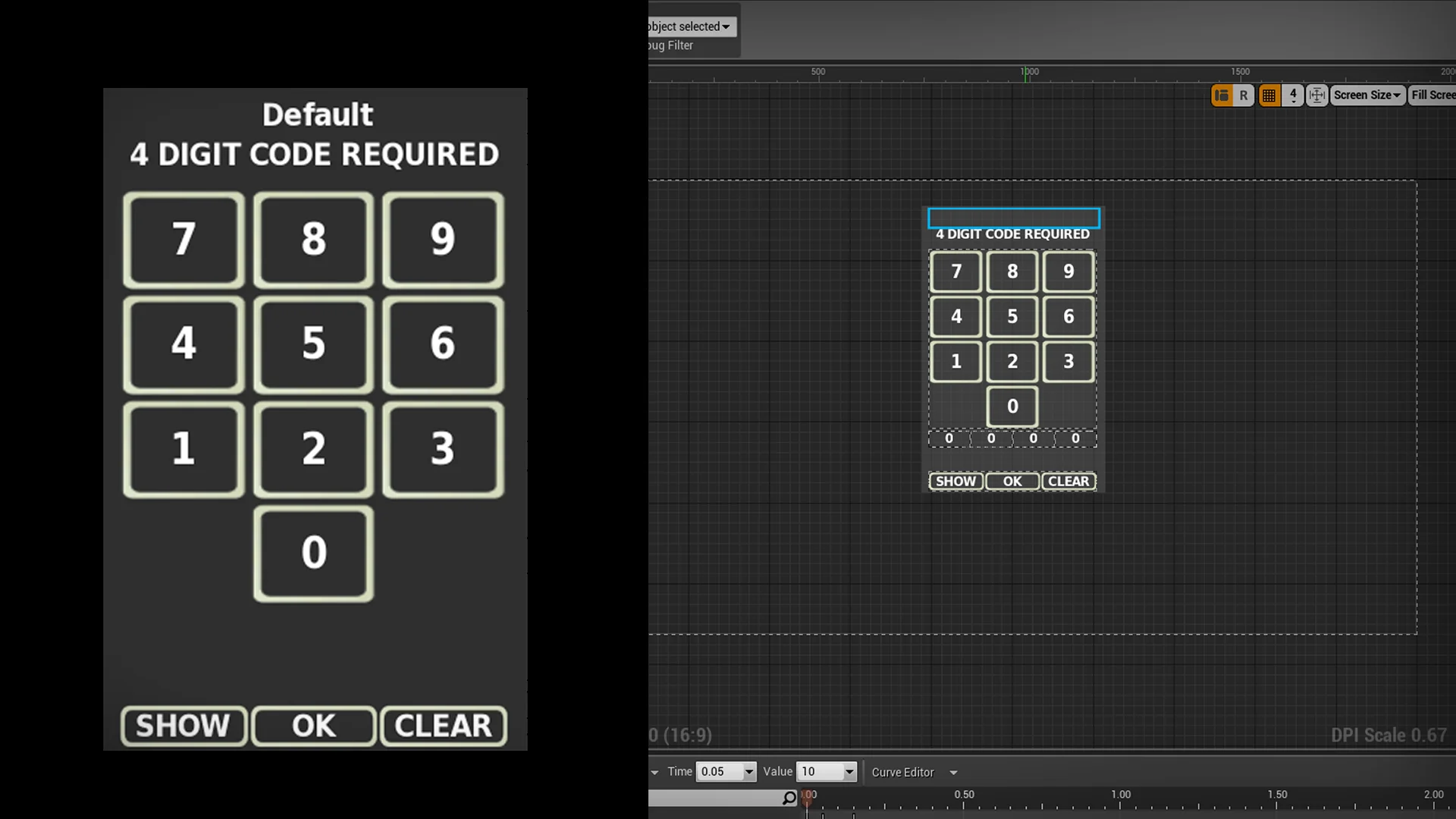
Summoning an on-screen numeric keypad requires a clean bridge between physical level actors and screen-space user input. In projects where a character must pause in front of an obstacle to input numeric information, BP Keypad UI provides a ready-made interface layer that appears on demand. The user encounters an interactive prompt, triggers the interface, and inputs a standard 4-digit numeric code. Instead of spending development time authoring custom widget animations, script logic, and input routing rules from scratch, the system establishes a direct input framework out of the box.
Input handling within the user interface responds directly to player selections, registering numeric button presses and assembling them into the required 4-digit string. This pattern fits cleanly into standard Blueprint gameplay flows. When an interaction occurs in the world, the keypad interface takes focus, captures the user input through its dedicated UI scripts, and executes verification routines before returning control to standard character gameplay. Because the interface is structured as a modular Blueprint tool, invoking it requires minimal wiring from whatever actor triggers the sequence.
Spreadsheet-Driven Master Data for Keypad Codes
Managing lock combinations directly inside individual actor instances often introduces human error and creates maintenance headaches during level revisions. BP Keypad UI addresses this by allowing the master code set to be defined through easily editable spreadsheet data populated by the game designer. Storing combinations externally or within centralized tabular datasets allows designers to rebalance puzzle sequences, update access passcodes, and reorganize level progression without manually searching through placed scene geometry to adjust code variables.
The master data set houses the target 4-digit passcodes that the UI checks against. When the player enters four numbers on the numeric pad, the system queries the designer-specified master dataset to determine whether the combination is valid. This verification step is completely decoupled from the cosmetic appearance of the keypad, ensuring that whether a designer is configuring an entry code for a vault door or a terminal passcode for a side quest, the internal validation workflow behaves identically and relies on the same centralized data pipeline.
Automatic Population Across Placed Scene Actors
Level placement often requires placing multiple interactive keypad objects across expansive environments. A central strength of BP Keypad UI is its ability to automatically populate code values directly to actors placed in the scene. Rather than requiring developers to manually pipe variables into every door frame, safe box, or terminal console, the underlying Blueprint scripting automatically handles the distribution of dataset values to their corresponding world actors.
Because actors can be placed anywhere throughout a level, this automated population minimizes repetitive setup tasks. Designers can drop interactive objects wherever environmental storytelling or puzzle design dictates. The script logic establishes the link between the world actor and the centralized code set, ensuring that when the player interacts with that specific placed actor, the keypad interface knows which code entry to validate against. The reliance on standard interface workflows and Blueprint messaging keeps actor dependencies clean and prevents level blueprints from becoming cluttered with custom keypad event dispatchers.
Session Persistence and Completed State Tracking
Tracking player progression through locked doors and solved terminals requires consistent state persistence. BP Keypad UI includes automatic save and load handling configured per game session. When a player successfully enters a correct 4-digit code and completes an interaction, that completed status is logged and retained. If the player leaves the area, interacts with other systems, and returns later in the same session, the actor maintains its completed state rather than resetting to a locked condition.
This persistence layer tracks both the specific keypad code values and the completion states of placed actors. The automatic save and load functionality eliminates the need to author bespoke save-game structures merely to remember which locks have been picked or bypassed. The interface checks the completion log immediately upon being summoned; if an actor has already been unlocked, the interaction can bypass the code entry sequence entirely or reflect its solved status visually.
Simulating Security Locks, ATMs, and Mobile Interfaces
A numeric keypad interface represents a ubiquitous mechanical requirement across multiple genres. BP Keypad UI is designed to serve a broad range of thematic scenarios that require player code entry:
Physical Security Locks: Vault doors, storage lockers, security gates, and containment rooms requiring specific 4-digit authorization pins.
Hacking Devices: Handheld diagnostic tools or electronic bypass decks where entering the correct sequence overrides environmental security systems.
Automated Teller Machines (ATMs): In-game banking or cash terminals requiring account pin authorization to complete financial transactions or story beats.
Mobile and Smart Device Screens: In-game mobile phone passcodes, tablet unlock screens, or digital entry systems styled like modern touchscreen devices.
By handling the underlying interaction scripting, user input capture, spreadsheet-backed master values, and actor population routines, the system allows development teams to focus purely on context, art dressing, and puzzle design rather than rebuilding numerical UI input logic for every new project.
 Characters
 Characters
 Characters