"a19e0535960bd083"{"id":"1002047","slug":"handy-quest-system","title":"Handy Quest System","category":"Dialog Systems","engine":"4.26+,5.0+","assetVersion":"","engineVersion":"Engine Version: 4.26+,5.0+","tag":"Dialog Systems","accent":"blue","visual":"mech","summary":"A streamlined Blueprint quest and mission framework for setting up interactive objectives quickly using the HandyquestGameInstance setup.","platform":"Unreal Engine","publishedAt":"2026-10-26T14:58:36.941Z","updatedAt":"2026-10-26T14:58:36.941Z","sourceNotes":[],"fileContents":[],"compatibility":["Unreal Engine","Engine Version: 4.26+,5.0+"],"featuredImage":{"alt":"Handy Quest System","src":"/wp-content/uploads/published/2026/10/81ab0bd405df-8327027b-b4e3-4b8e-9d3f-78758d21e31f-839c82831c.webp"},"hasDownloadLink":true,"downloads":0,"terms":[{"taxonomy":"category","slug":"dialog-systems","name":"Dialog Systems"}],"galleryImages":[{"src":"/wp-content/uploads/published/2026/10/93e870e22bff-11eaed0c-4ea8-4172-b569-3416030e5b70-39169dc88b.webp","alt":"Handy Quest System"},{"src":"/wp-content/uploads/published/2026/10/172f9f9aae54-d1e83ca5-a80b-4a9e-8f5b-b5b8b983a196-0759f31399.webp","alt":"Handy Quest System"},{"src":"/wp-content/uploads/published/2026/10/1f8c657f2605-9c453a93-c46f-4bfe-b088-793bf6c15817-7f39b5a8d5.webp","alt":"Handy Quest System"},{"src":"/wp-content/uploads/published/2026/10/9c118eca81a5-1075963a-1ae5-40ff-8282-6e0dc1320e47-e9864b2efc.webp","alt":"Handy Quest System"},{"src":"/wp-content/uploads/published/2026/10/51266cb0c76d-3e7cca7f-ceb5-4371-9bb5-123e6dd895ed-76fe4b775b.webp","alt":"Handy Quest System"},{"src":"/wp-content/uploads/published/2026/10/74c6372548f6-da523736-477f-48cb-b940-24ad6112a652-52b88f5900.webp","alt":"Handy Quest System"},{"src":"/wp-content/uploads/published/2026/10/240455af418a-f5f16803-9efa-4353-bb71-74c8a2088c8c-2a8a174aac.webp","alt":"Handy Quest System"},{"src":"/wp-content/uploads/published/2026/10/6fc397b3a9fb-2744b406-d75e-4d52-adbf-bffbff3b6bf4-401c05203f.webp","alt":"Handy Quest System"},{"src":"/wp-content/uploads/published/2026/10/857e0d5aeb75-9e33de19-e61e-4fbb-b3ab-0965602d4826-62793aed6d.webp","alt":"Handy Quest System"}],"accessPanel":{"kind":"resource","title":"Download this resource","eyebrow":"Free Download","message":"Log in or create a free account to start your download.","fileName":"Handy Quest System.7z","safetyNote":"Resources are manually reviewed before listing to improve quality and reduce obvious risks.","actionLabel":"Download Free","resourceType":"Resource archive"},"contentHtml":"\u003ch2\u003eStructuring Objectives and Missions Across Project Types\u003c/h2\u003e\n\u003cp\u003eGames that rely on structured progression inevitably face the challenge of managing player goals, whether those goals involve straightforward task tracking, complex sequential storylines, or localized interactive tasks. Building a quest architecture from scratch often introduces unnecessary friction, pulling time and resources away from core gameplay mechanics. The Handy Quest System addresses this specific production hurdle by establishing a ready-to-use framework centered around missions, objectives, and interactive objects.\u003c/p\u003e\n\u003cp\u003eBecause the architecture is fully adaptive, it is not tied to a single rigid game genre. A narrative adventure requiring focused character objectives, an open sandbox game tracking dispersed tasks across a large map, or a survival prototype needing clear interactive mission checkpoints can each rely on the same underlying structure. The focus of the system is rapid implementation, giving teams the means to produce quests quickly while maintaining complete adaptability across diverse game concepts.\u003c/p\u003e \u003ch2\u003eConfiguring Project Settings with HandyquestGameInstance\u003c/h2\u003e\n\u003cp\u003eIntegrating third-party systems into an ongoing development environment frequently requires resolving complex dependency trees and modifying core engine files. In contrast, the setup requirements for the Handy Quest System are intentionally straightforward and self-contained. The initial process takes place directly within the project configuration menus, bypassing intricate code rewrites.\u003c/p\u003e\n\u003cp\u003eTo initialize the framework, open Project Settings, use the search filter to locate the instance options, and switch the project's Game Instance Class over to HandyquestGameInstance. Applying this single configuration change establishes the operational foundation for tracking quest states. Once that assignment is in place, the system is ready to function with full efficiency after only a few basic adjustments to match the surrounding project logic.\u003c/p\u003e\n\u003cp\u003eCentering logic inside a designated Game Instance class serves a critical workflow purpose. In engine architecture, the Game Instance persists across map transitions and level streaming cycles, preventing player objective progress from resetting when the active scene changes. By relying on HandyquestGameInstance, mission states and active tasks retain their integrity throughout the session without demanding manual state-saving blueprints between distinct levels.\u003c/p\u003e \u003ch2\u003eHandling Interactive Missions in the Handy Quest System\u003c/h2\u003e\n\u003cp\u003eAt its core, the package relies on clean Blueprint scripting to drive mission flow and interactable elements. Visual scripting allows technical designers and artists to assemble quest lines without writing raw C++ code, keeping the pipeline accessible to all members of a multidisciplinary team. Creating a new quest within this structure involves minimal setup time, letting developers focus on the pacing of the narrative or the sequence of goals rather than the technical plumbing underneath.\u003c/p\u003e\n\u003cp\u003eThe interactive component of the framework connects world objects directly to mission outcomes. When a mission requires interacting with a specific in-game item, triggering an event, or completing a sub-task, the system registers the interaction and updates the corresponding objective status. Because the logic is modular, individual objectives can be tested, rearranged, or modified in isolation without breaking the broader mission sequence.\u003c/p\u003e \u003ch2\u003eIntegrating Interface Elements with Apocalypse Icons\u003c/h2\u003e\n\u003cp\u003eVisual clarity is essential whenever players are expected to parse mission updates, track multiple active tasks, or distinguish between target locations. The Handy Quest System features direct compatibility with Apocalypse Icons, bridging the gap between underlying Blueprint logic and user-facing presentation. Having visual icon compatibility out of the box makes it easier to assign distinct graphic indicators to interactive objectives, mission items, and tracking markers directly within interface widgets.\u003c/p\u003e\n\u003cp\u003eCombining functional mission tracking with dedicated icon assets allows development teams to build intuitive quest logs and interactive HUD elements without searching for standalone graphic sets. This alignment ensures that as objectives activate, progress, or complete, the visual representations remain clear and consistent across the entire user interface.\u003c/p\u003e \u003ch2\u003eWho Benefits Most from This Quest Framework\u003c/h2\u003e\n\u003cp\u003eSolo developers, small independent teams, and rapid-prototyping squads gain the most value from adopting the Handy Quest System. When working within strict timelines, spending days or weeks building an internal quest state machine diverts attention from level design, mechanics, and visual polish. This package provides an accessible alternative that achieves operational readiness almost immediately upon import.\u003c/p\u003e\n\u003cp\u003eFor studios that iterate rapidly, being able to implement quest nodes through a few straightforward adjustments ensures that prototypes can be playtested with interactive mission flow intact from early production phases. By combining an effortless Game Instance configuration, flexible Blueprint objectives, and support for dedicated iconography, the system offers a reliable foundation for any interactive project requiring organized mission delivery.\u003c/p\u003e\n\n\u003ch2\u003eRelated Resources Worth Checking\u003c/h2\u003e\n\u003cul\u003e\n\u003cli\u003e\u003ca href=\"https://3dcghub.com/anon-s-dialogue-system/\" title=\"Anon\u0026#039;s Dialogue System\"\u003eAnon\u0026#039;s Dialogue System\u003c/a\u003e\u003c/li\u003e\n\u003cli\u003e\u003ca href=\"https://3dcghub.com/grab-component-system/\" title=\"Grab Component System\"\u003eGrab Component System\u003c/a\u003e\u003c/li\u003e\n\u003cli\u003e\u003ca href=\"https://3dcghub.com/quest-editor-plugin/\" title=\"Quest Editor Plugin\"\u003eQuest Editor Plugin\u003c/a\u003e\u003c/li\u003e\n\u003cli\u003e\u003ca href=\"https://3dcghub.com/fullstag-quest-system/\" title=\"Fullstag Quest System\"\u003eFullstag Quest System\u003c/a\u003e\u003c/li\u003e\n\u003cli\u003e\u003ca href=\"https://3dcghub.com/handy-hands-pack-vr-hands-megapack/\" title=\"Handy Hands Pack - VR Hands Megapack\"\u003eHandy Hands Pack - VR Hands Megapack\u003c/a\u003e\u003c/li\u003e\n\u003c/ul\u003e","contentTextLength":5457,"navigation":{"current":44,"total":4026,"previous":{"id":"1002048","slug":"hatchback-car-driveable-animated-realistic-hatchback-car-driveable-vehicle","title":"HatchBack Car Driveable / Animated / Realistic (HatchBack Car Driveable Vehicle)","category":"Cars \u0026 Trucks","platform":"Unreal Engine","updatedAt":"2026-10-26T15:04:27.811Z"},"next":{"id":"1002046","slug":"hammer-animation-set","title":"Hammer Animation Set","category":"Combat","platform":"Unreal Engine","updatedAt":"2026-10-26T14:57:48.907Z"}},"relatedResources":[{"id":"1001619","slug":"anon-s-dialogue-system","title":"Anon's Dialogue System","category":"Dialog Systems","engine":"4.17+,5.0+","assetVersion":"","engineVersion":"Engine Version: 4.17+,5.0+","tag":"Dialog Systems","accent":"blue","visual":"mech","summary":"Explore Anon's Dialogue System, a modular dialogue framework supporting Blueprint and data table setups with Anon's Usable System compatibility.","platform":"Unreal Engine","publishedAt":"2026-10-13T01:48:36.473Z","updatedAt":"2026-10-13T01:48:36.473Z","sourceNotes":[],"fileContents":[],"compatibility":["Unreal Engine","Engine Version: 4.17+,5.0+"],"featuredImage":{"alt":"Anon's Dialogue System","src":"/wp-content/uploads/published/2026/10/edd5d1d9fec7-bfb61f77-a2aa-49e7-9629-7fe56a358b69-e0766cfc9d.webp"},"hasDownloadLink":true,"downloads":1},{"id":"10377","slug":"grab-component-system","title":"Grab Component System","category":"Dialog Systems","engine":"4.26+,5.0+","assetVersion":"Engine version: 4.26+,5.0+","engineVersion":"4.24","tag":"Dialog Systems","accent":"blue","visual":"city","summary":"The Grab Component System offers a flexible, 100% Blueprint-based solution for object interactions. It supports custom grab types, unique animations, and allows external entities like enemies to grab the player character.","platform":"Unreal Engine","publishedAt":"2026-03-03T15:12:19.000Z","updatedAt":"2026-04-19T15:50:03.000Z","sourceNotes":[],"fileContents":[],"compatibility":["Unreal Engine","Engine version: 4.26+,5.0+"],"featuredImage":{"alt":"Grab Component System","src":"https://3dcghub.com/wp-content/uploads/2026/03/2fc8470d-14ce-43c6-ae5b-7278a77e3c82.webp"},"hasDownloadLink":true,"downloads":0},{"id":"15157","slug":"quest-editor-plugin","title":"Quest Editor Plugin","category":"Network \u0026 Multiplayer","engine":"4.25 - 5.7","assetVersion":"Asset Version:8.0 - 10.14","engineVersion":"Engine version: 4.25 - 5.7","tag":"Network","accent":"blue","visual":"audio","summary":"Enhance your game development workflow with the Quest Editor Plugin. This modular system allows for customizable quests and dialogue with full multiplayer support for various project types.","platform":"Unreal Engine","publishedAt":"2026-03-12T08:06:14.000Z","updatedAt":"2026-09-30T04:38:07.422Z","sourceNotes":[],"fileContents":[],"compatibility":["Unreal Engine","Asset Version:8.0 - 10.14","Engine version: 4.25 - 5.7"],"featuredImage":{"alt":"Quest Editor Plugin","src":"https://3dcghub.com/wp-content/uploads/2026/03/8ecd90ae-2d23-4d68-850e-88eeca768f45.webp"},"hasDownloadLink":true,"downloads":0}]}
Dialog Systems
Handy Quest System
A streamlined Blueprint quest and mission framework for setting up interactive objectives quickly using the HandyquestGameInstance setup.
Category:Unreal Engine,Dialog SystemsPlatform: Unreal EngineEngine Version: 4.26+,5.0+Published: Oct 26, 2026
Dialog Systems
Resource overview
Structuring Objectives and Missions Across Project Types
Games that rely on structured progression inevitably face the challenge of managing player goals, whether those goals involve straightforward task tracking, complex sequential storylines, or localized interactive tasks. Building a quest architecture from scratch often introduces unnecessary friction, pulling time and resources away from core gameplay mechanics. The Handy Quest System addresses this specific production hurdle by establishing a ready-to-use framework centered around missions, objectives, and interactive objects.
Because the architecture is fully adaptive, it is not tied to a single rigid game genre. A narrative adventure requiring focused character objectives, an open sandbox game tracking dispersed tasks across a large map, or a survival prototype needing clear interactive mission checkpoints can each rely on the same underlying structure. The focus of the system is rapid implementation, giving teams the means to produce quests quickly while maintaining complete adaptability across diverse game concepts.
Configuring Project Settings with HandyquestGameInstance
Integrating third-party systems into an ongoing development environment frequently requires resolving complex dependency trees and modifying core engine files. In contrast, the setup requirements for the Handy Quest System are intentionally straightforward and self-contained. The initial process takes place directly within the project configuration menus, bypassing intricate code rewrites.
To initialize the framework, open Project Settings, use the search filter to locate the instance options, and switch the project's Game Instance Class over to HandyquestGameInstance. Applying this single configuration change establishes the operational foundation for tracking quest states. Once that assignment is in place, the system is ready to function with full efficiency after only a few basic adjustments to match the surrounding project logic.
Centering logic inside a designated Game Instance class serves a critical workflow purpose. In engine architecture, the Game Instance persists across map transitions and level streaming cycles, preventing player objective progress from resetting when the active scene changes. By relying on HandyquestGameInstance, mission states and active tasks retain their integrity throughout the session without demanding manual state-saving blueprints between distinct levels.
Handling Interactive Missions in the Handy Quest System
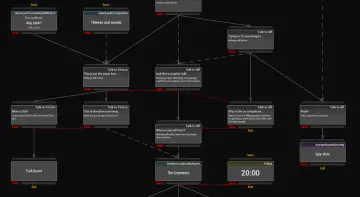
At its core, the package relies on clean Blueprint scripting to drive mission flow and interactable elements. Visual scripting allows technical designers and artists to assemble quest lines without writing raw C++ code, keeping the pipeline accessible to all members of a multidisciplinary team. Creating a new quest within this structure involves minimal setup time, letting developers focus on the pacing of the narrative or the sequence of goals rather than the technical plumbing underneath.
The interactive component of the framework connects world objects directly to mission outcomes. When a mission requires interacting with a specific in-game item, triggering an event, or completing a sub-task, the system registers the interaction and updates the corresponding objective status. Because the logic is modular, individual objectives can be tested, rearranged, or modified in isolation without breaking the broader mission sequence.
Integrating Interface Elements with Apocalypse Icons
Visual clarity is essential whenever players are expected to parse mission updates, track multiple active tasks, or distinguish between target locations. The Handy Quest System features direct compatibility with Apocalypse Icons, bridging the gap between underlying Blueprint logic and user-facing presentation. Having visual icon compatibility out of the box makes it easier to assign distinct graphic indicators to interactive objectives, mission items, and tracking markers directly within interface widgets.
Combining functional mission tracking with dedicated icon assets allows development teams to build intuitive quest logs and interactive HUD elements without searching for standalone graphic sets. This alignment ensures that as objectives activate, progress, or complete, the visual representations remain clear and consistent across the entire user interface.
Who Benefits Most from This Quest Framework
Solo developers, small independent teams, and rapid-prototyping squads gain the most value from adopting the Handy Quest System. When working within strict timelines, spending days or weeks building an internal quest state machine diverts attention from level design, mechanics, and visual polish. This package provides an accessible alternative that achieves operational readiness almost immediately upon import.
For studios that iterate rapidly, being able to implement quest nodes through a few straightforward adjustments ensures that prototypes can be playtested with interactive mission flow intact from early production phases. By combining an effortless Game Instance configuration, flexible Blueprint objectives, and support for dedicated iconography, the system offers a reliable foundation for any interactive project requiring organized mission delivery.
 Dialog Systems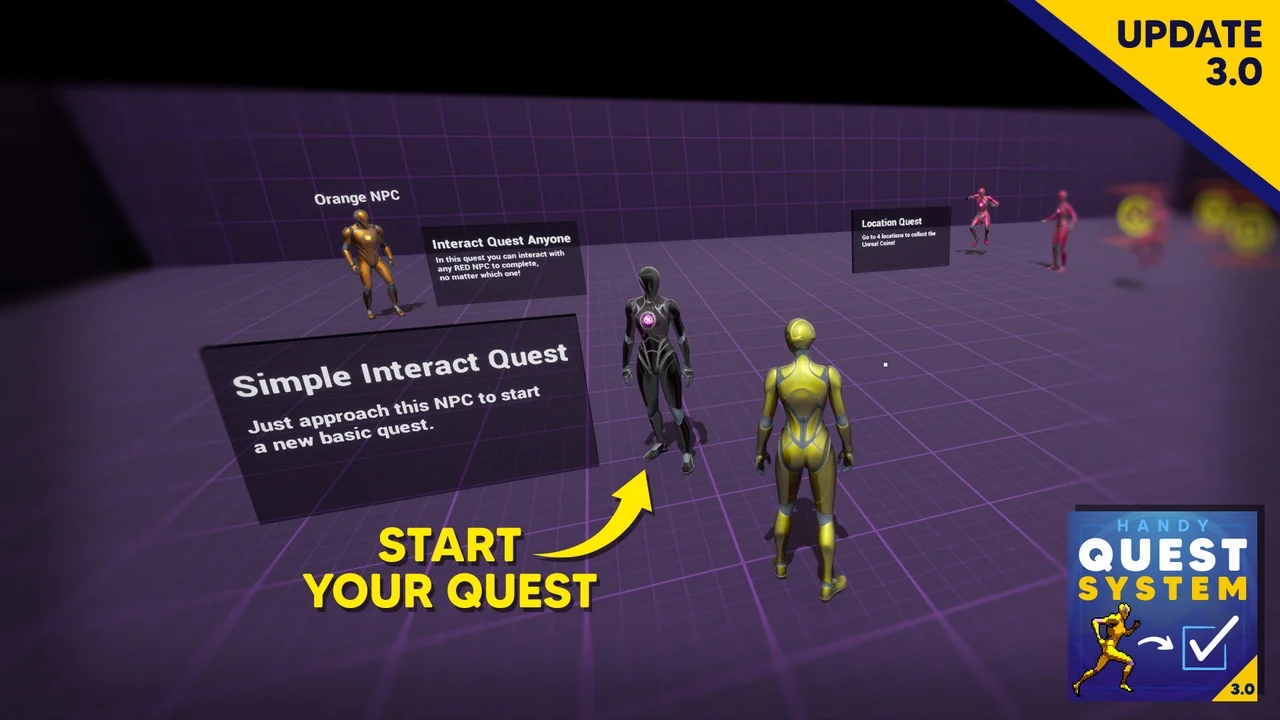
 Dialog Systems
 Dialog Systems
 Network