"ae2217ad8e73450c"{"id":"1003022","slug":"competitive-shooter-hud","title":"Competitive Shooter HUD","category":"UI Kits / HUDs","engine":"4.18+,5.0+","assetVersion":"","engineVersion":"Engine Version: 4.18+,5.0+","tag":"UI Kits / HUDs","accent":"blue","visual":"mech","summary":"A Blueprint-driven shooter HUD pack with independent systems for damage feedback, medals, health and armor bars, crosshairs, team kill counters and match timers","platform":"Unreal Engine","indexPolicy":"index","publishedAt":"2026-11-25T16:26:34.647Z","updatedAt":"2026-11-25T16:26:34.647Z","sourceNotes":[],"fileContents":[],"compatibility":["Unreal Engine","Engine Version: 4.18+,5.0+"],"featuredImage":{"alt":"Competitive Shooter HUD","src":"/wp-content/uploads/published/2026/11/ccf4817b4173-6f8e666c-b200-4660-b83f-aa011293f3e3-e12a3ee5eb.webp"},"hasDownloadLink":true,"downloads":0,"terms":[{"taxonomy":"category","slug":"ui-kits-huds","name":"UI Kits / HUDs"}],"galleryImages":[{"src":"/wp-content/uploads/published/2026/11/31d8d0d10735-c1a75aa6-0dbb-494e-8336-3ffc955d1297-14e205cbfb.webp","alt":"Competitive Shooter HUD"},{"src":"/wp-content/uploads/published/2026/11/fb35a9f17fb4-2cff671c-6dd2-4ff3-84b3-77a0223b4ff7-c331c01549.webp","alt":"Competitive Shooter HUD"},{"src":"/wp-content/uploads/published/2026/11/9319937a28df-811546f1-a7bb-436d-93f3-475992d90365-06b5f2afdf.webp","alt":"Competitive Shooter HUD"},{"src":"/wp-content/uploads/published/2026/11/9284186bfa15-6ac1322f-be98-49ae-a463-aab0c558d0eb-be1bec654b.webp","alt":"Competitive Shooter HUD"},{"src":"/wp-content/uploads/published/2026/11/c17cbcaed5bd-9e5a9925-5a48-460e-9b8a-cfd9d32b476e-9ec91ab9b3.webp","alt":"Competitive Shooter HUD"},{"src":"/wp-content/uploads/published/2026/11/2bcee1f680b5-99b0e605-26a2-4b03-bc44-3e276a73bcb0-046a512f7c.webp","alt":"Competitive Shooter HUD"},{"src":"/wp-content/uploads/published/2026/11/0d4a07c62634-5153763e-d901-4170-a5bc-3679378303fd-0370eb9d7f.webp","alt":"Competitive Shooter HUD"}],"accessPanel":{"kind":"resource","title":"Get this resource","safetyNote":"Resources are manually reviewed before listing to improve quality and reduce obvious risks.","fileName":"Content.7z","resourceType":"Resource archive","versions":[]},"contentHtml":"\u003ch2\u003eCalling Shooter HUD Systems From Almost Any Class\u003c/h2\u003e\n\u003cp\u003eThe entry point for this pack is not a single master widget that everything else hangs from. Each system is independent, and each is called and customized through custom Blueprint nodes surfaced by a context-sensitive interface. That means the calls show up in the node menu at the place where the work is already happening, instead of routing through a manager that has to be located first.\u003c/p\u003e\n\u003cp\u003eBecause the interface can be reached from almost any class, the call site is free to sit wherever the gameplay event actually occurs. A pawn, a controller, a game mode, or whatever class owns the logic can pull a HUD system in directly. That changes the order of assembly. You do not build the interface first and then hunt for places to update it; you wire the event where it lives and attach the display at that same point. When a hit is resolved, the feedback system is called from the code that resolved it. When a medal is earned, the class that decided it was earned pushes it out. The gap between cause and on-screen result is one node.\u003c/p\u003e\n\u003cp\u003eIndependent systems also make partial adoption practical. A vertical slice that only needs a crosshair and a health readout can bring in those two and leave the rest untouched. The other bars, counters and effects can follow later without the earlier work being rebuilt, since no system is propping another one up. For a team, that removes a common bottleneck: the person wiring combat does not have to wait on whoever owns the layout of the full HUD.\u003c/p\u003e\n\u003ch2\u003eCompetitive Crosshair Work as a Standalone System\u003c/h2\u003e\n\u003cp\u003eThe crosshair is treated as a system in its own right rather than a texture swap buried inside a larger widget. It is called and customized through the same node-based interface as everything else, which keeps the aiming reticle in the same mental model as the bars and counters instead of making it a special case that lives apart from them.\u003c/p\u003e\n\u003cp\u003eWorking this way has a practical consequence during tuning. Aim feel tends to change late and often, and a crosshair that is part of a monolithic HUD forces every adjustment through the whole layout. Kept separate, it can be iterated on its own while the rest of the interface stays exactly as it was.\u003c/p\u003e\n\u003ch2\u003eDamage Feedback, Damage Indicators, Medals and Achievements\u003c/h2\u003e\n\u003cp\u003eThe effects layer covers achievements, medals, damage feedback and a damage indicator. Those entries are not one switch. Damage feedback and the damage indicator are distinct systems answering distinct questions, which matters when a project wants to stage them: the immediate reaction to being hit can ship first, with the more explicit indication of what happened layered in later, or the two can be tuned at different intensities.\u003c/p\u003e\n\u003cp\u003eMedals and achievements sit on the opposite side of the same layer. Where damage systems report what the player received, medals mark something the player did. Both are effect systems that sit above the persistent readouts, and both are called from the same interface. A project that wants a lean presentation can leave the reward effects out entirely without disturbing the bars underneath; a project that leans into the competitive framing can use them as the visible payoff for good play.\u003c/p\u003e\n\u003ch2\u003eHealth, Armor, Weapon and Action Bars Inside the HUD\u003c/h2\u003e\n\u003cp\u003eThe shooter-typical bars are all present: health and armor for survivability, a weapon bar, and an action bar. What is notable is that they stay separate systems rather than being collapsed into one status strip. Health and armor are related readouts but not the same readout, and keeping them apart means layout, ordering and customization decisions can be made per bar instead of being inherited from a combined widget.\u003c/p\u003e\n\u003cp\u003eThe weapon bar and action bar round out the moment-to-moment readouts, covering what the player is currently holding and the actions available at that instant. Because each of these is called through the same context-sensitive interface, a class that already knows a weapon changed can drive the weapon bar without reaching into the rest of the HUD.\u003c/p\u003e\n\u003ch2\u003eTeam Kill Counter, Timer and Intermediate Points\u003c/h2\u003e\n\u003cp\u003eMatch-level information is handled by the same independent-system approach. A team kill counter, a timer, and an intermediate points count give the interface its competitive character — they are the elements that turn a combat display into something that reads as a scored contest rather than an isolated firefight.\u003c/p\u003e\n\u003cp\u003eThese are the pieces most likely to be reskinned between projects, since broadcast-style presentation varies far more than the underlying bars. Being separately callable, each can be mapped to whatever the game already tracks, without the timer's call site being tied to the kill counter's. A mode that runs without a clock, or one that does not track team eliminations, does not have to carry dead weight in the layout.\u003c/p\u003e\n\u003ch2\u003eKeeping the Interface Maintainable After First Pass\u003c/h2\u003e\n\u003cp\u003eThe design choice that carries the most weight over a project's life is the isolation between systems. A change to a bar does not ripple into the crosshair; a new effect does not force a re-call of the timer. Customization happens through the custom Blueprint nodes at the same place the calls were made, so the knowledge of how a given element works stays local rather than spreading across a manager class.\u003c/p\u003e\n\u003cp\u003eAccess from almost any class also keeps ownership flexible as a team grows. Work can be handed to whoever is closest to the relevant gameplay code, and the interface does not become a contested file that everyone needs to touch. That leaves a HUD pack that behaves like a set of callable services — bars, counters, crosshair and effects — that a first-person shooter can pull in piece by piece, tune individually, and keep separate as the project scales.\u003c/p\u003e\n\n\u003ch2\u003eRelated Resources Worth Checking\u003c/h2\u003e\n\u003cul\u003e\n\u003cli\u003e\u003ca href=\"https://3dcghub.com/pro-hud-pack-horror-skin/\" rel=\"noopener noreferrer\"\u003ePro HUD Pack: Horror Skin\u003c/a\u003e\u003c/li\u003e\n\u003cli\u003e\u003ca href=\"https://3dcghub.com/advanced-hud-style-12/\" rel=\"noopener noreferrer\"\u003eAdvanced HUD-Style 12\u003c/a\u003e\u003c/li\u003e\n\u003cli\u003e\u003ca href=\"https://3dcghub.com/pro-hud-navigation-tools-only/\" rel=\"noopener noreferrer\"\u003ePro HUD: Navigation Tools Only\u003c/a\u003e\u003c/li\u003e\n\u003cli\u003e\u003ca href=\"https://3dcghub.com/gui-simple-round-2/\" rel=\"noopener noreferrer\"\u003eGUI - Simple Round\u003c/a\u003e\u003c/li\u003e\n\u003cli\u003e\u003ca href=\"https://3dcghub.com/gui-mono-round-2/\" rel=\"noopener noreferrer\"\u003eGUI - Mono Round\u003c/a\u003e\u003c/li\u003e\n\u003c/ul\u003e","contentTextLength":5893,"navigation":{"current":22,"total":4964,"previous":{"id":"1003023","slug":"competitive-shooter-hud-action-bars-only","title":"Competitive Shooter HUD: Action Bars Only","category":"UI Kits / HUDs","platform":"Unreal Engine","updatedAt":"2026-11-25T16:27:42.276Z"},"next":{"id":"1003021","slug":"close-combat-animset","title":"Close Combat Animset","category":"Combat","platform":"Unreal Engine","updatedAt":"2026-11-25T16:25:48.049Z"}},"relatedResources":[{"id":"1003023","slug":"competitive-shooter-hud-action-bars-only","title":"Competitive Shooter HUD: Action Bars Only","category":"UI Kits / HUDs","engine":"4.18+,5.0+","assetVersion":"","engineVersion":"Engine Version: 4.18+,5.0+","tag":"UI Kits / HUDs","accent":"blue","visual":"mech","summary":"Competitive Shooter HUD: Action Bars Only pairs four animated, customizable bars with Blueprint node control through a context-sensitive Manager Function.","platform":"Unreal Engine","indexPolicy":"index","publishedAt":"2026-11-25T16:27:42.276Z","updatedAt":"2026-11-25T16:27:42.276Z","sourceNotes":[],"fileContents":[],"compatibility":["Unreal Engine","Engine Version: 4.18+,5.0+"],"featuredImage":{"alt":"Competitive Shooter HUD: Action Bars Only","src":"/wp-content/uploads/published/2026/11/054d032a9f7c-be8f8fe5-7a74-4763-82e6-a76c8300c4e4-01342b1031.webp"},"hasDownloadLink":true,"downloads":0},{"id":"1002155","slug":"pro-hud-pack-horror-skin","title":"Pro HUD Pack: Horror Skin","category":"UI Kits / HUDs","engine":"4.24+,5.0+","assetVersion":"","engineVersion":"Engine Version: 4.24+,5.0+","tag":"UI Kits / HUDs","accent":"blue","visual":"mech","summary":"Pro HUD Pack: Horror Skin provides navigational compass tools, minimaps, task alerts, and runtime HUD nodes tailored for horror and wargame interfaces.","platform":"Unreal Engine","indexPolicy":"noindex","publishedAt":"2026-10-29T09:59:23.096Z","updatedAt":"2026-10-29T09:59:23.096Z","sourceNotes":[],"fileContents":[],"compatibility":["Unreal Engine","Engine Version: 4.24+,5.0+"],"featuredImage":{"alt":"Pro HUD Pack: Horror Skin","src":"/wp-content/uploads/published/2026/10/2a99ef34b46b-984148b6-ffe2-475d-ba56-5890c73bd792-62e4a00883.webp"},"fileSizeBytes":2196946,"hasDownloadLink":true,"downloads":0},{"id":"1001858","slug":"advanced-hud-style-12","title":"Advanced HUD-Style 12","category":"UI Kits / HUDs","engine":"4.26+,5.0+","assetVersion":"","engineVersion":"Engine Version: 4.26+,5.0+","tag":"UI Kits / HUDs","accent":"blue","visual":"mech","summary":"An Action RPG interface system featuring level streaming across four maps, persistent settings, minimap pointers, and enhanced input updates.","platform":"Unreal Engine","indexPolicy":"index","publishedAt":"2026-10-22T10:52:37.375Z","updatedAt":"2026-10-22T10:52:37.375Z","sourceNotes":[],"fileContents":[],"compatibility":["Unreal Engine","Engine Version: 4.26+,5.0+"],"featuredImage":{"alt":"Advanced HUD-Style 12","src":"/wp-content/uploads/published/2026/10/6a724464fb23-fe0f8c74-09d6-42a7-acb0-add7cb7a8849-e91320c35a.webp"},"fileSizeBytes":60933252,"hasDownloadLink":true,"downloads":0}]}[{"id":4225,"sourceId":4225,"taxonomyId":4225,"taxonomy":"category","slug":"asset-library","name":"Asset Library","parentId":null,"count":4817,"hasChildren":true,"href":"/","seoTitle":"Free Game Assets Library | 3DCGHUB","seoDescription":"Browse free Unreal Engine, Unity, Blender assets and game development tutorials on 3DCGHUB with previews, compatibility notes, and secure downloads.","sitemapEnabled":true,"children":[{"id":4227,"sourceId":4227,"taxonomyId":4227,"taxonomy":"category","slug":"blender-add-ons-plugins","name":"Blender Add-ons \u0026 Plugins","parentId":4225,"count":10,"hasChildren":false,"href":"/category/blender-add-ons-plugins/","seoTitle":"Free Blender Add-ons \u0026 Plugins | 3DCGHUB","seoDescription":"Browse free Blender Add-ons \u0026 Plugins tools for Blender on 3DCGHUB: curated downloads with preview images, compatibility notes and secure download access.","sitemapEnabled":true},{"id":514,"sourceId":514,"taxonomyId":514,"taxonomy":"category","slug":"unity-2","name":"Unity","parentId":4225,"count":453,"hasChildren":true,"href":"/category/unity-2/","seoTitle":"Free Unity Assets | 3DCGHUB","seoDescription":"Browse free Unity resources on 3DCGHUB: curated downloads with preview images, compatibility notes and secure download access.","sitemapEnabled":true,"children":[{"id":523,"sourceId":523,"taxonomyId":523,"taxonomy":"category","slug":"2d","name":"2D","parentId":514,"count":1,"hasChildren":true,"href":"/category/2d/","seoTitle":"Free Unity 2D | 3DCGHUB","seoDescription":"Browse free 2D assets for Unity on 3DCGHUB: curated downloads with preview images, compatibility notes and secure download access.","sitemapEnabled":true},{"id":515,"sourceId":515,"taxonomyId":515,"taxonomy":"category","slug":"3d-unity-2","name":"3D","parentId":514,"count":162,"hasChildren":true,"href":"/category/3d-unity-2/","seoTitle":"Free Unity 3D Assets | 3DCGHUB","seoDescription":"Browse free 3D assets for Unity on 3DCGHUB: curated downloads with preview images, compatibility notes and secure download access.","sitemapEnabled":true},{"id":565,"sourceId":565,"taxonomyId":565,"taxonomy":"category","slug":"add-ons","name":"Add-Ons","parentId":514,"count":2,"hasChildren":false,"href":"/category/add-ons/","seoTitle":"Free Unity Add-Ons | 3DCGHUB","seoDescription":"Browse free Add-Ons assets for Unity on 3DCGHUB: curated downloads with preview images, compatibility notes and secure download access.","sitemapEnabled":true},{"id":529,"sourceId":529,"taxonomyId":529,"taxonomy":"category","slug":"audio-unity-2","name":"Audio","parentId":514,"count":1,"hasChildren":true,"href":"/category/audio-unity-2/","seoTitle":"Free Unity Audio | 3DCGHUB","seoDescription":"Browse free Audio for Unity on 3DCGHUB: curated downloads with preview images, compatibility notes and secure download access.","sitemapEnabled":true},{"id":557,"sourceId":557,"taxonomyId":557,"taxonomy":"category","slug":"templates","name":"Templates","parentId":514,"count":36,"hasChildren":true,"href":"/category/templates/","seoTitle":"Free Unity Templates | 3DCGHUB","seoDescription":"Browse free Unity project templates on 3DCGHUB. Starter kits with previews, compatibility notes, and secure download access.","sitemapEnabled":true},{"id":533,"sourceId":533,"taxonomyId":533,"taxonomy":"category","slug":"tools-unity-2","name":"Tools","parentId":514,"count":0,"hasChildren":true,"href":"/category/tools-unity-2/","sitemapEnabled":true},{"id":554,"sourceId":554,"taxonomyId":554,"taxonomy":"category","slug":"vfx-unity-2","name":"VFX","parentId":514,"count":4,"hasChildren":true,"href":"/category/vfx-unity-2/","seoTitle":"Free Unity VFX | 3DCGHUB","seoDescription":"Browse free VFX for Unity on 3DCGHUB: curated downloads with preview images, compatibility notes and secure download access.","sitemapEnabled":true}]},{"id":511,"sourceId":511,"taxonomyId":511,"taxonomy":"category","slug":"unreal-engine-2","name":"Unreal Engine","parentId":4225,"count":4355,"hasChildren":true,"href":"/category/unreal-engine-2/","seoTitle":"Free Unreal Engine Assets | 3DCGHUB","seoDescription":"Browse free Unreal Engine resources on 3DCGHUB: curated downloads with preview images, compatibility notes and secure download access.","sitemapEnabled":true,"children":[{"id":54,"sourceId":54,"taxonomyId":54,"taxonomy":"category","slug":"3d","name":"3D","parentId":511,"count":2441,"hasChildren":true,"href":"/category/3d/","seoTitle":"Free Unreal Engine 3D | 3DCGHUB","seoDescription":"Browse free 3D assets for Unreal Engine on 3DCGHUB: curated downloads with preview images, compatibility notes and secure download access.","sitemapEnabled":true},{"id":441,"sourceId":441,"taxonomyId":441,"taxonomy":"category","slug":"animations","name":"Animations","parentId":511,"count":269,"hasChildren":true,"href":"/category/animations/","seoTitle":"Free Unreal Engine Animations | 3DCGHUB","seoDescription":"Browse free Animations for Unreal Engine on 3DCGHUB: curated downloads with preview images, compatibility notes and secure download access.","sitemapEnabled":true},{"id":446,"sourceId":446,"taxonomyId":446,"taxonomy":"category","slug":"audio","name":"Audio","parentId":511,"count":63,"hasChildren":true,"href":"/category/audio/","seoTitle":"Free Unreal Engine Audio Resources | 3DCGHUB","seoDescription":"Browse free Unreal Engine audio resources including sound effects, voices, dialogue, and ambient sounds. Curated free downloads on 3DCGHUB.","sitemapEnabled":true},{"id":466,"sourceId":466,"taxonomyId":466,"taxonomy":"category","slug":"game-systems","name":"Game Systems","parentId":511,"count":381,"hasChildren":true,"href":"/category/game-systems/","seoTitle":"Free Unreal Engine Game Systems | 3DCGHUB","seoDescription":"Browse free Game Systems tools for Unreal Engine on 3DCGHUB: curated downloads with preview images, compatibility notes and secure download access.","sitemapEnabled":true},{"id":478,"sourceId":478,"taxonomyId":478,"taxonomy":"category","slug":"game-templates","name":"Game Templates","parentId":511,"count":155,"hasChildren":true,"href":"/category/game-templates/","seoTitle":"Free Unreal Engine Game Templates | 3DCGHUB","seoDescription":"Browse free Game Templates for Unreal Engine on 3DCGHUB: curated downloads with preview images, compatibility notes and secure download access.","sitemapEnabled":true},{"id":432,"sourceId":432,"taxonomyId":432,"taxonomy":"category","slug":"hdri","name":"HDRI","parentId":511,"count":6,"hasChildren":true,"href":"/category/hdri/","seoTitle":"Free Unreal Engine HDRI | 3DCGHUB","seoDescription":"Browse free Unreal Engine HDRI skies and lighting maps on 3DCGHUB. Environment lighting with previews and secure downloads.","sitemapEnabled":true},{"id":228,"sourceId":228,"taxonomyId":228,"taxonomy":"category","slug":"material-and-textures","name":"Material \u0026 Textures","parentId":511,"count":172,"hasChildren":true,"href":"/category/material-and-textures/","seoTitle":"Free Unreal Engine Material \u0026 Textures | 3DCGHUB","seoDescription":"Browse free Material \u0026 Textures for Unreal Engine on 3DCGHUB: curated downloads with preview images, compatibility notes and secure download access.","sitemapEnabled":true},{"id":298,"sourceId":298,"taxonomyId":298,"taxonomy":"category","slug":"sprites-and-flipbooks","name":"Sprites \u0026 Flipbooks","parentId":511,"count":18,"hasChildren":true,"href":"/category/sprites-and-flipbooks/","seoTitle":"Free Unreal Engine Sprites \u0026 Flipbooks | 3DCGHUB","seoDescription":"Browse free Sprites \u0026 Flipbooks assets for Unreal Engine on 3DCGHUB: curated downloads with preview images, compatibility notes and secure download access.","sitemapEnabled":true},{"id":489,"sourceId":489,"taxonomyId":489,"taxonomy":"category","slug":"tools-and-plugins","name":"Tools \u0026 Plugins","parentId":511,"count":390,"hasChildren":true,"href":"/category/tools-and-plugins/","seoTitle":"Free Unreal Engine Tools \u0026 Plugins | 3DCGHUB","seoDescription":"Browse free Tools \u0026 Plugins for Unreal Engine on 3DCGHUB: curated downloads with preview images, compatibility notes and secure download access.","sitemapEnabled":true},{"id":459,"sourceId":459,"taxonomyId":459,"taxonomy":"category","slug":"ui","name":"UI","parentId":511,"count":47,"hasChildren":true,"href":"/category/ui/","seoTitle":"Free Unreal Engine UI | 3DCGHUB","seoDescription":"Browse free UI for Unreal Engine on 3DCGHUB: curated downloads with preview images, compatibility notes and secure download access.","sitemapEnabled":true},{"id":450,"sourceId":450,"taxonomyId":450,"taxonomy":"category","slug":"vfx","name":"VFX","parentId":511,"count":413,"hasChildren":true,"href":"/category/vfx/","seoTitle":"Free Unreal Engine VFX | 3DCGHUB","seoDescription":"Browse free VFX for Unreal Engine on 3DCGHUB: curated downloads with preview images, compatibility notes and secure download access.","sitemapEnabled":true}]}]},{"id":4222,"sourceId":4222,"taxonomyId":4222,"taxonomy":"category","slug":"tutorial-library","name":"Tutorial Library","parentId":null,"count":117,"hasChildren":false,"href":"/tutorials/","seoTitle":"Free Game Development Tutorial Library | 3DCGHUB","seoDescription":"Browse free game development tutorials for Unreal Engine, Unity, Blender, and more on 3DCGHUB with practical workflows and secure downloads.","sitemapEnabled":true}]
Resource screenshots
1 / 7
Asset drops
Daily Asset Drops
Follow 3DCGHUB on Telegram for daily Unreal, Unity & Blender drops and curated CC0 releases.
Resources are manually reviewed before listing to improve quality and reduce obvious risks.
Reviewed archive
UI Kits / HUDs
Competitive Shooter HUD
A Blueprint-driven shooter HUD pack with independent systems for damage feedback, medals, health and armor bars, crosshairs, team kill counters and match timers
The entry point for this pack is not a single master widget that everything else hangs from. Each system is independent, and each is called and customized through custom Blueprint nodes surfaced by a context-sensitive interface. That means the calls show up in the node menu at the place where the work is already happening, instead of routing through a manager that has to be located first.
Because the interface can be reached from almost any class, the call site is free to sit wherever the gameplay event actually occurs. A pawn, a controller, a game mode, or whatever class owns the logic can pull a HUD system in directly. That changes the order of assembly. You do not build the interface first and then hunt for places to update it; you wire the event where it lives and attach the display at that same point. When a hit is resolved, the feedback system is called from the code that resolved it. When a medal is earned, the class that decided it was earned pushes it out. The gap between cause and on-screen result is one node.
Independent systems also make partial adoption practical. A vertical slice that only needs a crosshair and a health readout can bring in those two and leave the rest untouched. The other bars, counters and effects can follow later without the earlier work being rebuilt, since no system is propping another one up. For a team, that removes a common bottleneck: the person wiring combat does not have to wait on whoever owns the layout of the full HUD.
Competitive Crosshair Work as a Standalone System
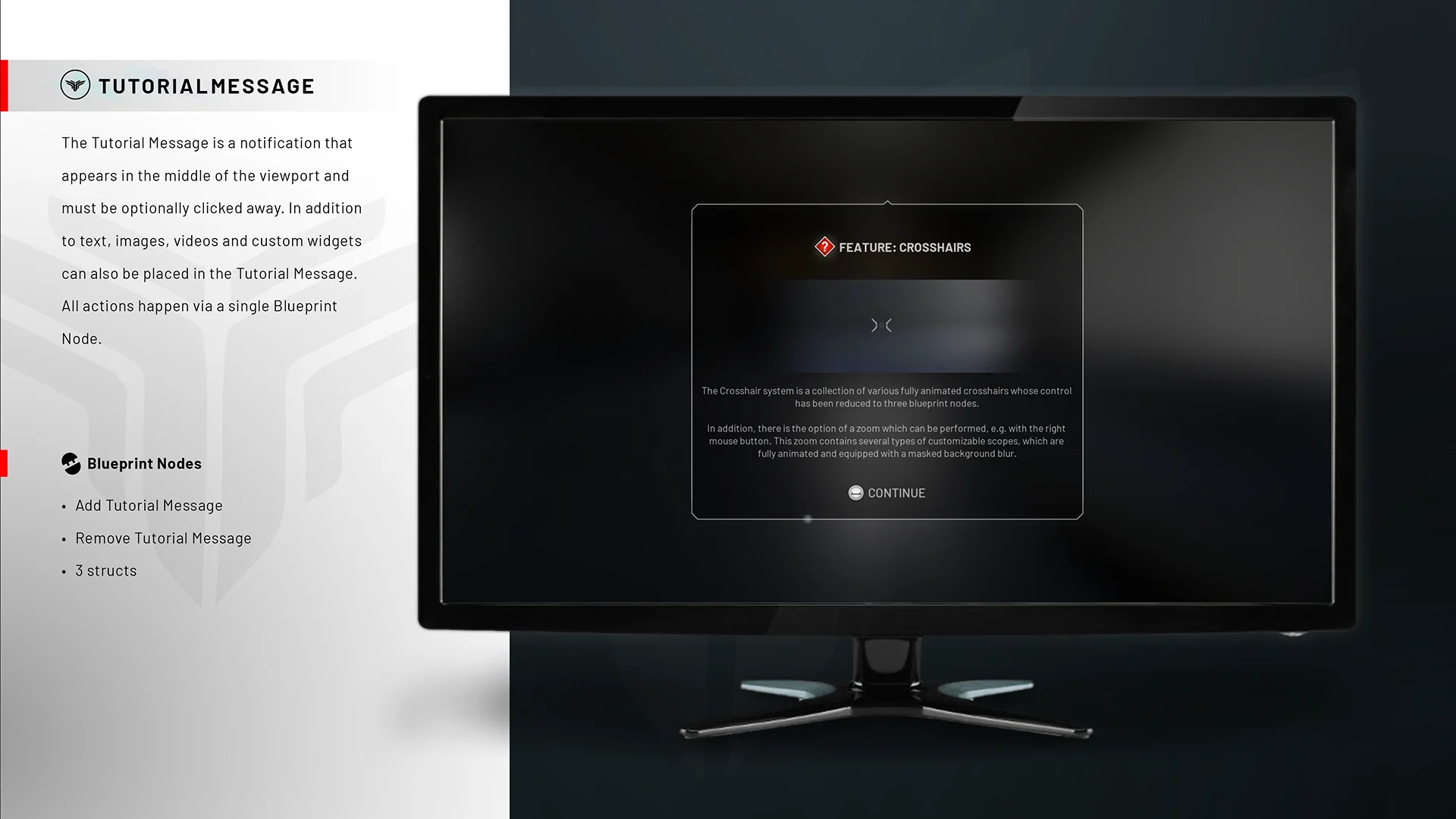
The crosshair is treated as a system in its own right rather than a texture swap buried inside a larger widget. It is called and customized through the same node-based interface as everything else, which keeps the aiming reticle in the same mental model as the bars and counters instead of making it a special case that lives apart from them.
Working this way has a practical consequence during tuning. Aim feel tends to change late and often, and a crosshair that is part of a monolithic HUD forces every adjustment through the whole layout. Kept separate, it can be iterated on its own while the rest of the interface stays exactly as it was.
Damage Feedback, Damage Indicators, Medals and Achievements
The effects layer covers achievements, medals, damage feedback and a damage indicator. Those entries are not one switch. Damage feedback and the damage indicator are distinct systems answering distinct questions, which matters when a project wants to stage them: the immediate reaction to being hit can ship first, with the more explicit indication of what happened layered in later, or the two can be tuned at different intensities.
Medals and achievements sit on the opposite side of the same layer. Where damage systems report what the player received, medals mark something the player did. Both are effect systems that sit above the persistent readouts, and both are called from the same interface. A project that wants a lean presentation can leave the reward effects out entirely without disturbing the bars underneath; a project that leans into the competitive framing can use them as the visible payoff for good play.
Health, Armor, Weapon and Action Bars Inside the HUD
The shooter-typical bars are all present: health and armor for survivability, a weapon bar, and an action bar. What is notable is that they stay separate systems rather than being collapsed into one status strip. Health and armor are related readouts but not the same readout, and keeping them apart means layout, ordering and customization decisions can be made per bar instead of being inherited from a combined widget.
The weapon bar and action bar round out the moment-to-moment readouts, covering what the player is currently holding and the actions available at that instant. Because each of these is called through the same context-sensitive interface, a class that already knows a weapon changed can drive the weapon bar without reaching into the rest of the HUD.
Team Kill Counter, Timer and Intermediate Points
Match-level information is handled by the same independent-system approach. A team kill counter, a timer, and an intermediate points count give the interface its competitive character — they are the elements that turn a combat display into something that reads as a scored contest rather than an isolated firefight.
These are the pieces most likely to be reskinned between projects, since broadcast-style presentation varies far more than the underlying bars. Being separately callable, each can be mapped to whatever the game already tracks, without the timer's call site being tied to the kill counter's. A mode that runs without a clock, or one that does not track team eliminations, does not have to carry dead weight in the layout.
Keeping the Interface Maintainable After First Pass
The design choice that carries the most weight over a project's life is the isolation between systems. A change to a bar does not ripple into the crosshair; a new effect does not force a re-call of the timer. Customization happens through the custom Blueprint nodes at the same place the calls were made, so the knowledge of how a given element works stays local rather than spreading across a manager class.
Access from almost any class also keeps ownership flexible as a team grows. Work can be handed to whoever is closest to the relevant gameplay code, and the interface does not become a contested file that everyone needs to touch. That leaves a HUD pack that behaves like a set of callable services — bars, counters, crosshair and effects — that a first-person shooter can pull in piece by piece, tune individually, and keep separate as the project scales.
 UI Kits / HUDs
 UI Kits / HUDs
 UI Kits / HUDs