"ae2217ad8e73450c"{"id":"1003023","slug":"competitive-shooter-hud-action-bars-only","title":"Competitive Shooter HUD: Action Bars Only","category":"UI Kits / HUDs","engine":"4.18+,5.0+","assetVersion":"","engineVersion":"Engine Version: 4.18+,5.0+","tag":"UI Kits / HUDs","accent":"blue","visual":"mech","summary":"Competitive Shooter HUD: Action Bars Only pairs four animated, customizable bars with Blueprint node control through a context-sensitive Manager Function.","platform":"Unreal Engine","indexPolicy":"index","publishedAt":"2026-11-25T16:27:42.276Z","updatedAt":"2026-11-25T16:27:42.276Z","sourceNotes":[],"fileContents":[],"compatibility":["Unreal Engine","Engine Version: 4.18+,5.0+"],"featuredImage":{"alt":"Competitive Shooter HUD: Action Bars Only","src":"/wp-content/uploads/published/2026/11/054d032a9f7c-be8f8fe5-7a74-4763-82e6-a76c8300c4e4-01342b1031.webp"},"hasDownloadLink":true,"downloads":0,"terms":[{"taxonomy":"category","slug":"ui-kits-huds","name":"UI Kits / HUDs"}],"galleryImages":[{"src":"/wp-content/uploads/published/2026/11/5431988d086f-c0b265d8-715e-4981-a57f-99a4eaac192c-e144728715.webp","alt":"Competitive Shooter HUD: Action Bars Only"},{"src":"/wp-content/uploads/published/2026/11/28099379acfd-c34bd839-257a-48e2-974b-f8bf27e0a8e1-3860c5d295.webp","alt":"Competitive Shooter HUD: Action Bars Only"},{"src":"/wp-content/uploads/published/2026/11/5916c4d7cab4-c341415a-6dda-4a23-ab01-5f33f23d4fa2-1db355900a.webp","alt":"Competitive Shooter HUD: Action Bars Only"},{"src":"/wp-content/uploads/published/2026/11/5b5383a3981d-9c377eda-8274-423b-858e-07747ee79577-5be5dc65a0.webp","alt":"Competitive Shooter HUD: Action Bars Only"},{"src":"/wp-content/uploads/published/2026/11/e93ebefaff71-90347150-3cd2-45f4-bad4-6a4fdc6d2e5e-742e6c6ce0.webp","alt":"Competitive Shooter HUD: Action Bars Only"},{"src":"/wp-content/uploads/published/2026/11/c3397cbdd8a7-269c70c8-2f3e-4593-87b2-769a86088bb8-e80fdeca86.webp","alt":"Competitive Shooter HUD: Action Bars Only"},{"src":"/wp-content/uploads/published/2026/11/8cc541e65c06-8b50227f-34c1-4efe-a072-1a56624dbc33-4323f5f545.webp","alt":"Competitive Shooter HUD: Action Bars Only"}],"accessPanel":{"kind":"resource","title":"Get this resource","safetyNote":"Resources are manually reviewed before listing to improve quality and reduce obvious risks.","fileName":"Content.7z","resourceType":"Resource archive","versions":[]},"contentHtml":"\u003cp\u003eA competitive shooter asks the HUD to repeat one job cleanly: show a changing combat state without slowing the player down. Health, armor, weapon and action information each need their own space, and they need to react when values move. Competitive Shooter HUD: Action Bars Only handles that layer. It is a part-piece rather than a complete interface, so it fits projects that already know the shape of the rest of their HUD and want the bar system separated from it.\u003c/p\u003e \u003cp\u003eFour bars make up the set: health, armor, weapon and action. Each is fully animated and fully customizable. Control runs through Blueprint nodes by way of a context-sensitive Manager Function, which gives the bars a shared logic entry point instead of leaving them as isolated visuals.\u003c/p\u003e \u003ch2\u003eWhere the Shooter HUD Bars Fit\u003c/h2\u003e \u003cp\u003eShooters and wargames often need readable status information at the same time as fast input. The four-bar layout addresses that split by giving each status its own line. The health bar, armor bar, weapon bar and action bar are not one combined meter; they are distinct elements that stay in the same visual family. That separation lets a player scan for a specific readout rather than parse a mixed display.\u003c/p\u003e \u003cp\u003eThe narrower scope is useful in practice. A project may have its own HUD layout, its own visual language, or its own way of presenting the information around the bars. Action Bars Only keeps that surrounding work out of the package. The bars become a contained part of the interface, which is easier to place into an existing plan than a full HUD that would replace every other element.\u003c/p\u003e \u003cp\u003eThat also makes the set relevant at different stages. In an early combat loop, animated bars give state changes something visible to land on. In a more developed HUD, the same bars can occupy the health, armor, weapon and action slots while the rest of the interface keeps its own structure. The common thread is the need for four clear readouts, not for a wholesale interface overhaul.\u003c/p\u003e \u003ch2\u003eFour Action Bars, Four Readouts\u003c/h2\u003e \u003cp\u003eThe health bar covers the health readout. The armor bar covers armor. The weapon bar covers weapon state. The action bar adds a fourth channel for the action side of the HUD. Each bar carries its own animation and its own customization, so the set is not a single animation applied to four labels.\u003c/p\u003e \u003cp\u003eCustomization matters here because the four bars may not carry equal weight on screen. A health bar and an armor bar can sit close together while the weapon and action bars occupy different positions, and the set allows those elements to be adjusted as part of the same system. The exact layout choices remain with the project; the package supplies the four bars and the means to style them.\u003c/p\u003e \u003cp\u003eAnimation gives the bars a second layer of readability. A bar that is fully animated can carry change through motion, not only through a static fill level. The animation is built into each bar, and customization runs alongside it, so the visual treatment and the behavior belong to the same element. For a shooter HUD, that keeps the feedback close to the readout it describes.\u003c/p\u003e \u003ch2\u003eThe Manager Function Behind the HUD Bars\u003c/h2\u003e \u003cp\u003eBlueprint nodes control the bars, and a context-sensitive Manager Function sits at the center of that control. The manager is the function the Blueprint logic works through. Context sensitivity means the function is aware of the situation in which it is called, rather than treating every call as a fixed, context-free operation.\u003c/p\u003e \u003cp\u003eThis arrangement keeps the bar logic from scattering across four separate control paths. The manager gives the Blueprint graph one named place to reach the bar system. A creator working in Blueprint can build the surrounding logic around that entry point and keep the bars connected to the same control structure.\u003c/p\u003e \u003cp\u003eThe control model also explains why the set is more than a group of animated images. The visuals are fully animated and fully customizable, while Blueprint nodes retain full control. Animation, appearance and logic are separate concerns that meet through the Manager Function. That separation is the practical reason to use a managed bar set in a shooter HUD: the person building the interface can change the presentation without losing the control route.\u003c/p\u003e \u003ch2\u003eAnimation and Customization in the Action Bars\u003c/h2\u003e \u003cp\u003eEvery bar in the set is fully animated and fully customizable. Those two properties apply across health, armor, weapon and action, not to one showcase bar and three static companions. This gives a consistent treatment across the whole group while still allowing each bar to be adjusted.\u003c/p\u003e \u003cp\u003eFor a competitive shooter, consistency helps the HUD stay legible under pressure. Four bars that share a visual and behavioral approach are easier to learn than four unrelated meters. At the same time, the customization keeps the set from forcing a single look on the project. The bars can be made to fit the surrounding interface rather than demanding that the interface fit them.\u003c/p\u003e \u003cp\u003eThe animation is part of the bar itself. It is not a separate decoration layered over a static display. That makes the animated state the default condition of the HUD element, which is the right starting point for a shooter where values are expected to move.\u003c/p\u003e \u003ch2\u003eA Part-Piece for a Competitive Shooter HUD\u003c/h2\u003e \u003cp\u003eThe phrase action bars only is the clearest guide to the scope. This is a part-piece of a competitive shooter HUD, not a complete HUD. It supplies the bar layer and leaves the rest of the interface to the project. Teams that only need animated, customizable bars can use it without taking on a full replacement.\u003c/p\u003e \u003cp\u003eThat modularity suits several situations. A prototype can use the bars to establish combat feedback before the rest of the HUD is finished. A shooter or wargame project with an existing interface can treat the four bars as a contained addition. A designer who prefers to keep Blueprint control close to the HUD logic can work through the Manager Function rather than adopting an unrelated control scheme.\u003c/p\u003e \u003cp\u003eThe scope also keeps the set focused. There is no need to evaluate a whole interface when the requirement is four specific readouts. The health, armor, weapon and action bars are the deliverable, and the animation, customization and Blueprint control all point at that same group.\u003c/p\u003e \u003ch2\u003eWho Gets the Most From Action Bars Only\u003c/h2\u003e \u003cp\u003eThe strongest fit is a project that already has a HUD direction and needs the bar system handled as its own piece. That includes shooter and wargame work where health, armor, weapon and action states are separate concerns. It also includes Blueprint-led projects that want the bars reachable through nodes and a context-sensitive manager rather than through a fixed visual setup.\u003c/p\u003e \u003cp\u003eA creator who wants every bar fully animated and fully customizable, but who does not need a complete HUD replacement, finds the clearest match. The set stays within that boundary. It gives the bar layer a clear control route, a consistent four-bar structure and enough customization to meet an existing interface on its own terms.\u003c/p\u003e\n\n\u003ch2\u003eContinue Browsing Similar Packs\u003c/h2\u003e\n\u003cul\u003e\n\u003cli\u003e\u003ca href=\"https://3dcghub.com/competitive-shooter-hud/\" rel=\"noopener noreferrer\"\u003eCompetitive Shooter HUD\u003c/a\u003e\u003c/li\u003e\n\u003cli\u003e\u003ca href=\"https://3dcghub.com/advanced-hud-style-12/\" rel=\"noopener noreferrer\"\u003eAdvanced HUD-Style 12\u003c/a\u003e\u003c/li\u003e\n\u003cli\u003e\u003ca href=\"https://3dcghub.com/pro-hud-navigation-tools-only/\" rel=\"noopener noreferrer\"\u003ePro HUD: Navigation Tools Only\u003c/a\u003e\u003c/li\u003e\n\u003cli\u003e\u003ca href=\"https://3dcghub.com/sdf-robo-progress-bars/\" rel=\"noopener noreferrer\"\u003eSDF Robo Progress Bars\u003c/a\u003e\u003c/li\u003e\n\u003cli\u003e\u003ca href=\"https://3dcghub.com/pro-hud-pack-horror-skin/\" rel=\"noopener noreferrer\"\u003ePro HUD Pack: Horror Skin\u003c/a\u003e\u003c/li\u003e\n\u003c/ul\u003e","contentTextLength":7133,"navigation":{"current":21,"total":4964,"previous":{"id":"1003024","slug":"conversion-animset-twinsword-and-twinblades","title":"Conversion Animset ( TwinSword \u0026 TwinBlades)","category":"Combat","platform":"Unreal Engine","updatedAt":"2026-11-25T16:28:58.798Z"},"next":{"id":"1003022","slug":"competitive-shooter-hud","title":"Competitive Shooter HUD","category":"UI Kits / HUDs","platform":"Unreal Engine","updatedAt":"2026-11-25T16:26:34.647Z"}},"relatedResources":[{"id":"1003022","slug":"competitive-shooter-hud","title":"Competitive Shooter HUD","category":"UI Kits / HUDs","engine":"4.18+,5.0+","assetVersion":"","engineVersion":"Engine Version: 4.18+,5.0+","tag":"UI Kits / HUDs","accent":"blue","visual":"mech","summary":"A Blueprint-driven shooter HUD pack with independent systems for damage feedback, medals, health and armor bars, crosshairs, team kill counters and match timers","platform":"Unreal Engine","indexPolicy":"index","publishedAt":"2026-11-25T16:26:34.647Z","updatedAt":"2026-11-25T16:26:34.647Z","sourceNotes":[],"fileContents":[],"compatibility":["Unreal Engine","Engine Version: 4.18+,5.0+"],"featuredImage":{"alt":"Competitive Shooter HUD","src":"/wp-content/uploads/published/2026/11/ccf4817b4173-6f8e666c-b200-4660-b83f-aa011293f3e3-e12a3ee5eb.webp"},"hasDownloadLink":true,"downloads":0},{"id":"1001858","slug":"advanced-hud-style-12","title":"Advanced HUD-Style 12","category":"UI Kits / HUDs","engine":"4.26+,5.0+","assetVersion":"","engineVersion":"Engine Version: 4.26+,5.0+","tag":"UI Kits / HUDs","accent":"blue","visual":"mech","summary":"An Action RPG interface system featuring level streaming across four maps, persistent settings, minimap pointers, and enhanced input updates.","platform":"Unreal Engine","indexPolicy":"index","publishedAt":"2026-10-22T10:52:37.375Z","updatedAt":"2026-10-22T10:52:37.375Z","sourceNotes":[],"fileContents":[],"compatibility":["Unreal Engine","Engine Version: 4.26+,5.0+"],"featuredImage":{"alt":"Advanced HUD-Style 12","src":"/wp-content/uploads/published/2026/10/6a724464fb23-fe0f8c74-09d6-42a7-acb0-add7cb7a8849-e91320c35a.webp"},"fileSizeBytes":60933252,"hasDownloadLink":true,"downloads":0},{"id":"1000870","slug":"pro-hud-navigation-tools-only","title":"Pro HUD: Navigation Tools Only","category":"UI Kits / HUDs","engine":"4.27,5.0+","assetVersion":"","engineVersion":"Engine Version: 4.27,5.0+","tag":"UI Kits / HUDs","accent":"blue","visual":"mech","summary":"Pro HUD: Navigation Tools Only provides easy-to-use HUD elements for navigation. Presets, a style guide, and runtime HUD nodes help guide players to objectives.","platform":"Unreal Engine","indexPolicy":"index","publishedAt":"2026-08-05T07:01:27.966Z","updatedAt":"2026-08-05T07:01:27.966Z","sourceNotes":[],"fileContents":[],"compatibility":["Unreal Engine","Engine Version: 4.27,5.0+"],"featuredImage":{"alt":"Pro HUD: Navigation Tools Only","src":"/wp-content/uploads/published/2026/08/fcc104e40615-be7b0a56-e52b-4af2-a9b4-3701ffaab3c5-7117c706ba.webp"},"fileSizeBytes":106809022,"hasDownloadLink":true,"downloads":0}]}[{"id":4225,"sourceId":4225,"taxonomyId":4225,"taxonomy":"category","slug":"asset-library","name":"Asset Library","parentId":null,"count":4817,"hasChildren":true,"href":"/","seoTitle":"Free Game Assets Library | 3DCGHUB","seoDescription":"Browse free Unreal Engine, Unity, Blender assets and game development tutorials on 3DCGHUB with previews, compatibility notes, and secure downloads.","sitemapEnabled":true,"children":[{"id":4227,"sourceId":4227,"taxonomyId":4227,"taxonomy":"category","slug":"blender-add-ons-plugins","name":"Blender Add-ons \u0026 Plugins","parentId":4225,"count":10,"hasChildren":false,"href":"/category/blender-add-ons-plugins/","seoTitle":"Free Blender Add-ons \u0026 Plugins | 3DCGHUB","seoDescription":"Browse free Blender Add-ons \u0026 Plugins tools for Blender on 3DCGHUB: curated downloads with preview images, compatibility notes and secure download access.","sitemapEnabled":true},{"id":514,"sourceId":514,"taxonomyId":514,"taxonomy":"category","slug":"unity-2","name":"Unity","parentId":4225,"count":453,"hasChildren":true,"href":"/category/unity-2/","seoTitle":"Free Unity Assets | 3DCGHUB","seoDescription":"Browse free Unity resources on 3DCGHUB: curated downloads with preview images, compatibility notes and secure download access.","sitemapEnabled":true,"children":[{"id":523,"sourceId":523,"taxonomyId":523,"taxonomy":"category","slug":"2d","name":"2D","parentId":514,"count":1,"hasChildren":true,"href":"/category/2d/","seoTitle":"Free Unity 2D | 3DCGHUB","seoDescription":"Browse free 2D assets for Unity on 3DCGHUB: curated downloads with preview images, compatibility notes and secure download access.","sitemapEnabled":true},{"id":515,"sourceId":515,"taxonomyId":515,"taxonomy":"category","slug":"3d-unity-2","name":"3D","parentId":514,"count":162,"hasChildren":true,"href":"/category/3d-unity-2/","seoTitle":"Free Unity 3D Assets | 3DCGHUB","seoDescription":"Browse free 3D assets for Unity on 3DCGHUB: curated downloads with preview images, compatibility notes and secure download access.","sitemapEnabled":true},{"id":565,"sourceId":565,"taxonomyId":565,"taxonomy":"category","slug":"add-ons","name":"Add-Ons","parentId":514,"count":2,"hasChildren":false,"href":"/category/add-ons/","seoTitle":"Free Unity Add-Ons | 3DCGHUB","seoDescription":"Browse free Add-Ons assets for Unity on 3DCGHUB: curated downloads with preview images, compatibility notes and secure download access.","sitemapEnabled":true},{"id":529,"sourceId":529,"taxonomyId":529,"taxonomy":"category","slug":"audio-unity-2","name":"Audio","parentId":514,"count":1,"hasChildren":true,"href":"/category/audio-unity-2/","seoTitle":"Free Unity Audio | 3DCGHUB","seoDescription":"Browse free Audio for Unity on 3DCGHUB: curated downloads with preview images, compatibility notes and secure download access.","sitemapEnabled":true},{"id":557,"sourceId":557,"taxonomyId":557,"taxonomy":"category","slug":"templates","name":"Templates","parentId":514,"count":36,"hasChildren":true,"href":"/category/templates/","seoTitle":"Free Unity Templates | 3DCGHUB","seoDescription":"Browse free Unity project templates on 3DCGHUB. Starter kits with previews, compatibility notes, and secure download access.","sitemapEnabled":true},{"id":533,"sourceId":533,"taxonomyId":533,"taxonomy":"category","slug":"tools-unity-2","name":"Tools","parentId":514,"count":0,"hasChildren":true,"href":"/category/tools-unity-2/","sitemapEnabled":true},{"id":554,"sourceId":554,"taxonomyId":554,"taxonomy":"category","slug":"vfx-unity-2","name":"VFX","parentId":514,"count":4,"hasChildren":true,"href":"/category/vfx-unity-2/","seoTitle":"Free Unity VFX | 3DCGHUB","seoDescription":"Browse free VFX for Unity on 3DCGHUB: curated downloads with preview images, compatibility notes and secure download access.","sitemapEnabled":true}]},{"id":511,"sourceId":511,"taxonomyId":511,"taxonomy":"category","slug":"unreal-engine-2","name":"Unreal Engine","parentId":4225,"count":4355,"hasChildren":true,"href":"/category/unreal-engine-2/","seoTitle":"Free Unreal Engine Assets | 3DCGHUB","seoDescription":"Browse free Unreal Engine resources on 3DCGHUB: curated downloads with preview images, compatibility notes and secure download access.","sitemapEnabled":true,"children":[{"id":54,"sourceId":54,"taxonomyId":54,"taxonomy":"category","slug":"3d","name":"3D","parentId":511,"count":2441,"hasChildren":true,"href":"/category/3d/","seoTitle":"Free Unreal Engine 3D | 3DCGHUB","seoDescription":"Browse free 3D assets for Unreal Engine on 3DCGHUB: curated downloads with preview images, compatibility notes and secure download access.","sitemapEnabled":true},{"id":441,"sourceId":441,"taxonomyId":441,"taxonomy":"category","slug":"animations","name":"Animations","parentId":511,"count":269,"hasChildren":true,"href":"/category/animations/","seoTitle":"Free Unreal Engine Animations | 3DCGHUB","seoDescription":"Browse free Animations for Unreal Engine on 3DCGHUB: curated downloads with preview images, compatibility notes and secure download access.","sitemapEnabled":true},{"id":446,"sourceId":446,"taxonomyId":446,"taxonomy":"category","slug":"audio","name":"Audio","parentId":511,"count":63,"hasChildren":true,"href":"/category/audio/","seoTitle":"Free Unreal Engine Audio Resources | 3DCGHUB","seoDescription":"Browse free Unreal Engine audio resources including sound effects, voices, dialogue, and ambient sounds. Curated free downloads on 3DCGHUB.","sitemapEnabled":true},{"id":466,"sourceId":466,"taxonomyId":466,"taxonomy":"category","slug":"game-systems","name":"Game Systems","parentId":511,"count":381,"hasChildren":true,"href":"/category/game-systems/","seoTitle":"Free Unreal Engine Game Systems | 3DCGHUB","seoDescription":"Browse free Game Systems tools for Unreal Engine on 3DCGHUB: curated downloads with preview images, compatibility notes and secure download access.","sitemapEnabled":true},{"id":478,"sourceId":478,"taxonomyId":478,"taxonomy":"category","slug":"game-templates","name":"Game Templates","parentId":511,"count":155,"hasChildren":true,"href":"/category/game-templates/","seoTitle":"Free Unreal Engine Game Templates | 3DCGHUB","seoDescription":"Browse free Game Templates for Unreal Engine on 3DCGHUB: curated downloads with preview images, compatibility notes and secure download access.","sitemapEnabled":true},{"id":432,"sourceId":432,"taxonomyId":432,"taxonomy":"category","slug":"hdri","name":"HDRI","parentId":511,"count":6,"hasChildren":true,"href":"/category/hdri/","seoTitle":"Free Unreal Engine HDRI | 3DCGHUB","seoDescription":"Browse free Unreal Engine HDRI skies and lighting maps on 3DCGHUB. Environment lighting with previews and secure downloads.","sitemapEnabled":true},{"id":228,"sourceId":228,"taxonomyId":228,"taxonomy":"category","slug":"material-and-textures","name":"Material \u0026 Textures","parentId":511,"count":172,"hasChildren":true,"href":"/category/material-and-textures/","seoTitle":"Free Unreal Engine Material \u0026 Textures | 3DCGHUB","seoDescription":"Browse free Material \u0026 Textures for Unreal Engine on 3DCGHUB: curated downloads with preview images, compatibility notes and secure download access.","sitemapEnabled":true},{"id":298,"sourceId":298,"taxonomyId":298,"taxonomy":"category","slug":"sprites-and-flipbooks","name":"Sprites \u0026 Flipbooks","parentId":511,"count":18,"hasChildren":true,"href":"/category/sprites-and-flipbooks/","seoTitle":"Free Unreal Engine Sprites \u0026 Flipbooks | 3DCGHUB","seoDescription":"Browse free Sprites \u0026 Flipbooks assets for Unreal Engine on 3DCGHUB: curated downloads with preview images, compatibility notes and secure download access.","sitemapEnabled":true},{"id":489,"sourceId":489,"taxonomyId":489,"taxonomy":"category","slug":"tools-and-plugins","name":"Tools \u0026 Plugins","parentId":511,"count":390,"hasChildren":true,"href":"/category/tools-and-plugins/","seoTitle":"Free Unreal Engine Tools \u0026 Plugins | 3DCGHUB","seoDescription":"Browse free Tools \u0026 Plugins for Unreal Engine on 3DCGHUB: curated downloads with preview images, compatibility notes and secure download access.","sitemapEnabled":true},{"id":459,"sourceId":459,"taxonomyId":459,"taxonomy":"category","slug":"ui","name":"UI","parentId":511,"count":47,"hasChildren":true,"href":"/category/ui/","seoTitle":"Free Unreal Engine UI | 3DCGHUB","seoDescription":"Browse free UI for Unreal Engine on 3DCGHUB: curated downloads with preview images, compatibility notes and secure download access.","sitemapEnabled":true},{"id":450,"sourceId":450,"taxonomyId":450,"taxonomy":"category","slug":"vfx","name":"VFX","parentId":511,"count":413,"hasChildren":true,"href":"/category/vfx/","seoTitle":"Free Unreal Engine VFX | 3DCGHUB","seoDescription":"Browse free VFX for Unreal Engine on 3DCGHUB: curated downloads with preview images, compatibility notes and secure download access.","sitemapEnabled":true}]}]},{"id":4222,"sourceId":4222,"taxonomyId":4222,"taxonomy":"category","slug":"tutorial-library","name":"Tutorial Library","parentId":null,"count":117,"hasChildren":false,"href":"/tutorials/","seoTitle":"Free Game Development Tutorial Library | 3DCGHUB","seoDescription":"Browse free game development tutorials for Unreal Engine, Unity, Blender, and more on 3DCGHUB with practical workflows and secure downloads.","sitemapEnabled":true}]
Resource screenshots
1 / 7
Asset drops
Daily Asset Drops
Follow 3DCGHUB on Telegram for daily Unreal, Unity & Blender drops and curated CC0 releases.
Resources are manually reviewed before listing to improve quality and reduce obvious risks.
Reviewed archive
UI Kits / HUDs
Competitive Shooter HUD: Action Bars Only
Competitive Shooter HUD: Action Bars Only pairs four animated, customizable bars with Blueprint node control through a context-sensitive Manager Function.
A competitive shooter asks the HUD to repeat one job cleanly: show a changing combat state without slowing the player down. Health, armor, weapon and action information each need their own space, and they need to react when values move. Competitive Shooter HUD: Action Bars Only handles that layer. It is a part-piece rather than a complete interface, so it fits projects that already know the shape of the rest of their HUD and want the bar system separated from it.
Four bars make up the set: health, armor, weapon and action. Each is fully animated and fully customizable. Control runs through Blueprint nodes by way of a context-sensitive Manager Function, which gives the bars a shared logic entry point instead of leaving them as isolated visuals.
Where the Shooter HUD Bars Fit
Shooters and wargames often need readable status information at the same time as fast input. The four-bar layout addresses that split by giving each status its own line. The health bar, armor bar, weapon bar and action bar are not one combined meter; they are distinct elements that stay in the same visual family. That separation lets a player scan for a specific readout rather than parse a mixed display.
The narrower scope is useful in practice. A project may have its own HUD layout, its own visual language, or its own way of presenting the information around the bars. Action Bars Only keeps that surrounding work out of the package. The bars become a contained part of the interface, which is easier to place into an existing plan than a full HUD that would replace every other element.
That also makes the set relevant at different stages. In an early combat loop, animated bars give state changes something visible to land on. In a more developed HUD, the same bars can occupy the health, armor, weapon and action slots while the rest of the interface keeps its own structure. The common thread is the need for four clear readouts, not for a wholesale interface overhaul.
Four Action Bars, Four Readouts
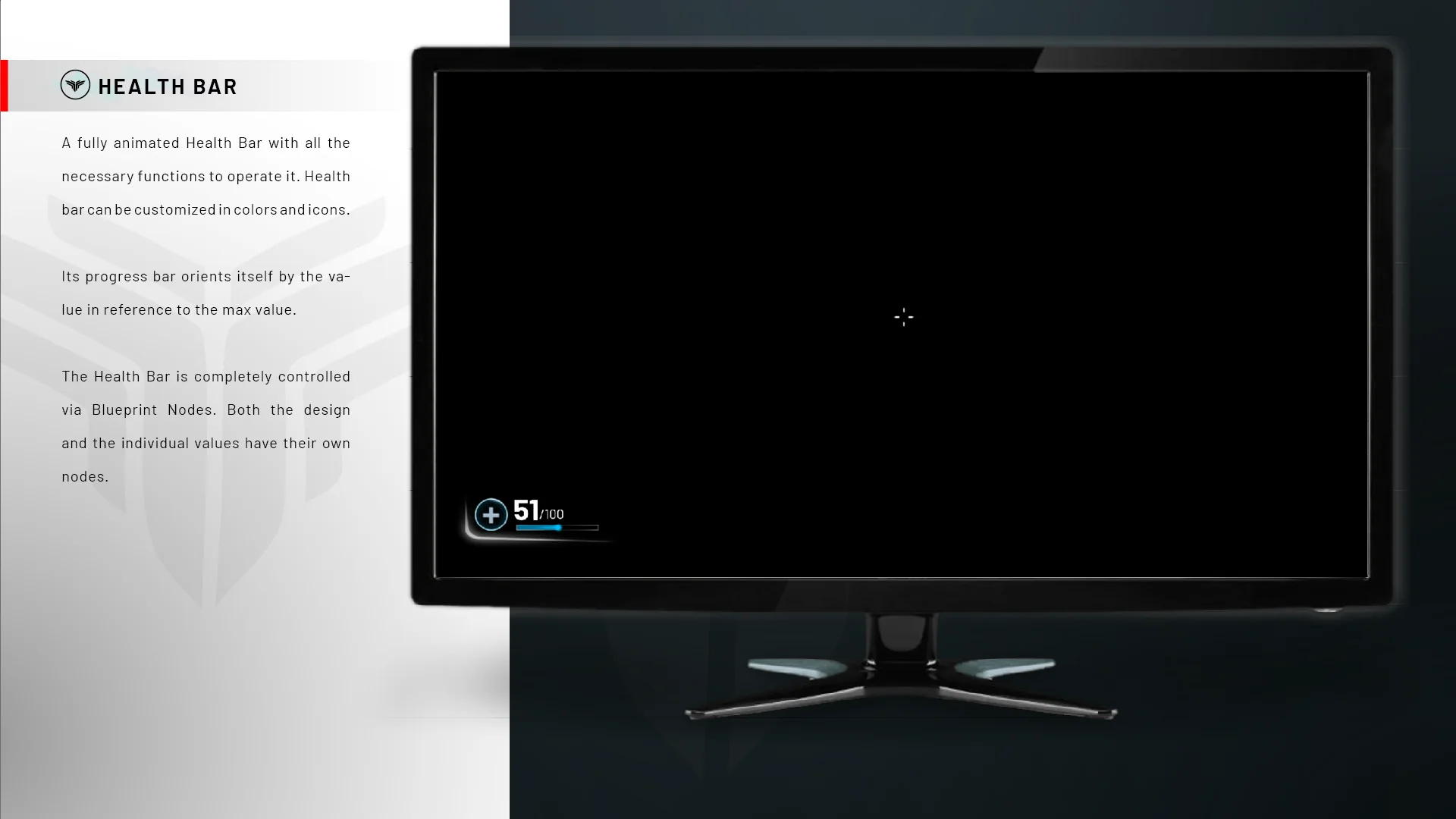
The health bar covers the health readout. The armor bar covers armor. The weapon bar covers weapon state. The action bar adds a fourth channel for the action side of the HUD. Each bar carries its own animation and its own customization, so the set is not a single animation applied to four labels.
Customization matters here because the four bars may not carry equal weight on screen. A health bar and an armor bar can sit close together while the weapon and action bars occupy different positions, and the set allows those elements to be adjusted as part of the same system. The exact layout choices remain with the project; the package supplies the four bars and the means to style them.
Animation gives the bars a second layer of readability. A bar that is fully animated can carry change through motion, not only through a static fill level. The animation is built into each bar, and customization runs alongside it, so the visual treatment and the behavior belong to the same element. For a shooter HUD, that keeps the feedback close to the readout it describes.
The Manager Function Behind the HUD Bars
Blueprint nodes control the bars, and a context-sensitive Manager Function sits at the center of that control. The manager is the function the Blueprint logic works through. Context sensitivity means the function is aware of the situation in which it is called, rather than treating every call as a fixed, context-free operation.
This arrangement keeps the bar logic from scattering across four separate control paths. The manager gives the Blueprint graph one named place to reach the bar system. A creator working in Blueprint can build the surrounding logic around that entry point and keep the bars connected to the same control structure.
The control model also explains why the set is more than a group of animated images. The visuals are fully animated and fully customizable, while Blueprint nodes retain full control. Animation, appearance and logic are separate concerns that meet through the Manager Function. That separation is the practical reason to use a managed bar set in a shooter HUD: the person building the interface can change the presentation without losing the control route.
Animation and Customization in the Action Bars
Every bar in the set is fully animated and fully customizable. Those two properties apply across health, armor, weapon and action, not to one showcase bar and three static companions. This gives a consistent treatment across the whole group while still allowing each bar to be adjusted.
For a competitive shooter, consistency helps the HUD stay legible under pressure. Four bars that share a visual and behavioral approach are easier to learn than four unrelated meters. At the same time, the customization keeps the set from forcing a single look on the project. The bars can be made to fit the surrounding interface rather than demanding that the interface fit them.
The animation is part of the bar itself. It is not a separate decoration layered over a static display. That makes the animated state the default condition of the HUD element, which is the right starting point for a shooter where values are expected to move.
A Part-Piece for a Competitive Shooter HUD
The phrase action bars only is the clearest guide to the scope. This is a part-piece of a competitive shooter HUD, not a complete HUD. It supplies the bar layer and leaves the rest of the interface to the project. Teams that only need animated, customizable bars can use it without taking on a full replacement.
That modularity suits several situations. A prototype can use the bars to establish combat feedback before the rest of the HUD is finished. A shooter or wargame project with an existing interface can treat the four bars as a contained addition. A designer who prefers to keep Blueprint control close to the HUD logic can work through the Manager Function rather than adopting an unrelated control scheme.
The scope also keeps the set focused. There is no need to evaluate a whole interface when the requirement is four specific readouts. The health, armor, weapon and action bars are the deliverable, and the animation, customization and Blueprint control all point at that same group.
Who Gets the Most From Action Bars Only
The strongest fit is a project that already has a HUD direction and needs the bar system handled as its own piece. That includes shooter and wargame work where health, armor, weapon and action states are separate concerns. It also includes Blueprint-led projects that want the bars reachable through nodes and a context-sensitive manager rather than through a fixed visual setup.
A creator who wants every bar fully animated and fully customizable, but who does not need a complete HUD replacement, finds the clearest match. The set stays within that boundary. It gives the bar layer a clear control route, a consistent four-bar structure and enough customization to meet an existing interface on its own terms.
 UI Kits / HUDs
 UI Kits / HUDs
 UI Kits / HUDs