"efaa631e936fd3ee"{"id":"1002196","slug":"sdf-robo-progress-bars","title":"SDF Robo Progress Bars","category":"UI Kits / HUDs","engine":"4.26+,5.0+","assetVersion":"","engineVersion":"Engine Version: 4.26+,5.0+","tag":"UI Kits / HUDs","accent":"blue","visual":"mech","summary":"Explore SDF Robo Progress Bars, an advanced master material using signed distance functions for vector-sharp circular and rectangular interface meters.","platform":"Unreal Engine","publishedAt":"2026-10-29T14:39:35.924Z","updatedAt":"2026-10-29T14:39:35.924Z","sourceNotes":[],"fileContents":[],"compatibility":["Unreal Engine","Engine Version: 4.26+,5.0+"],"featuredImage":{"alt":"SDF Robo Progress Bars","src":"/wp-content/uploads/published/2026/10/4d90ae46e9d9-36a06d93-e903-4a91-953d-4bc4f2330691-4f39c6d6b4.webp"},"hasDownloadLink":true,"downloads":0,"terms":[{"taxonomy":"category","slug":"ui-kits-huds","name":"UI Kits / HUDs"}],"galleryImages":[{"src":"/wp-content/uploads/published/2026/10/8041cdee1eaf-7ad21fc5-7735-4f70-adcc-e87e4ce23e25-296216d6c2.webp","alt":"SDF Robo Progress Bars"},{"src":"/wp-content/uploads/published/2026/10/3ccd5926bfb2-ce5d7b50-3901-4a34-a822-abce25d52ef0-6abbdfe920.webp","alt":"SDF Robo Progress Bars"},{"src":"/wp-content/uploads/published/2026/10/de6d61560a97-2ff45853-478a-4ca0-aa0d-d366a11761ba-fbf72a9134.webp","alt":"SDF Robo Progress Bars"},{"src":"/wp-content/uploads/published/2026/10/f4e6a4e35f45-e3113359-366b-4138-8097-a81903d3d09f-9ac0ca6bf6.webp","alt":"SDF Robo Progress Bars"},{"src":"/wp-content/uploads/published/2026/10/2ba992760b8c-e4042b81-cf5a-4f9d-bfbe-17e1304c5676-20856888be.webp","alt":"SDF Robo Progress Bars"},{"src":"/wp-content/uploads/published/2026/10/939546775f97-d867940e-80d8-4c81-be4a-8cd93a01e9f5-0be5caee6d.webp","alt":"SDF Robo Progress Bars"},{"src":"/wp-content/uploads/published/2026/10/5cccdfa57829-9d87db37-758d-422a-8f3b-4608aad21864-59f67a2fe9.webp","alt":"SDF Robo Progress Bars"},{"src":"/wp-content/uploads/published/2026/10/f77f3e0d1a95-942c0c03-5715-49f1-8cce-8300b90f34c0-b22e488984.webp","alt":"SDF Robo Progress Bars"},{"src":"/wp-content/uploads/published/2026/10/b38e09a1e4e8-b8f99735-72c6-49f9-b695-447572f4b99d-8dfaa0f9f1.webp","alt":"SDF Robo Progress Bars"},{"src":"/wp-content/uploads/published/2026/10/a83a7dd125fa-1abbc7ef-a7d9-4dc6-a7bd-42fa680f90d1-52745b388d.webp","alt":"SDF Robo Progress Bars"}],"accessPanel":{"kind":"resource","title":"Download this resource","eyebrow":"Free Download","message":"Log in or create a free account to start your download.","fileName":"Content.7z","safetyNote":"Resources are manually reviewed before listing to improve quality and reduce obvious risks.","actionLabel":"Download Free","resourceType":"Resource archive"},"contentHtml":"\u003cp\u003eSDF Robo Progress Bars operates as an advanced master material built specifically to generate customized interface indicators, health gauges, and progress meters. Rather than depending on heavy texture assets that degrade when scaled or consume extensive video memory, the package leverages signed distance functions (SDF) to construct shapes mathematically. This procedural approach produces clean, vectorized graphic output across arbitrary display resolutions, keeping edges sharp and well aliased whether deployed on compact screens or large displays.\u003c/p\u003e\u003ch2\u003eMathematical Vectorization via SDF Master Material Rendering\u003c/h2\u003e\u003cp\u003eThe core framework of the package relies on calculating procedural contours directly through shader mathematics. Traditional user interface meters often require dedicated sprite sheets or high-resolution texture maps to avoid visible pixelation when scaled up on high-density monitors. By replacing large bitmap textures with SDF math, the master material eliminates the memory footprint typically associated with high-resolution user interface graphics while preserving sharp silhouettes at any distance.\u003c/p\u003e\u003cp\u003eWhile the architecture centers on distance field algorithms, it remains flexible enough to combine mathematical shapes with standard textures. Developers can overlay or blend traditional surface textures into the procedural patterns to produce customized material properties. This hybrid capability allows clean mathematical edges to define the structural boundary of a meter while standard textured elements contribute surface variation, industrial paneling, or graphical motifs.\u003c/p\u003e\u003ch2\u003eRectangular and Circular Bar Geometries with Procedural Corner Styling\u003c/h2\u003e\u003cp\u003eTwo foundational shape layouts are provided to handle common gameplay needs: rectangular bars and circular bars. Rectangular setups serve horizontal and vertical interface functions such as health meters, stamina gauges, shields, and loading sequences. Circular bars suit radial dials, speedometers, cooldown indicators, and reticle-based combat displays. Both geometry types are fully scalable, extendable, and configurable for any display resolution.\u003c/p\u003e\u003cp\u003eVisual customization extends into shape refinement through adjustable rounded corners. Corner radius modifications apply not only to the outer boundary of the meter shape but also to the internal fill and color patterns. Modifying the curvature allows the bars to match hard-edged sci-fi consoles or rounded modern interface motifs. Theme settings can also be reparented between the circular and rectangular configurations, allowing developers to transfer a unified styling setup from a linear meter onto a circular gauge without rebuilding parameters from scratch.\u003c/p\u003e\u003ch2\u003eVisual Transitions, 23 Example Themes, and Custom Styling\u003c/h2\u003e\u003cp\u003eTo support immediate project integration, the package includes more than 50 predefined styles covering diverse game genres, alongside 23 example themes ready for direct deployment. These presets demonstrate a wide array of visual treatments, from technical robotic readouts to clean minimalist HUD elements. Because every property within the master material is exposed, developers can modify existing assets or author unlimited user-defined themes by altering colors, patterns, and curvature values.\u003c/p\u003e\u003cp\u003eCustomization workflows are designed to be non-destructive and iterative. Any bar provided in the package can serve as the direct base for another, allowing artists to branch variations quickly for enemy health, party status, dynamic damage feedback, or system loading states. Dynamic feedback is further expanded through multiple visual effects, including burning and fading transitions that animate as meter values rise or fall during active gameplay events.\u003c/p\u003e\u003ch2\u003eUMG Interface Pipeline and In-Scene Rendering Boundaries\u003c/h2\u003e\u003cp\u003eIntegration paths are structured around Unreal Motion Graphics (UMG), enabling UI designers to slot the materials directly into standard widget hierarchies. In addition to 2D screen-space menus and player HUDs, the assets function across in-world scene contexts, such as holographic terminals, interactive machinery displays, and floating combat health bars attached to 3D character actors.\u003c/p\u003e\u003cp\u003eA distinct technical boundary exists between screen-space widgets and in-world mesh placement. When placed directly within the 3D scene, the material fully supports glowing light emissions. However, when deployed inside a standard 2D UMG HUD widget, the glow effect is unsupported and will not render. Designers relying on intense ambient illumination must account for this behavior when building pure screen-space overlays versus world-space interactive screens.\u003c/p\u003e\u003ch2\u003eDraw Call Efficiency and Progression Stacking\u003c/h2\u003e\u003cp\u003ePerformance optimization follows a strict keep-it-simple philosophy: each individual bar requires only a single mesh and executes within a single draw call. This GPU-friendly footprint prevents interface elements from bogging down the rendering thread, making the material practical for target platforms with constrained budgets, including mobile projects and virtual reality applications where UI draw calls must be kept minimal.\u003c/p\u003e\u003cp\u003eNative multilayered progression is not handled within a single material pass. When a game design demands segmented or layered gauges—such as an overlapping health bar where a trailing damage indicator or secondary armor layer sits behind the active value—the effect is achieved by placing two bars directly on top of one another. By combining separate layered instances, developers can construct multi-tiered vitality systems while retaining the procedural edge fidelity and lightweight performance of the master material.\u003c/p\u003e\n\n\u003ch2\u003eMore From The Same Workflow\u003c/h2\u003e\n\u003cul\u003e\n\u003cli\u003e\u003ca href=\"https://3dcghub.com/hqui-progress-bars/\" title=\"HQUI: Progress Bars\"\u003eHQUI: Progress Bars\u003c/a\u003e\u003c/li\u003e\n\u003cli\u003e\u003ca href=\"https://3dcghub.com/extended-progress-bar/\" title=\"Extended Progress Bar\"\u003eExtended Progress Bar\u003c/a\u003e\u003c/li\u003e\n\u003cli\u003e\u003ca href=\"https://3dcghub.com/4k-full-fantasy-gui-ui-524-png-186-widget-blueprints/\" title=\"4k Full Fantasy GUI / UI + 524 png + 186 widget blueprints\"\u003e4k Full Fantasy GUI / UI + 524 png + 186 widget blueprints\u003c/a\u003e\u003c/li\u003e\n\u003cli\u003e\u003ca href=\"https://3dcghub.com/pro-hud-pack-horror-skin/\" title=\"Pro HUD Pack: Horror Skin\"\u003ePro HUD Pack: Horror Skin\u003c/a\u003e\u003c/li\u003e\n\u003cli\u003e\u003ca href=\"https://3dcghub.com/advanced-credits/\" title=\"Advanced Credits\"\u003eAdvanced Credits\u003c/a\u003e\u003c/li\u003e\n\u003c/ul\u003e","contentTextLength":5796,"navigation":{"current":89,"total":4209,"previous":{"id":"1002197","slug":"security-car","title":"Security Car","category":"Vehicles \u0026 Transportation","platform":"Unreal Engine","updatedAt":"2026-10-29T14:41:27.674Z"},"next":{"id":"1002195","slug":"scifi-racing-car","title":"Scifi Racing Car","category":"Vehicles \u0026 Transportation","platform":"Unreal Engine","updatedAt":"2026-10-29T14:38:38.868Z"}},"relatedResources":[{"id":"15480","slug":"hqui-progress-bars","title":"HQUI: Progress Bars","category":"Widgets \u0026 Controls","engine":"4.26+,5.0+","assetVersion":"Engine version: 4.26+,5.0+","engineVersion":"4.19","tag":"Widgets \u0026 Controls","accent":"blue","visual":"animation","summary":"HQUI: Progress Bars offers a robust set of highly customizable UMG components for developers. This pack features advanced settings, gradients, and automated interpolation to elevate your game's user interface.","platform":"Unreal Engine","publishedAt":"2026-03-12T09:09:48.000Z","updatedAt":"2026-04-19T15:44:46.000Z","sourceNotes":[],"fileContents":[],"compatibility":["Unreal Engine","Engine version: 4.26+,5.0+"],"featuredImage":{"alt":"HQUI: Progress Bars","src":"https://3dcghub.com/wp-content/uploads/2026/03/327a22db-0f44-410f-93b6-73bd636562cb.webp"},"hasDownloadLink":true,"downloads":2},{"id":"15467","slug":"extended-progress-bar","title":"Extended Progress Bar","category":"Widgets \u0026 Controls","engine":"4.26+,5.0+","assetVersion":"Engine version: 4.26+,5.0+","engineVersion":"4.24","tag":"Widgets \u0026 Controls","accent":"blue","visual":"character","summary":"Enhance your game's user interface with the Extended Progress Bar. This plugin simplifies the process of creating animated bars for health, mana, and stamina with deep customization options.","platform":"Unreal Engine","publishedAt":"2026-03-12T09:07:55.000Z","updatedAt":"2026-04-19T15:44:46.000Z","sourceNotes":[],"fileContents":[],"compatibility":["Unreal Engine","Engine version: 4.26+,5.0+"],"featuredImage":{"alt":"Extended Progress Bar","src":"https://3dcghub.com/wp-content/uploads/2026/03/2ae124bc-cc48-4d29-ba9a-8d3040b25849.webp"},"hasDownloadLink":true,"downloads":1},{"id":"1001931","slug":"4k-full-fantasy-gui-ui-524-png-186-widget-blueprints","title":"4k Full Fantasy GUI / UI + 524 png + 186 widget blueprints","category":"UI Kits / HUDs","engine":"5.0+","assetVersion":"","engineVersion":"Engine Version: 5.0+","tag":"UI Kits / HUDs","accent":"blue","visual":"mech","summary":"A 4K fantasy user interface kit featuring 524 high DPI PNG files, 186 widget blueprints, animated resource materials, and modular RPG screen templates.","platform":"Unreal Engine","publishedAt":"2026-10-24T11:10:16.342Z","updatedAt":"2026-10-24T11:10:16.342Z","sourceNotes":[],"fileContents":[],"compatibility":["Unreal Engine","Engine Version: 5.0+"],"featuredImage":{"alt":"4k Full Fantasy GUI / UI + 524 png + 186 widget blueprints","src":"/wp-content/uploads/published/2026/10/8c84d31c8996-d1e2c84a-912d-4d77-b567-89948fca607b-d872a19478.webp"},"hasDownloadLink":true,"downloads":0}]}
UI Kits / HUDs
SDF Robo Progress Bars
Explore SDF Robo Progress Bars, an advanced master material using signed distance functions for vector-sharp circular and rectangular interface meters.
SDF Robo Progress Bars operates as an advanced master material built specifically to generate customized interface indicators, health gauges, and progress meters. Rather than depending on heavy texture assets that degrade when scaled or consume extensive video memory, the package leverages signed distance functions (SDF) to construct shapes mathematically. This procedural approach produces clean, vectorized graphic output across arbitrary display resolutions, keeping edges sharp and well aliased whether deployed on compact screens or large displays.
Mathematical Vectorization via SDF Master Material Rendering
The core framework of the package relies on calculating procedural contours directly through shader mathematics. Traditional user interface meters often require dedicated sprite sheets or high-resolution texture maps to avoid visible pixelation when scaled up on high-density monitors. By replacing large bitmap textures with SDF math, the master material eliminates the memory footprint typically associated with high-resolution user interface graphics while preserving sharp silhouettes at any distance.
While the architecture centers on distance field algorithms, it remains flexible enough to combine mathematical shapes with standard textures. Developers can overlay or blend traditional surface textures into the procedural patterns to produce customized material properties. This hybrid capability allows clean mathematical edges to define the structural boundary of a meter while standard textured elements contribute surface variation, industrial paneling, or graphical motifs.
Rectangular and Circular Bar Geometries with Procedural Corner Styling
Two foundational shape layouts are provided to handle common gameplay needs: rectangular bars and circular bars. Rectangular setups serve horizontal and vertical interface functions such as health meters, stamina gauges, shields, and loading sequences. Circular bars suit radial dials, speedometers, cooldown indicators, and reticle-based combat displays. Both geometry types are fully scalable, extendable, and configurable for any display resolution.
Visual customization extends into shape refinement through adjustable rounded corners. Corner radius modifications apply not only to the outer boundary of the meter shape but also to the internal fill and color patterns. Modifying the curvature allows the bars to match hard-edged sci-fi consoles or rounded modern interface motifs. Theme settings can also be reparented between the circular and rectangular configurations, allowing developers to transfer a unified styling setup from a linear meter onto a circular gauge without rebuilding parameters from scratch.
Visual Transitions, 23 Example Themes, and Custom Styling
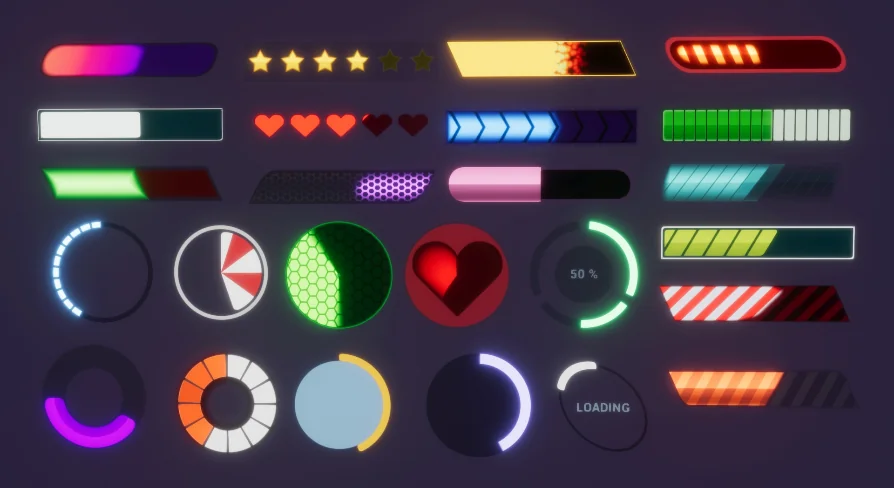
To support immediate project integration, the package includes more than 50 predefined styles covering diverse game genres, alongside 23 example themes ready for direct deployment. These presets demonstrate a wide array of visual treatments, from technical robotic readouts to clean minimalist HUD elements. Because every property within the master material is exposed, developers can modify existing assets or author unlimited user-defined themes by altering colors, patterns, and curvature values.
Customization workflows are designed to be non-destructive and iterative. Any bar provided in the package can serve as the direct base for another, allowing artists to branch variations quickly for enemy health, party status, dynamic damage feedback, or system loading states. Dynamic feedback is further expanded through multiple visual effects, including burning and fading transitions that animate as meter values rise or fall during active gameplay events.
UMG Interface Pipeline and In-Scene Rendering Boundaries
Integration paths are structured around Unreal Motion Graphics (UMG), enabling UI designers to slot the materials directly into standard widget hierarchies. In addition to 2D screen-space menus and player HUDs, the assets function across in-world scene contexts, such as holographic terminals, interactive machinery displays, and floating combat health bars attached to 3D character actors.
A distinct technical boundary exists between screen-space widgets and in-world mesh placement. When placed directly within the 3D scene, the material fully supports glowing light emissions. However, when deployed inside a standard 2D UMG HUD widget, the glow effect is unsupported and will not render. Designers relying on intense ambient illumination must account for this behavior when building pure screen-space overlays versus world-space interactive screens.
Draw Call Efficiency and Progression Stacking
Performance optimization follows a strict keep-it-simple philosophy: each individual bar requires only a single mesh and executes within a single draw call. This GPU-friendly footprint prevents interface elements from bogging down the rendering thread, making the material practical for target platforms with constrained budgets, including mobile projects and virtual reality applications where UI draw calls must be kept minimal.
Native multilayered progression is not handled within a single material pass. When a game design demands segmented or layered gauges—such as an overlapping health bar where a trailing damage indicator or secondary armor layer sits behind the active value—the effect is achieved by placing two bars directly on top of one another. By combining separate layered instances, developers can construct multi-tiered vitality systems while retaining the procedural edge fidelity and lightweight performance of the master material.
 UI Kits / HUDs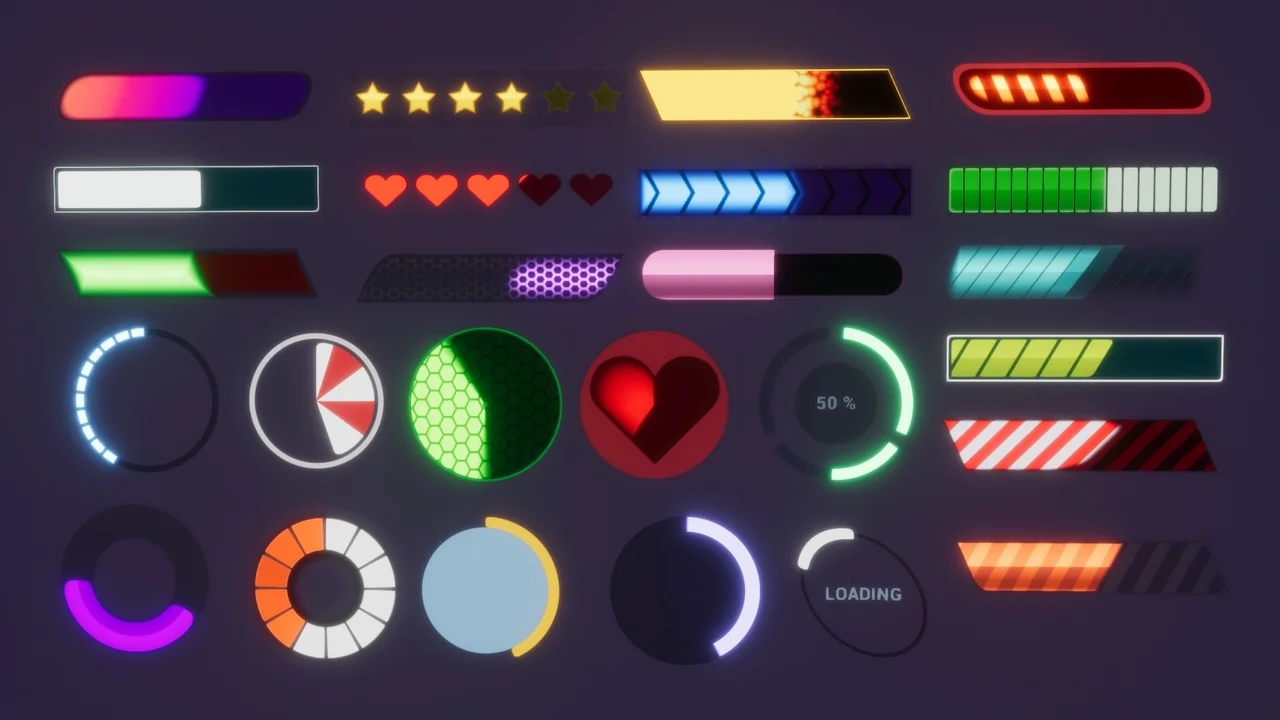
 Widgets & Controls
 Widgets & Controls
 UI Kits / HUDs