"7aa4acc705f0d80b"{"id":"1001936","slug":"advanced-credits","title":"Advanced Credits","category":"UI Kits / HUDs","engine":"4.26+,5.0+","assetVersion":"","engineVersion":"Engine Version: 4.26+,5.0+","tag":"UI Kits / HUDs","accent":"blue","visual":"mech","summary":"Advanced Credits provides a customizable closing credits system featuring 3D widget VR support, title styling, audio fading, and sequence end events.","platform":"Unreal Engine","publishedAt":"2026-10-24T11:13:05.800Z","updatedAt":"2026-10-24T11:13:05.800Z","sourceNotes":[],"fileContents":[],"compatibility":["Unreal Engine","Engine Version: 4.26+,5.0+"],"featuredImage":{"alt":"Advanced Credits","src":"/wp-content/uploads/published/2026/10/6e75a1d5818d-a56d4a50-2a3e-4e79-8d17-0fc329c763a2-b7b42a1076.webp"},"hasDownloadLink":true,"downloads":0,"terms":[{"taxonomy":"category","slug":"ui-kits-huds","name":"UI Kits / HUDs"}],"galleryImages":[{"src":"/wp-content/uploads/published/2026/10/318223b4a7de-3d9faa86-1bee-4501-8af8-261a34f751d9-b80ec71d52.webp","alt":"Advanced Credits"},{"src":"/wp-content/uploads/published/2026/10/b0ee51ac4986-6217516b-1b4a-4d3c-9551-938807daa09c-edaccf14b7.webp","alt":"Advanced Credits"},{"src":"/wp-content/uploads/published/2026/10/87e52ff29768-d1f5d9d3-8872-4e7c-8b30-3f7dd58db158-1e7cd2811d.webp","alt":"Advanced Credits"},{"src":"/wp-content/uploads/published/2026/10/8baa661cb6b0-d3972deb-1615-4511-8ed1-90952638fb47-f63a9db4fb.webp","alt":"Advanced Credits"},{"src":"/wp-content/uploads/published/2026/10/b5bf4772786c-93fef3af-4465-43d9-b93f-a1dc29fa9bc3-4b43e3e3ae.webp","alt":"Advanced Credits"},{"src":"/wp-content/uploads/published/2026/10/1be14d2da3f1-f0fbc592-a85f-470d-95ac-bf725a55bc38-058a4a7fcf.webp","alt":"Advanced Credits"}],"accessPanel":{"kind":"resource","title":"Download this resource","eyebrow":"Free Download","message":"Log in or create a free account to start your download.","fileName":"Content.7z","safetyNote":"Resources are manually reviewed before listing to improve quality and reduce obvious risks.","actionLabel":"Download Free","resourceType":"Resource archive"},"contentHtml":"\u003cp\u003eRolling credits at the end of a title marks the formal transition from active gameplay to project resolution. Advanced Credits provides an engine-ready framework designed to handle this transition cleanly, packaging visual customization, audio timing, and spatial presentation into an accessible closing credits system for interactive games.\u003c/p\u003e \u003ch2\u003eCustomizing Typography, Title Images, and Screen Placement\u003c/h2\u003e\n\u003cp\u003eCredits rarely follow a uniform structure from the opening studio emblem to the final copyright declaration. Department heads, production partners, voice talent, and technical contributors often require distinct visual hierarchies. Advanced Credits addresses these formatting demands by giving developers granular control over the typography, color, and positioning of individual title entries across the roster.\u003c/p\u003e \u003cp\u003eEach title element within the system can be tailored directly. Developers can adjust the exact font choice to match studio branding or game UI conventions, modify text colors to distinguish roles from contributor names, and manipulate screen placement to accommodate multi-column lists or centered feature lines. Beyond raw text, the system natively supports the integration of images directly into titles. This allows production teams to insert studio logos, middleware iconography, publisher emblems, or award seals seamlessly alongside written recognition, avoiding the need to hack external image planes into a purely typographic scroll.\u003c/p\u003e \u003ch2\u003eManaging Background Color, Imagery, and Audio Fading\u003c/h2\u003e\n\u003cp\u003eVisual backdrops set the tonal atmosphere while contributor names traverse the screen. Advanced Credits allows developers to configure the stage using either a solid background color or a static background image. Choosing a solid color allows for traditional minimalist sequences—such as pure black or slate grey backdrops that keep player attention focused on the text—while background image support allows teams to showcase narrative epilogue art, concept sketches, or quiet environment panoramas behind the sequence.\u003c/p\u003e \u003cp\u003eSound plays an equally important role in pacing the player's exit from the game world. The system includes native support for background music playback, coupled with automated audio fading. Rather than relying on abrupt cuts when the credits sequence begins or concludes, the fading controls allow music tracks to ease in softly and taper out naturally. This creates a cohesive audiovisual balance that aligns the visual pace of the scroll with the emotional tempo of the score.\u003c/p\u003e \u003ch2\u003eDeploying 3D Widgets for Virtual Reality Games\u003c/h2\u003e\n\u003cp\u003ePresenting user interfaces in virtual reality presents distinct spatial challenges. Flat screen-space overlays that work on standard monitors often induce discomfort, break spatial immersion, or clip through nearby geometry when viewed through a VR headset. Advanced Credits solves this through a dedicated demonstration mode configured around a 3D widget specifically made for virtual reality games.\u003c/p\u003e \u003cp\u003eBy rendering the closing credits onto a 3D widget positioned directly within the game world, the system anchors the text within the virtual environment's three-dimensional coordinate space. Players inside a headset can view the credit sequence at a comfortable focal depth, maintaining full stereoscopic immersion while retaining clear readability. This architecture ensures developers building for VR do not need to construct a secondary spatial canvas from scratch just to display end-game acknowledgments.\u003c/p\u003e \u003ch2\u003eTriggering Post-Roll Flow with the End of Credits Event\u003c/h2\u003e\n\u003cp\u003eA credit sequence must cleanly interface with a game's broader state machine once the final name passes out of view. Advanced Credits incorporates a dedicated event triggered specifically at the end of the credits sequence. This event acts as a critical execution hook for game logic, eliminating the need to estimate sequence duration using arbitrary delays or ticking timers.\u003c/p\u003e \u003cp\u003eWhen the final title completes its run, the completion event fires, enabling developers to route the player into subsequent game states immediately. Depending on project architecture, this hook can be wired to load the primary main menu, transition into an interactive post-credits scene, trigger an achievement unlocking routine, or initiate a clean save-and-quit command. Having a reliable event dispatched upon completion ensures that gameplay flow transitions dependably across both standard screen and VR configurations.\u003c/p\u003e \u003ch2\u003eSystem Settings and Installation Workflow\u003c/h2\u003e\n\u003cp\u003eDeploying a credits roll late in production requires tools that do not disrupt established game pipelines. Advanced Credits emphasizes an easy installation process supported by flexible system settings, allowing teams to integrate the package without having to rewire existing interface frameworks. Developers can calibrate scroll parameters, timing offsets, visual attributes, and audio handling through centralized settings panels.\u003c/p\u003e \u003cp\u003eTo assist implementation, the system is backed by structured guidance materials, including a step-by-step tutorial, an interactive demonstration build, and a demonstration video that exhibits the asset operating in both standard and VR widget configurations. These resources allow technical designers to observe expected behavior, verify layout adjustments, and inspect audio fading routines before integrating the setup into their release builds.\u003c/p\u003e \u003cp\u003eFor development teams seeking an adaptable credits solution that bridges standard monitors and spatial VR environments, Advanced Credits supplies an organized, parameter-driven toolkit for delivering polished end-game sequences.\u003c/p\u003e\n\n\u003ch2\u003eContinue Browsing Similar Packs\u003c/h2\u003e\n\u003cul\u003e\n\u003cli\u003e\u003ca href=\"https://3dcghub.com/fortuna-ultimate-menu-system/\" title=\"Fortuna Ultimate Menu System\"\u003eFortuna Ultimate Menu System\u003c/a\u003e\u003c/li\u003e\n\u003cli\u003e\u003ca href=\"https://3dcghub.com/easy-game-ui-ultimate/\" title=\"Easy Game UI Ultimate\"\u003eEasy Game UI Ultimate\u003c/a\u003e\u003c/li\u003e\n\u003cli\u003e\u003ca href=\"https://3dcghub.com/advanced-hud-style-12/\" title=\"Advanced HUD-Style 12\"\u003eAdvanced HUD-Style 12\u003c/a\u003e\u003c/li\u003e\n\u003cli\u003e\u003ca href=\"https://3dcghub.com/pro-hud-navigation-tools-only/\" title=\"Pro HUD: Navigation Tools Only\"\u003ePro HUD: Navigation Tools Only\u003c/a\u003e\u003c/li\u003e\n\u003cli\u003e\u003ca href=\"https://3dcghub.com/virtual-joystick-minimalist-pack/\" title=\"Virtual Joystick Minimalist Pack\"\u003eVirtual Joystick Minimalist Pack\u003c/a\u003e\u003c/li\u003e\n\u003c/ul\u003e","contentTextLength":5746,"navigation":{"current":54,"total":3925,"previous":{"id":"1001937","slug":"advanced-magic-fx-06","title":"Advanced Magic FX 06","category":"Spells \u0026 Combat","platform":"Unreal Engine","updatedAt":"2026-10-24T11:13:37.611Z"},"next":{"id":"1001935","slug":"advanced-bodycam-vhs-body-camera-component-with-video-effects","title":"Advanced BodyCam / VHS - Body Camera Component with Video Effects","category":"Gameplay Features","platform":"Unreal Engine","updatedAt":"2026-10-24T11:12:27.777Z"}},"relatedResources":[{"id":"1000990","slug":"fortuna-ultimate-menu-system","title":"Fortuna Ultimate Menu System","category":"UI Kits / HUDs","engine":"5.0+","assetVersion":"","engineVersion":"Engine Version: 5.0+","tag":"UI Kits / HUDs","accent":"blue","visual":"mech","summary":"A complete modular menu system with a ready-to-use main menu, settings suite, save/load audio and keybinds, credits via Data Table, confirmation popups, and reu","platform":"Unreal Engine","publishedAt":"2026-08-18T06:42:18.738Z","updatedAt":"2026-08-18T06:42:18.738Z","sourceNotes":[],"fileContents":[],"compatibility":["Unreal Engine","Engine Version: 5.0+"],"featuredImage":{"alt":"Fortuna Ultimate Menu System","src":"/wp-content/uploads/published/2026/08/02d76a441ee6-e6cec5e1-df66-41c0-af9c-fe7a60a63d8f-ea56872eb0.webp"},"hasDownloadLink":true,"downloads":0},{"id":"15453","slug":"easy-game-ui-ultimate","title":"Easy Game UI Ultimate","category":"UI Kits / HUDs","engine":"5.3+","assetVersion":"Engine version: 5.3+","engineVersion":"5.3","tag":"UI Kits / HUDs","accent":"blue","visual":"mech","summary":"Easy Game UI Ultimate provides a comprehensive toolkit for developers to implement professional user interfaces. It features advanced save systems, a procedural credits tool, and a robust HUD builder.","platform":"Unreal Engine","publishedAt":"2026-03-12T09:03:10.000Z","updatedAt":"2026-04-19T15:44:46.000Z","sourceNotes":[],"fileContents":[],"compatibility":["Unreal Engine","Engine version: 5.3+"],"featuredImage":{"alt":"Easy Game UI Ultimate","src":"https://3dcghub.com/wp-content/uploads/2026/03/f4fb3aaf-1633-47f4-aad4-504acc3e744c.webp"},"hasDownloadLink":true,"downloads":3},{"id":"1001858","slug":"advanced-hud-style-12","title":"Advanced HUD-Style 12","category":"UI Kits / HUDs","engine":"4.26+,5.0+","assetVersion":"","engineVersion":"Engine Version: 4.26+,5.0+","tag":"UI Kits / HUDs","accent":"blue","visual":"mech","summary":"An Action RPG interface system featuring level streaming across four maps, persistent settings, minimap pointers, and enhanced input updates.","platform":"Unreal Engine","publishedAt":"2026-10-22T10:52:37.375Z","updatedAt":"2026-10-22T10:52:37.375Z","sourceNotes":[],"fileContents":[],"compatibility":["Unreal Engine","Engine Version: 4.26+,5.0+"],"featuredImage":{"alt":"Advanced HUD-Style 12","src":"/wp-content/uploads/published/2026/10/6a724464fb23-fe0f8c74-09d6-42a7-acb0-add7cb7a8849-e91320c35a.webp"},"hasDownloadLink":true,"downloads":0}]}
UI Kits / HUDs
Advanced Credits
Advanced Credits provides a customizable closing credits system featuring 3D widget VR support, title styling, audio fading, and sequence end events.
Rolling credits at the end of a title marks the formal transition from active gameplay to project resolution. Advanced Credits provides an engine-ready framework designed to handle this transition cleanly, packaging visual customization, audio timing, and spatial presentation into an accessible closing credits system for interactive games.
Customizing Typography, Title Images, and Screen Placement
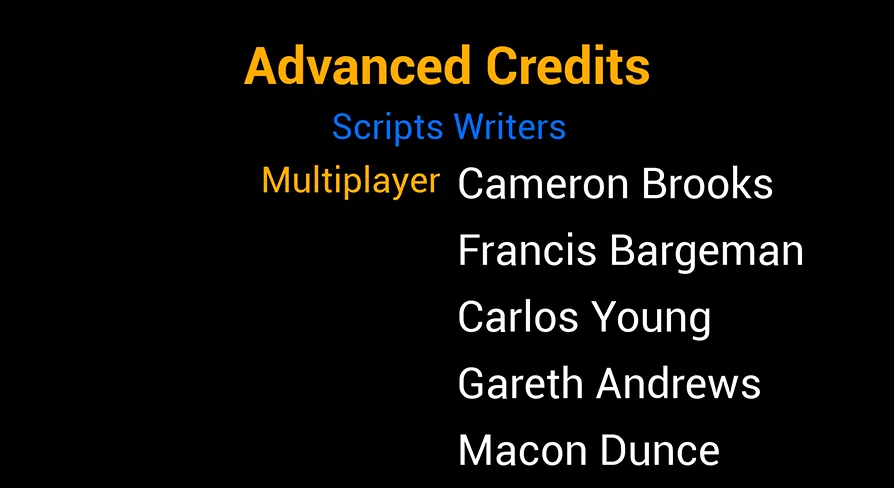
Credits rarely follow a uniform structure from the opening studio emblem to the final copyright declaration. Department heads, production partners, voice talent, and technical contributors often require distinct visual hierarchies. Advanced Credits addresses these formatting demands by giving developers granular control over the typography, color, and positioning of individual title entries across the roster.
Each title element within the system can be tailored directly. Developers can adjust the exact font choice to match studio branding or game UI conventions, modify text colors to distinguish roles from contributor names, and manipulate screen placement to accommodate multi-column lists or centered feature lines. Beyond raw text, the system natively supports the integration of images directly into titles. This allows production teams to insert studio logos, middleware iconography, publisher emblems, or award seals seamlessly alongside written recognition, avoiding the need to hack external image planes into a purely typographic scroll.
Managing Background Color, Imagery, and Audio Fading
Visual backdrops set the tonal atmosphere while contributor names traverse the screen. Advanced Credits allows developers to configure the stage using either a solid background color or a static background image. Choosing a solid color allows for traditional minimalist sequences—such as pure black or slate grey backdrops that keep player attention focused on the text—while background image support allows teams to showcase narrative epilogue art, concept sketches, or quiet environment panoramas behind the sequence.
Sound plays an equally important role in pacing the player's exit from the game world. The system includes native support for background music playback, coupled with automated audio fading. Rather than relying on abrupt cuts when the credits sequence begins or concludes, the fading controls allow music tracks to ease in softly and taper out naturally. This creates a cohesive audiovisual balance that aligns the visual pace of the scroll with the emotional tempo of the score.
Deploying 3D Widgets for Virtual Reality Games
Presenting user interfaces in virtual reality presents distinct spatial challenges. Flat screen-space overlays that work on standard monitors often induce discomfort, break spatial immersion, or clip through nearby geometry when viewed through a VR headset. Advanced Credits solves this through a dedicated demonstration mode configured around a 3D widget specifically made for virtual reality games.
By rendering the closing credits onto a 3D widget positioned directly within the game world, the system anchors the text within the virtual environment's three-dimensional coordinate space. Players inside a headset can view the credit sequence at a comfortable focal depth, maintaining full stereoscopic immersion while retaining clear readability. This architecture ensures developers building for VR do not need to construct a secondary spatial canvas from scratch just to display end-game acknowledgments.
Triggering Post-Roll Flow with the End of Credits Event
A credit sequence must cleanly interface with a game's broader state machine once the final name passes out of view. Advanced Credits incorporates a dedicated event triggered specifically at the end of the credits sequence. This event acts as a critical execution hook for game logic, eliminating the need to estimate sequence duration using arbitrary delays or ticking timers.
When the final title completes its run, the completion event fires, enabling developers to route the player into subsequent game states immediately. Depending on project architecture, this hook can be wired to load the primary main menu, transition into an interactive post-credits scene, trigger an achievement unlocking routine, or initiate a clean save-and-quit command. Having a reliable event dispatched upon completion ensures that gameplay flow transitions dependably across both standard screen and VR configurations.
System Settings and Installation Workflow
Deploying a credits roll late in production requires tools that do not disrupt established game pipelines. Advanced Credits emphasizes an easy installation process supported by flexible system settings, allowing teams to integrate the package without having to rewire existing interface frameworks. Developers can calibrate scroll parameters, timing offsets, visual attributes, and audio handling through centralized settings panels.
To assist implementation, the system is backed by structured guidance materials, including a step-by-step tutorial, an interactive demonstration build, and a demonstration video that exhibits the asset operating in both standard and VR widget configurations. These resources allow technical designers to observe expected behavior, verify layout adjustments, and inspect audio fading routines before integrating the setup into their release builds.
For development teams seeking an adaptable credits solution that bridges standard monitors and spatial VR environments, Advanced Credits supplies an organized, parameter-driven toolkit for delivering polished end-game sequences.
 UI Kits / HUDs
 UI Kits / HUDs
 UI Kits / HUDs
 UI Kits / HUDs