"ae2217ad8e73450c"{"id":"1003024","slug":"conversion-animset-twinsword-and-twinblades","title":"Conversion Animset ( TwinSword \u0026 TwinBlades)","category":"Combat","engine":"4.26+,5.0+","assetVersion":"Asset Version: 2","engineVersion":"Engine Version: 4.26+,5.0+","tag":"Combat","accent":"blue","visual":"mech","summary":"Explore the Conversion Animset for TwinSword and TwinBlades, featuring 8 transition animations, native UE5 Manny and Quinn support, and Niagara VFX.","platform":"Unreal Engine","indexPolicy":"index","publishedAt":"2026-11-25T16:28:58.798Z","updatedAt":"2026-11-25T16:28:58.798Z","sourceNotes":[],"fileContents":[],"compatibility":["Unreal Engine","Asset Version: 2","Engine Version: 4.26+,5.0+"],"featuredImage":{"alt":"Conversion Animset ( TwinSword \u0026 TwinBlades)","src":"/wp-content/uploads/published/2026/11/39f779cbeb02-432d2d3d-7d4e-4fb9-9cbe-c9b920b26e8a-17f811cccd.webp"},"hasDownloadLink":true,"downloads":0,"terms":[{"taxonomy":"category","slug":"combat","name":"Combat"}],"galleryImages":[{"src":"/wp-content/uploads/published/2026/11/4f352cf25b48-ba46d726-3c02-4c65-9fe5-058ec666f305-6c8d6e1933.webp","alt":"Conversion Animset ( TwinSword \u0026 TwinBlades)"},{"src":"/wp-content/uploads/published/2026/11/d5c91068c0e0-922616ed-2773-4303-b7c1-ca59dd134f43-e881201a02.webp","alt":"Conversion Animset ( TwinSword \u0026 TwinBlades)"},{"src":"/wp-content/uploads/published/2026/11/4f7ed03209e8-b6930fb7-7a69-406b-9166-c8cf6e3623f0-7e32c12531.webp","alt":"Conversion Animset ( TwinSword \u0026 TwinBlades)"},{"src":"/wp-content/uploads/published/2026/11/66dd43de3959-748e2b81-32af-4170-a37b-5eb65c5d5075-b1366242bd.webp","alt":"Conversion Animset ( TwinSword \u0026 TwinBlades)"},{"src":"/wp-content/uploads/published/2026/11/4d0e4c71be68-01d6cfc2-f537-485a-b1e8-cae5a933f016-1828cb30e4.webp","alt":"Conversion Animset ( TwinSword \u0026 TwinBlades)"},{"src":"/wp-content/uploads/published/2026/11/e31534b1d284-a02c9d2a-264c-49fe-a17b-052258800937-d6b5c8d78c.webp","alt":"Conversion Animset ( TwinSword \u0026 TwinBlades)"},{"src":"/wp-content/uploads/published/2026/11/062bf6ad8820-d2a9a8a8-0f04-4c12-a754-3585fddfc922-c6b57eeb3b.webp","alt":"Conversion Animset ( TwinSword \u0026 TwinBlades)"}],"accessPanel":{"kind":"resource","title":"Get this resource","safetyNote":"Resources are manually reviewed before listing to improve quality and reduce obvious risks.","fileName":"Content.7z","resourceType":"Resource archive","versions":[]},"contentHtml":"\u003ch2\u003eTransition Mechanics in the Conversion Animset\u003c/h2\u003e\u003cp\u003eIn high-tempo fantasy combat encounters, shifting between paired weapon types requires continuous physical momentum rather than an instantaneous weapon swap. The Conversion Animset ( TwinSword \u0026amp; TwinBlades) focuses specifically on resolving the mechanical and kinetic transition between two distinct dual-wielding weapon configurations: twin blades and twin swords. Instead of relying on a weapon instantly appearing in a character's grip or vanishing into an inventory slot, the package tracks weapon morphing and positional handoffs mid-motion.\u003c/p\u003e\u003cp\u003eBuilt to interface directly between the TwinBlades Animset Base and the TwinSword Animset Base, the collection provides the bridging frames necessary to unite both combat libraries into a single fluid moveset. Characters can maintain aggression while executing structural swaps, keeping kinetic flow uninterrupted. Root motion is fully supported across these movements, ensuring that steps, turns, and strikes accurately propel the character capsule in 3D space without foot sliding or programmatic translation offsets.\u003c/p\u003e\u003ch2\u003eEight Directed Sequences Between TwinSword and TwinBlades\u003c/h2\u003e\u003cp\u003eThe core motion library contains eight distinct transition animations divided evenly across both morphing directions. Rather than relying on mirror passes, each direction receives dedicated choreography tailored to how the two blade types separate, lock, or reposition during active combat handling.\u003c/p\u003e\u003cp\u003eFour animations govern the shift from TwinBlades to TwinSword. Within this set, two sequences are classified as basic forms, while the remaining two operate as attack forms. The basic forms resolve the transformation from neutral or repositioning movement states, allowing characters to adjust their armament while cycling stances. The attack forms embed the weapon transformation directly into a damaging blade sweep, enabling the character to strike outward as the blades connect or lengthen into twin swords.\u003c/p\u003e\u003cp\u003eConversely, four sequences drive the shift from TwinSword to TwinBlades. This return pathway mirrors the structural split, supplying two basic form conversions and two attack form conversions. When executed during combat sequences, the attack form transitions allow players to slice through an enemy while breaking the swords down into agile blades. By pairing dedicated attacking transitions alongside neutral transformation postures, the motion set accommodates both deliberate weapon pre-buffing and reactive mid-combo morphs.\u003c/p\u003e\u003ch2\u003eInteractive Testing in the TwinBlades Skill Map Environment\u003c/h2\u003e\u003cp\u003eA playable Skill Map is provided to test the interplay between weapon states, inputs, and character timing. Configured entirely within an included Character Blueprint, the layout maps the full array of state swaps to immediate keystrokes to illustrate proper implementation flow and simplify project migration.\u003c/p\u003e\u003cp\u003eWeapon transformation itself maps to keys Q, E, F, and G, giving dedicated access to the different conversion paths between twin blades and twin swords. Pressing these controls calls the respective basic and attack conversion sequences, demonstrating how stance logic transitions from one form to the other. To observe how transformations blend into broader offensive strings, key K is set up to execute an AUTO COMBO. This chained sequence automatically stitches transformation animations directly into standard attack chains, previewing seamless kinetic switches under live gameplay conditions.\u003c/p\u003e\u003cp\u003eKeys 1 through 4 trigger special attack skills, demonstrating unique combat sequences paired with visual effects to showcase combat pacing. The setup also maps key T to a dedicated slow-motion toggle. By dropping the engine play rate, developers can closely inspect the precise frame where the weapon transformation system, designated as TransformSwordXBlade, shifts components between hand sockets and alters blade configurations.\u003c/p\u003e\u003ch2\u003eNiagara Visual Effects and UI Slider Controls\u003c/h2\u003e\u003cp\u003eAccompanying the physical character motion is the TransformSwordXBlade visual effect system, which runs on Unreal Engine's Niagara framework. These effects emphasize the energy and kinetic force unleashed during the split-second weapon transformations, adding visual weight to every attack form and stance shift without incurring heavy rendering bottlenecks.\u003c/p\u003e\u003cp\u003eCustomization is handled via an integrated dynamic color script connected directly to in-engine UI sliders. Instead of opening individual Niagara emitter modules or editing particle material graphs manually, effect hues and saturation can be manipulated through the user interface. This enables quick adjustments to suit different elemental states, character themes, or distinct blade enchantments while maintaining consistent visual balance across the entire skill suite.\u003c/p\u003e\u003ch2\u003eNative Manny, Quinn, and FBX Data Pipelines\u003c/h2\u003e\u003cp\u003eRigging compatibility targets current Unreal Engine character standards. The package provides native support for both UE5 Manny and UE5 Quinn mannequins, allowing developers to apply the animations to either skeletal mesh variant without running retargeting workflows. Because the motions are aligned natively to the standard UE5 mannequin hierarchy, bone orientations and socket placements match immediately upon import.\u003c/p\u003e\u003cp\u003eSource FBX files are supplied alongside the engine assets. This native format access allows technical animators to inspect curves, alter bone transforms, or migrate the raw animations into external digital content creation software for specialized adjustments. Whether evaluated inside the included Character Blueprint or integrated into an established combat state machine, the conversion suite delivers the specialized connective tissue needed to blend twin swords and twin blades into a unified combat system.\u003c/p\u003e\n\n\u003ch2\u003eExplore Similar Assets\u003c/h2\u003e\n\u003cul\u003e\n\u003cli\u003e\u003ca href=\"https://3dcghub.com/twinsword-animset-expansion/\" rel=\"noopener noreferrer\"\u003eTwinSword Animset Expansion\u003c/a\u003e\u003c/li\u003e\n\u003cli\u003e\u003ca href=\"https://3dcghub.com/greatsword-animset/\" rel=\"noopener noreferrer\"\u003eGreatSword Animset\u003c/a\u003e\u003c/li\u003e\n\u003cli\u003e\u003ca href=\"https://3dcghub.com/two-sword-animset/\" rel=\"noopener noreferrer\"\u003eTwo Sword AnimSet\u003c/a\u003e\u003c/li\u003e\n\u003cli\u003e\u003ca href=\"https://3dcghub.com/sword-animset-pro/\" rel=\"noopener noreferrer\"\u003eSword Animset Pro\u003c/a\u003e\u003c/li\u003e\n\u003cli\u003e\u003ca href=\"https://3dcghub.com/fighting-animset-pro/\" rel=\"noopener noreferrer\"\u003eFighting Animset Pro\u003c/a\u003e\u003c/li\u003e\n\u003c/ul\u003e","contentTextLength":5901,"navigation":{"current":20,"total":4964,"previous":{"id":"1003025","slug":"crafting-animations","title":"Crafting Animations","category":"Gestures","platform":"Unreal Engine","updatedAt":"2026-11-25T16:29:35.560Z"},"next":{"id":"1003023","slug":"competitive-shooter-hud-action-bars-only","title":"Competitive Shooter HUD: Action Bars Only","category":"UI Kits / HUDs","platform":"Unreal Engine","updatedAt":"2026-11-25T16:27:42.276Z"}},"relatedResources":[{"id":"1000899","slug":"twinsword-animset-expansion","title":"TwinSword Animset Expansion","category":"Combat","engine":"4.26+,5.0+","assetVersion":"","engineVersion":"Engine Version: 4.26+,5.0+","tag":"Combat","accent":"blue","visual":"mech","summary":"UE5 twin-sword combat animation pack with 80 anims, Niagara VFX, dynamic colors, interactive skill map, and native Manny \u0026 Quinn support.","platform":"Unreal Engine","indexPolicy":"index","publishedAt":"2026-08-06T05:00:23.948Z","updatedAt":"2026-08-06T05:00:23.948Z","sourceNotes":[],"fileContents":[],"compatibility":["Unreal Engine","Engine Version: 4.26+,5.0+"],"featuredImage":{"alt":"TwinSword Animset Expansion","src":"/wp-content/uploads/published/2026/08/8d2b33bf9226-61ff1a14-4ee8-4a3a-9bea-9e2e147946ce-480645ac47.webp"},"fileSizeBytes":48834890,"hasDownloadLink":true,"downloads":7},{"id":"1002043","slug":"greatsword-animset","title":"GreatSword Animset","category":"Combat","engine":"4.21+,5.0+","assetVersion":"","engineVersion":"Engine Version: 4.21+,5.0+","tag":"Combat","accent":"blue","visual":"mech","summary":"A close look at the GreatSword Animset for Unreal Engine 5, featuring 130 combat animations built on the Epic Skeleton with broad stylistic range.","platform":"Unreal Engine","indexPolicy":"index","publishedAt":"2026-10-26T14:31:19.433Z","updatedAt":"2026-11-24T10:27:37.409Z","sourceNotes":[],"fileContents":[],"compatibility":["Unreal Engine","Engine Version: 4.21+,5.0+"],"featuredImage":{"alt":"GreatSword Animset","src":"/wp-content/uploads/published/2026/10/8c0a3d809aac-db4d456d-3970-4c20-b9a0-2123beb912eb-1200749d36.webp"},"hasDownloadLink":true,"downloads":1},{"id":"1002245","slug":"two-sword-animset","title":"Two Sword AnimSet","category":"Combat","engine":"4.26+,5.0+","assetVersion":"","engineVersion":"Engine Version: 4.26+,5.0+","tag":"Combat","accent":"blue","visual":"mech","summary":"A close look at Two Sword AnimSet, featuring 57 animations and 9 poses for dual sword and katana action RPG main characters.","platform":"Unreal Engine","indexPolicy":"index","publishedAt":"2026-10-29T16:04:20.439Z","updatedAt":"2026-10-29T16:04:20.439Z","sourceNotes":[],"fileContents":[],"compatibility":["Unreal Engine","Engine Version: 4.26+,5.0+"],"featuredImage":{"alt":"Two Sword AnimSet","src":"/wp-content/uploads/published/2026/10/4c186c71096d-ace5d2d5-70df-4b90-b46f-d7e7b254596d-110eb6e9ba.webp"},"fileSizeBytes":12382561,"hasDownloadLink":true,"downloads":3}]}[{"id":4225,"sourceId":4225,"taxonomyId":4225,"taxonomy":"category","slug":"asset-library","name":"Asset Library","parentId":null,"count":4817,"hasChildren":true,"href":"/","seoTitle":"Free Game Assets Library | 3DCGHUB","seoDescription":"Browse free Unreal Engine, Unity, Blender assets and game development tutorials on 3DCGHUB with previews, compatibility notes, and secure downloads.","sitemapEnabled":true,"children":[{"id":4227,"sourceId":4227,"taxonomyId":4227,"taxonomy":"category","slug":"blender-add-ons-plugins","name":"Blender Add-ons \u0026 Plugins","parentId":4225,"count":10,"hasChildren":false,"href":"/category/blender-add-ons-plugins/","seoTitle":"Free Blender Add-ons \u0026 Plugins | 3DCGHUB","seoDescription":"Browse free Blender Add-ons \u0026 Plugins tools for Blender on 3DCGHUB: curated downloads with preview images, compatibility notes and secure download access.","sitemapEnabled":true},{"id":514,"sourceId":514,"taxonomyId":514,"taxonomy":"category","slug":"unity-2","name":"Unity","parentId":4225,"count":453,"hasChildren":true,"href":"/category/unity-2/","seoTitle":"Free Unity Assets | 3DCGHUB","seoDescription":"Browse free Unity resources on 3DCGHUB: curated downloads with preview images, compatibility notes and secure download access.","sitemapEnabled":true,"children":[{"id":523,"sourceId":523,"taxonomyId":523,"taxonomy":"category","slug":"2d","name":"2D","parentId":514,"count":1,"hasChildren":true,"href":"/category/2d/","seoTitle":"Free Unity 2D | 3DCGHUB","seoDescription":"Browse free 2D assets for Unity on 3DCGHUB: curated downloads with preview images, compatibility notes and secure download access.","sitemapEnabled":true},{"id":515,"sourceId":515,"taxonomyId":515,"taxonomy":"category","slug":"3d-unity-2","name":"3D","parentId":514,"count":162,"hasChildren":true,"href":"/category/3d-unity-2/","seoTitle":"Free Unity 3D Assets | 3DCGHUB","seoDescription":"Browse free 3D assets for Unity on 3DCGHUB: curated downloads with preview images, compatibility notes and secure download access.","sitemapEnabled":true},{"id":565,"sourceId":565,"taxonomyId":565,"taxonomy":"category","slug":"add-ons","name":"Add-Ons","parentId":514,"count":2,"hasChildren":false,"href":"/category/add-ons/","seoTitle":"Free Unity Add-Ons | 3DCGHUB","seoDescription":"Browse free Add-Ons assets for Unity on 3DCGHUB: curated downloads with preview images, compatibility notes and secure download access.","sitemapEnabled":true},{"id":529,"sourceId":529,"taxonomyId":529,"taxonomy":"category","slug":"audio-unity-2","name":"Audio","parentId":514,"count":1,"hasChildren":true,"href":"/category/audio-unity-2/","seoTitle":"Free Unity Audio | 3DCGHUB","seoDescription":"Browse free Audio for Unity on 3DCGHUB: curated downloads with preview images, compatibility notes and secure download access.","sitemapEnabled":true},{"id":557,"sourceId":557,"taxonomyId":557,"taxonomy":"category","slug":"templates","name":"Templates","parentId":514,"count":36,"hasChildren":true,"href":"/category/templates/","seoTitle":"Free Unity Templates | 3DCGHUB","seoDescription":"Browse free Unity project templates on 3DCGHUB. Starter kits with previews, compatibility notes, and secure download access.","sitemapEnabled":true},{"id":533,"sourceId":533,"taxonomyId":533,"taxonomy":"category","slug":"tools-unity-2","name":"Tools","parentId":514,"count":0,"hasChildren":true,"href":"/category/tools-unity-2/","sitemapEnabled":true},{"id":554,"sourceId":554,"taxonomyId":554,"taxonomy":"category","slug":"vfx-unity-2","name":"VFX","parentId":514,"count":4,"hasChildren":true,"href":"/category/vfx-unity-2/","seoTitle":"Free Unity VFX | 3DCGHUB","seoDescription":"Browse free VFX for Unity on 3DCGHUB: curated downloads with preview images, compatibility notes and secure download access.","sitemapEnabled":true}]},{"id":511,"sourceId":511,"taxonomyId":511,"taxonomy":"category","slug":"unreal-engine-2","name":"Unreal Engine","parentId":4225,"count":4355,"hasChildren":true,"href":"/category/unreal-engine-2/","seoTitle":"Free Unreal Engine Assets | 3DCGHUB","seoDescription":"Browse free Unreal Engine resources on 3DCGHUB: curated downloads with preview images, compatibility notes and secure download access.","sitemapEnabled":true,"children":[{"id":54,"sourceId":54,"taxonomyId":54,"taxonomy":"category","slug":"3d","name":"3D","parentId":511,"count":2441,"hasChildren":true,"href":"/category/3d/","seoTitle":"Free Unreal Engine 3D | 3DCGHUB","seoDescription":"Browse free 3D assets for Unreal Engine on 3DCGHUB: curated downloads with preview images, compatibility notes and secure download access.","sitemapEnabled":true},{"id":441,"sourceId":441,"taxonomyId":441,"taxonomy":"category","slug":"animations","name":"Animations","parentId":511,"count":269,"hasChildren":true,"href":"/category/animations/","seoTitle":"Free Unreal Engine Animations | 3DCGHUB","seoDescription":"Browse free Animations for Unreal Engine on 3DCGHUB: curated downloads with preview images, compatibility notes and secure download access.","sitemapEnabled":true},{"id":446,"sourceId":446,"taxonomyId":446,"taxonomy":"category","slug":"audio","name":"Audio","parentId":511,"count":63,"hasChildren":true,"href":"/category/audio/","seoTitle":"Free Unreal Engine Audio Resources | 3DCGHUB","seoDescription":"Browse free Unreal Engine audio resources including sound effects, voices, dialogue, and ambient sounds. Curated free downloads on 3DCGHUB.","sitemapEnabled":true},{"id":466,"sourceId":466,"taxonomyId":466,"taxonomy":"category","slug":"game-systems","name":"Game Systems","parentId":511,"count":381,"hasChildren":true,"href":"/category/game-systems/","seoTitle":"Free Unreal Engine Game Systems | 3DCGHUB","seoDescription":"Browse free Game Systems tools for Unreal Engine on 3DCGHUB: curated downloads with preview images, compatibility notes and secure download access.","sitemapEnabled":true},{"id":478,"sourceId":478,"taxonomyId":478,"taxonomy":"category","slug":"game-templates","name":"Game Templates","parentId":511,"count":155,"hasChildren":true,"href":"/category/game-templates/","seoTitle":"Free Unreal Engine Game Templates | 3DCGHUB","seoDescription":"Browse free Game Templates for Unreal Engine on 3DCGHUB: curated downloads with preview images, compatibility notes and secure download access.","sitemapEnabled":true},{"id":432,"sourceId":432,"taxonomyId":432,"taxonomy":"category","slug":"hdri","name":"HDRI","parentId":511,"count":6,"hasChildren":true,"href":"/category/hdri/","seoTitle":"Free Unreal Engine HDRI | 3DCGHUB","seoDescription":"Browse free Unreal Engine HDRI skies and lighting maps on 3DCGHUB. Environment lighting with previews and secure downloads.","sitemapEnabled":true},{"id":228,"sourceId":228,"taxonomyId":228,"taxonomy":"category","slug":"material-and-textures","name":"Material \u0026 Textures","parentId":511,"count":172,"hasChildren":true,"href":"/category/material-and-textures/","seoTitle":"Free Unreal Engine Material \u0026 Textures | 3DCGHUB","seoDescription":"Browse free Material \u0026 Textures for Unreal Engine on 3DCGHUB: curated downloads with preview images, compatibility notes and secure download access.","sitemapEnabled":true},{"id":298,"sourceId":298,"taxonomyId":298,"taxonomy":"category","slug":"sprites-and-flipbooks","name":"Sprites \u0026 Flipbooks","parentId":511,"count":18,"hasChildren":true,"href":"/category/sprites-and-flipbooks/","seoTitle":"Free Unreal Engine Sprites \u0026 Flipbooks | 3DCGHUB","seoDescription":"Browse free Sprites \u0026 Flipbooks assets for Unreal Engine on 3DCGHUB: curated downloads with preview images, compatibility notes and secure download access.","sitemapEnabled":true},{"id":489,"sourceId":489,"taxonomyId":489,"taxonomy":"category","slug":"tools-and-plugins","name":"Tools \u0026 Plugins","parentId":511,"count":390,"hasChildren":true,"href":"/category/tools-and-plugins/","seoTitle":"Free Unreal Engine Tools \u0026 Plugins | 3DCGHUB","seoDescription":"Browse free Tools \u0026 Plugins for Unreal Engine on 3DCGHUB: curated downloads with preview images, compatibility notes and secure download access.","sitemapEnabled":true},{"id":459,"sourceId":459,"taxonomyId":459,"taxonomy":"category","slug":"ui","name":"UI","parentId":511,"count":47,"hasChildren":true,"href":"/category/ui/","seoTitle":"Free Unreal Engine UI | 3DCGHUB","seoDescription":"Browse free UI for Unreal Engine on 3DCGHUB: curated downloads with preview images, compatibility notes and secure download access.","sitemapEnabled":true},{"id":450,"sourceId":450,"taxonomyId":450,"taxonomy":"category","slug":"vfx","name":"VFX","parentId":511,"count":413,"hasChildren":true,"href":"/category/vfx/","seoTitle":"Free Unreal Engine VFX | 3DCGHUB","seoDescription":"Browse free VFX for Unreal Engine on 3DCGHUB: curated downloads with preview images, compatibility notes and secure download access.","sitemapEnabled":true}]}]},{"id":4222,"sourceId":4222,"taxonomyId":4222,"taxonomy":"category","slug":"tutorial-library","name":"Tutorial Library","parentId":null,"count":117,"hasChildren":false,"href":"/tutorials/","seoTitle":"Free Game Development Tutorial Library | 3DCGHUB","seoDescription":"Browse free game development tutorials for Unreal Engine, Unity, Blender, and more on 3DCGHUB with practical workflows and secure downloads.","sitemapEnabled":true}]
Resource screenshots
1 / 7
Asset drops
Daily Asset Drops
Follow 3DCGHUB on Telegram for daily Unreal, Unity & Blender drops and curated CC0 releases.
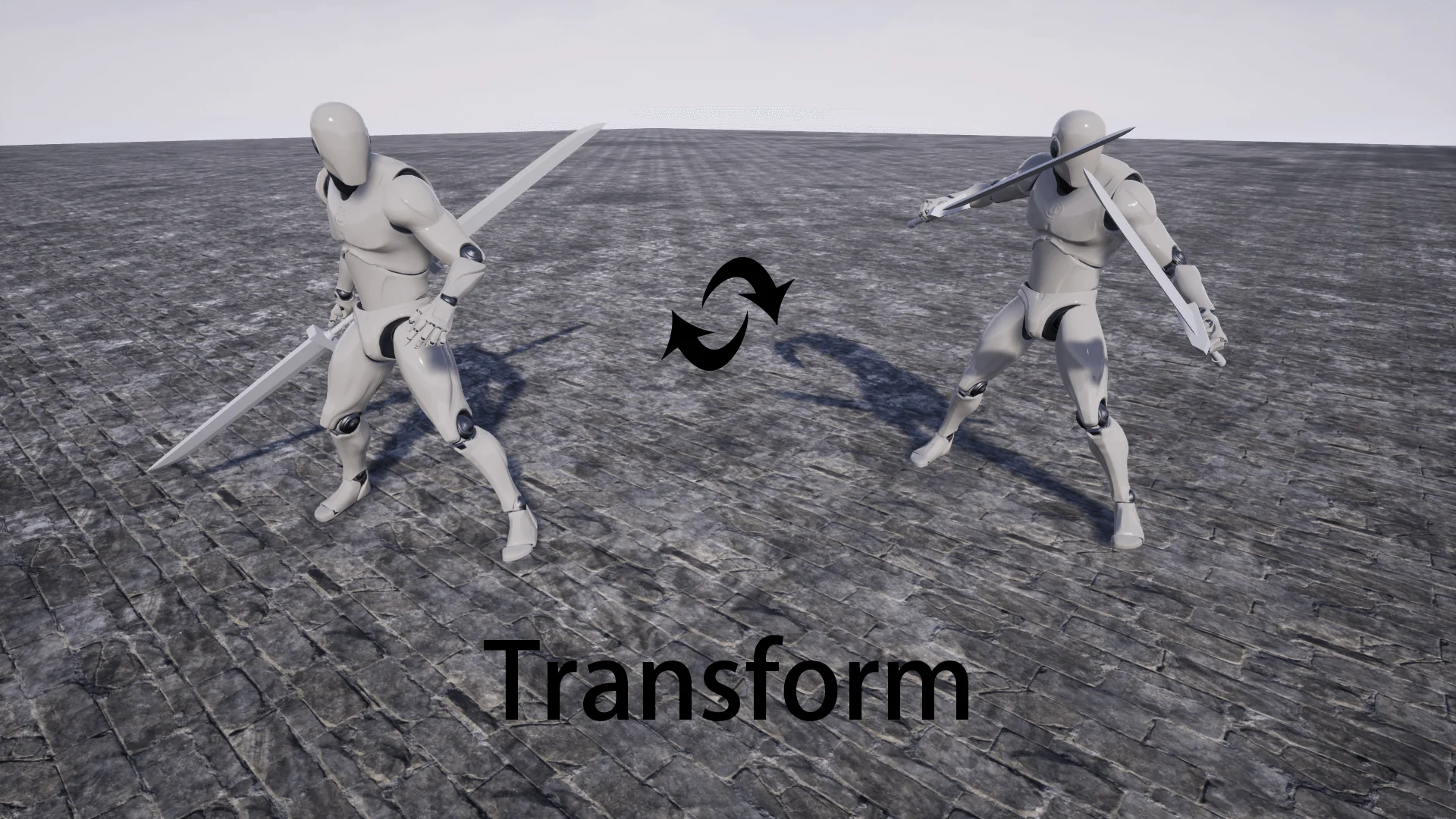
In high-tempo fantasy combat encounters, shifting between paired weapon types requires continuous physical momentum rather than an instantaneous weapon swap. The Conversion Animset ( TwinSword & TwinBlades) focuses specifically on resolving the mechanical and kinetic transition between two distinct dual-wielding weapon configurations: twin blades and twin swords. Instead of relying on a weapon instantly appearing in a character's grip or vanishing into an inventory slot, the package tracks weapon morphing and positional handoffs mid-motion.
Built to interface directly between the TwinBlades Animset Base and the TwinSword Animset Base, the collection provides the bridging frames necessary to unite both combat libraries into a single fluid moveset. Characters can maintain aggression while executing structural swaps, keeping kinetic flow uninterrupted. Root motion is fully supported across these movements, ensuring that steps, turns, and strikes accurately propel the character capsule in 3D space without foot sliding or programmatic translation offsets.
Eight Directed Sequences Between TwinSword and TwinBlades
The core motion library contains eight distinct transition animations divided evenly across both morphing directions. Rather than relying on mirror passes, each direction receives dedicated choreography tailored to how the two blade types separate, lock, or reposition during active combat handling.
Four animations govern the shift from TwinBlades to TwinSword. Within this set, two sequences are classified as basic forms, while the remaining two operate as attack forms. The basic forms resolve the transformation from neutral or repositioning movement states, allowing characters to adjust their armament while cycling stances. The attack forms embed the weapon transformation directly into a damaging blade sweep, enabling the character to strike outward as the blades connect or lengthen into twin swords.
Conversely, four sequences drive the shift from TwinSword to TwinBlades. This return pathway mirrors the structural split, supplying two basic form conversions and two attack form conversions. When executed during combat sequences, the attack form transitions allow players to slice through an enemy while breaking the swords down into agile blades. By pairing dedicated attacking transitions alongside neutral transformation postures, the motion set accommodates both deliberate weapon pre-buffing and reactive mid-combo morphs.
Interactive Testing in the TwinBlades Skill Map Environment
A playable Skill Map is provided to test the interplay between weapon states, inputs, and character timing. Configured entirely within an included Character Blueprint, the layout maps the full array of state swaps to immediate keystrokes to illustrate proper implementation flow and simplify project migration.
Weapon transformation itself maps to keys Q, E, F, and G, giving dedicated access to the different conversion paths between twin blades and twin swords. Pressing these controls calls the respective basic and attack conversion sequences, demonstrating how stance logic transitions from one form to the other. To observe how transformations blend into broader offensive strings, key K is set up to execute an AUTO COMBO. This chained sequence automatically stitches transformation animations directly into standard attack chains, previewing seamless kinetic switches under live gameplay conditions.
Keys 1 through 4 trigger special attack skills, demonstrating unique combat sequences paired with visual effects to showcase combat pacing. The setup also maps key T to a dedicated slow-motion toggle. By dropping the engine play rate, developers can closely inspect the precise frame where the weapon transformation system, designated as TransformSwordXBlade, shifts components between hand sockets and alters blade configurations.
Niagara Visual Effects and UI Slider Controls
Accompanying the physical character motion is the TransformSwordXBlade visual effect system, which runs on Unreal Engine's Niagara framework. These effects emphasize the energy and kinetic force unleashed during the split-second weapon transformations, adding visual weight to every attack form and stance shift without incurring heavy rendering bottlenecks.
Customization is handled via an integrated dynamic color script connected directly to in-engine UI sliders. Instead of opening individual Niagara emitter modules or editing particle material graphs manually, effect hues and saturation can be manipulated through the user interface. This enables quick adjustments to suit different elemental states, character themes, or distinct blade enchantments while maintaining consistent visual balance across the entire skill suite.
Native Manny, Quinn, and FBX Data Pipelines
Rigging compatibility targets current Unreal Engine character standards. The package provides native support for both UE5 Manny and UE5 Quinn mannequins, allowing developers to apply the animations to either skeletal mesh variant without running retargeting workflows. Because the motions are aligned natively to the standard UE5 mannequin hierarchy, bone orientations and socket placements match immediately upon import.
Source FBX files are supplied alongside the engine assets. This native format access allows technical animators to inspect curves, alter bone transforms, or migrate the raw animations into external digital content creation software for specialized adjustments. Whether evaluated inside the included Character Blueprint or integrated into an established combat state machine, the conversion suite delivers the specialized connective tissue needed to blend twin swords and twin blades into a unified combat system.
 Combat
 Combat
 Combat